Objects
JavaScript Object Properties
Learn how JavaScript object properties work, from naming them with any string to reading their values with dot notation and bracket notation.
JavaScript Objects have properties, which are composed by a label associated with a value.
The object literal syntax we saw:
const car = {

}
lets us define properties like this:
const car = {
  color: 'blue'
}
here we have a car object with a property named color, with value blue.
Labels can be any string. Notice that I didn’t use quotes around color, but if I wanted to include a character not valid as a variable name in the property name, I would have had to:
const car = {
  color: 'blue',
  'the color': 'blue'
}
This means spaces, hyphens, and more special characters.
As you see, we separate each property with a comma.
Retrieving the value of a property
We can retrieve the value of a property using 2 different syntaxes.
The first is dot notation:
car.color //'blue'The second, which is mandatory for properties with invalid names, is to use square brackets:
car['the color'] //'blue'Square brackets also let you read a property whose name is stored in a variable:
const property = 'color'

car[property] //'blue'
car.property would look for a property literally named property. It does not evaluate the variable.
If you access an unexisting property, you get undefined:
car.brand //undefinedA nice way to check for a property value but default to a predefined value is to use the || operator:
const brand = car.brand || 'ford'As said, objects can have nested objects as properties:
const car = {
  brand: {
    name: 'Ford'
  },
  color: 'blue'
}
You can access the brand name using
car.brand.nameor
car['brand']['name']or even mixing:
car.brand['name']
car['brand'].name
Setting the value of a property
As you saw above you can set the value of a property when you define the object.
But you can always update it later on:
const car = {
  color: 'blue'
}

car.color = 'yellow'
car['color'] = 'red'
And you can also add new properties to an object:
car.model = 'Fiesta'

car.model //'Fiesta'
How to remove a property
Given the object
const car = {
  color: 'blue',
  brand: 'Ford'
}
you can delete a property from this object using
delete car.brand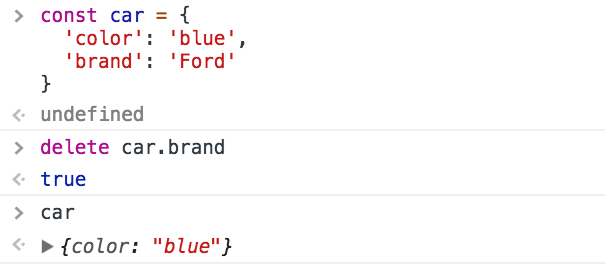
It works also expressed as:
delete car['brand']
delete car.brand
delete newCar['brand']
Setting a property to undefined
If you need to perform this operation in a very optimized way, for example, when you’re operating on a large number of objects in loops, another option is to set the property to undefined.
Due to its nature, the performance of delete is a lot slower than a simple reassignment to undefined, more than 50x times slower.
However, keep in mind that the property is not deleted from the object. Its value is wiped, but it’s still there if you iterate the object:
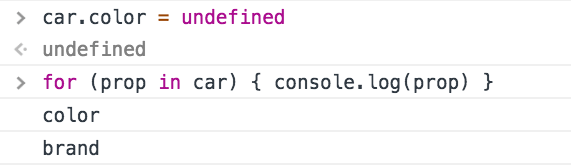
Using delete is still very fast, you should only look into this kind of performance issues if you have a very good reason to do so, otherwise it’s always preferred to have a more clear semantic and functionality.
Remove a property without mutating the object
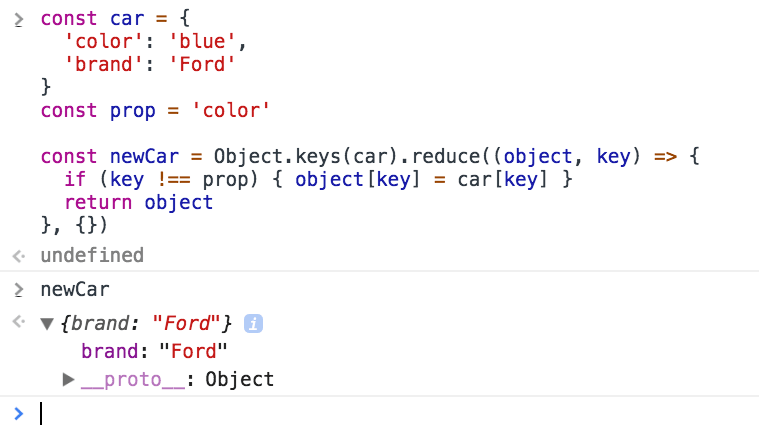
If mutability is a concern, you can create a completely new object by copying all the properties from the old, except the one you want to remove:
const car = {
  color: 'blue',
  brand: 'Ford'
}
const prop = 'color'

const newCar = Object.keys(car).reduce((object, key) => {
  if (key !== prop) {
    object[key] = car[key]
  }
  return object
}, {})
How to count the number of properties in a JavaScript object
Use the Object.keys() method, passing the object you want to inspect, to get an array of all the (own) enumerable properties of the object.
Then calculate the length of that array by checking the length property:
const car = {
  color: 'Blue',
  brand: 'Ford',
  model: 'Fiesta'
}

Object.keys(car).length
I said enumerable properties. This means their internal enumerable flag is set to true, which is the default. Check MDN for more info on this subject.
How to check if a JavaScript object property is undefined
In a JavaScript program, the correct way to check if an object property is undefined is to use the typeof operator.
typeof returns a string that tells the type of the operand. It is used without parentheses, passing it any value you want to check:
const list = []
const count = 2

typeof list //"object"
typeof count //"number"
typeof "test" //"string"

typeof color //"undefined"
If the value is not defined, typeof returns the ‘undefined’ string.
Now suppose you have a car object, with just one property:
const car = {
  model: 'Fiesta'
}
This is how you check if the color property is defined on this object:
if (typeof car.color === 'undefined') {
  // color is undefined
}
Dynamic properties
When defining a property, its label can be an expression if wrapped in square brackets:
const car = {
  ['c' + 'o' + 'lor']: 'blue'
}

car.color //'blue'
Simpler syntax to include variables as object properties
Instead of doing
const something = 'y'
const x = {
  something: something
}
you can do this simplified way:
const something = 'y'
const x = {
  something
}
Lesson completed