How to get the current URL in JavaScript
By Flavio Copes
Learn how to get the current URL in JavaScript with window.location and location.href, plus handy properties like pathname, hostname, hash, and search.
To get the current URL of the page you opened in the browser using JavaScript you can rely on the location property exposed by the browser on the window object:
window.locationSince window is the global object in the browser, the property can be referenced as
locationThis is a Location object which has many properties on its own:
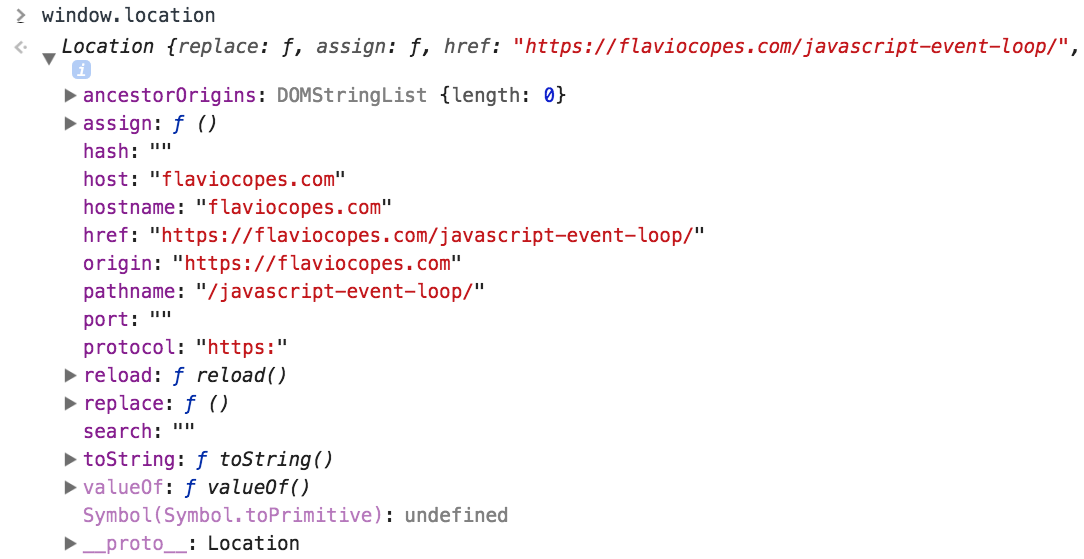
The current page URL is exposed in
location.hrefThis gives you the full URL as a string, ready to log, store, or send somewhere:
location.href
//'https://flaviocopes.com/javascript/?page=2#comments'
The other location properties
Most of the time you don’t need the whole URL. You need one piece of it, like the path or the query string. The location object already splits everything for you:
| Code | Description |
|---|---|
location.hostname | the host name |
location.origin | the origin |
location.hash | the hash, the part that follow the hash # symbol |
location.pathname | the path |
location.port | the port |
location.protocol | the protocol |
location.search | the query string |
Here’s what each one returns for the URL https://flaviocopes.com/javascript/?page=2#comments:
location.hostname //'flaviocopes.com'
location.origin   //'https://flaviocopes.com'
location.hash     //'#comments'
location.pathname //'/javascript/'
location.port     //''
location.protocol //'https:'
location.search   //'?page=2'
Notice two details. The protocol includes the trailing colon. And the port is an empty string when the page uses the default port for its protocol, like 443 for HTTPS.
Be careful when assigning to location.href
Reading location.href is safe. Writing to it is not the same thing: assigning a new value navigates the browser to that URL.
location.href = 'https://flaviocopes.com/access/'
//the browser loads this page
This is a common source of confusion. If your page unexpectedly redirects, look for a place in the code where something assigns to location.href instead of just reading it.
This only works in the browser
The window and location objects don’t exist in Node.js. If you run this code on the server, for example inside a server-rendered component, you’ll get a ReferenceError: window is not defined error.
On the server, get the URL from the incoming request object your framework gives you instead.
If you’re not sure which property maps to which part of a URL, I built a free URL parser tool that labels every part of any URL you paste in.
Want me to talk about your product? You can sponsor this site.
Related posts about js: