Unicode in JavaScript
By Flavio Copes
A complete guide to Unicode in JavaScript: UTF-16, code points, grapheme clusters, normalization, emoji, iteration, regex, and UTF-8 bytes.
Unicode encoding of source files
Save JavaScript and HTML source files as UTF-8. For an HTML document, declare the encoding near the start of <head>:
<meta charset="utf-8" />The HTTP response can declare it too:
Content-Type: text/html; charset=utf-8JavaScript modules are decoded as UTF-8. For classic scripts, browser decoding can also depend on the response and embedding document, so using UTF-8 consistently avoids an entire category of bugs.
You do not need to limit source code to ASCII. Identifiers, comments, and strings can contain Unicode. Escapes are useful when they make an invisible or confusing character explicit, not as a replacement for correctly encoded files.
How JavaScript uses Unicode internally
While a JavaScript source file can have any kind of encoding, JavaScript will then convert it internally to UTF-16 before executing it.
JavaScript strings are all UTF-16 sequences, as the ECMAScript standard says:
When a String contains actual textual data, each element is considered to be a single UTF-16 code unit.
Using Unicode in a string
A unicode sequence can be added inside any string using the format \uXXXX:
const s1 = '\u00E9' //éA sequence can be created by combining two unicode sequences:
const s2 = '\u0065\u0301' //éNotice that while both generate an accented e, they are two different strings, and s2 is considered to be 2 characters long:
s1.length //1
s2.length //2
And when you try to select that character in a text editor, you need to go through it 2 times, as the first time you press the arrow key to select it, it just selects half element.
You can write a string combining a unicode character with a plain char, as internally it’s actually the same thing:
const s3 = 'e\u0301' //é
s3.length === 2 //true
s2 === s3 //true
s1 !== s3 //true
Emojis
Emojis are fun, and they are Unicode characters, and as such they are perfectly valid to be used in strings:
const s4 = '🐶'Emojis are part of the astral planes, outside of the first Basic Multilingual Plane (BMP), and since those points outside BMP cannot be represented in 16 bits, JavaScript needs to use a combination of 2 characters to represent them
The 🐶 symbol, which is U+1F436, is traditionally encoded as \uD83D\uDC36 (called surrogate pair). There is a formula to calculate this, but it’s a rather advanced topic.
Some emojis are also created by combining together other emojis. You can find those by looking at this list https://unicode.org/emoji/charts/full-emoji-list.html and notice the ones that have more than one item in the unicode symbol column.
👩❤️👩 is created combining 👩 (\uD83D\uDC69), ❤️ (\u200D\u2764\uFE0F\u200D) and another 👩 (\uD83D\uDC69) in a single string: \uD83D\uDC69\u200D\u2764\uFE0F\u200D\uD83D\uDC69
To a reader this is one character. Unicode calls that user-perceived character a grapheme cluster. We can count it correctly with Intl.Segmenter, as we’ll see below.
Get the proper length of a string
If you try to perform
'👩❤️👩'.lengthYou’ll get 8 in return, because length counts UTF-16 code units. It does not count Unicode code points or grapheme clusters.
Also, iterating over it is kind of funny:
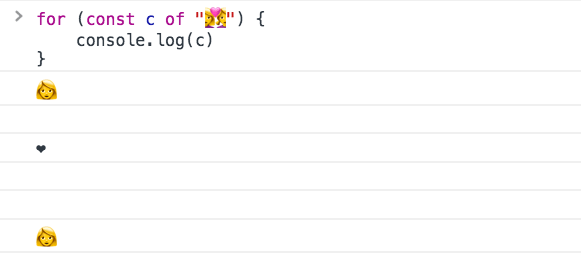
And curiously, pasting this emoji in a password field it’s counted 8 times, possibly making it a valid password in some systems.
How to get the “real” length of a string containing unicode characters?
Paste the string into my free string inspector if you want character count, grapheme count, byte length, and hidden characters spelled out.
The spread operator counts code points, which fixes surrogate pairs:
;[...'🐶'].length //1Emoji sequences built from multiple code points still give the wrong user-perceived count:
[...'👩❤️👩'].length //6If the string has combining marks, length and even [...str].length can still lie. Here’s a combining-mark example:
const eAcute = 'e\u0301' // e + combining acute accent
eAcute.length // 2
;[...eAcute].length // 2

const segmenter = new Intl.Segmenter('en', { granularity: 'grapheme' })
;[...segmenter.segment(eAcute)].length // 1
So for “how many characters does a person see?”, use Intl.Segmenter with granularity: 'grapheme' (more on that below). You can try the snippet above in a browser console.
(you can generate your own weird text with marks here: https://lingojam.com/WeirdTextGenerator)
Length is not the only thing to pay attention. Also reversing a string is error prone if not handled correctly.
Try my reverse text and Unicode explorer to compare grapheme-safe reversal with code-point reversal.
ES6 Unicode code point escapes
ES6/ES2015 introduced a way to represent Unicode points in the astral planes (any Unicode code point requiring more than 4 hexadecimal digits), by wrapping the code in curly braces:
'\u{XXXXX}'The dog 🐶 symbol, which is U+1F436, can be represented as \u{1F436} instead of having to combine two unrelated Unicode code points, like we showed before: \uD83D\uDC36.
But length calculation still does not work correctly, because internally it’s converted to the surrogate pair shown above.
Encoding ASCII chars
The first 128 characters can be encoded using the special escaping character \x, which only accepts 2 characters:
'\x61' // a
'\x2A' // *
This will only work from \x00 to \xFF, which is the set of ASCII characters.
Code units, code points, and grapheme clusters
These three terms explain most Unicode surprises in JavaScript.
- A code unit is one 16-bit value in a JavaScript string. This is what
lengthcounts. - A code point is one value in the Unicode codespace, such as
U+1F436for 🐶. - A grapheme cluster is what a person usually sees as one character. It can contain several code points.
For plain ASCII text, all three counts are usually the same. They separate as soon as we use characters outside the Basic Multilingual Plane, combining marks, flags, skin-tone modifiers, or zero-width joiners.
Their cousin, the zero-width non-joiner, is invisible too. You can use it to stop X from autolinking a domain with a zero-width non-joiner.
const text = '👩❤️👩'
text.length //8 UTF-16 code units
[...text].length //6 code pointsNeither result is the user-perceived length. For that, use a grapheme segmenter:
const segmenter = new Intl.Segmenter('en', {
granularity: 'grapheme',
})
const graphemes = [...segmenter.segment('👩❤️👩')]
graphemes.length //1Intl.Segmenter also supports word and sentence boundaries. This is much safer than splitting human text with an empty string or a regular expression. The rules change between languages, and the platform already knows them.
Iterate over code points
A for...of loop iterates over code points, not UTF-16 code units:
for (const character of 'A🐶') {
  console.log(character)
}

//A
//🐶
This makes for...of and the spread operator better than split('') when you need code points. Remember that a visible emoji sequence can still contain several code points.
Use codePointAt() to read a code point value:
'🐶'.codePointAt(0) //128054
'🐶'.codePointAt(0).toString(16) //'1f436'
Use String.fromCodePoint() to go the other way:
String.fromCodePoint(0x1f436) //'🐶'The older charCodeAt() and String.fromCharCode() work with individual UTF-16 code units. They are still useful when that is exactly what you need, but they are the wrong default for arbitrary Unicode text.
Normalize before comparing text
Two strings can look identical and still use different code-point sequences. We saw this with é: one form uses a single code point, while another combines e with an accent.
normalize() supports four forms: NFC, NFD, NFKC, and NFKD. The default is NFC, which is a good choice for most application text:
const composed = '\u00E9'
const decomposed = 'e\u0301'

composed === decomposed //false
composed.normalize('NFC') === decomposed.normalize('NFC') //true
Compatibility normalization, NFKC and NFKD, can turn characters that look like formatting variants into a shared representation. That can be useful for search, but it can also remove distinctions your application cares about. Do not apply it blindly.
Normalization is not a complete security system. Visually similar characters from different scripts can still be different code points.
Encode and decode UTF-8 bytes
JavaScript strings use UTF-16 code units, but files and network protocols commonly use UTF-8. TextEncoder converts a string to UTF-8 bytes:
const encoder = new TextEncoder()
const bytes = encoder.encode('Caffè')

bytes //[67, 97, 102, 102, 195, 168]
TextDecoder converts bytes back to a string:
const decoder = new TextDecoder('utf-8')
decoder.decode(bytes) //'Caffè'
This is the right tool when working with binary files, streams, cryptography inputs, or APIs that expect bytes. A string’s UTF-16 length does not tell you how many UTF-8 bytes it will use.
'🐶'.length //2
new TextEncoder().encode('🐶').length //4
Unicode-aware regular expressions
Use the u flag when a regular expression should treat the pattern as Unicode code points:
/^.$/.test('🐶') //false
/^.$/u.test('🐶') //true
Unicode property escapes let you match categories and scripts without maintaining enormous character ranges:
const hasLetter = /\p{Letter}/u

hasLetter.test('A') //true
hasLetter.test('日') //true
hasLetter.test('7') //false
The newer v flag adds Unicode set operations and better support for properties of strings. Check your runtime support before relying on it in code that must run in older browsers.
The important rule is simple: decide whether your operation is about code units, code points, bytes, or user-perceived characters. Once you choose the right level, JavaScript has the tools to handle it.
The exact string model is defined in the ECMAScript specification, while segmentation and locale-sensitive text operations are defined by ECMA-402.
Want me to talk about your product? You can sponsor this site.
Related posts about js: