How to convert a string to a number in JavaScript
By Flavio Copes
Learn how to convert a string to a number in JavaScript using the Number object, parseInt() and parseFloat(), the unary plus, or multiplying by 1 for speed.
JavaScript provides various ways to convert a string value into a number.
Best: use the Number object
The best one in my opinion is to use the Number object, in a non-constructor context (without the new keyword):
const count = Number('1234') //1234This takes care of the decimals as well.
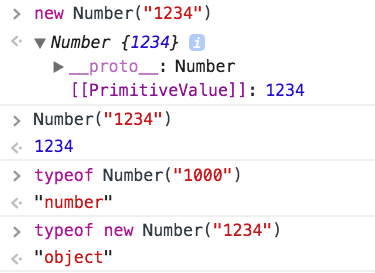
Number is a wrapper object that can perform many operations. If we use the constructor (new Number("1234")) it returns us a Number object instead of a number value, so pay attention.
Watch out for separators between digits:
Number('10,000') //NaN
Number('10.00') //10
Number('10000') //10000
In the case you need to parse a string with decimal separators, use Intl.NumberFormat instead.
Other solutions
Use parseInt() and parseFloat()
Another good solution for integers is to call the parseInt() function:
const count = parseInt('1234', 10) //1234Don’t forget the second parameter, which is the radix, always 10 for decimal numbers, or the conversion might try to guess the radix and give unexpected results.
parseInt() tries to get a number from a string that does not only contain a number:
parseInt('10 lions', 10) //10but if the string does not start with a number, you’ll get NaN (Not a Number):
parseInt("I'm 10", 10) //NaNAlso, just like Number it’s not reliable with separators between the digits:
parseInt('10,000', 10) //10     ❌
parseInt('10.00', 10) //10     ✅ (considered decimals, cut)
parseInt('10.000', 10) //10     ✅ (considered decimals, cut)
parseInt('10.20', 10) //10     ✅ (considered decimals, cut)
parseInt('10.81', 10) //10     ✅ (considered decimals, cut)
parseInt('10000', 10) //10000  ✅
If you want to retain the decimal part and not just get the integer part, use parseFloat(). Note that unlike
its parseInt() sibling, it only takes one argument – the string to convert:
parseFloat('10,000')  //10     ❌
parseFloat('10.00')   //10     ✅ (considered decimals, cut)
parseFloat('10.000')  //10     ✅ (considered decimals, cut)
parseFloat('10.20')   //10.2   ✅ (considered decimals)
parseFloat('10.81')   //10.81  ✅ (considered decimals)
parseFloat('10000')   //10000  ✅
Use +
One “trick” is to use the unary operator + before the string:
+'10,000'  //NaN ✅
+'10.000'  //10 ✅
+'10.00' //10 ✅
+'10.20'  //10.2 ✅
+'10.81'  //10.81 ✅
+'10000' //10000 ✅
See how it returns NaN in the first example, which is the correct behavior: it’s not a number.
Use Math.floor()
Similar to the + unary operator, but returns the integer part, is to use Math.floor():
Math.floor('10,000') //NaN ✅
Math.floor('10.000') //10 ✅
Math.floor('10.00') //10 ✅
Math.floor('10.20') //10 ✅
Math.floor('10.81') //10 ✅
Math.floor('10000') //10000 ✅
Use * 1
Generally one of the fastest options, behaves like the + unary operator, so it does not perform conversion to an integer if the number is a float.
'10,000' * 1 //NaN ✅
'10.000' * 1 //10 ✅
'10.00' * 1 //10 ✅
'10.20' * 1 //10.2 ✅
'10.81' * 1 //10.81 ✅
'10000' * 1 //10000 ✅
BigInt for huge integers
If the string is an integer outside the safe Number range, use BigInt instead:
BigInt('9007199254740993') //9007199254740993nFor normal numbers in day-to-day code, Number is still what you want. More on that in JavaScript type conversions.
Performance
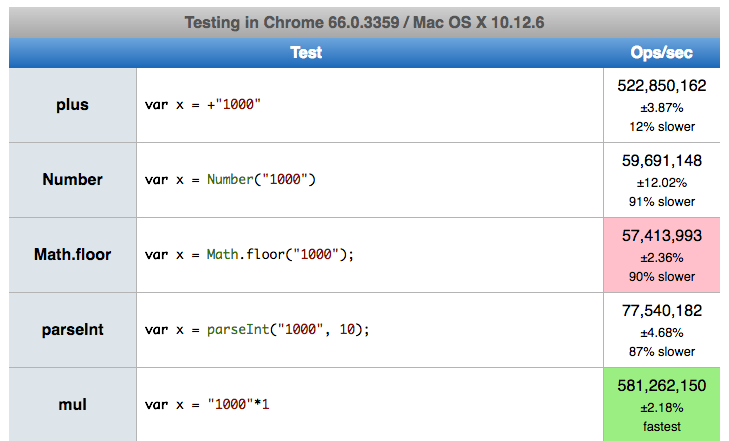
Every one of these methods has a different performance on different environments, as it all depends on the implementation. In my case, * 1 was the winner, 10x faster than the other alternatives. That was years ago, and results change with every engine version, so measure again before you pick one for speed.
Want me to talk about your product? You can sponsor this site.
Related posts about js: