How to use JavaScript Regular Expressions
By Flavio Copes
Learn how to use JavaScript regular expressions to search, validate, extract, and replace text, with practical examples of patterns, groups, and flags.
- Introduction to Regular Expressions
- Hard but useful
- How does a Regular Expression look like
- How does it work?
- Anchoring
- Match items in ranges
- Matching a range item multiple times
- Negating a pattern
- Meta characters
- Regular expressions choices
- Quantifiers
- Optional items
- Groups
- Capturing Groups
- Using
match()andexec() - Noncapturing Groups
- Flags
- Inspecting a regex
- Escaping
- String boundaries
- Replacing using Regular Expressions
- Greediness
- Lookaheads: match a string depending on what follows it
- Lookbehinds: match a string depending on what precedes it
- Regular Expressions and Unicode
- Unicode property escapes
- Examples
Introduction to Regular Expressions
A regular expression, also called a regex, is a pattern used to search and transform text.
With a regular expression, you can:
- search text in a string
- replace substrings in a string
- extract information from a string
JavaScript supports regular expressions through the RegExp object and methods such as test(), match(), and replace(). The MDN regular expression guide is the official practical reference.
Almost every programming language implements regular expressions. There are small differences between each implementation, but the general concepts apply almost everywhere.
Tip: as you follow along, you can try the patterns in my regex tester — it highlights matches live and explains each token of the pattern.
Regular Expressions date back to the 1950s, when it was formalized as a conceptual search pattern for string processing algorithms.
Implemented in UNIX tools like grep, sed, and in popular text editors, regexes grew in popularity and were introduced in the Perl programming language, and later in many others.
JavaScript, among with Perl, is one of the programming languages that have regular expressions support directly built in the language.
Hard but useful
Regular expressions can appear like absolute nonsense to the beginner, and many times also to the professional developer, if one does not invest the time necessary to understand them.
Cryptic regular expressions are hard to write, hard to read, and hard to maintain/modify.
But sometimes a regular expression is the only sane way to perform some string manipulation, so it’s a very valuable tool in your pocket.
This tutorial aims to introduce you to JavaScript Regular Expressions in a simple way, and give you all the information to read and create regular expressions.
The rule of thumb is that simple regular expressions are simple to read and write, while complex regular expressions can quickly turn into a mess if you don’t deeply grasp the basics.
How does a Regular Expression look like
In JavaScript, a regular expression is an object, which can be defined in two ways.
Use the RegExp constructor when the pattern comes from a variable:
const pattern = 'hey'
const re1 = new RegExp(pattern)
Use the regular expression literal form when you know the pattern while writing the code:
const re1 = /hey/You know that JavaScript has object literals and array literals? It also has regex literals.
In the example above, hey is called the pattern. In the literal form it’s delimited by forward slashes, while with the object constructor, it’s not.
This is the first important difference between the two forms, but we’ll see others later.
How does it work?
The regular expression we defined as re1 above is a very simple one. It searches the string hey, without any limitation: the string can contain lots of text, and hey in the middle, and the regex is satisfied. It could also contain just hey, and it will be satisfied as well.
That’s pretty simple.
You can test the regex using RegExp.test(String), which returns a boolean:
re1.test('hey')                     //✅
re1.test('blablabla hey blablabla') //✅


re1.test('he')        //❌
re1.test('blablabla') //❌
In the above example we just checked if "hey" satisfies the regular expression pattern stored in re1.
This is the simplest it can be, but you already know lots of concepts about regexes.
Anchoring
/hey/matches hey wherever it was put inside the string.
If you want to match strings that start with hey, use the ^ operator:
/^hey/.test('hey')     //✅
/^hey/.test('bla hey') //❌
If you want to match strings that end with hey, use the $ operator:
/hey$/.test('hey')     //✅
/hey$/.test('bla hey') //✅
/hey$/.test('hey you') //❌
Combine those, and match strings that exactly match hey, and just that string:
/^hey$/.test('hey') //✅To match a string that starts with a substring and ends with another, you can use .*, which matches any character repeated 0 or more times:
/^hey.*joe$/.test('hey joe')             //✅
/^hey.*joe$/.test('heyjoe')              //✅
/^hey.*joe$/.test('hey how are you joe') //✅
/^hey.*joe$/.test('hey joe!')            //❌
Match items in ranges
Instead of matching a particular string, you can choose to match any character in a range, like:
/[a-z]/ //a, b, c, ... , x, y, z
/[A-Z]/ //A, B, C, ... , X, Y, Z
/[a-c]/ //a, b, c
/[0-9]/ //0, 1, 2, 3, ... , 8, 9
These regexes match strings that contain at least one of the characters in those ranges:
/[a-z]/.test('a')  //✅
/[a-z]/.test('1')  //❌
/[a-z]/.test('A')  //❌

/[a-c]/.test('d')  //❌
/[a-c]/.test('dc') //✅
Ranges can be combined:
/[A-Za-z0-9]//[A-Za-z0-9]/.test('a') //✅
/[A-Za-z0-9]/.test('1') //✅
/[A-Za-z0-9]/.test('A') //✅Matching a range item multiple times
You can check if a string contains one and only one character in a range by starting the regex with ^ and ending it with $:
/^[A-Z]$/.test('A')  //✅
/^[A-Z]$/.test('AB') //❌
/^[A-Z]$/.test('Ab') //❌
/^[A-Za-z0-9]$/.test('1')  //✅
/^[A-Za-z0-9]$/.test('A1') //❌
Negating a pattern
The ^ character at the beginning of a pattern anchors it to the beginning of a string.
Used inside a range, it negates it, so:
/[^A-Za-z0-9]/.test('a') //❌
/[^A-Za-z0-9]/.test('1') //❌
/[^A-Za-z0-9]/.test('A') //❌
/[^A-Za-z0-9]/.test('@') //✅
Meta characters
\dmatches any digit, equivalent to[0-9]\Dmatches any character that’s not a digit, equivalent to[^0-9]\wusually matches an ASCII letter, digit, or underscore, equivalent to[A-Za-z0-9_]\Wmatches any character except the ones matched by\w\smatches any whitespace character: spaces, tabs, newlines and Unicode spaces\Smatches any character that’s not a whitespace\0matches null\nmatches a newline character\tmatches a tab character\uXXXXmatches a UTF-16 code unit with four hexadecimal digits\u{X...}matches a Unicode code point when using theuorvflag.matches any character that is not a newline char (e.g.\n) (unless you use thesflag, explained later on)[^]matches any character, including newline characters. It’s useful on multiline strings
Regular expressions choices
If you want to search one string or another, use the | operator.
/hey|ho/.test('hey') //✅
/hey|ho/.test('ho')  //✅
Quantifiers
Say you have this regex, that checks if a string has one digit in it, and nothing else:
/^\d$/You can use the ? quantifier to make it optional, thus requiring zero or one:
/^\d?$/but what if you want to match multiple digits?
You can do it in 4 ways, using +, *, {n} and {n,m}.
+
Match one or more (>=1) items
/^\d+$/

/^\d+$/.test('12')     //✅
/^\d+$/.test('14')     //✅
/^\d+$/.test('144343') //✅
/^\d+$/.test('')       //❌
/^\d+$/.test('1a')     //❌
*
Match 0 or more (>= 0) items
/^\d*$/

/^\d*$/.test('12')     //✅
/^\d*$/.test('14')     //✅
/^\d*$/.test('144343') //✅
/^\d*$/.test('')       //✅
/^\d*$/.test('1a')     //❌
{n}
Match exactly n items
/^\d{3}$/

/^\d{3}$/.test('123')  //✅
/^\d{3}$/.test('12')   //❌
/^\d{3}$/.test('1234') //❌

/^[A-Za-z0-9]{3}$/.test('Abc') //✅
{n,m}
Match between n and m times:
/^\d{3,5}$/

/^\d{3,5}$/.test('123')    //✅
/^\d{3,5}$/.test('1234')   //✅
/^\d{3,5}$/.test('12345')  //✅
/^\d{3,5}$/.test('123456') //❌
m can be omitted to have an open ending to have at least n items:
/^\d{3,}$/

/^\d{3,}$/.test('12')        //❌
/^\d{3,}$/.test('123')       //✅
/^\d{3,}$/.test('12345')     //✅
/^\d{3,}$/.test('123456789') //✅Optional items
Following an item with ? makes it optional:
/^\d{3}\w?$/

/^\d{3}\w?$/.test('123')   //✅
/^\d{3}\w?$/.test('123a')  //✅
/^\d{3}\w?$/.test('123ab') //❌
Groups
Using parentheses, you can create groups of characters: (...)
This example matches exactly 3 digits followed by one or more word characters:
/^(\d{3})(\w+)$/

/^(\d{3})(\w+)$/.test('123')          //❌
/^(\d{3})(\w+)$/.test('123s')         //✅
/^(\d{3})(\w+)$/.test('123something') //✅
/^(\d{3})(\w+)$/.test('1234')         //✅
Repetition characters put after a group closing parentheses refer to the whole group:
/^(\d{2})+$/

/^(\d{2})+$/.test('12')   //✅
/^(\d{2})+$/.test('123')  //❌
/^(\d{2})+$/.test('1234') //✅
Capturing Groups
So far, we’ve seen how to test strings and check if they contain a certain pattern.
A very cool feature of regular expressions is the ability to capture parts of a string, and put them into an array.
You can do so using Groups, and in particular Capturing Groups.
By default, a Group is a Capturing Group. Now, instead of using RegExp.test(String), which just returns a boolean if the pattern is satisfied, we use one of
String.match(RegExp)RegExp.exec(String)
Without the g flag, both return an array with the whole match first, followed by each captured group.
If there is no match, it returns null:
'123s'.match(/^(\d{3})(\w+)$/)
//Array [ "123s", "123", "s" ]

/^(\d{3})(\w+)$/.exec('123s')
//Array [ "123s", "123", "s" ]

'hey'.match(/(hey|ho)/)
//Array [ "hey", "hey" ]

/(hey|ho)/.exec('hey')
//Array [ "hey", "hey" ]

/(hey|ho)/.exec('ha!')
//null
When a group is matched multiple times, only the last match is put in the result array:
'123456789'.match(/(\d)+/)
//Array [ "123456789", "9" ]
Optional groups
A capturing group can be made optional by using (...)?. If it’s not found, the resulting array slot will contain undefined:
/^(\d{3})(\s)?(\w+)$/.exec('123 s') //Array [ "123 s", "123", " ", "s" ]
/^(\d{3})(\s)?(\w+)$/.exec('123s') //Array [ "123s", "123", undefined, "s" ]
Reference matched groups
Every group that’s matched is assigned a number. $1 refers to the first, $2 to the second, and so on. This will be useful when we’ll later talk about replacing parts of a string.
Named Capturing Groups
This is a new, ES2018 feature.
A group can be assigned to a name, rather than just being assigned a slot in the result array:
const re = /(?<year>\d{4})-(?<month>\d{2})-(?<day>\d{2})/
const result = re.exec('2015-01-02')

// result.groups.year === '2015'
// result.groups.month === '01'
// result.groups.day === '02'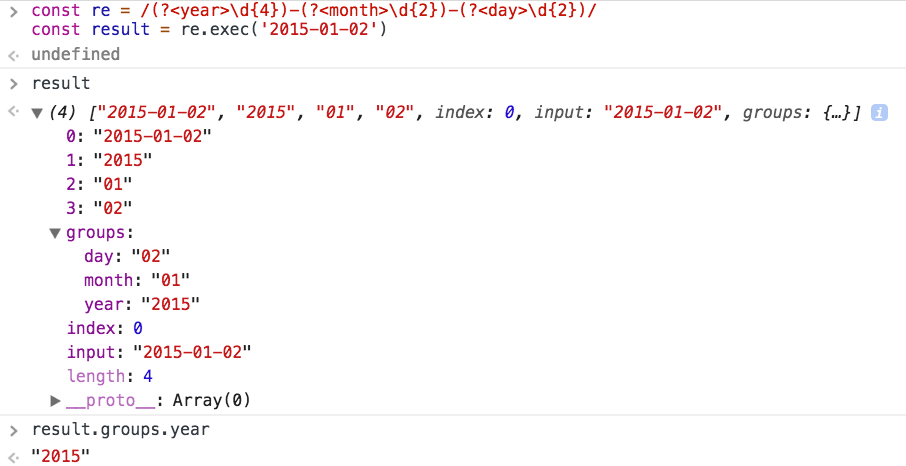
Using match() and exec()
Without capturing groups, the first item is still the whole match:
/hey|ho/.exec('hey')   // [ "hey" ]

/(hey).(ho)/.exec('hey ho') // [ "hey ho", "hey", "ho" ]
The main difference appears with the g flag. match() returns all matches without capture details, while repeated exec() calls return one detailed match at a time and update lastIndex.
See the MDN exec() reference for an example.
Noncapturing Groups
Since by default groups are Capturing Groups, you need a way to ignore some groups in the resulting array. This is possible using Noncapturing Groups, which start with an (?:...)
'123s'.match(/^(\d{3})(?:\s)(\w+)$/)
//null
'123 s'.match(/^(\d{3})(?:\s)(\w+)$/)
//Array [ "123 s", "123", "s" ]
Flags
You can use the following flags on any regular expression:
g: matches the pattern multiple timesi: makes the regex case insensitivem: makes^and$match the start and end of each lineu: enables support for unicode (introduced in ES6/ES2015)s: (new in ES2018) short for single line, it causes the.to match new line characters as welld: adds start and end indices for matches and captured groupsv: enables an extended Unicode mode with Unicode set featuresy: matches only from the currentlastIndex
Without m, ^ and $ match only the start and end of the whole input. The MDN regex reference documents every flag.
Flags can be combined, and they are added at the end of the string in regex literals:
/hey/ig.test('HEy') //✅or as the second parameter with RegExp object constructors:
new RegExp('hey', 'ig').test('HEy') //✅Inspecting a regex
Given a regex, you can inspect its properties:
sourcethe pattern stringmultilinetrue with themflagglobaltrue with thegflagignoreCasetrue with theiflaglastIndex
/^(\w{3})$/i.source     //"^(\\w{3})$"
/^(\w{3})$/i.multiline  //false
/^(\w{3})$/i.lastIndex  //0
/^(\w{3})$/i.ignoreCase //true
/^(\w{3})$/i.global     //false
Escaping
These characters are special:
\/[ ]( ){ }?+*|.^$
They are special because they are control characters that have a meaning in the regular expression pattern, so if you want to use them inside the pattern as matching characters, you need to escape them, by prepending a backslash:
/^\\$/
/^\^$/ // /^\^$/.test('^') ✅
/^\$$/ // /^\$$/.test('$') ✅
String boundaries
\b and \B match positions around word characters:
\bmatches a position at a word boundary\Bmatches a position that is not a word boundary
Example:
'I saw a bear'.match(/\bbear/)    //Array ["bear"]
'I saw a beard'.match(/\bbear/)   //Array ["bear"]
'I saw a beard'.match(/\bbear\b/) //null
'cool_bear'.match(/\bbear\b/)     //null
Replacing using Regular Expressions
We already saw how to check if a string contains a pattern.
We also saw how to extract parts of a string to an array, matching a pattern.
Let’s see how to replace parts of a string based on a pattern.
The String object in JavaScript has a replace() method, which can be used without regular expressions to perform a single replacement on a string:
'Hello world!'.replace('world', 'dog') //Hello dog!
'My dog is a good dog!'.replace('dog', 'cat') //My cat is a good dog!
This method also accepts a regular expression as argument:
'Hello world!'.replace(/world/, 'dog') //Hello dog!Use the g flag to replace every regex match:
'My dog is a good dog!'.replace(/dog/g, 'cat') //My cat is a good cat!For plain strings, you can also use replaceAll():
'My dog is a good dog!'.replaceAll('dog', 'cat')
//My cat is a good cat!
Groups let us do more fancy things, like moving around parts of a string:
'Hello, world!'.replace(/(\w+), (\w+)!/, '$2: $1!!!')
// "world: Hello!!!"
Instead of using a string you can use a function, to do even fancier things. It will receive a number of arguments like the one returned by String.match(RegExp) or RegExp.exec(String), with a number of arguments that depends on the number of groups:
'Hello, world!'.replace(/(\w+), (\w+)!/, (matchedString, first, second) => {
  console.log(first)
  console.log(second)

  return `${second.toUpperCase()}: ${first}!!!`
})
//"WORLD: Hello!!!"
Greediness
Regular expressions are said to be greedy by default.
What does it mean?
Take this regex
/\$(.+)\s?/It is supposed to extract a dollar amount from a string
/\$(.+)\s?/.exec('This costs $100')[1]
//100
but if we have more words after the number, it freaks off
/\$(.+)\s?/.exec('This costs $100 and it is less than $200')[1]
//100 and it is less than $200
Why? Because the regex after the $ sign matches any character with .+, and it won’t stop until it reaches the end of the string. Then, it finishes off because \s? makes the ending space optional.
To fix this, we need to tell the regex to be lazy, and perform the least amount of matching possible. We can do so using the ? symbol after the quantifier:
/\$(.+?)\s/.exec('This costs $100 and it is less than $200')[1]
//100
I removed the
?after\sotherwise it matched only the first number, since the space was optional
So, ? means different things based on its position, because it can be both a quantifier and a lazy mode indicator.
Lookaheads: match a string depending on what follows it
Use ?= to match a string that’s followed by a specific substring:
/Roger(?=Waters)/

/Roger(?= Waters)/.test('Roger is my dog') //false
/Roger(?= Waters)/.test('Roger is my dog and Roger Waters is a famous musician') //true
?! performs the inverse operation, matching if a string is not followed by a specific substring:
/Roger(?!Waters)/

/Roger(?! Waters)/.test('Roger is my dog') //true
/Roger(?! Waters)/.test('Roger Waters is a famous musician') //false
Lookbehinds: match a string depending on what precedes it
This is an ES2018 feature.
Lookaheads use the ?= symbol. Lookbehinds use ?<=.
/(?<=Roger) Waters/

/(?<=Roger) Waters/.test('Pink Waters is my dog') //false
/(?<=Roger) Waters/.test('Roger is my dog and Roger Waters is a famous musician') //true
A lookbehind is negated using ?<!:
/(?<!Roger) Waters/

/(?<!Roger) Waters/.test('Pink Waters is my dog') //true
/(?<!Roger) Waters/.test('Roger is my dog and Roger Waters is a famous musician') //false
Regular Expressions and Unicode
JavaScript strings use UTF-16. Some Unicode characters, including many emoji, use two UTF-16 code units.
Like Emojis, for example, but not just those.
If you don’t add that flag, this simple regex that should match one character will not work, because for JavaScript that emoji is represented internally by 2 characters (see Unicode in JavaScript):
/^.$/.test('a') //✅
/^.$/.test('🐶') //❌
/^.$/u.test('🐶') //✅
Use the u or v flag when your pattern must treat each Unicode code point as one character.
Unicode, just like normal characters, handle ranges:
/[a-z]/.test('a')  //✅
/[1-9]/.test('1')  //✅

/[🐶-🦊]/u.test('🐺')  //✅
/[🐶-🦊]/u.test('🐛')  //❌
JavaScript checks the code point values, so 🐶 < 🐺 < 🦊 because U+1F436 < U+1F43A < U+1F98A.
Unicode property escapes
As we saw above, in a regular expression pattern you can use \d to match an ASCII digit, \s to match whitespace, \w to match an ASCII word character, and so on.
Unicode property escapes is an ES2018 feature that introduces a very cool feature, extending this concept to all Unicode characters introducing \p{} and its negation \P{}.
Any Unicode character has a set of properties. For example, Script identifies its writing system, while ASCII is true for ASCII characters. Put the property name inside the braces:
/^\p{ASCII}+$/u.test('abc')   //✅
/^\p{ASCII}+$/u.test('ABC@')  //✅
/^\p{ASCII}+$/u.test('ABC🙃') //❌
ASCII_Hex_Digit is another boolean property, that checks if the string only contains valid hexadecimal digits:
/^\p{ASCII_Hex_Digit}+$/u.test('0123456789ABCDEF') //✅
/^\p{ASCII_Hex_Digit}+$/u.test('h')                //❌
There are many other binary properties. Add their name inside the braces, including Uppercase, Lowercase, White_Space, Alphabetic, and Emoji:
/^\p{Lowercase}$/u.test('h') //✅
/^\p{Uppercase}$/u.test('H') //✅

/^\p{Emoji}+$/u.test('H')   //❌
/^\p{Emoji}+$/u.test('🙃🙃') //✅
In addition to those binary properties, you can check any of the unicode character properties to match a specific value. In this example, I check if the string is written in the greek or latin alphabet:
/^\p{Script=Greek}+$/u.test('ελληνικά') //✅
/^\p{Script=Latin}+$/u.test('hey') //✅
Read more in the MDN Unicode property escape reference.
Examples
Extract a number from a string
Supposing a string has only one number you need to extract, /\d+/ should do it:
'Test 123123329'.match(/\d+/)
// Array [ "123123329" ]
Match an email address
A simplistic approach is to check non-space characters before and after the @ sign, using \S:
/(\S+)@(\S+)\.(\S+)/

/(\S+)@(\S+)\.(\S+)/.exec('copesc@gmail.com')
//["copesc@gmail.com", "copesc", "gmail", "com"]
This is a simplistic example however, as many invalid emails are still satisfied by this regex.
Capture text between double quotes
Suppose you have a string that contains something in double quotes, and you want to extract that content.
The best way to do so is by using a capturing group, because we know the match starts and ends with ", and we can easily target it, but we also want to remove those quotes from our result.
We’ll find what we need in result[1]:
const hello = 'Hello "nice flower"'
const result = /"([^"]*)"/.exec(hello)
//Array [ "\"nice flower\"", "nice flower" ]
Get the content inside an HTML tag
For example get the content inside a span tag, allowing any number of arguments inside the tag:
/<span\b[^>]*>(.*?)<\/span>/

/<span\b[^>]*>(.*?)<\/span>/.exec('test')
// null
/<span\b[^>]*>(.*?)<\/span>/.exec('<span>test</span>')
// ["<span>test</span>", "test"]
/<span\b[^>]*>(.*?)<\/span>/.exec('<span class="x">test</span>')
// ["<span class="x">test</span>", "test"]
This only works for tightly controlled strings. Use the browser’s HTML parser when you need to process arbitrary HTML.
Want me to talk about your product? You can sponsor this site.
Related posts about js: