How to use Redis Sorted Lists
By Flavio
Tagged: Redis
Learn how to use Redis sorted sets, which attach a score to each item, with ZADD, ZSCORE, ZRANGE and ZINCRBY, perfect for building a leaderboard.
A sorted set is a Redis set where each item also has a score, and items are kept ordered by that score. It’s the data type you reach for when you need a leaderboard, a priority queue, or items sorted by timestamp.
Sorted sets work in a similar way to sets, and they use similar commands, except S is now Z, for example:
SADD->ZADDSPOP->ZPOPMIN/ZPOPMAX
But they are slightly different.
ZADD accepts a score before the value:
ZADD names 1 "Flavio"
ZADD names 2 "Syd"
ZADD names 2 "Roger"
As you can see, values must still be unique, but now they are associated to a score.
The score does not have to be unique. Both Syd and Roger have score 2 here. When two items share a score, Redis orders them alphabetically.
The score is a number, and it can have decimals. ZADD prices 9.99 "coffee" is valid.
Items in a sorted set are always sorted by the score. There’s no separate “sort” step: the order is maintained as you add and update items.
Reading scores and positions
You can get the score of an item using ZSCORE:
ZSCORE names "Flavio"This returns 1.
A related command is ZRANK, which returns the position of the item in the set instead, counting from 0, lowest score first:
ZRANK names "Flavio"This returns 0, because Flavio has the lowest score. Don’t mix the two up: ZSCORE gives you the score you stored, ZRANK gives you where the item ranks.
Listing items
List all items in a sorted set using ZRANGE, which works similarly to LRANGE in lists:
ZRANGE names 0 -1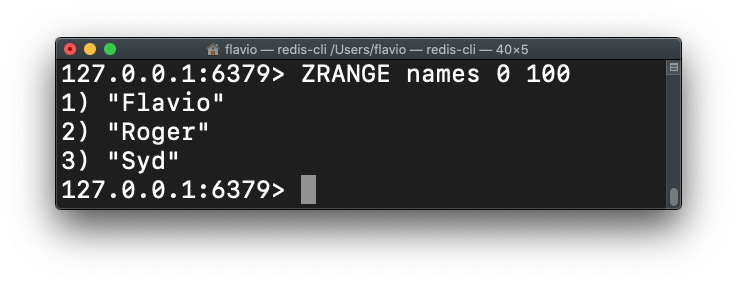
Add WITHSCORES to also return the scores information:
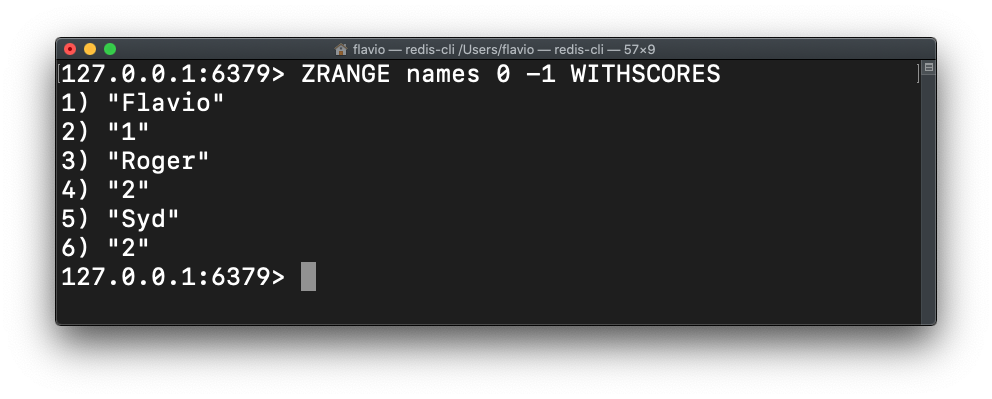
ZRANGE returns items from the lowest score up. For a leaderboard you usually want the opposite, highest first. Since Redis 6.2 you can add the REV option:
ZRANGE names 0 -1 REV WITHSCORESUpdating scores
You can increment the score of an item in the set using ZINCRBY:
ZINCRBY names 5 "Flavio"This adds 5 to Flavio’s score and returns the new value, 6. This is the heart of a leaderboard: every time a player scores, one ZINCRBY call, and the ranking updates itself.
One thing to be careful with: calling ZADD with a member that already exists does not add a duplicate. It updates the score of the existing member. If you want to add points rather than overwrite them, use ZINCRBY, not ZADD.
See all the sorted sets commands here.
Want me to talk about your product? You can sponsor this site.