Production-Ready on Cloudflare: the complete guide
By Flavio
Tagged: Cloudflare
The complete free handbook to shipping and operating production apps on Cloudflare: Workers, Static Assets, Wrangler 4, Local Explorer, D1, KV, R2, Queues, Durable Objects, Turnstile, Email Service, observability, gradual deploys, and rollbacks.
AI coding agents can generate a working web application in an afternoon. That part is solved. The hard part now is operating that app once real people, bots, bad migrations, and traffic spikes hit it.
This handbook replaces my older free Cloudflare courses. Everything you need to build, test, deploy, observe, and recover real products on the Cloudflare stack lives on this page, with no signups and no paywall.
I run several production properties on Cloudflare every day, including this blog (flaviocopes.com), my Mac app support portal (support.flaviocopes.com), and my app update server (updates.flaviocopes.com). Every command, query plan, bundle size, trace, and screenshot in this guide comes from running a real Worker application (pulsewatch, an uptime and incident monitor) locally on Wrangler 4.167 and from the production setups I maintain.
Find your way around this guide
This is a long reference handbook. Jump straight to the part you need:
| If you want to | Jump to |
|---|---|
| Understand the 2027 Cloudflare mental model and what to skip | The 2027 Cloudflare mental model, The default stack map |
| Master DNS, TLS, caching, and edge security | DNS, TLS, caching, and edge security |
Set up a real project with wrangler.jsonc and environments | Project setup, wrangler.jsonc, and environments |
| Run locally and debug with Local Explorer | Local development and Local Explorer |
| Understand the Workers runtime, Hono, and static asset routing | Workers runtime, Hono, and static assets |
| Pick between D1, KV, R2, Durable Objects, and Hyperdrive | Choosing the right storage |
| Run D1 safely with migrations, indexes, and Time Travel | D1 in production |
| Use KV and R2 without hitting consistency or memory traps | KV and R2 in production |
Move work off the request path with waitUntil, Cron, Queues, and Workflows | Background work and scheduling |
| Coordinate real-time state with Durable Objects | Durable Objects and when to skip them |
| Lock down auth, Turnstile, rate limits, webhooks, and Tunnels | Auth, bots, abuse, and edge security |
| Send and receive transactional email natively | Transactional email on Cloudflare |
| Add AI features with strict cost caps | AI on Cloudflare without runaway bills |
Write real workerd tests and read production traces | Testing and observability |
| Ship with CI/CD, gradual rollouts, rollbacks, and cost guardrails | CI/CD, gradual deployments, and rollbacks |
| See real production lessons and a pre-launch checklist | What I run in production, Pre-launch checklist and cheat sheet |
The 2027 Cloudflare mental model
Cloudflare started as a CDN and reverse proxy. Every piece of the developer platform still sits on that foundation.
When a browser requests your domain, it connects to a nearby Cloudflare data center announced worldwide via anycast. Cloudflare terminates TLS at the edge, runs security checks, serves cached or static files directly, and only wakes your JavaScript when a route needs dynamic logic.
You can see that edge layer on any proxied site with curl -I:
curl -sI https://flaviocopes.com | grep -iE '^(http/|server|cf-|cache-control)'Here is the real response from this site:
HTTP/2 200
content-type: text/html; charset=utf-8
cache-control: public, max-age=0, must-revalidate
server: cloudflare
cf-cache-status: DYNAMIC
cf-ray: a5f69b81197cedda-MXP
The cf-ray suffix (MXP) shows which Cloudflare data center answered the request (Milan). Everything you build on Cloudflare lives inside that network boundary.
Isolates, not long-running servers
Cloudflare Workers run on workerd, an open-source V8 isolate runtime. Your code does not boot a virtual machine or a persistent Node.js server process.
That difference causes most of the bugs AI coding agents introduce when they scaffold a Cloudflare app:
- No reliable in-memory state between requests. Module-level caches or Maps can vanish on the next request, or worse, leak request-scoped data across users sharing an isolate.
- No dangling background work. On a Node server, firing a
fetch()withoutawaitkeeps running after the response finishes. On a Worker, the runtime can cancel unfinished promises the moment you return aResponse, unless you register them withctx.waitUntil(). - Strict memory ceilings. Each isolate gets 128 MB of RAM. Buffering a 200 MB file with
await response.arrayBuffer()crashes the Worker. Streaming passes it through in constant memory. - CPU time vs. wall time. You pay for CPU execution time, not the milliseconds spent waiting on a D1 query or an upstream
fetch(). Long network waits do not drain your CPU budget, but tight loops and heavy synchronous parsing do.
Where Cloudflare is a poor fit
Knowing when to walk away saves weeks of workarounds. Skip Workers as your primary compute layer when you need:
- Long-running native binaries like
ffmpeg, headless video rendering, or heavy Python ML pipelines (use Cloudflare Containers or a dedicated VPS for those workloads, and keep Workers in front as the API gateway). - Unbounded raw TCP servers or legacy protocols that assume a single long-lived process.
- Multi-terabyte analytical SQL warehouses (D1 tops out at 10 GB per database; use Postgres via Hyperdrive or a dedicated analytical store when a single database grows beyond that).
The default stack map
Open the Cloudflare dashboard and the sidebar has more than twenty developer products. Do not adopt them because they are there. Start from the smallest stack that runs a real product reliably, and add the heavier primitives only when a concrete problem forces your hand.
Here is the opinionated 2027 default stack and the exact boundary for every product:
| Job | Default choice | Skip until… | Operational gotcha to watch |
|---|---|---|---|
| Web app + API | Workers + Static Assets | You only have a legacy Pages project already working | Never route static assets through a catch-all Worker middleware |
| Relational data | D1 (SQLite) | A single database approaches 10 GB or needs Postgres extensions | Missing composite indexes trigger full SCAN table reads |
| Read-heavy cache | KV | Never use for strong consistency or billing counters | Eventual consistency (~60s propagation) and 1 write/sec per key |
| Files, exports, media | R2 | Small site assets that belong in static builds | Stream large objects instead of buffering in RAM |
| Async jobs & retries | Queues + DLQ | Inline work takes under ~100ms and rarely fails | At-least-once delivery means consumers must be idempotent |
| Scheduled jobs | Cron Triggers | You need per-entity dynamic schedules (use DO alarms) | Cron runs in UTC; handle DST explicitly if local wall time matters |
| Multi-step durable jobs | Workflows | A job does not need durable sleep, waits, or per-step retries | Keep step payloads serializable and small |
| Live WebSockets / locks | Durable Objects | You do not need single-writer coordination | Never funnel all global traffic into one single DO ID |
| Existing Postgres / MySQL | Hyperdrive | You do not have an external database to keep | Disable query caching on read-after-write paths |
| Bot protection | Turnstile | Endpoint is private or already authenticated | Always verify the token server-side with siteverify |
| Outbound transactional mail | Email Service or Resend | You need marketing broadcasts (use a newsletter tool) | Restrict allowed_destination_addresses on alert Workers |
| Private origin exposure | Cloudflare Tunnel | Everything already runs on Workers | Run two cloudflared replicas for high availability |
Why Workers with Static Assets replaces Pages for new projects
For years, static sites lived on Cloudflare Pages and APIs lived on Cloudflare Workers. Going into 2027, Cloudflare’s recommendation for new projects is Workers with Static Assets, and I agree with it. I compared both models in Cloudflare Pages vs Workers.
With Workers Static Assets, your frontend HTML/CSS/JS and your API live in one repository, one wrangler.jsonc, and one deployment pipeline. You get Cron Triggers, Queues consumers, Durable Objects, Gradual Deployments, and Workers Observability out of the box without splitting your app across two projects. Existing Pages sites like this blog keep working fine, so there is no rush to migrate a working static site, but start new full-stack apps on Workers.
If you are choosing a full-stack framework on top of Workers, I compared Astro, Hono, React Router, Void, and vinext in Void, vinext, or React Router for a Cloudflare app? and Deploying Hono on Cloudflare Workers. For APIs and small server-rendered apps, Hono plus static assets keeps the bundle tiny and the request path obvious.
DNS, TLS, caching, and edge security
Before writing Worker code, get the network layer right. Most production outages on day one happen in DNS and TLS settings, not application code.
Zones and the orange cloud
When you add a domain to Cloudflare, Cloudflare becomes its authoritative DNS provider (a zone). Each DNS record has a proxy toggle:
- Proxied (orange cloud): DNS resolves to Cloudflare’s anycast IP addresses. Traffic passes through Cloudflare’s edge, giving you HTTPS, DDoS mitigation, WAF rules, caching, and Worker routing.
- DNS only (grey cloud): DNS returns your origin IP directly. Cloudflare only answers the DNS lookup and never sees the HTTP traffic.
Keep your domain registrar/DNS mental model separate from your hosting. Domains stay stable for years while hosting changes. When you point a domain at a new Worker or server, change one layer at a time: get DNS resolving first, enable the proxy second, then verify HTTPS and redirects with curl -I.
Fixing the redirect loop trap
The single most common misconfiguration when enabling the Cloudflare proxy is SSL/TLS mode set to Flexible.
In Flexible mode, Cloudflare connects to your visitor over HTTPS, then connects to your origin server over plain HTTP. If your origin server sees plain HTTP and redirects to HTTPS, Cloudflare sends the browser right back to the same URL forever.
Always use Full (strict) with a valid TLS certificate on the origin (Cloudflare Origin CA certificates are free and valid for up to 15 years). When you hit a loop, inspect the raw Location headers with curl -I instead of guessing in a browser. I walked through the full diagnosis in Fix ‘Too many redirects’ after enabling Cloudflare proxy.
Reading cache headers and controlling freshness
Check the cf-cache-status header on any response to see what the edge did:
cf-cache-status | What happened |
|---|---|
HIT | Served directly from the local Cloudflare data center |
MISS | Not in edge cache; fetched from origin or Worker and stored |
EXPIRED | Cached entry passed its TTL; refreshed from origin |
BYPASS | Cache skipped (often due to Cache-Control: private or cookies) |
DYNAMIC | Not cached by default (standard for HTML and API JSON) |
Never cache responses containing Set-Cookie, private user data, or personalized HTML at the shared edge cache. Use Cache-Control: private, no-store on every authenticated endpoint so a misconfigured Cache Rule can never leak one user’s response to another. For public API responses that can tolerate short staleness, use explicit s-maxage headers or Workers Cache, covered in Workers Caching.
Origin protection and WAF basics
If you proxy a traditional server behind Cloudflare, attackers can still scan IPv4 space and hit your origin IP directly, bypassing every WAF rule and rate limit you configured. Lock the origin firewall so it only accepts connections from Cloudflare IP ranges, or remove public inbound ports altogether with Cloudflare Tunnel.
Project setup, wrangler.jsonc, and environments
To keep every example in this guide grounded in real output, we will walk through PulseWatch, a real uptime and incident monitor built with Hono, Static Assets, D1, KV, R2, Queues, and Cron Triggers.
Start from an empty directory with Wrangler 4 installed locally in the project:
mkdir pulsewatch && cd pulsewatch
npm init -y
npm install hono
npm install -D wrangler typescript vitest @cloudflare/vitest-pool-workers
Run npx wrangler --version to verify you are on Wrangler 4 (wrangler 4.167.0 in this run). Keep Wrangler as a project devDependency rather than relying on a random global version so CI and your laptop match.
Make wrangler.jsonc your single source of truth
Always use wrangler.jsonc instead of the older wrangler.toml. Newer Cloudflare features ship JSON-only first, and referencing the local $schema gives your editor instant autocomplete and validation.
Here is the complete wrangler.jsonc for PulseWatch:
{
  "$schema": "./node_modules/wrangler/config-schema.json",
  "name": "pulsewatch",
  "main": "src/index.ts",
  "compatibility_date": "2026-11-24",
  "compatibility_flags": ["nodejs_compat"],
  "observability": {
    "enabled": true,
    "head_sampling_rate": 1
  },
  "assets": {
    "directory": "./public",
    "binding": "ASSETS",
    "run_worker_first": ["/api/*", "/admin/*"]
  },
  "vars": {
    "ENVIRONMENT": "production",
    "CACHE_TTL_SECONDS": "60"
  },
  "d1_databases": [
    {
      "binding": "DB",
      "database_name": "pulsewatch",
      "database_id": "00000000-0000-0000-0000-000000000001",
      "migrations_dir": "./migrations"
    }
  ],
  "kv_namespaces": [
    {
      "binding": "STATUS_CACHE",
      "id": "00000000000000000000000000000001"
    }
  ],
  "r2_buckets": [
    {
      "binding": "EXPORTS",
      "bucket_name": "pulsewatch-exports"
    }
  ],
  "queues": {
    "producers": [
      { "binding": "ALERTS_QUEUE", "queue": "pulsewatch-alerts" }
    ],
    "consumers": [
      {
        "queue": "pulsewatch-alerts",
        "max_batch_size": 10,
        "max_batch_timeout": 5,
        "max_retries": 3,
        "dead_letter_queue": "pulsewatch-alerts-dlq"
      }
    ]
  },
  "triggers": {
    "crons": ["*/5 * * * *"]
  },
  "env": {
    "staging": {
      "name": "pulsewatch-staging",
      "vars": {
        "ENVIRONMENT": "staging",
        "CACHE_TTL_SECONDS": "15"
      },
      "d1_databases": [
        {
          "binding": "DB",
          "database_name": "pulsewatch-staging",
          "database_id": "00000000-0000-0000-0000-000000000002",
          "migrations_dir": "./migrations"
        }
      ],
      "kv_namespaces": [
        {
          "binding": "STATUS_CACHE",
          "id": "00000000000000000000000000000002"
        }
      ],
      "r2_buckets": [
        {
          "binding": "EXPORTS",
          "bucket_name": "pulsewatch-exports-staging"
        }
      ],
      "queues": {
        "producers": [
          { "binding": "ALERTS_QUEUE", "queue": "pulsewatch-alerts-staging" }
        ],
        "consumers": [
          {
            "queue": "pulsewatch-alerts-staging",
            "max_batch_size": 10,
            "max_batch_timeout": 5,
            "max_retries": 3,
            "dead_letter_queue": "pulsewatch-alerts-staging-dlq"
          }
        ]
      }
    }
  }
}
Notice two production rules baked into that file:
- Bindings are not inherited across
env.*blocks. When I first wrote this config, I omittedqueuesinsideenv.staging. Runningnpx wrangler typesimmediately markedALERTS_QUEUE?: Queueas optional across the entireEnvinterface, which failedtsc --noEmit. Repeating every binding explicitly insideenv.stagingkeeps staging isolated from production and guarantees identical types across environments. - Pin
compatibility_dateand enablenodejs_compat. The compatibility date locks runtime behavior so a Cloudflare platform upgrade never silently breaks your app. Addingnodejs_compatlets you import standard built-ins likenode:crypto.
Generate Env types instead of hand-writing them
Never hand-write an interface Env by memory. It drifts the moment someone adds a binding or secret. Generate it straight from wrangler.jsonc and .dev.vars:
npx wrangler typesWrangler writes worker-configuration.d.ts automatically:
interface __BaseEnv_Env {
  STATUS_CACHE: KVNamespace
  EXPORTS: R2Bucket
  DB: D1Database
  ALERTS_QUEUE: Queue
  ASSETS: Fetcher
  ENVIRONMENT: 'staging' | 'production'
  CACHE_TTL_SECONDS: '15' | '60'
  ADMIN_TOKEN: string
  WEBHOOK_SECRET: string
  TURNSTILE_SECRET_KEY: string
}
Add npx wrangler types --check to CI so a pull request that edits wrangler.jsonc without regenerating types fails immediately.
Separate public vars from secrets
Non-secret configuration (ENVIRONMENT, CACHE_TTL_SECONDS, PUBLIC_TURNSTILE_SITE_KEY) belongs in wrangler.jsonc under vars so it is reviewed in Git.
Keep secrets (ADMIN_TOKEN, WEBHOOK_SECRET, TURNSTILE_SECRET_KEY, API keys) out of wrangler.jsonc and Git by placing them in a gitignored .dev.vars file for local development:
ADMIN_TOKEN=local-admin-token-change-in-prod
WEBHOOK_SECRET=whsec_local_test_signing_key_2026
TURNSTILE_SECRET_KEY=1x0000000000000000000000000000000AA
In production and staging, push secrets via Wrangler’s interactive prompt or from a file (never pass secret values as plain shell arguments where they land in shell history):
npx wrangler secret put ADMIN_TOKEN
npx wrangler secret put ADMIN_TOKEN --env staging
I covered environment separation and secret rotation in more detail in Cloudflare Workers: secrets and environments.
Local development and Local Explorer
Good local development is what separates calm shipping from pushing broken code to production to “see if it works”.
Start the local Worker runtime with:
npx wrangler devBy default, Wrangler simulates D1, KV, R2, Queues, and Static Assets completely locally inside .wrangler/state/v3/. Restarting wrangler dev preserves that local data. You can run destructive schema experiments, seed fake incidents, and break queries with zero risk to live users.
Be careful with
"remote": trueon any binding inwrangler.jsonc. That flag connects your localwrangler devsession to a live deployed resource (required for Workers AI and Vectorize, optional for D1/R2/KV). Always check the startup table Wrangler prints so you know which bindings are local and which are remote.
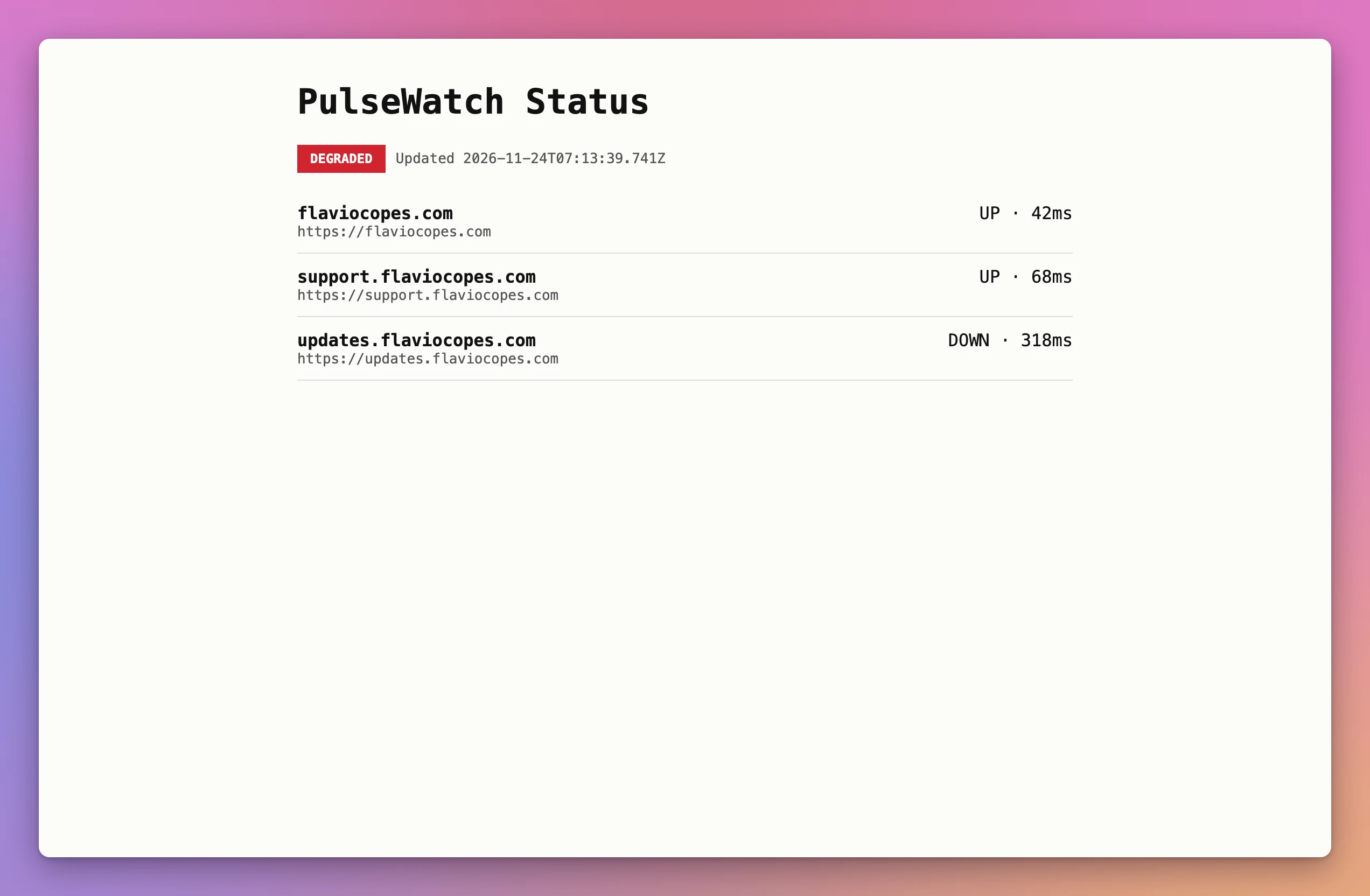
Once wrangler dev is running, PulseWatch serves its static status page at http://localhost:8787/. After seeding three monitors (flaviocopes.com, support.flaviocopes.com, and updates.flaviocopes.com) and recording a simulated HTTP 503 failure on the third one, the status page renders straight from Static Assets plus /api/status:
Inspecting local bindings and traces with Local Explorer
Wrangler 4 ships with Local Explorer, a built-in DevTools UI hosted at /cdn-cgi/local/explorer on your dev server (http://localhost:8787/cdn-cgi/local/explorer). There is nothing extra to install.
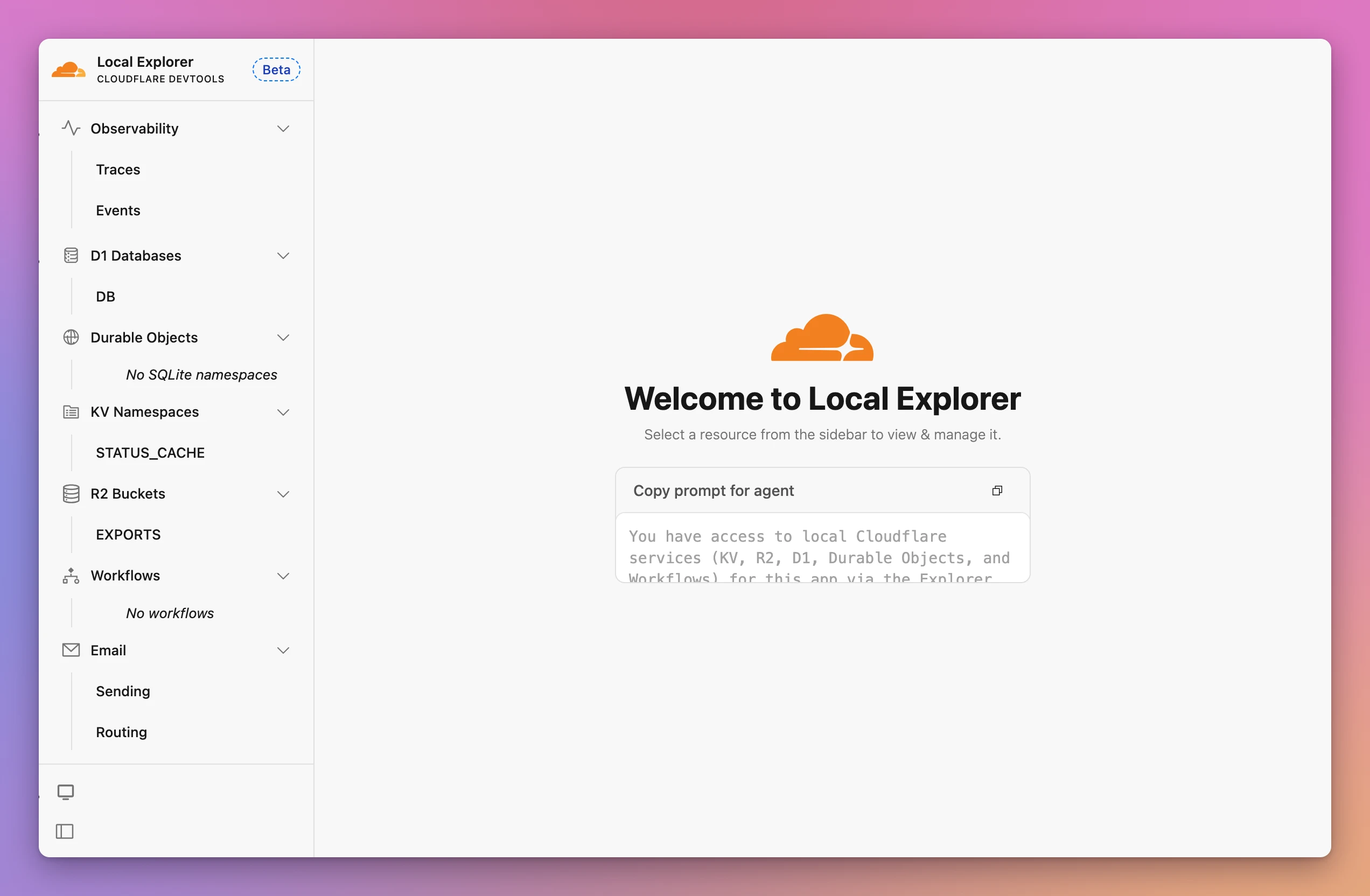
Local Explorer shows every binding wired into wrangler.jsonc in one sidebar:
- D1 Databases (
DB): Browse tables, edit rows, inspect schema, and run ad-hoc SQL queries directly against.wrangler/state. - KV Namespaces (
STATUS_CACHE): Read, edit, or delete cached keys without writing throwaway Wrangler commands. - R2 Buckets (
EXPORTS): Inspect uploaded objects, folders, and metadata. - Observability (
Traces&Events): See every local HTTP request, duration, span count, and error status in real time. - Cron Triggers: Fire your
scheduled()handler on demand without waiting five minutes. - Copy prompt for agent: Gives your coding agent direct API access to inspect local D1/KV/R2 state while debugging.
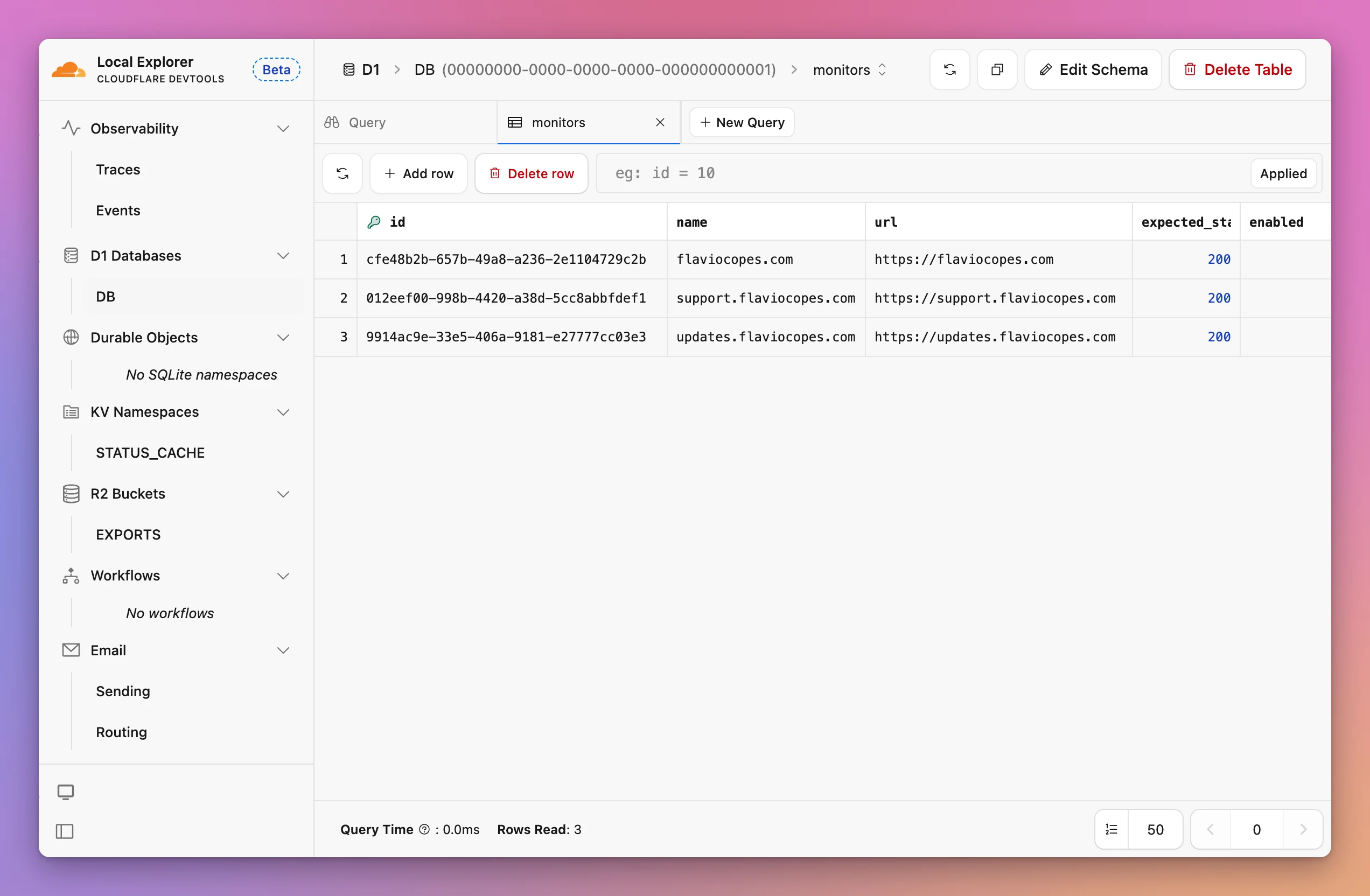
Here is our local monitors table inside Local Explorer after running our seed requests (Query Time: 0.0ms, Rows Read: 3):
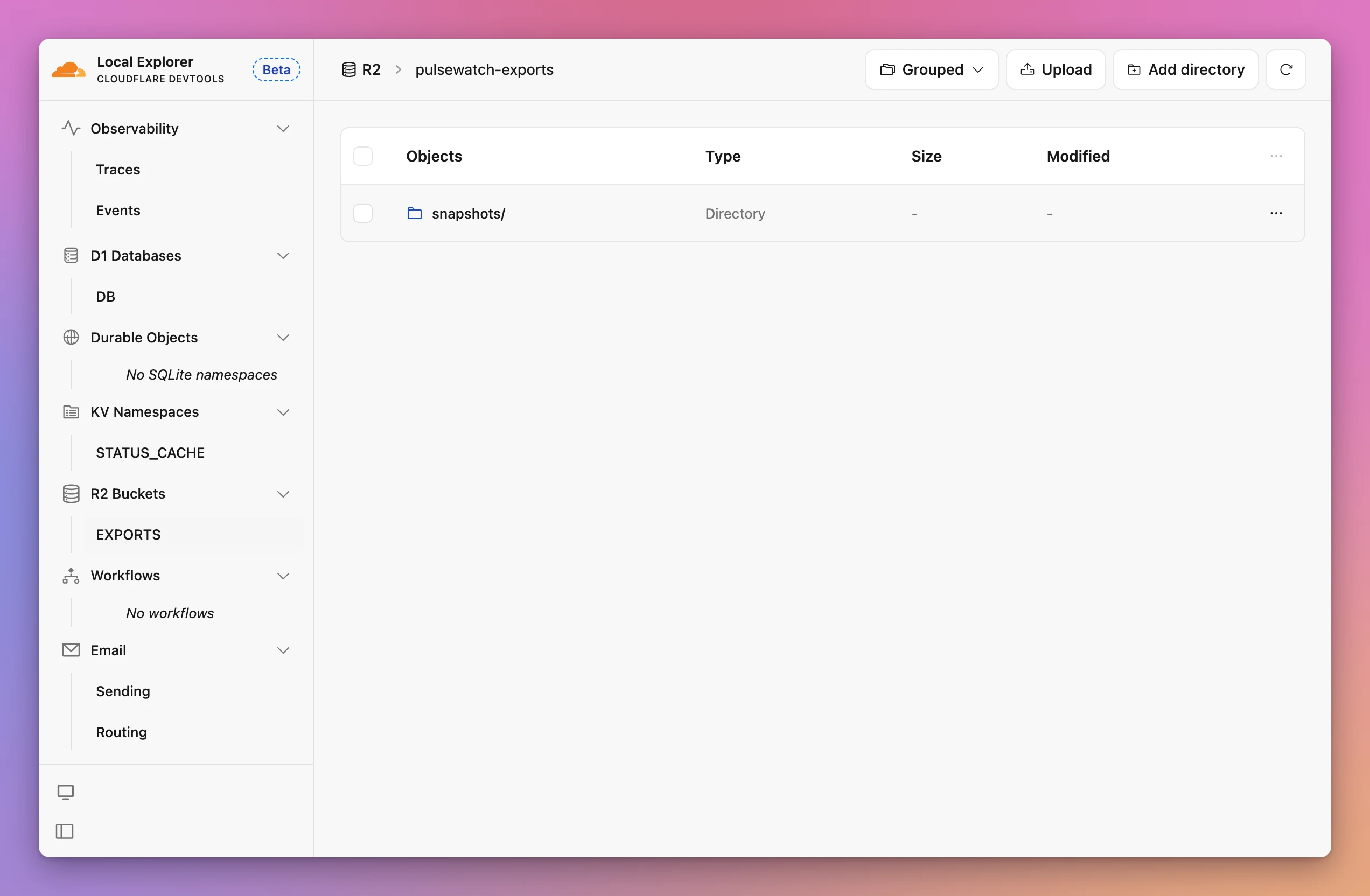
And here is the R2 EXPORTS bucket immediately after triggering POST /admin/export, showing the snapshots/ prefix containing snapshots/2026-11-24.json:
Workers runtime, Hono, and static assets
Understanding the boundary between Static Assets and your Worker is the single biggest lever for keeping latency low and your Cloudflare bill tiny.
Look at step 4 in the figure above. I learned that lesson the hard way on this blog: a root middleware intercepted every incoming path, turning every JPEG, CSS file, and font into a metered function invocation. Removing the root middleware fixed the bill immediately.
With Workers Static Assets, keep run_worker_first scoped strictly to dynamic paths:
"assets": {
  "directory": "./public",
  "binding": "ASSETS",
  "run_worker_first": ["/api/*", "/admin/*"]
}
Requests for /, /index.html, /app.css, or /logo.webp are served directly by Cloudflare’s edge asset layer with zero Worker invocations. Only /api/* and /admin/* wake your JavaScript.
Structuring a clean Hono Worker with multiple handlers
One Worker can export fetch, scheduled, and queue handlers side by side. That keeps your HTTP API, cron checks, and async queue consumer sharing the same types, helpers, and deployment artifact. I wrote a dedicated walkthrough of this pattern in Use fetch, queue, and scheduled handlers in one Cloudflare Worker.
Here is the core structure of src/index.ts in PulseWatch, starting with structured JSON request logging middleware and an explicit error boundary:
import { Hono } from 'hono'
import { signWebhookPayload, timingSafeEqualString } from './crypto'

const app = new Hono<{ Bindings: Env }>()

function logEvent(level: 'info' | 'warn' | 'error', event: string, fields: Record<string, unknown>) {
  console.log(JSON.stringify({ ts: new Date().toISOString(), level, event, ...fields }))
}

app.use('*', async (c, next) => {
  const requestId = c.req.header('cf-ray') ?? crypto.randomUUID()
  const started = Date.now()
  c.header('x-request-id', requestId)
  try {
    await next()
    logEvent('info', 'http_request', {
      requestId,
      method: c.req.method,
      path: new URL(c.req.url).pathname,
      status: c.res.status,
      durationMs: Date.now() - started,
    })
  } catch (err) {
    logEvent('error', 'http_error', {
      requestId,
      path: new URL(c.req.url).pathname,
      error: err instanceof Error ? err.message : String(err),
    })
    return c.json({ error: 'Internal server error', requestId }, 500)
  }
})
Avoid ctx.passThroughOnException() as a safety net. Explicit try/catch with a structured JSON log and a request ID gives you something actionable to search when a user reports a 500.
Profiling Worker startup time
Workers have a strict startup CPU limit (400 ms on paid plans). Heavy top-level imports or parsing large JSON tables at module load time can push a cold isolate over that ceiling before it handles a single request.
Wrangler 4 includes a built-in startup profiler:
npx wrangler check startupHere is the real profile output for PulseWatch:
Bundle: 71.46 KiB / gzip: 18.52 KiB

Local startup profile:
  Profile window: 20.7 ms
  Sampled time: 20.7 ms
  Active: 9.8 ms (including 0.0 ms garbage collection)
  Idle: 10.9 ms
At 18.52 KiB gzipped and 9.8 ms active startup time, the Worker starts almost instantaneously. Run wrangler check startup whenever you add a large npm package, especially ORMs, validation libraries, or PDF/image parsers.
Choosing the right storage
AI agents frequently pick the wrong Cloudflare storage product because the APIs all look equally simple in env. Picking wrong creates subtle production bugs that never appear during single-user local tests.
Use this reference table when deciding where a piece of data lives:
| Property | D1 | KV | R2 | Durable Objects | Hyperdrive |
|---|---|---|---|---|---|
| Data model | Relational SQLite | Key-value pairs | Blobs / objects | Per-ID SQLite + memory | External Postgres / MySQL |
| Consistency | Strong (primary) | Eventual (~60s) | Strong per key | Strict single-writer | Depends on origin DB |
| Max size | 10 GB per DB | 25 MiB per value | 5 TB per object | 10 GB SQLite per DO | Origin DB limit |
| Write rate | Moderate (single primary) | 1 write/sec per key | High | High per DO, single-threaded | Pooled to origin |
| Billing traps | Unindexed full table scans | Heavy writes/deletes | Class A/B ops on tiny files | Long-lived idle non-hibernating WS | Origin DB connection saturation |
| Best fit | Users, orders, incidents, auth | Public caches, flags, redirects | Uploads, PDFs, exports, backups | Chat rooms, locks, strict rate limits | Legacy Postgres you cannot move |
The rule of thumb I use is short:
- Rows with relationships, constraints, or queries belong in D1.
- Read-heavy snapshots or configuration that can tolerate 60 seconds of staleness belong in KV.
- Files, backups, and exports belong in R2.
- Strict single-writer coordination or live WebSockets belong in Durable Objects.
D1 in production
D1 is managed SQLite wired directly into your Worker via env.DB. There is no connection string, no TLS handshake to a database server, and no connection pool to exhaust. You still have to treat it like a real production database.
Schema design and versioned migrations
Put every schema change in ./migrations/ from day one instead of editing production tables by hand in the dashboard. Here is PulseWatch’s initial migration (migrations/0001_init.sql):
CREATE TABLE monitors (
  id TEXT PRIMARY KEY,
  name TEXT NOT NULL,
  url TEXT NOT NULL UNIQUE,
  expected_status INTEGER NOT NULL DEFAULT 200,
  enabled INTEGER NOT NULL DEFAULT 1,
  created_at TEXT NOT NULL DEFAULT (datetime('now'))
);

CREATE TABLE check_runs (
  id TEXT PRIMARY KEY,
  monitor_id TEXT NOT NULL REFERENCES monitors(id) ON DELETE CASCADE,
  status_code INTEGER NOT NULL,
  latency_ms INTEGER NOT NULL,
  ok INTEGER NOT NULL,
  checked_at TEXT NOT NULL DEFAULT (datetime('now'))
);

CREATE TABLE incidents (
  id TEXT PRIMARY KEY,
  monitor_id TEXT NOT NULL REFERENCES monitors(id) ON DELETE CASCADE,
  state TEXT NOT NULL CHECK (state IN ('open', 'resolved')),
  summary TEXT NOT NULL,
  opened_at TEXT NOT NULL DEFAULT (datetime('now')),
  resolved_at TEXT
);

CREATE TABLE alert_deliveries (
  idempotency_key TEXT PRIMARY KEY,
  incident_id TEXT NOT NULL REFERENCES incidents(id) ON DELETE CASCADE,
  channel TEXT NOT NULL,
  delivered_at TEXT NOT NULL DEFAULT (datetime('now'))
);

CREATE INDEX idx_check_runs_monitor_time ON check_runs(monitor_id, checked_at DESC);
CREATE INDEX idx_incidents_monitor_state ON incidents(monitor_id, state);
And a second, additive migration (migrations/0002_add_timeout_ms.sql) that adds a timeout column safely:
ALTER TABLE monitors ADD COLUMN timeout_ms INTEGER NOT NULL DEFAULT 5000;Apply migrations locally first, then to staging, then to production:
npx wrangler d1 migrations apply pulsewatch --local
npx wrangler d1 migrations apply pulsewatch-staging --remote --env staging
npx wrangler d1 migrations apply pulsewatch --remote
Running --local in PulseWatch prints the exact execution table:
┌─────────────────────────┬────────┐
│ name                    │ status │
├─────────────────────────┼────────┤
│ 0001_init.sql           │ ✅     │
│ 0002_add_timeout_ms.sql │ ✅     │
└─────────────────────────┴────────┘
Prepared statements, indexes, and EXPLAIN QUERY PLAN
Always bind every request value with .bind(). Never interpolate strings into SQL.
D1 bills by rows read and rows written. A missing index does not just slow down a query; it multiplies your billed rows read on every single request. Check every hot query with EXPLAIN QUERY PLAN before deploying.
First, run EXPLAIN QUERY PLAN on an indexed query in PulseWatch:
npx wrangler d1 execute pulsewatch --local --command \
  "EXPLAIN QUERY PLAN SELECT status_code, latency_ms, checked_at FROM check_runs WHERE monitor_id = 'mon-1' ORDER BY checked_at DESC LIMIT 20"
Output:
SEARCH check_runs USING INDEX idx_check_runs_monitor_time (monitor_id=?)Now run it on an unindexed column (status_code):
npx wrangler d1 execute pulsewatch --local --command \
  "EXPLAIN QUERY PLAN SELECT * FROM check_runs WHERE status_code = 503"
Output:
SCAN check_runsSEARCH ... USING INDEX reads only the matching rows (20 rows for LIMIT 20). SCAN check_runs reads every row in the table every time. When check_runs hits 500,000 rows, a single unindexed query burns half a million row reads per request.
Atomic writes with db.batch()
In D1, each separate await env.DB.prepare(...).run() is a separate round trip and a separate transaction. If you insert a failed check run and then crash before opening the incident, your database is left half-updated.
Wrap related writes in env.DB.batch([...]). D1 executes the entire batch sequentially inside one atomic transaction and rolls all statements back if any statement fails:
await c.env.DB.batch([
  c.env.DB.prepare(
    `INSERT INTO check_runs (id, monitor_id, status_code, latency_ms, ok) VALUES (?, ?, ?, ?, 0)`
  ).bind(checkId, monitor.id, body.statusCode, body.latencyMs),
  c.env.DB.prepare(
    `INSERT INTO incidents (id, monitor_id, state, summary) VALUES (?, ?, 'open', ?)`
  ).bind(incidentId, monitor.id, summary),
])
Zero-downtime migrations (expand and contract)
When deploying a schema change to a live app, remember that the old Worker version is still serving requests during and right after the migration, and you might need to roll back to it ten minutes later.
Never rename or drop a column in a single release. Split destructive changes across two deployments:
- Expand: Add the new column with a
DEFAULT(liketimeout_ms INTEGER NOT NULL DEFAULT 5000), deploy the migration, then deploy the new Worker that reads and writes both columns. - Contract: Wait until the old Worker version is no longer rollback-eligible, then drop the unused column in a later migration.
Backups and Time Travel recovery
D1 includes Time Travel, which lets you restore a database to any minute-granularity bookmark from the last 30 days on the Workers Paid plan (7 days on Free). Check your current bookmark before any risky migration:
npx wrangler d1 time-travel info pulsewatchRestore to a specific timestamp or bookmark if a bad script corrupts data:
npx wrangler d1 time-travel restore pulsewatch --timestamp="2026-11-24T07:00:00Z"For off-Cloudflare disaster recovery, also export periodic SQL dumps to an encrypted backup bucket or local archive:
npx wrangler d1 export pulsewatch --remote --output backup-2026-11-24.sqlFor deeper D1 and Drizzle patterns, see Cloudflare D1: a SQL database for your Workers and Astro SSR with D1 and Drizzle ORM.
KV and R2 in production
Once D1 holds your authoritative relational data, KV and R2 handle the two jobs a SQLite database should not do: global read caching and large file storage.
KV: caching with explicit staleness
In PulseWatch, GET /api/status is a public page that could receive thousands of requests per minute during an outage. Hitting D1 on every visitor wastes row reads.
Instead, the Worker checks env.STATUS_CACHE first. On a miss, it queries D1, sends the JSON response immediately, and populates KV inside ctx.waitUntil() with a 60-second TTL (the minimum expiration TTL KV allows):
app.get('/api/status', async (c) => {
  const cached = await c.env.STATUS_CACHE.get('public-status', 'json')
  if (cached) {
    c.header('x-status-cache', 'HIT')
    return c.json(cached)
  }

  // ... query D1 for monitors and openIncidents ...

  const ttl = Math.max(60, Number(c.env.CACHE_TTL_SECONDS) || 60)
  c.executionCtx.waitUntil(
    c.env.STATUS_CACHE.put('public-status', JSON.stringify(payload), { expirationTtl: ttl })
  )

  c.header('x-status-cache', 'MISS')
  return c.json(payload)
})
Running this locally in PulseWatch showed the exact payoff in Local Explorer’s Traces view:
- Cold
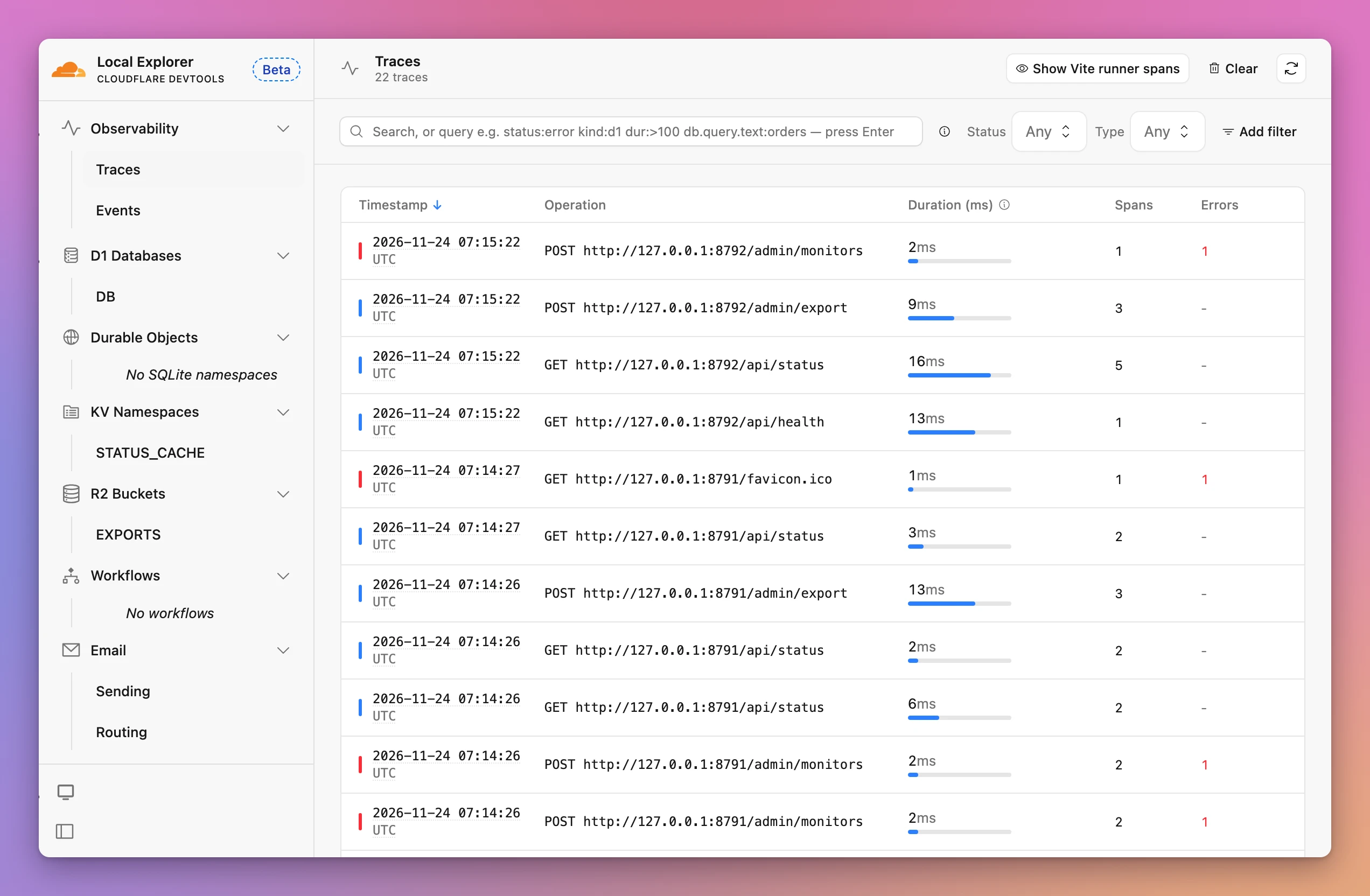
GET /api/status(x-status-cache: MISS): 16 ms across 5 spans (KV lookup, two D1 queries, background KV write). - Warm
GET /api/status(x-status-cache: HIT): 2 ms across 2 spans (KV lookup only, zero D1 reads).
Keep two KV constraints in mind:
- Eventual consistency. Deleting or updating
public-statusinvalidates the local data center quickly, while remote data centers can serve the previous value for up to 60 seconds. That is fine for a status page, and completely wrong for checking whether a user already redeemed a one-time license key. - One write per second per key. Never increment a hot global counter under a single KV key. Writes collide and drop updates silently.
R2: streaming objects with zero egress fees
R2 is S3-compatible object storage with $0 egress bandwidth fees. On this site, I use R2 behind downloads.flaviocopes.com for large books and archives so they stay out of Git and out of the Astro build output.
In PulseWatch, POST /admin/export writes a daily snapshot to snapshots/2026-11-24.json with explicit httpMetadata and customMetadata:
await c.env.EXPORTS.put(key, payload, {
  httpMetadata: { contentType: 'application/json' },
  customMetadata: { count: String(results.length) },
})
When serving large files back from R2 through a Worker, stream object.body directly into new Response() instead of calling await object.arrayBuffer() or await object.text():
app.get('/admin/exports/:day', async (c) => {
  const object = await c.env.EXPORTS.get(`snapshots/${c.req.param('day')}.json`)
  if (!object) return c.json({ error: 'Snapshot not found' }, 404)

  const headers = new Headers()
  object.writeHttpMetadata(headers)
  headers.set('etag', object.httpEtag)
  return new Response(object.body, { headers })
})
Streaming keeps Worker memory flat whether the file is 50 KB or 500 MB. For browser-to-R2 uploads larger than a few megabytes, generate short-lived presigned URLs so the browser uploads straight to R2 instead of piping through your Worker. See Cloudflare R2: object storage without egress fees for bucket and CORS setup.
Background work and scheduling
Never make a user wait for an external webhook, an email provider, or a slow report export inside an HTTP request handler. Cloudflare gives you four tools for work outside the request lifecycle, and each handles a different level of failure.
| Tool | Best for | Retries on failure? | Survives isolate eviction? |
|---|---|---|---|
ctx.waitUntil() | Fire-and-forget cache fills, metrics | No | No (bounded ~30s after response) |
| Cron Triggers | Periodic polling, daily exports, cleanup | No (runs next tick) | Yes (fresh invocation) |
| Queues | Reliable async jobs, webhook/email fanout | Yes + Dead Letter Queue | Yes (durable storage) |
| Workflows | Multi-step jobs with sleeps and human approvals | Yes, per individual step | Yes (durable step state) |
Watch out for destructuring ctx
Always call ctx.waitUntil(promise) or c.executionCtx.waitUntil(promise) as a method on ctx. Writing const { waitUntil } = ctx; waitUntil(p) strips this and throws TypeError: Illegal invocation at runtime in workerd.
Queues with idempotency keys and Dead Letter Queues
Cloudflare Queues guarantee at-least-once delivery. That means a network hiccup or batch retry can deliver the exact same alert message twice. If your consumer does not guard against duplicates, your user receives duplicate emails or duplicate charges.
In PulseWatch, every alert message carries a deterministic idempotencyKey (incident:${incidentId}:webhook). The consumer uses SQLite’s INSERT OR IGNORE against the PRIMARY KEY on alert_deliveries:
export async function processAlertBatch(batch: MessageBatch<AlertMessage>, env: Env) {
  for (const message of batch.messages) {
    const alert = message.body
    const inserted = await env.DB.prepare(
      `INSERT OR IGNORE INTO alert_deliveries (idempotency_key, incident_id, channel) VALUES (?, ?, 'webhook')`
    )
      .bind(alert.idempotencyKey, alert.incidentId)
      .run()

    if (inserted.meta.changes === 0) {
      logEvent('info', 'alert_duplicate_skipped', { idempotencyKey: alert.idempotencyKey })
      message.ack()
      continue
    }

    const body = JSON.stringify(alert)
    const timestamp = String(Math.floor(Date.now() / 1000))
    const signature = await signWebhookPayload(env.WEBHOOK_SECRET, timestamp, body)

    logEvent('info', 'alert_signed_and_delivered', {
      incidentId: alert.incidentId,
      signaturePrefix: signature.slice(0, 12),
    })
    message.ack()
  }
}
Always configure a dead_letter_queue on every production consumer ("dead_letter_queue": "pulsewatch-alerts-dlq"). Without one, messages that exceed max_retries disappear silently. With one, failed payloads wait safely for inspection and replay. See Build an idempotent scheduled job with Cloudflare Queues and D1 and Cloudflare Queues for more patterns.
Cron Triggers and UTC time zones
PulseWatch runs its uptime checks every 5 minutes via triggers.crons: ["*/5 * * * *"]. Always cancel unused response bodies (await res.body?.cancel()) inside loops that fetch external URLs, and pass an AbortSignal.timeout(monitor.timeout_ms) so one hanging origin never stalls your entire cron run.
Remember that Cron Triggers fire in UTC. On this blog, my scheduled-rebuild Worker checks the Europe/Rome wall-clock time inside the handler so daylight saving transitions never require manual schedule edits. See How I auto-publish scheduled posts with a Cloudflare Worker cron.
When to graduate to Workflows
If a background task has multiple external API calls that must not re-run from step 1 on a partial failure (for example: charge payment, provision account, wait 24 hours, send follow-up email), move from Queues to Cloudflare Workflows. Each step.do() persists its return value, retries independently, and step.sleep() pauses for hours or days without holding a Worker open.
Durable Objects and when to skip them
Start with D1, KV, R2, and Queues, because most CRUD apps have no need for Durable Objects.
Graduate to a Durable Object when you hit one of three concrete requirements:
- Real-time WebSockets (live dashboards, chat rooms, multiplayer state) using the Hibernation API so idle sockets cost almost nothing.
- Strict per-entity serialization (preventing two concurrent requests from overselling the last seat or exceeding a strict per-tenant rate limit).
- Per-entity scheduled alarms (
this.ctx.storage.setAlarm(...)) when thousands of users each need their own independent timer.
Each Durable Object instance is identified by a key you choose (env.MONITOR_ROOM.idFromName(monitorId)), runs single-threaded in one location, and includes its own private embedded SQLite database (this.ctx.storage.sql).
Here is the minimal modern Durable Object pattern using typed RPC (extending DurableObject, never implements):
import { DurableObject } from 'cloudflare:workers'

export class MonitorRoom extends DurableObject<Env> {
  async recordBeat(statusCode: number) {
    this.ctx.storage.sql.exec(
      `CREATE TABLE IF NOT EXISTS beats (ts INTEGER PRIMARY KEY, status INTEGER NOT NULL)`
    )
    this.ctx.storage.sql.exec(
      `INSERT INTO beats (ts, status) VALUES (?, ?)`,
      Date.now(),
      statusCode
    )
    return { ok: true }
  }
}
The one catastrophic Durable Object mistake is choosing a global key like idFromName('global'). Every request from every user on Earth then queues behind one single thread in one data center. Always scope your Durable Object ID to the narrowest natural boundary: one per user, one per room, one per tenant, or one per monitor. Read Cloudflare Durable Objects tutorial for full migration and WebSocket hibernation details.
Auth, bots, abuse, and edge security
An AI-generated app usually works fine for its author on localhost. The moment it gets a public URL, automated scanners probe every form and admin route within hours.
Timing-safe secrets and HMAC webhook signing
Never compare API tokens or webhook signatures with ===. Standard string comparison exits on the first mismatched byte, leaking timing information. With nodejs_compat enabled, use timingSafeEqual from node:crypto and Web Crypto (crypto.subtle) for HMAC-SHA256 signing:
import { timingSafeEqual } from 'node:crypto'

const encoder = new TextEncoder()

export function timingSafeEqualString(a: string, b: string): boolean {
  const aBytes = encoder.encode(a)
  const bBytes = encoder.encode(b)
  if (aBytes.byteLength !== bBytes.byteLength) return false
  return timingSafeEqual(aBytes, bBytes)
}

export async function signWebhookPayload(secret: string, timestamp: string, body: string): Promise<string> {
  const key = await crypto.subtle.importKey(
    'raw',
    encoder.encode(secret),
    { name: 'HMAC', hash: 'SHA-256' },
    false,
    ['sign']
  )
  const signature = await crypto.subtle.sign('HMAC', key, encoder.encode(`${timestamp}.${body}`))
  return [...new Uint8Array(signature)].map((b) => b.toString(16).padStart(2, '0')).join('')
}
Always sign ${timestamp}.${body} and reject timestamps older than 5 minutes on the receiving side to prevent replay attacks. For signed download links without database lookups, see HMAC-signed URLs on Cloudflare Workers.
Authentication on Workers + D1
Avoid bloated Node-only auth packages that break inside workerd. You have two clean options:
- Better Auth with Drizzle and D1 (
src/pages/api/auth/[...all].ts), which runs natively onfetchwith zero Node server dependencies. I documented the full setup in Better Auth in Astro on Cloudflare Workers. - Native Web Crypto auth with PBKDF2/scrypt password hashing and HTTP-only session cookies stored in D1, covered in Native email and password authentication on Cloudflare Workers.
Turnstile + rate limiting on every public form
Adding <div class="cf-turnstile"> to HTML protects nothing by itself. Bots skip your browser page and POST straight to /api/subscribe. Always verify the token server-side and fail closed if the token is missing or siteverify fails:
const verifyRes = await fetch('https://challenges.cloudflare.com/turnstile/v0/siteverify', {
  method: 'POST',
  body: new URLSearchParams({
    secret: c.env.TURNSTILE_SECRET_KEY,
    response: token,
    remoteip: c.req.header('cf-connecting-ip') ?? '',
  }),
})
const outcome = await verifyRes.json<{ success: boolean; 'error-codes'?: string[] }>()
if (!outcome.success) {
  return c.json({ error: 'Verification failed' }, 403)
}
Layer rate limiting in front of Turnstile and any paid API call. On this site, every newsletter signup and AI tool runs through both Turnstile and rate-limit counters (hashing the client IP before storing keys). For simple abuse protection, Cloudflare’s Workers Rate Limiting binding or Rate limiting with Cloudflare KV handles the bulk of bot floods; for strict per-user quotas, use a Durable Object.
Exposing private services with Cloudflare Tunnel
When part of your stack still runs on a VPS, home server, or Mac mini, never open port 80/443 or SSH to the public internet if you do not have to. Run cloudflared outbound from that machine to create a Cloudflare Tunnel, and put Cloudflare Access in front of internal admin panels so unauthenticated requests never even reach your server.
Transactional email on Cloudflare
Cloudflare now covers both halves of transactional email natively under Email Service:
- Email Sending (
send_emailbinding): Send outbound transactional emails (password resets, incident alerts, receipts) directly from a Worker without storing an API key in secrets. - Email Routing (Email Workers): Receive inbound emails on your domain and run a Worker
email(message, env, ctx)handler when a message arrives.
For an alert Worker like PulseWatch, restrict allowed_destination_addresses in wrangler.jsonc so even a bug in application code cannot turn the Worker into an open relay:
"send_email": [
  {
    "name": "EMAIL",
    "allowed_destination_addresses": ["ops@flaviocopes.com"]
  }
]
If you need mature deliverability dashboards, inbound webhooks, or higher initial sending quotas right away, Resend pairs cleanly with Workers too.
Verifying inbound email senders
If you build an inbound email workflow (like replying to support tickets by email), never trust the From: header alone. Anyone on the internet can forge a From: address.
On support.flaviocopes.com, my Worker only posts an agent reply to a customer when the inbound mail both matches my address AND passes DKIM or DMARC authentication headers verified by the mail relay. Apply that same rule to any Email Worker that triggers state changes. See How to send email with Cloudflare Email Service and Cloudflare Email Workers.
AI on Cloudflare without runaway bills
Cloudflare offers four main AI primitives:
- Workers AI (
env.AI): Serverless inference on Cloudflare’s GPUs with no third-party API key. Note thatenv.AIalways runs remotely and bills usage even duringwrangler dev. - AI Gateway: Put a proxy in front of OpenAI, Anthropic, Google, or Workers AI to get centralized request logging, response caching, rate limiting, and provider fallback without rewriting SDK calls. See Cloudflare AI Gateway.
- Vectorize: Managed vector index for semantic search and RAG when SQL
LIKEor FTS5 in D1 is no longer enough. - Agents SDK: Builds stateful per-user AI agents on top of Durable Objects with SQLite storage, WebSockets, and scheduled tasks.
The operational rule for any public AI endpoint is enforce hard budgets before calling the model. On flaviocopes.com, my interactive AI tools require a verified Turnstile token and check both a per-client daily counter and a global daily cap in KV before env.AI.run() is ever invoked. A small model can still rack up a painful bill overnight if an unauthenticated loop hammers your endpoint.
Testing and observability
Testing Workers with mocked fetch stubs hides the bugs that break production: D1 SQLite syntax errors, unconsumed R2 streams, broken wrangler.jsonc bindings, and runtime incompatibilities.
Real integration tests in workerd
Use Vitest with Cloudflare’s Workers test runner (@cloudflare/vitest-pool-workers, recently renamed to @cloudflare/vitest-plugin for upcoming releases) so your tests execute inside the actual workerd runtime against real simulated D1, KV, R2, and Queue bindings.
Configure vitest.config.ts:
import { defineWorkersConfig } from '@cloudflare/vitest-pool-workers/config'

export default defineWorkersConfig({
  test: {
    poolOptions: {
      workers: {
        wrangler: { configPath: './wrangler.jsonc' },
      },
    },
  },
})
Add test/env.d.ts so env imported from cloudflare:test inherits your generated Env bindings:
declare module 'cloudflare:test' {
  interface ProvidedEnv extends Env {}
}
Here is a real integration test from PulseWatch (test/worker.test.ts) that tests auth rejection, D1 monitor creation, atomic incident creation, KV cache miss headers, R2 export verification, duplicate Queue deduplication, HMAC signatures, and Turnstile failure handling:
const obj = await env.EXPORTS.get(exported.key)
expect(obj).not.toBeNull()
const snapshot = JSON.parse(await obj!.text()) as { count: number }
expect(snapshot.count).toBe(1)
Running this suite caught a classic Workers testing bug on the very first run: before I added await obj!.text(), leaving the R2 ReadableStream unconsumed caused Failed to pop isolated storage stack frame: unable to pop R2 storage. Always consume or cancel R2ObjectBody and Response streams in tests and production code alike.
With that one line fixed, all five integration tests run inside workerd in 55 ms:
 ✓ test/worker.test.ts (5 tests) 55ms
   ✓ PulseWatch Worker in workerd > rejects unauthenticated admin requests 12ms
   ✓ PulseWatch Worker in workerd > creates a monitor, records a failed check, opens an incident, and exports to R2 23ms
   ✓ PulseWatch Worker in workerd > deduplicates duplicate queue deliveries via D1 idempotency keys 5ms
   ✓ PulseWatch Worker in workerd > signs and verifies webhook payloads with Web Crypto HMAC-SHA256 3ms
   ✓ PulseWatch Worker in workerd > rejects Turnstile form submissions when token is missing 4ms

 Test Files  1 passed (1)
      Tests  5 passed (5)
Structured JSON logs, wrangler tail, and Workers Traces
Plain console.log('error creating monitor') strings are useless once you have thousands of requests per hour. Emit one JSON object per event with requestId, path, status, and durationMs, and enable observability in wrangler.jsonc:
"observability": {
  "enabled": true,
  "head_sampling_rate": 1
}
In development, Local Explorer’s Traces tab records every request, span count, duration, and error automatically. Here are the live traces captured from PulseWatch showing our 401 unauthorized admin probe (red error count 1), POST /admin/export (9 ms, 3 spans), cold GET /api/status (16 ms, 5 spans), and cached GET /api/status (2 ms, 2 spans):
In production, inspect live requests from your terminal with:
npx wrangler tail --status error --format prettyFor high-traffic Workers, lower head_sampling_rate (for example 0.1 for 10% sampling) once your app stabilizes so observability volume stays within your included quota. See Cloudflare Workers observability: logs and traces for querying production logs in the dashboard.
CI/CD, gradual deployments, and rollbacks
The safest deployment is the one you can undo in ten seconds without touching your database.
Gradual deployments with wrangler versions
Instead of jumping straight from 0% to 100% traffic with wrangler deploy, upload a new immutable Worker version and shift traffic gradually:
# 1. Upload the new build without sending it live traffic yet
npx wrangler versions upload --message "add monitor timeout_ms support"

# 2. Route 90% to the proven version, 10% to the new version
npx wrangler versions deploy

# 3. Inspect recent versions and active traffic split
npx wrangler versions list
Watch Workers Logs and wrangler tail --status error while 10% of real requests hit the new version. If error rates stay flat, promote the new version to 100%.
Instant rollback drill
When a deploy breaks production, do not spend fifteen minutes writing a hotfix under pressure. Roll back first, investigate second:
npx wrangler rollbackwrangler rollback shifts 100% of traffic back to the previous proven version in seconds. This only works cleanly if your D1 migrations follow the expand-and-contract rule so the previous Worker version can still read and write the current schema.
Minimal GitHub Actions pipeline
Automate typechecks, workerd tests, D1 migrations, and deploys in CI using a scoped Cloudflare API token stored in GitHub Secrets (never use your Global API Key):
name: Deploy PulseWatch
on:
  push:
    branches: [main]

jobs:
  deploy:
    runs-on: ubuntu-latest
    steps:
      - uses: actions/checkout@v4
      - uses: actions/setup-node@v4
        with:
          node-version: 22
          cache: npm
      - run: npm ci
      - run: npx wrangler types --check
      - run: npx tsc --noEmit
      - run: npm test
      - run: npx wrangler d1 migrations apply pulsewatch --remote
        env:
          CLOUDFLARE_API_TOKEN: ${{ secrets.CLOUDFLARE_API_TOKEN }}
          CLOUDFLARE_ACCOUNT_ID: ${{ secrets.CLOUDFLARE_ACCOUNT_ID }}
      - run: npx wrangler deploy
        env:
          CLOUDFLARE_API_TOKEN: ${{ secrets.CLOUDFLARE_API_TOKEN }}
          CLOUDFLARE_ACCOUNT_ID: ${{ secrets.CLOUDFLARE_ACCOUNT_ID }}
Create a separate Cloudflare API token per project with least privilege: only the permissions that project actually needs (Workers Scripts: Edit, D1: Edit), scoped to the specific account. For pull-request preview environments before merging to main, see How to use Cloudflare Worker Previews.
Cost guardrails that prevent surprise bills
Cloudflare’s $5/month Workers Paid plan includes generous allowances (10 million requests, 30 million CPU milliseconds, 25 billion D1 rows read, 10 GB R2 with zero egress), yet a single coding mistake can blow past any allowance in hours:
- Keep static assets off your Worker. Scope
run_worker_firststrictly to dynamic routes. - Avoid recursive self-fetches. A Worker that fetches its own public URL without a loop guard can trigger an infinite amplification storm. Use Service Bindings for Worker-to-Worker calls instead of public HTTP.
- Index every D1
WHEREandORDER BYcolumn. Verify withEXPLAIN QUERY PLANso a busy endpoint never runsSCAN. - Cap public AI and external API endpoints. Enforce Turnstile + per-IP and global daily limits before spending tokens.
- Turn on Cloudflare billing notifications under Manage Account > Notifications so you hear about abnormal usage on day one instead of invoice day.
What I run in production
To ground all of this in systems that take real traffic every day, here is how I actually use Cloudflare across three live products (I also keep a running inventory in The Cloudflare products I actually use):
flaviocopes.com(this blog): Astro static site on Cloudflare with a handful of explicit API functions (functions/api/newsletter/subscribe.jsfor Turnstile + rate-limited Sendy signups, plus AI tool routes guarded byTOOLS_USAGEKV daily caps), large books/downloads served from R2 atdownloads.flaviocopes.com, and a tiny Cron Trigger Worker that rebuilds the site for scheduled posts. Adding.node-versionto Git fixed dashboard-vs-wrangler.jsoncbuild drift; removing a root middleware eliminated millions of unnecessary function invocations.support.flaviocopes.com(Mac app support portal): A single Cloudflare Worker backed by D1 for buyers, conversations, and messages, with Resend handling transactional email in both directions. Inbound email replies only post to a customer thread when DKIM/DMARC verification passes for my sender addresses.updates.flaviocopes.com(licensed Mac app updates): A Cloudflare Worker + D1 registry that verifies Creem purchase webhooks idempotently, stores versioned HMAC-SHA256 license fingerprints, and issues short-lived authorized download URLs for notarized app ZIPs while keeping updates working even if the payment provider has downtime.
Notice what those three production systems have in common: small blast radius, explicit wrangler.jsonc config, D1 for relational state, KV only for short-lived counters/cache, R2 for big files, and zero unnecessary services added just because they looked neat in the dashboard.
Pre-launch checklist and cheat sheet
Run through this operational checklist before pointing a custom domain at a new Cloudflare app:
-
wrangler.jsoncis the single source of truth (compatibility_dateset,nodejs_compatenabled,env.stagingbindings declared explicitly). -
npx wrangler types --checkandnpx tsc --noEmitpass with zero errors. - Zero secrets in Git or
wrangler.jsonc;.dev.varsis gitignored and production secrets are pushed viawrangler secret put. -
run_worker_firstonly matches API/SSR routes; static images, fonts, and CSS serve directly from Static Assets. - Every hot D1 query returns
SEARCH ... USING INDEXinEXPLAIN QUERY PLAN, and all schema changes live inmigrations/. - Multi-statement D1 writes use
env.DB.batch(), and migrations follow expand-and-contract. - Every Queue consumer is idempotent (
INSERT OR IGNOREor unique constraint) and has a configureddead_letter_queue. - Every public form verifies Turnstile server-side and has rate limiting; every authenticated route returns
Cache-Control: private, no-store. - Every Worker secret/HMAC comparison uses
timingSafeEqual; every large R2 response streamsobject.body. -
observability.enabledis true, logs are structured JSON with a request ID, andnpx wrangler check startupis well under the 400 ms ceiling. - Vitest tests pass inside
workerd(npm test), and you have testednpx wrangler rollbackon staging at least once. - Cloudflare SSL/TLS is set to Full (strict), billing alerts are enabled, and CI deploys with a least-privilege API token.
Wrangler quick-reference cheat sheet
# Development & typing
npx wrangler dev                                        # Run locally with simulated bindings
npx wrangler types                                      # Generate worker-configuration.d.ts
npx wrangler types --check                              # Verify types match wrangler.jsonc (CI)
npx wrangler check startup                              # Profile Worker bundle & startup CPU

# D1 databases & recovery
npx wrangler d1 migrations create <db> <name>           # Create a new SQL migration file
npx wrangler d1 migrations apply <db> --local           # Apply pending migrations locally
npx wrangler d1 migrations apply <db> --remote          # Apply pending migrations to production
npx wrangler d1 execute <db> --local --command "..."    # Run ad-hoc SQL or EXPLAIN QUERY PLAN
npx wrangler d1 time-travel info <db>                   # Inspect current restore bookmark
npx wrangler d1 export <db> --remote --output dump.sql  # Export SQL snapshot

# Secrets, versions & rollbacks
npx wrangler secret put SECRET_NAME                     # Set production secret interactively
npx wrangler secret put SECRET_NAME --env staging       # Set staging secret interactively
npx wrangler versions upload --message "..."            # Upload new immutable Worker version
npx wrangler versions deploy                            # Shift traffic gradually across versions
npx wrangler rollback                                   # Restore previous proven version in seconds

# Live debugging
npx wrangler tail --status error --format pretty        # Stream production errors in real time
All individual Cloudflare deep dives and single-product tutorials stay indexed on the cloudflare tag page.
Want me to talk about your product? You can sponsor this site.
Related posts about cloudflare: