
A developer tool by Flavio
Plausible Automation Toolkit
Add the tracker, read traffic reports and manage goals on your own Plausible Community Edition instance, from the terminal or Codex. macOS CLI and Codex skill.
Buy Plausible Automation Toolkit · $20One-time purchase. Tax included. Source code included.
macOS · Python 3.10 through 3.15 · self-hosted Plausible
Latest version 1.2.0, released November 18, 2026
The same checklist for every new site
Plausible Automation Toolkit operates your self-hosted analytics from the terminal or a coding agent.
It turns a request like “Install Plausible on this site” into a repeatable operation.
I built it for myself. I self-host Plausible and use it on all my sites. Every new project came with the same small checklist.
I had to create the property, find the shared site layout, add the tracker without adding it twice, and check that it worked. Later, I had to create an API key, remember the Stats API, and configure conversion goals.
The individual steps are easy. I kept repeating them and looking up the same details.
The toolkit does those steps for you, the same way every time. It previews the change before touching your project, refuses to add a second tracker, and keeps every password and token in the macOS Keychain.
Here’s a one-minute run on a small surf shop’s sites: a dry run, the install, a traffic report, a breakdown, a new goal and the health check:
The sites, traffic numbers and credentials are fictional. The CLI talks to a local fake of a Plausible Community Edition instance.
Who it’s for
- Indie hackers who self-host Plausible. You launch a new side project every month. Each one needs a property, the tracker in the layout, and a check that visits come in. One command does the three.
- Developers who work with Codex. You’d rather say “install Plausible on this site” or “how did traffic do this month?” than open the dashboard. The skill tells Codex which command to run, and the CLI does the work.
- Freelancers running Plausible for clients. One Plausible instance, a dozen client sites.
report --format markdowngives you a 30-day summary with the comparison to the previous 30 days, ready to paste into the monthly email. - Founders tracking signups. You want a
Signupgoal and a/thank-you*page goal without clicking through the goal settings of every site.goal-addcreates them from the terminal. - Anyone whose tracker stopped recording.
doctorchecks the instance, the tracker endpoint, the snippet in your layout, the property and the API access, and says which one fails. The walkthrough is Check why a Plausible tracker isn’t recording visits.
One request, then a dry run
Plausible Automation Toolkit includes a Codex skill and a command-line tool called plausible-setup. The skill helps Codex inspect the project and choose the right action. The CLI does the work in a predictable way.
Before changing anything, it can show you exactly what it plans to do:
plausible-setup setup --dry-runThe command detects the website domain, finds the shared layout, and previews the tracker change.
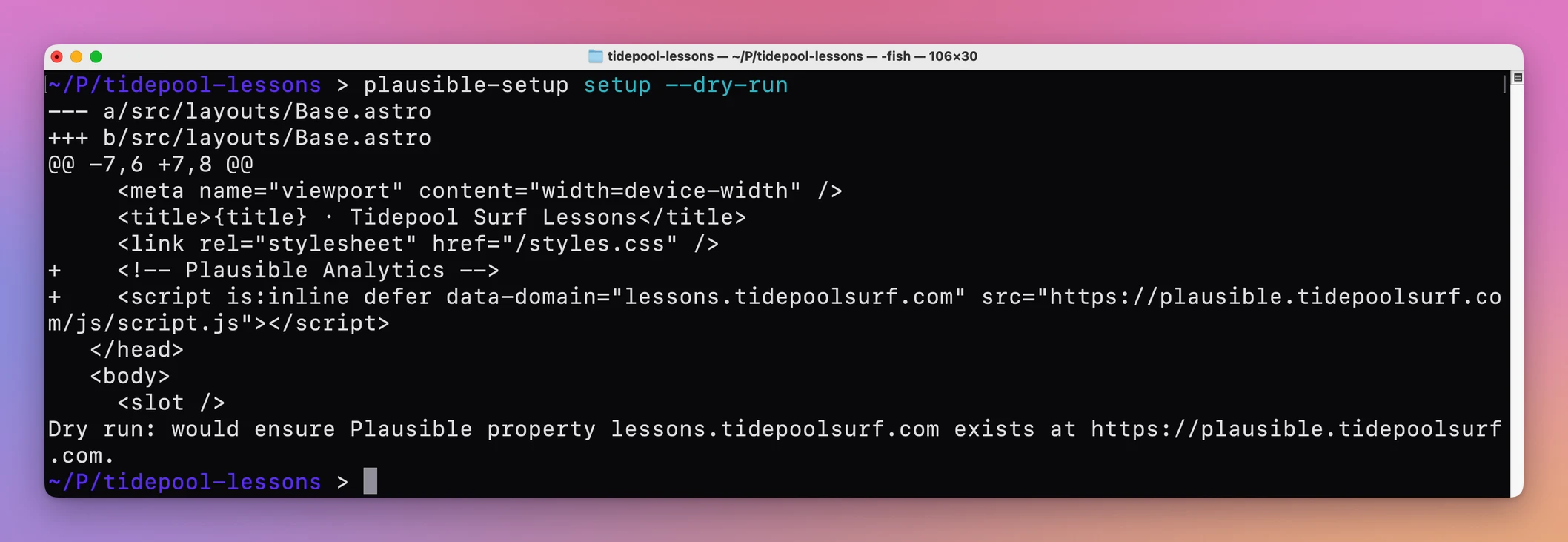
Then you apply it:
plausible-setup setupThe tool signs in to your Plausible dashboard, creates the property if it does not exist, and adds the tracker to the project.
Running it again does not create another property or add a second tracker.
How it finds the layout and the domain
It looks for a shared HTML or layout file containing </head>. It takes the domain from Astro’s site setting, the homepage field in package.json, or a folder name with a dot in it, like shop.example.com.
If it guesses wrong, tell it:
plausible-setup setup --domain shop.yourdomain.com --target src/layouts/Layout.astroIf it finds more than one possible layout, or a layout that already has an analytics snippet, it stops and asks you to choose with --target. It won’t add a duplicate tracker.
Why it goes through the dashboard
Plausible Community Edition does not provide the same Sites API as Plausible Cloud. The toolkit works through the authenticated dashboard instead. It preserves the form’s security fields and checks the resulting state before continuing.
A new site, start to finish
- Open Terminal in the new site’s folder and run
plausible-setup setup --dry-run. - Read the diff. It shows the domain it picked and the line it adds to your layout’s
<head>. - Run
plausible-setup setup. The property is created on your instance and the tracker is added. - Commit and deploy the site the way you always do.
- Run
plausible-setup doctor. Every check should sayPASS. Then open the live site once to confirm the visit shows up. - Add your goals:
goal-add --event Signupandgoal-add --page '/thank-you*'. - A month later, run
plausible-setup report --period 30d --compare previous.
By hand, steps 1 to 3 mean opening the dashboard, adding the site, copying the snippet, finding the right layout file and pasting it in the head. Step 5 is a mix of browser tabs and DevTools. Call it 10 minutes per site, as a rough estimate. For every site you launch, it’s the same 10 minutes again, plus the time spent looking up what you did last time.
It works with your Plausible instance
This is not a hosted analytics service.
You need a self-hosted Plausible Community Edition instance you control. Keeping that instance updated is its own story: Updating self-hosted Plausible Analytics using AI. During installation, you give the toolkit its HTTPS address:
./install.sh --plausible-url https://analytics.yourdomain.comThere is no analytics domain or account from me inside the package.
The toolkit detects each website domain from its project. You can also provide it yourself:
plausible-setup setup --domain shop.yourdomain.comOne installation can operate all the websites on your Plausible instance.
Read traffic without opening the dashboard
This command reports the last 30 days and compares them with the previous 30:
plausible-setup report \
  --domain shop.yourdomain.com \
  --period 30d \
  --compare previous
It reports visitors, visits, pageviews, bounce rate, visit duration, top pages, traffic sources, and goals.
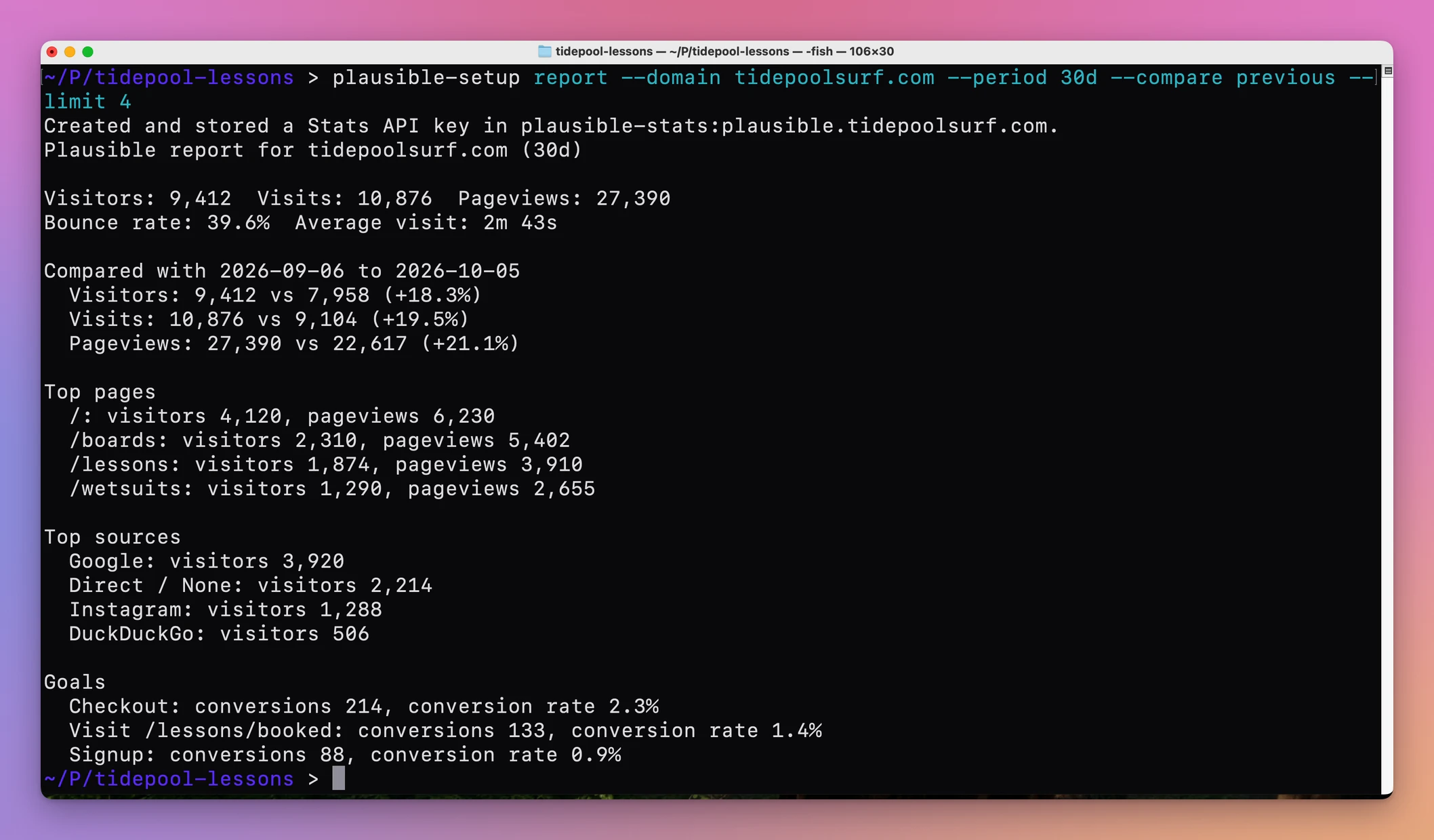
The first report creates a Stats API key through your dashboard session and saves it in the Keychain. You never copy it by hand. More in Get a 30-day Plausible traffic report in your terminal.
You can also ask for a specific breakdown:
plausible-setup breakdown \
  --domain shop.yourdomain.com \
  --by country \
  --format markdown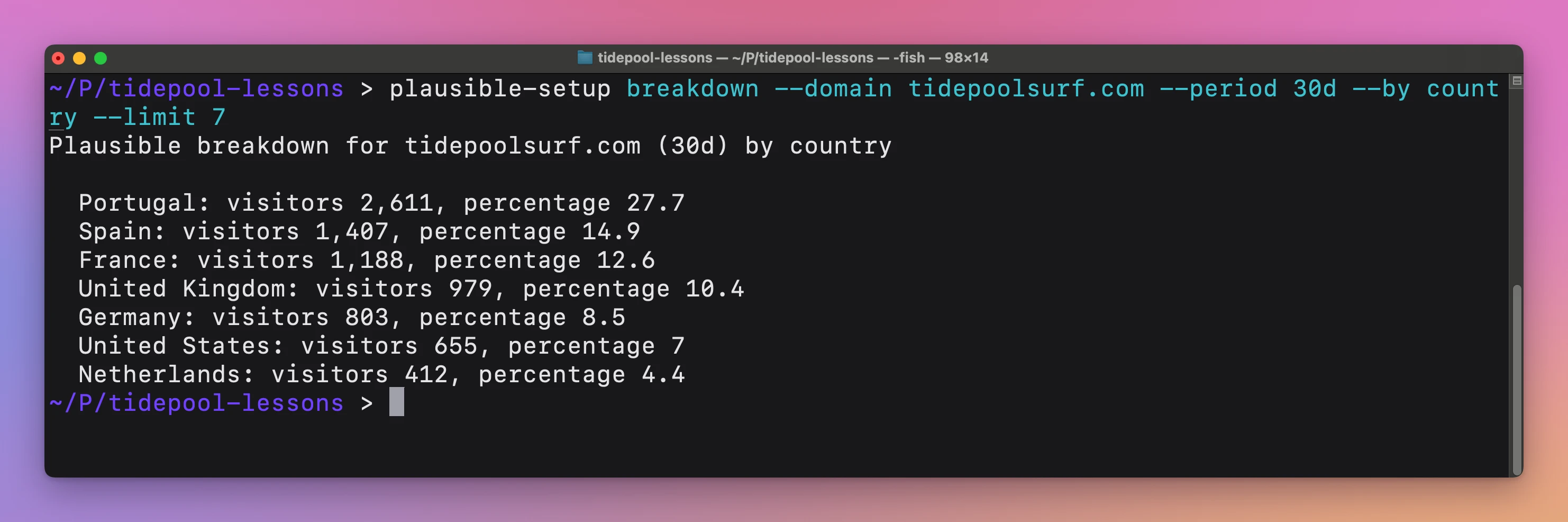
The CLI supports pages, sources, campaigns, countries, devices, browsers, operating systems, goals, and custom properties. Filters narrow it down, like --by page --filter source=Google for the pages Google sends people to.
It can return text, JSON, CSV, or Markdown. You can use the output directly, or ask Codex to explain what changed and which pages or sources matter.
Goals and health checks
The toolkit can list, create, and delete custom-event and pageview goals:
plausible-setup goal-add \
  --domain shop.yourdomain.com \
  --event Signup
Goal commands use a token limited to one Plausible site. The CLI prints the dashboard page where you create it, and asks for it in a secure Terminal prompt. Deleting a goal requires its exact ID and an explicit confirmation. The full flow is in Set up Plausible goals and custom events on a self-hosted instance from the terminal.
There is also a read-only health check:
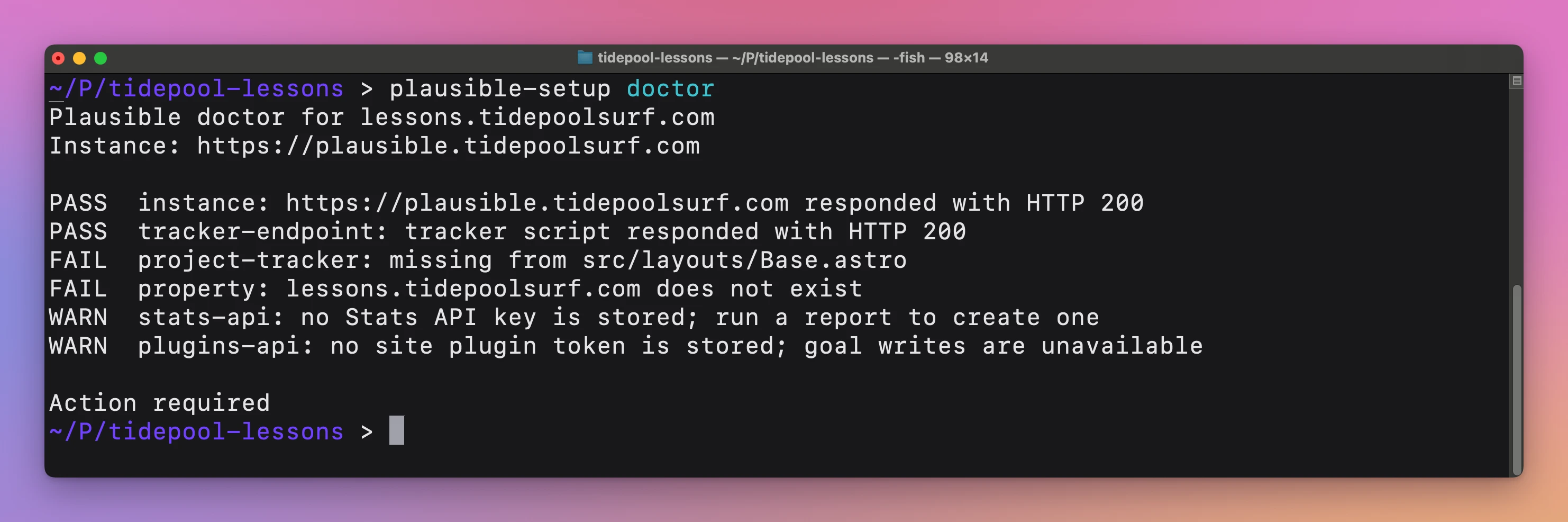
plausible-setup doctor --domain shop.yourdomain.comIt checks the Plausible instance, tracker endpoint, project snippet, property, Stats API, and optional goal token. It does not create or change anything.
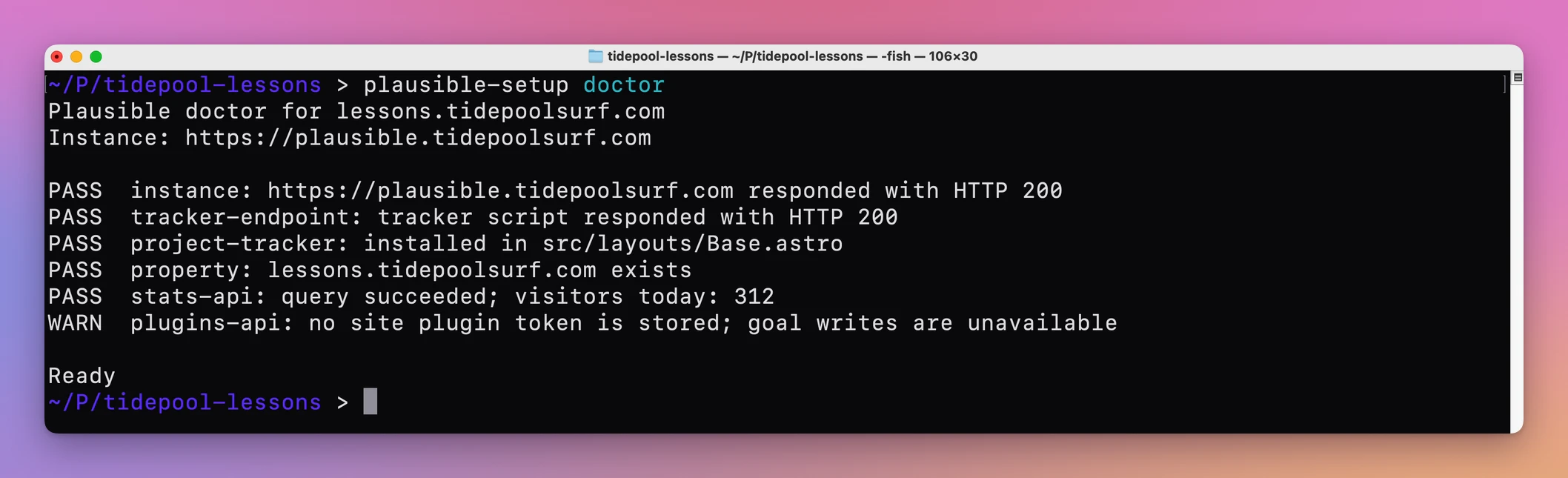
When something’s wrong, each failing check says what it found:
Secrets stay out of the project
I did not want dashboard passwords or API tokens in project files, shell history, or AI conversations.
The toolkit stores the dashboard login, generated Stats API key, and site-specific goal tokens as separate macOS Keychain entries. You enter the login once with plausible-setup credentials. The instance address lives in ~/.config/plausible-setup/config.json, with no secrets in it.
Why not use the dashboard
Plausible’s dashboard does all of this, and it’s good. You add a site, copy the snippet, set up goals in the site settings, and read the stats on a nice page. For one site you rarely touch, use the dashboard.
It can’t edit your project, though. Your snippet still has to go into the right layout file, by hand, without a duplicate. You create a Stats API key and store it somewhere yourself. Checking a broken tracker means poking at several places. And a coding agent can’t click through the dashboard for you.
| Dashboard by hand | Plausible Automation Toolkit | |
|---|---|---|
| Add a new site | Add the site, copy the snippet, paste it into the layout | setup --dry-run, then setup |
| Duplicate trackers | Up to you to notice | Refuses to add a second one |
| 30-day report with comparison | Open the dashboard, pick the dates | One command, in text, JSON, CSV or Markdown |
| Goals on a new site | Click through the settings | goal-add |
| Tracker not recording | Check each piece by hand | doctor lists what fails |
| API keys | Created and stored by you | Created and kept in the Keychain |
What it doesn’t do
- It doesn’t host your analytics. You need your own Plausible Community Edition instance. It’s built for Community Edition, not Plausible Cloud.
- It doesn’t deploy your site. It changes the layout in your project. You commit and deploy.
- It doesn’t add event code. A custom-event goal needs your site to send that event. The toolkit creates the goal only.
- It doesn’t update or back up your Plausible server. That’s a separate job.
- It doesn’t run on Windows or Linux. It uses the macOS Keychain and the
securityandexpectcommands.
Questions
Do I need Codex?
No. Codex is optional. The CLI works directly from the terminal, and the skill is there if you want to ask in plain words.
Where are my passwords stored?
In the macOS login Keychain, as separate entries for the dashboard login, the Stats API key and each goal token. Nothing goes in your project files.
Does it work with several sites?
Yes. One installation works with every site on your instance. Pass --domain or run it from the site’s folder.
What do I need?
You need macOS, Python 3.10 through 3.15, and an account on your own self-hosted Plausible Community Edition instance.
The documentation covers the install, credentials and every command.
What you get
The download includes:
- the packaged Plausible CLI
- the installable Codex skill
- property creation and safe tracker installation
- traffic reports, comparisons, breakdowns, and exports
- goal management and read-only diagnostics
- macOS Keychain integration
- setup instructions
Buy Plausible Automation Toolkit
Plausible Automation Toolkit costs $20 including tax, paid once. The purchase includes the ready-to-install ZIP.
Download the runtime ZIP from your purchase page. Reopen that page for later versions.
After extracting the ZIP, open Terminal in its folder and run ./install.sh --plausible-url with the HTTPS address of your instance, as shown above. The installer uses macOS Keychain for your credentials. You also need the macOS security and expect commands.
If you want to understand the system behind it, I also wrote a detailed guide to how Plausible Community Edition is built.