How Plausible Analytics Community Edition is built
By Flavio
I read the Plausible Community Edition code to see how its tracker, Elixir app, databases, and React dashboard work together.
I use Plausible Analytics on all my sites.
I like it because the dashboard is simple.
You open one page and see visitors, sources, pages, countries, and devices.
But I never looked closely at how it worked.
This is the first post in a new series where I open popular software projects and trace how they are built.
I don’t want to just list the technologies they use. I want to read the code and understand how the pieces work together.
We’ll start with Plausible Analytics.
This post is only about Plausible Community Edition, the open-source version you can run yourself.
I read the v3.2.1 application source and the matching Community Edition deployment repository.
The server is released under AGPLv3-or-later. The tracker that you add to a website has a separate MIT license.
I followed a pageview from the JavaScript tracker to the dashboard. I also checked how the official Docker setup runs it.
If you’re upgrading a long-untouched self-hosted instance instead, that story is in Updating self-hosted Plausible Analytics using AI.
I ignored Plausible Cloud and its private features. This post is about the code we can read and run ourselves.
Plausible changes often. File names and implementation details will move over time. The larger architectural ideas should last longer.
What can we learn from this?
I found 10 ideas worth keeping. The architecture follows the work the product does: analytics receives many small events, then runs large reports over them. Plausible keeps the collection script small by compiling away optional features, and cleans browser input before the rest of the app uses it.
Small memory caches avoid repeated database work. The processing code follows a readable order: check, filter, add information, identify, and save. Events from one visitor are processed in order, then grouped into fewer ClickHouse inserts.
Privacy reaches the storage layer. Plausible does not store raw IP addresses, and temporary visitor IDs change with a rotating salt. The dashboard asks for useful numbers such as visitors and bounce rate rather than database tables.
The extra complexity appears where it pays. React owns the interactive dashboard, while Phoenix and LiveView handle the rest. The official deployment remains three containers.
What are we looking at?
Plausible is a privacy-friendly web analytics product.
A small JavaScript file runs on a website. It notices pageviews and optional interactions. It sends compact events to Plausible. Plausible filters and enriches those events, groups them into sessions, stores them, and answers aggregate questions for the dashboard.
Plausible is mainly answering aggregate questions over large collections of events, rather than retrieving individual records by ID:
- how many visitors arrived today?
- where did they come from?
- which pages did they read?
- how many visits bounced?
- how long did people stay?
- how does this week compare with last week?
Those questions shape almost every important technical decision in the project.
The architecture in one picture
Plausible is not a React dashboard with a small API behind it.
The main application is a modular Elixir and Phoenix monolith. It uses Postgres for application data and ClickHouse for analytics data. The interactive dashboard is built with React, while the rest of the web application mostly uses server-rendered Phoenix pages and LiveView.
A separate, small JavaScript tracker runs on each website.
The main flow looks like this:
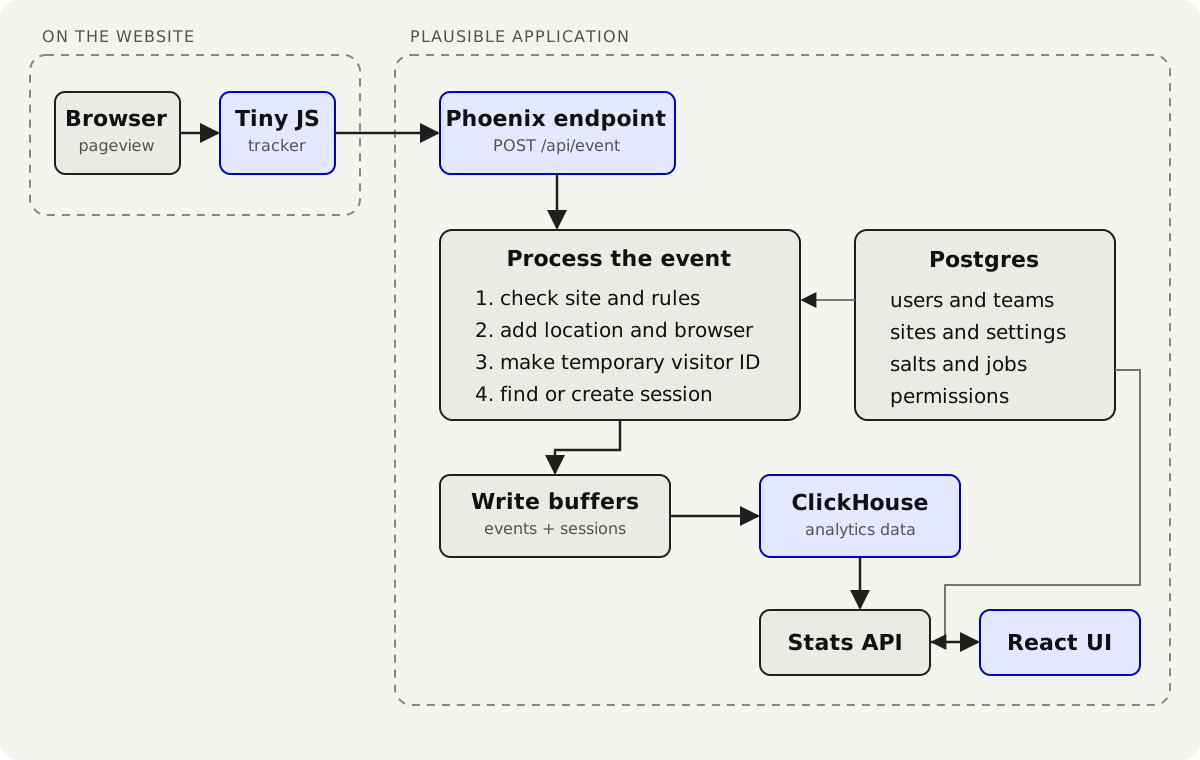
Postgres sits beside the event path. It stores users, sites, settings, permissions, salts, and background jobs.
This split is the first important decision.
Plausible does not ask one database to be both a normal application database and a high-volume analytics engine.
The repository is several systems living together
The top-level directories tell us a lot.
analytics/
  assets/       React dashboard and other browser assets
  config/       Phoenix and runtime configuration
  e2e/          browser-level tests
  lib/          Community Edition Elixir application code
  priv/         migrations, static data, compiled tracker files
  test/         Elixir tests
  tracker/      tracker source, compiler, and browser tests
The main mix.exs file describes an Elixir 1.18 application using Phoenix 1.8, Ecto, Postgrex, an Ecto adapter for ClickHouse, Oban, Phoenix LiveView, OpenTelemetry, PromEx, and Sentry.
The browser side includes React, React Router, TanStack Query, Alpine.js, Chart.js, and D3-related packages.
That list could make the application sound more fragmented than it is.
There is one main Phoenix application. Different tools have specific jobs inside it.
- Phoenix handles HTTP, routing, controllers, templates, and the application shell.
- LiveView handles interactive server-rendered product pages.
- React owns the analytics dashboard.
- Alpine.js adds small interactions elsewhere.
- Ecto is used to express queries and schemas for both Postgres and ClickHouse.
- Oban runs durable jobs backed by Postgres.
- the BEAM runtime provides supervised processes, caches, workers, and message passing.
This is a monolith, but not a ball of code.
Which source belongs to Community Edition?
The Community Edition deployment and application source live in two repositories.
The plausible/community-edition repository contains the official Compose file and the ClickHouse configuration needed to run the application.
The application itself comes from the plausible/analytics repository.
When Plausible builds Community Edition, Mix uses the ce environment. The build compiles lib/ and leaves extra/lib/ out of the release.
The Plausible module contains compile-time on_ce and on_ee branches. For this article, I followed the on_ce branch and ignored the other one.
This matters when reading the source.
Finding a module in the repository does not automatically mean it runs in Community Edition. We need to check the build branch and the official CE configuration.
Start at the browser: the tracker is a tiny application
The tracker lives in the tracker directory.
Its job is small:
- detect a pageview or custom event
- collect the URL, referrer, site domain, and optional properties
- send the event to
/api/event - send engagement time and scroll depth when needed
The tracker runs on someone else’s website. It must be small, fast, and careful not to break the page.
The payload is intentionally compact
A pageview payload has this general shape:
{
  "n": "pageview",
  "u": "https://flaviocopes.com/react/",
  "d": "flaviocopes.com",
  "r": "https://google.com/",
  "v": 35
}
The fields mean event name, URL, site domain, referrer, and tracker version.
Short keys are not pleasant API design for humans.
They are good wire design for a script sent and executed on many pages.
The server accepts readable versions too. The browser gets the smaller format.
Why the tracker sends text/plain
The networking module serializes the event as JSON and sends it with the Fetch API:
fetch(endpoint, {
  method: 'POST',
  headers: { 'Content-Type': 'text/plain' },
  keepalive: true,
  body: JSON.stringify(payload)
})
The old compatibility build can use XMLHttpRequest instead.
text/plain avoids an extra CORS preflight request in normal cases.
keepalive: true gives the browser permission to continue a small request while the page is unloading.
Delivery is not guaranteed. The page can close, the network can fail, or a content blocker can stop the request.
The tracker knows when not to run
The tracker refuses to collect some traffic before making a request.
It can ignore:
localhostandfile:pages unless local collection is explicitly enabled- browsers with automation markers such as WebDriver or Cypress
- a browser where
localStorage.plausible_ignoreis set - pages excluded by the site’s configuration
Server-side filtering still exists. This first check only avoids sending traffic that is clearly unwanted.
Pageviews in a single-page application
A traditional page load naturally starts the tracker again.
A single-page application changes routes without loading a new document, so Plausible has to observe navigation.
The tracker watches history.pushState(), popstate, and optional hash changes. This lets it record navigation without a full page reload.
Engagement is active time, not wall-clock time
Plausible does more than record that a page opened.
The engagement code counts time while the page is visible and focused.
It does not count 45 minutes because someone left a tab open in the background.
An engagement event is sent when there is useful new information. In the inspected version, that means scroll depth increased or at least three seconds of additional engagement accumulated.
The tracker also measures scroll depth. It updates its idea of the page height when the document changes.
This is a good reminder that a metric is not just a label. Someone has to decide exactly what “time on page” means.
Custom events are several browser behaviors
Depending on its configuration, the tracker can recognize:
- outbound link clicks
- file downloads based on a list of extensions
- form submissions
- elements tagged with Plausible event classes
- custom events pushed through its public API
The tracker also provides a queue. A page can call the public Plausible function before the full tracker has loaded. The temporary function stores calls, and the tracker drains them after initialization.
One tracker source becomes more than 1,000 builds
This was the first surprise I found in the code.
Plausible supports its normal web snippet, an npm package, installation checking, and many old script URLs that cannot suddenly stop working.
It also has optional features. One site may want outbound-link tracking. Another wants file downloads, forms, hash routes, or automatic pageviews.
Shipping every feature to every site would make the default script larger.
Maintaining a hand-written file for every combination would be impossible.
Plausible instead generates the variants from one source tree.
The tracker architecture document explains how it works. Rollup builds the script. SWC removes the parts a specific version does not need.
The document says more than 1,000 variants compile in roughly three seconds on a development machine.
Suppose a tracker build defines automatic form tracking as false. The compiler can remove the form-tracking branch instead of leaving an if statement that will always fail at runtime.
The team maintains one source tree. The build creates many small tracker files from it.
Backward compatibility becomes a routing problem
Older Plausible installations use script names that encode features in the filename.
The Phoenix TrackerPlug understands those routes. It normalizes aliases, sorts requested feature names, and maps them to a compiled legacy variant.
Legacy scripts can be cached for a day because their filenames identify immutable behavior.
The newer route uses a site-specific script ID. Its response can contain a tiny configuration for one site and uses a shorter cache lifetime.
The source stays modern. The delivery code translates old URLs into the right build.
Site configuration is injected without another request
The PlausibleWeb.Tracker module reads the compiled tracker template and inserts a compact site configuration.
That configuration can include:
- the domain
- the event endpoint
- outbound-link tracking
- file-download tracking
- form tracking
The browser does not need to load a generic tracker and then request its configuration separately.
The script response is already specialized for the site.
Community Edition warms an in-memory cache of the complete site-specific scripts. A background warmer refreshes all entries periodically and recently changed sites more often.
When you change a relevant setting, Plausible updates the cached script. The next browser request gets the new configuration without adding a separate configuration endpoint to every page load.
The event endpoint is small on purpose
The public route is POST /api/event.
I expected this controller to contain a lot of logic. It does not.
The ExternalController does three things.
It:
- cleans up the incoming request
- passes it to
Plausible.Ingestion.Event.build_and_buffer/1 - returns a response
A valid accepted event gets 202 Accepted and ok.
Many deliberately dropped events also get 202.
The response can include an x-plausible-dropped header, but a bot or blocked request does not necessarily receive a detailed public explanation or a retryable error.
This makes sense for an analytics endpoint.
If every filtered request received an error, well-behaved clients might retry traffic the server explicitly does not want. The endpoint would also reveal more of its filtering policy.
Malformed input is different. A request that cannot become a valid event gets a client error.
Plausible checks the event before using it
The Plausible.Ingestion.Request module uses Ecto to validate the incoming data. It is not a Postgres table.
The request builder:
- limits the request size
- limits URLs and referrers to 2,000 bytes
- limits an event name to 120 characters
- parses and sanitizes the hostname, path, and query string
- validates engagement fields
- clamps scroll depth to the range from 0 to 100
Custom properties receive another defensive pass.
Plausible accepts at most 30. Nested objects, lists, and blank values are removed.
This matters because anyone can call the event endpoint, and it receives a lot of traffic.
You do not want arbitrary browser data flowing deep into the application. Every later step should receive a value it understands.
After this step, the rest of the code receives a clean event with known fields.
One request can represent several configured domains
The domain field may contain a comma-separated list. Plausible parses the request once and can create one event for each configured domain.
Plausible avoids querying Postgres for every event
Every event needs to know whether its site exists, whether collection is allowed, and which site rules apply.
The simplest implementation would query Postgres several times per pageview. That becomes expensive when traffic grows.
Plausible uses warmed in-memory caches instead.
The Site.Cache stores the site fields needed during ingestion. Background processes keep it fresh.
The GateKeeper checks that cached site.
It can reject traffic when:
- no site exists for the domain
- the site is not in a collectable state
- ingestion has been disabled for the site
- the site’s traffic exceeds its allowed rate
Hostname, page, IP, and country rules also have warmed caches.
Postgres remains the source of truth. The event endpoint does not need to query it for every pageview.
The idea looks like this:
Postgres is the source of truth
          │
          │ periodic and change-driven refreshes
          ▼
in-memory read model
          │
          │ constant-time request checks
          ▼
event processing
The tradeoff is a short delay before a configuration change reaches the cache.
That delay is acceptable for an analytics setting. It would not be acceptable for something like revoking access to a bank account.
The event processing code is easy to follow
The real event policy lives in Plausible.Ingestion.Event.
This is the part I liked most while reading the code.
The module lists the event steps in order:
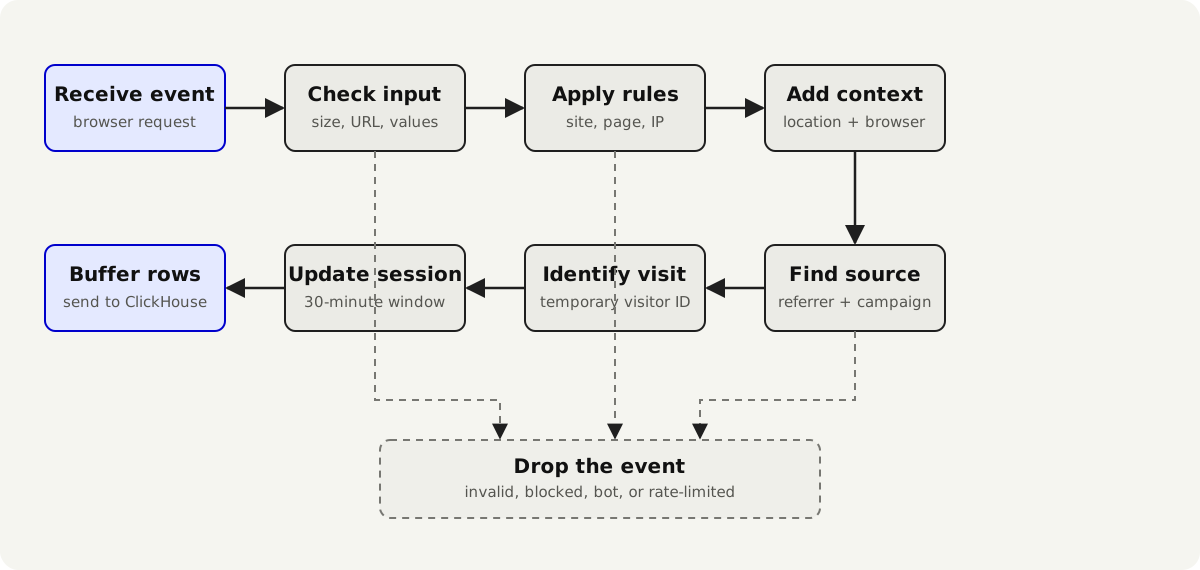
Each step receives the event and either adds information or drops it.
Once a step drops it, reduce_while stops the pipeline.
Location lookup happens before a country rule because the rule needs the country. The visitor ID happens after Plausible loads the salt. ClickHouse validation happens before saving the session.
The event object also makes it clear what the code knows at each point.
The pipeline also wraps each function with duration telemetry. Dropped and buffered events emit telemetry with the site, reason, tracker version, and request timestamp.
This is much easier to understand than one large controller full of conditions.
Filtering is layered
The browser avoids obvious local or automated traffic. The server then applies site rules, checks known spam referrers, and parses the user agent.
Plausible limits browser detection work
User-agent parsing can be expensive. Plausible caches the results and stops parsing after 200 milliseconds.
The parsed result identifies browser, operating system, and device. Known bots and headless Chrome traffic are dropped.
This prevents a strange user-agent string from holding the request open for too long.
Plausible uses the IP address but does not keep it
The IP address is used to find the country, region, and city.
The ClickHouse event and session schemas do not contain a raw IP address column.
The raw value is useful during the request. It is not kept in the analytics database.
Source attribution has a precedence order
The source resolver first checks campaign values such as utm_source. If there is no campaign value, it uses the external referrer.
Click identifiers such as gclid, gbraid, wbraid, msclkid, fbclid, and twclid can identify advertising traffic and help infer a medium.
Keeping this logic on the server lets Plausible improve attribution without changing every tracker.
How Plausible recognizes a visitor without cookies
Plausible does not put a persistent visitor ID in a cookie.
It creates a temporary ID on the server from values including:
- the browser user agent
- the IP address
- the Plausible site domain
- the visited root domain
- a secret salt
Those values go through a hash function and become a number.
Conceptually:
temporary_user_id = hash(
  daily_secret,
  user_agent + ip_address + site_domain + root_domain
)
The raw IP address is used while processing the request for filtering, location, and this hash. It is not a field in the ClickHouse event or session schemas.
The salt rotates every day
The Session.Salts process keeps the current and previous salts in memory. Postgres stores them so they survive a restart.
An Oban job rotates the salt each day. Old salts are deleted after 48 hours.
The previous salt handles a visit that crosses midnight. Imagine a visitor opens a page at 23:59 and clicks another page at 00:01.
The second request gets a different current-salt ID. Plausible can also calculate the previous-salt ID and look for an active session under it. That lets the visit continue across midnight.
The previous salt keeps this one visit together. It does not create a permanent identifier.
This is intentionally approximate
Two people behind the same IP with the same user agent can produce the same temporary ID.
One person changing network or browser details can produce a new one.
The system is estimating visitors. It is not trying to build a permanent profile for each person.
This creates a useful boundary:
Events from the same browser can belong to one visit. The identifier cannot naturally follow that person for months.
Privacy is part of the storage design, not a banner added to an identity system later.
Plausible keeps active sessions in memory
Plausible considers events part of the same session when they share the temporary user ID and arrive within 30 minutes.
At first, I thought this would be a database query:
- find the latest session for this user
- check its timestamp
- update it or insert a new one
But ClickHouse is built for batches and reports. It is not a good place to update one live session for every pageview.
Plausible keeps active sessions in memory.
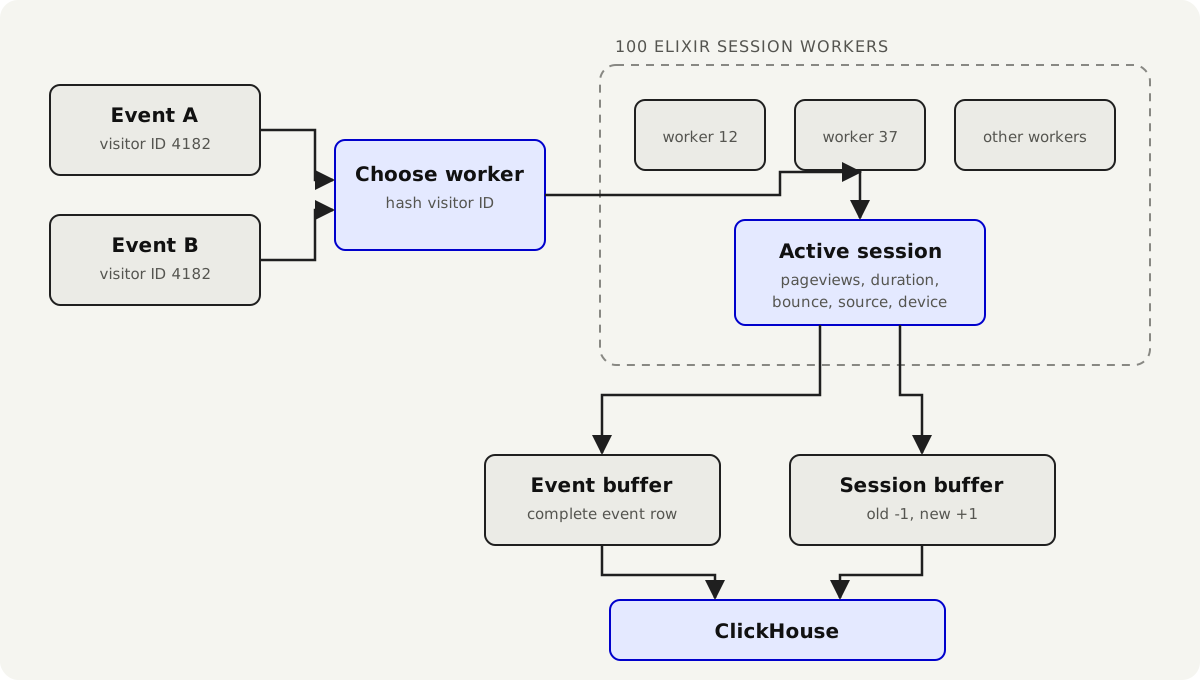
One of 100 workers owns each user
The BalancerSupervisor starts 100 session workers. Elixir calls these workers GenServers.
The temporary user ID always points to the same worker. That worker handles one message at a time.
This prevents two events from changing the same session at the same time.
The call has a one-second timeout. If the worker cannot respond, Plausible drops the event instead of leaving the request waiting.
What is stored in the active-session cache?
The active session contains values such as:
- session ID and temporary user ID
- start and last-event timestamps
- entry and exit pages
- total events and pageviews
- duration
- bounce status
- source, referrer, and campaign values
- country, region, and city
- browser, operating system, and device type
The cache removes sessions after 30 minutes. It checks both the current and previous visitor IDs so a visit can cross midnight.
Engagement events cannot create sessions
An engagement event updates scroll depth or time for an existing visit.
If it arrives without an active session, Plausible drops it with no_session_for_engagement.
An engagement ping says “the existing page is still active.” It should not invent a new visit just because the original pageview was blocked, lost, too old, or no longer present in the session cache.
How bounce and duration change
A new pageview session begins as a bounce unless the event is already considered interactive.
A second pageview or an interactive custom event can clear the bounce state. Duration becomes the difference between the current event timestamp and the session start. The entry page stays fixed. The exit page moves as new pageviews arrive.
Keeping the active session in memory makes these updates fast.
How Plausible updates a session in ClickHouse
Plausible writes session changes to the sessions_v2 table.
The table uses ClickHouse’s VersionedCollapsingMergeTree. When a session changes, Plausible writes two records. The old version gets a -1 sign, and the new version gets a +1 sign.
ClickHouse later combines those records and keeps the latest session.
The live session stays in memory. ClickHouse receives a history of changes using inserts, which is the kind of work it handles well.
The tradeoff is more complex report queries. Old and new versions can both exist until ClickHouse combines them.
Community Edition saves events inside the Phoenix app
After Plausible checks an event and adds the extra information, it must save it.
Community Edition does this inside the same Phoenix app. The code calls this the Embedded persistor.
Its job is short:
- send the event to the session cache
- create or update the session
- copy session fields onto the event
- add session rows to the session buffer
- add the enriched event to the event buffer
There is no message broker or separate event service in the official setup.
This keeps the Community Edition deployment understandable. Phoenix receives the request. Elixir keeps the active session in memory. Two small buffers collect rows for ClickHouse.
This path is also why active sessions live beside the web endpoint. The process receiving an event can reach the in-memory session workers directly.
Events and sessions enter separate write buffers
Plausible does not issue one ClickHouse insert per event.
One buffer collects events. Another collects session changes.
The default buffer flushes when either condition is reached:
- about 100,000 bytes have accumulated
- five seconds have passed
Instead of making one database request per pageview, Plausible writes many rows at once.
What does 202 Accepted really mean?
In Community Edition, the controller can return after the event has been cast to an in-memory buffer.
It does not wait until ClickHouse has safely written the row to disk.
So 202 Accepted means something close to:
the app accepted this event and placed it in the save queue
It does not mean:
this event is durably stored and will survive an immediate machine failure
The buffer tries to flush during a normal shutdown. A sudden machine failure can still lose the current batch.
This is acceptable for Plausible’s use case.
It would be a dangerous interpretation of 202 for a payment, an order, or a medical record.
Architecture is not only the list of components. It is also the exact point where the system tells the caller “I have it.”
Why Plausible uses ClickHouse for traffic data
Web analytics produces many writes and a particular kind of read.
The dashboard does not usually ask for one event by primary key. It scans a time range, groups rows by one or more dimensions, and calculates aggregates.
ClickHouse stores data by column. A report can read only the fields it needs.
That is a strong fit for analytics.
Plausible keeps two main native tables:
events_v2for pageviews, custom events, engagement, and propertiessessions_v2for visits, visitors, duration, bounces, and acquisition data
The event table is ordered for site-and-time queries
The events_v2 table is split into monthly partitions. Its ordering starts with:
site_id, date, event_name, user_id, timestampMost reports know the site and date range. Putting those values first helps ClickHouse skip unrelated data.
Events repeat session information on purpose
Before an event is buffered, Plausible merges session information into it.
An event can carry its session ID plus source, location, browser, device, and other values also represented by the session.
This duplicates data, but it avoids joins in many common reports.
A report of pageviews by country can scan event columns. It does not need to join every pageview to the session table first.
Plausible stores a little more data to make common reports faster.
Postgres runs the product
Postgres holds the relational side of Plausible.
This includes accounts, teams, permissions, sites, goals, API keys, shared dashboards, email reports, and settings.
It also powers Oban, the background job system. Jobs rotate salts, send reports, clean old data, and run imports.
Postgres is where transactions, constraints, and relationships matter.
ClickHouse is where scanning large collections of measurements matters.
The boundary is visible in the code:
Plausible.Repo           -> Postgres product data
Plausible.IngestRepo     -> ClickHouse writes
Plausible.ClickhouseRepo -> ClickHouse reads
Two databases mean more work
The split is correct for Plausible, but it comes with a cost.
Deleting a site, importing data, or resetting analytics can affect both stores. One transaction cannot cover both databases.
You must also back up and maintain both sides. A Postgres backup contains the product and its settings. A ClickHouse backup contains the analytics data.
If you want to understand the database roles first, start with my database guide and introduction to PostgreSQL, then read the official ClickHouse architecture overview.
How the dashboard gets its reports
When you open a dashboard, Phoenix first checks access and renders the page shell.
React then sends report requests to:
POST /api/stats/:domain/queryA request describes business concepts:
- metrics
- dimensions
- date range
- filters
- ordering
- pagination
- comparisons
- optional imported data
The browser does not send SQL.
The server then turns that request into a ClickHouse query:
JSON report request
      │
      ▼
Dashboard.QueryParser
      │ validate metrics, dimensions, filters, and access
      ▼
Stats.QueryBuilder
      │ construct the internal query model
      ▼
QueryOptimizer + TableDecider
      │ choose events, sessions, or both
      ▼
SQL.QueryBuilder
      │ construct Ecto/ClickHouse query
      ▼
ClickHouse
      │
      ▼
QueryRunner
      │ comparisons, labels, totals, formatting
      ▼
JSON response
I like this boundary. The browser asks for a report, not a database table. The server decides how to get the answer.
Choosing the events table, sessions table, or both
The TableDecider decides which table can answer a report.
Event metrics include:
- pageviews
- events
- scroll depth
- time on page
Session metrics include:
- bounce rate
- visit duration
- views per visit
- exit rate
Some metrics can come from either table. Dimensions matter too. A normal page belongs to an event, while entry and exit pages belong to a session.
Invalid questions are rejected early
Some combinations do not have a clean meaning or would require unsupported joins.
The table decider rejects combinations it cannot answer correctly.
This is a good decision. An analytics API should not return a believable number for a question it cannot answer correctly.
Joins are conditional
The SQL builder starts with events or sessions. It adds a join only when the report needs both.
For example, pageviews grouped by entry page need information from both tables. Only then does the builder join events and sessions.
Most dashboard cards avoid joins because Plausible copies useful session data onto events when it receives them.
Comparisons run as a second query and are merged into the result. The real-time visitor number is simpler: Plausible counts recent temporary visitor IDs.
Imported analytics data is different
Plausible can import data from Google Analytics and CSV files. Imported reports are not the same as native events, so they use separate ClickHouse tables.
When a report supports imported data and overlaps an imported date range, the query builder can merge the imported aggregate query with the native Plausible query.
Some reports cannot mix imported and native data. In those cases, the API returns a warning instead of inventing detail the imported source does not have.
React owns one island, not the whole product
The StatsController documents a clear boundary: the dashboard is client-rendered, while the rest of the application is not built as one large client-side application.
Phoenix renders a page containing the site’s initial settings. The dashboard.tsx entry point reads those settings and mounts React into the page.
React Router keeps filters and date ranges in the URL, so reports can be shared and the back button works. TanStack Query caches report results and refreshes real-time data. Old requests are cancelled when the user quickly changes filters.
Why React earns its place here
The dashboard has linked filters, multiple reports, charts, comparisons, real-time invalidation, pagination, search, and shareable URL state.
React fits that work, while the password reset page does not need the same machinery.
Plausible uses Phoenix templates, LiveView, and Alpine.js elsewhere.
I like this choice: use the browser framework where it helps, without making the whole product a client-side application because one page needs it.
If you want to dig into that part of the code, my React guide covers components, state, effects, context, and routing.
The monolith is a supervision tree
Plausible deploys as one application, but many small Elixir processes run inside it.
The Application supervisor starts a long list of children, including:
- both database connections
- the session workers and caches
- event and session buffers
- background jobs
- the Phoenix web server
If one process fails, the supervisor can restart it without restarting everything else.
Elixir’s process model lets a single deployed application contain many independently supervised responsibilities.
This is still a monolith. It is also a highly concurrent program.
Observability follows the boundaries
Plausible measures how long each event step takes and counts why events are dropped. This helps an operator tell the difference between bot filtering, invalid data, site rules, and session problems.
What self-hosting actually runs
The official Community Edition repository supplies a Docker Compose setup with three main services:
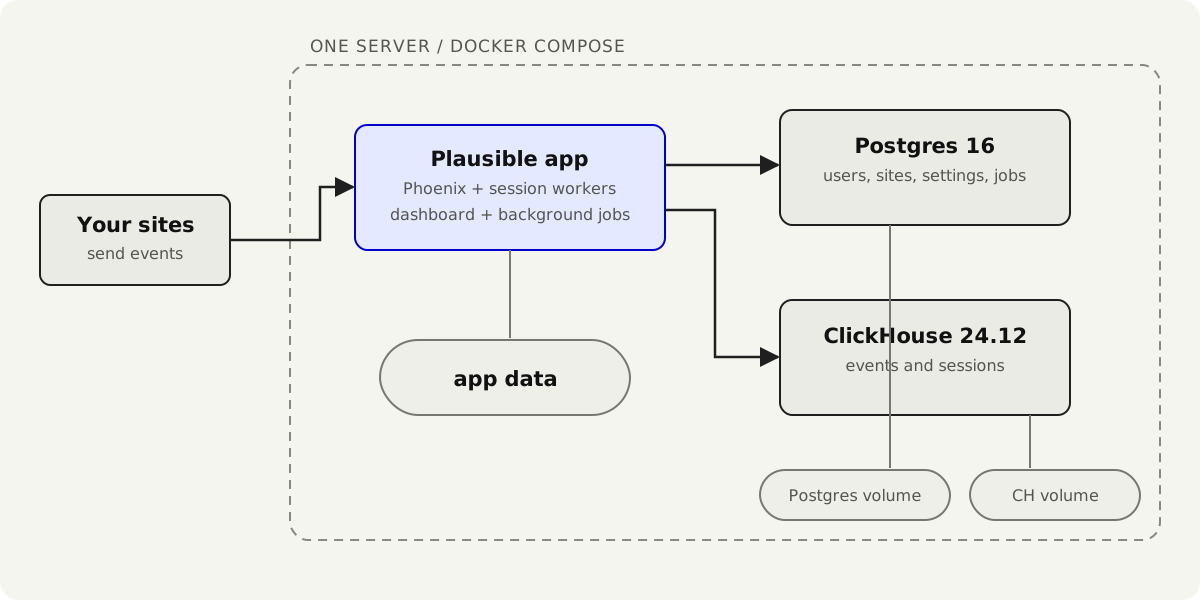
The Compose file pins the application image, checks that both databases are healthy, runs migrations, and then starts Plausible. Named Docker volumes keep the data between restarts.
The ClickHouse configuration includes settings intended to make a single-host Community Edition install practical, but ClickHouse still has real resource needs. The documentation recommends at least 2 GB of memory and a CPU with SSE 4.2 or NEON support.
If you are new to containers, start with my Docker introduction and Introduction to Docker Compose. The Compose file becomes much easier to read once services, networks, health checks, and volumes make sense.
A three-container setup is simple, not trivial
It is reasonable to run all three services on one machine.
You still need backups for both databases, enough memory and disk space, working email delivery, HTTPS, and a safe upgrade process.
The Docker Compose file makes the architecture reproducible. It does not remove operations.
Where can data be lost or become approximate?
A useful architecture review should not stop at the happy path.
Plausible deliberately chooses availability, speed, and privacy over exact accounting in several places.
The browser may close before it sends an event. A content blocker may stop it. A network request may fail.
Visitor counts are estimates because the temporary ID can sometimes join two people or split one person into two visitors.
Session state and write batches live briefly in memory. A sudden machine failure can lose a small amount of recent data. Configuration caches can also remain slightly out of date for a short time.
None of these facts means the architecture is poor.
They mean Plausible has chosen the consistency level its product needs.
Losing a few pageviews changes a report slightly. Making every event fully durable before replying would make the system slower and harder to run.
The correct design depends on what a small amount of lost data would mean for your product.
Why this architecture works
The system has a clean separation of work.
tracker       observes browser behavior cheaply
Phoenix       validates, filters, enriches, and authorizes
ETS/GenServer coordinates short-lived session state
buffers       convert individual events into batch writes
ClickHouse    stores and aggregates measurements
Postgres      protects relational product state
stats layer   translates product metrics into database queries
React         coordinates the interactive report interface
Each component receives work that matches its strengths.
More importantly, the boundaries align with change.
Attribution rules can change on the server without replacing the tracker.
The session implementation can change without rewriting the controller or the earlier enrichment steps.
The dashboard can change presentation without giving the browser SQL access.
The complete application still fits into one Phoenix release and two databases.
Good architecture often puts boundaries where future pressure is likely instead of trying to predict every requirement.
What I would copy
Several Plausible decisions transfer well to smaller products.
- Make the request path easy to follow. The controller is small and the pipeline lists its steps in order.
- Put privacy in the data model. The temporary visitor ID expires by design, and raw IP addresses are not stored with events.
- Batch only the work that needs batching. Many pageviews become a smaller number of database writes.
- Keep storage details behind the report API. React asks for metrics such as visitors and bounce rate. It does not need to know which ClickHouse table answered the question.
- Use React where it earns its place. The dashboard needs rich client-side state. A password reset page does not.
- Keep related work behind one boundary. The controller can save an event without knowing every detail of session state and buffering.
The deeper lesson: simple products can have sophisticated internals
Plausible presents one calm dashboard backed by browser code, request validation, privacy rules, session tracking, two databases, and an interactive dashboard.
The product stays understandable because those jobs have clear boundaries. The browser sends a small event. Phoenix processes it. ClickHouse stores analytics data. React receives report results rather than raw database rows.
This is what I want to explore in this series.
The interesting question is not just which technologies a product uses. It is why the system is divided this way, and what each boundary makes easier.
I later used Plausible’s API as the foundation for a small Plausible Automation Toolkit.
What I’d do differently if I had to build this from scratch myself
I would not start with Plausible’s current architecture.
Plausible has years of traffic, features, imports, and old tracker versions to support. A new product does not.
I would start with the smallest version that works.
One app and one database
My first version would use Phoenix and Postgres.
I would create one append-only events table with the site, event name, time, page, source, country, device, and temporary visitor ID.
I would also calculate sessions from those events. A gap of 30 minutes would start a new session.
This would not be as fast as Plausible. But it would be easier to build, back up, change, and understand.
I would add ClickHouse only when Postgres reports became a real problem.
One small tracker
I would ship one tracker that records pageviews and custom events.
I would add file downloads, form tracking, outbound links, and the other variants later.
Plausible’s tracker compiler makes sense today. I would not need it on day one.
Keep privacy from the start
I would keep the rotating visitor ID.
The server would use the IP address to create that temporary ID, then discard it. It would never store the raw IP with the event.
Privacy is much easier to design at the start than add later.
Keep the event path readable
I would still organize the code in this order:
parse
validate
filter
enrich
identify
save
Those could be six small functions in one module.
I would write events to Postgres immediately at first. When individual writes became too slow, I would add a small batch buffer.
The same rule applies to everything else.
If session queries become slow, add an active-session cache.
If reports become slow, add ClickHouse.
If report endpoints become repetitive, add a query builder.
If tracker features multiply, add compiled variants.
Use React only for the dashboard
I would copy this boundary from Plausible.
The dashboard has charts, filters, date ranges, and live updates. React is useful there.
Login forms and account settings can stay server-rendered.
My first version
It would look like this:
small JavaScript tracker
          │
          ▼
Phoenix event endpoint
          │
          ├── check the event
          ├── add location and browser data
          └── create a temporary visitor ID
                  │
                  ▼
              Postgres
                  │
                  ▼
          a few fixed reports
                  │
                  ▼
          React dashboard
I would start with one app, one database, one tracker, and a few reports. Then I would watch where it becomes slow or awkward.
Plausible shows what those decisions can become after years of real use. I would use its architecture as a map, not as a checklist.
Want me to talk about your product? You can sponsor this site.
Related posts about database: