Set up Plausible goals and custom events on a self-hosted instance from the terminal
By Flavio
Updated
Add a pageview goal and a custom event goal to self-hosted Plausible with plausible-setup, send the event from your site, and read the conversions in a terminal report.
Plausible counts pageviews on its own. A goal is how you count something specific: someone reaching the thank-you page, or finishing a signup.
There are two kinds. A pageview goal matches a path, so it needs no code on the site. A custom event goal matches an event name your site sends from JavaScript, for actions that don’t have their own URL.
I self-host Plausible Community Edition for all my sites, and Plausible Automation Toolkit is the CLI I built to stop doing this setup by hand. The command is plausible-setup. How to self-host Plausible analytics covers the server itself.
The examples use plausible.example.com for the Plausible server and shop.example.com for the site you track. Use your own.
Install the tracker
The toolkit runs on macOS with Python 3.10 or later. Unzip the download from your Polar receipt and point the installer at your instance:
./install.sh --plausible-url https://plausible.example.comThat puts plausible-setup in ~/.local/bin and a Codex skill in ~/.codex/skills/setup-plausible. Then save your dashboard login, which goes to the macOS login Keychain:
plausible-setup credentialsA goal can’t count anything until the tracker is on the site. Run a dry run from the site’s project folder first. It shows the change without touching the file or the server:
plausible-setup setup --dry-run--- a/src/layouts/Base.astro
+++ b/src/layouts/Base.astro
@@ -5,6 +5,8 @@
<head>
<meta charset="utf-8" />
<title>{title}</title>
+ <!-- Plausible Analytics -->
+ <script is:inline defer data-domain="shop.example.com" src="https://plausible.example.com/js/script.js"></script>
</head>
<body>
<slot />
Dry run: would ensure Plausible property shop.example.com exists at https://plausible.example.com.The domain came from the folder name, shop.example.com. It can also come from site in an Astro config or homepage in package.json, or you pass --domain. The layout file was found by looking for </head> in src/layouts/Base.astro and a few other usual places. Pass --target if it picks the wrong one.
Run it again without --dry-run to create the site in Plausible and write the snippet. Then deploy the site as you usually do.
Store the goal token
Goal commands use Plausible’s Plugins API, which needs a token for that one site. Your dashboard password doesn’t work here. Without the token, every goal command stops and tells you where to get it:
plausible-setup goals-list --domain shop.example.comError: No plugin token is stored for shop.example.com. Create one at https://plausible.example.com/shop.example.com/settings/integrations?new_token=Plausible+CLI, then run `plausible-setup plugin-token --domain shop.example.com` in a terminal.Open that URL, create the token, and store it:
plausible-setup plugin-token --domain shop.example.comIt prints the same URL, then asks for the token at a secure Keychain prompt. Type it there, not in a chat with an agent and not in a file in the repo.
Add a pageview goal
A pageview goal fits a page people only reach by doing the thing, like a confirmation page after an order:
plausible-setup goal-add --domain shop.example.com --page '/thank-you*'Quote the path so the shell leaves the * alone. The path has to start with /. Plausible escapes it, turns each * into “anything, including more slashes”, and matches the whole path, so:
| Goal path | /thank-you |
/thank-you/ |
/thank-you/order-18 |
/thank-you-page |
|---|---|---|---|---|
/thank-you |
yes | no | no | no |
/thank-you* |
yes | yes | yes | yes |
/thank-you/* |
no | yes | yes | no |
If your site has other pages starting with /thank-you, use /thank-you/* or the exact path.
goal-add is safe to run twice. Plausible finds the existing goal instead of creating a second one.
Send a custom event
A signup doesn’t always end on its own page, so here we send an event from the code that handles the form. Call plausible() after your backend confirms the signup worked, not when the button is clicked:
const response = await fetch('/api/signup', {
  method: 'POST',
  body: new FormData(form)
})

if (response.ok && typeof window.plausible === 'function') {
  window.plausible('Signup')
}
The typeof check keeps the form working when an ad blocker stops the tracker from loading. Keep email addresses and other personal data out of the event name.
Then register the goal with the exact same name. Matching is case sensitive, so signup won’t count Signup:
plausible-setup goal-add --domain shop.example.com --event SignupEvents sent before you add the goal aren’t lost. Plausible stores every event and matches goals when you look at the stats, so a goal added today also shows the Signup events from last week.
Events from a CSS class
Plausible also counts clicks on elements with a class like plausible-event-name=Signup+Click (the + is a space, so the goal is Signup Click). That needs the script.tagged-events.js tracker instead of the script.js the toolkit installs. See Plausible’s custom event docs.
If you edit the snippet by hand to switch, the toolkit no longer recognizes it. setup stops with “An existing analytics script in … needs manual review; refusing to duplicate it”, and doctor reports its project-tracker check as FAIL with the same message. That’s expected after the switch. The JavaScript call above works with the default script.js, so I’d stick with that.
Check the goals
List what the site has now:
plausible-setup goals-list --domain shop.example.comEach line has the goal ID, its type and its name. You need that ID for goal-delete, which also wants --yes.
The traffic report has a Goals section with conversions and conversion rate:
plausible-setup report --domain shop.example.com --period 30d --compare previous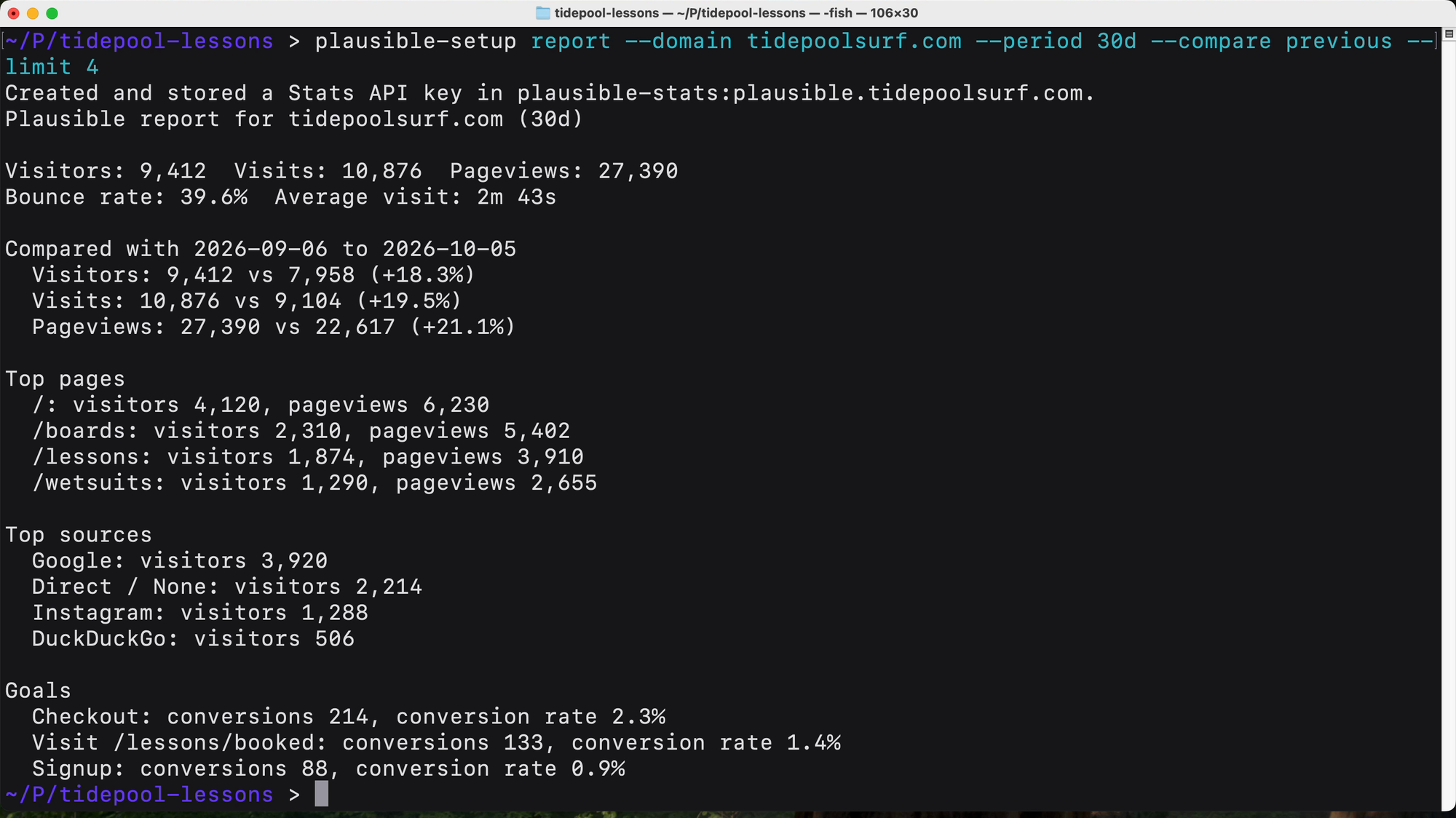
Plausible names pageview goals “Visit” plus the path, like Visit /lessons/booked in that demo.
The first report creates a Stats API key through your dashboard login and saves it in Keychain, and says so on the first line. For the goals alone, use a breakdown:
plausible-setup breakdown --domain shop.example.com --period 30d --by goalAdd --format json, csv or markdown to either command when you want the numbers in a file.
If a goal stays at zero
Run doctor. It changes nothing:
plausible-setup doctor --domain shop.example.com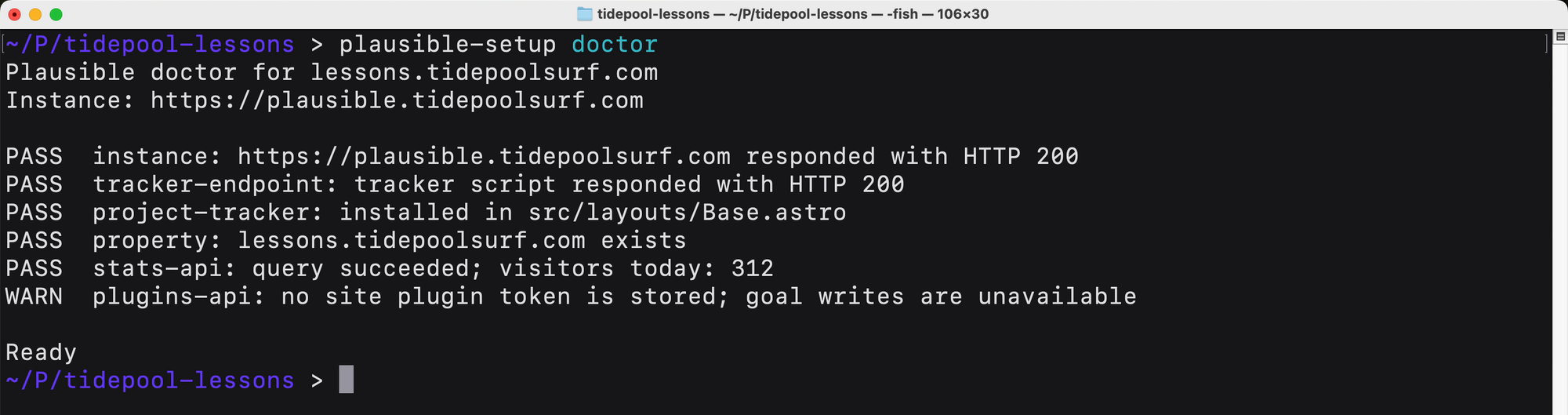
It checks the instance, the tracker script URL, the snippet in your project files, the site in Plausible, the Stats API key and the goal token. The snippet check reads your repo, not the deployed page, so open the live site too.
In the browser’s Network panel, do the signup and look for a request to /api/event on your Plausible host. No request means the tracker isn’t on that page, or your code never reached the plausible() call. A request but no conversion means the goal name and the event name differ, often by a capital letter.
For a pageview goal, compare the goal path with the page path in the Plausible dashboard’s Top Pages, using the table above.
Get Plausible Automation Toolkit
Install trackers, report traffic and manage goals on your own Plausible Community Edition instance. Includes a macOS CLI, Codex skill and MIT source.
See Plausible Automation Toolkit → · Read the docs · $20 including tax, with full source code.
Want me to talk about your product? You can sponsor this site.