Check why a Plausible tracker isn't recording visits
By Flavio
Updated
Run plausible-setup doctor to find why self-hosted Plausible records no visits, then fix a missing tracker, a wrong domain or a broken login.
You added Plausible to your site, deployed it, opened the dashboard, and the graph is flat. Zero visitors, even though you just visited the page yourself.
A Plausible tracker that isn’t recording visits can break in a few different places. The server might be down. The script tag might be missing from the layout, or point at the wrong domain. The site might not exist in the dashboard. Or the page is fine, and your own browser is blocking the script.
Checking each of those by hand means a browser, a terminal, the dashboard and the source code. Plausible Automation Toolkit has a command that checks the server side and the project side in one go, and tells you which layer failed. It runs against your own self-hosted Plausible Community Edition instance.
By the end you’ll know how to read its report, fix the three most common failures, and check the part no command can see: the live page in a real browser.
What you need
The toolkit runs on macOS with Python 3.10 or newer. It also needs the system security and expect commands, which it uses to keep your login and API keys in the macOS login Keychain.
You need a self-hosted Plausible Community Edition instance with an account you can log in to. If you don’t have one yet, How to self-host Plausible analytics walks through the server setup. The instance must be reachable over HTTPS, because the CLI refuses plain HTTP.
The toolkit is a source download, not an app. After purchasing it, download the source zip from your Polar receipt, unzip it, and run the installer from that folder with the address of your instance:
./install.sh --plausible-url https://plausible.northstar.exampleThis puts plausible-setup in ~/.local/bin. If your shell can’t find it, add ~/.local/bin to your PATH and open a new Terminal window.
The examples below use plausible.northstar.example as the Plausible server and shop.northstar.example as the website you track. Those, the paths, and the names and numbers in the sample output (including the tidepoolsurf.com demo) are example values; use your own.
As a preflight check, confirm the command runs:
plausible-setup --versionplausible-setup 1.1.2You also need the website’s source code on your Mac, because part of the check reads your layout files.
Run the health check from the site’s folder
The doctor command is the starting point. It runs six independent checks and reports every result, instead of stopping at the first problem. That matters here. A missing tracker and an expired login can happen at the same time, and fixing one only to discover the next is slow.
It’s also read-only. It doesn’t create a Stats API key, doesn’t add a tracker, and doesn’t create the site in Plausible. You can run it as often as you want, on any project, without worrying about side effects.
Open Terminal in the website’s source folder and run it with your domain:
cd ~/dev/tidepool-lessons
plausible-setup doctor --domain lessons.tidepoolsurf.com
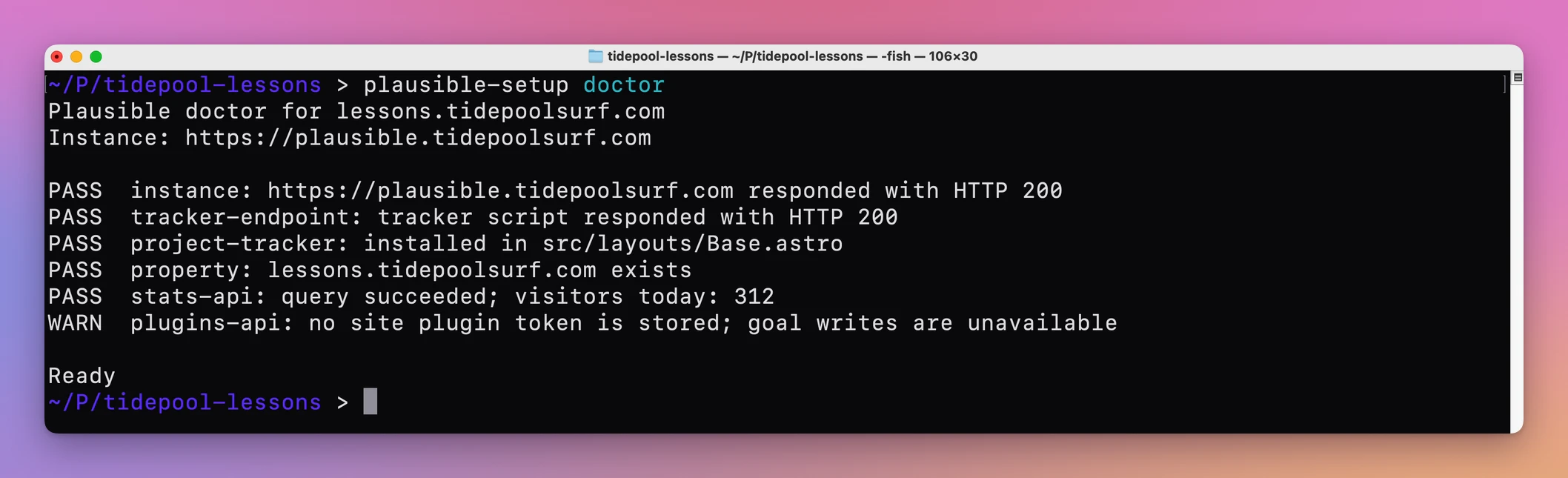
This is a healthy result, from the toolkit’s own demo:
Plausible doctor for lessons.tidepoolsurf.com
Instance: https://plausible.tidepoolsurf.com

PASS  instance: https://plausible.tidepoolsurf.com responded with HTTP 200
PASS  tracker-endpoint: tracker script responded with HTTP 200
PASS  project-tracker: installed in src/layouts/Base.astro
PASS  property: lessons.tidepoolsurf.com exists
PASS  stats-api: query succeeded; visitors today: 312
WARN  plugins-api: no site plugin token is stored; goal writes are unavailable

Ready
In Terminal, from the demo project’s folder, it looks like this:
Without --domain, it guesses the domain from Astro’s site setting, the homepage field in package.json, or a folder name with a dot in it, like shop.northstar.example.
A WARN doesn’t block anything. The plugins token is only needed for managing goals, which the goals tutorial covers. Any FAIL turns the last line into Action required, and the command exits with code 1 instead of 0. That makes it usable in a script too.
Read which layer failed
Each line of the report tests a different link in the chain between a visitor and your dashboard. Reading them in order tells you where the chain breaks.
If you skip this step and go straight to the browser, you can spend a long time on DevTools for a problem that’s on the server, or redeploy a site when the real issue is a missing property in the dashboard. The order of the checks follows the path of a pageview.
| Check | What it tests |
|---|---|
instance | Your Plausible server answers at /api/health |
tracker-endpoint | The server serves the script at /js/script.js |
project-tracker | The shared layout in your project has the right script tag |
property | A site with that domain exists in your dashboard |
stats-api | A stored Stats API key can query the site’s visitors today |
plugins-api | A stored goal token works, needed only for goals |
The stats-api line is a nice extra check. When it passes, it reports today’s visitors straight from Plausible, so you see whether anything arrived at all without opening the dashboard.
Add the missing tracker without duplicating it
The most common reason for a flat graph is the simplest: the script tag isn’t on the page. Maybe it was added to one page and not the shared layout, or it was lost in a refactor.
The project-tracker check reads your layout and compares it with the tag it expects. That tag uses your instance’s /js/script.js and your domain in data-domain. When the tag isn’t there, you could paste one by hand, but a typo in either value gives you a page that loads a script and still records nothing. Let the tool write it instead.
Example 1: a site with no tracker at all
I made a small Astro project for an example shop, with a src/layouts/Base.astro layout and no tracker. Here are the lines that matter from the doctor run:
plausible-setup doctor --domain shop.northstar.exampleFAIL project-tracker: missing from src/layouts/Base.astroThe tidepoolsurf.com demo project starts in the same state. Before the first setup, its doctor run also fails property, because the site doesn’t exist in Plausible yet:
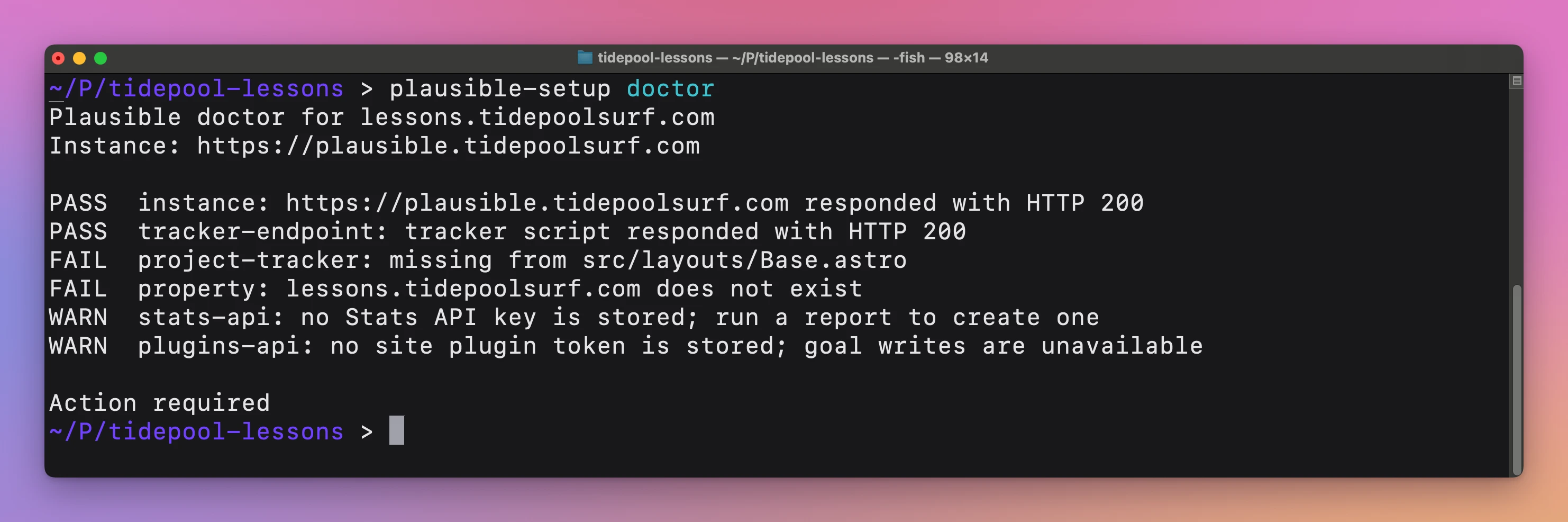
Preview the fix with a dry run. It prints a diff and touches nothing, neither the file nor the server:
plausible-setup setup --dry-run --domain shop.northstar.example--- a/src/layouts/Base.astro
+++ b/src/layouts/Base.astro
@@ -2,6 +2,8 @@
<head>
<meta charset="utf-8" />
<title>{title} · Northstar Shop</title>
+ <!-- Plausible Analytics -->
+ <script is:inline defer data-domain="shop.northstar.example" src="https://plausible.northstar.example/js/script.js"></script>
</head>
<body>
<slot />
Dry run: would ensure Plausible property shop.northstar.example exists at https://plausible.northstar.example.The tag goes right before </head>. In an .astro file it gets is:inline, so Astro ships it as written instead of bundling it. Here’s the dry run in the demo project:
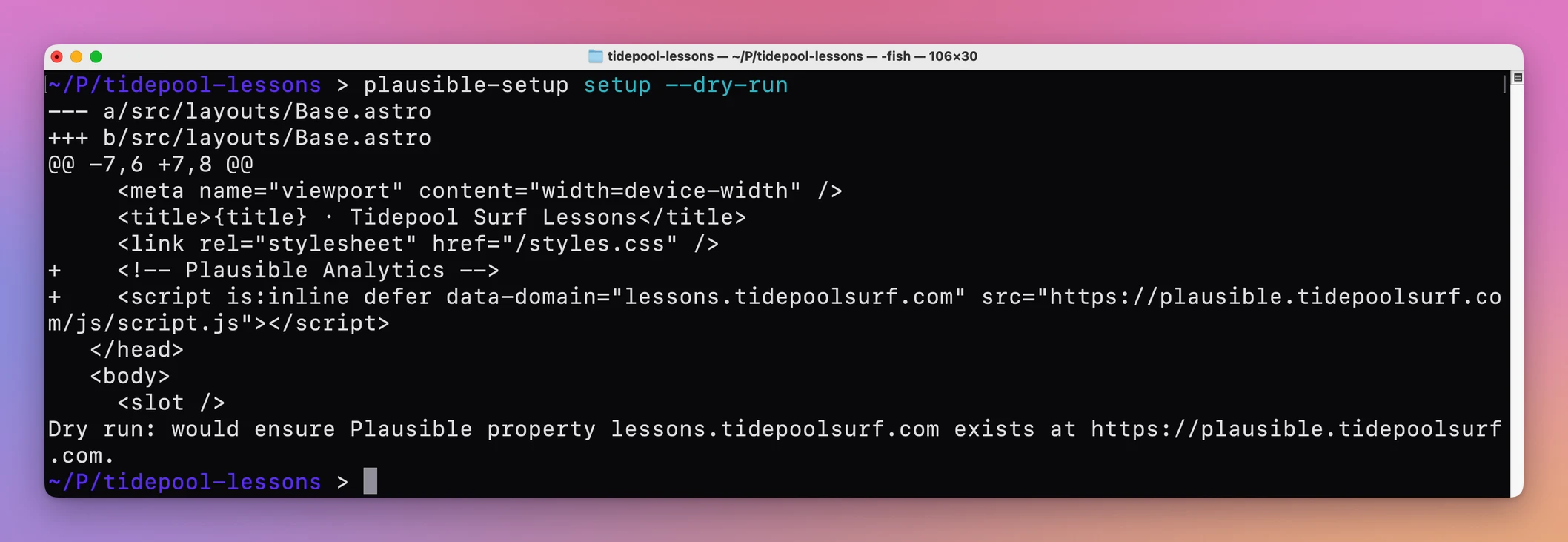
If the diff looks right, run it for real:
plausible-setup setup --domain shop.northstar.exampleThis logs in to your dashboard, creates the site if it doesn’t exist yet, and writes the tag into the layout. Commit the change and deploy the site the way you always do. The tool edits your source, not your server.
On a second run, nothing is added twice:
plausible-setup setup --dry-run --domain shop.northstar.exampleTracker already installed for shop.northstar.example in src/layouts/Base.astro.
Dry run: would ensure Plausible property shop.northstar.example exists at https://plausible.northstar.example.To undo the edit before you deploy, git checkout -- src/layouts/Base.astro restores the file. The toolkit never deletes a site from your dashboard.
Fix a tracker that points at the wrong domain
A subtler failure: the tag is on every page, the script loads, and the dashboard still shows nothing. Often the data-domain value doesn’t match the site in Plausible.
The data-domain value is what identifies your site in Plausible. If your layout says www.shop.northstar.example and the dashboard site is shop.northstar.example, the two don’t match, and the dashboard you’re looking at stays empty. The toolkit won’t guess which one is right. When it finds an existing analytics tag that isn’t the exact one it expects, it stops, because overwriting someone’s integration or adding a second tracker would both be worse.
Example 2: a hand-written tag with www.
This layout has a tag someone pasted by hand, with data-domain="www.shop.northstar.example". This is the doctor line that flags it:
plausible-setup doctor --domain shop.northstar.exampleFAIL project-tracker: An existing analytics script in /Users/flavio/dev/northstar-shop/src/layouts/Base.astro needs manual review; refusing to duplicate it.setup refuses for the same reason:
plausible-setup setup --dry-run --domain shop.northstar.exampleError: An existing analytics script in /Users/flavio/dev/northstar-shop/src/layouts/Base.astro needs manual review; refusing to duplicate it.The fix is a manual edit. Open the layout and either correct the data-domain value, or delete the old tag and let setup add a fresh one. Deleting is the cleaner route when the src also looks wrong. After I changed www.shop to shop, the dry run accepted it:
Tracker already installed for shop.northstar.example in src/layouts/Base.astro.One detail helps here: --domain drops a leading www.. Passing --domain www.shop.northstar.example gave me the same result, so the tool always writes the bare domain.
Point it at the right layout
setup and doctor need one file that every page shares, the one containing </head>. They try the usual places first: src/layouts/Base.astro, src/layouts/Layout.astro, src/app.html, index.html and public/index.html.
Projects with several layouts break that guess. A shop with a Shop.astro and a Docs.astro has two files with a </head>, and the tool can’t know which one your pages use. Rather than pick one and leave half the site untracked, it stops and lists them:
plausible-setup setup --dry-run --domain shop.northstar.exampleError: Multiple shared head files found (src/layouts/Docs.astro, src/layouts/Shop.astro); pass --target.Choose with --target, a path inside the project:
plausible-setup setup --dry-run --domain shop.northstar.example --target src/layouts/Shop.astroIf both layouts serve real pages, run it once for each target. Pass the same --target to doctor, or it hits the same ambiguity and reports it as a project-tracker failure.
Fix the instance and login checks
When the first two checks fail, nothing else matters yet. A visitor’s browser can’t load a script from a server that doesn’t answer. The property check depends on something else: it logs in to your dashboard with the credentials stored in Keychain, then looks for your domain in the list of sites.
So a property failure can mean the site doesn’t exist, or that the tool couldn’t log in to check. The detail text tells you which. Skipping this step and reinstalling the tracker won’t help, because the tag was never the problem.
Example 3: wrong instance address and no stored login
Here’s a full run from a Mac with no saved credentials, against an address that doesn’t resolve:
plausible-setup doctor --domain shop.northstar.examplePlausible doctor for shop.northstar.example
Instance: https://plausible.northstar.example
FAIL instance: Could not connect to plausible.northstar.example.
FAIL tracker-endpoint: Could not connect to plausible.northstar.example.
FAIL project-tracker: missing from src/layouts/Base.astro
FAIL property: The required Plausible Keychain item is missing.
WARN stats-api: no Stats API key is stored; run a report to create one
WARN plugins-api: no site plugin token is stored; goal writes are unavailable
Action requiredCould not connect means the address is wrong or the server is down. Check the saved address, and change it if it’s wrong:
plausible-setup configure --plausible-url https://plausible.northstar.exampleThe address lives in ~/.config/plausible-setup/config.json. Then store your dashboard login:
plausible-setup credentialsIt asks for your email, then for the password at a secure Keychain prompt, so the password never shows up in your shell history. Run doctor again after each fix.
Check the live page in a browser
When every check passes and visits still don’t show up, the problem is outside what doctor can see. It reads the layout in your project folder, not the deployed page. The docs say it plainly: a local snippet and a reachable tracker don’t prove the production page has been deployed.
So the last checks happen on the live site. Plausible’s troubleshooting page lists the usual causes. The script disables itself on localhost, so testing on your dev server records nothing. An ad blocker, browser extension or VPN on your own device may block it. And a cache can keep serving an older version of the site without the tag, so purge it after you deploy.
Open the live page, view its source, and search for data-domain. If it’s not there, the deploy didn’t ship the change. If it is, open the Network panel in DevTools, reload, and look for a request to /api/event on your Plausible host. No request usually means the script was blocked or never loaded. Try a private window with extensions off.
Once you see a visit, the stats-api line in doctor starts counting it too.
Hand it to Codex
The toolkit installs a Codex skill alongside the CLI. Ask Codex why Plausible isn’t recording visits, and the skill has it run doctor and report failed checks and warnings separately. It can preview a tracker change with a dry run before applying it. Keep your password and keys out of the chat; the CLI asks for them in Terminal.
If something looks wrong
- If you get
Error: Plausible is not configured, runplausible-setup configure --plausible-urlwith your instance’s address. - If you get
Error: The Plausible URL must be an HTTPS origin., use thehttps://address. The CLI won’t talk to an instance over plain HTTP. - If you get
Error: Could not infer the public domain; pass --domain., add--domainwith the site’s bare domain. Your project has nositesetting, nohomepage, and no dotted folder name. - If you get
Error: Could not find a shared file containing </head>; pass --target., point--targetat the file that holds your<head>. - If
propertysaysPlausible login failed; update the Keychain credentials and try again., runplausible-setup credentialsagain with the right password. - If it says
This Plausible account requires two-factor authentication, which the CLI does not bypass., the dashboard-based checks and site creation can’t run for that account. The tracker check still works. - If
propertysays your domaindoes not exist, runplausible-setup setup --domainwith that domain to create the site, or fix a typo in the domain you passed. - If everything passes and the dashboard still shows zero, check the deployed page and your own browser as described above. Visits from localhost never count.
Get Plausible Automation Toolkit
Install trackers, report traffic and manage goals on your own Plausible Community Edition instance. Includes a macOS CLI, Codex skill and MIT source.
See Plausible Automation Toolkit → · Read the docs · $20. See the app page for tax details, with full source code.
Want me to talk about your product? You can sponsor this site.