The best thing agents built for me wasn't an app, it was the tooling around my apps
By Flavio
Tagged: AI
The biggest win from coding agents wasn't the apps they shipped, it was the peripheral tools around them: testvm, OCR redaction, backdrops, and CLI manifests.
In my post yesterday, I mentioned that I shipped many desktop apps this year using coding agents.
Those apps get the launch posts and the screenshots. What actually changed how I work is the smaller layer sitting around them: the scripts, helper CLIs, and local apps that test, screenshot, redact, document, and wire up the real products.
Thorsten Ball calls this peripheral tooling in his post on engineers becoming agent-pilled, and that is the exact kind of software I never had time to build when I was writing every line by hand. Before coding agents, whenever I hit a repeated annoyance around my work, I either lived with it or clicked through a general-purpose desktop app. Now I spend ten minutes describing the exact wrapper I want, and every app and post after that gets faster.
Here are five pieces of peripheral tooling running on my Mac right now, along with what they replaced and how much use they get.
| Tool | What it is | What it replaced | Real usage on this Mac |
|---|---|---|---|
testvm | 574-line Bash wrapper around Tart | Agents opening apps and stealing focus on my desktop | 44,670 commands logged in 7 days |
redact-screenshot.swift | 126-line Swift script using macOS Vision OCR | Drawing boxes over IPs and emails by hand in Preview | Scans screenshots for IPv4, IPv6, and custom regexes |
backdrop.mjs + Swift helpers | 108-line Node runner and 635 lines of Swift | Clicking through CleanShot X on every screenshot | 2,112 bare screenshots across 285 folders |
blueprint + Architecture Dissector | Swift CLI and Mac viewer | Grepping through generated codebases weeks later | 21 mapped projects with saved version snapshots |
capabilities + clitools | Shared JSON contract and catalog CLI | Explaining my installed CLIs in every new session | 30 CLIs answering clitools capabilities --all --json |
Most of these feed directly into each other when an agent builds or updates an app.
testvm: 44,670 agent actions without touching my screen
When I started building Mac apps with Claude Code and Codex, every test cycle took over my Mac. An agent would compile a build, run open, pop the window on top of whatever I was reading, take a screenshot, and click around with AppleScript. With two or three agents working in parallel, my desktop was unusable.
Instead of buying a Mac mini as a test box, I wrapped Tart in a 574-line Bash script called testvm (how I set up the headless macOS VM). The agent still builds on my Mac, then copies the .app into a headless macOS VM and runs all its clicks, keystrokes, and screenshots over SSH. I also built VM Peek to watch the activity log when I want to see what agents are doing inside the VM.
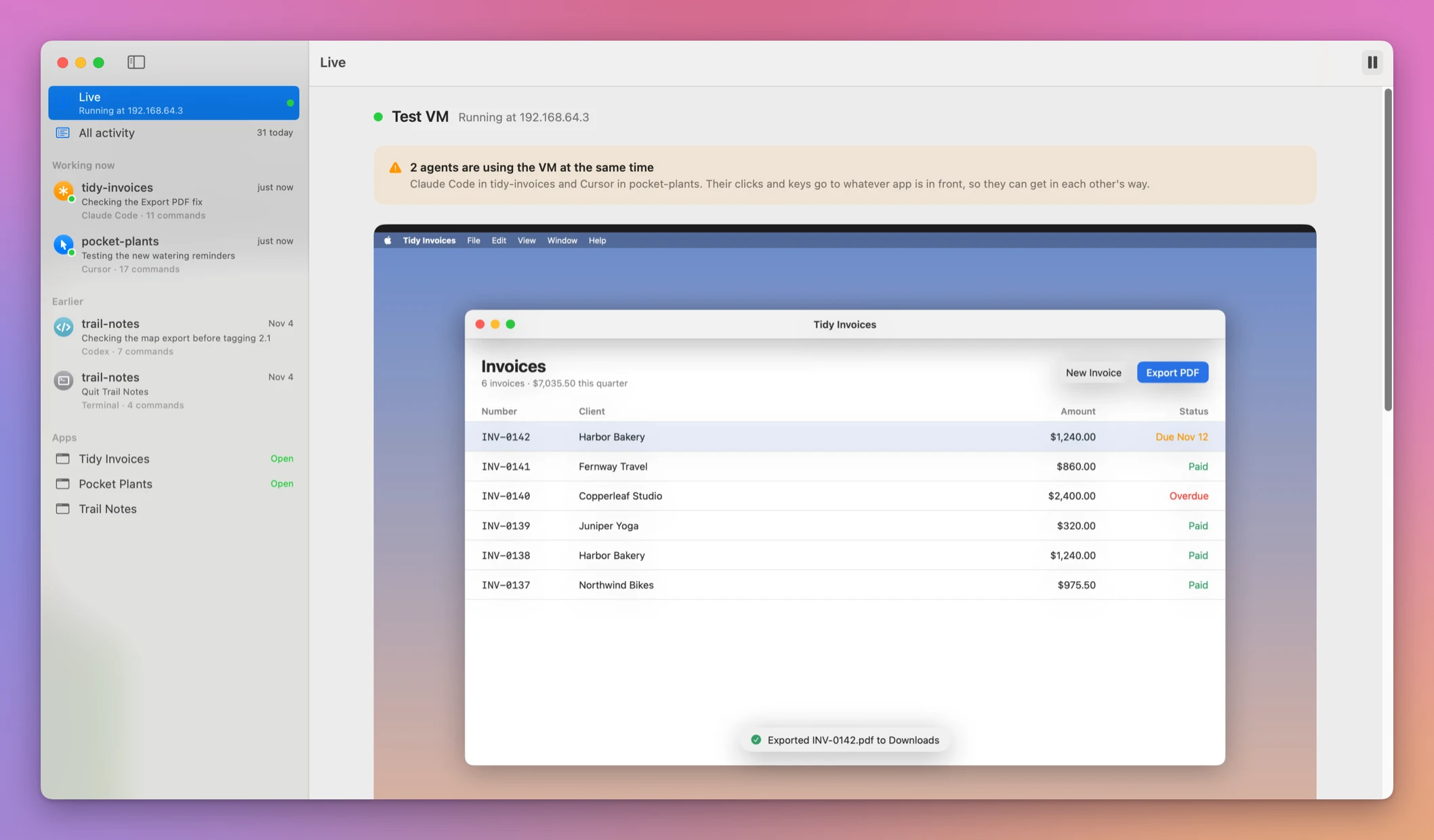
Looking at ~/Library/Logs/testvm/ for the seven days from November 17 to November 24, my agents ran 44,670 commands through testvm. Claude Code accounted for 41,136 of them, Codex ran 2,310, and my own terminal scripts ran 1,224. That single week included 4,980 app launches, 2,705 UI control inspections, 2,406 window screenshots, and 11,313 AppleScripts.
Running testvm capabilities prints what any agent can do with it:
testvm capabilitiestestvm 1.1.1
Runs Mac app builds in a headless macOS VM so coding agents can launch, screenshot and click through them without taking over your screen.
What it can do:
Open an app build in the test VM
$ testvm open 'build/Build/Products/Debug/Skill Cabinet.app'
Screenshot an app's window for visual checks
$ testvm shot 'Skill Cabinet'
List UI controls with labels and click coordinates
$ testvm ui 'Skill Cabinet'
Click at screen coordinates in the VM
$ testvm click 255 200Writing 574 lines of Bash with SSH setup, cliclick helpers, Accessibility tree dumping, and JSONL logging for a side annoyance is something I never would have prioritized by hand. I would have put up with the window stealing for months. With an agent, it took an afternoon and paid itself back in the first week.
redact-screenshot.swift: OCR redaction with zero manual boxes
When I wrote posts about Tailscale, a screenshot of the admin panel still showed real IP addresses. Blurring or pixelating text in an image editor is slow and can sometimes be reversed, and doing it manually breaks the flow whenever an agent prepares screenshots for a tutorial.
So I had an agent write scripts/redact-screenshot.swift, a 126-line Swift script that uses macOS Vision OCR (VNRecognizeTextRequest) and CoreImage. By default it scans an image for IPv4 and IPv6 addresses, plus any extra regex passed with --match. For each match, it computes the average color of that rectangle with CIAreaAverage and paints a solid bar over the text so the original pixels are gone.
Here is what --dry-run prints on the bare VM Peek screenshot, which shows the VM’s local IP address twice:
swift scripts/redact-screenshot.swift scripts/app-screenshots/bare/vm-peek/screenshot.png --dry-run Live
* Running at 192.168.64.3 -> 192.168.64.3
All activity
...
* • Test VM Running at 192.168.64.3 -> 192.168.64.3
...
2 area(s) to cover in scripts/app-screenshots/bare/vm-peek/screenshot.pngIt has no external packages, runs with the Swift toolchain already on macOS, and drops cleanly into any agent workflow before an image lands in public/images/.
backdrop.mjs: replacing CleanShot X with a script
I like putting app screenshots on a colorful gradient backdrop with rounded corners and a soft shadow, the look CleanShot X gives you. The problem is that CleanShot X expects a human clicking on the desktop, and once you save the flattened PNG you are stuck with that framing unless you retake every screenshot.
Now every bare screenshot goes into scripts/app-screenshots/bare/<slug>/. Running node scripts/app-screenshots/backdrop.mjs <slug> compiles and caches two Swift scripts (cut-out-window.swift, 365 lines, and backdrop.swift, 270 lines), trims the window cleanly, draws the gradient and shadow in linear light, and writes a WebP to public/images/<slug>/.
The first batch converted 101 app screenshots from 96 MB of PNGs down to 11 MB of WebP. Today scripts/app-screenshots/bare/ holds 2,112 bare screenshots across 285 folders. If I ever want a different gradient or tighter margins across the whole site, I change one color table and re-run the script.
I did the same thing for social preview cards. scripts/og/render.mjs and scripts/og/lib.mjs are 508 lines of JavaScript that render 1200×630 OG images with headless Chrome and the site’s Geist Mono font. That script now generates 733 custom OG cards from tiny card definitions in scripts/og/cards/. Whenever the site theme changes, every card re-renders from code.
blueprint and Architecture Dissector: maps for codebases I didn’t type
When agents write most of the code, you stop memorizing every file path. That works fine while you are actively shipping a feature, and then three weeks later you open the repo and need to know which service owns a table or what changed between version 1.0 and 1.3.
To fix that, I built Architecture Dissector and its companion CLI, blueprint. The viewer doesn’t try to guess your architecture from static analysis. Instead, a coding agent reads the project, writes structured architecture, flow, and data maps through blueprint, and saves snapshots at milestones (blueprint snapshot --version 1.0.0).
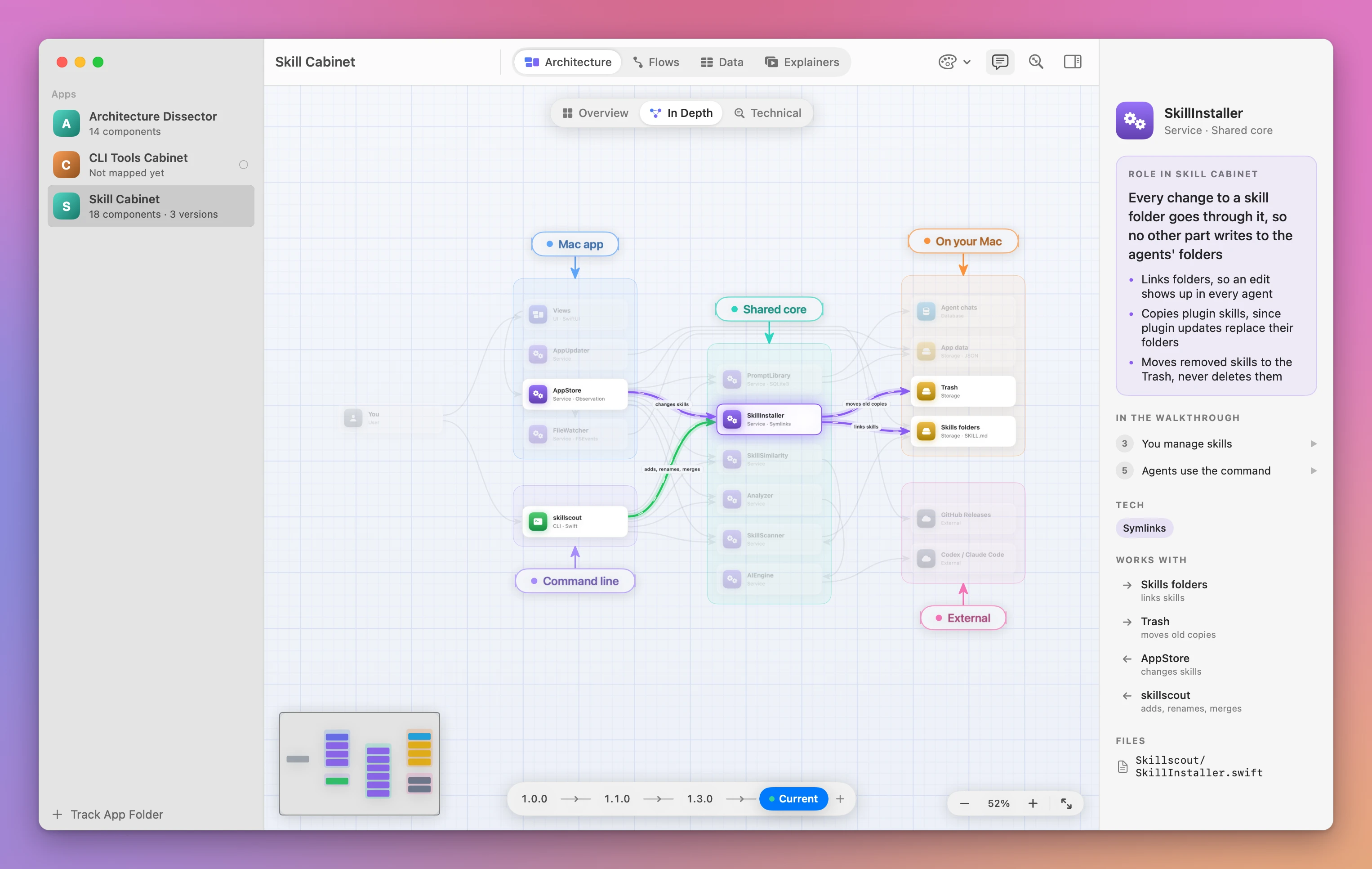
Right now ~/Library/Application Support/Blueprint/apps holds 21 mapped projects, including testvm, cli-tools, noterepo, postdeck, and blueprint itself. When I return to a project I haven’t touched in a month, I look at the component map and version diff before asking an agent to change anything.
The capabilities standard and clitools
Once you have thirty helper CLIs on your machine, a new problem shows up: a fresh agent session doesn’t know they exist. If you don’t remind it, the agent writes a throwaway Python script for something a local CLI already does cleanly.
So every CLI I build implements one small contract. Running <tool> capabilities --json prints a static JSON manifest with the tool’s version, a one-sentence summary, 4 to 10 concrete tasks with real example commands, and a changelog. It makes no network calls, never launches the GUI app, and finishes in milliseconds.
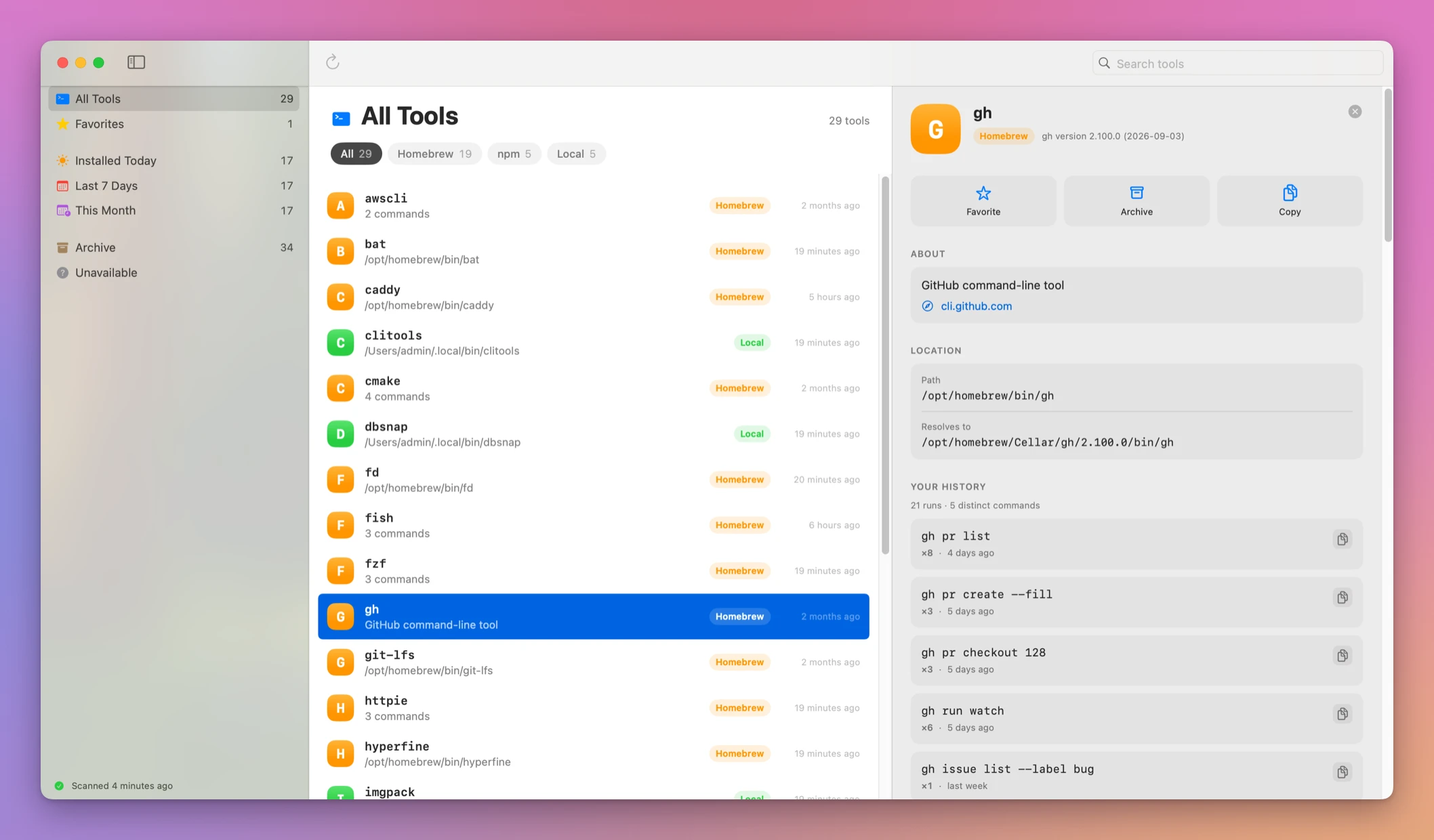
CLI Tools Cabinet catalogs every CLI on my Mac, and its companion command clitools collects all those manifests in one place:
clitools capabilities --all --jsonRight now 30 of my CLIs answer that command, from testvm, things, and notary to plausible, searchglass, seobot, postdeck, and explainers. An agent checks that list first before writing new glue code or asking me what is installed.
I wrote more about why small structured interfaces pair so well with agents in How AI agents make existing software more useful, and listed my daily terminal setup in The CLI tools I use every day. If the terminal itself is new to you, my free Shell Commands course covers the fundamentals.
Why peripheral tooling compounds
Each app I ship solves one problem for the people who use it. A peripheral tool speeds up every app and post I ship after that.
Before coding agents, the math rarely worked out for this kind of utility. Spending half a day building a Swift OCR redactor or a custom window-cropping pipeline felt like procrastination when you could drag a box in Preview in thirty seconds. Over two thousand screenshots and all those apps, those thirty-second chores turn into days, and worse, they break the agent loop because an agent cannot click Preview or CleanShot X on your desktop while you are working.
Every manual step I replace with a small script becomes a step an agent can run on its own, safely and repeatably, which expands what fits into things I let coding agents do unattended.
A nice side effect is that the best internal tools sometimes turn into products of their own. VM Peek, Architecture Dissector, and CLI Tools Cabinet all started as tooling I wanted for my own agent workflow and ended up on /apps/.
Next time you catch yourself doing the same boring five-step chore around an agent’s output, pause before asking for the next feature and have the agent build a small CLI for the chore first.
Want me to talk about your product? You can sponsor this site.
Related posts about ai: