How to use Cookies in PHP
By Flavio
Tagged: PHP
Learn how to use cookies in PHP, reading them from the $_COOKIE superglobal and creating them with setcookie, including SameSite, secure and HttpOnly options.
Cookies are a browser feature.
When we send a response to the browser we can set a cookie and that will be stored by the browser, client-side.
Then, every request the browser makes will include the cookie back to us.
We can do many things with cookies. They are mostly used to create a personalized experience without you having to login to a service.
It’s important to note that cookies are domain-specific, so we can only read cookies we set on the current domain of our application, not other application’s cookies.
But JavaScript can read cookies (unless they are HttpOnly cookies but we’re starting to go into a rabbit hole) so cookies should not store any sensitive information.
We can use PHP to read the value of a cookie referencing the $_COOKIE superglobal:
if (isset($_COOKIE['name'])) {
  $name = $_COOKIE['name'];
}
The setcookie() function allows you to set a cookie:
setcookie('name', 'Flavio');We can add a third parameter to say when the cookie will expire. If omitted, the cookie expires at the end of the session/when the browser is closed.
Use this code to make the cookie expire in 7 days:
setcookie('name', 'Flavio', time() + 3600 * 24 * 7);Since PHP 7.3 the third parameter can also be an array of options. That’s the form to use when you need more than an expiry, because it’s the only way to set the SameSite attribute:
setcookie('name', 'Flavio', [
  'expires' => time() + 3600 * 24 * 7,
  'path' => '/',
  'secure' => true,
  'httponly' => true,
  'samesite' => 'Lax',
]);
secure means the browser only sends the cookie over HTTPS. httponly keeps it out of document.cookie. samesite controls whether the cookie travels with cross-site requests, and accepts Lax, Strict or None (None also requires secure).
We can only store a limited amount of data in a cookie, and users can clear the cookies client-side when they clear the browser data.
Also, they are specific to the browser / device, so we can set a cookie in the user’s browser, but if they change browser or device, the cookie will not be available.
If you need to store more than a small preference, use a cookie-based session instead: the cookie only carries an ID, and the data lives on the server.
Let’s do a simple example with the form we used in the PHP forms post. We’re going to store the name entered as a cookie:
<?php
if (isset($_POST['name'])) {
  setcookie('name', $_POST['name']);
}
if (isset($_POST['name'])) {
  echo '<p>Hello ' . $_POST['name'];
} else {
  if (isset($_COOKIE['name'])) {
    echo '<p>Hello ' . $_COOKIE['name'];
  }
}
?>

<form method="POST">
  <input type="text" name="name" />
  <input type="submit" />
</form>
I added some conditionals to handle the case where the cookie was already set, and to display the name right after the form is submitted, when the cookie is not set yet (it will only be set for the next HTTP request).
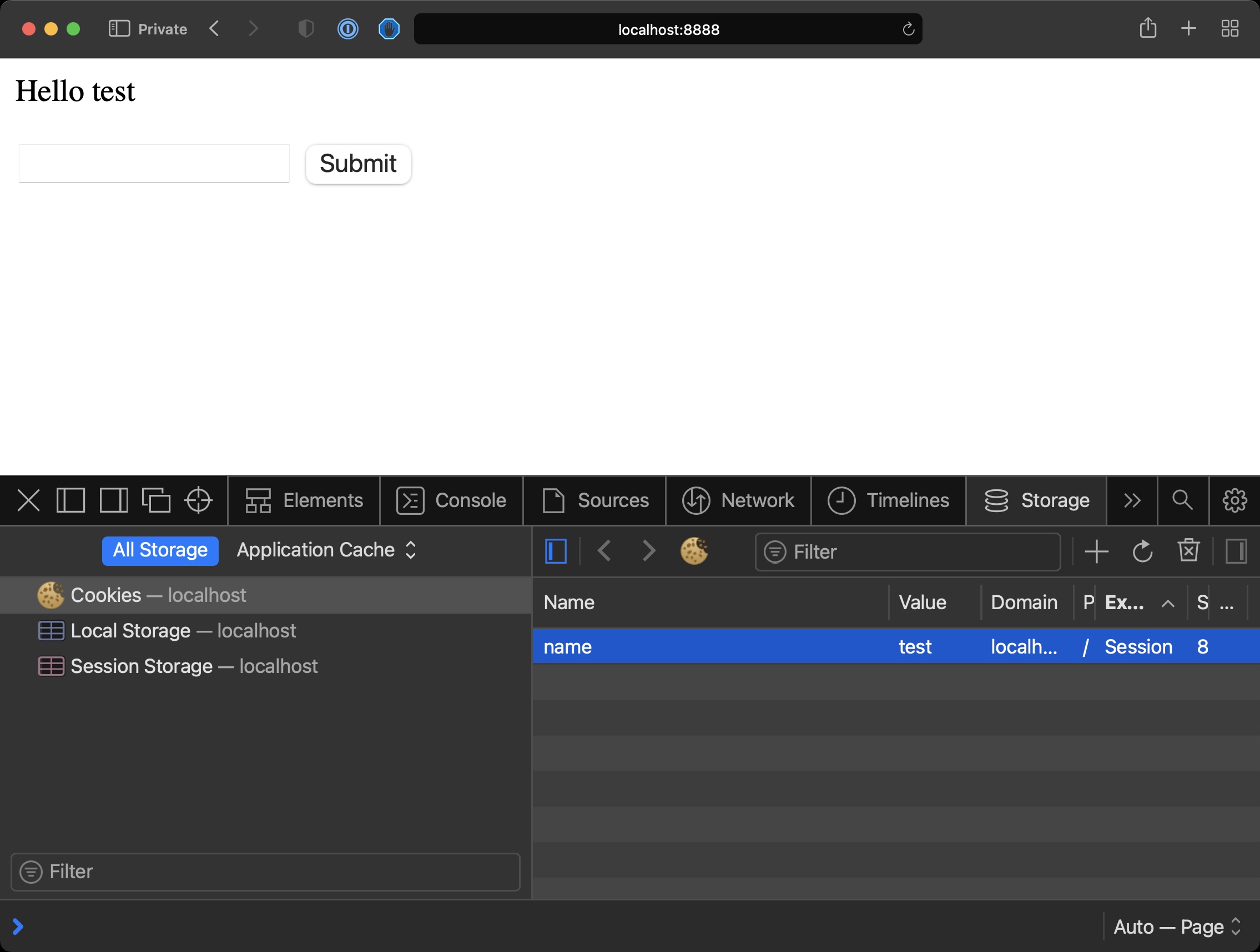
If you open the Browser Developer Tools you should see the cookie in the Storage tab. No expiry was set, so it’s a session cookie.
From there you can inspect its value, and delete it if you want.
Want me to talk about your product? You can sponsor this site.