Grok Bot vs Cursor Projects: when to use which
By Flavio
Grok Bot and Cursor Projects both give an agent its own computer and jobs that run without you. Here is how I decide which one gets a task, with examples from my own work.
Grok Bot and Cursor Projects look like the same product from a distance. Each gives an AI agent a computer in the cloud that keeps running after you close the laptop. The agent remembers what it learned last week, and it can wake up on its own because a PR opened or a schedule fired.
They’re built for different work, though, and the split is simple.
Work that starts in a repository and ends in a commit or a pull request goes to a Cursor Project. Work that starts somewhere you have to log in, an inbox, an analytics dashboard, a Notion page, a pricing page in a browser, goes to Grok Bot. And when a job does both, Grok Bot finds the work and hands it to a Cursor agent.
I wrote a long guide on each tool already, one on Grok Bot and one on Cursor Projects. This post is only about choosing between them, using the jobs I run or considered running for this site. Claude Duet is another always-on agent in this category, aimed at inbox and calendar work.
Why people mix them up
They come from the same company. SpaceX closed the Cursor acquisition on August 14, xAI had become SpaceXAI a month earlier, and you sign in to Grok Bot with a Cursor account. Grok Bot launched on August 11 and Projects on September 10, so within a month the same company shipped two always-on agents, both pitched as the thing that works while you sleep.
They also use the same ideas under different names:
| Grok Bot | Cursor Projects | |
|---|---|---|
| The long-lived thing | a Bot with a role | a Project with a coordinator |
| Where it runs | one cloud computer per user, shared by all your Bots | a cloud machine per Project, subagents on their own cloud machines, a local agent on your Mac when a step needs it |
| What it remembers | Bot memory and saved skills | shared context files synced to every agent |
| What wakes it up | routines, on a schedule or after an event | subscriptions to your PRs, a Slack channel, or a schedule |
| What it produces | reports, drafts, files, actions inside your apps | commits and pull requests |
| What it can reach | the apps and sites you signed it into | the repository you connected |
What each one can see
A Project is attached to a repository. The coordinator reads the codebase, writes a plan, and creates agents that each get a clean copy of the repo on their own machine. When they finish you get a PR, and when a step needs your computer, say a test against a local database, the coordinator starts a local agent for it.
This is the Project I created for this site, in Cursor’s Agents view. The arrow points at where Projects live in the sidebar. The coordinator’s welcome message is the whole model: work over weeks instead of one chat, hand the real work to background agents on cloud machines or your Mac, learn from your feedback, keep progress and shared context in the Project notes.
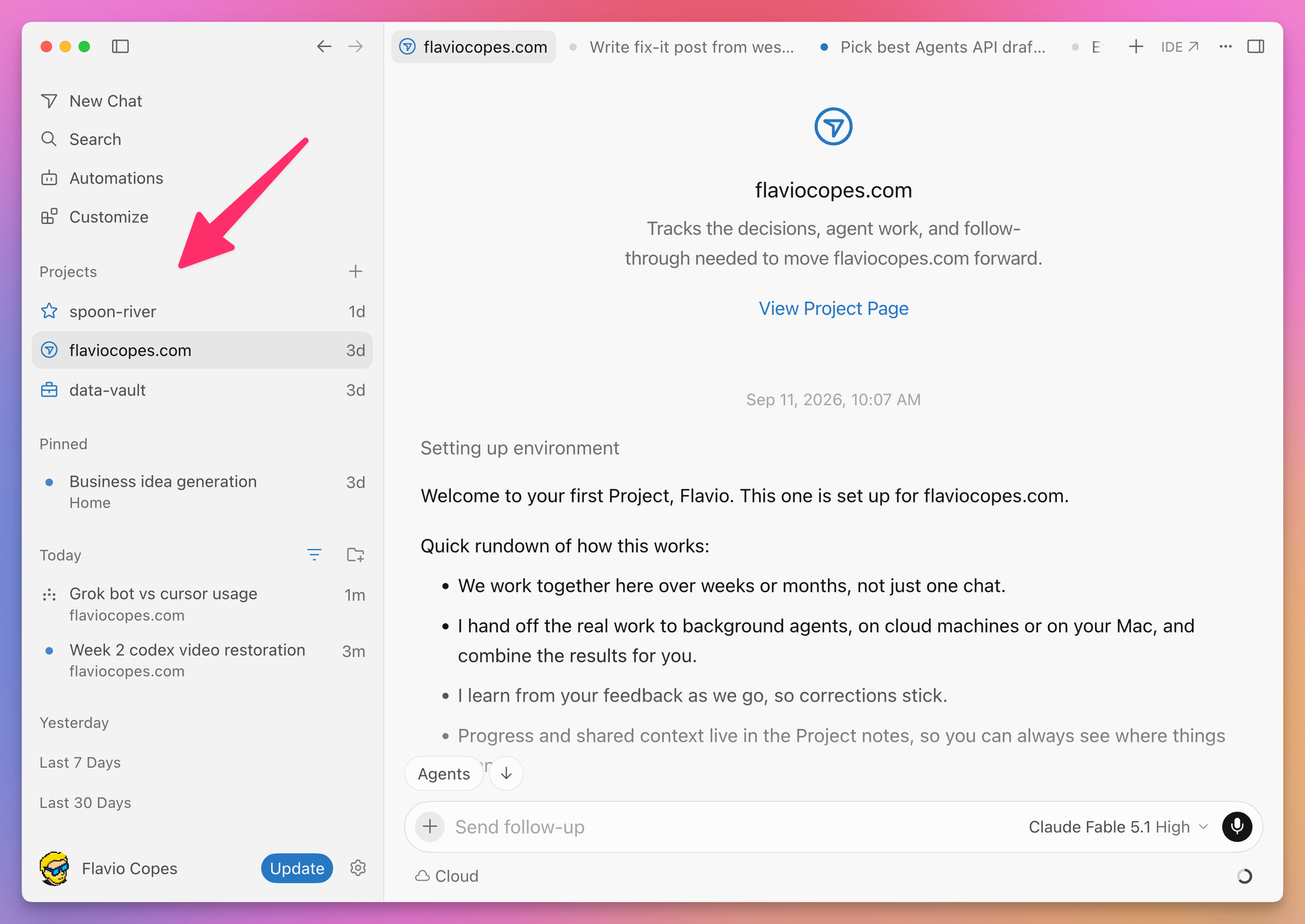
What a Project doesn’t have is your browser. It can’t open your Plausible dashboard or read your support inbox. If a page looks wrong only for a customer who is signed in to your product, it can’t see that either. It knows the repo and the PRs, and what CI says about them.
Grok Bot is attached to you. Every Bot on your account runs on one persistent Linux computer, and that computer keeps the browser sessions you signed in with and the connectors you authorized, plus whatever files you saved under /workspace. A Bot can open Plausible because you logged in once. It can read Sendy, Cloudflare, Notion, Gmail, X.
It can also run commands and clone a repository. But that computer is shared by every Bot you own, there is no isolation between them, and it was not designed as a coding environment. The FAQ says it plainly: do not use separate Bots as a security boundary.
So the first question I ask about a task is: does it need my logins, or does it need my repo?
Where the work starts
Jobs that start in the repository
The cleanup after a migration is the clearest case. This site moved from Netlify to Cloudflare Pages in June. The cutover took a day. Removing the old Netlify functions, a dead dependency, and the stale docs took until August, in small commits squeezed between other work. Every step of it lives in the repo, so it’s a Project: agree on the approach, let it open small PRs, review the first few closely, then less.
Gardening 2,000 posts is another. I schedule two or three a day, and before each goes live I want its internal links checked, and any screenshot that is exactly 1024px wide flagged as a downscaled upload. Today I do this in bursts, when I remember. A Project subscribed to a daily schedule could do it every morning and open a PR only when it finds something. The input is files and the output is a diff.
Dependency upgrades, dead code and missing tests have the same shape, with the repo as both input and output.
Jobs that start somewhere I log in
The morning site review is the Bot I built in the Grok Bot guide, Blog Pulse. It opens Plausible, the Cloudflare deployments page, the blog index, and the RSS feed, then writes one report: did today’s post go live and did the last deploy finish, plus yesterday’s traffic against the weekly average. Two of those four sources need a login, and none of them is a file in the repo. There’s nothing for a Project to do here.
Then there’s pricing data. I run a routine every two weeks for my hosting picker and payment picker. Twenty-one hosting providers and the payment processors I track change prices, add footnotes, move limits between tiers. The routine reads their pricing pages, works out what changed and what it means, and updates the data.
This one ends in code. The data lives in TypeScript files, so you could argue it’s a Project. But the edit at the end is a few lines. Most of the job is reading twenty-one pricing pages full of regional exceptions and usage conditions, then deciding whether a change matters. That’s browser work and judgment, and it starts in a browser, so the Bot owns it.
The newsletter is the same story. Open the last campaign in Sendy, find everything published since, verify every link on the live site, check the current course pages before mentioning any date, then write an HTML draft and a plain-text one. Sendy needs a login. The rest is public pages. Nothing in that list touches the repo, so it goes to Grok Bot.
Jobs that go to neither
Anything near payments goes to neither. The Paddle webhook that grants course access gets a normal Cursor chat on my Mac, and I read the diff before it lands. I don’t want an always-on agent anywhere near it.
Same for anything deterministic. If the inputs are fixed and the rules are fixed, write a script, or a cron job. A Bot that wakes up every morning to run the same five commands costs usage every day for work a script does for free. I wrote about that boundary in the Swamp tutorial: use the agent to discover the workflow, then run the stable parts as code.
When a job starts outside and ends in code
Some jobs start in a browser and end in a repo. This is where the two tools overlap, and since September 10 xAI supports the handoff directly.
Grok Bot runs the outer loop. It reads the bug report in Slack or the support email, reproduces the problem in its browser, pulls what it needs from Notion and the analytics, and writes up a clean task. The inner loop is a Cursor agent that starts from the repository and that task and comes back with a PR.
xAI’s engineering guide, published the same day as Projects, describes the built-in version. Every Bot can create Cursor cloud agents, read their transcripts, review the proofs attached to PRs, and queue a follow-up message or interrupt the run. The author runs five engineer Bots that manage more than 200 cloud agents at once. They check a Notion database of PRs every 30 minutes for failing CI and merge conflicts, and they merge on their own when the review is confident and the blast radius is low.
That’s the extreme end. You don’t need a fleet to use the pattern, and the cloud agent doesn’t have to run in Cursor’s cloud either. A Bot can start it on a machine you own, if you registered that machine as a private worker. I covered that setup in Run Cursor cloud agents on your own Mac mini.
I run a small version of this. A Bot called Update old posts wakes up once a day, picks ten posts on this site whose version claims went stale (Laravel 13, Express 5, Node 26, Astro 7 links), and hands them to a Cursor cloud agent. The agent comes back with a PR touching those ten files, and the Bot posts a one-line summary of what changed. Three runs over two days, three merged PRs, #93 to #95.
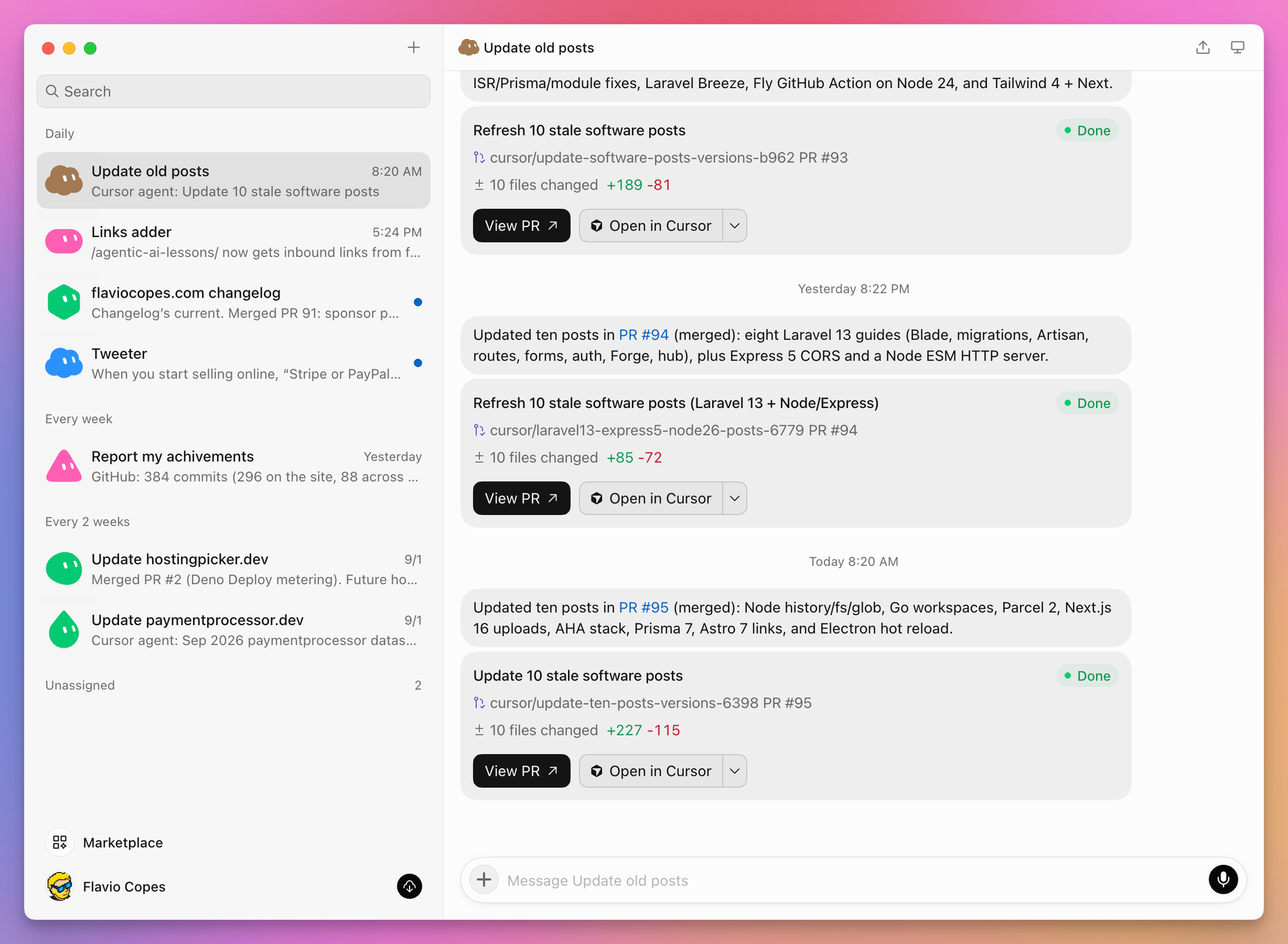
The sidebar is the rest of my week. A Bot that adds inbound links to the posts published that day, one that keeps the changelog current, one that drafts tweets, the two pricing refreshes, and a weekly report of what I shipped. Most of them end in a PR from a Cursor agent.
You could run the stale-post sweep as a Project on a daily subscription instead. I already had the Bot, and one agent with ten files is small enough that a coordinator adds nothing.
A Project fits in this loop when the fix is bigger than one PR. One bug goes to one cloud agent. The same class of bug showing up every week goes to a Project, which already knows the codebase and carries the shared context from the last ten fixes. You write that choice into the Bot’s instructions once.
One warning about that last step. The closer you get to “merge when confident”, the more the limits need to be code rather than prompts. “Ask me before merging” in a Bot description is advice the model may or may not follow. A branch protection rule on master is enforced whatever the model decides. I wrote about that in how to let an AI agent perform irreversible actions safely, and about where I draw the merge line in things I let coding agents do unattended.
Cost and access
Both bill usage, and both can spend it faster than you expect.
Grok Bot subscriptions come with a weekly allowance. A routine that runs every 15 minutes runs 96 times a day, and every run costs something even when it finds nothing. Browser work costs more than a connector call, because a sequence of screenshots and clicks is more tokens than one structured request. So schedule as rarely as the job allows and prefer a plugin over the browser. And delete one-shot watches once the event has passed, or they keep waking up to find nothing.
Projects run on cloud agents, which cost more than working in the local editor, and a coordinator with twenty subagents in flight burns through a plan quickly. The engineering guide above describes a P0 mode that polls an agent every five minutes and warns that it “can burn tokens much faster than you think”. Size the first Project to work you can afford to redo.
On access, the gap has narrowed. As of September 30, 2026, Cursor’s plans page includes Grok Bot with every paid individual Cursor plan, plain Pro included, and with every member of a Cursor Teams plan. You can also link an individual SuperGrok or X Premium+ subscription. The desktop app runs on macOS, Windows, and Linux, with iPhone, iPad, and Android companions, which is wider than at launch. Projects is in beta and rolling out to all Cursor users. It lives in the Agents view, not the IDE, so if you spend your day in the editor you won’t see it until you switch.
How I split it today
My own split is lopsided. Grok Bot earned a place in my week because its routines are chores I kept forgetting. The changelog update, the pricing refresh and the stale-post sweep are jobs where most of the value is in doing them at all, every day or every two weeks, and I wasn’t.
Projects hasn’t found a place yet. I’ve been using it since launch to try it, three Projects so far including one for this site, and I know why it doesn’t fit me right now. I prefer the agent on my Mac, where I can read what it does, one task at a time. When I work myself I commit to master, no PRs. The only PRs in the repo are the ones the Bots’ agents open, ten files at a time, so most of what a Project does well (coordinating many agents on one long job, following PRs, fixing CI) is work I don’t have yet. When a migration-shaped job comes along, the kind that is easy to start and takes three months to finish, I’ll give it that one.
The loop I want to close next is Blog Pulse. It can tell when a post didn’t go live or a deploy failed, and today that ends in a report I act on by hand. The next step is letting it hand the finding to a Cursor agent on my Mac mini, the way Update old posts does with its ten files, and getting back a diff I can review over coffee. I don’t know yet whether the Bot will spend more usage supervising the agent than the fix is worth. I’ll find out and write it up.
Want me to talk about your product? You can sponsor this site.
Related posts about ai: