How to use Cursor Projects
By Flavio Copes
Cursor Projects gives you a coordinator agent that plans work, delegates it to subagents, keeps shared context, and watches your PRs. Here is how to use it.
Cursor launched Projects on September 10, 2026. Instead of opening a chat for every task, you talk to one coordinator agent inside a thread that stays open for as long as the work lasts. The coordinator does not write code. It plans the work, hands it to other agents, and brings the results back to you to check.
Projects is in beta and rolling out to everyone. Cursor announced it in a blog post and a changelog entry, and the people who built it spent the launch evening answering questions on X. I went through the announcement and a good part of those threads, and this guide is what I got out of it.
The problem with one chat per task
If you have used Cursor for a while, you know what your sidebar looks like. Dozens of chats, half of them with the same auto-generated title. Somewhere in there is the one where you figured out how to run the test suite, and the one where you found the config file nobody documented, and you can’t remember which is which.
Every new chat starts cold. The agent knows nothing about what the previous agent learned, so you explain the project again, or paste a summary, or hope it figures things out on its own. For a small fix that’s fine. For a feature spread over ten pull requests, or a migration that touches hundreds of files, or a job you want to keep running while you sleep, it isn’t.
Projects gives that body of work one persistent place, with an agent that remembers what happened in it. Ryo Lu, who leads design at Cursor, described it as “long-lived agents for your big ideas”, and that’s the frame to keep in mind while reading the rest. Projects is for the work that outlives a single chat. The quick fix still belongs in a normal chat.
What a Project is
You talk to the coordinator. It reads your request, works out a plan, and creates other agents to do the implementation. Since it delegates instead of executing, it’s never stuck waiting on a build or a test run, so you can send it a new message at any time and it answers.
To try it I created a Project on an empty repo and pasted the spec for Data Vault, a small self-hosted personal data store I wanted to build. The coordinator saved the spec as project context and started a worker to build the whole thing on its own machine, then told me it would ping me when the PR was up:
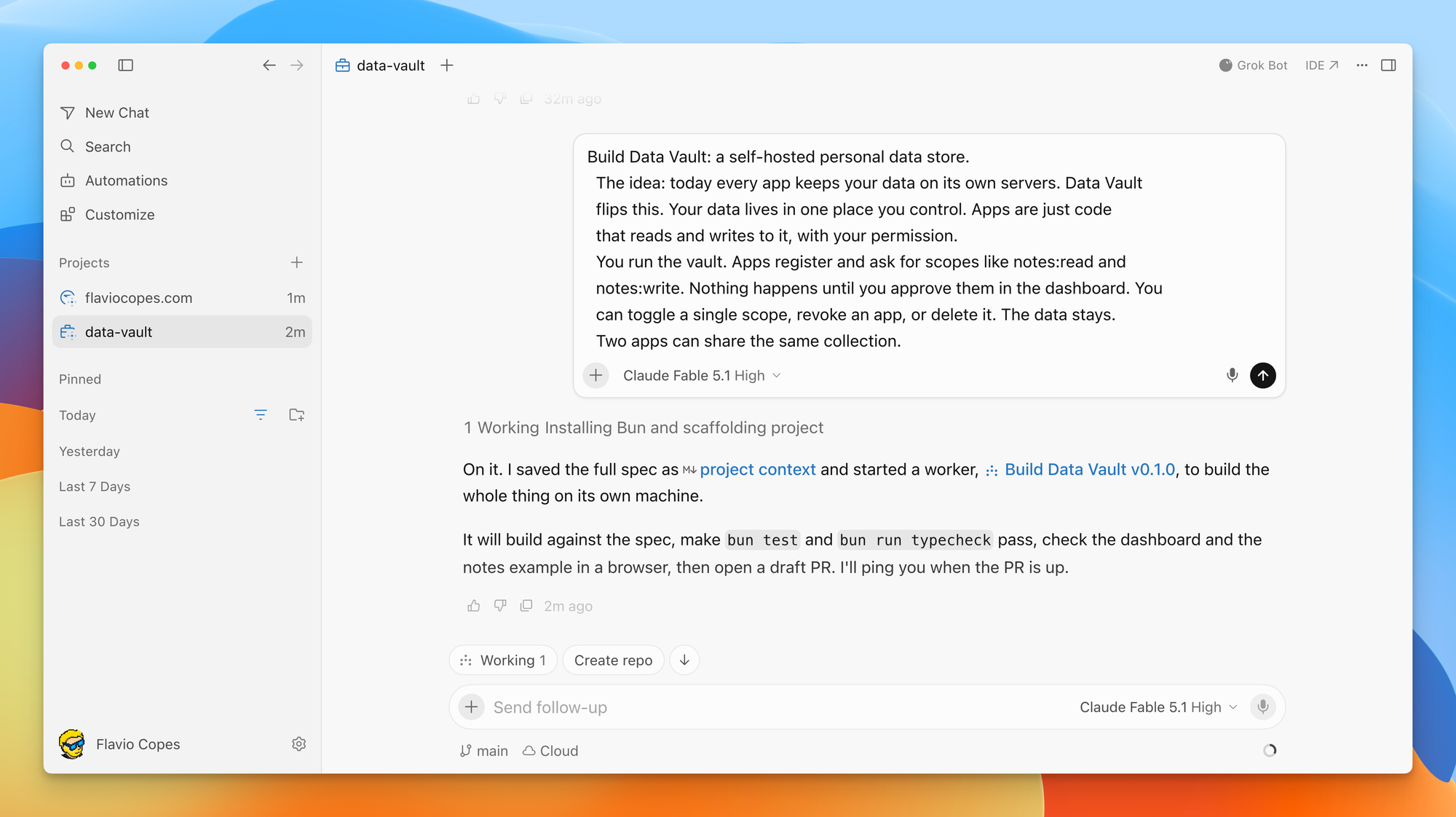
The agents it creates are the ones that write code. The coordinator can create as many as the work needs and run them in parallel. Fatih Arslan from the Cursor team wrote that his coordinators manage tens of agents each, and that they can spin up local, remote, and cloud agents.
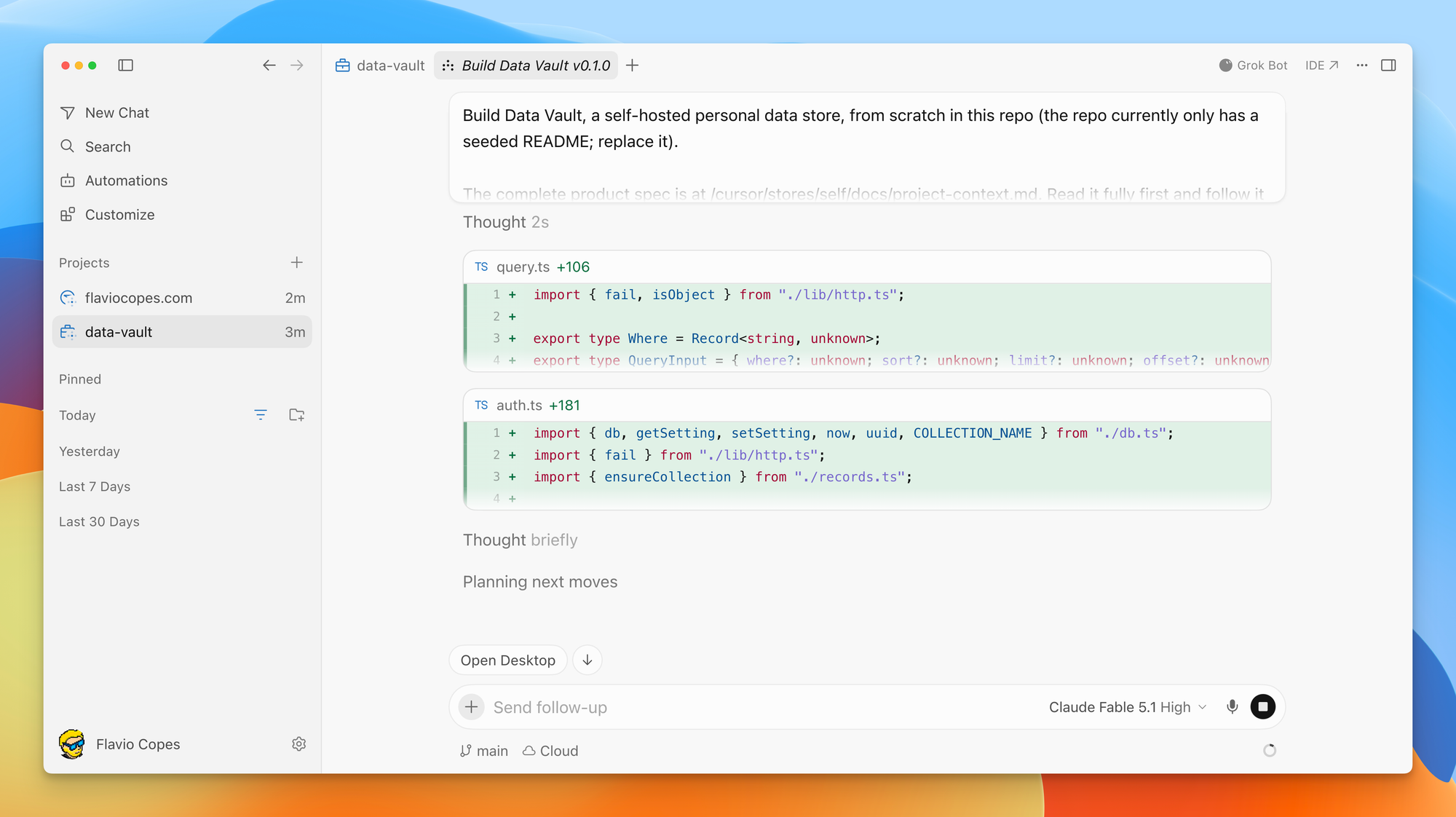
You can open any of those agents and watch it work. Here is the Data Vault worker writing query.ts and auth.ts while the coordinator sits in the other tab, free to take my next message:
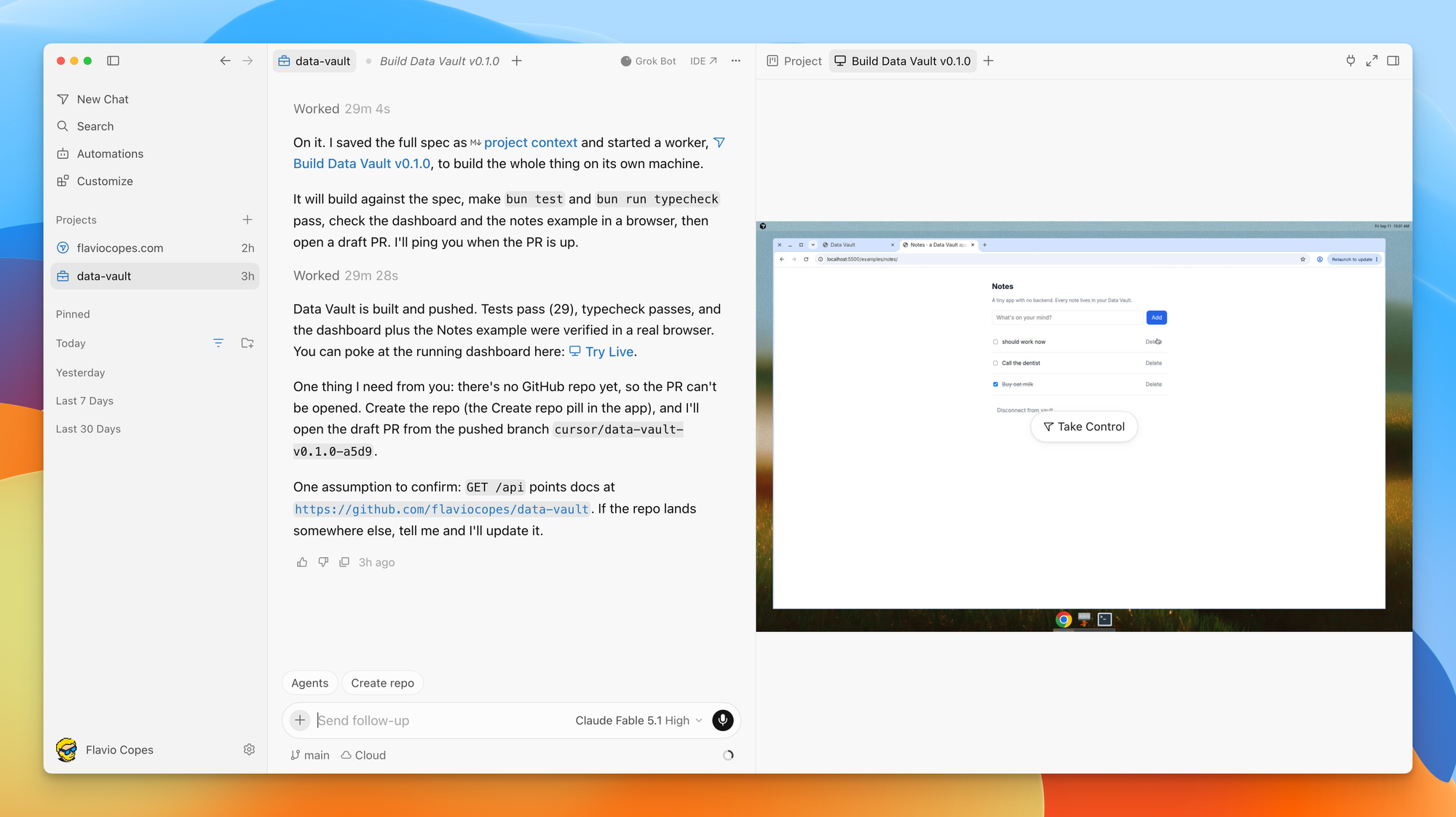
When the worker finished, the coordinator summarized the result and gave me a Try Live link. Clicking it opened the Project’s cloud computer on the right, with the finished Notes app running in its browser:
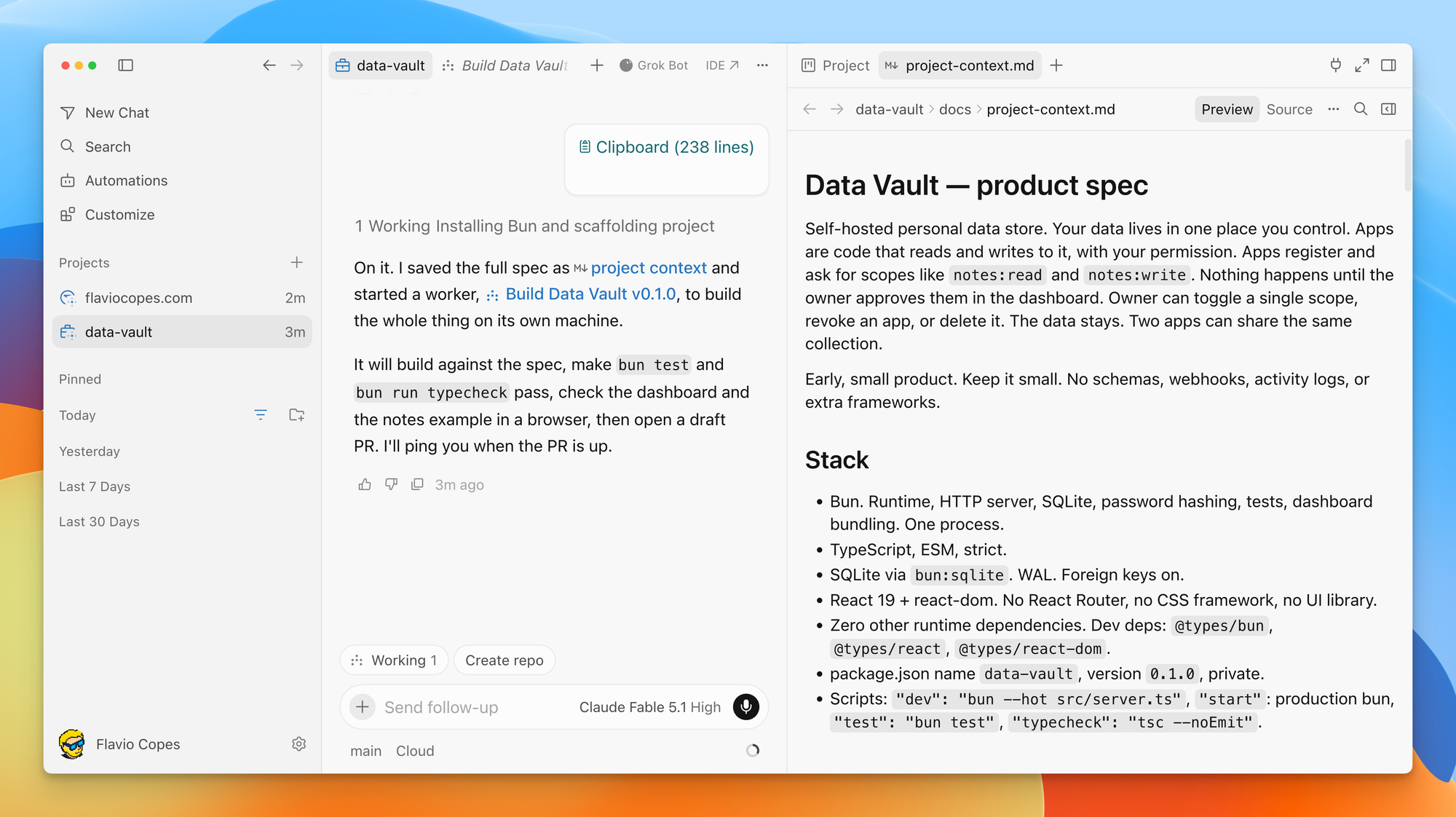
Each Project also keeps a set of shared context files that sync to every machine its agents run on. Agents write what they learn into them: how to run the tests, where a service is configured, how you like PRs structured. The next agent reads those files before it starts, which is what fixes the cold-start problem from the previous section.
In my case the first context file was the product spec itself, saved as docs/project-context.md and shown in the Project pane on the right:
And you can tell the coordinator to watch a Slack channel, follow your PRs, or run on a schedule. Cursor calls these subscriptions. When something happens, the coordinator acts without waiting for you.
Andrew Milich from Cursor summed it up in one line: work with a single agent across multiple PRs, with subscriptions, a shared filesystem, and memory.
Cloud by default, local when needed
A Project runs on its own computer in the cloud, so closing your laptop does not stop it. It also means the coordinator isn’t limited by your hardware. Your laptop can run a handful of agents before it slows down, while a cloud machine can run many more in parallel, and each subagent can get its own virtual machine with a clean copy of the repo.
When something needs your machine, say a test that depends on a local database or a manual check in your browser, the coordinator starts a local agent and runs it there. You don’t move anything by hand.
If you’d rather have cloud agents run on hardware you control, I covered that in Run Cursor cloud agents on your own Mac mini.
How to create your first Project
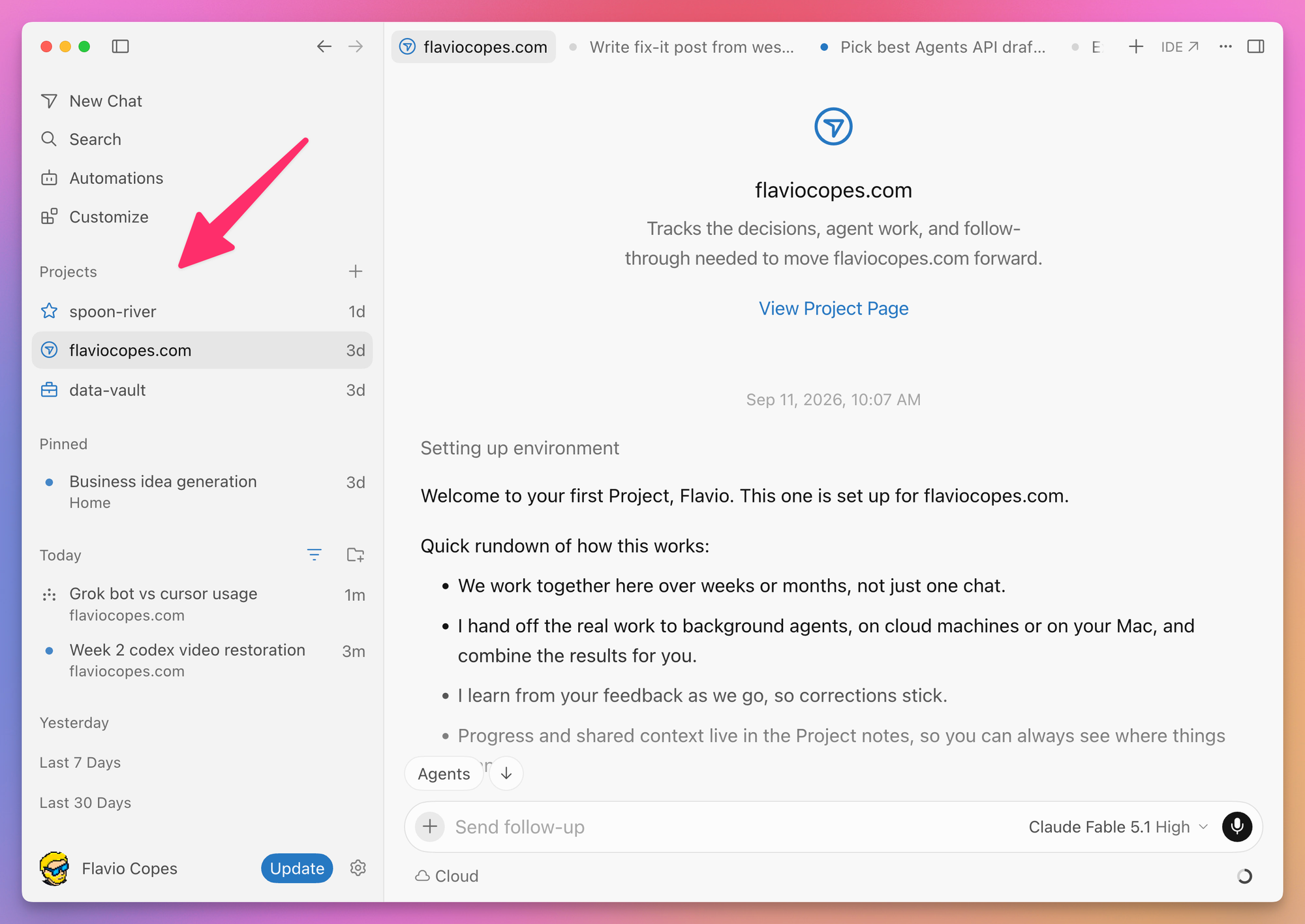
Update Cursor to the latest version. Projects live in the Agents view, the window with New Chat, Search, and Automations in the left sidebar, not in the IDE. If you spend your day in the editor you won’t see them there.
Open the Agents view (the screenshots in this post are all from it, and you can jump back with the IDE link in the top right) and look for a new Projects section in the sidebar. If it isn’t there, the rollout hasn’t reached you yet. Several people on Linux reported that on launch day.
This is what it looks like on my Mac a few days in, with three Projects in the sidebar and the page of the one for this site open. The chats under Today show the Project they belong to under their title.
Then:
- Click Projects in the left-hand nav and create a new one.
- Connect the repository you want to work on.
- Describe what you want built.
From there the coordinator reads the codebase, writes a plan, and starts creating agents.
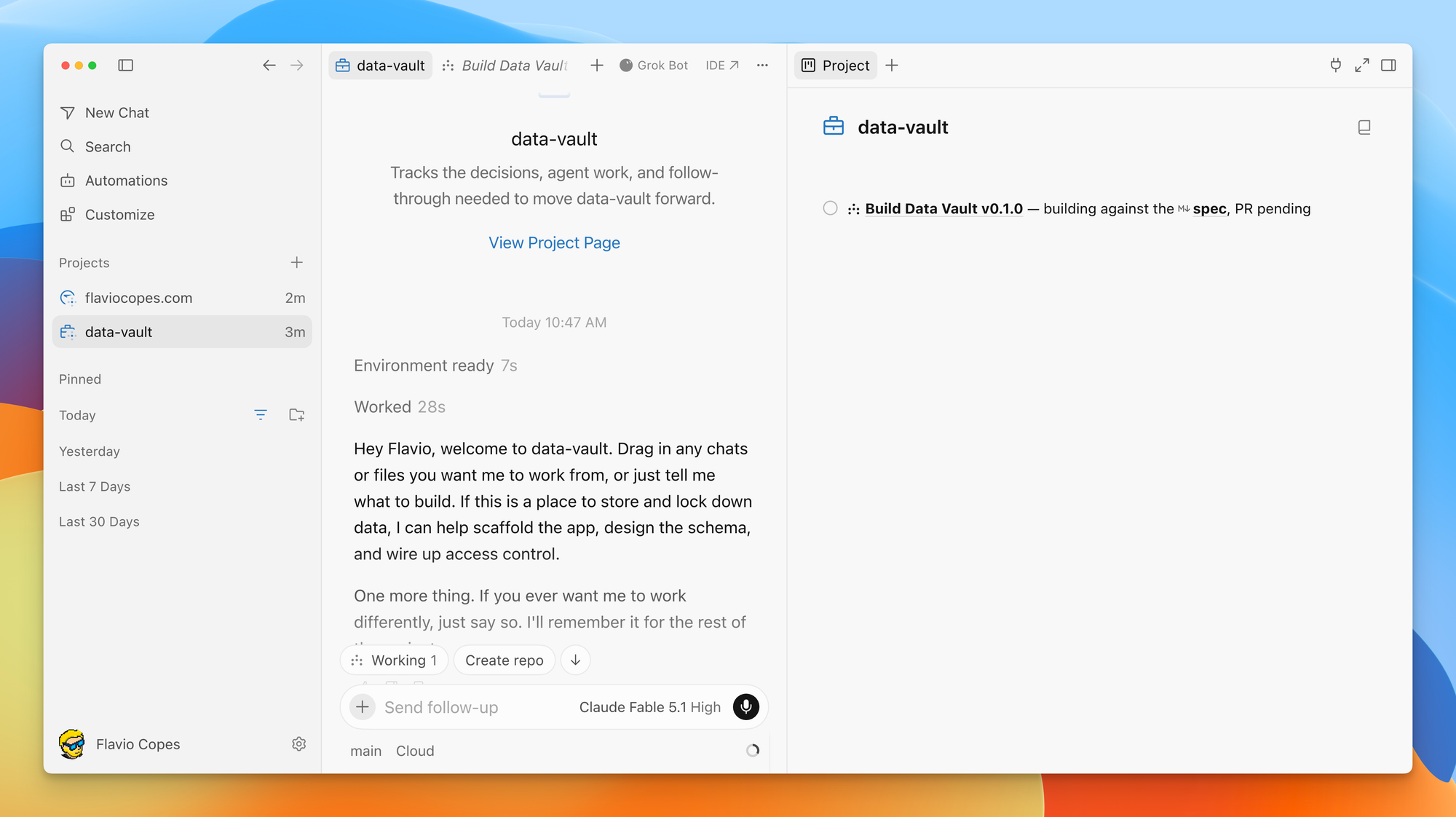
Every Project also gets its own page. It greets you, asks you to drag in chats or files to work from, and lists the agents it’s running with their status. This is what mine looked like a few minutes in, with one worker building against the spec and a PR pending:
My advice is to start small, with something that has a clear end state, rather than handing it a full app on day one:
Add test coverage for the billing module. Right now only the
happy path is tested. Cover refunds, partial refunds, and the
webhook retry logic. One PR per area.
Then leave it alone for a bit. Let it finish delegating, let the subagents work, and come back when it reports.
The coordinator learns from each round of feedback. If you tell it the PRs are too big, the next ones are smaller. If you tell it to always run the linter before opening a PR, it writes that down and every agent after that does it.
Move your existing chats into a Project
You can treat a Project like a folder for your chats. Drag existing chats from the sidebar into the Project, and the coordinator sees that you dragged them in and can read their transcripts.
Finished chats are worth moving too. The agent that figured out how to test a service two weeks ago is done, but its transcript is now context for every future agent in the Project, instead of sitting orphaned in your sidebar.
A few details came up in the replies. You drag chats one at a time, and there is no way yet to move a whole repo’s worth of chats in one go. At least one user reported that dragging only worked when the chat was already a cloud agent. I’d expect both to change, but that’s the beta today.
How many Projects should you create?
One Project per repo, or several? It depends on what makes sense to you. You can have several Projects for the same app, one for performance work, another for a new feature, and so on.
One reply put it in a way I liked: group chats by the outcome they are working toward, not by the repository. A Project full of unrelated tasks gives the coordinator nothing to aim at, while one called “checkout redesign” tells it exactly what belongs there.
For a single codebase, I’d create one Project per feature that spans several PRs, one per migration, and one for ongoing maintenance. Small one-off fixes still go in a normal chat.
The three patterns Cursor uses internally
Cursor has been running Projects internally for months. The blog post describes three patterns that cover most of what their engineers do, and they map well to the prompts you’ll end up writing.
Feature work
A feature starts with research. Agents explore the system and write what they find into the shared context. Then the coordinator plans and sends agents to implement and test different parts in parallel.
When it’s time to try the feature, the coordinator can start an agent on your machine and run it locally. After it ships, the same Project can watch the logs and handle bug reports, with the full history of why things were built the way they were.
A prompt for this kind of work looks like:
We need magic link login next to the existing password flow.
Research how sessions work today and write it up in the project
context first. Then plan the work in PRs I can review one at
a time.
Migrations
Migrations are easy to start and hard to finish. You do the first ten files with enthusiasm and the remaining four hundred never happen.
Cursor used Projects to adopt new frameworks and swap styling systems across hundreds of PRs. You work with the coordinator to agree on a safe approach, then let it apply that approach across the codebase in small increments. You review each PR closely at first, and as the fixes hold up you review less.
Migrate every component in src/components from styled-components
to Tailwind. Start with the five simplest ones so I can check
the approach. Keep each PR under 300 lines. Do not touch
anything under src/legacy.
Gardening
Some work never ends: keeping a design system consistent, watching for regressions, cleaning up after other people’s PRs.
One Cursor engineer runs a design-system Project this way. It follows every new PR, pulls out components that belong in the design system, and adds a lint rule when it sees the same mistake twice. It is on track to touch 20 to 100 PRs a day. The engineer checks in where attention is needed and leaves the rest alone.
This is where subscriptions come in:
Follow all new PRs in this repo. When one adds a hardcoded color
or spacing value, open a follow-up PR that replaces it with the
design token. Tag me only when you are not sure which token fits.
Subscriptions
Subscriptions arrived in Cursor’s August 19 release for cloud agents, and Projects builds on them. An agent subscribes to an event source and wakes when something happens there. The sources today are:
- your pull requests (open, merge, CI failure, review comments)
- a Slack channel or thread
- a schedule
Connect Slack and point the coordinator at a bug-report channel, and it starts delegating a fix each time a bug comes in. Tell it to follow your PRs, and it fixes CI and answers bot comments without you asking.
The schedule is the one I’d use most. A coordinator that runs every morning, checks a few things, and either does nothing or opens a small PR costs very little and keeps a codebase from drifting.
Who merges?
Early in a Project, you review every PR. That’s what Cursor recommends for migrations and it’s what I’d do for everything.
As the coordinator learns your preferences and the PRs keep landing clean, you can loosen up. Some people on the Cursor team let their Projects merge their own PRs and review after they land.
I wouldn’t start there. Give the coordinator permission to open PRs, keep merge for yourself, and move the line later if the track record earns it. One reply in the Japanese part of the thread asked exactly where the boundary between “open a PR” and “merge on green” sits, and the answer is that Cursor has not published a default, so you set it in your instructions.
Projects vs Grok Bot vs a normal chat
Cursor’s own announcement compared Projects to Grok Bot: an agent that is always on, manages work with subagents, and improves over time.
A normal chat is for one task with one result. You want the code now, you review it, you move on.
A Project is for a body of work in a codebase. It lives in Cursor, it knows your repo, it opens PRs, and it can run agents on your machine when needed.
Grok Bot is a general assistant with a persistent computer. It can sign in to your apps, run routines, and handle work that isn’t code. It can also drive coding agents. One user on launch night set up a Cursor coordinator and had Grok Bot talk to it instead of spawning its own.
So “change this codebase over the next month” is a Project and “run my business ops” is Grok Bot. When it’s not obvious, ask whether the work lives in a repo. If it does, it goes in a Project.
Here is how I’d split actual tasks between the two.
Tasks that belong in a Cursor Project:
- a migration across a codebase, like moving a site from Netlify to Cloudflare Pages
- a feature that touches many files and needs several PRs to land
- keeping CI green and answering review bot comments on your PRs
- gardening a repo: dead code, outdated dependencies, missing tests, inconsistent patterns
- a scheduled check that opens a small PR when it finds something wrong in the code
Tasks that belong to Grok Bot:
- anything that starts outside the repo: reading support emails, a Slack channel, a Notion page, analytics
- routines that need a browser and a login, like checking a dashboard every morning
- work that isn’t code at all: research, summaries, admin, buying a domain
- personal automations where chat is the interface and a JSON file is the database
- gathering context from several systems and then handing a clean task to a coding agent
The last one is where they meet. Grok Bot can be the outer loop that figures out what needs to change, and a Project (or a normal Cursor chat) is the inner loop that changes it. If a bug report arrives in Slack, Grok Bot can read it, reproduce it in a browser, and write the task. The Project takes it from there, because the fix lives in the repo.
The overlap is smaller than the announcement makes it sound, because Projects knows your code and your PRs while Grok Bot knows your apps and your inbox. Pick by where the work starts. For how I split the jobs on this site, see Grok Bot vs Cursor Projects.
The rough edges
Projects is a beta, and the launch thread had the usual mix of excitement and complaints. A few of them are worth knowing before you start.
Cost came up a lot. Cloud agents cost more than working in the local editor, and a coordinator running twenty subagents in the cloud burns through usage fast. Watch your limits during the first Project and size the work to your plan.
The most common technical question was how the persistent thread avoids getting bloated over months. Part of the answer is the shared context files, since agents write summaries there instead of everything living in one conversation, and the coordinator stays lean because it delegates instead of reading every diff. But Cursor has not documented how compaction works inside a Project, so treat this as an open question.
Linux users reported not seeing Projects on day one. Give it a few days. At least one user called the whole thing buggy, which is normal for a beta this ambitious, so keep your first Project on work you can afford to redo.
One more thing: Cursor already used “project” to mean a folder you open. Projects with a capital P is the new agent feature. Expect some confusion in docs and forums for a while.
How I would use it
I’ve only used it for half a day, and as I write this it has been out for a day. I already know where it goes in my workflow, though.
The first use is gardening. This site has about 2,000 blog posts, and I schedule two new ones a day. Before each goes live I want to check that its internal links resolve and that no screenshot is a downscaled 1024px upload. Today I do this in bursts, when I remember. A coordinator subscribed to a daily schedule would do it every morning and open a small PR when it finds something.
The second is the kind of migration I keep putting off. This site moved from Netlify to Cloudflare in June. The move itself was quick. Removing the old Netlify functions, the dead dependency, and the stale docs dragged on until August, in small commits between other work. A migration Project would have finished that in a few days of background work.
Where I would not use it: anything touching payments or the course access webhook. Those get a normal chat and a human merge.
What I don’t like about Projects
Projects are built around cloud agents, and I personally prefer not to use cloud agents. Having the agent on my computer, with access to my files, my terminal, and my running dev server, is a much better workflow for me. When something goes wrong I can look at it right there.
I am also not running thousands of agents on a task. A coordinator that fans out to hundreds of subagents consumes a ton of tokens, and I prefer working on one thing at a time, under more control, where I can read what the agent is doing while it does it. Even a handful of parallel agents needs a review plan.
And I don’t work with PRs or issues. I commit to master and push. Most of what Projects does around following PRs, fixing CI, and reacting to review comments doesn’t apply to how I work.
So I think I work at a smaller scale than what Projects is intended for. I’ll still experiment with it in the next few months to see if any of this changes my mind.
Where to read more
- Introducing Projects, the launch post with the internal usage patterns
- The changelog entry
- Cloud Agents and Cursor Harness Improvements, where subscriptions and cloud subagents first appeared
- The sidebar tip and launch thread from the team on X
- Ryo Lu’s one-line summary: long-lived agents for your big ideas
Want me to talk about your product? You can sponsor this site.
Related posts about ai: