How to add automatic updates to a Mac app using GitHub Releases
By Flavio Copes
Tranquillity Maker and CLI Tools Cabinet check GitHub once a day, download the new release, verify it, and replace themselves. Here's how it works, in one Swift file with no dependencies.
My Mac apps Tranquillity Maker and CLI Tools Cabinet update themselves. Once a day they ask GitHub whether there’s a new release. When there is, they show what’s new and offer to install it:
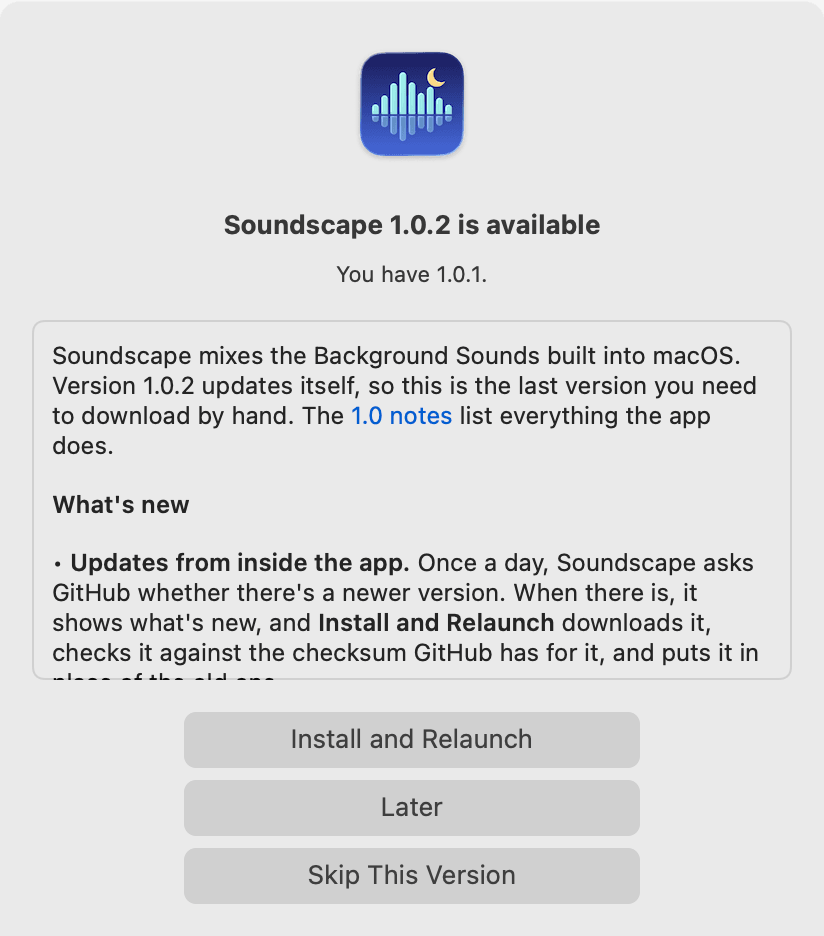
Click Install and Relaunch, and the app downloads the new version, checks it, puts it in place of the old one, and opens again.
All of this lives in one Swift file with no dependencies, AppUpdater.swift. It’s 436 lines, and every app gets an identical copy.
Why not Sparkle
Sparkle is the usual way to update a Mac app that’s not on the App Store. It’s a framework you add to your app. You host an appcast, an XML feed that lists your versions, and you sign every update with a private key.
My apps are open source, and every release is already a GitHub release with the app zipped and attached. So the release can be the feed. The app reads it from the GitHub API, and there’s nothing else to host or sign.
The release is the feed
Every release follows three rules:
- the tag is
vfollowed by the version, likev1.0.2 - the app in the zip has exactly that version in its
Info.plist - the zip is attached to the release, made with
ditto -c -k --keepParent
Keep the zip for the updater. A DMG installer can sit beside it for first-time installs.
The GitHub API returns the latest release of a repo at https://api.github.com/repos/flaviocopes/tranquillity-maker/releases/latest. This is the part of the answer the updater reads:
{
  "tag_name": "v1.0.2",
  "html_url": "https://github.com/flaviocopes/tranquillity-maker/releases/tag/v1.0.2",
  "body": "Tranquillity Maker mixes the Background Sounds built into macOS...",
  "assets": [
    {
      "name": "Soundscape-1.0.2.zip",
      "browser_download_url": "https://github.com/flaviocopes/tranquillity-maker/releases/download/v1.0.2/Soundscape-1.0.2.zip",
      "digest": "sha256:8b0836d9903ea43fd595c7f281b310a567940ba3275e6bc5cdc1fdb409469d50"
    }
  ]
}
Notice the digest. GitHub computes the SHA-256 of every file you upload to a release, so we get a checksum for free. The updater uses it to check the download.
Checking for a new version
The app decodes the JSON into a small struct. CodingKeys maps GitHub’s names to shorter ones:
struct Release: Decodable {
  let tag: String
  let body: String?
  let pageURL: URL
  let assets: [Asset]

  var version: String { tag.hasPrefix("v") ? String(tag.dropFirst()) : tag }

  enum CodingKeys: String, CodingKey {
    case tag = "tag_name", body, pageURL = "html_url", assets
  }

  struct Asset: Decodable {
    let name: String
    let url: URL
    let digest: String?

    enum CodingKeys: String, CodingKey {
      case name, url = "browser_download_url", digest
    }
  }
}
GitHub asks every API client to send a User-Agent, so the request sends the app’s name and version:
let url = URL(string: "https://api.github.com/repos/flaviocopes/tranquillity-maker/releases/latest")!
var request = URLRequest(url: url, cachePolicy: .reloadIgnoringLocalCacheData)
request.setValue("application/vnd.github+json", forHTTPHeaderField: "Accept")
request.setValue("TranquillityMaker/1.0.1", forHTTPHeaderField: "User-Agent")

let (data, response) = try await URLSession.shared.data(for: request)
if (response as? HTTPURLResponse)?.statusCode == 200 {
  let release = try JSONDecoder().decode(Release.self, from: data)
}
A 404 means the repo has no releases yet, so there’s nothing to do.
The installed version comes from Bundle.main.object(forInfoDictionaryKey: "CFBundleShortVersionString"). Comparing it with the release version as strings doesn’t work, because "1.0.10" sorts before "1.0.9". So we compare the numbers one by one:
func isVersion(_ version: String, newerThan current: String) -> Bool {
  let new = version.split(separator: ".").map { Int($0) ?? 0 }
  let old = current.split(separator: ".").map { Int($0) ?? 0 }
  for index in 0..<max(new.count, old.count) {
    let a = index < new.count ? new[index] : 0
    let b = index < old.count ? old[index] : 0
    if a != b { return a > b }
  }
  return false
}

isVersion("1.0.10", newerThan: "1.0.9") //true
isVersion("1.0", newerThan: "1.0.0") //false
The app checks five seconds after launch, then every hour while it runs. Each time, it goes ahead only if 24 hours have passed since the last check, which it saves in UserDefaults:
func checkIfDue() {
  let lastCheck = UserDefaults.standard.object(forKey: "AppUpdaterLastCheck") as? Date ?? .distantPast
  guard Date().timeIntervalSince(lastCheck) >= 24 * 60 * 60 else { return }
  Task { await check() }
}
So an app that stays open for weeks still checks every day, and opening it ten times in a day makes one request. The GitHub API allows 60 requests per hour without a token, per IP address, so one a day is nowhere near the limit.
Showing what’s new
The dialog is an NSAlert. The release notes go in its accessory view, a small SwiftUI view that renders the Markdown with AttributedString.
My release notes end with an ## Install section. It says the app offers the update by itself, then gives the zip’s name, the macOS version it needs, and the SHA-256 for people who download it by hand. Someone updating from inside the app doesn’t need it, so the updater cuts the notes at that heading. It also turns the other headings into bold text and the - bullets into •, because the view only renders inline Markdown.
Skip This Version saves the version in UserDefaults, and the daily check doesn’t ask about it again. The Check for Updates… menu item ignores it, so you can still install a version you skipped.
Downloading next to the app
The zip downloads into a temporary folder on the same volume as the app. FileManager has a special folder for this, meant for files that will replace another one:
let folder = try FileManager.default.url(
  for: .itemReplacementDirectory, in: .userDomainMask,
  appropriateFor: Bundle.main.bundleURL, create: true)

let (downloaded, _) = try await URLSession.shared.download(from: asset.url)
let zip = folder.appending(path: asset.name)
try FileManager.default.moveItem(at: downloaded, to: zip)
Being on the same volume makes the final swap a rename, which is instant, instead of a copy. While the zip downloads, a small window shows a progress bar and a Cancel button. The progress comes from the download task’s progress property.
Checking the download
Before the app replaces itself, the updater checks four things. If any check fails, it deletes the download, shows the error, and leaves the installed app alone.
First, the checksum. CryptoKit computes the SHA-256, reading the file 1 MB at a time so the whole zip is never in memory:
import CryptoKit

func sha256(of file: URL) throws -> String {
  let handle = try FileHandle(forReadingFrom: file)
  defer { try? handle.close() }
  var hasher = SHA256()
  while let chunk = try handle.read(upToCount: 1 << 20), !chunk.isEmpty {
    hasher.update(data: chunk)
  }
  return hasher.finalize().map { String(format: "%02x", $0) }.joined()
}
The result must match GitHub’s digest:
guard asset.digest == "sha256:\(try sha256(of: zip))" else { throw UpdateError.checksum }Then ditto, the same tool that made the zip, unpacks it:
let ditto = Process()
ditto.executableURL = URL(filePath: "/usr/bin/ditto")
ditto.arguments = ["-x", "-k", zip.path, folder.path]
try ditto.run()
ditto.waitUntilExit()
Next, the updater reads the new app’s Info.plist. The bundle identifier must be the same as the running app’s, and the version must be the one in the tag. This catches a release with the wrong zip attached. It also catches a version I forgot to bump, which would otherwise make the app offer the same update every day, forever.
Last, the code signature. The Security framework runs the same checks as codesign --verify --deep --strict:
var code: SecStaticCode?
let flags = SecCSFlags(rawValue: UInt32(kSecCSCheckAllArchitectures | kSecCSCheckNestedCode | kSecCSStrictValidate))
guard SecStaticCodeCreateWithPath(app as CFURL, [], &code) == errSecSuccess, let code,
  SecStaticCodeCheckValidity(code, flags, nil) == errSecSuccess
else { throw UpdateError.signature }
My apps are signed with my Developer ID and notarized by Apple. This check passes no requirement as its third argument, so it doesn’t look at who signed the app. It proves the signature is valid and that no file in the bundle changed after signing.
If you also want to be sure the new app comes from you, pass a SecRequirement that names your team ID instead of nil.
Swapping the app
FileManager.replaceItemAt puts the new app where the old one was:
try FileManager.default.replaceItemAt(
  Bundle.main.bundleURL, withItemAt: newApp,
  backupItemName: nil, options: .usingNewMetadataOnly)
The .usingNewMetadataOnly option matters because of quarantine. When you download an app with Safari, macOS gives it a com.apple.quarantine attribute, and that’s why the first launch shows the Gatekeeper warning. With this option, the new app keeps only its own metadata and doesn’t inherit anything from the old one.
The new app has no quarantine attribute of its own either. A browser adds it because it asks macOS to, and URLSession in an app that’s not sandboxed doesn’t. So the updated app opens without any warning.
Relaunching
A running app can’t open itself again, because open would bring the running copy to the front. So the updater starts a tiny shell script that waits for the app to quit, then opens it:
let shell = Process()
shell.executableURL = URL(filePath: "/bin/sh")
shell.arguments = [
  "-c", "while kill -0 \"$0\" 2>/dev/null; do sleep 0.2; done; open \"$1\"",
  String(ProcessInfo.processInfo.processIdentifier), Bundle.main.bundlePath,
]
try shell.run()
NSApp.terminate(nil)
kill -0 checks that the process still exists, without sending it a signal. The process ID and the app’s path arrive as $0 and $1, so a name with a space, like CLI Tools Cabinet.app, needs no extra quoting.
When it can’t install
In three cases the first button becomes Open Release Page, and you download the update by hand:
- The app runs from App Translocation. If you open a downloaded app straight from the Downloads folder, macOS runs it from a random read-only location, and the dialog asks you to move it to Applications first.
- The app’s folder isn’t writable, like
/Applicationsfor a standard account. - The release has no digest, so there’s nothing to check the download against.
The limits
The updater trusts my GitHub account. The checksum comes from the same release as the file, so it catches a broken or incomplete download, not a malicious release. Sparkle’s signing key protects against that, if you need it.
macOS ties permissions like Accessibility or Screen Recording to the app’s code signing identity. With a Developer ID, the bundle identifier and your team ID stay the same from build to build, so those permissions survive an update. An ad-hoc signed app gets a new identity with every build, so it has to ask again after each update. The free Ship macOS Apps course walks through signing and notarizing.
It only works with public repos, because the app calls the API without a token. And it’s for apps that aren’t sandboxed, because a sandboxed app can’t replace itself in /Applications.
Use it in your app
The file is MIT licensed, like the rest of Tranquillity Maker. Copy it into your app, start it with your repo, and add the menu item after About:
@main
struct CliToolsApp: App {
  init() {
    AppUpdater.shared.start(repository: "flaviocopes/cli-tools")
  }

  var body: some Scene {
    WindowGroup {
      ContentView()
    }
    .commands {
      CommandGroup(after: .appInfo) {
        Button("Check for Updates…") {
          AppUpdater.shared.checkForUpdates()
        }
      }
    }
  }
}
Then publish every release with the three rules above. Tell your users about the daily check in the README, along with the command that turns it off:
defaults write com.flaviocopes.clitools AppUpdaterAutomaticChecks -bool falseThe first release with the updater still needs one download by hand. From the next one, the app updates itself.
Want me to talk about your product? You can sponsor this site.
Related posts about swift: