How to build typed decisions with Jev
By Flavio
Learn how Jev turns text into typed choices, scores, and probabilities, with JavaScript examples, practical patterns, limits, and real use cases.
Jev adds typed decisions to an application. You define the possible answers, send it data, and use its probabilities to decide what your code should do next.
This guide focuses on writing those questions and using their answers. For signup and credentials, start with how to get access to the Jev API.
Jev does not write replies, explanations, or code.
You send it data and a list of typed questions. It sends back one answer per question: a yes/no probability, one option from a list you defined, or a position on a scale you defined, each with probabilities. Experimental image input and a Box type also let it locate something in a picture. TypeSafe says most calls complete in about 100 milliseconds. Input tokens cost $0.042 per million, output tokens are free.
The difference is where the AI sits. With ChatGPT or a coding agent, the AI is the interface or the worker. Jev is a small component inside a regular application, added where code needs one judgment.
It comes from TypeSafe AI, a San Francisco lab that came out of stealth on September 15, 2026 with $40M in seed funding and Jev as its first public model. TypeSafe calls it a System One model, built to make fast decisions inside software rather than chat with people.
On October 9, 2026, TypeSafe also announced an $870 million Series A at a $7.5 billion valuation, led by Andreessen Horowitz with participation from Sequoia Capital and existing investor DCVC.
This post covers what Jev is, how you call it, how to write questions for it, where it fails, and where I would put it in my own projects.
What Jev is in one sentence
The simplest way to describe Jev is as a smart if statement.
Ordinary code branches on values it can compute, like if (order.total > 100). It falls apart when the condition is a judgment. Is this support message angry? Is this email about billing? Which of these 12 buttons continues the checkout?
Classifiers handle narrow judgments when you have training data and fixed labels. LLM apps ask a general model for structured output. Jev is a third option: define the possible answers up front, get a probability for each, branch on the result.
Here is a request built from a hypothetical sponsor-form submission. The state holds the form fields, the questions are what I want to know about it.
{
  "model": "jev-latest",
  "state": {
    "opportunity": "link",
    "name": "Managed Postgres",
    "description": "We make a managed PostgreSQL hosting product and would like to sponsor the newsletter in October."
  },
  "questions": {
    "is_sponsor_inquiry": {
      "type": "noul",
      "instructions": "Does `description` ask to sponsor the site or newsletter?"
    },
    "product_category": {
      "type": "choice",
      "instructions": "What kind of product is described by `name` and `description`?",
      "criteria": {
        "dev_tool": "Developer tools, hosting, APIs, SaaS for developers",
        "course": "Courses, books, or training",
        "unrelated": "Anything not aimed at developers"
      }
    },
    "message_quality": {
      "type": "score",
      "instructions": "How specific is the request?",
      "criteria": [
        "Generic template, no reference to this site",
        "Mentions the site but no concrete ask",
        "Concrete ask with a timeframe or product named"
      ]
    }
  }
}
And here is the shape of what comes back:
{
  "model": "jev-1.13.0",
  "answers": {
    "is_sponsor_inquiry": { "type": "noul", "noul": 0.99 },
    "product_category": {
      "type": "choice",
      "choice": "dev_tool",
      "probabilities": { "dev_tool": 0.97, "course": 0.01, "unrelated": 0.02 },
      "confidence": 0.95
    },
    "message_quality": {
      "type": "score",
      "score": 1.9,
      "legend": {
        "0": "Generic template, no reference to this site",
        "1": "Mentions the site but no concrete ask",
        "2": "Concrete ask with a timeframe or product named"
      },
      "probabilities": { "0": 0.0, "1": 0.1, "2": 0.9 },
      "confidence": 0.86
    }
  },
  "usage": { "input_tokens": 210, "output_tokens": 31 }
}
The numbers are illustrative, the shape is exact. Notice that:
- There is no generated prose to interpret.
- Every answer is constrained to the options I supplied.
product_categorycan only bedev_tool,courseorunrelated. - All three questions were answered in one call. A fourth barely changes the response time.
Your code then does the boring part:
const { answers } = response

if (answers.is_sponsor_inquiry.noul > 0.9 && answers.product_category.choice === 'dev_tool') {
  sendRateCard(email)
} else {
  queueForManualReply(email)
}
The model supplies the judgment, and the code decides what happens next.
How Jev differs from ChatGPT, Cursor, Codex and Claude Code
Most AI tools put a generative model at the center. You give it a broad request, it produces something new.
With ChatGPT, the interface is a conversation. You ask, and you get generated text, code, an image, or a tool call result. The model decides what the response contains.
Cursor is not a model. It is an editor and agent product that uses different models. You give it a coding task and a repository, and its agents inspect files, write code, run commands and tests until they have a result.
OpenAI Codex and Claude Code are coding agents too. Codex ships as an app, a CLI, and cloud workflows. Claude Code runs in the terminal and other development environments. Both take a goal such as “add authentication”, inspect the project, edit files, run commands, and iterate.
Other agentic CLI tools follow the same pattern: an agent owns the loop of reading the request, calling a tool, inspecting the result, and continuing.
Jev does none of that. It takes no open-ended goal, invokes no tools, edits no files, runs no loop. Your code gives it one state and a set of questions. It returns typed answers and probabilities, then stops.
| Tool | What you give it | What comes back | Its role |
|---|---|---|---|
| ChatGPT | A prompt or conversation | A generated response | General assistant |
| Cursor | A coding task, repository, and tools | File edits, commands, test results | Editor and coding agent |
| OpenAI Codex | A coding goal, project, and tools | Code changes and completed tasks | Coding agent |
| Claude Code and other CLI agents | An instruction and local tools | Tool calls, edits, and terminal results | Terminal coding agent |
| Jev | State plus questions with defined answer shapes | Choices, scores, and probabilities | Decision primitive inside software |
Jev can sit inside these tools rather than replacing them.
A coding agent could ask Jev whether a shell command is read-only, reversible, or destructive before running it. A router could use it to pick which model gets a task, and a SaaS app to decide whether a support message needs a database lookup, a generative model, or a person.
The coding agent still writes the code and ChatGPT still writes the answer. Jev handles the small decision about which path to take.
This changes how you add AI to a product, because the product doesn’t need to become a chatbot or an agent. You keep the application you have and add one model call where a normal if can’t understand the input.
It could also change where most AI calls happen. Chatbots and coding agents are visible because the model is the product. A decision model disappears inside a support queue, an event pipeline, a spam filter, or a permission check, with no AI interface in sight.
Whether decision models become a larger market than generative LLMs is too early to tell, but they could produce more calls. A person opens ChatGPT a few times a day. Software could make thousands of tiny decisions in the background. The big providers followed within two weeks. OpenAI announced a Decisions API powered by GPT-6 Luna, in limited preview, on September 29, 2026, and on October 1 Cloudflare released Clef, an open-weight decision model that accepts Jev’s request format.
Composing AI into software is not new. Developers do it with small LLMs, embeddings, classifiers, and structured outputs. What Jev adds is a model and API designed only for that role: low latency, low cost, typed answers, probabilities as the normal output.
How Jev differs from classifiers and structured LLM outputs
Before Jev, we had three common ways to make this kind of decision in software:
- Write an
if, a regular expression, or a decision tree. - Train a classifier for a specific set of labels.
- Ask a general-purpose LLM to return structured output.
Rules are fast, cheap, and predictable, but brittle when meaning matters. A classifier is fast too, but needs labeled examples, a training step, and a separate model per task.
A general-purpose LLM understands unstructured text with no per-task training, but it is still a generative model, even when you constrain its answer to JSON.
Jev aims for the middle. Like an LLM, it accepts unstructured text and questions you define at runtime. Like a classifier, it returns a constrained probability distribution instead of an open-ended answer.
Structured outputs already exist and work. Most providers offer them directly or through tool calling, and the Vercel AI SDK standardizes them with generateText() and Output.object(), validated against your schema.
The difference is in how the answer is produced and what it costs.
An LLM generates its answer one token at a time. To return {"category": "billing", "urgent": true} it generates every token in sequence. A schema constrains the result, but generation can still fail or stop early, and the AI SDK reports those as structured-output errors. If you ask an LLM for a probability, that number is not guaranteed to be calibrated.
Jev doesn’t generate a string. TypeSafe says it samples all the answers in parallel: each question is evaluated independently against the same state, and the output is a probability distribution over the options you defined. You still get JSON, but no decision has to be recovered from generated prose.
This is what makes it fast and cheap. TypeSafe quotes 70 to 500 milliseconds end to end, against 3 to 329 seconds for frontier LLMs on the same kind of question. $0.042 per million input tokens is 5 to 240 times lower than LLM input prices, which run from $0.20 to $10 per million, and output is free because there is almost none to meter. The headline “193.6x faster, 444.6x cheaper” comes from TypeSafe’s own workflow evaluations, which it says sit at the high end of real-world results, so treat it as a ceiling.
The other difference is training. Chat models use RLHF or similar methods that reward answers humans prefer. TypeSafe trained Jev with Reinforcement Learning for Calibrated Decisions (RLCD), which optimizes for probabilities that match outcomes: across many predictions, answers given 90% probability should be right about 90% of the time. Any single answer can still be wrong. And since a response cannot contain a value outside your schema, schema errors and wrong decisions become separate problems.
Jev also gives something up on purpose. It cannot write a reply, produce code, summarize a document or explain its reasoning. If you need text, you need an LLM. The interesting architecture uses the two together, with Jev deciding and the LLM writing.
Where the name comes from
System One comes from Thinking, Fast and Slow by Daniel Kahneman. System 1 is fast, intuitive judgment. System 2 is slow, deliberate reasoning. In TypeSafe’s framing, Jev handles the first, reasoning models the second.
Jev is named after William Stanley Jevons, the economist behind the Jevons paradox. More efficient steam engines drove coal consumption up, not down, because cheaper power found new uses. TypeSafe’s bet is the same for intelligence. Make a decision cost far less than a cent and you’ll put decisions where you’d never have called an LLM.
How Jev works under the hood
The company hasn’t published the architecture in detail. These are the parts that matter for you as a user.
Every question in a request uses the same state. TypeSafe evaluates them independently and in parallel, so one answer never becomes context for another. Its tests found no batching effect beyond normal sampling noise.
Because the output is a distribution over your options, a successful answer cannot contain a malformed value. TypeSafe plots this as a 0% type-error rate and calls it structural rather than empirical. It covers the shape of an answer, not whether it’s correct.
By default, the state and all questions share about 64,000 tokens. The state plus any one question must also fit in about 32,000 tokens. A Choice can have up to 255 options, a Score between 2 and 10 levels.
Jev accepts text as a string, a JSON object or an array. It also accepts images behind an experimental header, covered below. Audio and video need conversion to text or individual still images first.
The newest release is jev-1.14.0, announced on October 14, 2026. TypeSafe describes it as a general improvement, with the biggest expected gain in multilingual support. On October 15, jev-preview points to it, while jev-latest (the SDK default) still points to jev-1.13.0. TypeSafe plans to move jev-latest to the new release a week after the announcement. The model reference lists the current aliases. Log the versioned ID in each response, and pin a version once you’ve tuned your thresholds against it.
The core question types
Noul, Choice and Score are the established decision types. Each returns a differently shaped answer. The experimental Box type adds image localization, which we’ll try after these.
| Type | The question | What comes back |
|---|---|---|
| Noul | Is this true? | noul, a probability from 0 to 1 |
| Choice | Which of these options? | choice, probabilities, confidence |
| Score | Where on this scale? | score, legend, probabilities, confidence |
Every question has an ID you choose, a type, and instructions. Choice and Score also need criteria. Noul accepts criteria as an optional clarification.
The ID is for your code and is not sent to the model, so write the full question in instructions. refund_requested as a key tells the model nothing.
Noul: a yes/no question
Use a Noul when the answer is yes or no: does this message ask for a refund, does this resume mention Kubernetes, is there an email address in this comment.
{
  "refund_requested": {
    "type": "noul",
    "instructions": "Does the customer ask for money back?"
  }
}
The answer is a single number:
{ "refund_requested": { "type": "noul", "noul": 0.93 } }noul is the probability that the answer is yes. Near 1 is a strong yes, near 0 a strong no, near 0.5 means the model gives both similar probability.
Phrase the question so a high value means yes. “Is the customer calm?” and “Is the customer angry?” both work, but a Noul where true means “no” confuses the model and whoever reads your code six months from now.
When the boundary between yes and no is subtle, add criteria describing what each side means:
{
  "is_urgent": {
    "type": "noul",
    "instructions": "Does the message convey urgency?",
    "criteria": {
      "true": "The sender asks for action today or mentions losing money or customers",
      "false": "No deadline and no consequence is mentioned"
    }
  }
}
A Noul at 0.5 does not mean “medium”. Ask “Is this candidate strong in Python?” and get 0.5, and you learned the model can’t tell, not that the candidate is average. To measure a degree, use a Score. For a yes/no, make the condition checkable: “Does the resume state the candidate used Python at work?”
Noul answers have no separate confidence field, because the probability itself is the uncertainty signal.
Choice: pick one option
Use a Choice when the answer is one of a fixed set of options with no order between them: which team handles this ticket, what language this file is written in, or which of these 40 links leads to the pricing page.
{
  "department": {
    "type": "choice",
    "instructions": "Which team should handle this message?",
    "criteria": {
      "billing": "Charges, invoices, refunds, subscriptions",
      "technical": "Bugs, outages, integration problems",
      "sales": "Pricing questions, upgrades, new accounts",
      "other": "None of the above"
    }
  }
}
The answer has the selected option plus the full distribution:
{
  "department": {
    "type": "choice",
    "choice": "billing",
    "probabilities": { "billing": 0.84, "technical": 0.15, "sales": 0.0, "other": 0.01 },
    "confidence": 0.6
  }
}
choice is the option with the highest probability, probabilities the full distribution, confidence its shape collapsed into one number: high when one option dominates, low when probability is spread out. Here billing wins but some probability remains on technical.
Add an other or none_of_the_above option whenever your list might not cover every input, because the model has to pick something. Describe each option with what belongs to it, and how it differs from its neighbors when the boundary is subtle. Then test against labeled examples. I go through writing labels and measuring their accuracy in how to classify text with Jev.
Score: a position on a scale you describe
Use a Score when the answer sits on a spectrum and you can describe each point: bug severity, customer frustration, a candidate’s experience with a technology.
{
  "bug_severity": {
    "type": "score",
    "instructions": "How severe is the reported issue?",
    "criteria": [
      "Cosmetic; no impact on functionality",
      "Broken or degraded feature, but a workaround exists",
      "Blocking issue; no workaround exists"
    ]
  }
}
The criteria array goes from low to high, and each entry’s index, starting at 0, is its level number. The answer:
{
  "bug_severity": {
    "type": "score",
    "score": 1.43,
    "confidence": 0.35,
    "legend": {
      "0": "Cosmetic; no impact on functionality",
      "1": "Broken or degraded feature, but a workaround exists",
      "2": "Blocking issue; no workaround exists"
    },
    "probabilities": { "0": 0.0, "1": 0.57, "2": 0.43 }
  }
}
score is the probability-weighted mean of the level numbers: 0 × 0.0 + 1 × 0.57 + 2 × 0.43 = 1.43. It can land between levels. 1.43 here means “split between a broken feature with a workaround and a blocking issue, leaning to the workaround”, a fair reading of an export bug that only affects Safari: Chrome is a workaround, except for customers who only use Safari.
Read probabilities alongside the score. A 1.0 can mean all the weight on level 1, or half on 0 and half on 2. confidence tells them apart.
The most important rule for Scores is to describe situations, not degrees. “Broken feature, workaround exists” gives the model something to match. “Moderately severe” does not, and bare numbers leave it nothing at all, so it spreads probability across levels.
Each level is judged independently. The model doesn’t see the level number or its neighbors, so “worse than the previous level” means nothing.
Keep each Score to one dimension. If a level says “punctual and smart and experienced”, an input high on one and low on another can’t be placed, and confidence collapses. Split it into three Scores and combine them in code, as we’ll do below.
Experimental images and Box questions
TypeSafe calls these features “danger zone” capabilities. They’re available to prototype with, but the company doesn’t consider them ready for production.
Image input works with both Jev 1.13 and 1.14. Send TypeSafe-Danger-Zone-Images: true with each request. Images can appear in the state, instructions, or criteria through references in a top-level assets map. The SDKs can create those references for you.
Suppose we want to locate a coffee mug in a photo. A Box question returns its edges. It needs jev-1.14.0 or an alias pointing to that model, plus the images header.
Save a JPEG photo as kitchen.jpg; 1024 × 768 pixels fits the image limits. With TYPESAFE_API_KEY set (see Your first call with curl), send this multipart request. The asset connects the reference in state.photo to the uploaded file:
curl https://api.typesafe.ai/v1/systemone \
  -H "Authorization: Bearer $TYPESAFE_API_KEY" \
  -H "TypeSafe-Danger-Zone-Images: true" \
  -F 'request={
    "model": "jev-1.14.0",
    "state": {"photo": "f8b6d0c2-kitchen-photo"},
    "assets": {
      "f8b6d0c2-kitchen-photo": {"type": "image", "part": "kitchen-photo"}
    },
    "questions": {
      "mug_visible": {"type": "noul", "instructions": "Is there a coffee mug in `photo`?"},
      "mug": {"type": "box", "instructions": "The coffee mug nearest the sink in `photo`"}
    }
  };type=application/json' \
  -F 'kitchen-photo=@kitchen.jpg;type=image/jpeg'
A Box answer contains box.top, box.bottom, box.left, and box.right, each between 0 and 1, plus confidence. Multiply the horizontal edges by the image width and the vertical edges by its height to get pixel coordinates.
Box always returns a rectangle, even when the target is absent. That’s why we also ask mug_visible: ignore the box when the Noul says the mug isn’t there. Choose the probability threshold by testing your own images.
Use PNG or JPEG files within the documented image limits. Images are rejected rather than resized automatically. Image tokens are billed at the same input rate as text.
Opt into longer context
The default context limits still apply unless you send this header:
TypeSafe-Danger-Zone-Long-Context: trueIt raises both the per-request and per-question limits to 262k tokens on Jev 1.13 and 1.14. The long-context option keeps the same per-token price, but TypeSafe says it’s slower and less accurate. Keep filtering irrelevant material before sending it.
State: what you give Jev to look at
The state is the content the questions are about. It can be a plain string:
"My card was charged twice for order A-104."Or an object with named fields:
{
  "message": "My card was charged twice for order A-104.",
  "order": { "id": "A-104", "charges": [49, 49] },
  "refund_policy": "Duplicate charges are refunded in full."
}
Or an array, for a conversation or a list of records.
Use an object for most requests. It lets you point a question at a specific part of the state with a backticked path:
{
  "policy_supports_refund": {
    "type": "noul",
    "instructions": "Does `refund_policy` cover the situation described in `message`, given `order.charges`?"
  }
}
The docs recommend backticks and dot-and-index notation for field names, so there’s no ambiguity about which part of the state a question refers to.
The other rule is to send only what the questions need. Accuracy falls as the state fills with unrelated content, so filter in code first. Don’t send the customer’s whole history to score one ticket, or the whole document to classify one paragraph. TypeSafe says the model suffers from context rot like any other, and the fix is on your side.
Confidence: when to act and when to ask
Confidence is one of Jev’s most useful outputs. A probability written by an LLM is not calibrated the same way.
Every Choice and Score answer carries a confidence from 0 to 1, computed from the shape of probabilities: concentrated on one option means high, spread out means low. The full distribution is in the response, so you can compute your own statistic if your domain needs one.
The pattern the docs suggest, and the one I would start with, splits confidence into three ranges:
- High: act automatically.
- Medium: ask the user to confirm, flag for review, or gather more data first.
- Low: route to a person, ask for clarification, or fall back to a slower system.
Where the boundaries sit depends on what a wrong answer costs. The docs use 0.5 as a review floor and 0.9 before a destructive action, as examples, not defaults. Here is the pattern with the JavaScript SDK:
const { answers } = await client.systemOne({
  state: userMessage,
  questions: {
    action: choice('What is the user trying to do?', {
      check_balance: 'View the account balance',
      approve_transfer: 'Approve the pending withdrawal',
      support: 'Get help with a problem',
    }),
  },
})

const action = answers.action

if (action.confidence < 0.5) {
  routeToHuman(userMessage)
} else if (action.choice === 'check_balance') {
  showBalance(accountId)
} else if (action.choice === 'approve_transfer') {
  if (action.confidence > 0.9) {
    confirmThenExecute(accountId)
  } else {
    askUserToConfirm(accountId)
  }
}The 0.5 floor catches answers the model reports as unsure. Above it, the bar for acting without confirmation rises with the stakes. The risk tolerance lives in your code, in numbers you can read and change.
Start conservative, run it on your own data, plot confidence against accuracy, and move the thresholds from there. For a step-by-step walkthrough of picking those thresholds, read How to use Jev confidence scores.
Is Jev open source? Can you run it locally?
No. TypeSafe hasn’t published Jev’s weights, so there’s no model to download and run on your own machine. Jev is only available as a hosted service: you call TypeSafe’s API, directly or through Vercel’s AI Gateway.
The docs don’t mention a self-hosted or on-premises version either. On privacy, they say Jev is never trained on your requests, and enterprise customers can get zero data retention. The October release also adds an opt-in to share queries for debugging and finding model weaknesses. TypeSafe says opting in still doesn’t allow training on those queries.
The open source part is the code around the model. The JavaScript and Python SDKs are on TypeSafe’s GitHub under the MIT license, and so is the agent skill. TypeSafe also publishes system-one-adapter, a Python drop-in for the SDK client that sends the same questions to OpenAI, Anthropic, Gemini or any OpenAI-compatible endpoint instead of Jev, so you can compare them.
The projects in this post that run locally run their own code on your machine and still call the Jev API. Oko finds files and does its keyword search locally, then sends your question and the selected snippets to TypeSafe for the ranking. Its --no-jev flag keeps everything local by skipping Jev.
On Hugging Face you’ll find community models called Open-Jev or Jev-Style. They copy Jev’s request format on top of open models like Qwen, and some run in LM Studio, but they’re independent projects and none of them is Jev.
The closest thing to a Jev you can run yourself is Cloudflare’s Clef, released on October 1, 2026 with open weights under the Apache 2.0 license. It’s a separate model built on Qwen, but it takes the same requests and returns the same answer shapes, so code written for Jev works with it once you change the URL, the key and the model name. Cloudflare hosts it on Workers AI. Running the weights yourself takes a datacenter GPU: Cloudflare tested them on a single NVIDIA H200.
TypeSafe hasn’t published a paper either. The launch post mentions a new model architecture, a parallel sampler and the RLCD training method without details, calls Jev “neither small nor an LLM”, and says TypeSafe chose not to publish results on public benchmarks. The parts that matter when you use it are in How Jev works under the hood.
Getting access
Jev launched with a waitlist, and people reported getting in within a day or two. On September 20, 2026 TypeSafe opened it to everyone, then on September 22 it paused new signups because of demand. Existing accounts keep working. Check typesafe.ai for the current state, or use the Vercel AI Gateway route described below. A paused signup is why I care more about the AI product I can use than about the announcement.
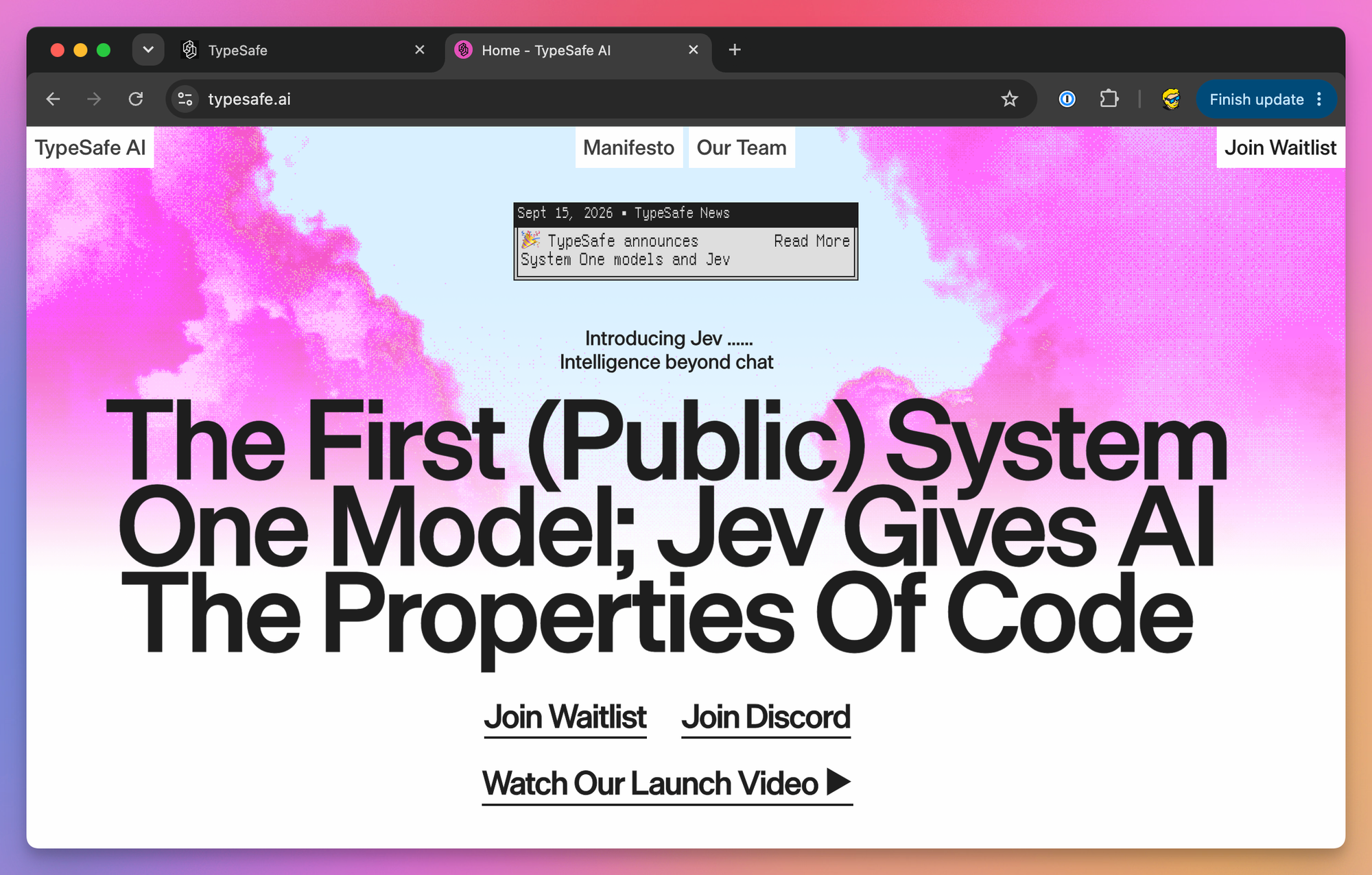
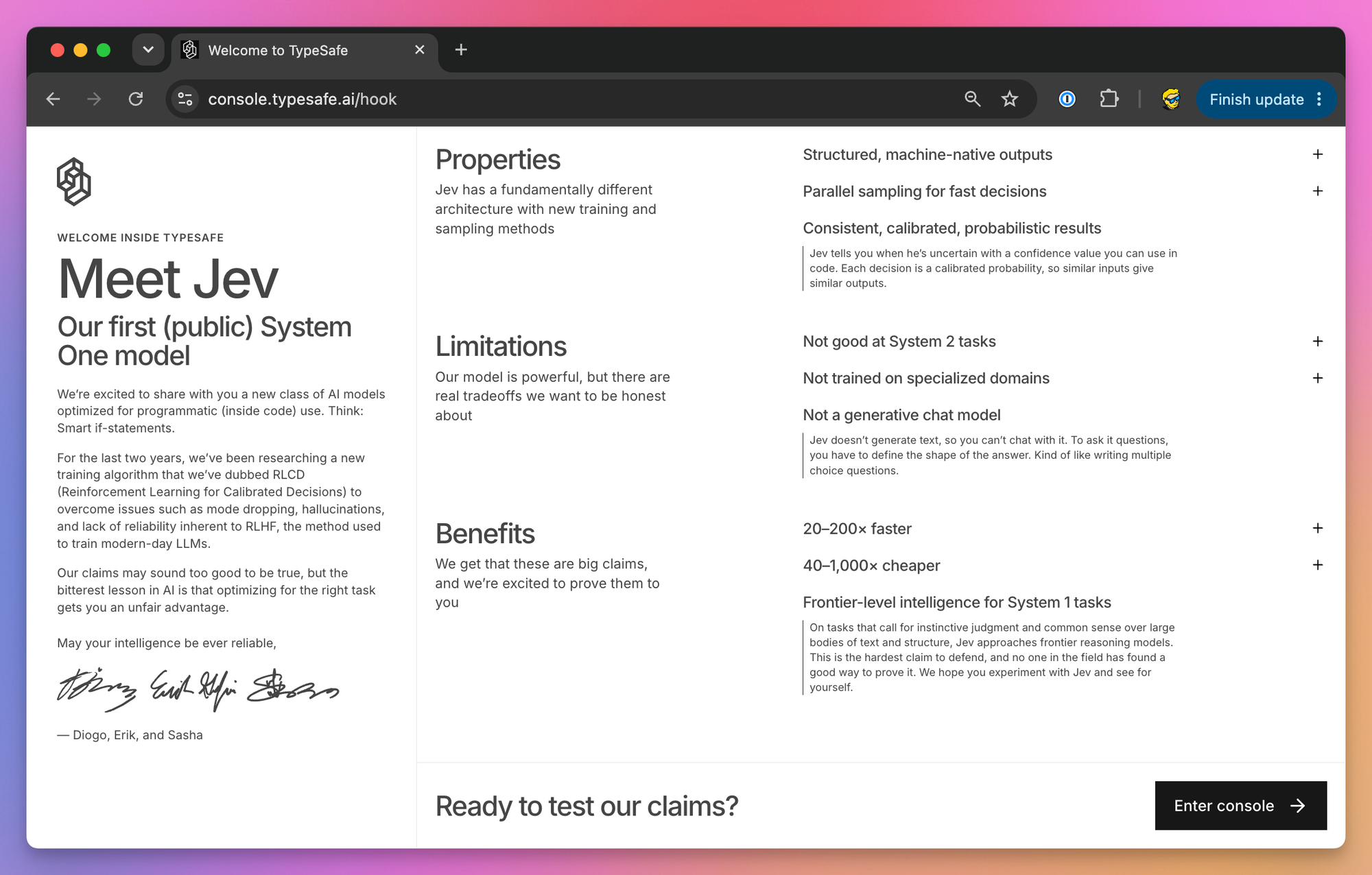
The console at console.typesafe.ai opens with a short page on what Jev is and, to its credit, what it is not good at: System 2 tasks, specialized domains, and anything generative.
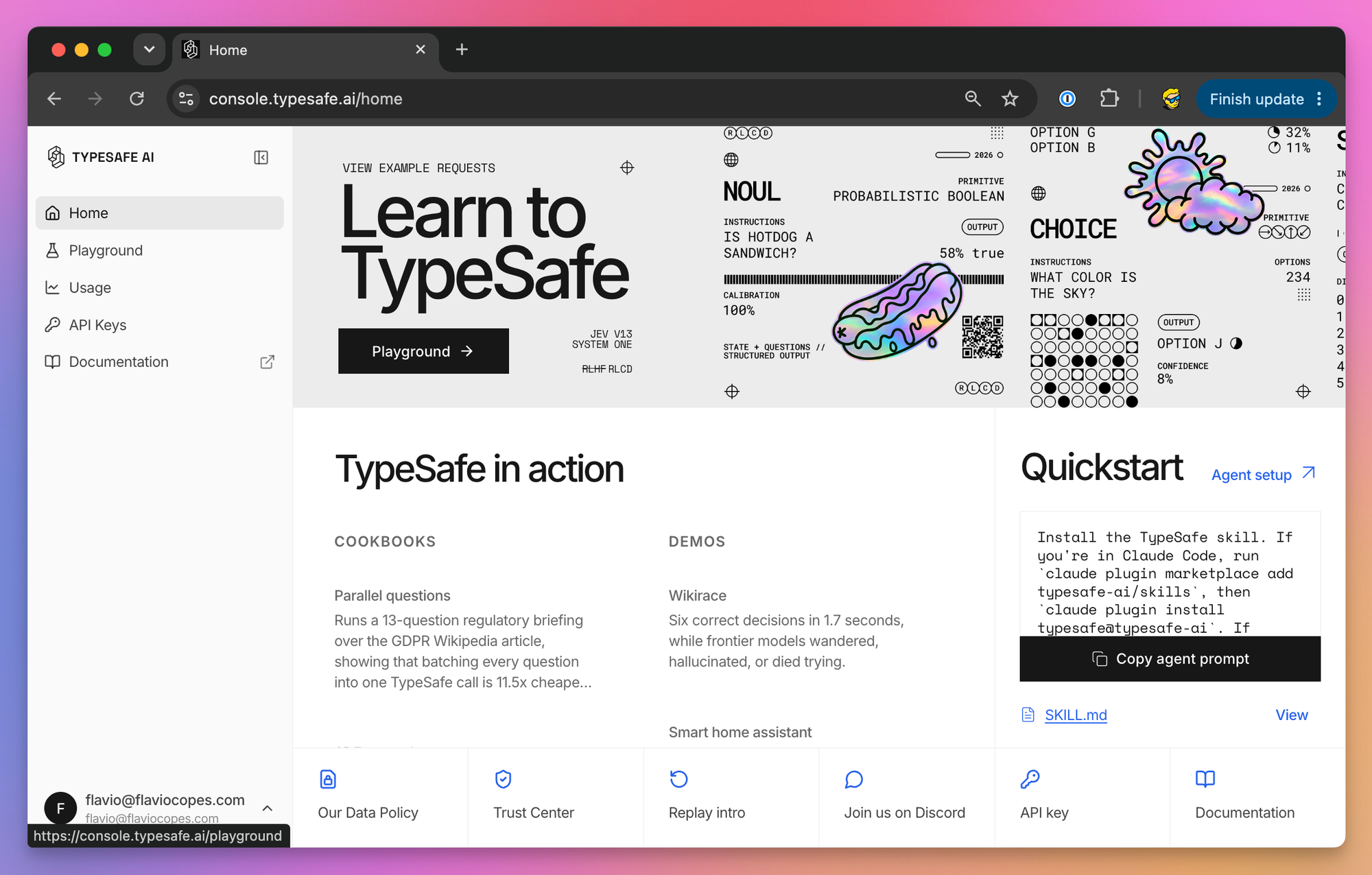
The console home links the cookbooks, the demos, and a one-paragraph prompt you can paste into your coding agent to install the TypeSafe skill.
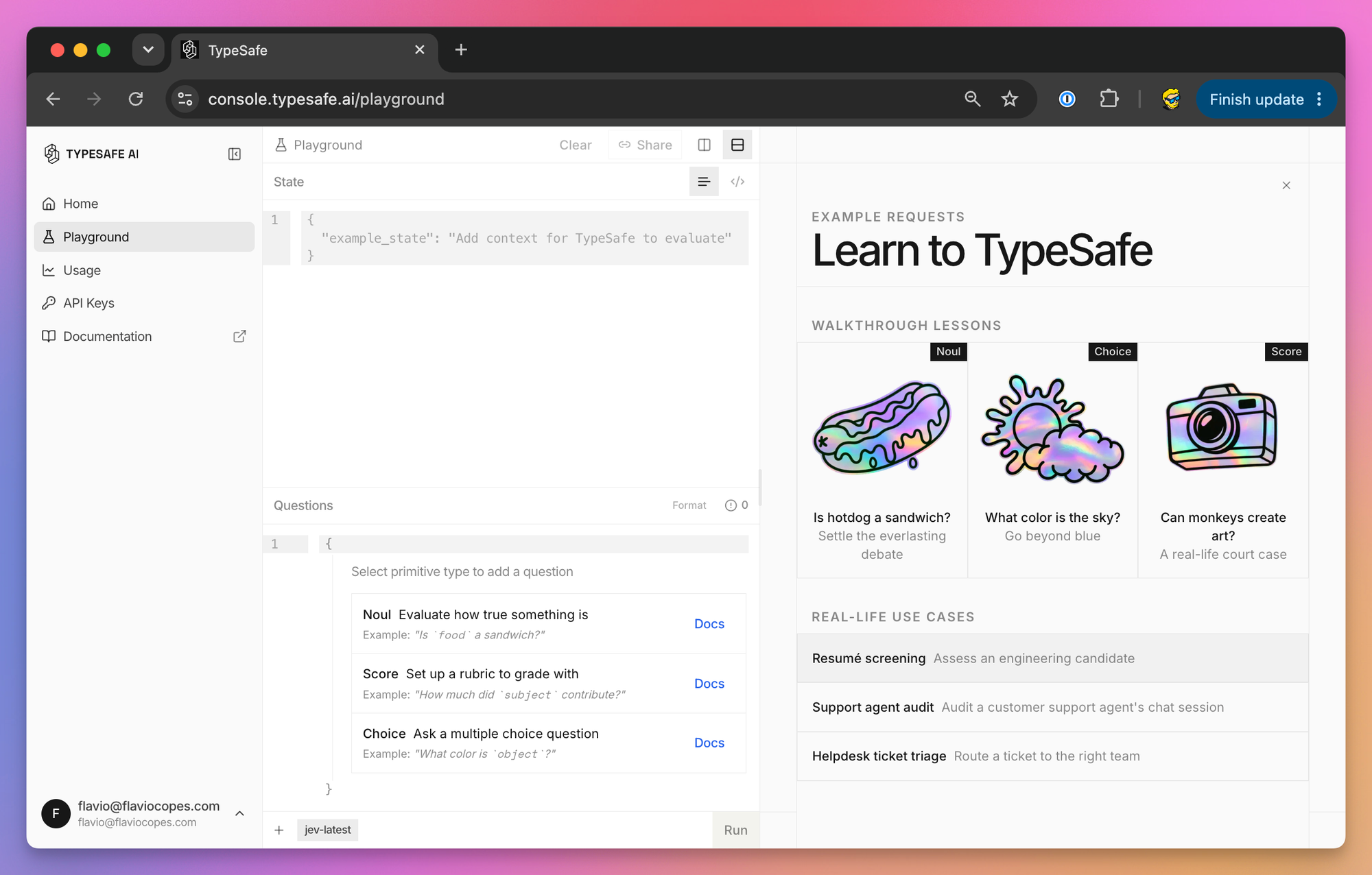
The Playground is where I’d spend the first hour. Paste a state on the left, add questions, run them against jev-latest. The right side has a walkthrough lesson per primitive and three realistic use cases: resume screening, auditing a support agent’s chat, and routing a helpdesk ticket.
API keys live in the console too, under API Keys. Usage shows your token consumption. The full signup and key walkthrough is in How to get access to Jev and an API key.
If you don’t have a TypeSafe account, Jev is also on Vercel’s AI Gateway as typesafe-ai/jev, at the same $0.042 per million input tokens. That path uses the AI SDK instead of TypeSafe’s own, and I’ll cover it below.
Your first call with curl
Evaluations go through one endpoint:
POST https://api.typesafe.ai/v1/systemone
Authorization: Bearer <API_KEY>
Content-Type: application/json
Set your key in the environment and send the sponsor-form example from the top of this post:
export TYPESAFE_API_KEY=your_key_here

curl -s https://api.typesafe.ai/v1/systemone \
  -H "Authorization: Bearer $TYPESAFE_API_KEY" \
  -H "Content-Type: application/json" \
  -d '{
    "model": "jev-latest",
    "state": {
      "opportunity": "link",
      "name": "Managed Postgres",
      "description": "We make a managed PostgreSQL hosting product and would like to sponsor the newsletter in October."
    },
    "questions": {
      "is_sponsor_inquiry": {
        "type": "noul",
        "instructions": "Does `description` ask to sponsor the site or newsletter?"
      }
    }
  }'
You get back the answers object, the versioned model that answered, and usage with input and output token counts.
The API returns 401 for a missing or wrong key, 422 when the body fails validation (the response says which field), 429 for rate limits and 529 when the service is overloaded. Retry the last two with exponential backoff, which the SDKs do for you.
Rate limits are set per organization. Check the developer console for your requests-per-second and tokens-per-second limits; exceeding either returns 429.
GET /v1/models lists the aliases your account can send in the model field. Versioned IDs such as jev-1.13.0 work even when not in that list.
Using Jev from Node.js
The JavaScript SDK is @typesafe-ai/sdk. It needs Node.js 20 or newer and ships ESM, CommonJS and TypeScript types. This is the short version. The full walkthrough, with install, Noul, Choice and Score, errors, retries and a complete script, is in how to use Jev in Node.js.
npm install @typesafe-ai/sdkThe client reads TYPESAFE_API_KEY from the environment. Three helper functions, noul, choice and score, build the questions, and the answer types are inferred from them:
import { choice, noul, score, TypeSafeClient } from '@typesafe-ai/sdk'

const client = new TypeSafeClient()

const ticket = 'The export button crashes the settings page in Safari. Works in Chrome, but some of our customers only use Safari.'

const { answers, model, usage } = await client.systemOne({
  state: { ticket },
  questions: {
    category: choice('What kind of ticket is `ticket`?', {
      bug_report: 'Something is broken or behaving wrong',
      feature_request: 'Asks for something that does not exist yet',
      billing: 'Charges, invoices, refunds',
      other: null,
    }),
    severity: score('How severe is the issue in `ticket`?', [
      'Cosmetic; no impact on functionality',
      'Broken or degraded feature, but a workaround exists',
      'Blocking issue; no workaround exists',
    ]),
    has_repro_steps: noul('Does `ticket` say how to reproduce the problem?'),
  },
})

console.log(answers.category.choice)
console.log(answers.severity.score)
console.log(answers.has_repro_steps.noul)
console.log(model)
console.log(usage.input_tokens)
A null description on a Choice option means “no extra detail”, which is fine for an other bucket.
In TypeScript, answers.category.choice is typed as 'bug_report' | 'feature_request' | 'billing' | 'other', so you get autocomplete, unknown labels fail type checking, and a never assertion gives you an exhaustive switch.
You can pass model: 'jev-1.13.0' in the request to pin a version, and per-call timeout, retry and signal options as a second argument to systemOne().
Python in a few lines
The Python SDK is typesafe-sdk and needs Python 3.10 or newer. The full walkthrough is in how to use Jev with Python. Install it with:
pip install typesafe-sdkSame shape, with Choice, Noul and Score classes:
from typesafe_sdk import Choice, Noul, Score, TypeSafeClient

client = TypeSafeClient()

response = client.system_one(
    state="I was charged twice for order A-104. Please refund the duplicate.",
    questions={
        "department": Choice(
            instructions="Which team should handle this?",
            criteria={
                "billing": "Charges, invoices, refunds",
                "technical": "Bugs and integration problems",
                "other": None,
            },
        ),
        "refund_requested": Noul(
            instructions="Does the customer ask for money back?",
        ),
    },
)

print(response.answers["department"].choice)
print(response.answers["refund_requested"].noul)
There’s an AsyncTypeSafeClient too, and a configurable retry policy.
Using Jev through the Vercel AI SDK
If your app already uses the Vercel AI SDK, you don’t need a second client. AI SDK 7 (from 7.0.105) has an experimental_evaluate function built for this kind of model, with TypeSafe as its native provider. I cover the whole setup in how to use Jev with the Vercel AI SDK.
Both packages need Node.js 22 or newer. Install them and set TYPESAFE_AI_API_KEY:
npm install ai @ai-sdk/typesafe-ai
export TYPESAFE_AI_API_KEY=your_key_here
The vocabulary differs slightly: the yes/no type is boolean and its answer field probability. Choice and Score keep their names.
import { experimental_evaluate as evaluate } from 'ai'
import { typeSafeAi } from '@ai-sdk/typesafe-ai'

const result = await evaluate({
  model: typeSafeAi.evaluationModel('jev-latest'),
  state: { message: 'I was charged twice. Please refund the extra charge.' },
  questions: {
    department: {
      type: 'choice',
      instructions: 'Which team should handle `message`?',
      criteria: {
        billing: 'Payments and refunds',
        support: 'Everything else',
      },
    },
    requests_refund: {
      type: 'boolean',
      instructions: 'Is the customer asking for money back?',
    },
  },
})

console.log(result.answers.department.choice)
console.log(result.answers.requests_refund.probability)
Through the AI Gateway you skip the provider package and pass a string model ID, which resolves through the Gateway once AI_GATEWAY_API_KEY is set:
const result = await evaluate({
  model: 'typesafe-ai/jev',
  state: 'The support agent issued a full refund to the customer.',
  questions: {
    refunded: {
      type: 'boolean',
      instructions: 'Was a refund issued?',
    },
  },
  providerOptions: {
    gateway: { zeroDataRetention: true },
  },
})
zeroDataRetention is a Gateway option on Vercel Pro and Enterprise plans. It stops Vercel and the provider from retaining prompt and output after processing, and disallows training on them. The request still travels to both. TypeSafe’s direct service only advertises ZDR for enterprise customers, so don’t assume the same option in its own SDK.
TypeSafe’s confidence is not in result.answers. It lives at result.providerMetadata.typesafe.confidence, keyed by question ID. And experimental_evaluate also works with OpenAI, Anthropic and Google models through an adapter that prompts them for structured output, handy for comparing Jev against an LLM on your own labeled data. Those adapters return no probability distributions and their boolean probabilities aren’t promised to be calibrated, so compare on accuracy, cost and latency, not confidence.
Run both on the server. The TypeSafe SDK blocks browser use by default, because an API key in client-side JavaScript is exposed.
Ask everything at once
This is the habit that changes how you design with Jev, and the one coding agents get wrong most often.
LLM calls are slow and expensive, so workflows ask one question, then decide what to ask next. With Jev every question runs in parallel against the same state, and each extra one costs only its own tokens. Ask every independent question you might need in one call, even those that only matter for some inputs, and let your code decide which answers to use.
TypeSafe calls this speculative fan-out. In one cookbook, 13 questions in one call were 12.2x cheaper and 10x faster than 13 sequential calls. The test used jev-1.12 and a 53,777-character document, so most of the saving came from sending that state once. Concurrent separate calls would close the latency gap, not the cost gap. Batching had no effect on the answers beyond sampling noise.
Here is a support triage in one request. Bug severity only matters for bugs, the refund question only for billing. I ask all of them anyway:
import { choice, noul, score, TypeSafeClient } from '@typesafe-ai/sdk'

const client = new TypeSafeClient()

const TRIAGE = {
  category: choice('What kind of ticket is `ticket`?', {
    bug_report: 'Something is broken or behaving wrong',
    billing: 'Charges, invoices, refunds, subscriptions',
    feature_request: 'Asks for something that does not exist yet',
    other: null,
  }),
  bug_severity: score('If `ticket` reports a bug, how severe is it?', [
    'Cosmetic; no impact on functionality',
    'Broken or degraded feature, but a workaround exists',
    'Blocking issue; no workaround exists',
  ]),
  has_repro_steps: noul('Does `ticket` include steps to reproduce a problem?'),
  refund_requested: noul('Does `ticket` ask for money back?'),
  frustration: score('How frustrated is the author of `ticket`?', [
    'Calm, just stating facts',
    'Frustrated but civil',
    'Very angry, strong language, or threatening to leave',
  ]),
}

export async function triage(ticket) {
  const { answers } = await client.systemOne({
    state: { ticket },
    questions: TRIAGE,
  })

  const { category, bug_severity, has_repro_steps, refund_requested, frustration } = answers

  if (category.confidence < 0.6) {
    return { route: 'human', reason: 'unclear category' }
  }

  if (category.choice === 'bug_report') {
    if (bug_severity.score > 1.5 && has_repro_steps.noul > 0.6) {
      return { route: 'engineering', priority: 'high' }
    }
    return { route: 'bug_backlog' }
  }

  if (category.choice === 'billing') {
    return { route: 'billing', refundLikely: refund_requested.noul > 0.7 }
  }

  if (category.choice === 'feature_request') {
    return { route: 'product' }
  }

  return { route: 'human', flag: frustration.score > 1.5 }
}
One call feeds the whole decision tree. For a feature request, bug_severity is ignored. It cost its own tokens, but the shared state was sent once.
Notice the questions live in one constant, with the thresholds in the same file. That’s what a reviewer needs to read.
You only need a second request when your code can’t build it until it has the first answer, because it must fetch more data or the first answer decides the next question’s options. TypeSafe’s skill-suggestion cookbook does this: one request ranks 182 skills, a second looks at the full text of the top three and can reject them all. If the second request could have run against the original state, fold it into the first.
Compose decisions in code
The second habit is for judgments that depend on several things. Ask one question per thing and combine the answers with weights you own.
Ticket priority depends on how bad the bug is, how upset the customer is, and how much the report gives an engineer to work with. Three Scores, one request:
const PRIORITY_QUESTIONS = {
  severity: score('How severe is the issue in `ticket`?', [
    'Cosmetic; no impact on functionality',
    'Broken or degraded feature, but a workaround exists',
    'Blocking issue; no workaround exists',
  ]),
  frustration: score('How frustrated is the author of `ticket`?', [
    'Calm, just stating facts',
    'Frustrated but civil',
    'Very angry or threatening to leave',
  ]),
  report_quality: score('How much does `ticket` give an engineer to work with?', [
    'No detail; just says something is broken',
    'Names the feature but no steps or environment',
    'Steps to reproduce or environment, but not both',
    'Steps to reproduce and environment',
  ]),
}

function normalized(answers, id) {
  const topLevel = PRIORITY_QUESTIONS[id].criteria.length - 1
  return answers[id].score / topLevel
}

export async function priority(ticket) {
  const { answers } = await client.systemOne({
    state: { ticket },
    questions: PRIORITY_QUESTIONS,
  })

  return (
    0.6 * normalized(answers, 'severity') +
    0.3 * normalized(answers, 'frustration') +
    0.1 * normalized(answers, 'report_quality')
  )
}
The scales have different lengths (three levels return 0 to 2, four return 0 to 3), so each score is divided by its top level before weighting. Then 0.6 on severity means severity counts twice as much as frustration.
When the ranking doesn’t match what your team would decide, change a coefficient and rerun. There’s no prompt to rewrite. TypeSafe calls this composite scoring.
The third pattern is intent routing, where most early experiments land. Some requests need a database lookup, some an LLM with the right context, a few a person. Jev sits in front and decides which:
const { answers } = await client.systemOne({
  state: { message },
  questions: {
    intent: choice('What does the author of `message` want?', {
      order_status: 'Where is my order, has it shipped, tracking',
      product_question: 'How a product works, compatibility, specs',
      return_exchange: 'Return, exchange, or replace an item',
      complaint: 'Unhappy with service or product, wants a resolution',
    }),
    needs_reasoning: score('How much thought does a good answer to `message` need?', [
      'A lookup or a one-line fact',
      'A short explanation using product knowledge',
      'A judgment call with trade-offs or an unhappy customer',
    ]),
  },
})

if (answers.intent.confidence < 0.5) {
  return routeToHuman(message)
}

switch (answers.intent.choice) {
  case 'order_status':
    return lookupOrder(message) // no LLM involved
  case 'product_question':
    return answerWithLLM(message, PRODUCT_CONTEXT)
  case 'return_exchange':
    return answerWithLLM(message, RETURNS_CONTEXT)
  case 'complaint':
    return answers.needs_reasoning.score > 1 ? routeToHuman(message) : answerWithLLM(message, COMPLAINT_CONTEXT)
}
The order lookup never touches an LLM, two intents get an LLM with different context, and complaints use the second score to pick LLM or human, so the expensive resources only run when a message needs them.
The same shape works as a model router inside an agent: ask how much reasoning a message needs and which profile it fits, then pick the cheap or the expensive model. One proposed migration reduced a routing prompt to those two questions.
Writing questions Jev answers well
Most of the skill is in the questions. Everything below comes from the docs, the console lessons, and the mistakes people reported in the first days.
One judgment per question. “Does this message convey urgency?” is good. “Analyze this message and decide the best course of action” hides several judgments behind one answer. If a question weighs several factors, split it.
Write the exact condition. Jev answers the question you wrote, not the one you meant; scoping words, negations and implied conditions are read literally. When a wrong answer makes you explain what you really meant, that explanation is the missing half of the instruction.
In criteria, describe situations rather than degrees: what belongs to a Choice option and what belongs to its neighbor, a concrete state of the world for a Score level. When the model keeps landing between two levels on inputs you consider clear, give each level an object with a description and a few examples, same field names on every level:
{
  "what": "Broken or degraded feature, but a workaround exists",
  "examples": ["export fails in one browser but works in another"]
}
The docs measured this on a Safari export bug: plain string levels gave 1.43 at 0.35 confidence, the same levels with one relevant example gave 1.03 at 0.96. An unrelated example left it at 1.43 and 0.35. Examples help when they look like your real inputs.
Give the model an exit: an other option on every Choice that might not cover every input, and “not stated” when extracting something that may be missing. Keep instructions and criteria saying the same thing in plain language, because when they disagree the answer degrades.
Numbers, dates and counting stay in code. The next section explains why.
For the surrounding code, put every question and threshold in one file, because that’s the part a human needs to review. Then test against labeled examples before trusting a threshold: run inputs you know the answer for and look at where confidence and accuracy diverge. One early test got 11 invoice cases out of 11 right after its rubric was written down. That order, rubric first, matches the docs.
Where Jev breaks
TypeSafe publishes a “jaggedness” page per model version, listing what jev-1.13 does badly. Here it is, with the fix for each.
The first is literal reading, covered above. The model reads your words, not your intent. Be explicit, or split the interpretation into two literal questions.
Then there’s math. Jev is not a calculator and does not count reliably, whether characters, occurrences, or items in a list. It can’t tell whether two hex colors are close: named colors work, #FF4B0A doesn’t. Do the arithmetic in code and pass in the result or a named bucket.
If you need to count items that match a semantic condition, ask one Noul per item and sum in code:
const items = ['typesafe', 'apple', 'california', 'banana', 'orange']

const questions = Object.fromEntries(
  items.map((_, i) => [`item_${i}`, noul(`Is \`items[${i}]\` the name of a fruit?`)])
)

const { answers } = await client.systemOne({ state: { items }, questions })

const fruits = items.filter((_, i) => answers[`item_${i}`].noul > 0.5)
console.log(fruits.length) // 3
A Score is not a measurement either. A 1.4 does not mean “40% of the way from frustrated to angry”, because the levels are weakly calibrated against each other. Use it to pass a threshold or to rank, not to interpolate a magnitude.
Dates have the same problem. Jev reads a date as text, so which comes first, how far apart, whether one falls in a window, all of it is unreliable, worse with mixed formats or relative references. Extract with a Choice over months, days and years plus a “not stated” option, then build a real date in code and compare there.
Indirection costs accuracy: double negatives, a property of a property, anything with multiple hops. Point directly at the relevant part of the state.
A large state full of irrelevant detail costs accuracy too. Filter first. When you can’t do it deterministically, ask a Noul per chunk, “is this relevant to the question?”, and drop the rest.
Typed output does not guarantee correct routing. A Choice always returns an allowed destination and can still be the wrong one. Version the model, questions, criteria, and thresholds together, and replay a set of known inputs whenever any of them change.
State is treated as data, but text written to steer the model can still move the answer. TypeSafe says it expects to improve on adversarial content. For now, write precise criteria and test with hostile inputs before going public.
Contradictions between instructions and criteria, like a Noul where true means “no”, make the answers worse.
And it can’t write. You can force text out by chaining Choices over characters, and the docs are blunt that this works badly and slowly. To extract a value, find the candidates with a regex or an LLM and let Jev pick.
A useful rule is that with Jev you pick a card from the deck instead of asking it to name one. When your instinct says “extract X”, rephrase as “here are the candidates for X, which one is it?”
What people are building with it
Many of the examples below come from the launch period. Treat demos and production measurements separately.
The easiest way to follow them is shipwithjev.com, an independent catalog of Jev builds, not affiliated with TypeSafe. It listed 551 builds on September 23, 2026, grouped by category, and many entries carry the cost and latency their authors reported. Those are the authors’ numbers, not independent measurements.
The first production report comes from Metaview, a recruiting platform. It says it shipped Jev into every agent on its platform over a weekend, and candidate searches in its sourcing product went from minutes to seconds, about 10x faster, at the same accuracy and a lower cost per search.
A later Jack & Jill case study, published on October 7, describes replacing Gemini in the initial candidate-screening stage. The reported cost per 1,000 candidates fell from $0.755 to $0.092, about 88%, while median screening time per role fell from 20.3 to 10.3 seconds. An offline comparison across 150 live roles found similar quality. The projected $500,000 annual saving assumes growth in volume; the estimate at current volume was $265,000. These are the company’s reported results, not an independent benchmark.
Labeling data
Labeling is the obvious use. One demo classified 1,018 summarized AI research papers across 24 topics for $0.08, median latency 256 milliseconds per paper (the LLM summaries cost another $3.99). Another ran 98,000 listing classifications in ten minutes. A third reported half a million input tokens for about two cents, matching the published price. Anything shaped like “label every row” fits.
Resume screening is the same shape with a rubric: fit for this job posting, as a Score. A hiring site reported about one tenth the cost of small LLMs for that job. The console ships it as a built-in example.
So is inbox triage: priority, spam or not, needs a reply or not, one call per email, fast enough to watch it work through a mailbox.
Resume screening also works in reverse. One developer ran his resume against all 6,245 Y Combinator companies in 25 seconds, for $0.37, and got a list of 156 founders worth contacting.
Marketing data fits too. A teardown of 724 live ads from 37 brands took about 40 seconds and nine cents. For each ad, Jev picked the hook, the format, the offer, the call to action and the awareness stage, and flagged any mismatch with the landing page. A survey research product rebuilt on Jev (200 samples, 12 questions per survey) reported running twice as fast as Gemini 3.5 Flash-Lite at 85% lower cost.
Routing and verification
Intent and model routing were among the most suggested uses: one call in front of a support flow or an agent, deciding which handler or which model gets the message.
Routing also works for business processes. A deal-review demo reads a sales deal and says what comes next: approval, more documents, or review by sales, finance and legal. One deal can need several of those teams at once. Jev maps that out, and people still make the call.
Verification is the other side. One proposed workflow takes a podcast site that generates episode summaries with an LLM and checks each claim against the transcript with a Noul, flagging low-probability answers. The LLM writes the summary, Jev checks it, and code decides which claims need review.
Another developer added Jev to a coding agent loop with a single job: answer “is the task done?”. It’s a small question, and a coding agent asks it many times per task.
Podcasts show up again in MinusPodJev, which plugs Jev into MinusPod, a self-hosted server that removes ads from podcasts. It asks one Noul per transcript segment, joins the flagged segments into ad spans, and returns them in the format MinusPod expects from an OpenAI-compatible model. Chapter titles still need a chat model, because Jev can’t write them.
Code review fits the same mold: per modified file in a PR, Scores and Nouls on security risk, complexity, bad practices and commit message quality, combined into a risk matrix in code.
TypeSafe’s cookbooks push into retrieval: re-ranking BM25 shortlists with a Noul per query-passage pair, scoring passages for relevance and hidden prompt injections before they reach the answering model, and checking whether a citation supports its claim.
Search
Several open source builds use Jev for search, and they follow the same pattern: a cheap keyword pass finds candidates, then Jev ranks them by what the person meant.
jevsearch is a drop-in site search for React and shadcn/ui. Keyword hits appear on the first keystroke, then Jev re-ranks the top candidates by intent, with no embeddings and no vector database. If TypeSafe is slow or down, the keyword order stays. Its author reports a 278 ms median and $0.26 per 1,000 uncached searches. Most site search, including the Pagefind search on this site, stops at the keyword pass.
JevQL brings the same idea to plain PostgreSQL. You write normal SQL with a jev() filter:
SELECT title, organizer
FROM meetings
WHERE jev(meetings, 'could have been an email')
  AND starts_at > now();
The JevQL CLI evaluates the jev() calls and sends ordinary SQL to the database, so there’s no extension to install and no superuser needed. It also has SDKs and an MCP server. Every row that reaches a jev() filter is a judgment you pay for, so keep the normal conditions next to it, and use --explain to see a cost estimate before any API call.
Oko does it for code. It runs locally, finds candidate snippets, lets Jev rank them, and serves the best ones to Codex, Claude Code or OpenCode over MCP, so the agent reads less irrelevant code. On a public benchmark of 345 code-retrieval tasks in six languages, it puts a right file first more often than other published methods (MRR 0.39 against 0.24), and in its authors’ own benchmark the agents finished tasks 12 to 38% faster.
The same shape works for smaller lookups. A settings finder lets you describe what you want to change and returns the matching control. A CLI wrapper gives “Did you mean?” suggestions by meaning: type git record and it suggests git commit, which no typo-distance algorithm would find.
Inside apps that already exist
Some builds add Jev to software people already use, as one more decision inside an existing workflow.
Spliit Cloud, an open source expense splitter, suggests a category for each new expense with a Jev Choice. It checks its local dictionary and the group’s history first, and users review the suggestions Jev is unsure about. That’s the same boundary as the Shared Expense Tracker exercise I describe below.
A Magento 2 module asks a fixed set of Nouls and Choices about orders, customers, products, reviews and abandoned carts. Every question for an entity goes in one API call when the entity is saved, and the answer, confidence and full probability breakdown are stored on it and shown in the admin.
A house-style formatter for Word documents splits the work between two models. An LLM reads your house style once and describes each style in it. Then, for every paragraph of a contract, Jev picks which of those styles applies.
Real-time interfaces
A few hundred milliseconds per call means Jev can run on every keystroke pause. One editor demo scored tone, conviction, urgency and “reads as AI-written” while the user typed, with criteria the developer defined rather than a fixed detector.
A browser extension asks, per post in a social feed, whether it’s rage bait, crypto promotion or political argument, and hides the ones that score high. The user defines the categories, not the platform.
Games showed up early too. A Tetris demo chose between rotate, move and drop. A driving simulator passed structured observations and asked whether to accelerate, brake or turn. TypeSafe’s launch demos include a Doom bot on structured game state at about ten queries a second, costed at roughly $7 an hour, and a Wikiracing bot choosing among hundreds of links per step without ever picking one that doesn’t exist.
A Pac-Man demo shows the loop: on every tile the app sends the nearby game state, Jev returns a direction, a strategy, a danger score, and flags such as trapped or committed, code moves the character and sends the next state.
Robotics is a smaller corner with the same split. A dual-arm robot project gives Jev the middle of three control layers: it makes the decisions, while inverse kinematics and physics stay in code, at about 500 ms and half a yen per attempt. A simulated traffic light ran on near-real-time traffic feeds for under a cent in total, and its author’s favorite moment was watching it decide to do nothing.
Other demos: a Rubik’s Cube, an experimental programming language, natural-language database search, browser and operating-system control, speech-to-text cleanup, fraud detection, classifying scraped content. They show how many kinds of problems fit, not that any of it is production-ready.
Agents and tools
A chatbot demo used no generative LLM. It asked Jev “which tool answers the user’s last message?” as a Choice, with the arguments in the same call: which city, which time frame, which unit, each a Choice over candidates found in the conversation. Code called the tool. It turned a smart-home light off from a plain sentence in about 300 milliseconds end to end, and answered “how tall is Mount Rainier?” by fetching Wikipedia and having Jev point at the sentence with the answer.
Browser automation splits the same way: a planner LLM sets the goal, Jev picks which element to click next as a Choice over the interactive elements. One demo booked a flight in about seven seconds. If you’ve watched a Playwright agent think for ten seconds between clicks, you know why that matters.
Hunch, an open source browser agent, is built entirely around that split. Jev maps an accessibility snapshot of the page to the next operation, code checks the result, and uncertain or irreversible steps go to an LLM. Its author reports a 153 ms median per decision, 24 correct decisions out of 24, and a four-step form filled in 3.4 seconds.
Jive applies it to a terminal coding agent: frontier LLMs plan and handle exceptions, Jev makes the repetitive decisions in between.
A semantic linter for a large codebase: split changed code into chunks, ask whether each needs attention, what kind of problem it has, how risky it is. Rank, then send only the top chunks to a coding model that can explain and fix them.
If a chunk lacks context, offer options such as open_file, previous_chunk, or next_chunk. Jev picks one, code fetches the context, a second evaluation continues from there. Jev finds where to look; the coding model edits.
Logs are a smaller first project. Instead of an LLM explaining every line, ask Jev which entries are expected noise, a forgotten scheduled job, a user-facing failure, or something needing attention. Code groups and ranks before involving a person or another model.
Natural-language PostgreSQL search needs the same split. Don’t ask Jev to generate SQL. Code provides allowed query templates, tables, columns, and filters; Jev selects the intent and options; code builds a parameterized query. The model handles meaning without permission to invent a database operation.
Guardrails for coding agents are the first use case I’d test: classify a shell command as read-only, reversible or irreversible before it runs. In one early shadow test, an ambiguous rm -rf came back “irreversible” at 0.56 with confidence 0.33. That 0.33 tells the code to ask a human instead of trusting the label.
And one for fun: a startup idea judge. Ten questions evaluate problem, demand, monetization, distribution and differentiation in about half a second, and code combines them into kill, fix or ship. The result is only as good as the rubrics.
Feature engineering
Turn free text into numeric features for a classical model. TypeSafe’s feature-discovery cookbook starts with 18 questions and ends with 38 after five rounds. Those answers become 67 numeric columns for a CatBoost regressor.
The skeptical notes
The useful metric is cost per solved task, not per token. If the cheap path adds retries or human review, the savings shrink. Most of these use-case lists will turn into two or three integrations with real traffic. And where deterministic code already decides correctly, code stays.
The demos prove many problems map to typed decisions. They don’t show which ones make money, survive real traffic, or stay accurate after the model changes. That needs production measurements. Every cost and latency in this section, including the production reports, comes from builders or TypeSafe’s case studies.
Jev and coding agents
TypeSafe published an agent skill. Install it before asking an agent to integrate Jev, because agents trained on LLM APIs ask one question per call and invent request fields.
For Claude Code:
claude plugin marketplace add typesafe-ai/skills
claude plugin install typesafe@typesafe-ai
For Cursor, Codex and everything else:
npx skills add typesafe-ai/skills --skill typesafe-aiThe skill points the agent at the live docs (Mintlify serves any page as Markdown by appending .md to the URL), lists the primitives, and explains fan-out and confidence gating.
The prompt TypeSafe suggests as a first step is the one I’d use too:
Using the TypeSafe skill, explore the project and find opportunities for using
intelligent judgement to stand in for complex parsing or other fragile code.
Review what it proposes before it writes anything, and make it put every question and threshold in one file. Agents aren’t great at writing questions, so you’ll be editing them together.
How I will use Jev in my workflows
I have console access but haven’t put Jev into production yet. My plan is to start with decisions I already make every day, run Jev in shadow mode beside the current workflow, and compare its answers before letting it control anything.
Route work before starting a coding agent
I use coding agents for small fixes, long research, browser work, and jobs across several repositories. They don’t all need the same model or environment.
I can give Jev the task, the repository name, and a description of the available agents. A Choice picks a route: deterministic_script, fast_agent, reasoning_agent, browser_agent, or human. A Score measures how ambiguous the request is, a Noul whether it needs logged-in applications on my computer.
Jev would not start the agent. My code reads the answers, applies confidence thresholds, and sends the task to the workflow I already use.
Put a safety check in front of shell commands
Before a coding agent runs a command, I can send Jev the command, current directory, and a small amount of repository state.
A Choice classifies it as read_only, reversible, or irreversible. Nouls check whether it deletes files, changes Git history, deploys to production, or touches anything outside the repository.
At first I would only log the answers. With enough real examples, high-confidence read-only commands could run, while uncertain or destructive ones still ask me.
Prefilter the blog maintenance work
This blog has more than 2,000 posts. Many contain software versions, prices, service limits, and links that become stale.
The tempting question is “is this version number outdated?”, but comparing 18.17.1 with 24.15.0 belongs in code.
I would use Jev one step earlier, on each paragraph:
- Does this paragraph contain a version claim?
- Does it state a price or usage limit?
- Does it describe a product interface that may have changed?
- Would checking this claim require current external documentation?
Code collects the paragraphs that cross the threshold, and a coding agent or a script checks only those against current sources. Jev filters the work; it does not rewrite the posts.
Sort sponsor inquiries and newsletter replies
My sponsor form already sends structured submissions through a Cloudflare Pages Function. I can add a Noul for whether it’s a real sponsorship inquiry, a Choice for the product category, and a Score for how specific the request is.
I would start by adding those answers to the email I already receive, and keep making the decision myself. If the labels hold up, code can prepare the right reply or rate card without sending anything automatically.
Newsletter replies get a smaller version of the same questions: a Choice between thank-you, broken link, question, sponsorship lead, and other, so I open the ones that need a response first.
Add semantic priority to Events Logger
Events Logger collects events from my applications into one dashboard. Each event has a project, category and title, plus an optional description and tags.
I can add a Score for severity and Nouls for whether the event is a user-facing failure, lost money, or something that needs action. The feed stays chronological, with a second view ordered by semantic priority.
It’s a good first production test, because a wrong answer only reorders a dashboard and never touches data or infrastructure.
Try it in the Bootcamp projects
The Bootcamp projects are a good way to teach where a decision model belongs. Jev would be an optional extension after the core project works, not a day-one dependency.
Each project has at least one place where normal code handles the facts and Jev can handle a fuzzy judgment:
| Bootcamp project | What I would ask Jev | What stays in code |
|---|---|---|
| Personal Dashboard | Which existing category best fits a new link? | URL validation, storage, editing, and ordering |
| Events Dashboard | Is this event expected noise, a user-facing failure, or something urgent? | API authentication, event ingestion, search, and charts |
| Shared Expense Tracker | Which expense category fits this description? | Amounts, balances, splits, and who owes whom |
| Live Chat Room | Is this message spam, abusive, or likely to need moderation? | Authentication, rooms, message delivery, and mentions |
| Recipe Finder | Does a generated recipe respect the requested diet and ingredients? | Recipe generation, caching, bookmarks, and image loading |
| Port Pilot | Does this process look safe to stop, uncertain, or likely to be a system service? | Reading ports and processes, parsing exact values, and sending signals |
| Recipe Finder Pro | Which model should handle this recipe request based on its complexity? | Payments, subscriptions, entitlements, and access control |
| Your Own Product | Which fuzzy decision inside this product would benefit from a typed probability? | The product’s main workflow and every deterministic rule |
The Shared Expense Tracker shows the boundary. Jev can read “pizza with Luca and Sara” and suggest food, but it never calculates who owes what, because that arithmetic has to be exact.
Port Pilot is stricter. Jev can add a risk label beside a process, but never kill anything. The operating-system query, PID checks, and confirmation stay in code.
In the Recipe Finder the language model still creates the recipes. Jev checks whether a result matches the diet, uses the supplied ingredients, or needs another attempt, which shows students how generative and decision models work together.
I would turn this into the same small exercise for every project:
- Finish the deterministic version first.
- Find one decision that requires understanding meaning.
- Write the possible answers before calling Jev.
- Collect at least 20 realistic inputs with expected answers.
- Run Jev without changing the application’s behavior.
- Review the mistakes and adjust the questions.
- Automate only a low-risk result.
Each Bootcamp week keeps its subject: databases, APIs, authentication, real-time data, AI generation, CLI tools, product development. Jev is one more tool to add when the project needs judgment.
How I will roll this out
I would use the same process for each workflow:
- Keep the existing behavior.
- Run Jev beside it and log the full answers.
- Label the cases where its decision was right or wrong.
- Adjust the questions and thresholds using that data.
- Automate the low-risk path first.
- Keep a human or a stronger model for uncertain cases.
I would not use Jev for writing, summarizing, or precise arithmetic. Image input is now available experimentally; I would keep it in prototypes while evaluating its accuracy. And I’d leave deterministic code alone when it already decides correctly: an if that costs nothing beats a model call that can be wrong.
What it costs, and how fast it is
$0.042 per million input tokens, output free. TypeSafe’s homepage says $42 per billion tokens, the same number in a form that makes the point.
A support ticket with its questions runs around 300 tokens in TypeSafe’s examples: about $0.0000126 per call, or $1.26 for 100,000 tickets of the same size. To compare against an LLM on your own workload, the token cost calculator and the inference cost tool on this site take the same per-million inputs. How much does Jev cost? covers billing, workload estimates, rate limits, Vercel pricing and how it compares with LLMs.
Vercel’s AI Gateway lists the same rate, billed like any other Gateway model.
On speed, TypeSafe quotes 70 to 500 milliseconds end to end, most around 100, measured from the US West Coast where the service runs. From Italy I’d expect network latency on top, so measure before promising anything to a user interface. Whether the claimed 40x to 200x speedup holds depends on which LLM and which task; the company itself calls its headline multiples the high end.
Rate limits depend on your organization, so check your current allowance in the developer console before sizing a batch job.
Could Jev cut an AI bill by 50 or 60 percent?
It could, but it depends on the workload. Jev only reduces the part of the bill spent on decisions it can replace.
The rough calculation is:
total savings = classification share × savings on those callsA company spends $10,000 a month on AI. If $6,000 goes to classification, routing, scoring, and verification, and the new path costs 5% of the old one, the saving is $5,700, or 57% of the bill.
If classification is only 10% of the workload, even making those calls free saves at most 10%.
The big savings come at scale. A company running a general model over hundreds of millions of records for one small judgment each can route that to Jev and keep the frontier model for reasoning and generated output.
Measure the whole pipeline: preprocessing, retries, failed requests, human review, and any generative step before or after Jev. The research-paper example cost $0.08 in Jev classification and $3.99 in summaries.
Experimental image input is billed as input tokens too. Audio and video still need preprocessing, such as transcription or extracting still frames, and that work belongs in the cost calculation.
Where to start
Sign in at typesafe.ai if you have an account, or use the Gateway path with a Vercel account while TypeSafe’s signups are paused. How to get access to Jev and an API key walks through both routes.
Spend the first hour in the Playground with your own data, not the examples: a real support message, a real log line, a real form submission.
Then pick one boring decision your code hardcodes or handles with a regex that keeps breaking: route, approve, skip. Replace it with one Noul or one Choice, log the confidence for a week beside the current behavior, and only then let it act.
Want me to talk about your product? You can sponsor this site.
Related posts about ai: