How to stop X from turning a domain into a link
By Flavio Copes
To stop X from turning a domain into a link, put an invisible zero-width non-joiner (U+200C) after the dot. How to type it, and where it fails.
To stop X from turning a domain into a link, type an invisible character called the zero-width non-joiner (U+200C) right after the last dot. Readers still see tryblurgh.ai. X sees tryblurgh., then a character it doesn’t expect in a domain, then ai, and it finds nothing to link.
Paul Graham used this trick in a post about startup domain names, and Guillermo Rauch spotted it by inspecting the post in the browser DevTools:
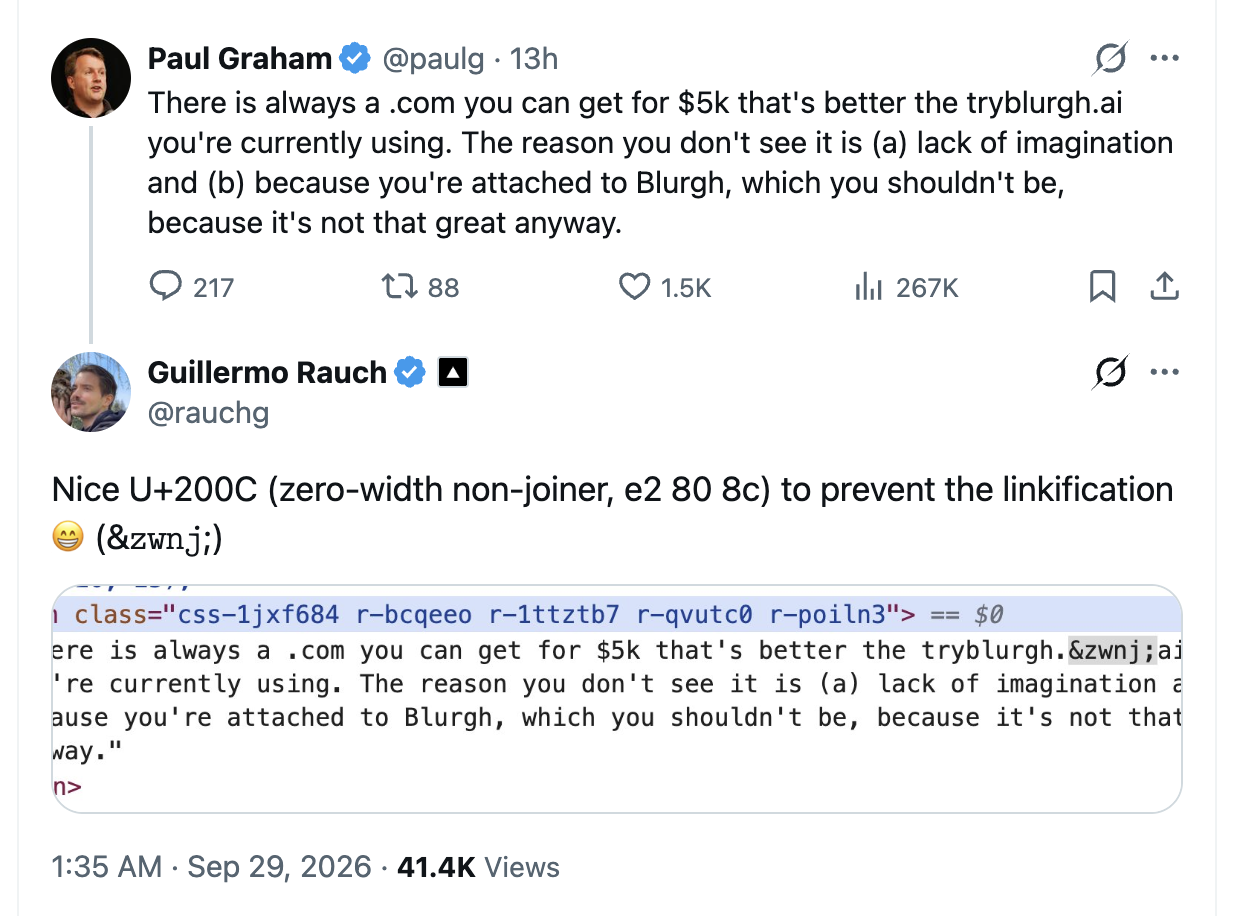
The domain in Paul’s post is plain text. If you fetch the post from the X API, it comes back with no link entities at all, so X never saw a URL in it.
Why would you want to do this?
X turns anything that looks like a domain into a clickable link and wraps it in its t.co shortener. Most of the time that’s what you want.
Sometimes it isn’t. Paul made up tryblurgh.ai as an example of a bad startup domain, and a made-up domain can be a real one, owned by someone you don’t know. As of September 29, 2026, tryblurgh.ai is a registered domain that redirects to an AI sales startup. With a link, his post would have sent readers there.
The same goes for a scam site you’re warning people about, or a domain you’re discussing as a name rather than as a place to visit.
What is a zero-width non-joiner?
It’s a Unicode character with no width. You can’t see it, but it sits in the text like any other letter.
Its real job is in scripts where letters connect to each other, like Persian and Arabic. Placed between two letters, it tells the font to keep them apart even when they would normally join. In Persian, for example, it separates the prefix می from the verb that follows it.
Its code point is U+200C. In UTF-8 it takes three bytes, E2 80 8C, and in HTML you can write it as ‌, which is how the DevTools showed it in Guillermo’s screenshot. If code points and bytes are new to you, I explain them in my introduction to Unicode and UTF-8.
Why X doesn’t link it
Twitter published its text parser as an open-source library called twitter-text, and its rules explain what’s going on.
When a domain has no https:// in front of it, the parser only accepts plain ASCII: letters, digits, hyphens and dots, ending with a top-level domain it knows, like .ai or .com. The zero-width non-joiner is not ASCII, so the parser splits the text around it. On one side there’s tryblurgh., on the other there’s ai, and neither one is a domain.
We can check this ourselves. Install the library in an empty folder:
npm install twitter-textSave this as links.mjs. It asks the parser to find the URLs in the same sentence, first with a normal domain and then with the hidden character after the dot:
import twttr from 'twitter-text'

console.log(twttr.extractUrls('better than the tryblurgh.ai you use'))
console.log(twttr.extractUrls('better than the tryblurgh.\u200cai you use'))
Run it with node links.mjs:
[ 'tryblurgh.ai' ]
[]Where to put the character
Put it right after the last dot, just before the top-level domain. Right before the dot works too.
Don’t put it in the middle of the name. The parser still finds a domain in the part that follows it:
console.log(twttr.extractUrls('better than the try\u200cblurgh.ai you use'))
//[ 'blurgh.ai' ]
Now the link points to blurgh.ai, a different domain from the one you wrote. Subdomains have the same catch. Put the character after the first dot of docs.flaviocopes.com and the parser still links flaviocopes.com, because that part is a complete domain on its own.
How to type it
On a Mac, the quickest way is the terminal. This command puts the character in your clipboard:
printf '\u200c' | pbcopyThen paste it after the dot. It works in zsh, the default macOS shell, and in fish. The old bash that ships with macOS doesn’t understand \u200c and copies those six characters instead.
On Omarchy, pipe it into wl-copy instead:
printf '\u200c' | wl-copyOn a phone there’s no key for it. Write the post on your computer, or keep a note with the domain already broken and copy it from there.
If you post to X from code, a small helper does it for you. This one adds the character after every dot, which covers subdomains too:
const unlink = (domain) => domain.replaceAll('.', '.\u200c')

const text = `There's always a better domain than ${unlink('tryblurgh.ai')}`
How to see it
The character is invisible, so how do you know it’s there?
Copy the domain from the post and look at the raw bytes in the terminal:
pbpaste | hexdump -C00000000 74 72 79 62 6c 75 72 67 68 2e e2 80 8c 61 69 |tryblurgh....ai|
0000000f2e is the dot, e2 80 8c is the zero-width non-joiner, and 61 69 is ai. Those are the same three bytes Guillermo quoted. On Omarchy, use wl-paste instead of pbpaste.
In the browser, right-click the post text and pick Inspect. The Elements panel in Chrome shows the character as ‌.
The catches
The character travels with the text. If someone copies tryblurgh.ai from the post to visit it, they copy the hidden character too, and what they paste is no longer a valid domain. Node’s URL parser, which follows the same URL standard browsers implement, rejects it:
new URL('https://tryblurgh.\u200cai')
//TypeError: Invalid URL
That’s fine for a made-up domain like Paul’s. For a domain you want people to visit, it means they have to type it by hand.
Other apps also have their own link parsers, and they don’t all behave like X. The linkifyjs JavaScript library skips the broken domain too. But when the text starts with https://, it creates a link that includes the hidden character, so readers get a broken link instead of plain text. If you paste the same text somewhere else, check how it looks there.
Other ways to break a link
If you don’t want hidden characters in your text, break the domain in a way people can see. Security researchers write tryblurgh[.]ai when they share malicious domains, so nobody clicks them by accident. A space before the dot (tryblurgh .ai) or tryblurgh dot ai works too. twitter-text finds no link in any of them, and readers can see you broke the domain on purpose.
Other invisible characters work as well, with small costs. A zero-width space (U+200B) breaks the domain the same way, but it also marks a spot where a line can wrap, so the domain can end up split across two lines. A word joiner (U+2060) never wraps, but twitter-text counts it as two characters. I’d stick with the zero-width non-joiner, which counts as one and keeps the domain on one line.
Want me to talk about your product? You can sponsor this site.
Related posts about js: