Efficiently load JavaScript with defer and async
By Flavio Copes
Learn how the async and defer attributes change the way scripts load on an HTML page, how they affect parsing and rendering, and which to choose for speed.
- The position matters
- Async and Defer
- Performance comparison
- Blocking parsing
- Blocking rendering
- domInteractive
- Keeping things in order
- Just tell me the best way
When loading a script on an HTML page, you need to be careful not to harm the loading performance of the page.
A script is traditionally included in the page in this way:
<script src="script.js"></script>whenever the HTML parser finds this line, a request will be made to fetch the script, and the script is executed.
Once this process is done, the parsing can resume, and the rest of the HTML can be analyzed.
As you can imagine, this operation can have a huge impact on the loading time of the page.
If the script takes a little longer to load than expected, for example if the network is a bit slow or if you’re on a mobile device and the connection is a bit sloppy, the visitor will likely see a blank page until the script is loaded and executed.
The position matters
When you first learn HTML, you’re told script tags live in the <head> tag:
<html>
  <head>
    <title>Title</title>
    <script src="script.js"></script>
  </head>
  <body>
    ...
  </body>
</html>
As I told you earlier, when the parser finds this line, it goes to fetch the script and executes it. Then, after it’s done with this task, it goes on to parse the body.
This is bad because there is a lot of delay introduced. A very common workaround was to put the script tag at the bottom of the page, just before the closing </body> tag.
In doing so, the script is loaded and executed after all the page is already parsed and loaded, which is a huge improvement over the head alternative.
Today you don’t need that workaround. Put the script in the head with defer (or async when the scripts are independent). Every browser has supported both attributes since the Internet Explorer days.
Async and Defer
Both async and defer are boolean attributes. Their usage is similar:
<script async src="script.js"></script><script defer src="script.js"></script>if you specify both, async takes precedence on modern browsers, while older browsers that support defer but not async will fallback to defer.
These attributes only make sense when using the script in the head portion of the page, and they are useless if you put the script in the body footer like we saw above.
Performance comparison
No defer or async, in the head
Here’s how a page loads a script without either defer or async, put in the head portion of the page:
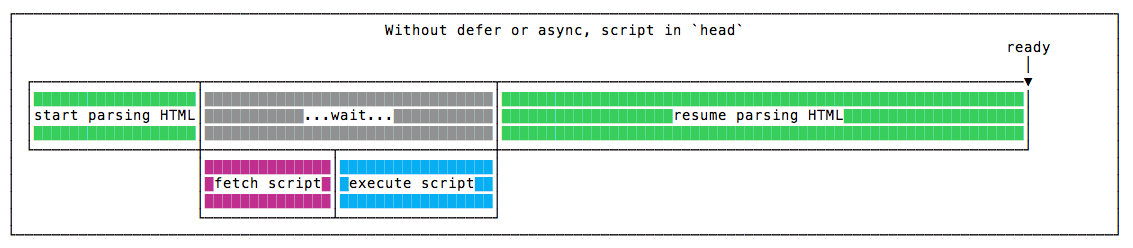
The parsing is paused until the script is fetched, and executed. Once this is done, parsing resumes.
No defer or async, in the body
Here’s how a page loads a script without defer or async, put at the end of the body tag, just before it closes:

The parsing is done without any pauses, and when it finishes, the script is fetched, and executed. Parsing is done before the script is even downloaded, so the page appears to the user way before the previous example.
With async, in the head
Here’s how a page loads a script with async, put in the head tag:
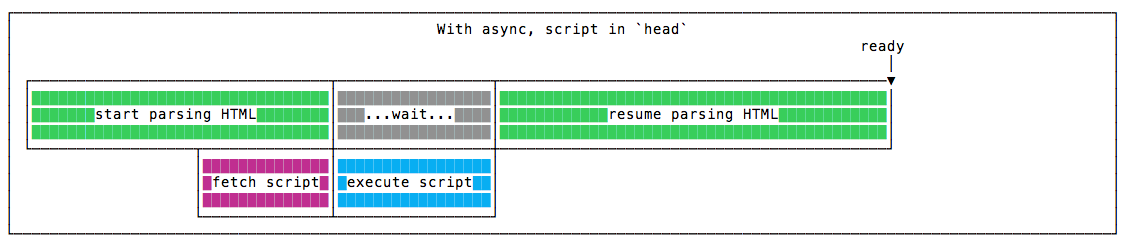
The script is fetched asynchronously, and when it’s ready the HTML parsing is paused to execute the script, then it’s resumed.
With defer, in the head
Here’s how a page loads a script with defer, put in the head tag:
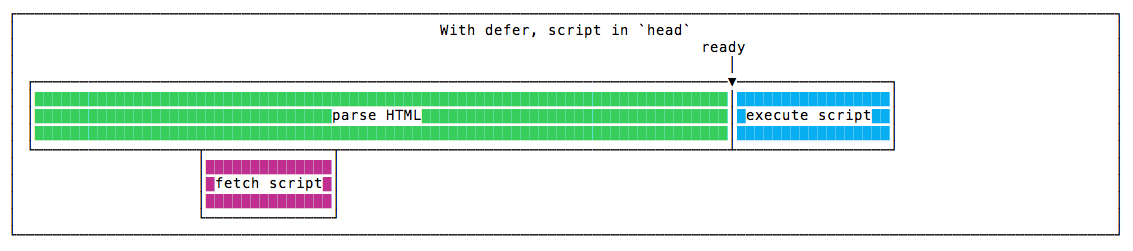
The script is fetched asynchronously, and it’s executed only after the HTML parsing is done.
Parsing finishes just like when we put the script at the end of the body tag, but overall the script execution finishes well before, because the script has been downloaded in parallel with the HTML parsing.
So this is the winning solution in terms of speed 🏆
Blocking parsing
async blocks the parsing of the page while defer does not.
Blocking rendering
Neither async nor defer guarantee anything on blocking rendering. This is up to you and your script (for example, making sure your scripts run after the onLoad) event.
domInteractive
Scripts marked defer are executed right after the domInteractive event, which happens after the HTML is loaded, parsed and the DOM is built.
CSS and images at this point are still to be parsed and loaded.
Once this is done, the browser will emit the domComplete event, and then onLoad.
domInteractive is important because its timing is recognized as a measure of perceived loading speed. See the MDN for more.
If you need to wait until the DOM is ready before your own code runs, see how to wait for the DOM ready event.
Keeping things in order
Another case pro defer: scripts marked async are executed in casual order, when they become available. Scripts marked defer are executed (after parsing completes) in the order which they are defined in the markup.
Just tell me the best way
The best thing to do to speed up your page loading when using scripts is to put them in the head, and add a defer attribute to your script tag:
<script defer src="script.js"></script>This is the scenario that triggers the faster domInteractive event.
Considering the pros of defer, is seems a better choice over async in a variety of scenarios.
Use async when the script does not depend on other scripts, and you are fine with it running as soon as it downloads. Analytics snippets are a common example.
Unless you are fine with delaying the first render of the page, make sure that when the page is parsed the JavaScript you want is already executed.
Want me to talk about your product? You can sponsor this site.
Related posts about platform: