How to put a tab back into a Chrome window
By Flavio
Dragged a tab out of Chrome, or a link opened in its own window? Put it back in the main window by dragging it or with Move Tab to Another Window.
You pulled a tab a little too far and it became its own window. Or you clicked a link and it opened in a new window instead of a new tab. Now there’s a second Chrome window with one tab in it, and you want that tab back with the others.
Drag the tab onto the row of tabs at the top of your main window and let go. It joins that window, and the empty window closes by itself.
If dragging keeps missing, right-click the tab instead. Both ways are free and built into Chrome. When there are many stray windows, Tab Reunion, the extension I built for this, puts every tab back in one click.
How do I put one tab back?
Drag it. Grab the tab by its title and drop it on the tab row of the main window. Dragging a tab away from a tab row is how Chrome makes a new window in the first place, so aim for the row of tabs.
Use the menu. Right-click the tab and hover Move Tab to Another Window. The submenu shows New Window and then your other windows. Each one is named after the tab it’s showing, plus how many other tabs it has:
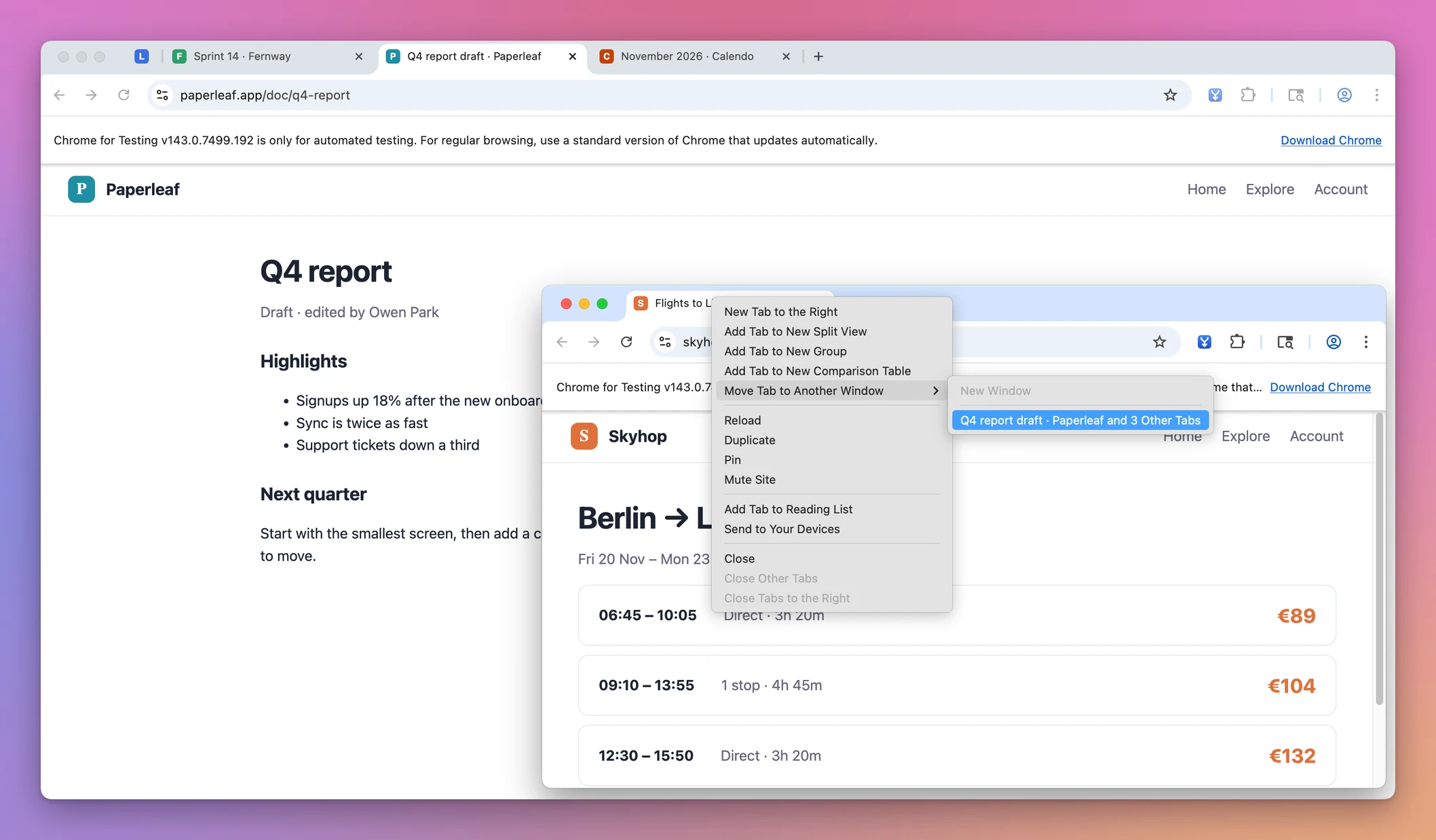
New Window is greyed out here because the tab is already alone in its window. Pick the main window, and the tab moves to the end of its tab row and becomes the tab you’re looking at. The window it came from had nothing left in it, so Chrome closed it:
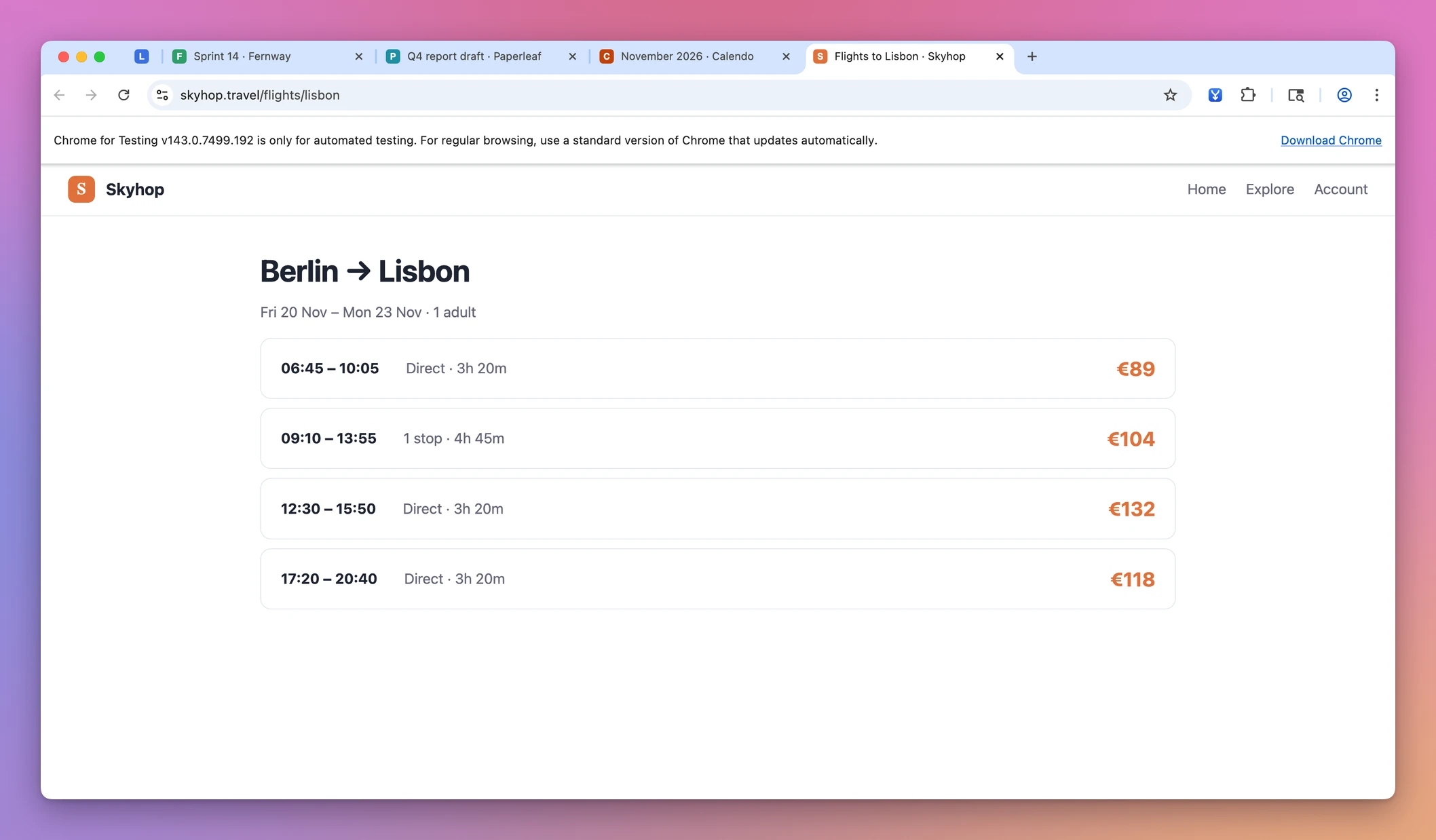
The tabs, sites and windows in these screenshots are made up.
If all your windows look alike in that submenu, name the main one. Right-click the empty space next to the New Tab button, choose Name window, and give it a name like “Main”, so it’s easy to tell apart.
Is there a shortcut to bring back a tab?
It depends on where the tab went.
If you closed it, press ⌘+Shift+T on a Mac or Ctrl+Shift+T on Windows and Linux. Chrome reopens closed tabs in the order you closed them.
If it’s in another window, Chrome’s list of keyboard shortcuts has no key to move it back. The list says to drag the tab into an existing window, with the mouse. The right-click menu is the closest thing to doing it without dragging.
Tab Reunion adds the missing key: Option+Shift+M on a Mac, Alt+Shift+M on Windows and Linux. Press it in your main window, and the tabs of every other window move in. A keyboard shortcut to merge Chrome windows covers how to set it if it does nothing.
How do I put back a few tabs at once?
Select them first. Click the first tab, hold Shift and click the last one, and every tab in between gets selected. Then right-click one of them and choose Move Tabs to Another Window, with an “s”. The tabs arrive in the same order.
When you have only one window open, the same menu item reads Move Tabs to New Window instead, and it does the opposite of what you want here. That’s handy for splitting a window, not for merging.
A pinned tab moved with the menu stays pinned, and it lands at the left end of the tab row, where pinned tabs live.
Which way should I use?
| Way | Free | Moves | Best for |
|---|---|---|---|
| Drag the tab onto the tab row | Yes | One tab | One stray tab, both windows visible |
| Right-click, Move Tab to Another Window | Yes | One tab | Windows that overlap, or a shaky drag |
Shift-click, then Move Tabs to Another Window | Yes | A selection from one window | A few tabs that sit next to each other |
Tab Reunion, button or Option+Shift+M | $20 once | Every tab of every other window | Many windows, tab groups, pinned tabs |
For one tab, Chrome’s own ways are all you need.
When there are many windows
Links that open in new windows add up, and by the evening there can be four or five windows with a few tabs each. Putting those back one window at a time is where the free ways get slow.
Tab Reunion is a Chrome extension that does it in one go. Click into the window you want to keep, then click its toolbar button or press the shortcut. Every tab of every other window moves in, in order, tab groups keep their name and color, pinned tabs stay pinned, and the empty windows close. It also closes empty New Tab pages and duplicate tabs at the end.
It isn’t on the Chrome Web Store, so you add it from a folder with Chrome’s Developer mode, a switch on the chrome://extensions page that lets Chrome load an extension from your computer. The Tab Reunion page has the steps, and merge all Chrome windows into one shows a merge of four windows from start to finish.
Get Tab Reunion
Too many Chrome windows? Move every tab into the window you're using, keeping tab groups, their order and pinned tabs.
See Tab Reunion → · Read the docs · $20. See the app page for tax details, with full source code.
Want me to talk about your product? You can sponsor this site.