Which AI model is best for coding? A hands-on comparison
By Flavio
Tagged: AI
Which AI model is best for coding? Claude Opus 5.5, Fable 5.1, GPT-6.1 Sol, Grok 4.7 and open models compared, plus a test you can run on your own code.
As of September 23, 2026, the best AI model for coding is Claude Opus 5.5. It sits at the top of Cursor’s coding leaderboard, it’s cheaper than Opus 5 was, and in the test we’ll build in this post it was the fastest model, and it got every hidden test right in three runs out of four.
GPT-5.6 Sol is a close second for careful, well-specified changes, and it used the fewest tokens of any model I tried.
The one to watch is GPT-6.1 Sol. OpenAI released it on September 29 and says it comes close to GPT-6 Astra, its top model, at a fifth of the price. In Artificial Analysis’s tests it scores higher than GPT-5.6 Sol for about a third of the cost per task. It’s not in my test, because Cursor doesn’t have it and it hadn’t reached my Codex account yet on September 30.
That’s the short answer. The longer one is that a leaderboard can’t tell you how a model does on your code. So in this post we’ll go through the models worth knowing right now, and then we’ll build a small bake-off: the same coding task, given to six models inside the same coding agent, graded by tests the agent never sees, three times each.
Every model passed the tests I wrote from the task description. The differences showed up somewhere else.
The short version
If you just want a pick for each situation:
- For most coding work in an agent: Claude Opus 5.5 at its default medium effort. Be careful with the higher settings: at max effort it took 185 steps and $13.43 per task on CursorBench, where medium needed 54 steps and $2.91.
- For interfaces, prototypes and other things you look at: I use Claude Fable 5.1 for frontend work, while some people prefer Opus 5.5 for it.
- For precise changes with a clear spec, or a deadline: GPT-5.6 Sol, and GPT-6.1 Sol once it lands in your tool. GPT-5.6 Sol wrote the fewest tokens in my test and never missed an edge case.
- For problems too big to check by eye: Claude Fable 5.1, if you can pay for it. It’s near the top of the long-task leaderboards, but it wasn’t the most consistent model on my small task, so review what it does.
- For high-volume simple tasks: GPT-5.6 Luna or GPT-6 Luna.
- For open weights: GLM-5.3, or Kimi K3.1 Pro through a hosted API, and Muse Glimmer or Gemma 4 on your own machine.
Everything below explains where those picks come from, and how to check them against your own work.
The models worth knowing in September 2026
There are a lot of models. Most launch pages compare against a different set of rivals, so here are the ones that matter for coding right now, with their API prices per million input and output tokens. For the companies and tools around them, see the AI coding landscape. I checked every price on the vendors’ pages on September 23, 2026, the GPT-6.1 Sol price on September 30, the Sonnet 5.5 / Haiku 5.5 prices after they shipped, and the Kimi K3.1 Pro rates on November 4.
| Model | Maker | Released | Price in / out |
|---|---|---|---|
| Claude Opus 5.5 | Anthropic | Sep 22, 2026 | $4 / $20 |
| Claude Fable 5.1 | Anthropic | Sep 1, 2026 | $10 / $50 |
| Claude Sonnet 5.5 | Anthropic | Sep 28, 2026 | $2 / $10 |
| Claude Haiku 5.5 | Anthropic | Oct 7, 2026 | $0.10 / $0.50 |
| GPT-6 Astra | OpenAI | Sep 3, 2026 | $10 / $50 |
| GPT-6.1 Sol | OpenAI | Sep 29, 2026 | $2 / $10 |
| GPT-6 Sol | OpenAI | Sep 22, 2026 | $2 / $10 |
| GPT-6 Luna | OpenAI | Sep 22, 2026 | $0.10 / $0.50 |
| GPT-5.6 Sol | OpenAI | Jul 9, 2026 | $4 / $20 |
| GPT-5.6 Luna | OpenAI | Jul 9, 2026 | $0.20 / $1.20 |
| Grok 4.7 | SpaceXAI | Sep 21, 2026 | $2 / $6 |
| GLM-5.3 | Z.ai | Aug 14, 2026 | $1.40 / $4.40 |
| Kimi K3 | Moonshot | Jul 2026 | $3 / $15 |
| Kimi K3.1 Pro | Moonshot | Oct 2026 | $2 / $10 |
Most of them read up to 1 million tokens of context. Grok 4.7 stops at 500k.
Two things in the fine print. GPT-5.6 Sol launched at $5 / $30, and $4 / $20 is a promotion that runs at least through November 21, 2026. OpenAI and SpaceXAI bill long prompts at a higher rate past a threshold (272k tokens for OpenAI, 200k for Grok). Claude’s 1M context has no surcharge, except Haiku 5.5, which jumps to $0.50 / $2.50 past 100k tokens.
Now let’s see what each family is good at.
Anthropic: Opus 5.5, Fable 5.1 and Sonnet 5.5
Claude Opus 5.5 is the first model of the Claude 5.5 family. Anthropic says it performs at the level of Fable 5.1 on most work, and it’s cheaper than Opus 5 was ($5 / $25). It’s the default model in Claude Code, and it’s available in Cursor, GitHub Copilot and on the big cloud platforms.
One detail matters if you used Opus 5 before: the default effort dropped to medium. Effort is how long the model thinks and works before answering. Low, medium, high, xhigh and max are all available.
Claude Fable 5.1 is the tier above Opus, at more than twice the price. Anthropic positions it for long agent runs and hard reasoning. In Claude Code it’s never the default, you pick it with /model fable. Requests that trip its safety checks, mostly security and biology work, get handed to an Opus model instead.
Claude Sonnet 5.5 is the cheaper option at $2 / $10. It shipped on September 28, 2026. Cached reads dropped to $0.10 per million tokens on October 7.
Claude Haiku 5.5 came out on October 7 (API id claude-haiku-5-5). It’s $0.10 / $0.50 for prompts up to 100k tokens, and $0.50 / $2.50 above that.
OpenAI: GPT-6 and GPT-5.6
OpenAI has two generations on sale at the same time.
GPT-6 Astra is the flagship. OpenAI calls it its best model for software engineering so far, and it’s priced like Fable. It’s in Codex, ChatGPT, the API and GitHub Copilot, but not in Cursor.
GPT-6 Sol and GPT-6 Luna came out on September 22, 2026. They bring much of Astra into faster and cheaper models: Sol for complex coding and agent work, Luna for simple tasks you run a lot. At $2 / $10, GPT-6 Sol costs half of GPT-5.6 Sol’s current price. They’re rolling out in Codex and ChatGPT for paid plans, in the API and in GitHub Copilot. On September 23 they hadn’t reached my account yet. I care more about the model I can pick than about the launch headline. The Codex app listed GPT-6 Astra and the GPT-5.6 models, but no GPT-6 Sol:
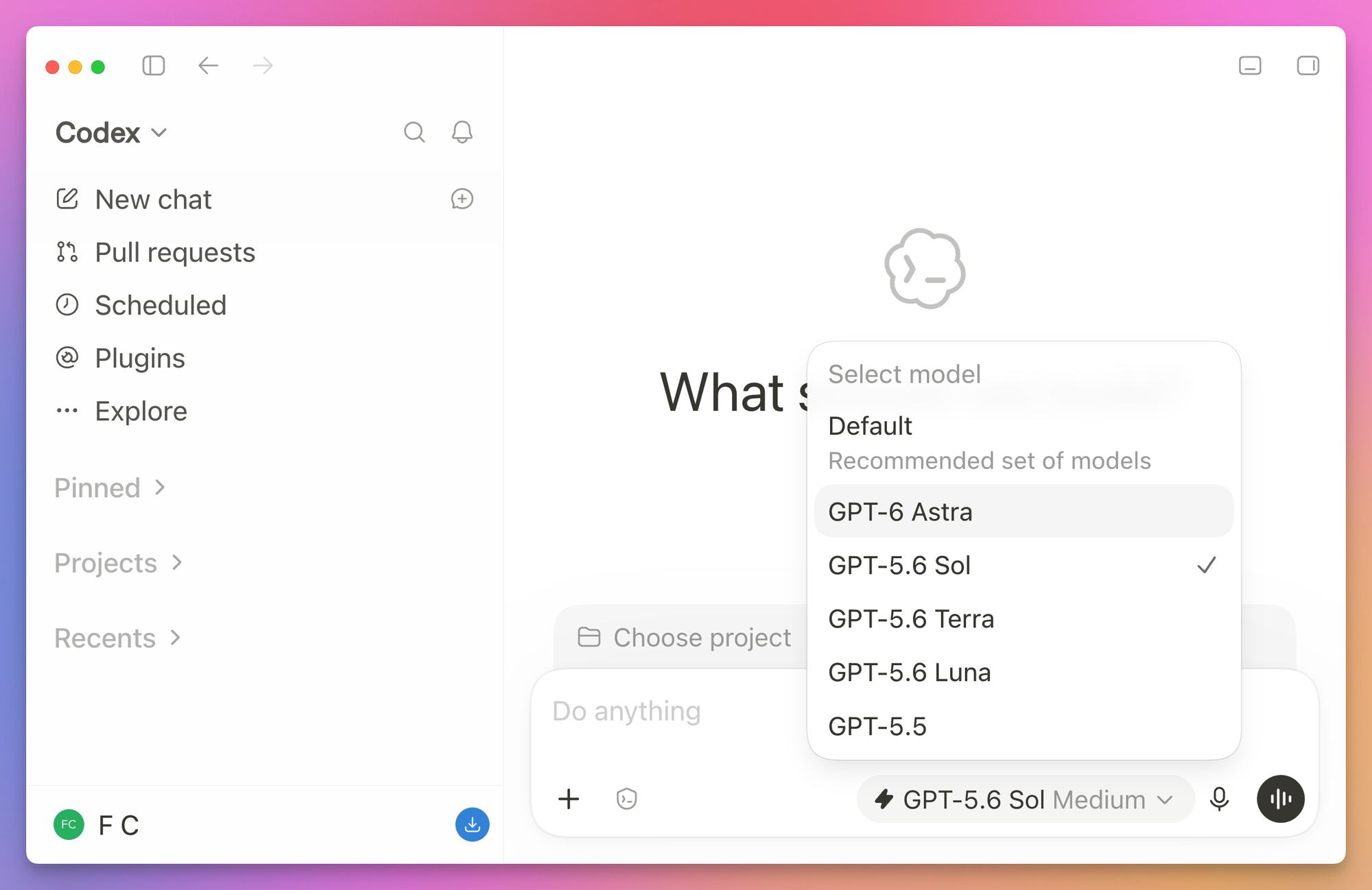
The Codex CLI didn’t accept gpt-6-sol with my ChatGPT login either, and Cursor didn’t list it.
GPT-6.1 Sol came out on September 29, 2026. It’s an upgrade to GPT-6 Sol at the same $2 / $10, and OpenAI says it nearly matches Astra on coding and agent work at a fifth of Astra’s price. Artificial Analysis puts it 1 point below Astra on its Intelligence Index. At max effort, a task there costs $0.72 with GPT-6.1 Sol, $1.99 with GPT-5.6 Sol and $3.26 with Astra.
It writes 10% to 30% more output tokens than GPT-6 Sol, so the saving doesn’t come from shorter output. Cached input got cheaper, $0.10 per million tokens instead of $0.20. That matters for coding agents, because they send the same long prompt again on every step. It’s in Codex and ChatGPT Work for Plus, Pro, Business, Enterprise and Edu plans, and in the API. It’s not in Cursor. On September 30 my Codex CLI still refused it:
The 'gpt-6.1-sol' model is not supported when using Codex with a ChatGPT account.That error means the rollout hasn’t reached your account yet, so GPT-6.1 Sol is not in the bake-off below.
GPT-5.6 Sol is the model I’ve sent most of my precise coding work to since July. It’s careful, it follows instructions closely, and it writes fewer tokens than the Claude models to finish a task. GPT-5.6 Terra and GPT-5.6 Luna are the cheaper tiers. On October 7, GPT-6 replaced GPT-5.6 in ChatGPT Chat. Codex still has the 5.6 models. The current fast vision tier is GPT-6.1 Terra.
The GPT-6 Sol, GPT-6 Luna and GPT-5.6 models have effort levels from none to max, with medium as the default. GPT-6.1 Sol drops none and starts at low. In Codex there’s also ultra for Sol, which splits the work across parallel agents.
SpaceXAI: Grok 4.7
Grok 4.7 came out on September 21, 2026. SpaceXAI says it’s built on a larger base model than Grok 4.6, at the same price, and that it was trained on tasks that take hours. It’s in Cursor, in Grok Build and in the Grok API. There’s a Fast variant with twice the speed at twice the price.
At $2 / $6 it costs a lot less per token than Opus 5.5 or GPT-5.6 Sol. Keep that in mind when we look at the test results, because the price per token is not the price per task.
Google: Gemini 4 Carbon and Argon
Google announced Gemini 4 Carbon on October 28, 2026. Google reports better coding and long-running agent performance than Argon, with a particular focus on finding and patching security vulnerabilities. It ranks first on Artificial Analysis’s Intelligence Index v5.0 with a score of 59, according to the announcement.
Access starts with selected cyber defenders in Google’s Fairwind Program. General developer and consumer access is still to come, so Carbon is not in the tests below. Google announced introductory API pricing of $2 per million input tokens and $10 per million output tokens.
Gemini 4 Argon is already generally available through the paid Gemini API, and to Google AI Pro and Ultra subscribers in the Gemini app. For the latest releases, I keep an AI news page.
Open-weight models
Open-weight models are the ones you can download and run yourself. If the idea is new to you, my guide to open-weight models explains the weights, the licenses, and recent releases like Qwen3.8 and Kimi K3.1 Pro.
For coding, the strong ones are huge:
- GLM-5.3 from Z.ai is a 753B-parameter model, and Z.ai calls it the most capable open model for coding. I tried it in Z.ai’s own coding agent, ZCode.
- Kimi K3.1 Pro from Moonshot is the newer build of that 2.8-trillion-parameter model, announced on October 23, 2026, with the weights out on November 4. It costs less than K3 on the API, $2 and $10 per million tokens against $3 and $15, and its license is still custom.
- DeepSeek V4.1 Flash and Qwen 3.8 are the latest from DeepSeek and Alibaba.
None of these runs on a laptop. You use them through a hosted API, often for much less than the closed models.
Kimi K3.1 Pro makes that price gap sharper. Moonshot’s table puts it at 65.7 on Terminal-Bench 4.0, against 58.2 for GPT-6 Astra and 66.4 for Claude Opus 5.5. It also reports 70.0 on HLE with tools, where Opus 5.5 gets 67.7, and 92.1 on BrowseComp against 91.5 for Astra. The same table shows where it falls behind: 31.5 on Program Bench against 65.0 for Opus 5.5, and 38.1 on Terminal-Bench-Science against 68.1 for Astra. Moonshot marks the Claude and GPT-6 columns as “max, w/ fallback”, so those rows were not run the same way. The scores come from Moonshot’s model card, and K3.1 Pro is not in the bake-off below.
What does fit on a well-equipped laptop is Muse Glimmer from Meta, a 30B model under Apache 2.0 whose 4-bit build is under 20 GB, and the smaller Gemma 4 sizes from Google. Meta also released Muse Wonder on October 12, a newer open model in the same family. They’re good for private, offline work, but don’t expect them to keep up with the models above on long agent tasks. Muse Wonder is also in Cursor. I wrote how I would evaluate it there. To see what fits your machine, check how much VRAM an LLM needs, and Run a local LLM with Ollama walks you through the setup.
What the leaderboards say
The most useful public table for coding agents right now is CursorBench 4.0, because Cursor builds it from real agent sessions, much of it on Cursor’s own code that models haven’t seen in training, and it lists the cost of each run. This is the top of the leaderboard on September 23, 2026:
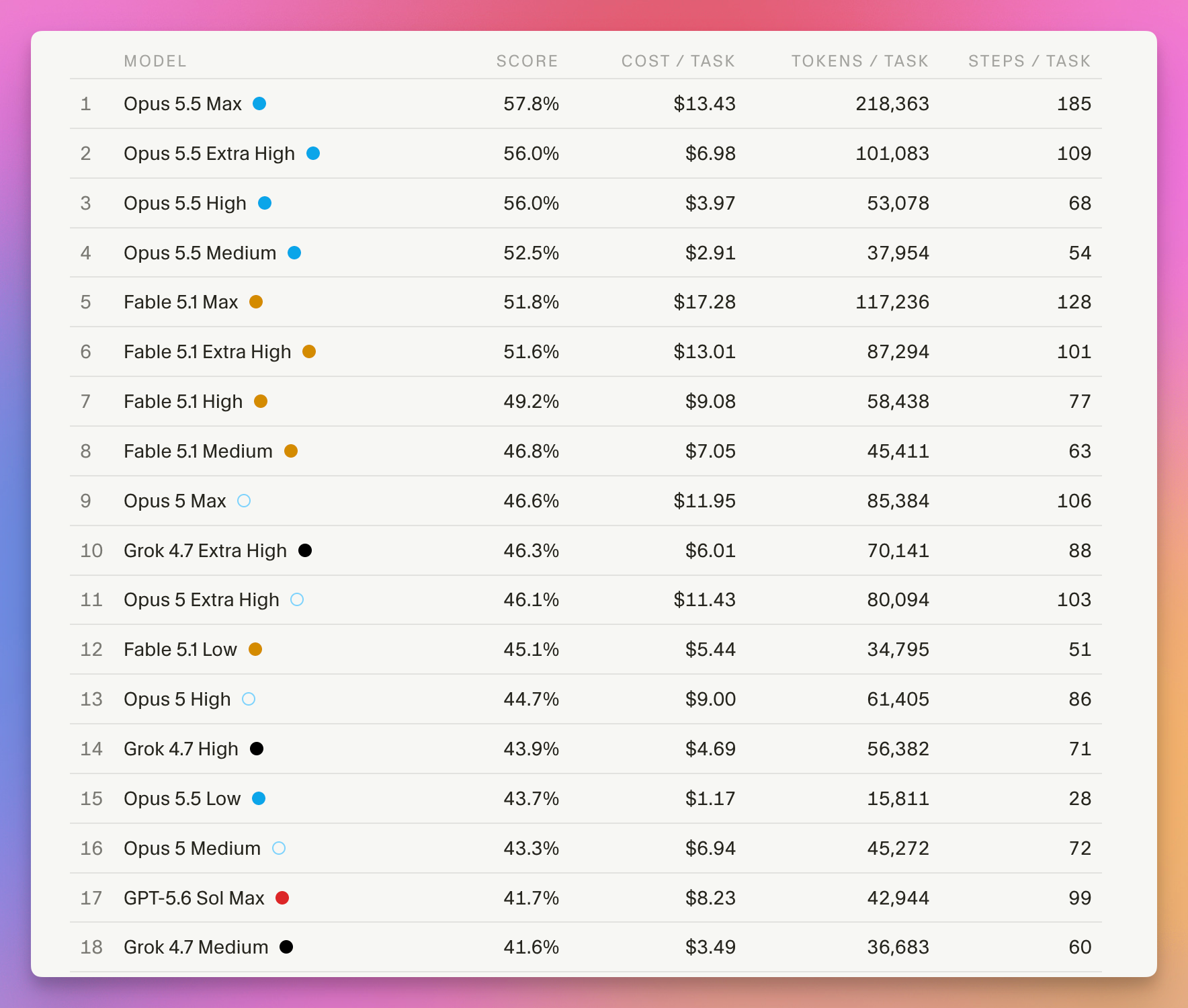
Here are the rows for the exact settings I used in my test:
| Model | CursorBench 4.0 | Cost per task |
|---|---|---|
| Claude Opus 5.5 Medium | 52.5% | $2.91 |
| Claude Fable 5.1 High | 49.2% | $9.08 |
| Grok 4.7 Medium | 41.6% | $3.49 |
| GPT-5.6 Sol High | 35.7% | $2.85 |
| GPT-5.6 Luna Medium | 22.2% | $0.08 |
Kimi K3 isn’t on it, and neither is K3.1 Pro or anything from GPT-6. For GPT-6.1 Sol, the closest coding number comes from the Artificial Analysis Coding Agent Index: at xhigh effort it scores 1 point above GPT-6 Astra, for less than 15% of Astra’s cost per task.
Cursor also plots every run as score against average cost per task. Each line is one model, and each dot on it is one effort level:
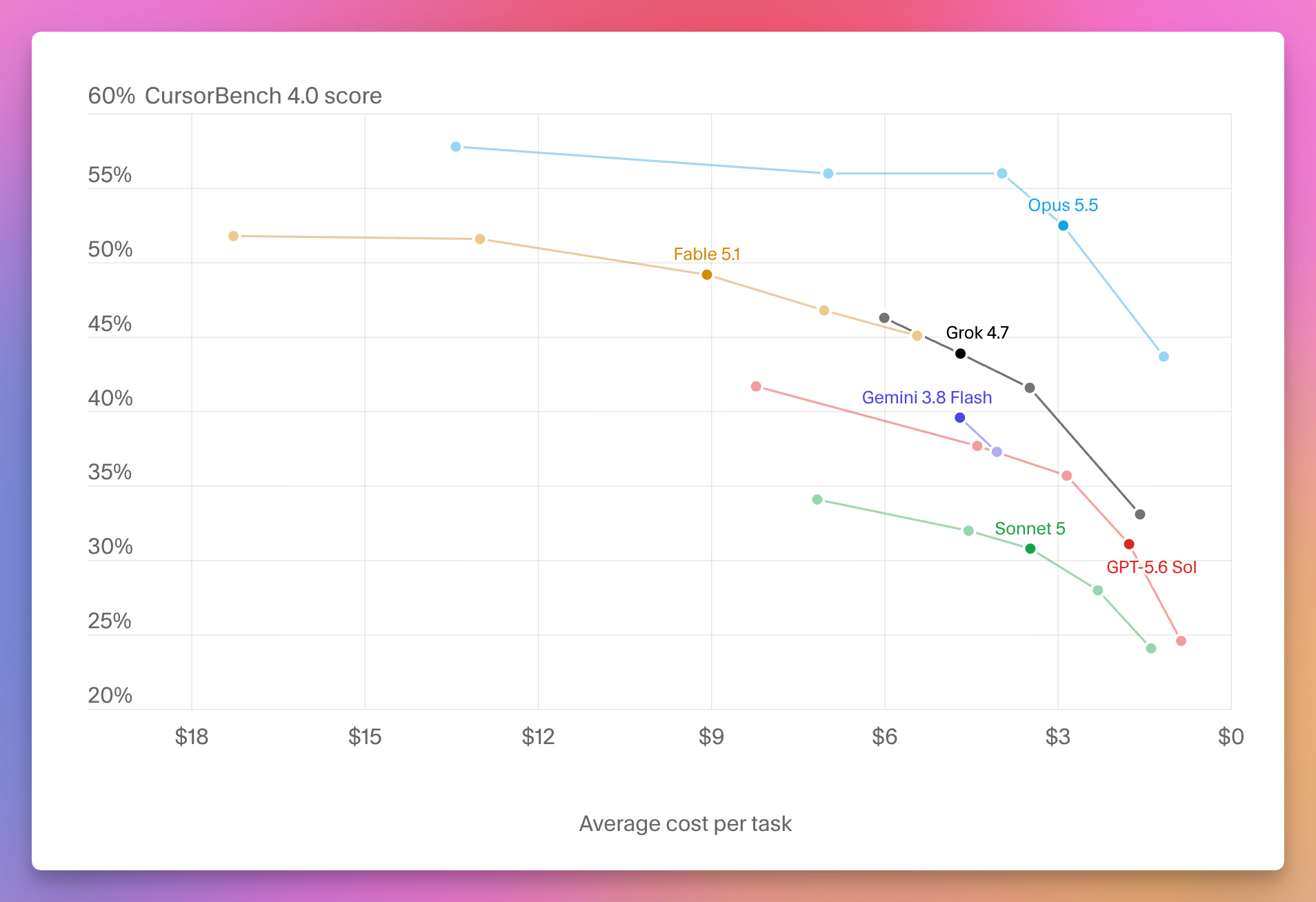
The cost axis runs from $18 on the left to $0 on the right, so the best place to be is the top right: a high score for little money. Opus 5.5’s line sits above every other line at every price.
Now compare Grok 4.7 Medium with Opus 5.5 Medium. Grok’s tokens cost a fraction of Opus 5.5’s, and Cursor counts about the same number of tokens per task for both, around 37,000. Yet Grok costs more per task, $3.49 against $2.91, and scores 11 points lower.
The per-token price on a model’s page doesn’t tell you what a task costs. The price of cached input counts too, and in an agent loop that’s most of what the model reads at each step: $0.50 per million tokens for Grok 4.7, against $0.20 for Opus 5.5.
A benchmark like this has limits. It measures a model inside Cursor’s agent, on Cursor’s kind of tasks, and a two-point gap is often noise. I went through all of that in How AI models are measured and compared, including why vendors’ own numbers rarely agree.
What no leaderboard can tell you is how a model does on your task. So let’s build a test.
Build your own model bake-off
Here’s the plan. We’ll write a tiny JavaScript project with two bugs and one missing feature, and a task description, the kind of prompt you’d give an agent on a normal day. Then a script gives that same task to six models, one at a time, each in a fresh copy of the project.
When an agent finishes, the script drops in a test file the agent never saw and runs it. That’s the only way to know if the model solved the task or just made its own tests pass.
We use the same coding agent for every model, the Cursor CLI, so the only thing that changes between runs is the model. The agent around the model (its tools, its system prompt) is called the harness, and a different harness can change the result as much as a different model.
What you need
You need Node.js and the Cursor CLI. The CLI installs with one command on macOS and Linux:
curl https://cursor.com/install -fsS | bashThen log in and list the models your account can use:
agent login
agent models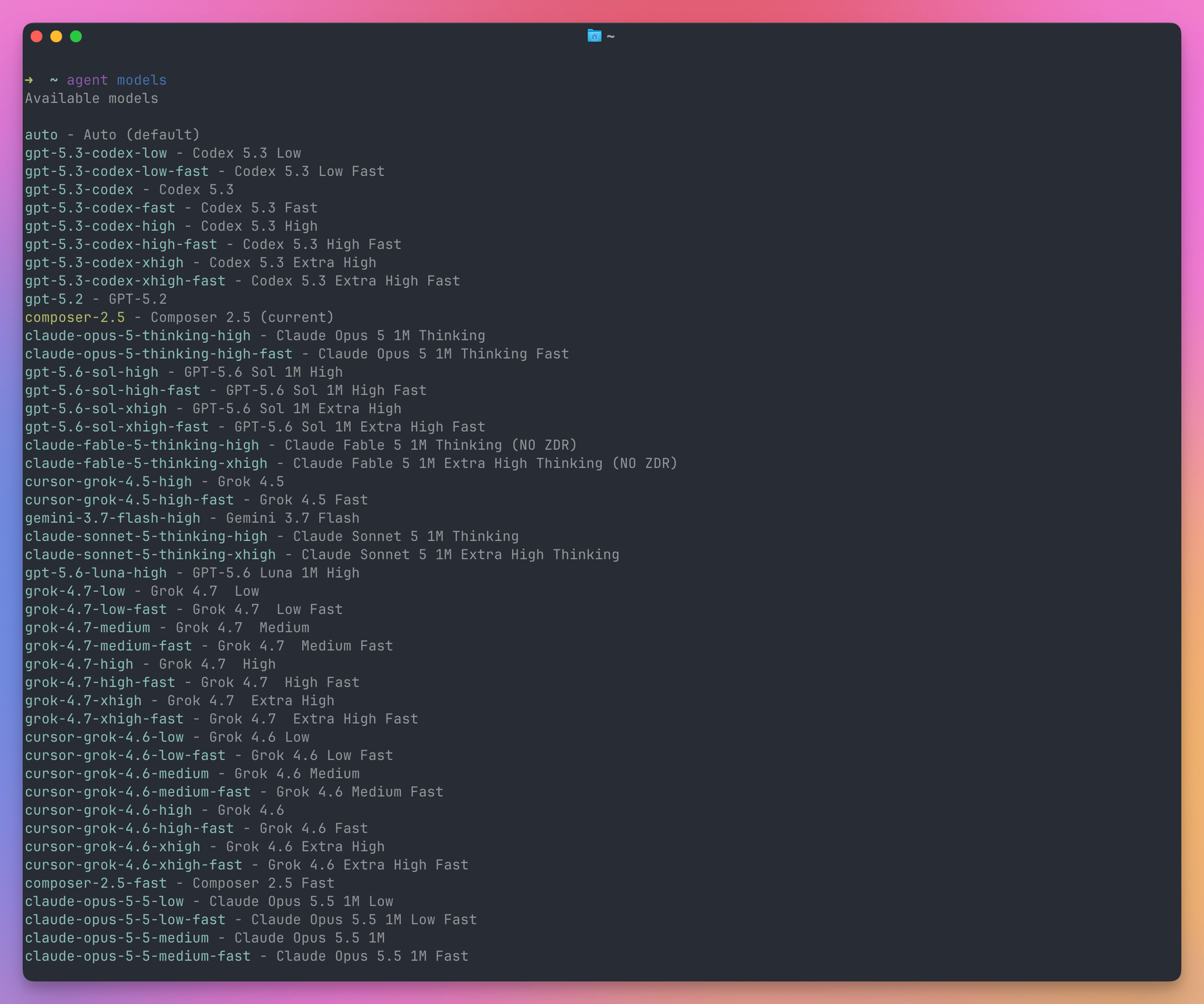
The names in that list are the ones we’ll pass to --model, like claude-opus-5-5-medium or gpt-5.6-sol-high. The effort level is part of the name.
The runs are billed to your Cursor account like any other agent request. The task is small: in my runs a model wrote between 2,000 and 17,000 output tokens.
Step 1: the project
Our project is a small library that computes stats for Markdown blog posts, the kind of thing a blog like this one needs. Create a folder called bakeoff, and inside it a project folder.
This is project/package.json:
{
  "name": "post-stats",
  "type": "module",
  "scripts": {
    "test": "node --test"
  }
}
project/src/stats.js has two functions, both with a bug:
export function slugify(title) {
  return title
    .toLowerCase()
    .replace(/[^a-z0-9]+/g, '-')
    .replace(/^-|-$/g, '')
}

export function readingTime(markdown) {
  const words = markdown.split(/\s+/).filter(Boolean)
  return Math.ceil(words.length / 200)
}
slugify() throws away accented letters, so an Italian title loses its é. readingTime() counts the words inside code blocks, which makes a tutorial with a lot of code look much longer than it is.
The project also has a small test file the agent can see, project/test/stats.test.js:
import { test } from 'node:test'
import assert from 'node:assert/strict'
import { slugify, readingTime } from '../src/stats.js'

test('slugify makes a URL-friendly slug', () => {
  assert.equal(slugify('How to use Node.js'), 'how-to-use-node-js')
})

test('readingTime counts 200 words per minute', () => {
  const text = 'word '.repeat(400)
  assert.equal(readingTime(text), 2)
})
Step 2: the task
The prompt goes in bakeoff/task.md, outside the project. It asks for the two fixes and one new function:
This is a small library that computes stats for Markdown blog posts. Make these changes in src/stats.js:

1. slugify() drops accented letters: slugify('Perché usare Node.js?') returns 'perch-usare-node-js'. It should return 'perche-usare-node-js'. Accented letters should become their plain version.
2. readingTime() also counts the words inside fenced code blocks (``` or ~~~). It should skip them. A post always takes at least 1 minute.
3. Add and export tableOfContents(markdown). It returns an array of { level, text, slug } for every ## and ### heading, in order. Ignore headings inside fenced code blocks. If two headings have the same slug, the second one gets -2, the third -3, and so on.

Add tests for your changes and run npm test before you finish.
Notice it’s written like a normal request, not like a formal spec. It says what’s wrong, gives one example, and describes the new function in a few lines.
Step 3: the hidden tests
Now the part the agent never sees. These tests go in bakeoff/hidden/, and the script copies them into each project only after the agent is done.
The first file checks exactly what the task asked for, nothing more. Save it as hidden/hidden.test.js:
import { test } from 'node:test'
import assert from 'node:assert/strict'
import { slugify, readingTime, tableOfContents } from '../src/stats.js'

const fence = '```'

test('slugify keeps plain titles working', () => {
  assert.equal(slugify('How to use Node.js'), 'how-to-use-node-js')
})

test('slugify turns accented letters into plain ones', () => {
  assert.equal(slugify('Perché usare Node.js?'), 'perche-usare-node-js')
  assert.equal(slugify('Ça va, Loïc?'), 'ca-va-loic')
})

test('readingTime counts 200 words per minute', () => {
  assert.equal(readingTime('word '.repeat(200)), 1)
  assert.equal(readingTime('word '.repeat(201)), 2)
})

test('readingTime skips backtick code blocks', () => {
  const md = `${'word '.repeat(150)}\n\n${fence}js\n${'code '.repeat(500)}\n${fence}\n`
  assert.equal(readingTime(md), 1)
})

test('readingTime skips tilde code blocks', () => {
  const md = `${'word '.repeat(150)}\n\n~~~\n${'code '.repeat(500)}\n~~~\n`
  assert.equal(readingTime(md), 1)
})

test('readingTime returns at least 1 minute', () => {
  assert.equal(readingTime(''), 1)
})

test('tableOfContents lists ## and ### headings in order', () => {
  const md = '# Title\n\n## Install\n\ntext\n\n### On macOS\n\n#### Too deep\n\n## Usage\n'
  assert.deepEqual(tableOfContents(md), [
    { level: 2, text: 'Install', slug: 'install' },
    { level: 3, text: 'On macOS', slug: 'on-macos' },
    { level: 2, text: 'Usage', slug: 'usage' },
  ])
})

test('tableOfContents ignores headings inside code blocks', () => {
  const md = `## Real\n\n${fence}md\n## Not a heading\n${fence}\n\n~~~\n### Also not\n~~~\n`
  assert.deepEqual(tableOfContents(md), [{ level: 2, text: 'Real', slug: 'real' }])
})

test('tableOfContents numbers duplicate slugs', () => {
  const md = '## Example\n\n## Example\n\n### Example\n'
  assert.deepEqual(
    tableOfContents(md).map((h) => h.slug),
    ['example', 'example-2', 'example-3'],
  )
})

test('tableOfContents uses the accent-aware slug', () => {
  assert.equal(tableOfContents('## Perché usare Node.js?')[0].slug, 'perche-usare-node-js')
})
The second file is different. It tests Markdown that real blog posts contain but the task never mentions: a four-backtick block that shows a three-backtick block inside it (every post that explains Markdown has one), Windows line endings, a heading written as ## Install ##, a ## with no space after it, and a code block someone forgot to close.
A developer who knows Markdown would handle these without being told. I wanted to see which models would. Save it as hidden/edge.test.js:
import { test } from 'node:test'
import assert from 'node:assert/strict'
import { readingTime, tableOfContents } from '../src/stats.js'

const slugs = (md) => tableOfContents(md).map((h) => h.slug)

test('a longer fence can contain a shorter one', () => {
  const md = '## Real\n\n````md\nOpen a code block with:\n\n```js\n## Inside\n````\n\n## After\n'
  assert.deepEqual(slugs(md), ['real', 'after'])
})

test('readingTime skips a fence that contains a fence', () => {
  const md = `${'word '.repeat(150)}\n\n\`\`\`\`md\n\`\`\`js\n${'code '.repeat(500)}\n\`\`\`\`\n`
  assert.equal(readingTime(md), 1)
})

test('Windows line endings', () => {
  assert.deepEqual(tableOfContents('## Install\r\n\r\n## Usage\r\n'), [
    { level: 2, text: 'Install', slug: 'install' },
    { level: 2, text: 'Usage', slug: 'usage' },
  ])
})

test('closing hashes are not part of the heading', () => {
  assert.equal(tableOfContents('## Install ##')[0]?.text, 'Install')
})

test('a heading needs a space after the hashes', () => {
  assert.deepEqual(tableOfContents('##NoSpace\n\n## Real\n'), [
    { level: 2, text: 'Real', slug: 'real' },
  ])
})

test('an unclosed fence runs to the end of the post', () => {
  assert.deepEqual(slugs('## A\n\n```\ncode\n## B\n'), ['a'])
})
Before spending money on model runs, check that your hidden tests can actually pass: write a quick solution yourself and run the tests against it. A test that no model can pass, because the test itself is wrong, looks exactly like a model failure.
Step 4: the runner
The runner loops over the models. For each one it copies the project into runs/<round>/<model>, runs the agent with the task, copies in the hidden tests, and prints one line of results.
Save it as bakeoff/bakeoff.js:
import { spawnSync } from 'node:child_process'
import { cpSync, readFileSync, rmSync } from 'node:fs'

const models = [
  'claude-opus-5-5-medium',
  'claude-fable-5-1-high',
  'gpt-5.6-sol-high',
  'gpt-5.6-luna-medium',
  'grok-4.7-medium',
  'kimi-k3-high',
]

const round = process.argv[2] ?? '1'
const task = readFileSync('task.md', 'utf8')

function run(command, args, cwd) {
  return spawnSync(command, args, { cwd, encoding: 'utf8' }).stdout
}

function passed(dir, file) {
  cpSync(`hidden/${file}`, `${dir}/test/${file}`)
  const report = run('node', ['--test', '--test-reporter=tap', `test/${file}`], dir)
  const pass = report.match(/^# pass (\d+)/m)?.[1] ?? 0
  const total = report.match(/^# tests (\d+)/m)?.[1] ?? '?'
  return `${pass}/${total}`
}

function linesChanged(dir) {
  const diff = run('git', ['diff', '--no-index', '--numstat', 'project/src', `${dir}/src`])
  return diff
    .trim()
    .split('\n')
    .filter(Boolean)
    .reduce((sum, line) => {
      const [added, removed] = line.split('\t')
      return sum + Number(added) + Number(removed)
    }, 0)
}

for (const model of models) {
  const dir = `runs/${round}/${model}`
  rmSync(dir, { recursive: true, force: true })
  cpSync('project', dir, { recursive: true })

  const output = run(
    'agent',
    ['-p', '--force', '--model', model, '--output-format', 'json', task],
    dir,
  )
  const result = JSON.parse(output)

  console.log(
    [
      model.padEnd(24),
      passed(dir, 'hidden.test.js').padEnd(7),
      passed(dir, 'edge.test.js').padEnd(5),
      `${Math.round(result.duration_ms / 1000)}s`.padEnd(6),
      `${result.usage.outputTokens} tokens`.padEnd(14),
      `${linesChanged(dir)} lines`,
    ].join(' '),
  )
}
agent -p runs the Cursor agent without the interactive interface and prints the result. --force lets it run commands, like npm test, without asking you each time. That’s why every run happens in a throwaway copy of the project. --output-format json gives us a JSON object at the end, and two of its fields are useful here: duration_ms, how long the run took, and usage.outputTokens, how many tokens the model wrote.
passed() copies a hidden test file into the finished project and runs it with Node’s built-in test runner. The TAP reporter prints lines like # pass 10, which are easy to pick out with a regular expression.
linesChanged() uses git diff --no-index, which compares two folders even when neither is a Git repository. It counts the lines each model added or removed in src, a rough measure of how much code it wrote.
Also add a bakeoff/package.json so Node treats the script as an ES module:
{
  "type": "module"
}
This is the layout you should have now:
bakeoff/
├── bakeoff.js
├── package.json
├── task.md
├── hidden/
│   ├── edge.test.js
│   └── hidden.test.js
└── project/
    ├── package.json
    ├── src/stats.js
    └── test/stats.test.js
The agents run inside runs/, a sibling of hidden/. An agent that goes looking around the parent folder could find the hidden tests. If you run this on something that matters, keep the hidden tests somewhere else entirely, and copy them in from there.
Step 5: run it three times
Models don’t give the same answer twice, so one run of each tells you very little. Run three rounds:
node bakeoff.js 1
node bakeoff.js 2
node bakeoff.js 3
A round takes around 8 minutes, a good part of it waiting for Grok 4.7, so you can also run each one in its own terminal tab at the same time. That’s what I did, on September 23, 2026.
Here’s the output of round 1:
claude-opus-5-5-medium   10/10   6/6   42s    3278 tokens    48 lines
claude-fable-5-1-high    10/10   3/6   63s    3252 tokens    51 lines
gpt-5.6-sol-high         10/10   6/6   53s    2739 tokens    67 lines
gpt-5.6-luna-medium      10/10   4/6   39s    3282 tokens    59 lines
grok-4.7-medium          10/10   6/6   119s   7935 tokens    63 lines
kimi-k3-high             10/10   4/6   44s    3509 tokens    45 lines
The columns are: model, spec tests passed, edge tests passed, time, output tokens, lines changed in src.
And here are all three rounds together, with time and tokens averaged:
| Model | Spec tests | Edge tests per round | Avg time | Avg output tokens |
|---|---|---|---|---|
| Claude Opus 5.5 Medium | 30/30 | 6, 6, 6 | 34s | 3,067 |
| GPT-5.6 Sol High | 30/30 | 6, 6, 6 | 52s | 2,599 |
| Grok 4.7 Medium | 30/30 | 6, 6, 6 | 177s | 11,636 |
| GPT-5.6 Luna Medium | 30/30 | 4, 4, 6 | 38s | 3,584 |
| Claude Fable 5.1 High | 30/30 | 3, 6, 4 | 70s | 3,744 |
| Kimi K3 High | 30/30 | 4, 3, 4 | 49s | 3,338 |
What the results tell us
Every model passed the spec
All 18 runs passed all 10 spec tests. The six models are very different in size, price and leaderboard score, and on the task as written they tied.
This is what people mean when they say a benchmark is saturated: when everyone scores 100%, the test can’t tell them apart anymore. A small, clearly described change is now easy for every model on this list, including the cheapest.
If most of your work looks like this task, the most expensive model gives you capability you don’t use.
The edge cases separated them
The differences showed up in the Markdown the task didn’t mention.
Three models passed all six edge tests in all three rounds: Opus 5.5, GPT-5.6 Sol and Grok 4.7. The other three failed mostly the same thing, the four-backtick block with a three-backtick line inside it.
Here’s the fence-tracking code Fable 5.1 wrote in round 1:
function linesOutsideCodeBlocks(markdown) {
  const lines = []
  let fence = null

  for (const line of markdown.split('\n')) {
    const match = line.match(/^\s*(`{3,}|~{3,})/)

    if (fence === null && match) {
      fence = match[1][0]
      continue
    }

    if (fence !== null) {
      if (match && match[1][0] === fence) fence = null
      continue
    }

    lines.push(line)
  }

  return lines
}
It’s clean code, and it looks right. It remembers which character opened the fence, a backtick or a tilde, but not how many, so a block opened with four backticks closes at the first line starting with three. From that line on, the “code” gets counted as text and the headings inside it end up in the table of contents.
GPT-5.6 Sol wrote the same kind of loop, but it saved the length too, and only closed the fence on a line with at least as many characters and nothing else on it. This is from its round 3 code:
if (fence) {
  const closingFence = line.match(/^ {0,3}(`+|~+)[ \t]*$/)

  if (
    closingFence &&
    closingFence[1][0] === fence.marker &&
    closingFence[1].length >= fence.length
  ) {
    fence = null
  }

  continue
}
That’s the rule in the CommonMark spec, the standard most Markdown parsers follow. Opus 5.5, Sol and Grok 4.7 applied it in every run without being asked.
The other edge cases tripped models less often. Fable 5.1 in round 1 and Kimi K3 in round 2 also kept the closing ## in the heading text.
The same model writes different code each time
Look at Fable 5.1’s edge column: 3, 6, 4. In round 2 it tracked the fence length. In rounds 1 and 3 it didn’t. Same model, same prompt, same project.
GPT-5.6 Luna did the opposite, 4 and 4, then a perfect 6.
If I had run round 1 only, I’d have told you Luna handles edge cases better than Fable, and after round 3 I’d have said the opposite. What the three rounds show is that both sometimes get this right, while Opus 5.5 and Sol got it right in every one of them.
A few hours later I ran one more round, from a fresh copy of the project:
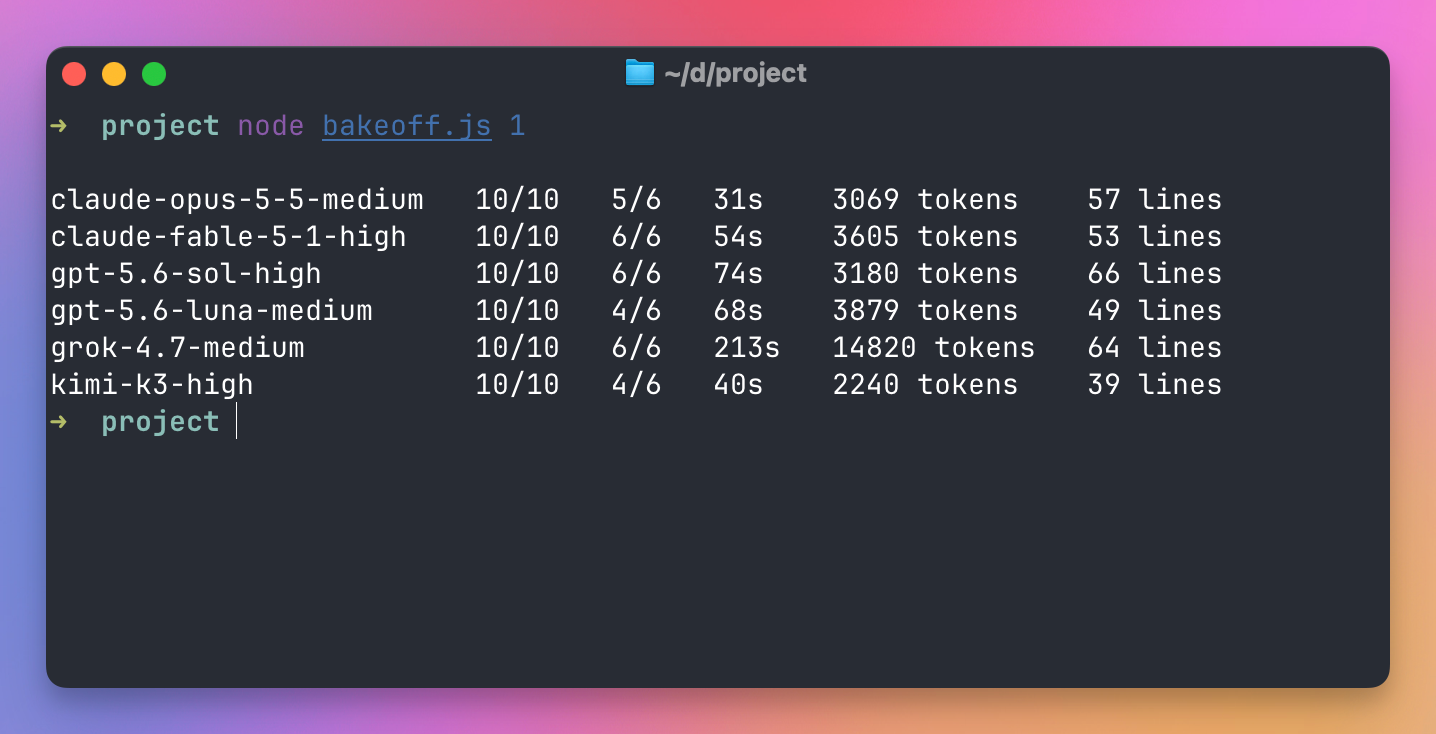
This time Fable 5.1 got all six, and Opus 5.5 missed one: Windows line endings, which it had handled in all three earlier rounds. Sol and Grok 4.7 got all six again, so over four rounds they’re the only two that never missed an edge case.
So three runs is the minimum, and five is better when you’re about to make a real decision, like which model to pay for.
Time and tokens tell a different story than price
This chart shows the average time per run, in seconds:
The times come from the agent’s own duration_ms, so they don’t include the CLI starting up.
Opus 5.5 was the fastest model in the test, at 34 seconds, and it got every edge case right in the three rounds. Grok 4.7 got the same result in five times as long. It was also the least predictable: its runs took from 119 to 267 seconds.
Now the tokens:
GPT-5.6 Sol wrote the fewest tokens. Grok 4.7 wrote about four and a half times as many to reach the same score.
It’s the same result as on CursorBench, where Grok 4.7 cost more per task than Opus 5.5 despite its cheaper tokens. Here it also wrote a lot more of them. At its output price, 11,636 tokens is about 7 cents, and Opus 5.5’s 3,067 tokens is about 6 cents. Its tokens cost less than a third of Opus 5.5’s, and it still spent a bit more on this task.
Output tokens are only part of the bill, because every step also re-reads the input. But when one model writes four times as much as another, the gap in the real cost goes the same way.
What this test doesn’t tell you
This is one small task, in JavaScript, about Markdown. It’s a realistic change for a blog codebase, but it’s not your codebase.
It also doesn’t measure the things that separate the top models on long tasks: working for an hour without getting lost, keeping a big refactor consistent across 40 files, knowing when to stop and ask. Leaderboards like CursorBench are closer to that, and there Opus 5.5 and Fable 5.1 are clearly ahead of the rest.
And six models times three rounds is 18 samples. It’s enough to see a pattern, not enough to rank models that are close.
Make it your own
The script is more useful pointed at your own work than at my Markdown library.
Start with a real task. Take a bug you fixed last month, copy the repository from before the fix into project/, write the bug report into task.md, and turn your fix’s tests into the hidden tests. Now you’re measuring the models on the kind of work you actually do.
Then write the edge tests from experience. The spec tests tell you if a model can follow instructions, and the edge tests tell you if it knows the domain. Every project has things you learned the hard way, and each one can become a test the task doesn’t mention.
You can also compare effort levels of the same model. claude-opus-5-5-low and claude-opus-5-5-high are in the same list as the medium one, and low effort could be enough for your work at a lower price.
The same idea works with other agents, like Claude Code (claude -p --model <name>) or Codex (codex exec -m <name>). That’s the way to test GPT-6 Sol and GPT-6.1 Sol once your Codex CLI accepts them, since neither is in Cursor. You’re then comparing the agent and the model together, not the model alone. If you want to set up Codex, I wrote a complete guide to Codex.
And read the diffs. The numbers point you at the interesting runs, then you open runs/1/<model>/src/stats.js and see what the model did. That’s how I found the fence-length bug.
Opening two versions side by side in your editor makes the differences easy to spot. Here are GPT-5.6 Sol’s and Claude Fable 5.1’s files from the fourth round, open in Zed:
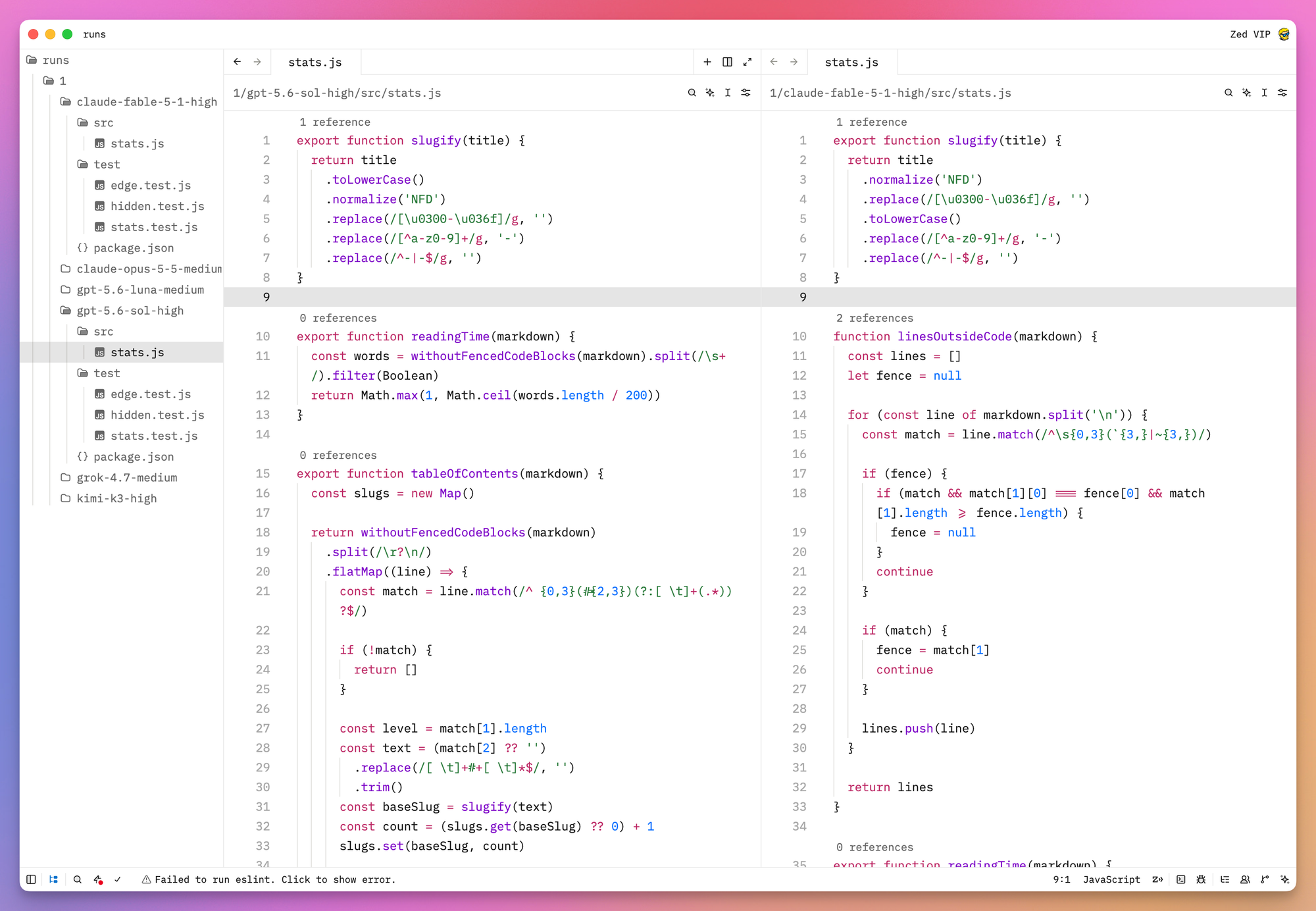
Both passed every test in that round, with different code. Sol’s withoutFencedCodeBlocks() helper returns the Markdown as text without its code blocks, and tableOfContents() splits it again and builds the list with flatMap(). Fable’s linesOutsideCode() returns an array of lines, and tableOfContents() walks it with a for loop.
How I pick a model
There’s not much science in how I pick a model. I always use the latest ones, and which one depends on the task.
For coding tasks I prefer GPT-5.6 Sol at the moment. For frontend work, or when I want help with a writing task, I prefer Claude Fable 5.1. And now that Opus 5.5 is out, I’m going to start using it too.
You can also split one task. A model you trust writes the plan, and a cheaper model makes the edit.
Other than always going with the latest release, I don’t have a system, and I think that makes sense. New models come out every few weeks, and the AI news page is where I keep track of them.
Want me to talk about your product? You can sponsor this site.
Related posts about ai: