A deep dive into pstack
By Flavio Copes
pstack is a Cursor plugin for rigorous agent work. The same SKILL.md files also load in Claude Code, Codex, and other coding agents.
AI coding agents can write a lot of code, but engineering also means understanding the existing system, choosing a good design, verifying the result, reviewing the diff, and shipping it without breaking something else.
What is pstack?
pstack is a Cursor plugin that makes coding agents follow a real engineering workflow. Its skills, principles, and task playbooks tell the agent to understand the existing code, choose a design, verify the result, and review the diff before it reports success. It works best in Cursor, and its SKILL.md files also load in Claude Code and Codex.
It was created by Lauren Tan, also known as @poteto on X. The stated goal is not more code. It is less code, higher quality, and enough verification that several agents can work in parallel without turning the repository into a mess. I wrote about that coordination problem on its own.
pstack is much bigger than a collection of prompts.
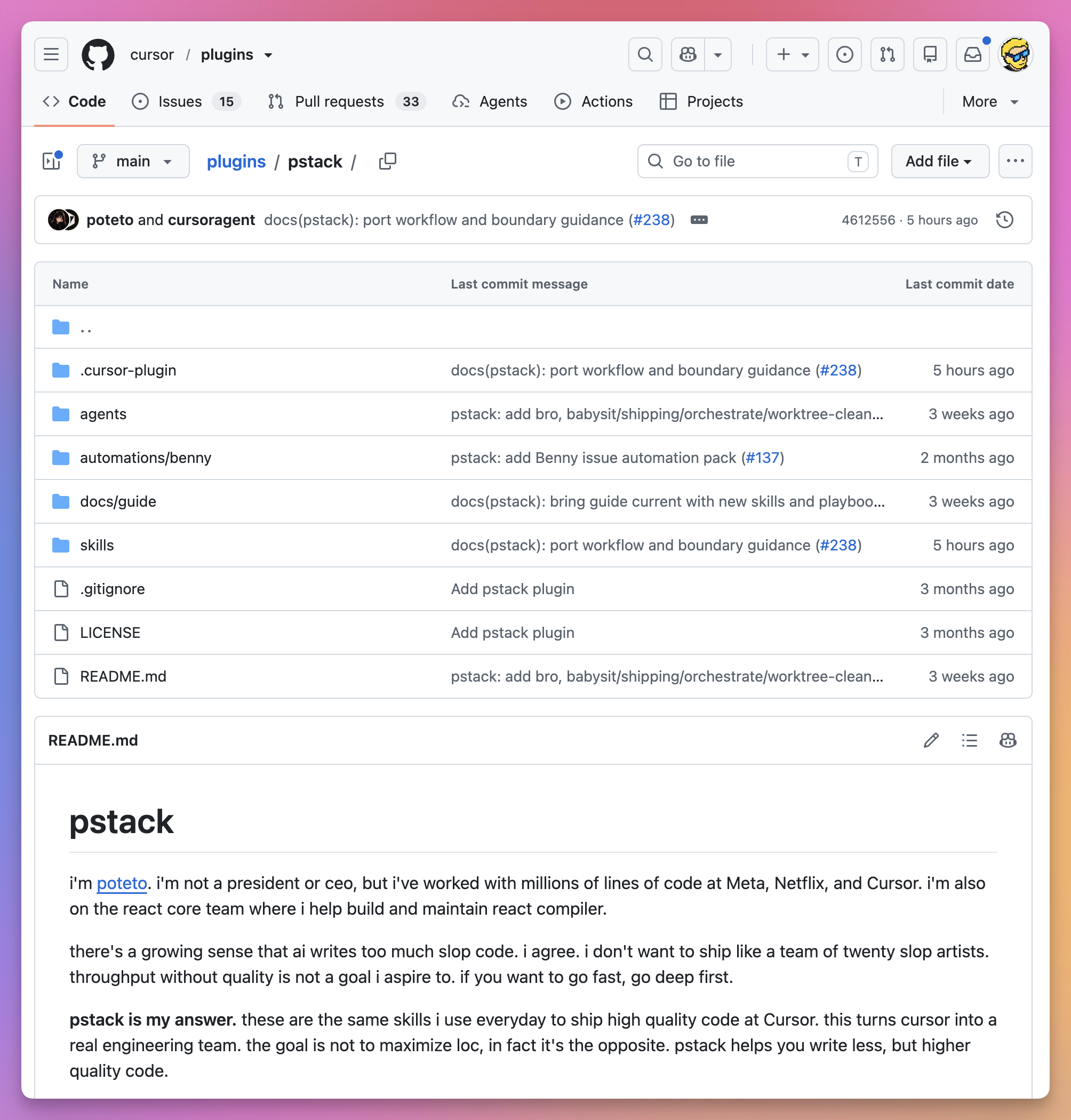
It currently contains 24 workflow skills, 23 engineering principles, 22 task playbooks, 2 specialized subagents, helper programs, and an optional automation pack.
This is how the plugin is organized in the Cursor repository:
But you do not need to memorize any of that.
Most of the time, you use one command:
/poteto-modeYou describe the result you want. poteto-mode chooses a playbook, creates a task list, calls the other skills when needed, delegates work to suitable models, and demands evidence before it reports success.
This turns a short request into a complete engineering workflow.
Why pstack exists
Lauren explained the thinking behind pstack in her article How I Use Cursor.
Before joining Cursor, she used Claude Code and started building her own orchestration layer around it. A simple CLI was easy to extend, but it also left the human coordinating every agent.
Cursor changed that model for her. She could switch models during a task, give subagents different models, compact context quickly, and use purpose-built interfaces such as the browser and Design Mode.
But the main lesson was not “run more agents.”
Lauren compares working with agents to managing an engineering team. New engineers need to learn the codebase and the way the team investigates, designs, tests, and communicates. Agents need the same guidance, except they keep forgetting it.
Rules, skills, tools, and memory provide that guidance.
pstack goes deep before it goes broad. It turns repeated agent failures into explicit playbooks, with the goal of making one agent trustworthy on a complete problem before multiplying it across many tasks.
At launch, Lauren showed that her skills had been used 9,000 times inside Cursor in one week. pstack packages those internal habits into a public plugin.
Does pstack work outside Cursor?
Yes. The official package is a Cursor plugin. The skills themselves are SKILL.md files.
That is the same format Claude Code, Codex, and other coding agents already load.
You can copy the skill folders into that tool’s skills directory. To see which of your agents load each skill, I built Skill Cabinet.
If you want a ready-made Claude Code port, use pstack-claude. It is not the official package. It translates Cursor-specific pieces to Claude Code equivalents, and it also ships a Codex plugin.
You lose the Cursor-only pieces:
/add-plugin/setup-pstackwriting~/.cursor/rules/pstack-models.mdc- assigning a different model on each subagent
/loop
The playbooks, principles, /how, /why, and /interrogate still make sense. They are instructions, not Cursor APIs.
Cursor remains the best fit. pstack wants different models for different jobs, and Cursor can assign those models on one task.
The rest of this article follows the official Cursor install. That is where pstack is maintained.
How do you use pstack?
To use pstack, install it in Cursor with /add-plugin pstack, run /setup-pstack to assign models to roles, and start a new chat. Then type /poteto-mode followed by the result you want and a way to check it, like /poteto-mode add a --json flag to this command and verify both forms.
Install pstack
pstack ships through the Cursor plugin system.
Open a Cursor chat and run:
/add-plugin pstackCursor opens a plugin picker. Choose pstack:

Then configure the models pstack can use:
/setup-pstackThe setup skill detects the models available in your Cursor account. It assigns them to roles such as implementation, investigation, judgment, and review.
The configuration is saved in:
~/.cursor/rules/pstack-models.mdcThis is an override file. When a role is missing, pstack uses its built-in default.
You can also set a role to auto or inherit-parent. Both values tell pstack to use the model from the parent chat.
Panel roles accept several models. The number of models in the list becomes the number of reviewers or candidates pstack starts.
The bundled defaults split work by model strength. Code goes to Grok. The hardest changes, judgment, and prose go to Opus 5.5. Review panels mix Opus 5.5 with Sol and Grok.
You can change those choices with /setup-pstack.
After setup, start a new chat so the rule is loaded.
Then run your first task:
/poteto-mode add a --json flag to this command. Keep the text output unchanged. Verify both forms against the sample project.That prompt gives pstack a goal and a way to check it.
The pstack architecture
What is poteto-mode?
poteto-mode works as a router. It selects smaller pieces instead of containing every instruction needed for every task, then runs them in order. I wrote a separate post on how poteto-mode works.
The complete flow looks like this:
Every run starts by reading the principles index inside the poteto-mode skill.
Next, it matches the request to a playbook.
Bug reports go to the Bug fix playbook, while new behavior goes to Feature. Structural changes use Refactoring. Questions use Investigation, and measured slowdowns use Perf issue.
The matched playbook is copied into the task list verbatim.
The model does not read a playbook and then improvise a shorter plan that quietly drops half the checks. Every named step remains visible. When pstack skips something, the task list keeps the step and records the reason.
poteto-mode is sticky. After you enter the mode, normal follow-up messages stay inside it. You can type continue, do it, or keep going until done. The current playbook and conversation provide the missing context.
When you change subjects, say new task so pstack matches a fresh playbook:
/poteto-mode new task. Find out why the cache entry survives logout. Do not change code yet.The last sentence keeps the work read-only.
What the playbooks do
pstack has 22 user-facing playbooks. There is also an internal Opening a PR playbook used by the others.
The easiest way to understand them is to group them by job.
Understand before changing
The Investigation playbook handles read-only questions.
It routes a question through /how, and through /why when the question involves history or intent.
/poteto-mode how does this notification retry work? Are we doing one subscriber query for every notification?The result explains the architecture without changing code. For unfamiliar systems, I would start here. An agent that edits the first plausible function often fixes a symptom, while tracing the runtime path gives it a chance to find the real boundary.
A related practice is Use AI to understand code: question what exists before writing more.
Build and change code
The main code playbooks are Bug fix, Feature, Refactoring, Perf issue, Hillclimb, Prototype, and Visual parity.
They do not share one generic checklist.
A bug must be reproduced before the fix. The agent forms competing causes, rules them out with runtime evidence, and verifies the original reproduction on the same interface afterward.
A feature starts with /how, runs /architect for parallel design exploration, delegates implementation, reviews the diff, and verifies the result on the real interface.
A refactoring first records existing behavior. It might use a characterization test, snapshot, or equivalence script. Then it changes structure in small steps while keeping that behavior check green.
A performance task starts with a trace. It compares a baseline with the result after the change. “It feels faster” does not count.
Hillclimb is for improving one metric over several attempts. Each attempt states a hypothesis, measures the result, keeps the win, and discards the loss.
Prototype builds the smallest throwaway artifact needed to make a decision. Visual parity starts with screenshots and treats a nonzero pixel difference as a failure.
Diagnose without fixing
Runtime forensics and Trace forensics stop at the diagnosis.
Runtime forensics captures a live signal. That might be a CPU profile, heap snapshot, or browser trace.
Trace forensics starts with an artifact someone already captured. It turns large trace data into something queryable, narrows it to the costly frame or retention path, and maps the finding back to source code.
The playbook stops at the diagnosis. Once the cause is known, you can start a new Bug fix or Perf issue task.
Keep long work moving
The long-running playbooks include Autonomous run, Multi-phase plan, Orchestrate, Autopilot-full, and Autopilot-stack. They operate at different scales.
Autonomous run drives one task until a checkable condition passes.
Autopilot-full runs a queue of independent pull requests through verification and merge. Autopilot-stack creates one reviewed stack of pull requests but leaves the final landing to the human.
Orchestrate is the heavy option. It is for a project that lasts several days, creates many stacked pull requests, and needs a standing coordinator plus a fleet of agents.
pstack is careful about this distinction. A long task is not automatically a program. If one agent can finish the work in a session, Orchestrate is too much.
Pick work back up safely
Session pickup reconstructs a previous agent’s state from its transcript, branch, and decision log. It identifies what is done, what remains, and where the next agent should resume.
Pause safely does the opposite. It stops at an atomic boundary, makes the current work durable, and writes a resume note.
These playbooks prevent an expensive failure mode. A new agent should not redo three hours of completed work because it did not know where the last one stopped.
Maintain the delivery pipeline
Babysit drives a pull request or stack to merge-ready. It checks conflicts first, reports any required rebase, then handles review threads and CI.
Shipping is separate. It verifies each pull request with a fresh agent, checks that old verdicts still describe the current commit, and lands only the contiguous verified part of a stack.
The separation means a green pull request is ready for a merge decision, not automatically approved for merge.
/how, /why, /teach, and /recall
The most useful pstack skills might be the ones that do not write code.
/how traces the current system
Use /how when you need to understand runtime behavior, ownership, or architecture:
/how how does the rate limiter work?For a narrow question, one explainer reads the code and answers.
For a larger subsystem, pstack splits the exploration into two to four parts. One agent might trace the data model. Another follows the request path. A third reads configuration and metrics.
An explainer then combines the findings into one account.
The output focuses on the concepts, runtime flow, relevant files, and sharp edges. It is a mental model, not annotated source code.
/why looks for historical evidence
Code can tell us what a function does.
It rarely tells us why the team chose that shape.
/why starts from Git history and pull requests. It then discovers the external sources available through Cursor MCP connections.
It can search seven evidence categories:
- source control
- issues and tickets
- long-form documents
- team chat
- infrastructure monitoring
- error tracking
- product analytics
One investigator owns each available category. A final model combines the evidence and keeps direct facts separate from inference.
Empty searches are reported too. If no ticket or design document explains a choice, the reader should know that.
This takes longer than reading the code and inventing a plausible reason, but it keeps the explanation tied to evidence.
/teach combines mechanics and history
/teach sits above /how and /why.
It is for the moment when a list of files and functions is not enough:
/teach me how this pull request changes retries. Convince me it fixes the cause instead of the symptom.The skill builds a plain explanation of what the system is, how it works, and why it has that shape.
/recall rebuilds your own context
/recall searches recent Cursor transcripts from the current workspace. It combines that history with current Git and pull-request state.
Use it when you return to a topic after a few days:
/recall catch me up on the export work from last weekThe result is a short brief with completed work, active threads, recurring problems, and the next useful move.
Design with /architect and /arena
AI agents tend to start implementing too soon.
pstack tries to settle the shape first.
/architect starts from the caller
/architect has five phases:
- ground the problem
- sketch several shapes
- agree when you requested a checkpoint
- implement against the sketch
- scrap the sketch when repeated friction proves it wrong
Grounding runs /how over the surrounding system. If the change moves ownership or crosses layers, it may also run /why.
The sketch starts with caller usage. Types, function signatures, and module boundaries follow from that usage.
Starting with the caller prevents a design that looks elegant inside its own file but feels awkward everywhere it is used.
By default, /architect continues into implementation. Add with checkpoint when you want to approve the design first:
/architect with checkpoint. Design the import pipeline before writing code.The last phase is just as important as the first.
If implementation keeps adding casts, optional fields that are always present, repeated exceptions, or parameters the sketch never anticipated, pstack treats that friction as evidence. It throws the shape away and designs again.
/arena runs competing attempts
/arena gives the same task to several models.
Each candidate writes to its own worktree or temporary directory. Each also explains the alternatives it considered and rejected.
The coordinator creates a private rubric. A separate model judges every candidate against it. Meanwhile, the coordinator reads every result from start to finish.
Then it picks one candidate as the base and folds in the strongest ideas from the others.
The coordinator does not decide by vote. One candidate can win while another contributes a better error model or a smaller interface.
If every candidate converges on the same shape, pstack records that agreement as evidence. If they diverge wildly, it treats the prompt as underspecified and runs the arena again with a clearer brief.
/swarm is different from /arena
Both skills start several agents for different jobs. /arena repeats the same task, compares the results, and produces one synthesized artifact.
/swarm splits a task into independent slices or declared race arms. It waits for every worker and returns one report.
For example:
/swarm check every package under packages/ against its check.sh. One worker per package. One report.Each worker returns PASS, ISSUES, or BLOCKED with evidence.
Use Arena for competing designs and Swarm for coverage.
Multi-model review with /interrogate
/interrogate sends the same diff, intent, and review rules to several models. It gets different perspectives from model diversity instead of assigning personas.
The lead reviewer merges duplicate findings, notes where models agree, and places every point into one of four groups:
- act on
- consider
- noted
- dismissed
The dismissed section is part of the result.
Review agents produce noise. Showing what the lead rejected, and why, lets you override the judgment instead of receiving a mysterious filtered list.
The skill never applies changes automatically.
Run it when a diff is ready to attack:
/interrogate review the whole branch. No nitpicks unless they reveal a bug or regression.The 23 principles
pstack includes 23 small principle skills.
poteto-mode keeps a short index of them in its own file. It reads that index at the start of multi-step work. When a task triggers a principle, it can open the complete skill and apply it.
Some principles reduce code:
- Laziness Protocol prefers deletion and the smallest complete change.
- Subtract Before You Add removes dead paths before introducing a new design.
- Minimize Reader Load reduces layers and hidden state.
Some shape architecture:
- Model the Domain replaces scattered conditions with one explicit structure.
- Boundary Discipline validates external data at the edge and keeps internal logic clean.
- Type System Discipline makes invalid states hard to represent.
- Make Operations Idempotent makes retries converge on the same result.
Some define proof:
- Prove It Works checks the real artifact.
- Fix Root Causes reproduces the symptom and follows it to the mechanism.
- Sequence Work into Verifiable Units ends each small step with a check.
The delegation rules are practical too.
Guard the Context Window sends bulk reading to subagents and keeps summaries in the main chat. Separate Before Serializing Shared State gives parallel writers separate worktrees instead of adding locks around one shared directory.
You do not invoke these principles as commands.
You use their names when you need to steer the current run:
Apply prove it works. Run the real import flow and inspect the records it writes.The reply must name the decision the principle changed. Merely repeating the principle name does not count.
Verification is a first-class part of the workflow
pstack rejects “the build passed” as complete evidence.
The verification should match the thing that changed:
- a command-line change runs the real command
- a UI change walks the changed flow
- a migration replays real input
- a performance change compares traces
- a storage change reads the value back
When a repository has no reliable way to do that, pstack can create one:
/create-verification-skillThe skill inspects the repository and writes a project-local verify-<app> skill.
The generated skill has exact instructions for five jobs:
- launch the application
- check that the instance is healthy
- drive the user-facing behavior
- capture evidence
- clean up only what the verification started
It also creates a feature map. Each feature records how a user reaches it, how an agent drives it, and what observable state proves it works.
Before handing the skill over, pstack runs it once from start to finish.
There is a maintenance skill too:
/maintain-verification-skillIt compares every mapped feature with the current source, then runs one live pass. It can update the verification skill, but it cannot hide a product bug by editing the documentation.
I like this part of pstack a lot because “verify it” becomes a repository capability instead of a new conversation every time.
Run pstack while you sleep
Long autonomous work needs a finish condition. “Work on this for four hours” only sets a duration. “Stop when there are zero old callers and every parser fixture passes” gives the agent a result it can check.
A complete overnight request can look like this:
/poteto-mode I am going to bed. Migrate every caller to the new parser in a fresh worktree.
Done means zero old callers, every parser fixture passes, and the old API is deleted.
Keep a decision log. Do not ask before committing.
/loop until done. If you reach a real dead end, stop and explain it.
/loop is a Cursor command, not a pstack skill. It wakes the task on an event or a timed heartbeat.
Each iteration follows the same pattern:
The decision log is a TSV file.
Each row records the time, phase, decision, reason, evidence, and result. It is local by default. A large project can commit it when reviewers need the trail to trust the work.
If Git branches and worktrees are new to you, my free Git course explains the model behind them.
The smaller skills pstack also installs
Besides the skills above, pstack ships a set of smaller ones. poteto-mode calls several of them when a step needs them, and you can run each one as a slash command. /bro gets its own spot in the first workflow below.
unslopcuts AI tells from any writing. It’s the anti-slop pass from my post on anti-slop skills (the how-to is in how to use the unslop skill), andpoteto-modeapplies it to every piece of prose, its own replies included.technical-writingis a layered standard for docs, RFCs, READMEs, PR descriptions and commit messages, built on Diátaxis, Google’s developer style guide, Simplified Technical English and Global English.no-commentsspawns the Comment Sicko subagent to strip comments before review, fixes the findings it accepts, and offers to turn constraint comments like “do not remove” into a type, a runtime check, a test or a lint rule.tddwrites a failing test before the fix, but only when you ask for one or the bug has an obvious, cheap local test.typescript-best-practicesis for reading and editing.tsand.tsxfiles, and grounds the Type System Discipline principle in TypeScript syntax.blast-radiuslooks for what a change could break outside the diff, then proves the one fact that makes it safe by running real code.figure-it-outdesigns a custom, auditable playbook for a large migration, or for any task no bundled playbook fits.show-me-your-workkeeps the decision log from the previous section, a TSV file with one row per decision.make-bot-uibuilds a page whose buttons wake a Grok Bot over a webhook, with the sender key kept on a local server and optional access over Tailscale.
What pstack does not include
Some advanced pstack workflows refer to tools from other places.
/deslop, control-cli, and control-ui come from the separate cursor-team-kit plugin.
/create-skill, /babysit, and /loop are Cursor built-ins. Inside poteto-mode, the pstack Babysit playbook replaces the built-in babysitting flow for pull-request status work.
The advanced shipping playbooks also assume GitHub, and Orchestrate relies on Graphite.
This does not affect the basic /poteto-mode workflow. It matters when you expect every cleanup, UI-control, stacked-pull-request, and overnight feature to work from pstack alone.
The repository also contains a dormant automation pack named Benny.
Benny can triage Slack issue reports, reproduce confirmed problems, and fix them with UI evidence. The automation files are not registered as slash skills. Setup copies them into a target repository when you explicitly enable the pack.
Lauren’s article explains what the complete Benny pipeline is meant to do.
One Benny automation starts with triage. It reads a bug report and its image or video attachments, inspects the relevant code, and asks the reporter for clearer reproduction steps when needed.
It then checks Git history, Slack discussions, and Notion decisions. That extra context helps it distinguish a regression from behavior that was designed intentionally.
After it creates a ticket, another Benny automation picks it up through /orchestrate. It tries to reproduce the problem with computer use before changing code. For performance problems, it can capture before-and-after CPU traces and heap snapshots.
Fresh workers verify the fix against the ticket. Other workers record before-and-after videos and open a pull request with the evidence.
This is still a work in progress, but it shows the larger idea behind pstack. A software factory starts with trust in one complete loop: understand, reproduce, fix, verify, and show the result.
Make pstack yours
poteto-mode encodes Lauren’s engineering style.
pstack does not pretend that style is universal.
Run this to create a personal mode:
/automate-meThe skill reads recent Cursor transcripts from the current workspace. It looks for repeated preferences in delegation, verification, code, prose, and process.
Then it asks which patterns are really yours and creates:
.cursor/skills/<your-name>-mode/SKILL.mdUse /reflect after a difficult task when you want to improve an existing skill.
/reflect sends the transcript to several reviewers. A synthesizer sorts their proposals into accepted, rejected, and backlog. Nothing changes until you approve it.
The approval step prevents one strange task from becoming a permanent rule for every future task.
How I would use pstack
I would use pstack for work where a plausible diff is not enough.
A good example is the purchase webhook on this site.
One purchase can generate more than one Paddle delivery. The important question is not whether an if statement compiles. I need to trace both payloads, prove which path sends the email, reproduce the duplicate behavior, and verify one welcome email is sent after the fix.
I would start with this:
/poteto-mode the purchase webhook can send two welcome emails for one purchase.
Reproduce both Paddle deliveries first. Trace the cause, fix it, and verify one email is sent.
Do not change the fulfillment behavior for a valid purchase.
That prompt gives pstack a symptom, a required reproduction, a finish condition, and behavior to preserve.
I would also use pstack for a large migration, a hard performance problem, or an overnight run with a result I can test in the morning.
I would not use the complete workflow for every change.
Moving one publication date or correcting one sentence does not need several models, an architecture arena, a decision log, and a verification skill. Neither does changing a small configuration value. All that machinery has a cost.
pstack can start several agents for one task. If they all use frontier models, the tokens add up fast.
I would use Composer 2.5 for routine work and keep frontier models for the difficult parts. /setup-pstack lets me choose a model for each role.
Long playbooks also require me to trust the routing rules.
For small work, I prefer the shorter loop in fstack. It keeps the human close to each decision and aims for the smallest process that works.
I would keep pstack for deeper investigation, adversarial review, real runtime proof, and autonomous work that must remain auditable.
A practical first workflow
Do not start by memorizing all 47 skills.
Install pstack, run setup, and choose one real task.
Most of the time, /poteto-mode is enough. I can learn the direct commands when I need them.
Use this shape:
/poteto-mode <what you observed or what you want>
Done means <something the agent can run or inspect>.
Keep <existing behavior that must not change>.
Watch the task list. You should see a matching playbook copied into place first, and specialist skills called when their step arrives.
After the first run, try the direct skills that solve a question you have:
/how how does this subsystem work?/why why was this limit chosen?/interrogate review this diffAnd when the final explanation is accurate but unreadable:
/broThat skill rewrites the last reply in plain language.
Common mistakes
The official pstack guide calls out several mistakes worth avoiding.
State the goal and constraints instead of listing every skill you want pstack to run. The playbook chooses the sequence.
Do not give an autonomous run a vague finish condition. The loop needs a result it can check.
Give parallel writers separate worktrees or output paths so they do not share one working directory.
Use /swarm when you need coverage because it divides the work. /arena compares several answers to one brief.
The auto value tells the subagent to inherit the parent model instead of naming a model.
Do not accept a green build as proof of behavior. Run the command, drive the interface, inspect the record, or compare the trace.
Do not accept every review finding. Read what the lead dismissed and decide whether the reason holds.
Reserve Orchestrate for a genuine multi-day program with many independent units, not any task that sounds large.
My take
pstack tries to turn Cursor into a small engineering organization. It provides a coordinator, specialist investigators, implementation agents, competing architects, skeptical reviewers, verification workers, and a shipping process.
That is sometimes more ceremony than a task needs. I still value reproducing a problem before fixing it and starting designs from caller usage. For expensive decisions, I want comparisons and reviews from different models.
I also want parallel writers isolated, the real artifact verified, and autonomous work tied to a finish condition. If someone will review the work later, the decision trail should survive too.
pstack turns those habits into executable workflows. You can ignore every individual skill at first and start with /poteto-mode.
Want me to talk about your product? You can sponsor this site.
Related posts about ai: