A deep dive into Businesses in ChatGPT
By Flavio
Tagged: AI
Businesses in ChatGPT lets you claim your business, add a product feed, see mentions and clicks, and publish a Business Agent. How it works and its limits.
Businesses in ChatGPT is how a company gets a say in what ChatGPT shows about it. You claim your business in a new dashboard called Business Hub, fix its details, upload your products with prices and stock, and see how often ChatGPT sends people to your website.
Some businesses can also publish a Business Agent, a chatbot that speaks for the business inside ChatGPT, in a conversation kept apart from ChatGPT’s own answers.
OpenAI launched it in beta on November 10, 2026. Claiming is open to eligible businesses wherever ChatGPT is available. Business Agents are limited to ecommerce and online service businesses in the United States.
The first Business Hub screens, the ChatGPT answer and the product feed are from my own runs. The steps after those screens follow OpenAI’s setup guide and policies.
The quick answer
| What | How |
|---|---|
| Where you manage it | Business Hub, at chatgpt.com/business-hub or in the ChatGPT sidebar |
| Price | OpenAI lists no fee for claiming. Ads are a separate, paid product |
| Who can claim | An owner or authorized representative of an eligible business with a website |
| Verification | Business phone, business email, a DNS TXT record or a Shopify store, then an identity check with Persona |
| What you can edit | Website, description, category, logo, cover photo, delivery policy, return policy |
| Product data | A CSV or JSONL feed with 9 required fields, or a Shopify connection |
| Insights | Mentions, website clicks and discovery topics over the past 28 days |
| Business Agents | Eligible ecommerce and online service businesses in the US |
| What it doesn’t do | Move you up in ChatGPT’s recommendations |
What OpenAI launched
There are three parts, and you can use the first two without the third.
Business Hub is the dashboard. You claim your business there, and once you’re verified you edit its profile and add a product feed.
Insights are aggregated numbers about how people meet your business in ChatGPT: how many times it was mentioned, how many clicks went to your website, and the themes of the conversations where it came up.
Business Agents are the conversational part. A customer who sees your business in an answer can open its profile and start a chat with your agent, which answers from the product and policy information you gave it.
OpenAI says 1.2 billion people use ChatGPT each week. Many of those conversations are about what to buy and who to buy it from, and until now a business had no way to correct what ChatGPT said about it.
How a business shows up in ChatGPT today
Before looking at the dashboard, let’s see what it’s meant to influence. On launch day I opened ChatGPT without logging in, from Italy, and asked this:
I want a good pair of wool running socks. Which brands should I look at, and where can I buy them online?ChatGPT recommended five brands, each with a product photo, a price range in euros and links to stores. It noticed I was in Italy and picked European and Italian retailers.
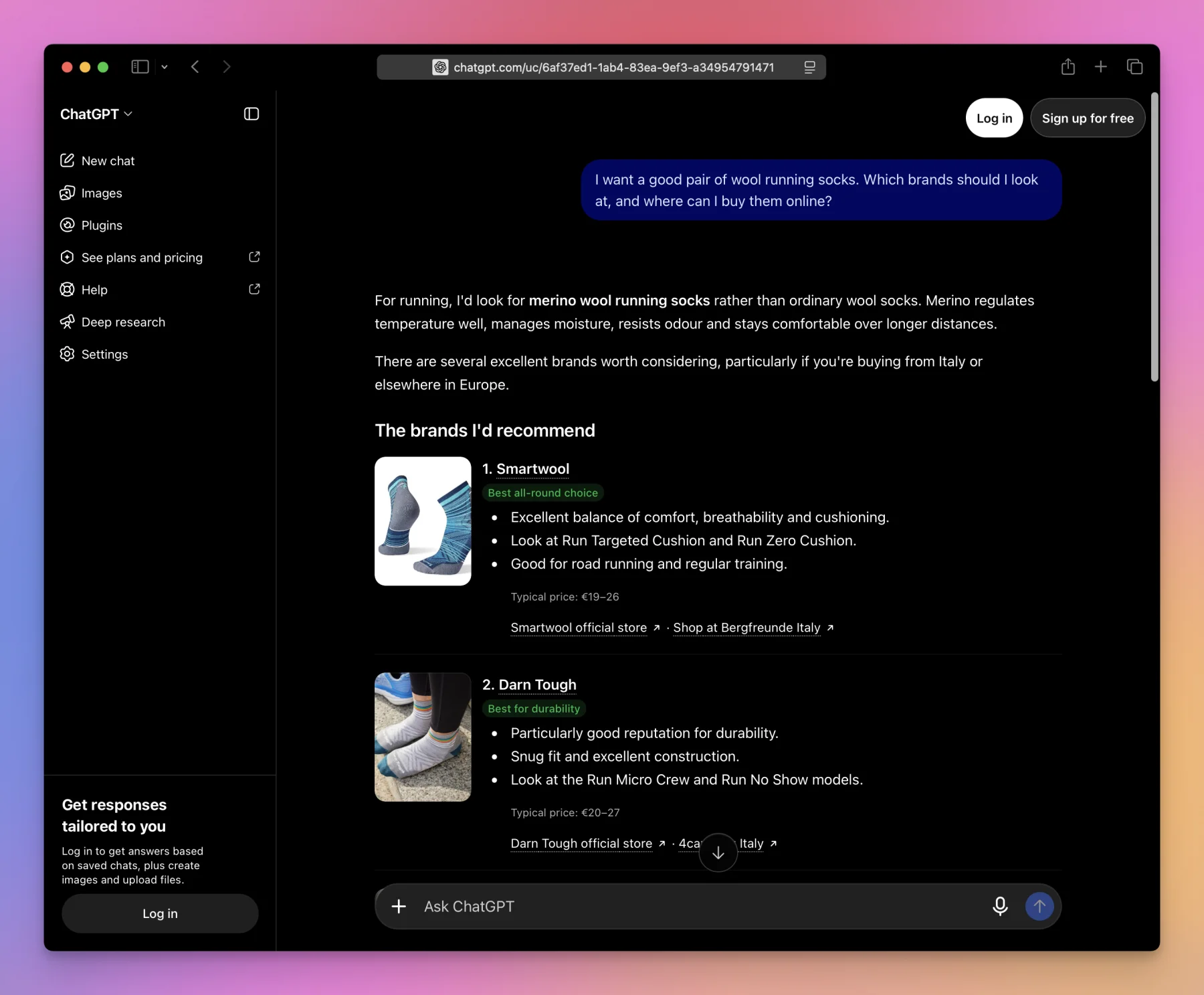
The answer changes from one run to the next. The screenshot is from a second run, where Smartwool came first. The first time Darn Tough did.
I counted the links in the first answer. Every one of them had ?utm_source=chatgpt.com added to the URL.
| Business | Named as | Links to its website |
|---|---|---|
| Bergfreunde | Retailer | 4 |
| 4camping | Retailer | 3 |
| Darn Tough | Brand | 2 |
| Smartwool | Brand | 2 |
| Icebreaker | Brand | 1 |
| Bridgedale | Brand | 0 |
| Injinji | Brand | 0 |
Look at the last two rows. ChatGPT recommended Bridgedale and Injinji by name, but it linked to a retailer’s website, not theirs. This matters for the Insights numbers, as we’ll see later: for an online business, OpenAI counts a mention only when ChatGPT references the business’s website.
The two retailers got more links than any brand. Bergfreunde was linked four times in one answer without being one of the “5 brands I’d recommend”.
Clicking a brand name opened a panel about it:
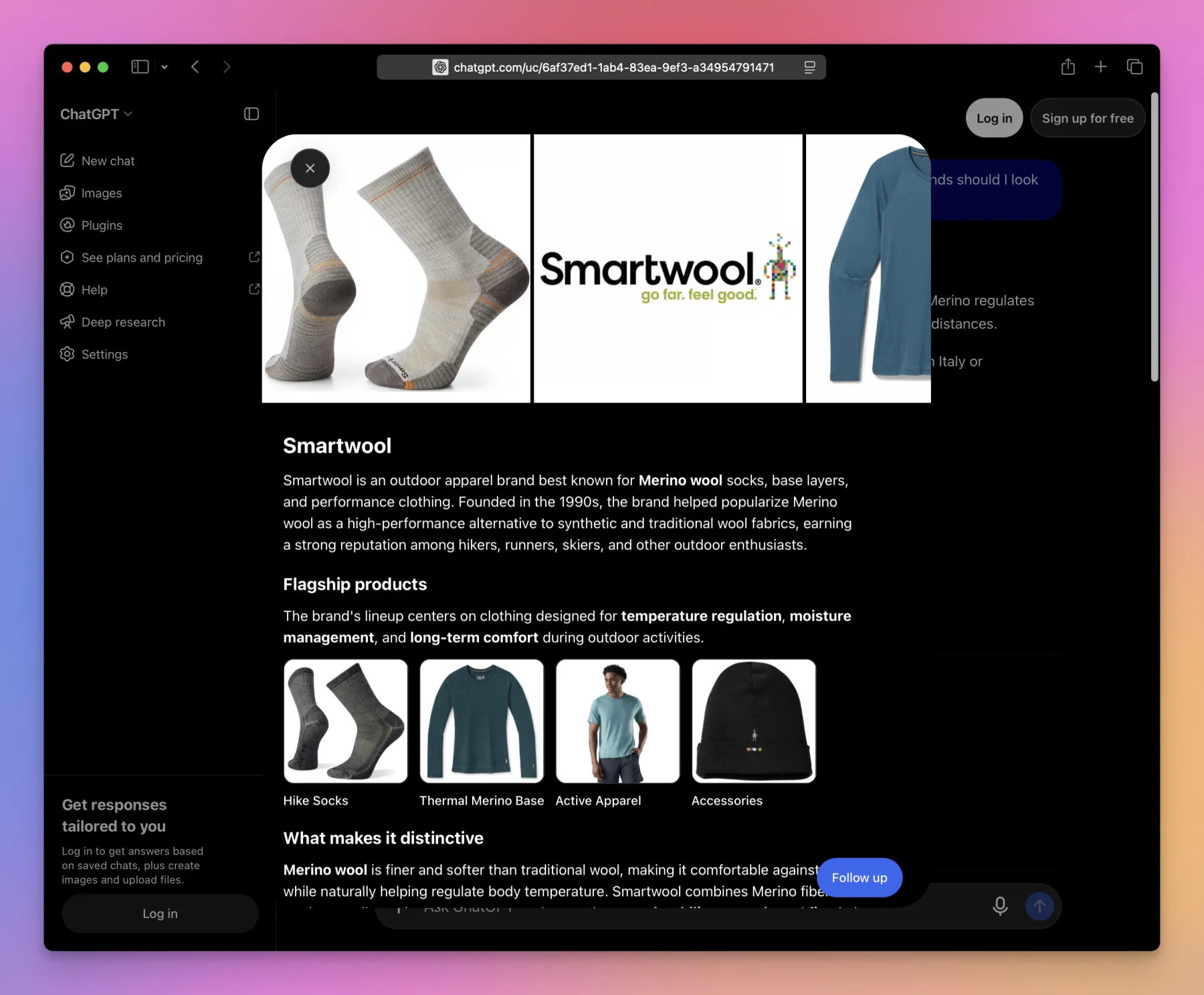
ChatGPT wrote this panel itself: a description of the brand, its flagship products, what makes it distinctive. The only action is a Follow up button that continues the conversation with ChatGPT. I saw no blue check and no way to chat with the business, which is what you’d expect on the first day of a beta, logged out, outside the US.
This is the page OpenAI wants businesses to take over. A claimed and verified profile gets a blue check, shows the details the business provided, and can offer a chat with the business’s agent.
Who can claim a business
You must own the business or be authorized to represent it, and the business needs a website. You don’t need an Ads account or a ChatGPT Enterprise contract.
What you get depends on where you are and what you sell:
| Feature | Who gets it |
|---|---|
| Claim a profile, edit details, see insights | Eligible businesses where ChatGPT is available and verification is supported |
| Add a new online business that has no listing | Eligible online businesses |
| Local stores and restaurants | Can only claim a listing that already exists, and only in the US |
| Product feed | Businesses that sell products. A standard feed upload targets the US |
| Business Agent | Eligible ecommerce and online service businesses in the US, with a website |
| Enterprise customers and advertisers | Claim through their OpenAI representative |
OpenAI can also say no. The Businesses in ChatGPT policy says it may decline a business whose products or practices raise safety or integrity concerns, and that some categories are on hold until it has safeguards for them. Being verified doesn’t make you eligible for an agent either, because the Business Agents policy reviews the category and the intended use separately.
How to claim your business
Sign in to ChatGPT and open Business Hub from the sidebar. Then:
- Search for your business by name.
- Select the listing that matches and confirm the ChatGPT account that will manage it.
- Choose one of the verification methods offered and follow the prompts.
- Wait for OpenAI to review the claim. The decision arrives by email.
If you can’t find your business and it’s an eligible online business, you may get an option to add it. If the listing shows Contact support, it’s locked and you have to ask OpenAI for access.
Adding a business that has no listing
flaviocopes.com had no listing, so Business Hub offered to add it. The first screen sums up what you get:
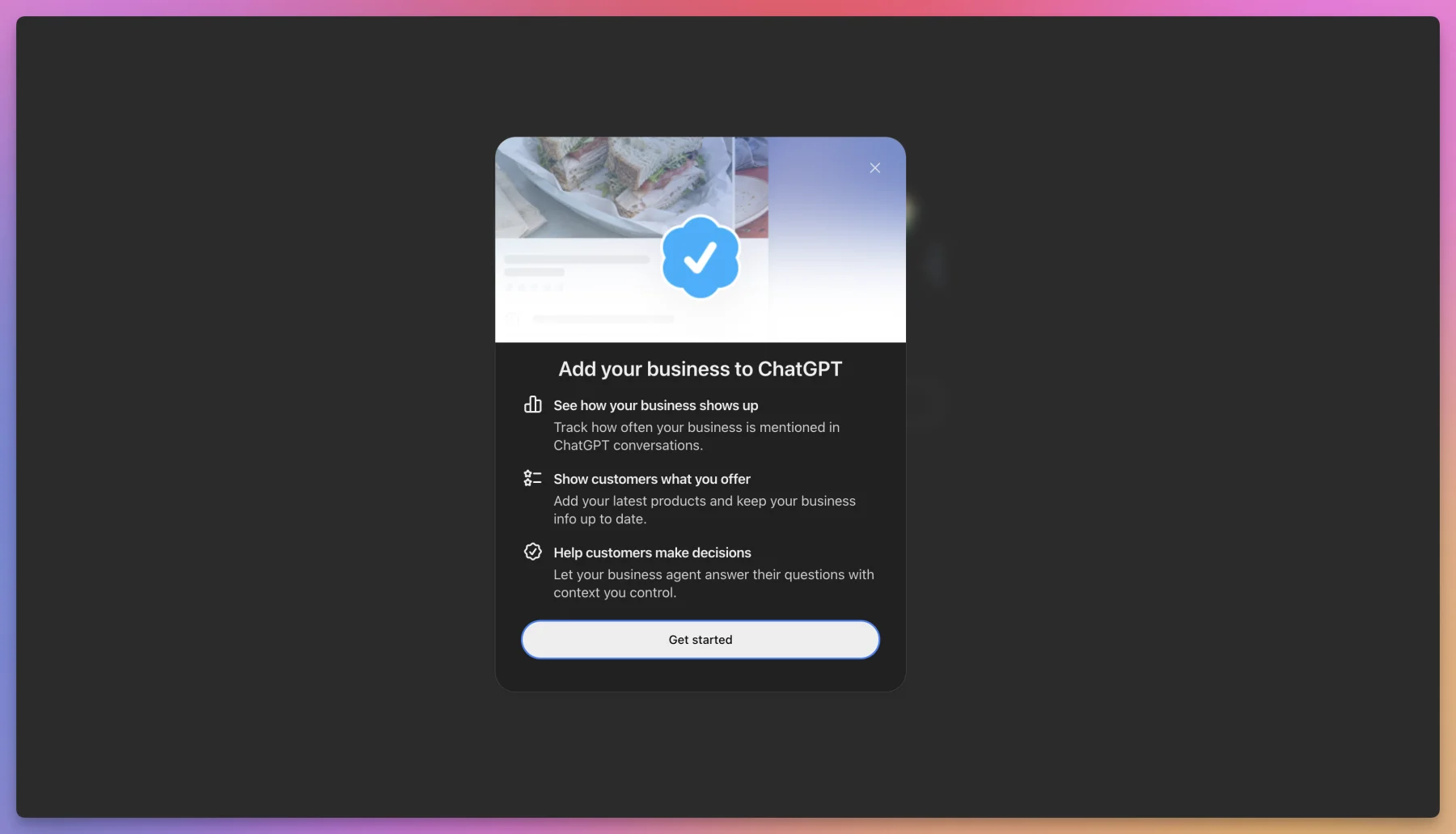
After Get started, it asks how customers usually interact with the business:
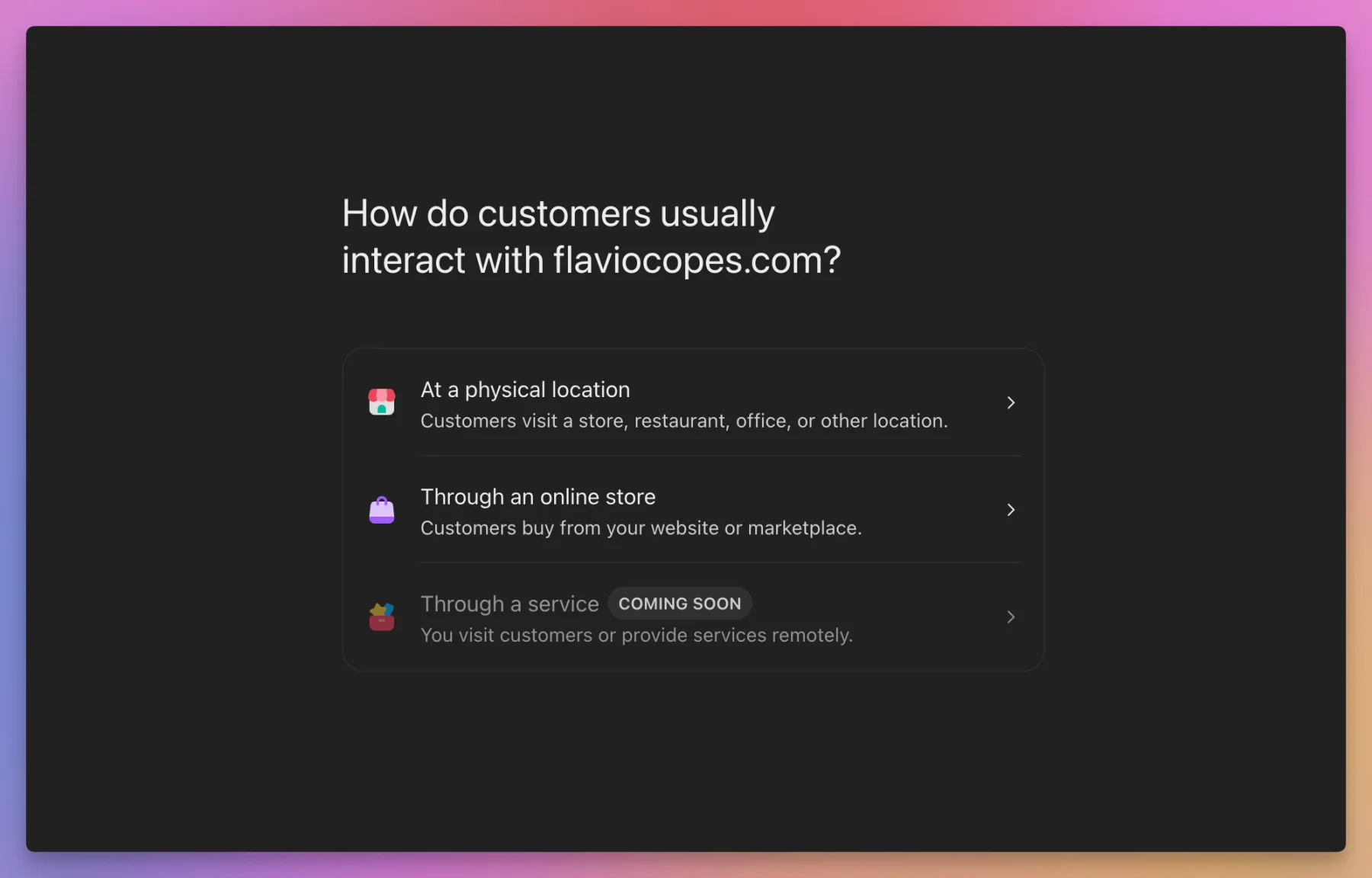
There are three options:
| Option | Meaning | On launch day |
|---|---|---|
| At a physical location | Customers visit a store, restaurant, office or other location | Available |
| Through an online store | Customers buy from your website or a marketplace | Available |
| Through a service | You visit customers or provide services remotely | Coming soon |
Notice the third row. A freelancer, an agency or a consultant has no option to pick yet.
I chose the online store. The next screen asks for the website, and a preview of the profile fills in on the right as you type:
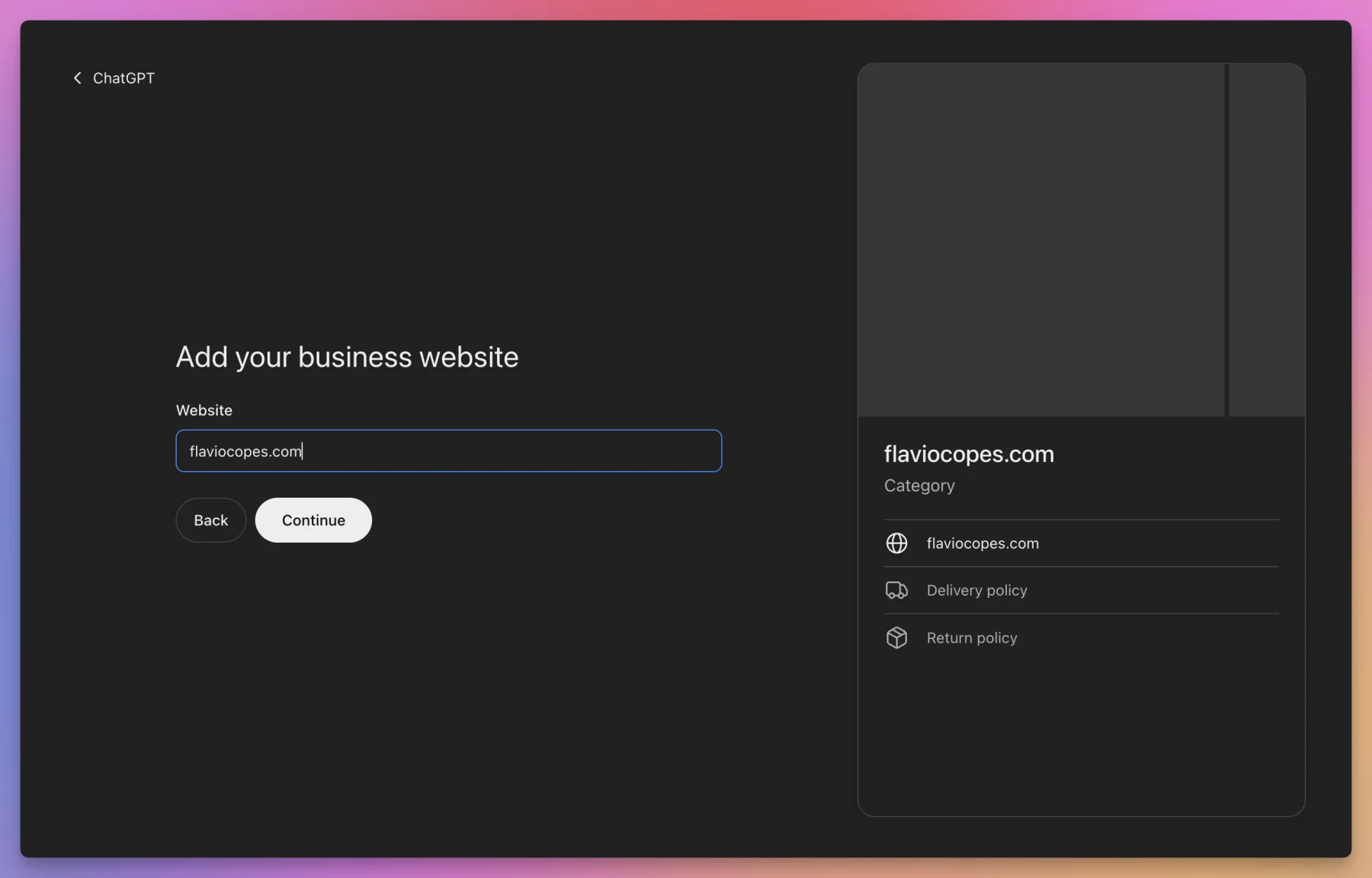
The preview shows what a profile is made of: a cover area, the name, a category, the website, a delivery policy and a return policy. Those last two are built for shops that ship things.
The four ways to verify a claim
You only see the methods that apply to your business.
| Method | What you do |
|---|---|
| Business phone | Get a code by SMS or automated call on the number in the listing, and enter it |
| Business email | Get a code at the email address associated with the business, and enter it |
| Website domain | Add the TXT record ChatGPT shows you to your domain’s DNS, then select Verify domain |
| Shopify store | Select Connect Shopify, review the permissions and log in to the store |
For a website like mine, the DNS record is the natural choice. It’s the same proof Google Search Console asks for, and the record can take a while to show up after you add it.
Persona comes after the claim
An approved claim puts the business in your Business Hub, and that’s all it does. To publish changes, connect a feed, view insights or create an agent, you also have to complete identity verification with Persona.
Persona may ask for a government-issued ID, your business registration details and proof that you’re authorized to represent the business. The name, address and registration or tax number you enter must match your official records.
The blue check appears when the Persona verification is approved, not when the claim is.
Be careful with one case. If you’re creating a new profile, OpenAI’s approval publishes it automatically, with no separate publish step. And OpenAI Support can’t delete, unpublish or hide a published profile, so only drafts can be removed.
Here’s what each stage gives you:
| Claim approved | Persona approved | Agent published | |
|---|---|---|---|
| Business listed in your Business Hub | Yes | Yes | Yes |
| Blue check on the profile | No | Yes | Yes |
| Publish changes to business details | No | Yes | Yes |
| Connect a product feed | No | Yes | Yes |
| See insights | No | Yes | Yes |
| Customers can chat with your business | No | No | Yes |
What you can change in your profile
Once both approvals are in, you can update the website, the business description, the product or service category, the logo, and the delivery and return policies. You can also add a cover photo.
OpenAI reviews every change before publishing it, so an edit you save doesn’t go live right away. ChatGPT also keeps using other sources when it answers questions about you. Your profile is one input among several.
If someone else already claimed your business, open the profile, select the ••• menu and choose Dispute ownership. You then go through Persona to show you’re the one authorized to represent it.
Add a product feed
If you sell products, a feed tells ChatGPT what you sell, at what price, and whether it’s in stock. Shopify merchants connect their store and the catalog syncs. Everyone else uploads a file that follows the product feed specification.
The spec has 48 fields. Nine are required:
| Field | What it holds | Example |
|---|---|---|
item_id | A stable ID, unique per item or variant | page-saver |
title | Product name, 150 characters at most | Page Saver |
description | Plain-text description, 5,000 characters at most | |
url | The product page | https://flaviocopes.com/apps/page-saver/ |
brand | The brand shown on the product page | Flavio Copes |
seller_name | Who sells it | Flavio Copes |
image_url | A direct link to the main image | |
price | Amount, a space, and the currency code | 20.00 USD |
availability | in_stock, out_of_stock, pre_order, backorder or unknown | in_stock |
Be careful with availability. A row with an empty or misspelled value is rejected, and unknown must be written out.
The price is in major units. 20.00 USD is twenty dollars, with two decimals and no thousands separator.
Let’s build one. I sell 33 small apps on this site, and their data lives in a TypeScript file, src/data/apps.ts. This script turns that file into a feed and checks the rules above:
import { writeFileSync } from 'node:fs'
import { paidApps } from './src/data/apps.ts'

const site = 'https://flaviocopes.com'

const rows = paidApps.map((app) => ({
  item_id: app.slug,
  title: app.name,
  description: app.description,
  url: site + app.pagePath,
  brand: 'Flavio Copes',
  seller_name: 'Flavio Copes',
  image_url: site + (app.image ?? app.ogImage),
  price: `${app.price.toFixed(2)} USD`,
  availability: 'in_stock',
}))

const required = ['item_id', 'title', 'description', 'url', 'brand', 'seller_name', 'image_url', 'price', 'availability']
const stock = ['in_stock', 'out_of_stock', 'pre_order', 'backorder', 'unknown']

const problems = []
for (const row of rows) {
  for (const field of required) {
    if (!row[field]) problems.push(`${row.item_id}: missing ${field}`)
  }
  if (!/^\d+\.\d{2} [A-Z]{3}$/.test(row.price)) problems.push(`${row.item_id}: bad price`)
  if (!stock.includes(row.availability)) problems.push(`${row.item_id}: bad availability`)
  if (row.title.length > 150) problems.push(`${row.item_id}: title over 150 characters`)
  if (row.description.length > 5000) problems.push(`${row.item_id}: description over 5,000 characters`)
}
if (new Set(rows.map((row) => row.item_id)).size !== rows.length) problems.push('duplicate item_id')

writeFileSync('feed.jsonl', rows.map((row) => JSON.stringify(row)).join('\n') + '\n')

console.log(`${rows.length} products written to feed.jsonl`)
console.log(problems.length ? problems.join('\n') : 'no problems found')
Node.js 22.18 and later imports a .ts file directly, so there’s no build step. I ran it with node feed.mjs:
33 products written to feed.jsonl
no problems found
The file has one JSON object per line. This is the second one:
{"item_id":"page-saver","title":"Page Saver","description":"Save web pages on your Mac as single HTML files, keep snapshots, compare them, and get alerts when watched pages change, die or get taken over. Crawl whole sites to read offline. Includes a native Mac app, Safari and Chrome extensions, a CLI and full MIT source.","url":"https://flaviocopes.com/apps/page-saver/","brand":"Flavio Copes","seller_name":"Flavio Copes","image_url":"https://flaviocopes.com/images/page-saver/screenshot.png","price":"20.00 USD","availability":"in_stock"}Writing the feed is the easy part. Two limits apply to a shop like mine. A standard upload targets the US, and other markets need OpenAI to confirm the integration first. And the is_digital field, which marks a product with no physical shipment, only works on integrations that have been set up for it.
Notice also what the spec leaves out on purpose. Sale dates and availability dates don’t schedule anything, so when a sale starts or an item sells out you update the feed yourself.
A feed makes your products available to ChatGPT. Whether it recommends them is still ChatGPT’s decision.
What the insights count
Open your business in Business Hub and select Insights. The numbers cover the past 28 days.
| Metric | What it counts |
|---|---|
| Mentions, online business | Times ChatGPT referenced your website. Your brand name alone doesn’t count |
| Mentions, local business | Times ChatGPT showed a result for that location, even if nobody opened it |
| Website clicks | Times people clicked through to your website |
| Discovery topics | Common themes in the answers that mentioned or cited you |
Go back to my sock question. Under this definition Bergfreunde earned a mention and Bridgedale didn’t, even though ChatGPT recommended Bridgedale as a brand to buy. A business whose products are sold mostly through retailers will see lower numbers than its real presence in answers.
You never see the conversations. OpenAI doesn’t share prompts or chats with businesses, including the chats people have with your own agent. Discovery topics are grouped themes, not a list of questions.
Insights only appear once activity passes a reporting threshold. A small business may see a blank metric for a while, and blank isn’t the same as zero.
You don’t have to wait for Business Hub to measure the clicks, though. Since ChatGPT adds utm_source=chatgpt.com to the links it shows, you can filter by that source in your own analytics today.
Business Agents
A Business Agent answers customers’ questions about your products and policies, using the information you provided and the guidelines you wrote.
This is how a customer gets to it:
The customer chooses to start that chat. It’s labeled as a conversation with the business and it’s separate from the conversation they were having with ChatGPT.
Set one up
After your claim and your Persona verification are approved, open the business in the Business tab. If you connected Shopify, a draft agent may already be there. Otherwise create one, if the option is available to you.
Then review the information it will use, like your product details and your return policy, and write the instructions for how it should answer.
Preview it with a question customers really ask. OpenAI’s own suggestion is a good one:
Can I return an item I bought on sale?If the answer is wrong, fix the information or the instructions and ask again. Select Publish when you’re happy with it, because customers can only talk to a published agent.
What an agent can’t do
An agent explains and links. It can’t complete purchases, make bookings or look up a customer’s order, so those still happen on your website.
If your business also has a ChatGPT plugin, the agent’s chat doesn’t use it. The two are not connected.
The Business Agents policy adds rules for what you put in the instructions:
| Area | The rule |
|---|---|
| Identity | The agent must be clear that it’s AI representing the business. It can’t pose as a human, an independent adviser, or something endorsed by OpenAI |
| Facts | No invented products, prices, stock, credentials, reviews or guarantees. No hiding fees or conditions that matter to the question |
| Pressure | No false urgency, and no pushing a sale after someone declines |
| Personal data | No asking for health details, government IDs, financial or login credentials |
| Forms and bookings | Nothing submitted on the user’s behalf without explicit authorization through an approved feature |
| Advice | No advice that legally requires a professional license |
OpenAI reviews an agent when you create it and every time you update it. It can pause or remove one, and it can restrict a business from creating agents after serious or repeated problems.
Ads and the Shopify app
Businesses can sponsor their Business Agent and use it as the destination of a ChatGPT ad. OpenAI says sponsored placements are labeled and kept apart from ChatGPT’s responses, and that advertising doesn’t influence the independent answers.
Claiming a business, publishing an agent and advertising are three separate things. You can do the first and never touch the other two.
For Shopify merchants, the ChatGPT app in the Shopify App Store connects the store, syncs the catalog and manages ads from the Shopify admin. Eligible products from Shopify merchants were already reaching ChatGPT through Shopify Catalog.
Check the reviews before you rely on it. On launch day the app had a 2.0 rating from 26 reviews, 19 of them one star. The ones I read were about the ads side: products stuck at zero in the feed, conversions not being recorded, and one merchant whose $25 budget was gone after 17 clicks, about $1.47 each.
What claiming doesn’t change
OpenAI is direct about this on its product page: “Claiming does not guarantee higher placement or sales.”
ChatGPT shows information about your business whether you claim it or not, and it keeps making its own recommendations and comparisons after you do. What you gain is accurate inputs: the right return policy, current prices, real stock.
There are also things Business Hub can’t do yet. Each brand is managed separately, with no central management for a parent company’s brands and locations, and claiming the main brand doesn’t claim its locations. You can add teammates or give an agency access, each person with their own ChatGPT account.
How I would use it
Being in Italy, Business Hub would give me the profile, its details and the insights. A Business Agent isn’t available to me, and a standard feed upload targets the US, so my 33 apps would stay out of it.
The part I’d want is the click count, and I can already get most of it. ChatGPT adds utm_source=chatgpt.com to its links, so my own analytics shows the visits it sends, with no identity check.
Mentions would tell me less, because a tutorial site gets cited in answers where nobody is shopping.
If you run a US shop the math is different. I would claim it with the DNS TXT record, go through Persona, fix the return and delivery policies first, and connect the feed. The feed script above takes a minute to adapt to any catalog you keep in a file.
I wouldn’t publish an agent for this site even if I could. People ask ChatGPT about JavaScript, and ChatGPT answers them. An agent that can only talk about my catalog has little to add to that. It fits a shop with many similar products and real pre-sale questions: sizes, compatibility, shipping, returns.
It’s also a poor fit if most of your sales go through retailers or marketplaces. The profile and the insights follow your website, and as the sock answer showed, the links often go to whoever sells the product.
If your site depends on being found, the older work still applies: clear pages that say what you sell, and content that AI agents can read.
Want me to talk about your product? You can sponsor this site.
Related posts about ai: