How to add ReCaptcha to a Next.js form
By Flavio
Learn how to add Google reCAPTCHA v2 to a Next.js form with the react-google-recaptcha component and validate the token server-side via the siteverify API.
To add reCAPTCHA to a Next.js form you need two pieces: the widget in the frontend, rendered with the react-google-recaptcha component, and a server-side check in the API route (or App Router Route Handler) that receives the form. The widget alone blocks nothing. The server-side validation is what stops the bots.
ReCaptcha is Google’s solution to spam and abuse with forms.
It’s an invaluable tool. Here’s how it works: when a visitor passes the “I’m not a robot” check, Google issues a token, and the widget adds it to your form as a hidden g-recaptcha-response field. Your server then sends that token back to Google, which confirms whether it’s valid.
Set up the keys
First create an account on https://www.google.com/recaptcha if you haven’t already, and add your site domain.
Get the v2, and select the “I’m not a robot” checkbox:
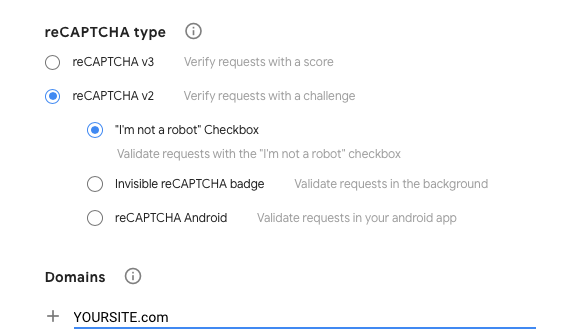
You’ll get a site key, and a site secret. The site key is public, it goes in your frontend code. The secret must never reach the browser.
Store the secret in your .env file:
RECAPTCHA_SECRET=<....>Note there’s no NEXT_PUBLIC_ prefix. In Next.js, only variables with that prefix are bundled into the client code, so this one stays on the server.
Add the widget to the form
Now in your Next.js site install react-google-recaptcha using npm:
npm install react-google-recaptchaNow inside the page where you have the form, import it:
import ReCAPTCHA from 'react-google-recaptcha'And you add it to the JSX:
<ReCAPTCHA size="normal" sitekey="<YOUR SITE KEY>" />You should see it in the form:
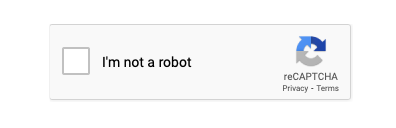
Now if you try submitting your form it works because it’s not doing anything. Anyone, bots included, can submit the form successfully without even clicking the “I’m not a robot” button.
You need to validate the captcha server-side to make it useful.
Validate the token server-side
On Next.js 16 you can put this check in a pages API route, or in an App Router Route Handler under app/api/.../route.js. Same idea either way: read the token from the request, call Google, reject the form if it fails.
I suppose you send the form to a Next.js API route. In there, add a validateCaptcha method:
const validateCaptcha = (response_key) => {
  return new Promise((resolve, reject) => {
    const secret_key = process.env.RECAPTCHA_SECRET

    const url = `https://www.google.com/recaptcha/api/siteverify?secret=${secret_key}&response=${response_key}`

    fetch(url, {
      method: 'post'
    })
      .then((response) => response.json())
      .then((google_response) => {
        if (google_response.success == true) {
          resolve(true)
        } else {
          resolve(false)
        }
      })
      .catch((err) => {
        console.log(err)
        resolve(false)
      })
  })
}
The siteverify endpoint is Google’s API for checking tokens. It responds with a JSON object, and the success property tells us if the token is good.
Now in the request processing main code, add this before doing anything else:
if (!(await validateCaptcha(req.body['g-recaptcha-response']))) {
  return res.redirect(`/captcha`)
}
delete req.body['g-recaptcha-response']
Create a /captcha page in Next.js to redirect if the captcha check is invalid.
In the frontend, you should add some validation prior to submitting the form:
<form
  method='post'
  action='/api/new'
  enctype='multipart/form-data'
  onSubmit={event => {
    if (grecaptcha.getResponse() === '') {
      event.preventDefault()
      alert("Please click <I'm not a robot> before sending the job")
    }
  }}
>
...
Things that trip people up
Tokens expire after two minutes. If someone checks the box, then takes a long time filling the form, the widget shows a “verification expired” message and they have to check it again.
Each token can also be verified only once. If your API route calls siteverify twice with the same token, the second call fails.
Want me to talk about your product? You can sponsor this site.
Related posts about next: