Permissions and users
Linux commands: umask
Learn how the Linux umask command sets the default permissions for new files, reading octal values like 0022 and the -S human-readable notation.
When you create a file, you don’t have to decide permissions up front. Permissions have defaults.
Those defaults are controlled by the umask command.
Typing umask with no arguments shows you the current mask, in this case 0022:
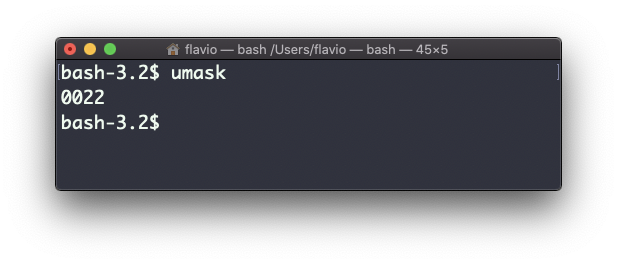
What does 0022 mean? That’s an octal value that represents the permissions. The name says it: it’s a mask. It lists the permissions to take away from new files, not the ones to grant.
Another common value is 0002.
Use umask -S to see a human-readable notation:
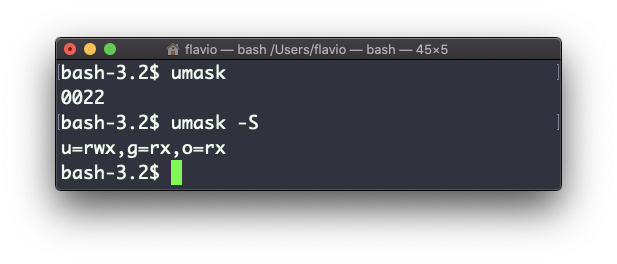
In this case, the user (u), owner of the file, gets read, write and execute permissions.
Other users belonging to the same group (g) get read and execute permission, same as all the other users (o).
In the numeric notation, we typically change the last 3 digits. Each digit is a persona, in the same order as chmod: owner, group, others.
Here’s a list that gives a meaning to each number. Remember, these are the permissions being removed, so the meaning is upside down compared to chmod:
0read, write, execute1read and write2read and execute3read only4write and execute5write only6execute only7no permissions
Note that this numeric notation differs from the one we use in chmod. In chmod, 7 means everything. In umask, 7 means nothing.
Let’s see the mask at work. With the default 0022, create a file and look at it:
touch plain.txt
ls -l plain.txt
-rw-r--r-- 1 flavio staff 0 Sep 8 18:23 plain.txtThe 2 in the group and others position removed write access from them, and left read. Notice there’s no x anywhere, even for the owner. New files never get execute permission, whatever the mask says. Only folders do. That’s why you need chmod +x on every script you write.
We can set a new value for the mask in numeric format:
umask 002Or you can change a specific persona’s permission:
umask g+rA realistic use: you’re about to create some files that only you should ever read. Set the mask to 077 first, which removes everything from group and others:
umask 077
touch secret.txt
ls -l secret.txt
-rw------- 1 flavio staff 0 Sep 8 18:23 secret.txtThe file came out private without a chmod afterwards.
Two things trip people up. First, umask only affects files created after you run it. Existing files keep their permissions, so umask won’t fix a file that’s too open. You need chmod. Second, the change only lasts for the current shell. To make it permanent, put the umask line in your shell’s config file, like ~/.zshrc.
The
umaskcommand works on Linux, macOS, WSL, and anywhere you have a UNIX environment
Lesson completed