Start with Swift
Swift Variables
Learn how variables work in Swift, the difference between var and let constants, how type inference assigns a type, and why a variable is bound to it.
This tutorial belongs to the Swift series
A variable gives a name to a value. In Swift we declare one with the var keyword:
var name = "Roger"
var age = 8
Once we have a variable, we can change its value:
age = 9If you know a value won’t change, declare it as a constant with the let keyword:
let name = "Roger"
let age = 8
Changing a constant is forbidden. Try to assign a new value to age and the compiler stops you with Cannot assign to value: 'age' is a 'let' constant:
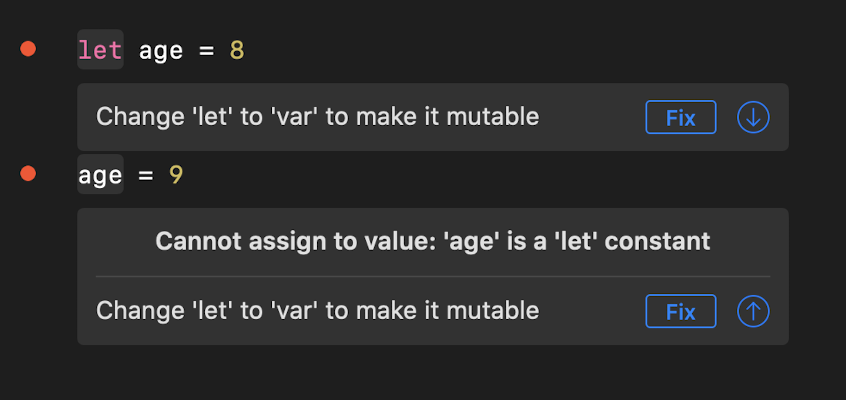
Xcode even offers to change let to var for you. My advice is to not accept that fix on autopilot. Start with let everywhere, and switch to var only when you find out you need to reassign. The less a value can change, the fewer places a bug can hide.
Type inference
When you declare a variable and give it a value, Swift figures out its type on its own. This is called type inference.
8 is an Int value.
"Roger" is a String value.
A decimal number like 3.14 is a Double value.
You can also write the type yourself:
let age: Int = 8Most of the time we let Swift infer it. Writing the type is useful mainly when you declare a constant without giving it a value right away:
let age: Int

age = 8
Swift needs the type on the first line, because there’s no value to infer it from. You can then assign the value once, later, and it stays a constant.
A variable is bound to its type
Once a variable has a type, it keeps that type. You can’t put a different kind of value in it, unless you convert the value first.
You can’t do this:
var age = 8
age = "nine"
The compiler answers with Cannot assign value of type 'String' to type 'Int':
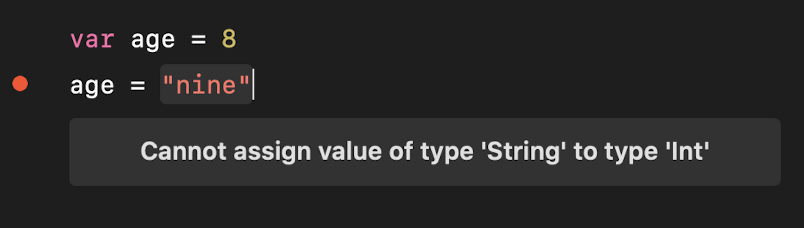
This is different from JavaScript or Python, where a variable can hold a number now and a string later. Swift’s rule feels strict at first, but it means the compiler catches a whole class of mistakes before the program runs.
Int and String are two of the built-in types Swift provides. We’ll look at booleans, numbers, and strings in the next lessons.
Lesson completed