
An app by Flavio
Video Size Limit
Type the upload limit in MB and get an MP4 under it. The app tries settings from best to smallest, checks the real file, and resumes a batch after a relaunch.
Buy Video Size Limit · $20One-time purchase. Plus tax where it applies.
macOS 15 or later · Apple silicon and Intel
Latest version 1.3.0, released November 20, 2026
The support form says “Max file size: 10 MB”. Your screen recording of the bug is 84 MB. You export it smaller in QuickTime Player, check the size, and it’s 31 MB. You try a lower setting. Now it’s under the limit, and the text in the recording is a blur.
Video Size Limit starts from the number on the form. You type the limit in MB, add the video and click Export. The app tries export settings from the best down, stops at the first one that fits, and checks the real file on disk before it saves it.
It works on a batch too, and if you quit halfway through, the queue is still there when you come back.
Who it’s for
- Anyone filing a bug report or a support ticket. The help desk takes attachments up to 10 MB, and a two-minute screen recording on a Retina display is many times that. Type 10, export, attach.
- Teachers and students. The school’s assignment portal caps uploads, and a ten-minute presentation recorded on a laptop is far over it. Set the cap once with Save defaults and every recording fits.
- People sending video by email. Gmail stops attachments at 25 MB, and other providers have their own limits. A short clip from the phone often needs one pass to fit.
- Real estate agents and online sellers. Listing sites and marketplaces cap each video. Fit a whole set of walkthroughs or product clips in one batch instead of finding out which ones bounce.
- Job seekers. An application asks for a one-minute video introduction under a size you can’t argue with. Get it under the limit on the first try.
A batch, start to finish
Say you have six screen recordings for a bug tracker that takes 25 MB.
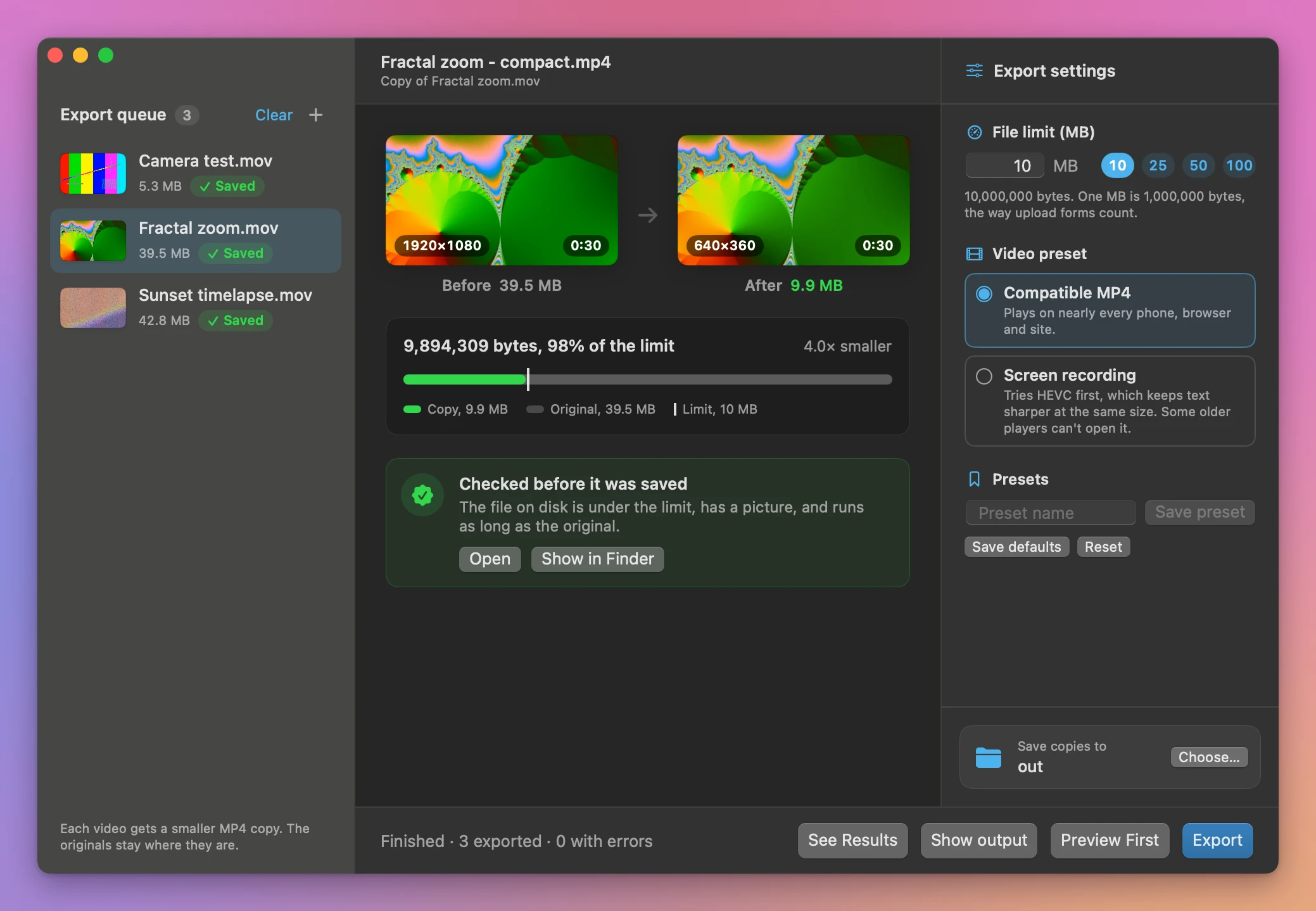
- Add the videos. Drag them onto the window, or click Add Videos…. The originals stay where they are. Each one shows up in the Export queue with a still, its size, and how many times too big it is.
- Type the limit. Enter 25 in File limit (MB), or click the 25 button next to it. Decimals work, so 9.5 is fine when you want a margin. Click a video to see it on a meter against the limit.
- Pick the video preset. Compatible MP4 plays almost anywhere. Screen recording tries HEVC first, which usually looks better at the same size.
- Look at one first. Click Preview First. The app compresses the first video to a temporary file and opens it in Quick Look. Check that the text you need is still readable.
- Choose the output folder. Click Choose… next to Save copies to, then click Export.
- Read the results. The app lists every copy, like
Studio walkthrough - compact.mp4, with its size and how much of the limit it uses, and the videos that didn’t fit with the reason. Click a video in the queue to see a frame from the original and the copy side by side. Show output opens the folder in Finder.
If you upload to the same three places every week, save each limit as a preset. Type “Bug tracker 25 MB” in Preset name, click Save preset, and it’s in the Presets menu next time.
How it gets under the limit
Best quality first
The app works down a list. If the video is already under the limit, it first tries copying it into an MP4 as it is, with no re-encode. Then it tries the macOS export presets from the largest down: 4K for videos bigger than 1080p, then 1080p, 720p, 540p, 480p and a low-quality preset. With Screen recording, HEVC versions of the 4K and 1080p presets come first.
It stops at the first result that fits. That’s the highest of those settings that stays under your number, so you don’t get a 480p video when 720p would have fit.
Then a bitrate it works out from your number
For tight limits, the presets aren’t small enough. The app then divides your limit by the video’s length to work out a bitrate, and encodes at that rate. It picks a resolution that suits the bitrate, so a very small limit gets a smaller picture instead of a big blocky one. If the file still comes out too big, it lowers the rate and tries again, a few times.
This step keeps the first video track and mixes the sound down to mono. A screen recording with a voiceover sounds the same. A concert clip loses its stereo.
Every file is checked
A file counts only when its real size on disk is at or under the limit. The app also checks that the MP4 has a video track and that its length is within 0.3 seconds of the original’s, so you never get a copy that was cut short.
The limit uses decimal megabytes, the way most upload forms count them: 1 MB is 1,000,000 bytes. You can enter anything from 0.1 to 20,000 MB.
When it can’t fit
An hour of video can’t fit in 2 MB. When a limit is out of reach, the app tells you the smallest file it managed, in a message like “The smallest available export was 3.4 MB. Increase the limit or trim the original.” The rest of the batch keeps going.
The queue survives a relaunch
Cancel stops a long batch and keeps the copies that already finished. The queue, the settings and the results are saved as you go, so when you open the app again it shows “Restored queue” with the number of unfinished videos. Click Resume and it does only those. If the output folder moved or its disk is unplugged, the app asks you to pick a folder first.
The originals stay put
The app writes new MP4 files into the folder you chose. When a name is taken it adds a number, like Demo - compact (2).mp4. The MP4s are set up so a browser can start playing them before the download finishes.
Why not export a smaller size in QuickTime
QuickTime Player is free and can export a video at 4K, 1080p, 720p or 480p. It can’t aim at a file size. So you export at 720p, check the size in Finder, find it’s still too big, and export at 480p. For a ten-minute recording each try is a full export, and for six videos it’s six rounds of guessing.
Online compressors can target a size, but they want the whole video uploaded first. For a screen recording of your company’s admin panel, or a walkthrough of your home, that’s a file you’d rather not hand to a stranger’s server.
| By hand | Video Size Limit | |
|---|---|---|
| Aiming at a size | You guess a resolution and check | You type the limit in MB |
| Six videos | Six rounds of export, check, try again | One batch |
| Quality | Often lower than needed, to be safe | The best preset that fits, tried first |
| Checking the result | You look at the size in Finder | Size, video track and length checked |
| Stopping halfway | Start over | Resume does only the unfinished videos |
| Privacy | Online compressors upload the video | Everything happens on your Mac |
What it doesn’t do
- It doesn’t trim. If a 40-minute video has to fit in 5 MB, cut it first. The app compresses the whole length.
- It doesn’t work miracles on tight limits. Very small limits soften text and fine detail. Check the first one with Preview First.
- It only writes MP4. Both presets give an MP4 file.
- It doesn’t remove the sound. For a silent copy, run the clips through Batch Video Mute first. Need only the audio? That’s Video Audio Extractor.
- It’s for videos only. For a PDF that’s too big for a form, there’s PDF Size Limit. For photos with a pixel and KB limit, there’s Image Upload Fitter.
Questions
Are my original videos changed?
They aren’t touched. The app reads them and writes new MP4 copies into the output folder.
Does anything get uploaded?
The compression runs on your Mac. The app uses the internet only to check for and download updates.
Why is the copy smaller than the limit by quite a bit?
The app stops at the first setting that fits. If 720p comes out at 6 MB and your limit is 10, you get the 6 MB file, because 1080p came out over 10.
What’s the difference between the two presets?
Compatible MP4 uses formats that play on nearly every device and site. Screen recording tries HEVC first, which usually gives a better picture at the same size. Some older players and sites don’t play HEVC, so use Compatible MP4 when you’re not sure.
What if I quit in the middle of a batch?
The finished copies stay in the output folder. Open the app again and the queue is back, with a Resume button for the videos that didn’t finish.
What it needs
Video Size Limit runs on macOS 15 Sequoia or later, on Apple silicon and Intel Macs. Files are processed locally.
Very small limits can soften text and fine detail or leave no viable export. The bitrate fallback keeps the first video track and mixes audio down to mono.
The Video Size Limit docs cover each step.
Buy Video Size Limit
$20 plus tax where it applies, paid once.
Download the app from the order page or your Creem receipt, unzip it and move it to Applications. I sign the app with my Apple Developer ID, and Apple notarizes the download.
The app checks for updates once a day. When a new version is ready, click Install and Relaunch. To check anytime, choose Video Size Limit → Check for Updates….