Give every project a stable .localhost URL so you stop remembering ports
By Flavio
Updated
How Local Hoster turns a name in package.json into https://name.localhost and a fixed port, how to run several projects side by side, and what happens when that port is already taken.
Right now on my Mac there’s an Astro dev server that was started with --port 4327 and is listening on 4328, because an astro preview already had 4327. Astro and Vite do that without failing: they print a line and take the next port. A bookmark or an OAuth callback saved for 4327 now points at the preview.
Local Hoster gives each project a name instead. https://shop.localhost is the shop, every time, and the port behind it is picked from the name. I built it because I never remembered which project ran on which port, and I run flaviocopes.com through it.
This tutorial is about the names and the ports. Setting up Caddy and the certificate is in HTTPS on localhost with Caddy. You need that done first: Caddy running with its admin API on localhost:2019, and caddy trust run once.
Name the project
Add a localhost field to package.json and put localhoster in front of the dev command:
{
  "name": "ceramics-shop",
  "localhost": "shop",
  "scripts": {
    "dev": "localhoster astro dev"
  }
}
npm run dev now prints two routes before Astro starts, http://shop.localhost and https://shop.localhost, both pointing to localhost:15515, and Astro reports that it’s listening on 15515:
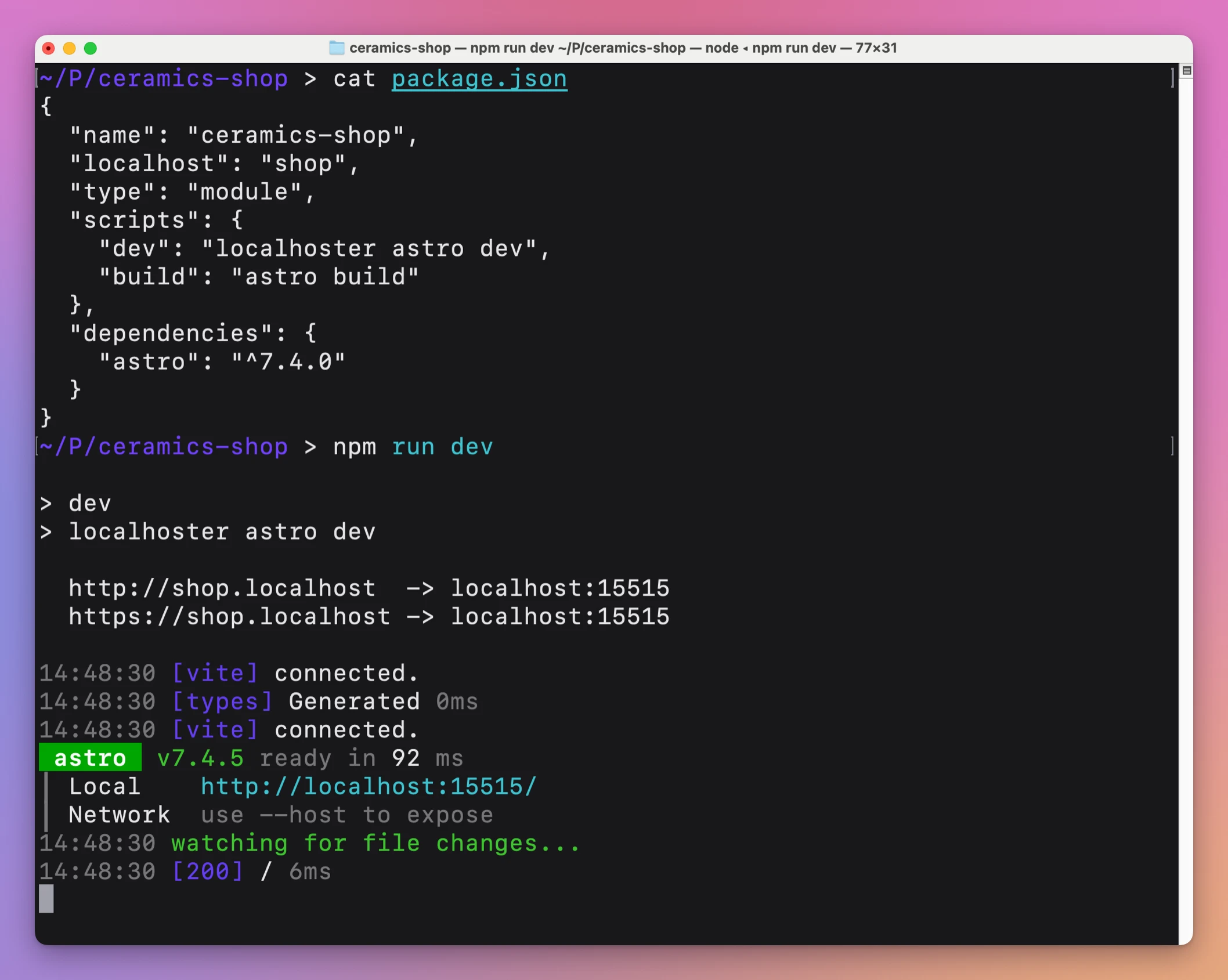
Local Hoster adds --port 15515 to the end of your command. astro dev becomes astro dev --port 15515. The command runs from node_modules/.bin if the project has it there, otherwise from your PATH.
This site works the same way. Its package.json has "localhost": "flaviocopes" and "dev": "localhoster astro dev", and Port Pilot’s ports check shows the chain behind the port:
  Command:   astro dev --port 38586
  Project:   flaviocopes.com
  Framework: Astro
  Directory: /Users/flaviocopes/www/flaviocopes.com
  Chain:     ... → npm run dev  → node /opt/homebrew/bin/localhoster astro dev → astro dev --port 38586
How a name becomes a port
Local Hoster takes the localhost field, or the package name when there’s no localhost field. It lowercases it, drops a .localhost suffix if you wrote one, and adds it back. Each part between dots can use letters, numbers and hyphens, but can’t start or end with a hyphen.
Then it hashes the full hostname into a number between 10000 and 59999. Same name, same port, on every machine. These are the ports Local Hoster 1.0.1 gives a few names:
localhost field | Address | Port |
|---|---|---|
shop | shop.localhost | 15515 |
admin | admin.localhost | 48220 |
Admin | admin.localhost | 48220 |
shop-preview | shop-preview.localhost | 12922 |
myapp | myapp.localhost | 29830 |
flaviocopes | flaviocopes.localhost | 38586 |
Admin and admin are the same address, so they get the same port. Two projects with the same name would share it too, so give each one its own.
A scoped package name like @flavio/shop isn’t a valid hostname. Without a localhost field, npm run dev stops right away:
The localhost name must use only lowercase letters, numbers, hyphens, and dots, with no leading or trailing hyphen.The port is picked, not reserved. Nothing stops another program from listening on 15515 before your shop starts. More on that below.
Run several projects at once
A Vite admin next to the Astro shop gets its own name:
{
  "name": "ceramics-admin",
  "localhost": "admin",
  "scripts": {
    "dev": "localhoster vite --strictPort"
  }
}
Start each one with npm run dev in its own terminal. The shop stays on 15515, the admin gets 48220, and the same Caddy serves https://shop.localhost and https://admin.localhost side by side.
You can start or stop them at the same moment. Each change to Caddy’s config is checked against the version Local Hoster read, and repeated if another project changed it in between, so one project’s routes never overwrite the other’s.
Ctrl+C in one terminal removes only that project’s routes, and the other project keeps working.
--strictPort in the admin script is there for the next section.
Use the name everywhere
The number in the terminal is for Caddy. Everything else should get the name: bookmarks, the OAuth app’s callback URL, allowed origins in your API’s CORS config, the site URL in your framework’s config.
Separate names also keep cookies apart. shop.localhost and admin.localhost are different hosts, so a login cookie set by the shop isn’t sent to the admin. On plain localhost they’d share cookies, because cookies don’t care about the port.
Both HTTP and HTTPS work, and there’s no redirect between them. Pick HTTPS for anything with secure cookies or OAuth, and use that exact origin everywhere.
When the port is already taken
To see what happens, I started another server on localhost:15515, then ran a Vite project named shop with a plain localhoster vite script:
> dev
> localhoster vite

  http://shop.localhost  -> localhost:15515
  https://shop.localhost -> localhost:15515

Port 15515 is in use, trying another one...

  VITE v7.3.1  ready in 101 ms

  ➜  Local:   http://localhost:15516/
Vite moved to 15516. Caddy still sends shop.localhost to 15515, so the address served the other server’s page. Nothing fails, you’re just looking at the wrong project.
With --strictPort, Vite refuses to move:
> dev
> localhoster vite --strictPort

  http://shop.localhost  -> localhost:15515
  https://shop.localhost -> localhost:15515

error when starting dev server:
Error: Port 15515 is already in use
Vite exits, Local Hoster removes the routes it just added, and the command exits with 1. That’s the better failure, so add --strictPort to Vite scripts. With other dev servers, compare the port in their startup line with the one Local Hoster printed.
To fix it, find out what holds the port before you stop it. With Port Pilot, ports check 15515 shows the project and the command (see find what’s using a port on macOS). If it’s something you need, rename your project. A new name means a new port, but also a new address, so update your bookmarks and callbacks.
Undo it
Take localhoster out of the dev script and remove the localhost field. The project goes back to its framework’s default port. Caddy keeps running with no routes for it, and the trusted root stays until you remove it with caddy untrust.
Get Local Hoster
Give your development projects memorable .localhost URLs with local HTTPS through Caddy. Includes the localhoster CLI and full MIT source.
See Local Hoster → · Read the docs · $20. See the app page for tax details, with full source code.
Want me to talk about your product? You can sponsor this site.