Find the projects with commits waiting to ship
By Flavio
Updated
List every project with commits since its last GitHub release, read what changed, and pick what to release next with Releases Manager and its releases command.
You fixed a bug in one app last Tuesday. You tweaked a CLI the week before. Did either of them ship? With one project, git log v1.4.1..HEAD answers that. With fifteen projects, you’d have to remember every last tag and run it fifteen times.
That’s how fixes sit in a repo for a month while users keep hitting the bug. The question you want answered is “which of my projects have unreleased commits?”, for all of them at once.
Releases Manager is the Mac app I use for this. It compares each project’s latest GitHub release with the git history in its folder, and lists the ones with commits since that release, the most commits first. It does the same from the terminal with the releases command.
At the end you’ll have one list of what’s waiting to ship, the commits behind each count, and a way to decide what deserves a release.
What you need
Releases Manager runs on macOS 14 or later, on Apple silicon and Intel Macs. After purchasing it, download the Mac app from your Polar receipt, unzip it, and drag it to your Applications folder. The receipt also has the full source code of the same version.
The releases command is built from that source. You need Xcode 26 or a Swift 6.2 toolchain. From the unzipped source folder, run:
./Scripts/install-cli.shIt installs the command in ~/.local/bin, which needs to be on your PATH. Pass another folder as the argument to install it somewhere else, like /opt/homebrew/bin.
Your projects need two things. Each one is a git repository with an origin remote on GitHub. And each one has at least one published GitHub release, with its tag. A project that never shipped has no “since” to count from, so it isn’t waiting to ship. It’s “Not released yet”.
For private repos, log in to the GitHub CLI with gh auth login. Releases Manager signs its requests with that token, or with GH_TOKEN or GITHUB_TOKEN. Public repos work without a token, within GitHub’s limit of 60 anonymous requests an hour.
Here’s a preflight check. This prints the version of the command and confirms it’s on your PATH:
releases --versionreleases 1.7.0Add every project you ship
Releases Manager only looks at projects in its list. That’s the part that makes the answer trustworthy: a project you forgot to add can’t show up as waiting, and that’s the exact project you’d forget to release. So the first job is getting every project you ship into the list, once.
The list is one file, shared by the app and the command. It keeps the folders and the releases GitHub returned last time. Everything else, like the version, the branch and the commits, is read from the folder each time Releases Manager looks.
In the app, drop a project folder on the window, or click Add More… at the end of the sidebar. ⌘O and the + button in the toolbar do the same. The Add Projects sheet lists the apps and command-line tools next to the projects you already track, the most recently worked on first. Click Add next to each one.
From the terminal, pass one or more folders:
releases add ~/dev/hostingpicker ~/dev/recipe-box ~/dev/mood-journal ~/dev/invoice-kit ~/dev/tidy-tabsEach folder prints what Releases Manager read from the folder and from GitHub. The project names, paths, commits and counts in this tutorial’s output are example values, in the exact format the command prints:
Added hostingpicker (/Users/flavio/dev/hostingpicker)
  GitHub:  flavio/hostingpicker
  Version: 2.3.0 (version in Sources/HostingPicker/Version.swift)
  Status:  3 commits since v2.3.0
Added Recipe Box (/Users/flavio/dev/recipe-box)
  GitHub:  flavio/recipe-box
  Version: 1.4.1 (MARKETING_VERSION in project.yml)
  Status:  1 commit since v1.4.1
Added Mood Journal (/Users/flavio/dev/mood-journal)
  GitHub:  flavio/mood-journal
  Version: 1.3.0 (MARKETING_VERSION in project.yml)
  Status:  Up to date
Added invoice-kit (/Users/flavio/dev/invoice-kit)
  GitHub:  flavio/invoice-kit
  Version: 1.0.1 (version in package.json)
  Status:  1 commit since v1.0.1
Added tidy-tabs (/Users/flavio/dev/tidy-tabs)
  GitHub:  flavio/tidy-tabs
  Version: not found
  Status:  7 commits since v1.0.0
A folder inside a git repository adds the whole repository, so you can’t add a subfolder by mistake. releases discover lists the projects on your Mac that aren’t in the list yet, the same ones the Add Projects sheet shows.
To undo, releases remove <project> takes a project off the list. It leaves the folder alone.
Read the Waiting to Ship tab
The app’s home page is Latest Releases, every release of every project on one timeline. That’s useful for looking back. For looking forward, switch to the Waiting to Ship tab at the top right, next to All Releases and First Releases. Its pill shows how many projects are waiting.
Without this tab, you’d open each project’s page and read its badge. The tab collects only the projects that need a decision, sorted so the biggest backlog is on top.
Latest Releases → Waiting to ShipEach row has the project’s icon and name, its status, and the subjects of its unreleased commits on one line, separated by ·. A Create Release… button sits at the end of the row. This is the shape of the rows, filled in with the projects from the run above:
tidy-tabs        7 commits since v1.0.0                       [Create Release…]
hostingpicker    3 commits since v2.3.0                       [Create Release…]
Recipe Box       Waiting for commit   1 commit since v1.4.1   [Create Release…]
invoice-kit      1 commit since v1.0.1                        [Create Release…]
This is the real tab, with a set of made-up projects. Two have commits since their last release, and two have a version bump that isn’t released yet:
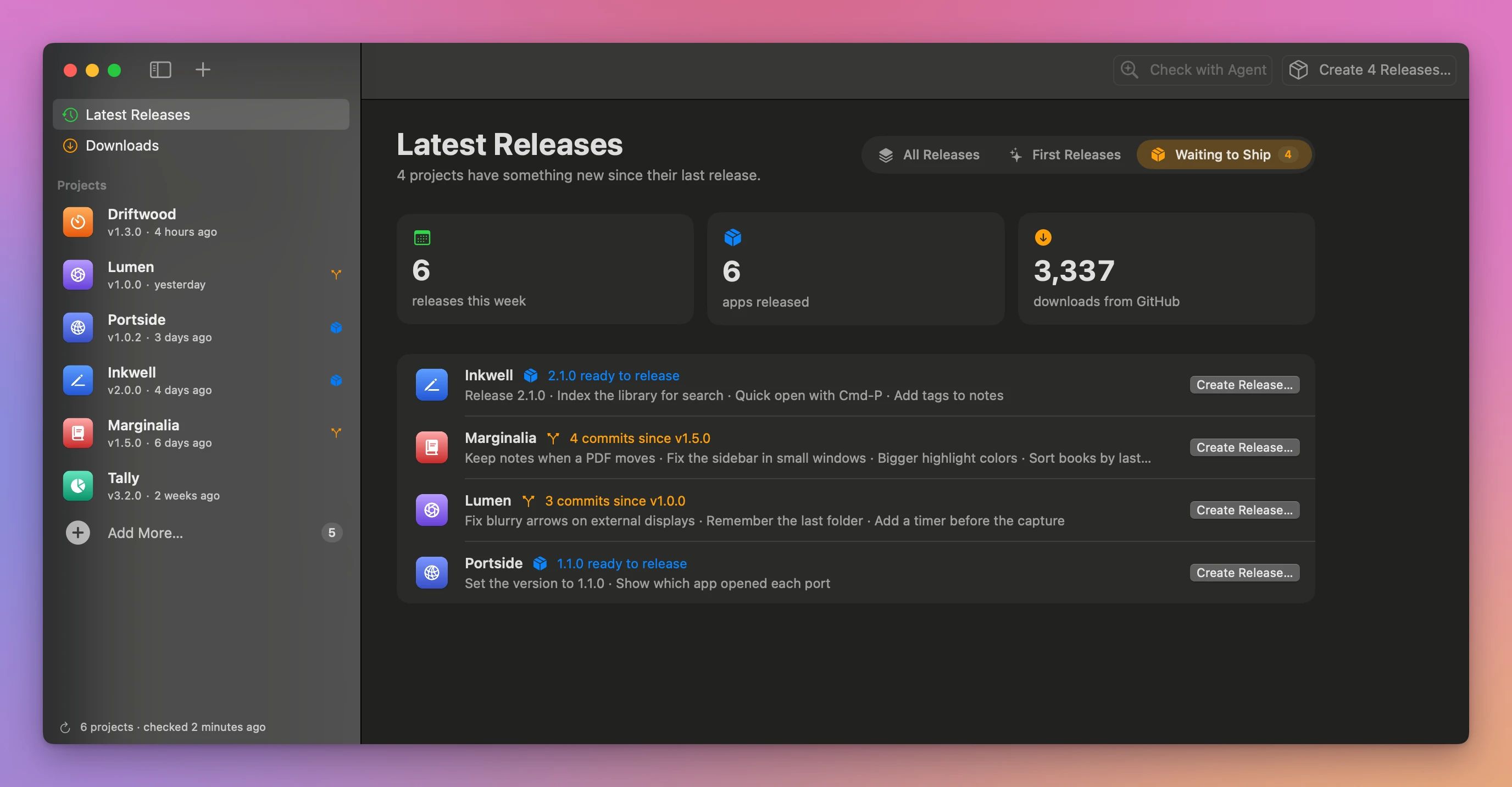
The orange Waiting for commit tag means the folder has uncommitted changes. That’s work that won’t be in a release until you commit it. When nothing is waiting, the tab says “Nothing is waiting to ship. New commits and version bumps show up here.”
Click a row to open the project’s page. It shows the version and the file it comes from, the branch, every commit since the last release, and a “not pushed” tag when you have commits that aren’t on GitHub yet.
The releases refresh every 10 minutes and when you switch back to the app. ⌘R refreshes right away.
List waiting projects from the terminal
The terminal version of the same list is better when you want to paste it somewhere, or hand it to a coding agent. It reads the same list file as the app, so there’s nothing to keep in sync.
releases list shows every project. --waiting keeps only the ones with commits or a newer version since their last release.
Example 1: the weekly check across five projects. This is the same five projects, on a Monday morning:
releases list --waitingtidy-tabs - v1.0.0 Oct 28, 2026 7 commits since v1.0.0
hostingpicker 2.3.0 v2.3.0 Nov 4, 2026 3 commits since v2.3.0
Recipe Box 1.4.1 v1.4.1 Nov 5, 2026 1 commit since v1.4.1 · Waiting for commit
invoice-kit 1.0.1 v1.0.1 Nov 4, 2026 1 commit since v1.0.1The columns are the name, the version in the project, the latest release tag, its date, and the status. Mood Journal is gone from this list, because it’s up to date. The - in the version column means Releases Manager didn’t find a version in that folder.
It reads the version from the first of these it finds: MARKETING_VERSION in project.yml, version in package.json, a constant like static let version = "1.0.0" in Sources/, then MARKETING_VERSION in the Xcode project.
Run it a second time and the releases come from a cache when they were fetched in the last 5 minutes. The commits are read again on every run. Add --refresh to ask GitHub again too:
releases list --waiting --refreshRead the commits behind each count
“7 commits since v1.0.0” tells you there’s something. It doesn’t tell you whether it’s worth a release. Seven README edits aren’t. One crash fix is. You need the commit subjects to decide, and that’s what releases show prints.
Here’s how the count works. Releases Manager takes the tag of the latest public release on GitHub and runs git log --no-merges <tag>..HEAD in the project folder. So the count is the commits on your current branch that aren’t in the release tag, without merge commits.
releases show invoice-kitinvoice-kit
https://github.com/flavio/invoice-kit
Path: /Users/flavio/dev/invoice-kit
Version: 1.0.1 (version in package.json)
Branch: main
Status: 1 commit since v1.0.1
Downloads: 43
Fetched: Nov 9, 2026 at 7:42 AM
Since v1.0.1:
4c1e9a2 README: add the --currency option to the examples
Releases:
v1.0.1 Nov 4, 2026 12 downloads https://github.com/flavio/invoice-kit/releases/tag/v1.0.1
- Fixes the total when an invoice has no tax rate
- Adds a --due option to the new command
v1.0.0 Oct 28, 2026 31 downloads https://github.com/flavio/invoice-kit/releases/tag/v1.0.0 [first release]
- First release of invoice-kitIn the app, a project’s page shows the same commits under the last tag, like Since v1.5.0 for this made-up Marginalia project, with the releases and their notes below:
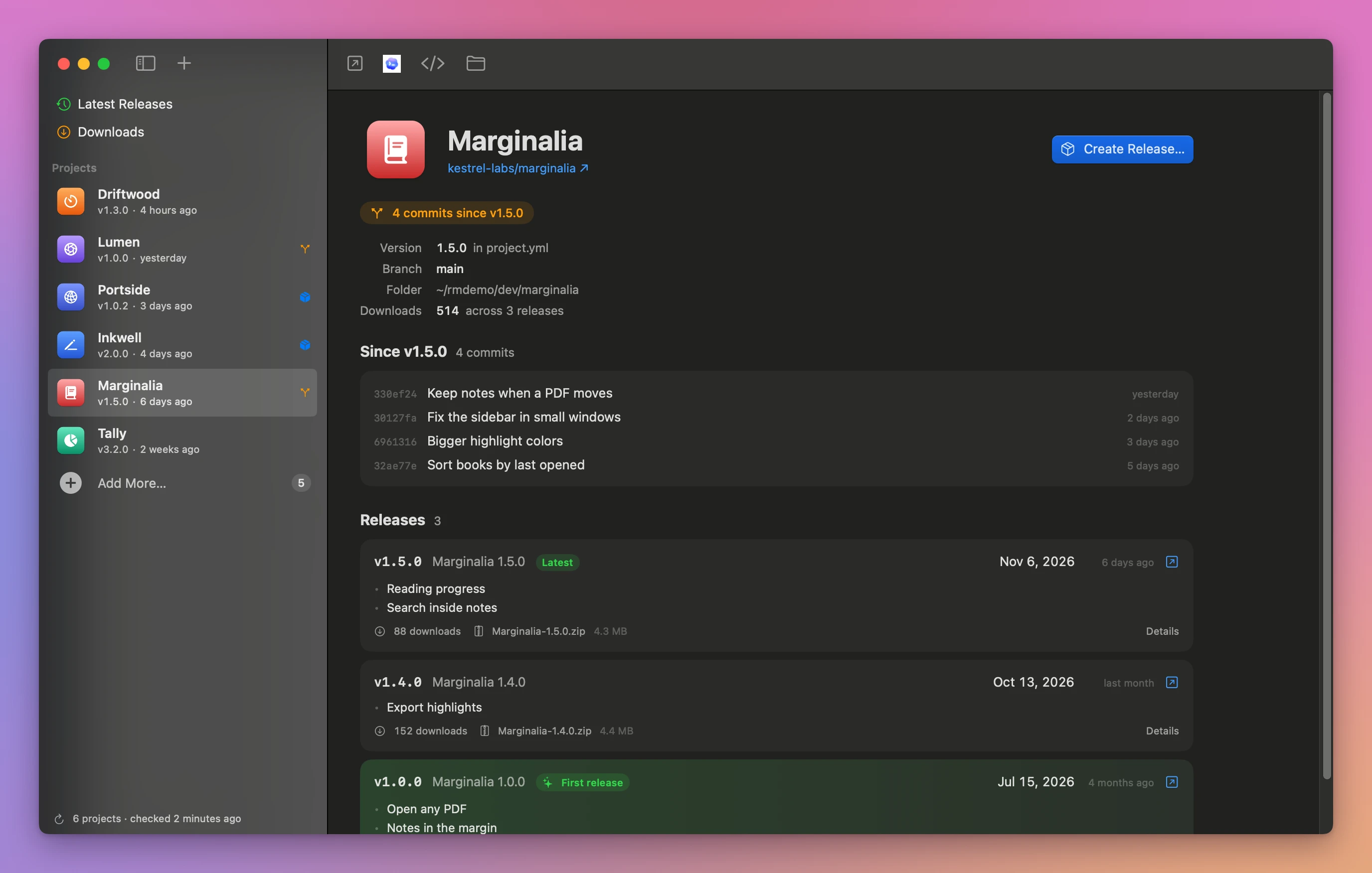
That one commit is a README change. Nobody who runs the tool gets anything new, so I’d leave invoice-kit alone. The list under Releases comes from the project’s CHANGELOG.md, or from the “What’s new” part of the release notes on GitHub. The download counts are the same ones covered in seeing download counts for your GitHub releases.
A project is its folder path, its folder name, its app name, or its GitHub repo, so releases show flavio/invoice-kit works too.
Count a version bump as waiting
Commits aren’t the only signal. Sometimes you bump the version in the project and then get distracted before you publish. The code is ready, the number is ready, and no release exists. That’s the most finished kind of waiting, and the easiest to forget, because the work feels done.
Releases Manager compares the version in your project with the latest release’s version. When the project’s is higher, the status is “ready to release”, and the project counts as waiting even with zero new commits. When it’s lower, the status says the project and GitHub disagree, which usually means a version file you forgot to update.
Example 2: a version bumped but never released. In invoice-kit, change version in package.json from 1.0.1 to 1.1.0 and don’t commit it:
releases listinvoice-kit 1.1.0 v1.0.1 Nov 4, 2026 1.1.0 ready to release · Waiting for commitThe status changed from “1 commit since v1.0.1” to “1.1.0 ready to release”. And because the edit isn’t committed, Waiting for commit shows up too. The JSON output has the same information as fields an agent can read:
releases list --waiting --json[
{
"branch" : "main",
"hasUncommittedChanges" : true,
"name" : "invoice-kit",
"repository" : "flavio/invoice-kit",
"status" : "readyToRelease",
"statusText" : "1.1.0 ready to release",
"unreleasedCommits" : [
{
"date" : "2026-11-06T16:12:05Z",
"hash" : "4c1e9a2",
"subject" : "README: add the --currency option to the examples"
}
],
"version" : "1.1.0",
"versionFile" : "package.json"
}
]I cut the latestRelease object and a few other fields. To undo the edit, run git checkout package.json, and the status goes back to “1 commit since v1.0.1”.
Decide which projects deserve a release
A list of four waiting projects is a list of four decisions. Some need a release today, some need nothing, and reading every diff yourself takes a while. Releases Manager can write the request for a coding agent, so the agent reads the diffs and you only approve the result.
In the app, click Check with Agent in the toolbar of Latest Releases. It needs Codex installed, and opens a new Codex chat with the prompt. From the terminal, releases prompt --check prints the same prompt, so you can paste it into any agent:
releases prompt --checkCheck which of my projects need a new release. Each one has changes since its last release on GitHub:
- tidy-tabs, /Users/flavio/dev/tidy-tabs: 7 commits since v1.0.0
- hostingpicker, /Users/flavio/dev/hostingpicker: 3 commits since v2.3.0
- Recipe Box, /Users/flavio/dev/recipe-box: 1 commit since v1.4.1, uncommitted changes
- invoice-kit, /Users/flavio/dev/invoice-kit: 1 commit since v1.0.1
In each folder, look at what changed since the last release tag with git log and git diff. A release is worth it when people who use the app or the CLI get something new: a feature, a fix, a change they'll notice. Changes to the README, the docs, CI, screenshots or agent instructions alone don't need one.
Then give me a short list: the projects to release, each with the version you'd pick and why, and the ones to skip. Default to a minor release every time unless I explicitly request another bump. Wait for my go-ahead, then release them one at a time, following the "Later releases" steps of the open-source-release skill if you have it.
For the projects with uncommitted changes, ask me whether they belong in the release before committing anything.Printing the prompt doesn’t run anything. Adding --codex opens it in Codex, and even then nothing happens until you send it. The open-source-release skill it mentions is the one I use to publish my apps. You can write your own skill with that name.
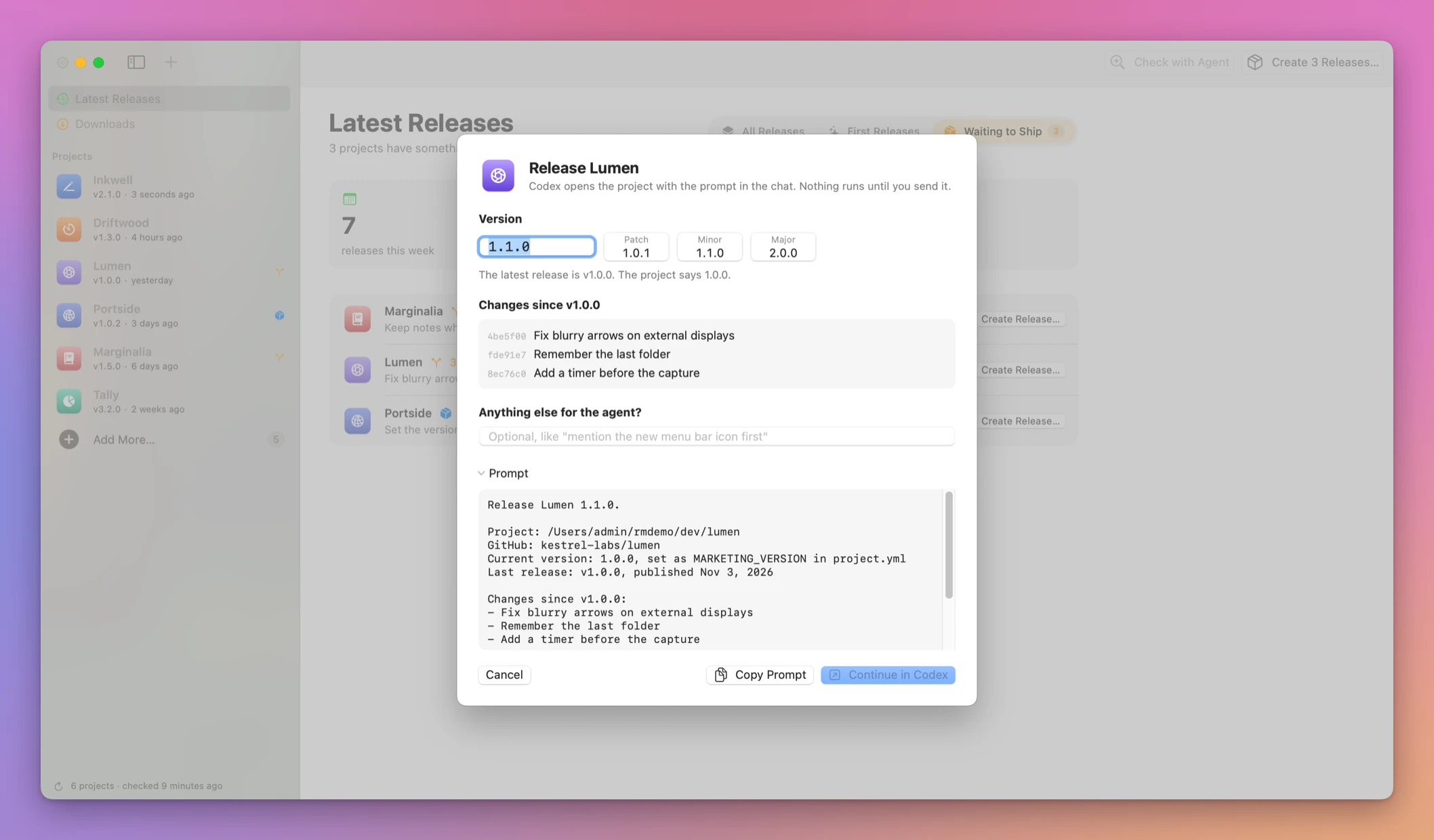
For one project, releases prompt <project> prints the release request itself, with the version, the repo and the commits. --bump patch, minor or major picks the next version, following semantic versioning:
releases prompt invoice-kit --bump patchRelease invoice-kit 1.0.2.
Project: /Users/flavio/dev/invoice-kit
GitHub: flavio/invoice-kit
Current version: 1.0.1, set as version in package.json
Last release: v1.0.1, published Nov 4, 2026
Changes since v1.0.1:
- README: add the --currency option to the examples
Follow the "Later releases" steps of the open-source-release skill if you have it. Set the version to 1.0.2, commit, tag v1.0.2 and push. Build the zip, write the release notes with what's new first, publish the GitHub release and verify the download.This one does publish something once an agent runs it: a commit, a tag, a push and a public GitHub release. Read it before you send it.
In the app, the Create Release… button on a row opens the same request in a sheet. You pick the version, add a note for the agent, and copy the prompt or continue in Codex:
Make sure the release tags are on your Mac
The count depends on the release tag existing in your local repository. GitHub knows about the tag, but git log v1.0.1..HEAD runs on your Mac. If the tag isn’t there, Releases Manager can’t count, and it falls back to “Up to date”. That’s the worst failure for this job, because it hides the exact projects you’re looking for.
It happens when a release was published from another machine or by a CI job, and you never fetched since. A clone made with --no-tags has the same problem.
Example 3: a project that says “Up to date” but isn’t. Clone invoice-kit with --no-tags and add the clone to the list:
releases listinvoice-kit 1.0.1 v1.0.1 Nov 4, 2026 Up to dateThe README commit is there, but the v1.0.1 tag isn’t, so there’s nothing to count from. Fetching the tags fixes it:
git fetch --tags --quiet
releases list
invoice-kit 1.0.1 v1.0.1 Nov 4, 2026 1 commit since v1.0.1git fetch --tags doesn’t touch your branch or your working files, so it’s safe to run in every project. If a project shows “Up to date” and you’re sure you changed something, run git tag --list in its folder and look for the release tag.
Make it a weekly habit
I check the Waiting to Ship tab on Monday mornings. A week is short enough that I still remember why each commit happened.
If you’d rather have an agent do it, the request can be one line: “Run releases list --waiting, then releases prompt --check, and tell me which projects need a release.” Every command takes --json, and releases help --json describes all of them, so the agent can learn the tool in one call. Errors go to stderr with exit code 1.
If something looks wrong
- If a project says “Up to date” but you know it has new commits, the release tag is probably missing locally. Run
git fetch --tagsin its folder. - If a project’s status is “No GitHub remote” or “Not a git repository”, it has no
originon GitHub. Add the remote withgit remote add origin, or ignore it until it has a repo. - If the status is “Not released yet”, the repo has no published release, so there’s nothing to compare with. Its first release is a separate step.
- If you see “GitHub can’t find flavio/invoice-kit. If the repo is private, sign in with ‘gh auth login’.”, run
gh auth loginwith an account that can read the repo, then refresh with⌘Rorreleases refresh. - If you see “GitHub’s rate limit is used up”, you’re using anonymous requests. Sign in with
gh auth loginfor a higher limit. - If the version column shows
-, Releases Manager didn’t findproject.yml,package.json, a Swift version constant or an Xcode project version. Commits still count, but a version bump can’t make the project “ready to release”. - If the status reads like “The project says 1.0.0, GitHub has v1.2.0” (example versions), your version file is behind the latest release. Update it before the next release.
- If
releases showprints “Error: No project matches ‘recipebox’.”, the name doesn’t match a project in the list. The error lists the names it knows, so use one of those, or the folder path.
Get Releases Manager
See every app release on one timeline, find projects waiting to ship, and prepare your next release from your Mac.
See Releases Manager → · Read the docs · $20. See the app page for tax details, with full source code.
Want me to talk about your product? You can sponsor this site.