See download counts for your GitHub releases across all your repos
By Flavio
Updated
Read download_count for one release with gh, add up every release of a repo with jq, then see all your repos together with Releases Manager and its releases command.
GitHub counts how many times each file attached to a release was downloaded, but you only get the number from the API. Each uploaded file is a release asset, and each asset has a download_count.
With the GitHub CLI you can read it for one repo at a time. Releases Manager is the app I use to see it for every app I ship, on one screen and from the terminal. Let’s start with gh, then move to the app.
How to add automatic updates to a Mac app reads this same releases API to find new versions. If tags and assets are still fuzzy, A developer’s introduction to GitHub covers what a release is.
Read the count for one release
Install gh with Homebrew and sign in. gh api needs a login even for public repos:
brew install gh
gh auth login
From the folder of the repo, name the tag. This is the 1.5.0 release of Tranquillity Maker:
gh release view v1.5.0 --json assets --jq '.assets[] | {name, downloadCount}'{"downloadCount":12,"name":"Tranquillity-Maker-1.5.0.zip"}One line per uploaded file. Without the tag, gh release view uses the latest release. downloadCount is the CLI’s name for the API field download_count.
The release itself has no count, only its assets. The Source code (zip) and Source code (tar.gz) links GitHub adds to every release aren’t assets either. They’re zipball_url and tarball_url on the release, with no count, so if people download those instead of your zip, nobody counts them.
List every release of the repo
People keep downloading older releases too. This lists every release with its assets:
gh api --paginate "repos/{owner}/{repo}/releases" \
--jq '.[] | {tag: .tag_name, assets: [.assets[] | {name, download_count}]}'{"assets":[{"download_count":0,"name":"Tranquillity-Maker-1.6.1.zip"}],"tag":"v1.6.1"}
{"assets":[{"download_count":0,"name":"Tranquillity-Maker-1.6.0.zip"}],"tag":"v1.6.0"}
{"assets":[{"download_count":12,"name":"Tranquillity-Maker-1.5.0.zip"}],"tag":"v1.5.0"}
{"assets":[{"download_count":4,"name":"Soundscape-1.4.0.zip"}],"tag":"v1.4.0"}
{"assets":[{"download_count":1,"name":"Soundscape-1.3.0.zip"}],"tag":"v1.3.0"}
{"assets":[{"download_count":3,"name":"Soundscape-1.2.0.zip"}],"tag":"v1.2.0"}
{"assets":[{"download_count":3,"name":"Soundscape-1.1.0.zip"}],"tag":"v1.1.0"}
{"assets":[{"download_count":6,"name":"Soundscape-1.0.2.zip"}],"tag":"v1.0.2"}
{"assets":[{"download_count":3,"name":"Soundscape-1.0.1.zip"}],"tag":"v1.0.1"}
{"assets":[{"download_count":1,"name":"Soundscape-1.0.0.zip"}],"tag":"v1.0.0"}gh fills in {owner} and {repo} from the git remote of the folder you’re in. Here the API spells it download_count, with an underscore. You can see the app was called Soundscape until 1.4.0: each count belongs to the file that was uploaded, under the name it had back then.
The API returns 30 releases per page. --paginate follows the next pages, so you don’t lose the old ones.
Add them up
For one number, fetch all pages with --slurp and sum with jq. This skips drafts and prereleases and only counts .zip and .dmg files, so a checksums.txt next to the app doesn’t inflate the total:
releases=$(gh api --paginate --slurp 'repos/{owner}/{repo}/releases') &&
  printf '%s\n' "$releases" | jq '[.[][]
    | select(.draft == false and .prerelease == false)
    | .assets[]
    | select(.name | test("\\.(zip|dmg)$"; "i"))
| .download_count] | add // 0'33--slurp wraps the pages in one more array, which is why there’s .[][]. // 0 prints 0 for a repo with no assets instead of null. The && stops it from printing a total from a partial download if GitHub fails halfway.
The total is downloads, not people. Someone can download twice, and an in-app updater fetches the same zip, so every update counts too.
See every repo together
gh works on one repo at a time, and GitHub has no call that sums across repos. That’s what Releases Manager does. It runs on macOS 14 or later and updates without a license key.
Drop a project folder on the window, press ⌘O, or click Add More… at the bottom of the sidebar. It reads the git remote and fetches the GitHub releases, signing the requests with GH_TOKEN, GITHUB_TOKEN, or the token of gh auth login. Without a token it works for public repos only, within GitHub’s 60 requests an hour.
Latest Releases shows every release of every project, newest first and grouped by day, with the download count of each one. This is the window with six demo projects:
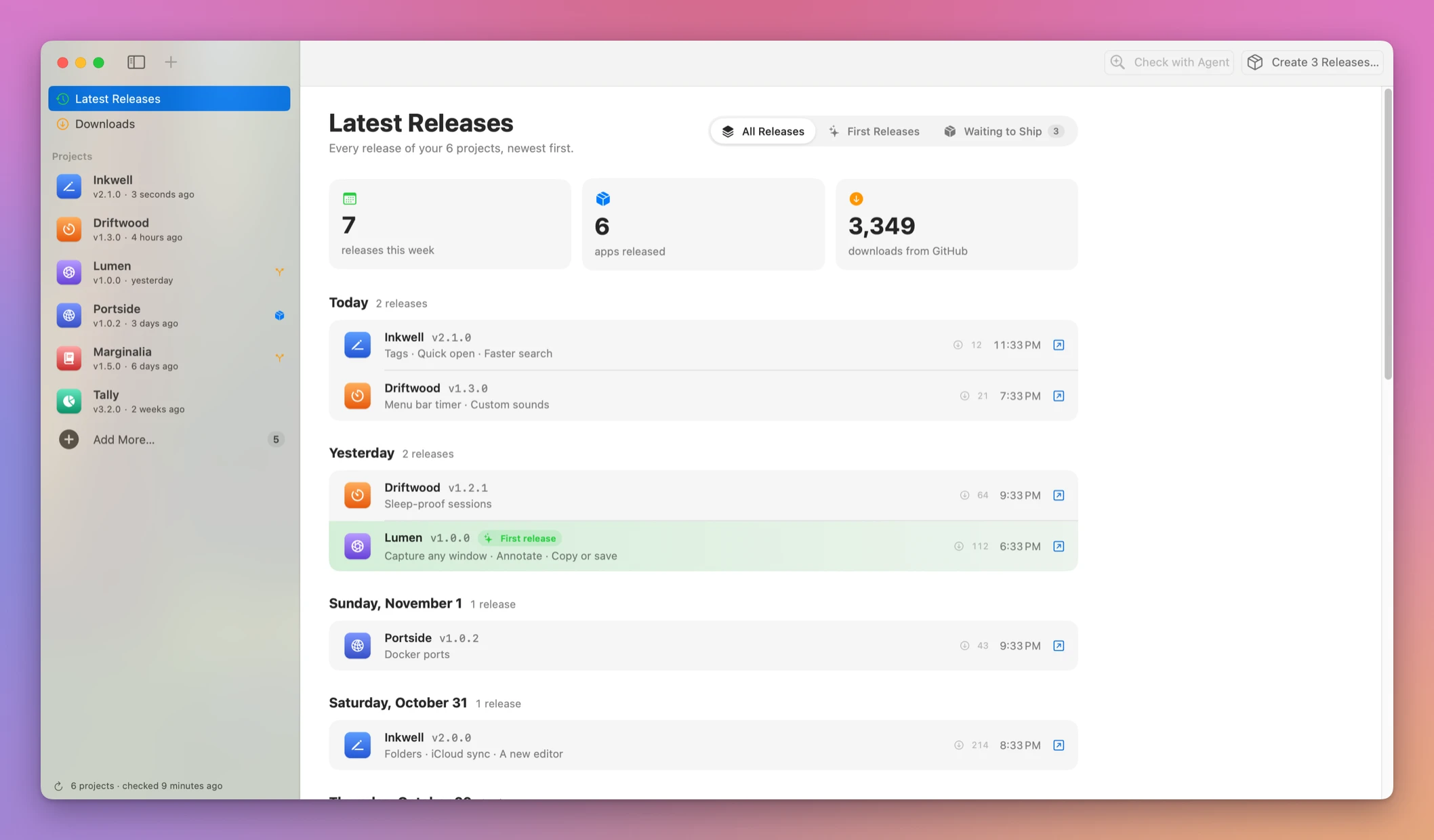
The line under each release comes from the project’s CHANGELOG.md, or from the “What’s new” part of the release notes. A first release gets the green First release label.
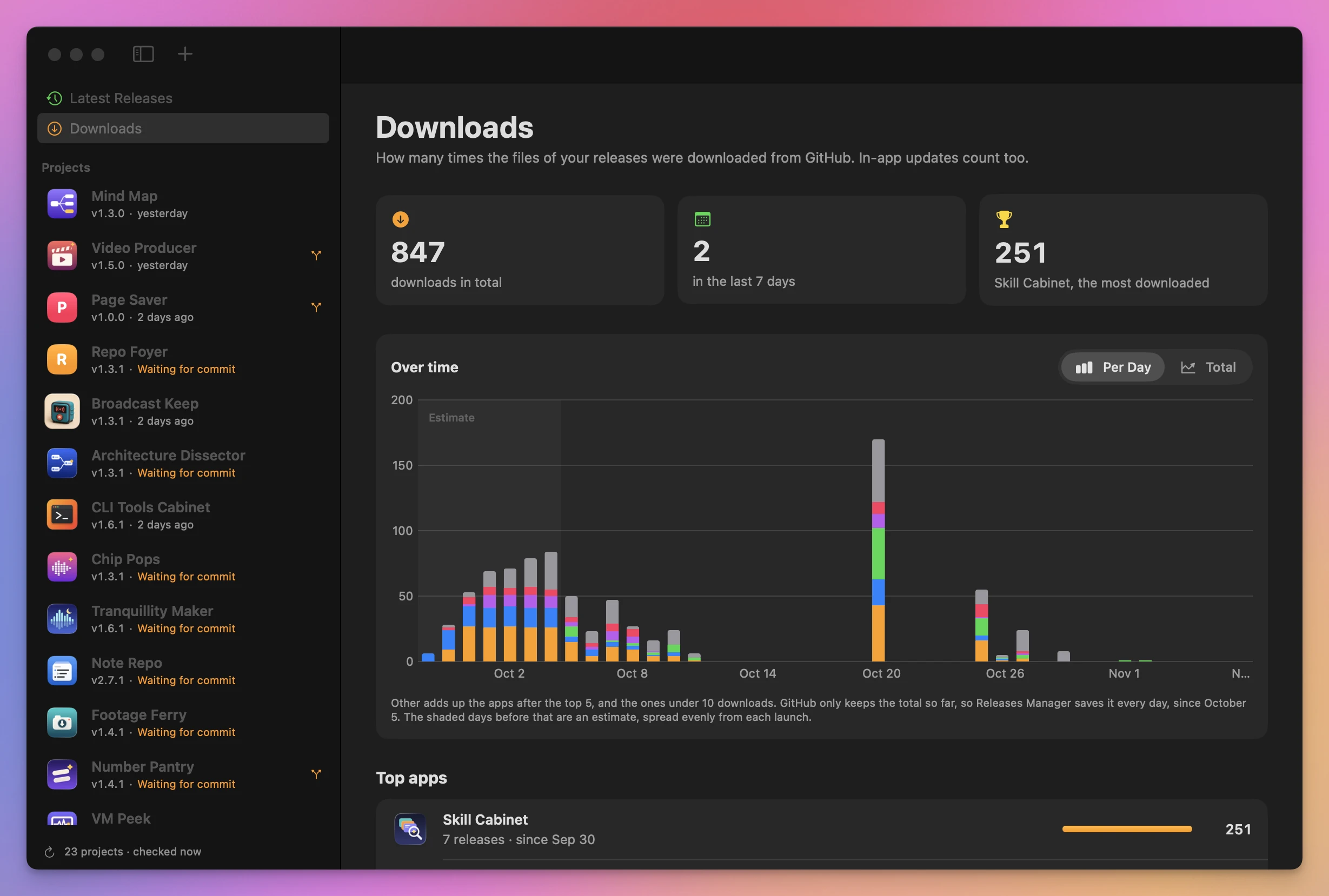
Downloads in the sidebar has the totals and a chart per day. GitHub only keeps the total so far, so the app saves it each day it fetches. The days before the first saved count are an estimate, spread evenly from each launch and shaded as Estimate on the chart. These are my 23 projects:
The app fetches every 10 minutes while it’s open, and ⌘R fetches right away.
Ask from the terminal
The releases command reads the same project list as the app. It comes inside the app. Add its Helpers folder to your PATH and run:
export PATH="/Applications/Releases Manager.app/Contents/Helpers:$PATH"
releases downloads
PROJECT DOWNLOADS LAST 7 DAYS RELEASES
Skill Cabinet 251 +0 7
Note Repo 141 +0 12
Footage Ferry 79 +2 6
Work Tracebook 71 +0 5
CLI Tools Cabinet 69 +0 8
Number Pantry 40 +0 6
Architecture Dissector 35 +0 5
Tranquillity Maker 33 +0 10
...
Total 847 +2That’s my list today, cut to the top eight of 23 projects. The 33 for Tranquillity Maker is the same number the jq sum printed. Add a project to see each release and the counts saved so far:
releases downloads tranquillity-makerTranquillity Maker: 33 downloads, 0 in the last 7 days
Releases:
v1.6.1 Nov 5, 2026 0
v1.6.0 Nov 4, 2026 0
v1.5.0 Oct 8, 2026 12
v1.4.0 Oct 4, 2026 4
v1.3.0 Oct 4, 2026 1
v1.2.0 Oct 3, 2026 3
v1.1.0 Oct 1, 2026 3
v1.0.2 Sep 30, 2026 6
v1.0.1 Sep 30, 2026 3
v1.0.0 Sep 30, 2026 1
Saved counts:
Oct 21, 2026 30
Oct 26, 2026 32
...
Nov 7, 2026 33A project can be its folder name, its path, its app name or its GitHub repo. --by-day prints the downloads of each day, --json prints JSON, and --refresh fetches from GitHub even if the data is recent.
When the numbers look wrong
| What you see | Why |
|---|---|
0 on a release people used | They took the Source code archive, which isn’t counted. Attach the zip as an asset |
| Only the newest releases | You got one page. Add --paginate |
| A count reset to 0 | You deleted the asset and uploaded a new one, which has a new ID and a new counter |
| No releases for a private repo in the app | No token. Run gh auth login or set GH_TOKEN |
| GitHub’s rate limit is used up | 60 requests an hour without a token. Sign in with gh auth login |
releases: command not found | ~/.local/bin isn’t on your PATH, or the CLI isn’t built yet |
Get Releases Manager
See every app release on one timeline, find projects waiting to ship, and prepare your next release from your Mac.
See Releases Manager → · Read the docs · $19. See the app page for tax details, with full source code.
Want me to talk about your product? You can sponsor this site.