Run everyday calculations from the terminal with numberpantry
By Flavio
Updated
Use the numberpantry command on your Mac to split bills, price road trips and work out VAT in Terminal, and get plain or JSON answers for scripts.
You’re in Terminal and you need a number. What each of four people owes on a $186 dinner with tip. What a 420 km round trip costs in fuel. How much of a €122 receipt is VAT.
macOS has bc, and you can do the arithmetic in it. But you still need the formula, and you have to remember whether the tip goes on the bill before or after tax. A calculator that already knows the formula and prints the supporting figures saves you that step.
Number Pantry is a Mac app with 281 everyday calculators, the same ones I launched as calculum.dev in July. It ships with a command called numberpantry that runs every one of them from Terminal or a script.
By the end you’ll find a calculator for your question, run it with your numbers, switch country and units, and pull just the answer, or JSON, into a script.
What you need
Number Pantry runs on macOS 14 or later, on Apple silicon and Intel. The command is part of the app, so you need the app installed first.
After buying it, download the app zip from your Polar receipt, unzip it, and drag Number Pantry to your Applications folder. The receipt also has the source zip, and it always holds the latest version of both.
Then open the app and choose Number Pantry → Install Command Line Tool… from the menu bar. It creates a link at /usr/local/bin/numberpantry that points to the copy inside the app, in Contents/Helpers. That folder belongs to root on most Macs, so macOS asks for your administrator password.
Because the command is a link into the app, replacing the app also replaces the command. You never update the two separately.
If you used the command before version 1.3, it was called calculum. The app still bundles a calculum alias so old links keep working, but new scripts should use numberpantry.
There are no other prerequisites. Every calculation runs in the JavaScript engine built into macOS, so the command works offline. One section pipes JSON into jq, which is optional.
Here’s the preflight check. Open a new Terminal window and ask for the version:
numberpantry --versionnumberpantry 1.4.1Your number may be higher. Any version prints a line like this, and that tells you the link works.
Find the calculator for your question
Every calculation needs a calculator name, like tip-and-bill-split, and you won’t guess most of them. A wrong name doesn’t fall back to a close match: the command stops with an error. So the first step is a search.
numberpantry search looks at calculator names, categories and the questions they answer. That’s why the results are useful even when your words don’t appear in the name. Each result prints the name you type and the question the calculator answers, so you can tell similar ones apart before running anything.
Search for what you’re trying to do:
numberpantry search split billtip-and-bill-split What does each person owe after tip and tax?A broader word gets you more candidates. Searching for fuel returns three:
numberpantry search fuelroad-trip-fuel-cost What will fuel cost for the full route?
fuel-economy-converter How do MPG, L/100 km, and km/L compare?
backup-generator-load-runtime What generator capacity and fuel runtime cover the devices you plan to run?When you’d rather browse, numberpantry categories lists the 20 categories with their short names and how many calculators each one has. Pass a category’s short name to list:
numberpantry list shopping-foodThat prints 16 calculators, from unit-price-comparison and sales-tax-or-vat to recipe-scaler and home-coffee-cost.
In the app, that list is the Shopping & food category in the sidebar. The search field at the top of the window searches all 281 calculators.
Read a calculator’s inputs before you run it
Each calculator takes inputs with short names like bill or tipRate, and you pass them as name=value. Here’s the part that trips people up: any input you leave out keeps its example value. The command doesn’t ask for it and doesn’t warn you.
That’s handy when the example is close to your case. It’s a trap when the example includes something you didn’t mean to add, like a tax amount. numberpantry show prints every input, its example value, the formula and the assumptions. Read it once per calculator, and you’ll know what you’re accepting when you leave an input out.
numberpantry show tip-and-bill-split --country USTip and bill split
What does each person owe after tip and tax?
Inputs name, what it is, example value
bill Bill before tax $146
tax Sales tax amount on bill $12.41
tipRate Tip on pre-tax bill 20%
people People splitting 3 people
Formula
(Bill + tax + bill × tip rate) ÷ people
Assumptions
- Everyone has an equal share.
- The tip percentage applies to the pre-tax bill.
Example: numberpantry tip-and-bill-split bill=146 tax=12.41The assumptions answer the question from the intro: the tip goes on the bill before tax. The tax input is an amount in dollars, not a rate.
Some inputs are a choice rather than a number. For those, show adds a line that lists the accepted values. In sales-tax-or-vat, for example, it says priceIncludesTax takes 1 (Yes — tax is included) or 0 (No — add tax).
Run a calculation with your own numbers
Now type the calculator name and the inputs you want to change. The command prints your inputs first, then the main answer, then the supporting figures.
That order matters more than it looks. The inputs block shows every value the calculation used, including the example values you didn’t type. If an answer looks off, that block is where you spot the leftover default. Values can include a currency symbol or a percent sign, like 'bill=$186' or tipRate=18%. Quote anything with a $, or the shell will try to expand it as a variable.
Example 1: split a dinner bill four ways. The bill is $186 before tax, the sales tax on it is $15.35, and four of us leave a 20% tip:
numberpantry tip-and-bill-split bill=186 tax=15.35 people=4 --country USTip and bill split
Inputs
Bill before tax $186
Sales tax amount on bill $15.35
Tip on pre-tax bill 20%
People splitting 4 people
What each person owes
$59.64 per person
Tip $37.20
Total bill $238.55
Effective tip on final total 15.6%Each person owes $59.64. The tip is 20% of $186, which is $37.20. As a share of the final total it works out to 15.6%, because the total includes tax.
I didn’t pass tipRate, so it kept its example value of 20%. That’s the rate I wanted. Had I also left out tax, the example $12.41 would have been added to my bill. A second run with the same inputs prints the same answer: the command saves nothing and changes nothing. There’s nothing to undo.
If you’d rather click, open Tip and bill split in the app and type the same three numbers. The tip field already says 20, and the answer is the same $59.64:
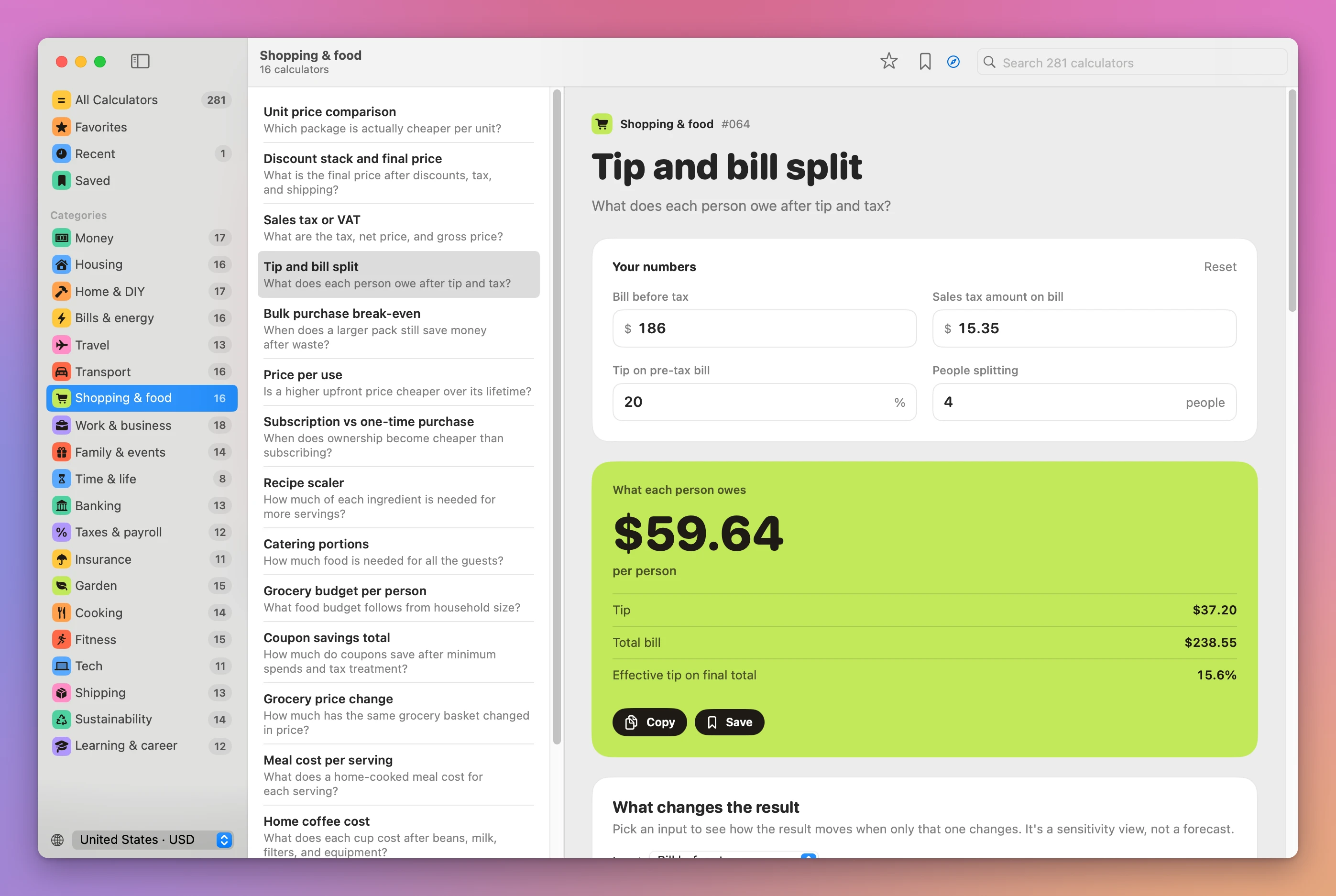
Where does the answer come from? The calculators are JavaScript, the same code that runs on calculum.dev. The app bundles them into one file and runs it in JavaScriptCore, the JavaScript engine built into macOS, and numberpantry is a small Swift program that shares that engine with the app. So the terminal, the Mac app and the website give the same answer for the same inputs. When you want to double-check a number, open the same calculator in the app and look at its formula and guide.
Switch country, currency and units
The country decides three things: the currency label, the number format, and whether units are metric or US customary. It also changes the example values, because they’re stored once and shown in the country’s units.
When you don’t pass --country, the command picks one in a fixed order. It uses the country you set in the app, read from ~/Library/Application Support/Calculum/library.json. If there’s none, it uses your Mac’s region, and the US after that. The diagram above shows the order. In a script that runs on more than one Mac, always pass --country, so the answer doesn’t depend on someone’s settings.
numberpantry countries lists the 21 codes, with each one’s currency and unit system.
Example 2: price the same road trip in two countries. First, the calculator’s own example, with no inputs, in the US:
numberpantry road-trip-fuel-cost --country USRoad trip fuel cost
Inputs
Round-trip distance 528.166 mi
Vehicle consumption 31.786 MPG
Fuel price $6.738 / gal
Travelers splitting cost 2 people
Fuel for the whole route
$111.96 total fuel cost
Fuel needed 16.6 gal
Per traveler $55.98
Cost / 100 mi $21.20Now the same example in Italy:
numberpantry road-trip-fuel-cost --country ITRoad trip fuel cost
Inputs
Round-trip distance 850 km
Vehicle consumption 7,4 L / 100 km
Fuel price €1,78 / L
Travelers splitting cost 2 people
Fuel for the whole route
111,96 € total fuel cost
Fuel needed 62,9 L
Per traveler 55,98 €
Cost / 100 km 13,17 €The units changed: 850 km became 528.166 miles, and 7.4 L/100 km became 31.786 MPG. The money didn’t change. Both totals are 111.96, once in dollars and once in euros. Number Pantry never converts currencies or looks up fuel prices. You type the amounts in your own currency.
Values you type follow the country’s units. With --country US, distance is in miles. With --country IT, it’s in kilometres. Here’s a real trip, three of us, 420 km in a car that uses 6.1 litres per 100 km, with fuel at €1.84:
numberpantry road-trip-fuel-cost distance=420 consumption=6.1 price=1.84 people=3 --country ITFuel for the whole route
47,14 € total fuel cost
Fuel needed 25,6 L
Per traveler 15,71 €
Cost / 100 km 11,22 €I cut the inputs block from that output. The command also accepted consumption=6,1 with a comma when I tried it with --country IT.
In the app, the country menu at the bottom of the sidebar does the job of --country. Pick Italy · EUR, open Road trip fuel cost, and type the same trip:
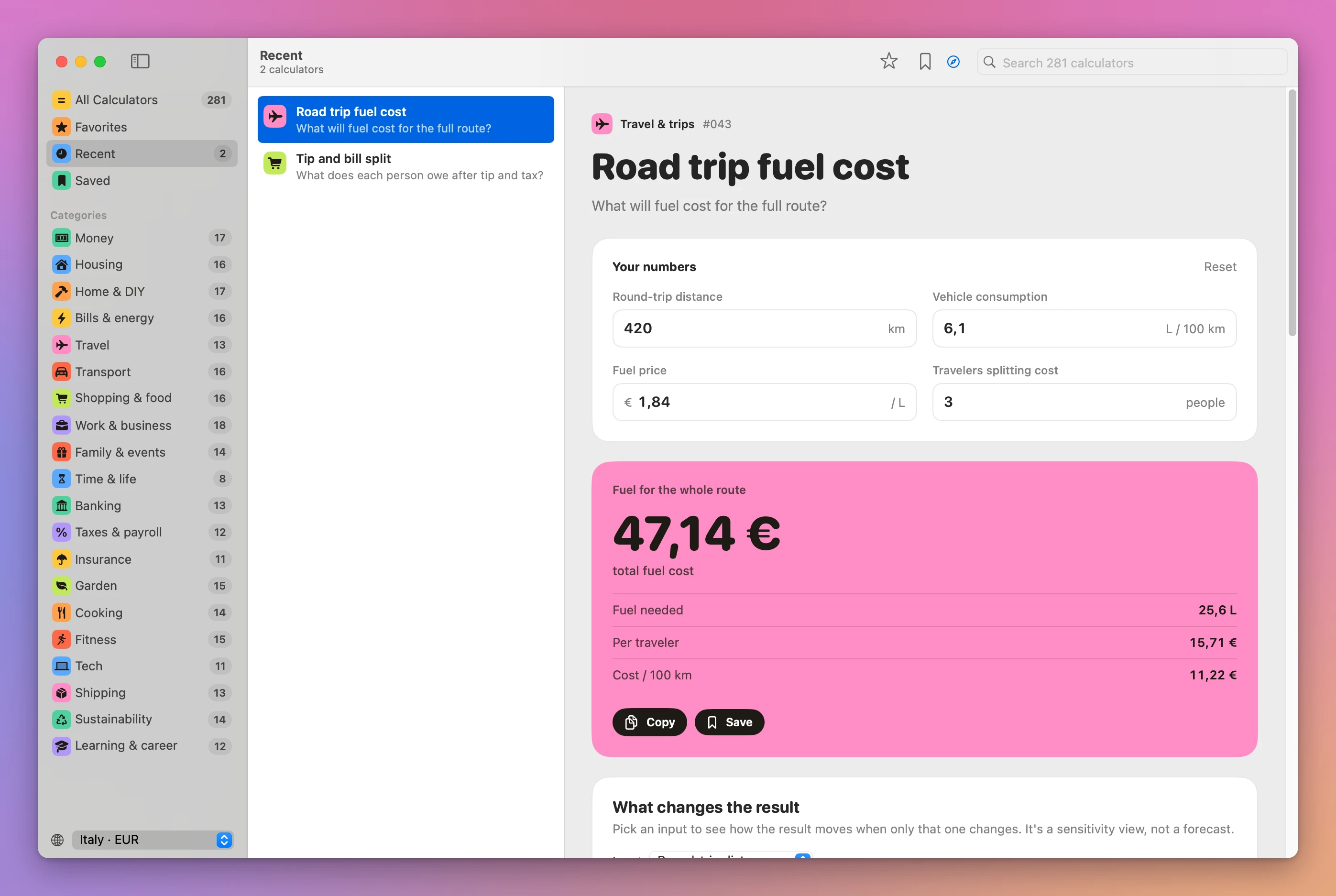
Get only the answer, or JSON, for scripts
The full output is for reading. A script wants one value it can drop into a sentence, or numbers it can compare. That’s what -q and --json are for.
-q prints the main answer and nothing else, formatted for the country, with the currency symbol and its decimal separator. That’s ideal for a message. It’s wrong for arithmetic, because $59.64 and 55,98 € aren’t numbers to a shell. For arithmetic, use --json, which includes the raw number next to the formatted one. Errors go to standard error and the command exits with 1, so set -e stops a script before it uses a missing answer.
numberpantry tip-and-bill-split bill=186 tax=15.35 people=4 --country US -q$59.64--json prints every input with its name, label, value and formatted text, plus the result:
numberpantry tip-and-bill-split bill=186 tax=15.35 people=4 --country US --json | jq '.result'{
"details": [
{ "label": "Tip", "value": "$37.20" },
{ "label": "Total bill", "value": "$238.55" },
{ "label": "Effective tip on final total", "value": "15.6%" }
],
"heading": "What each person owes",
"label": "per person",
"note": "",
"number": 59.640000000000001,
"value": "$59.64"
}I compacted the details array onto single lines. Notice number: it’s the unrounded floating-point value, so round it before you show it. In jq that’s .result.number * 100 | round / 100, which prints 59.64. If you’re new to jq, I wrote a guide to the jq command.
To make a calculation a one-word habit, wrap it in a shell function in your shell’s startup file. I set tax to 0 unless I pass it, so the example $12.41 never sneaks in:
billsplit() {
  numberpantry tip-and-bill-split bill="$1" people="$2" tax="${3:-0}" --country US -q
}
billsplit 186 4
billsplit 186 4 15.35$55.80
$59.64Don’t name it split. macOS already has a split command, and your function would hide it.
Fix a calculation that doesn’t run
When the command can’t run a calculation, it prints one line that starts with numberpantry: and exits with 1. Nothing else is printed, so a script that captured the output gets an empty string. Each message names what was wrong and usually what it expected, so you can fix the command without opening the help.
Example 3: a misremembered calculator name. I typed the name I thought it had:
numberpantry tip-split bill=186numberpantry: There's no calculator called "tip-split". Did you mean: security-deposit-split, roommate-rent-split, group-trip-expense-split, tip-and-bill-split, nanny-share-split? Find one with numberpantry search <words>.The fix is in the suggestions. Run it again as tip-and-bill-split. The same goes for input names, where the error lists the right ones:
numberpantry tip-and-bill-split total=186numberpantry: tip-and-bill-split has no input called "total". Its inputs are: bill, tax, tipRate, peopleHand it to a coding agent
The command is a good fit for an agent that needs a correct number, because it doesn’t have to recall formulas. numberpantry capabilities lists the tasks the tool supports with an example command for each, plus its release history. Add --json for a machine-readable version. Tell the agent to read it, run show before each new calculator, and always pass --country.
show takes --json too. It returns the category, the formula, the assumptions and every input with its name, label, unit and example value under default. That’s what an agent needs to fill in the inputs it was given and say which ones it left at their examples.
The mortgage comparison tutorial does the same kind of comparison in the app’s window, with saved calculations.
If something looks wrong
- If you get
numberpantry: command not found, open a new Terminal window. If it’s still missing, choose Install Command Line Tool… again. When it says “Move Number Pantry to your Applications folder first”, macOS was running the app from a temporary location. Move it to Applications and retry. - If the install says “Number Pantry couldn’t install the command”, run the
sudo ln -sf …line that the same dialog shows. Note that installing replaces whatever already sits at/usr/local/bin/numberpantry. To remove the command, delete that link. The app stays untouched. - If an answer is higher than you expected, read the Inputs block. An input you left out kept its example value, like the $12.41 tax in
tip-and-bill-split. Pass it explicitly, even as 0. - If you see euros, commas or kilometres in a script that expected dollars, the command took the country from the app or your Mac’s region. Add
--country US, or the code you want. - If you get
There's no country "XX", use one of the 21 codes the error lists, or runnumberpantry countries. - If a choice input fails with
priceIncludesTax takes one of: 1 (Yes — tax is included), 0 (No — add tax), pass the number, or the start of the label, likepriceIncludesTax=yes. - If you get
"abc" isn't a number for bill, the value has a typo or an unquoted character. Put values with$in single quotes. - If
unit-price-comparisonshows$0.01for both options, the per-unit prices are rounded to cents. The main answer and Unit-price saving (11.7% in its example) still tell you which one is cheaper.
Get Number Pantry
Calculate, save, and compare everyday numbers with 281 offline calculators and the numberpantry command line tool.
See Number Pantry → · Read the docs · $20. See the app page for tax details, with full source code.
Want me to talk about your product? You can sponsor this site.