
An app by Flavio
Number Pantry
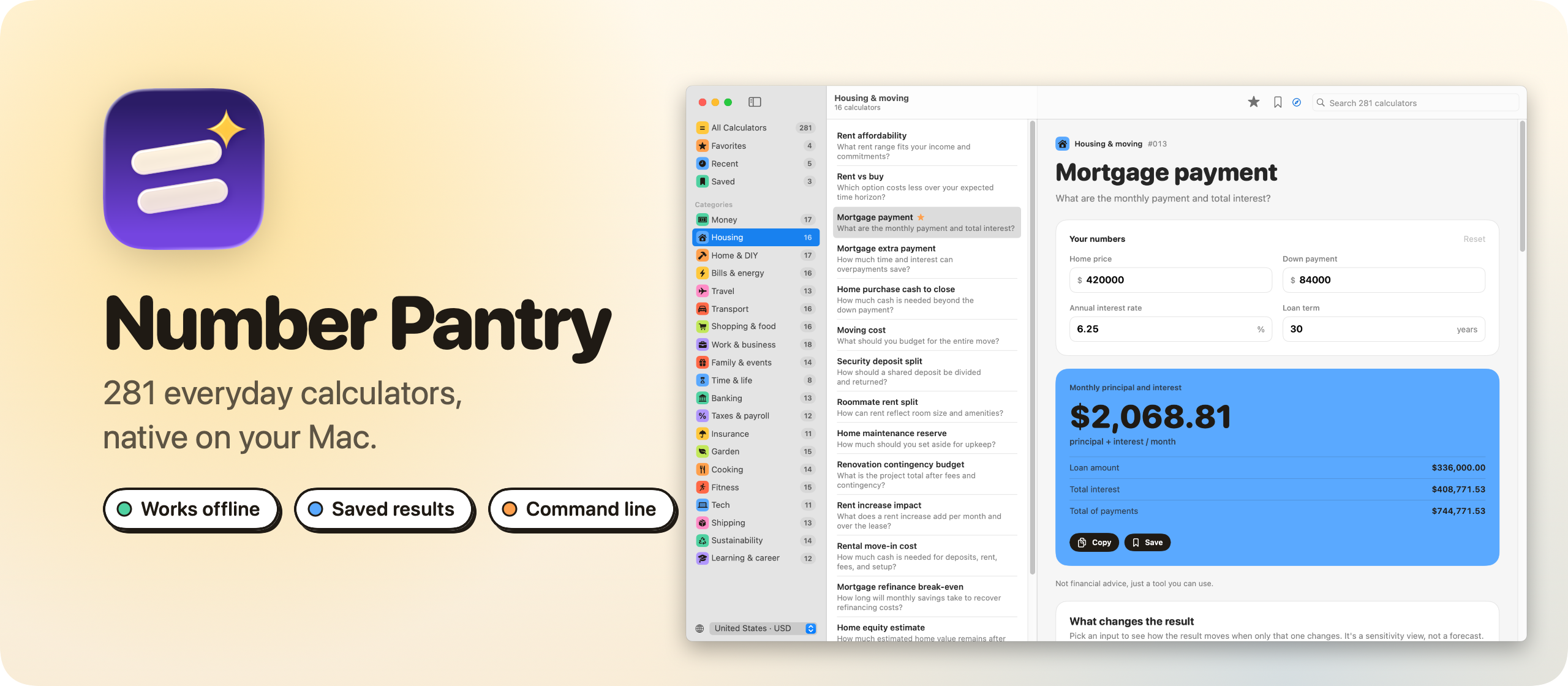
Calculate, save, and compare everyday numbers with 281 offline calculators and the numberpantry command line tool.
Buy Number Pantry · $20One-time purchase. Tax included.
macOS 14 or later · Apple silicon and Intel
Latest version 1.6.0, released November 20, 2026
You’re deciding between a 25-year and a 30-year mortgage. Or how many litres of paint the living room needs. Or what each of four friends owes after tax and a 20% tip. You search the web, land on a calculator page full of ads, type your numbers, and close the tab. A week later you want to try a different rate, and the numbers are gone.
Number Pantry is an app with the 281 calculators from calculum.dev, the library I launched in July. It’s the same calculators in a native window. It works without a connection, keeps the calculations you save, and comes with a command for Terminal.
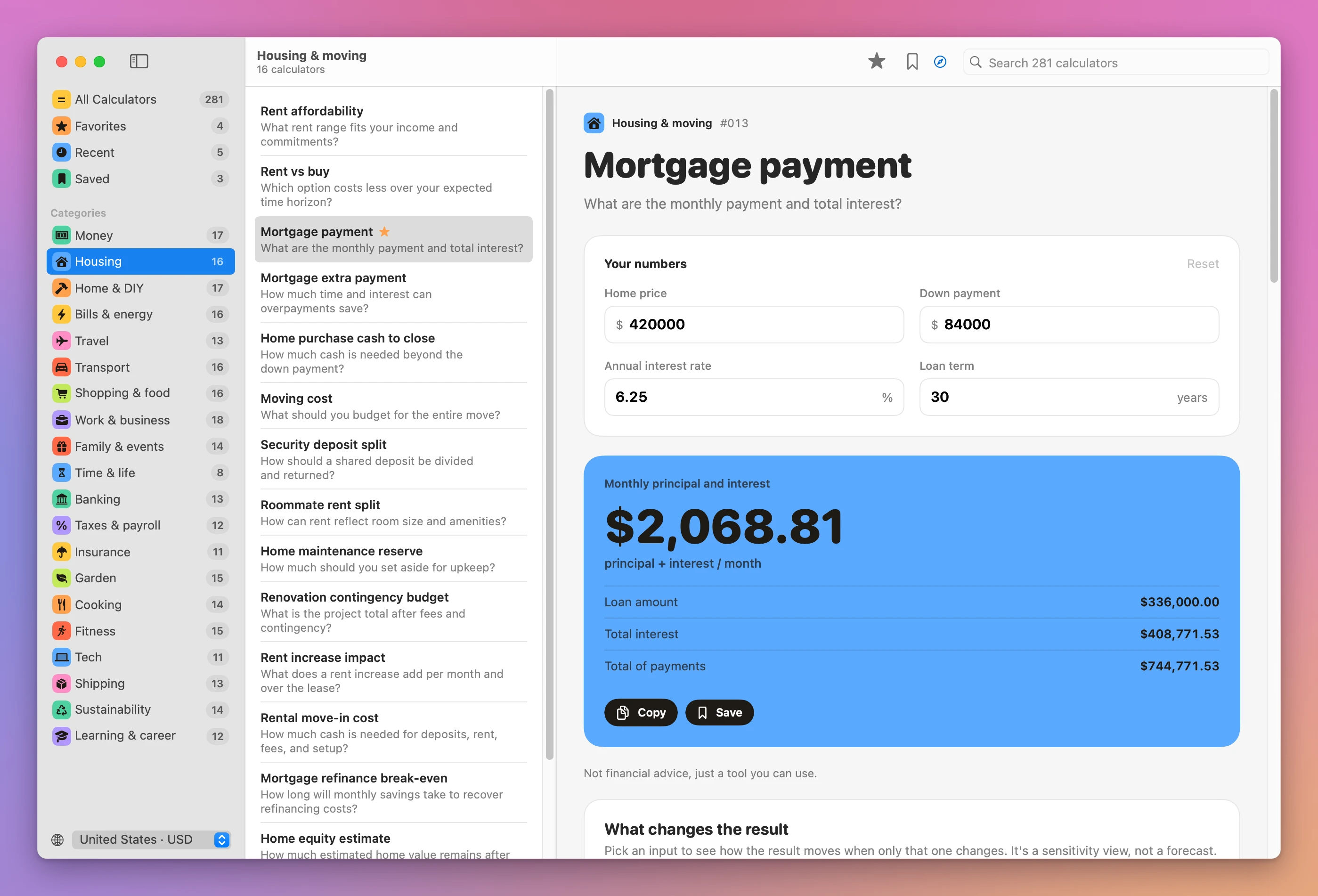
Each calculator shows its answer as you type, then shows the formula behind it and the assumptions it makes. Save a calculation and it stays exactly as it was, so you can compare it with the next one.
Here’s the app in a minute and a half, recorded with made-up numbers:
Who it’s for
- People buying or renting a home. Rent affordability, rent versus buy, the mortgage payment and the effect of extra payments. Save each offer and compare two side by side before you call the bank.
- Freelancers and small business owners. A freelance rate, salary versus freelance, a project quote, markup versus margin and a self-employment tax reserve, without building a spreadsheet for each.
- Home and garden projects. Paint, flooring, wallpaper, tiles and grout, lawn seed and raised bed soil. You type the room or the bed size and get how much to buy.
- Travelers and families. A trip budget, road trip fuel cost split between travelers, the restaurant bill with tip, a wedding budget or childcare costs.
- People outside the US. Pick Italy and you get euros,
2.253,52 €formatting, kilometres and litres. There are 21 countries to choose from.
What’s inside
The sidebar lists the 20 categories, each in its own color, plus Favorites, Recent and Saved. ⌘F searches all 281 calculators at once, by name, category and the question each one answers. Searching for “split” finds the bill, rent and trip splitters.
| Category | A few of the calculators |
|---|---|
| Personal money | Monthly budget planner, emergency fund target, debt snowball vs avalanche |
| Housing & moving | Rent affordability, rent vs buy, mortgage payment, mortgage extra payment |
| Home projects & DIY | Paint, flooring, wallpaper, tiles and grout |
| Bills & home energy | Appliance electricity cost, standby power cost, heat pump payback |
| Travel & trips | Trip budget, road trip fuel cost, EV road trip charging |
| Work & small business | Freelance rate, salary vs freelance, project quote, markup vs margin |
| Cooking & kitchen | Baker’s percentage, dough hydration, yeast scaling |
| Fitness & activity | Running splits, race time predictor, steps to distance |
The others cover transport and cars, shopping and food, family and events, banking, taxes and payroll, insurance, garden, tech, shipping, sustainability, learning and career, and everyday time trade-offs.
Comparing two mortgages, start to finish
Here’s a real decision done with the app.
- Press ⌘F, type
mortgageand open the mortgage payment calculator. - Type the price, the down payment, the rate and a 30-year term. The monthly payment updates as you type, with total interest and the other figures under it.
- Press ⌘S to save it.
- Change the term to 25 years and the rate to the bank’s other offer. Press ⌘S again.
- Open Saved in the sidebar and ⌘-click both calculations.
- Read the comparison. Every input and every figure of the result sits side by side, with the change next to each one.
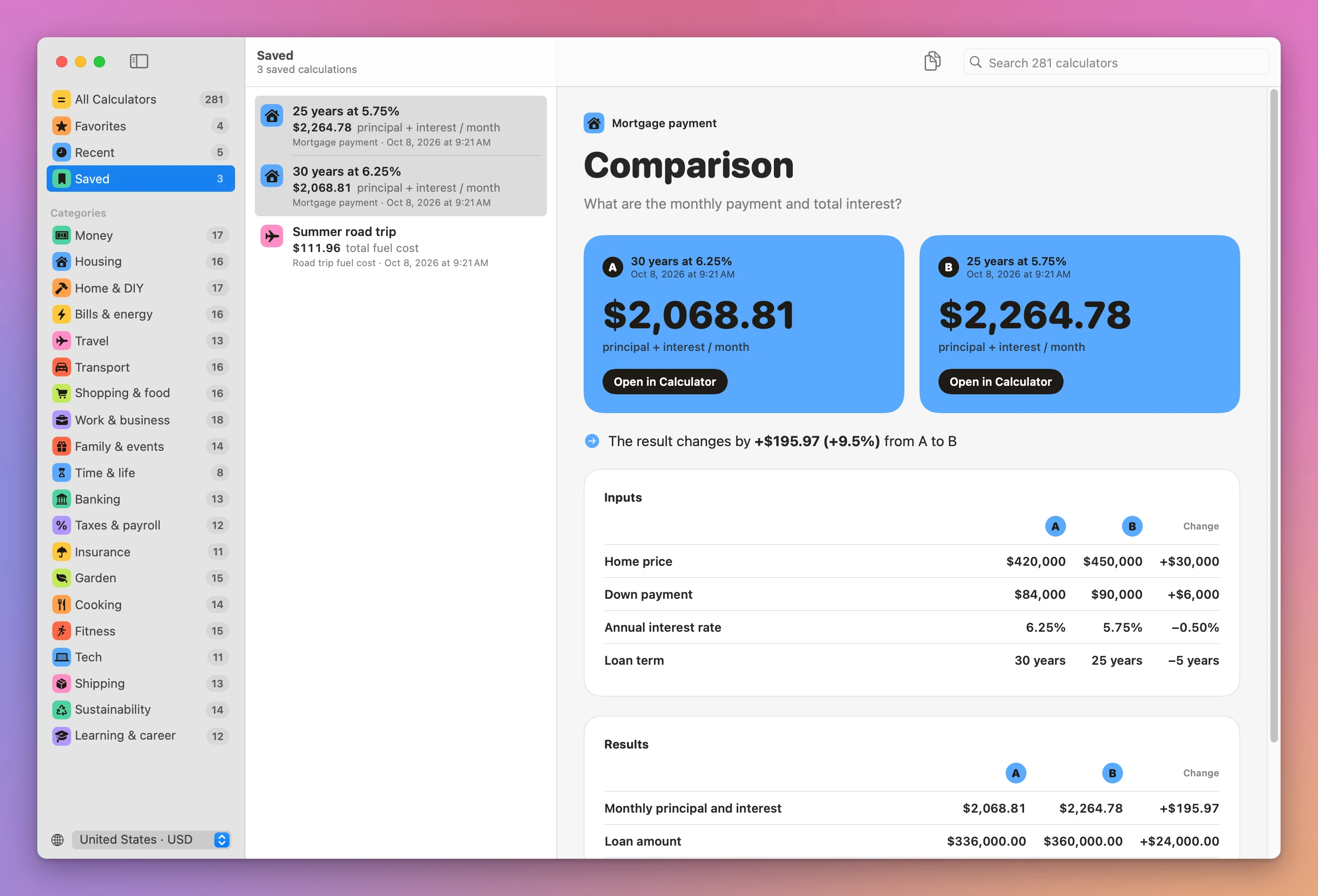
In this comparison, the 25-year mortgage at 5.75% costs $195.97 more per month than the 30-year one at 6.25%. It also saves $89,336.62 in total interest, on a more expensive home.
On a web calculator, that’s two tabs, two sets of numbers copied into a note by hand, and the subtraction done yourself. Here it’s two saves and a click.
How a calculator works
Pick one and type your numbers. The result updates as you type, with every supporting figure under it. Below that there’s a chart of what changes the result, three realistic examples, the formula, the assumptions, and a short guide with the edge cases worth checking. Loans, savings and investments also get a chart of how the numbers develop over time.
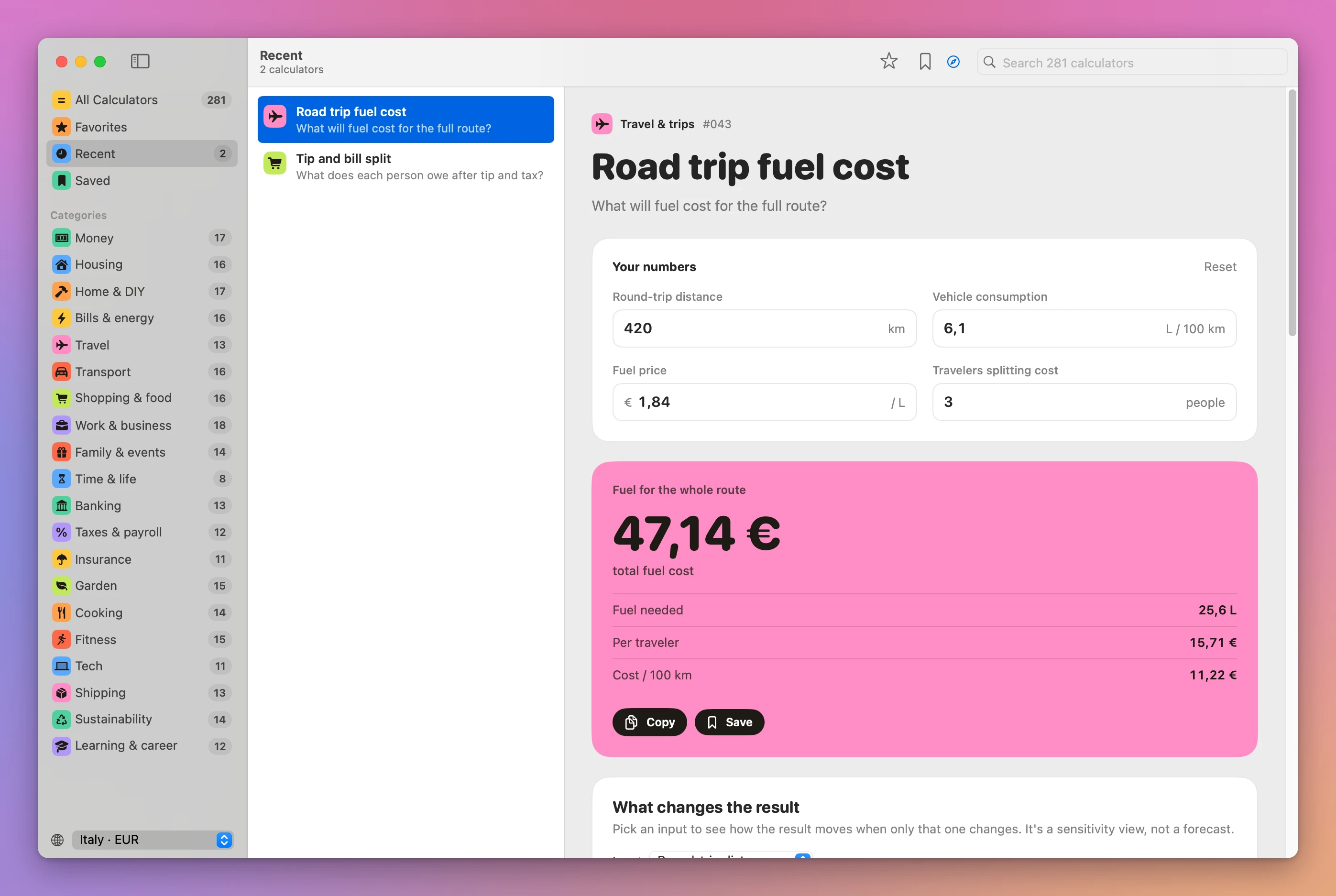
What changes the result shows how the answer moves when you change one input. The app remembers your latest inputs for each calculator. ⌘R or Reset brings back the example values, and ⇧⌘C copies the result with its supporting figures.
Pick your country at the bottom of the sidebar to get its currency, number format, and metric or US customary units. The country changes how numbers are shown and which units you type. It doesn’t fetch prices or convert currencies.
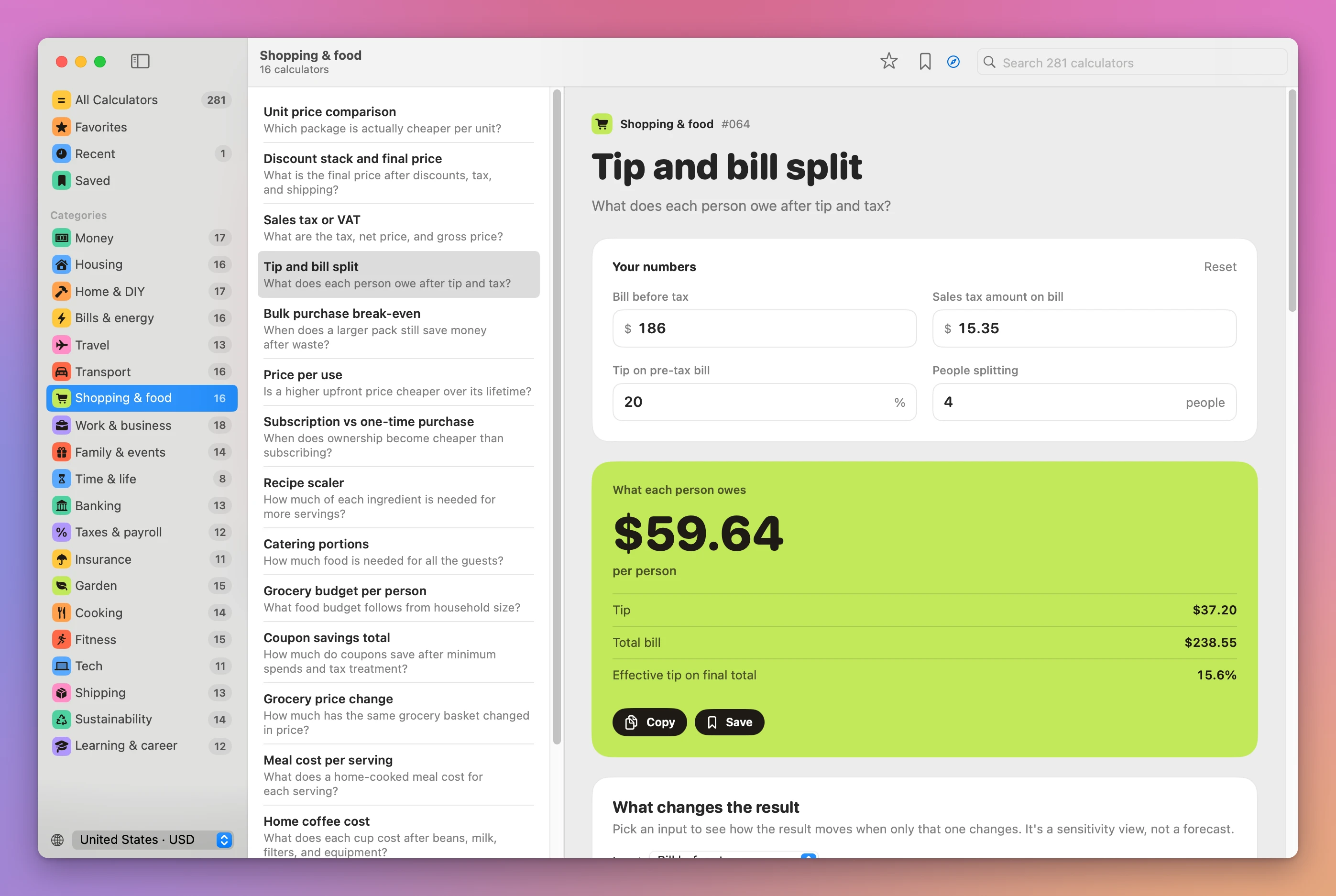
Saving and comparing calculations
Press ⌘S and Number Pantry saves the calculation: the inputs as you typed them, and the result with all its details. It’s a record of the answer, so it doesn’t change later, even if you switch country.
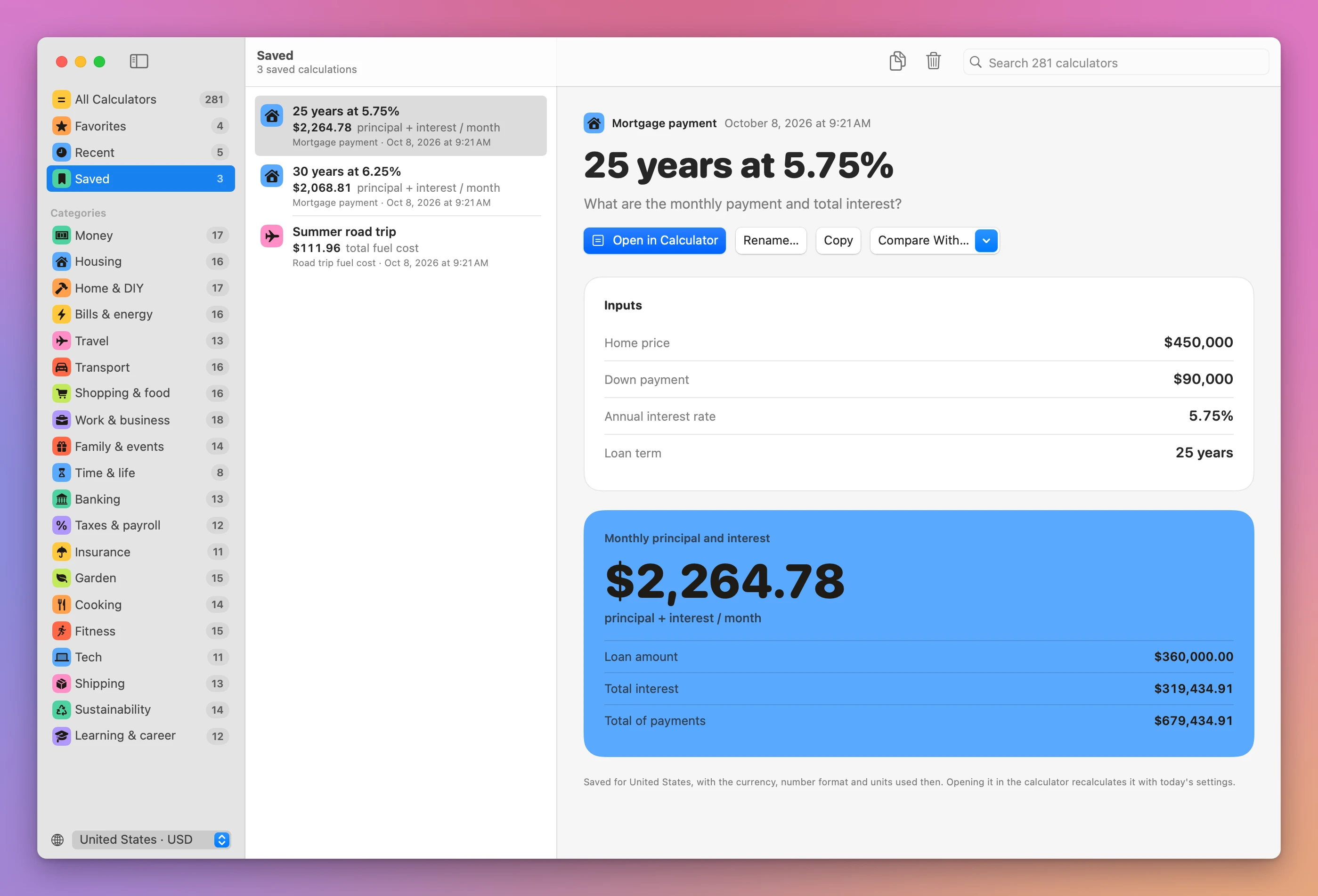
Saved calculations get their own page. You can rename one, copy it as text, or open it in the calculator again to try something else.
Save two calculations from the same calculator and you can compare them. ⌘-click both, or use Compare With… on a saved one, and Number Pantry lines up every input and every figure of the result.
A command for Terminal
Number Pantry comes with a numberpantry command. Choose Number Pantry → Install Command Line Tool… to link it into /usr/local/bin, and every calculator works from the terminal:
numberpantry mortgage-payment price=450000 rate=5.5You pass the inputs you want to change as name=value, and the others keep their example values. It prints the inputs and the full result. numberpantry show mortgage-payment lists the input names, and numberpantry search paint finds a calculator.
-q prints only the answer, which is handy in a script:
numberpantry tip-and-bill-split bill=186 people=4 -qThat prints $58.90. --json prints every input and every figure of the result, and --country IT switches to euros and metres.
How it works
The calculators are JavaScript, the same code that runs on calculum.dev. Instead of rewriting 281 formulas in Swift, the app bundles them into one file and runs it in JavaScriptCore, the JavaScript engine built into macOS. The app and the numberpantry command share that engine, so the Mac app, the terminal and the website give the same answers.
Everything else is SwiftUI, with no dependencies. Your favorites, saved calculations and numbers stay in one JSON file on your Mac. There are no accounts and no analytics. The calculator engine works offline.
Why not use the Mac Calculator or a website
The Calculator app on your Mac is free and good at arithmetic. For a mortgage you’d need to know the amortization formula and type it in step by step. A spreadsheet can do it if you build it, and most people don’t want to build a paint calculator.
Calculator websites have the formulas. They need a connection, they’re usually surrounded by ads, and they forget your numbers when you close the tab.
| Mac Calculator or a website | Number Pantry | |
|---|---|---|
| Mortgage, paint, fuel and 278 more | Formula by hand, or one site per job | 281 calculators in one app |
| Works offline | Calculator yes, websites no | Yes |
| Formula and assumptions shown | Rarely | On every calculator |
| Keeping a result | Copy it somewhere | ⌘S saves inputs and result |
| Comparing two scenarios | Two tabs and your own subtraction | Side by side, with the changes |
| Ads and tracking | Common on websites | None |
What it doesn’t do
- It doesn’t give financial advice. Results depend on your inputs and the stated assumptions. Check those before using an estimate for a real decision.
- It doesn’t fetch live prices or rates. You type the interest rate, the fuel price and the tax amount yourself.
- It doesn’t convert currencies. The country setting changes the currency label and format, not the value.
- It doesn’t compare calculations from different calculators. A comparison works on two saves of the same calculator.
- It doesn’t sync. Saved calculations live in one JSON file on this Mac. There’s no iPhone app.
- It doesn’t let you write your own calculators. The 281 are the ones from calculum.dev.
Questions
Does it need an internet connection?
Every calculation runs on your Mac, so it works offline. Source links open your browser when you click them, and the app checks for updates once a day.
Where are my saved calculations?
In ~/Library/Application Support/Calculum/library.json. Settings → Show in Finder opens the folder. Back it up to keep your saved work.
Does it work on Intel Macs?
Yes. It runs on macOS 14 Sonoma or later, on Apple silicon and Intel.
Are the results the same as on calculum.dev?
Yes. The app runs the same JavaScript formulas as the website, so the answers match.
The documentation walks through every feature, and the tutorials show how to compare two mortgages side by side and run everyday calculations from the terminal.
What you get
Number Pantry costs $20 including tax, paid once. The purchase includes the signed Mac app and automatic updates.
Download and install
After purchase, download the signed and notarized Mac app ZIP from your purchase page.
Unzip the Mac app and drag Number Pantry to your Applications folder. It runs on macOS 14 Sonoma or later, on Apple silicon and Intel.
Number Pantry is signed with my Apple Developer ID and notarized by Apple.
Number Pantry checks for updates once a day. Choose Number Pantry → Check for Updates… to check now and Install and Relaunch to install.