Compare two mortgages side by side and keep both calculations
By Flavio
Updated
Save two mortgage offers in Number Pantry, compare every input and result side by side, then use the numberpantry command to see how much of the difference comes from the term and how much from the rate.
Two mortgage offers are hard to compare in your head when everything changes at once: the home, the deposit, the rate and the term.
Number Pantry lets you save each calculation and then line the two up, input by input. The saves stay there, so you can come back to them next week when the bank calls.
We’ll compare these two made-up offers:
| Input | Offer A | Offer B |
|---|---|---|
| Home price | $420,000 | $450,000 |
| Down payment | $84,000 | $90,000 |
| Annual interest rate | 6.25% | 5.75% |
| Loan term | 30 years | 25 years |
Set the country first
The country picker sits at the bottom of the sidebar. It sets the currency, the number format, and metric or US customary units, and there are 21 countries. Pick United States for this example.
Set it before you save. A saved calculation keeps the format it was saved with, so switching country later doesn’t rewrite it.
Calculate offer A
Press ⌘F, type mortgage and pick Mortgage payment. It’s in Housing & moving.
Type the four numbers of offer A. The result updates as you type:
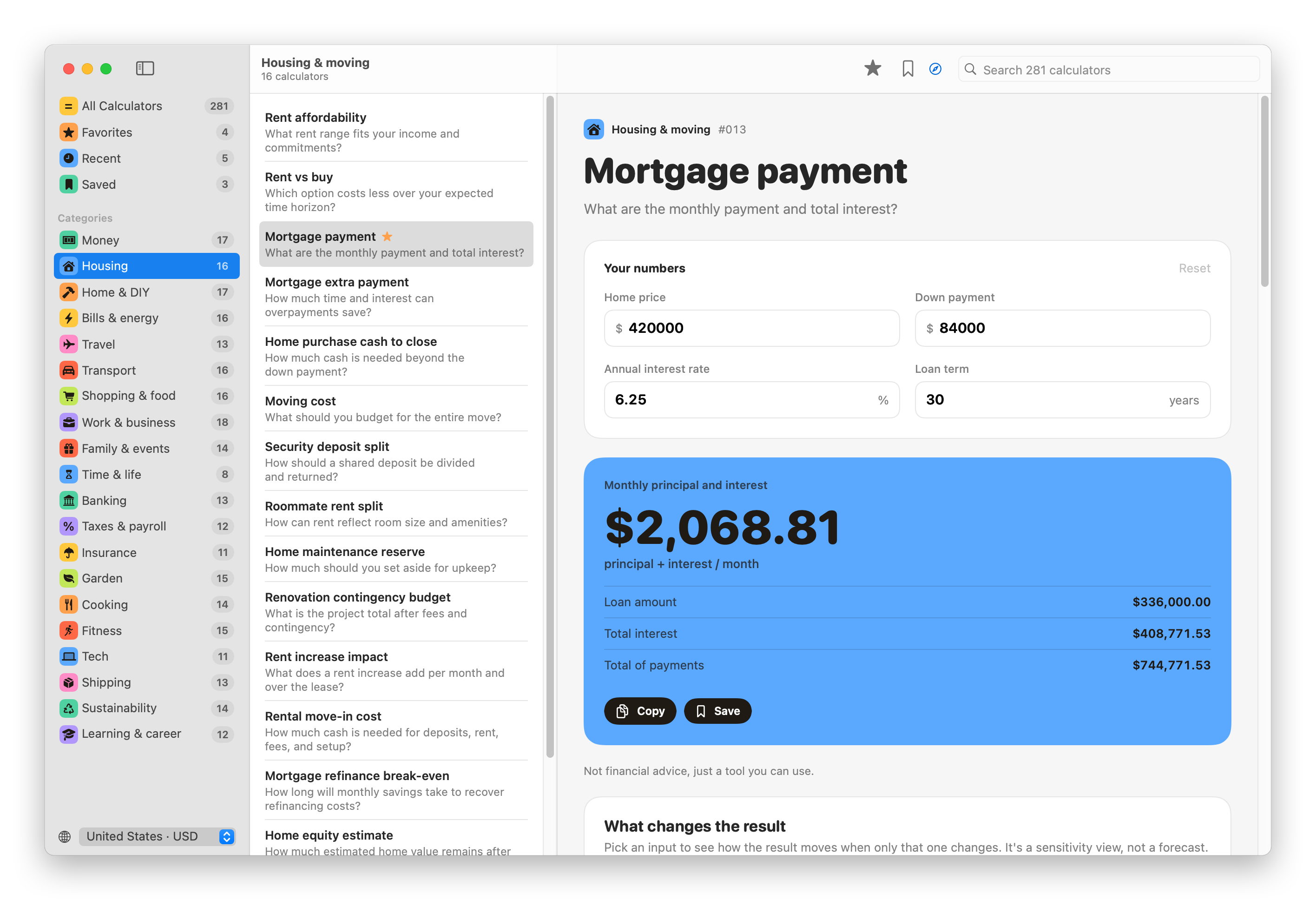
$2,068.81 a month, on a loan of $336,000 (the price minus the down payment). Over 30 years you pay $408,771.53 in interest.
The payment is principal and interest only. Property tax, insurance, fees and mortgage insurance aren’t in it, and the rate is fixed for the whole term. The calculator lists these assumptions further down the page, with the formula.
Check the payment yourself
The formula is the standard one for a loan paid back in equal monthly installments:
M = P × r(1+r)ⁿ ÷ ((1+r)ⁿ − 1)P is the loan, r the monthly rate, which is the annual rate divided by 12, and n the number of monthly payments. For offer A, P is 336,000, r is 0.0625 ÷ 12 = 0.0052083 and n is 360.
A few lines of Python give the same numbers:
P = 336000
r = 0.0625 / 12
n = 360
M = P * r * (1 + r) ** n / ((1 + r) ** n - 1)
print(round(M, 2), round(M * n - P, 2))
2068.81 408771.53Notice that the total interest uses the unrounded payment. If you multiply the displayed $2,068.81 by 360 you get 7 cents more interest, $408,771.60.
Save it
Press ⌘S, or click Save under the result. Number Pantry saves the inputs and the whole result, named after the calculator, Mortgage payment.
Open Saved in the sidebar, select it and click Rename…. Call it 30 years at 6.25%, so you can tell the two offers apart.
Save offer B
Go back to the calculator. Your numbers are still there, so change all four to offer B’s and press ⌘S again. Rename this one 25 years at 5.75%.
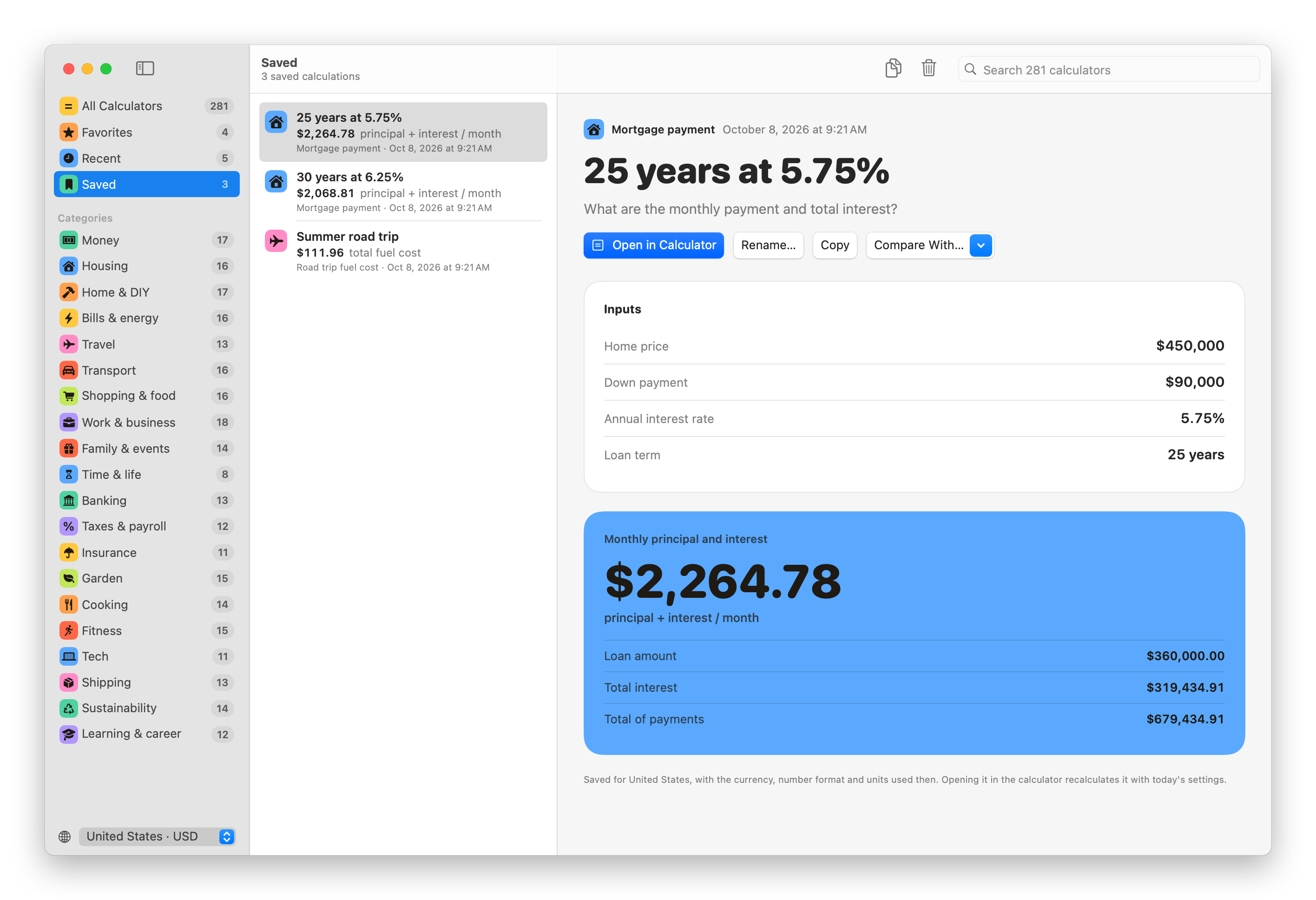
A saved calculation is a record. Changing the calculator afterwards doesn’t touch it. Open in Calculator loads its numbers back into the calculator, recalculated with today’s country settings. Copy puts the inputs and result on the clipboard as text.
Compare them
Select one of the two and choose the other from Compare With…, or ⌘-click both in the list. The older save is A and the newer is B:
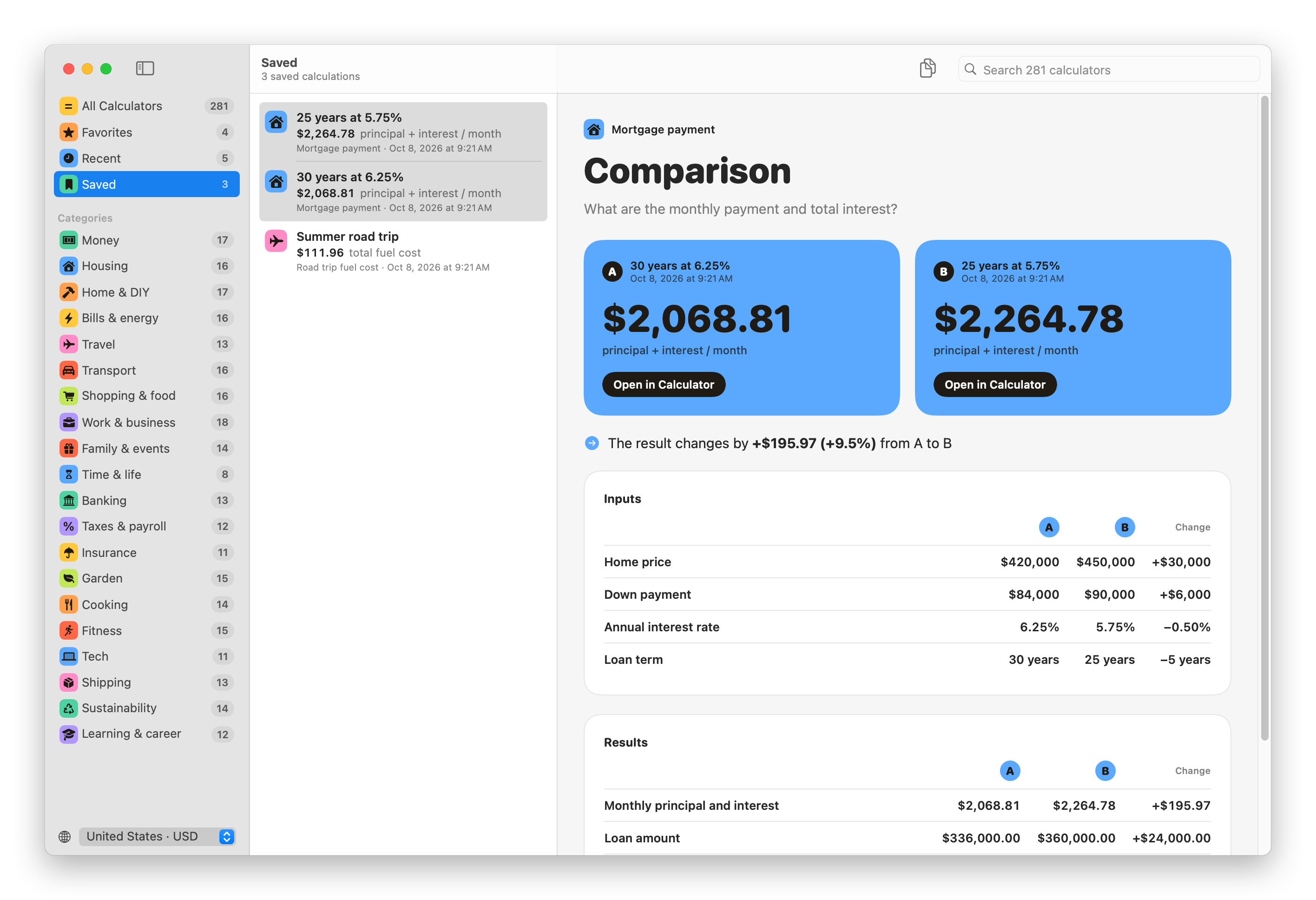
Every input and every result figure sits in a row, with the change in the last column:
| Result | A: 30 years at 6.25% | B: 25 years at 5.75% | Change |
|---|---|---|---|
| Monthly principal and interest | $2,068.81 | $2,264.78 | +$195.97 |
| Loan amount | $336,000.00 | $360,000.00 | +$24,000.00 |
| Total interest | $408,771.53 | $319,434.91 | −$89,336.62 |
| Total of payments | $744,771.53 | $679,434.91 | −$65,336.62 |
Offer B costs $195.97 more a month, on a home that’s $30,000 more expensive, and you pay $89,336.62 less interest.
Comparing only works between two saves from the same calculator. A mortgage and a road trip fuel cost can’t be lined up.
Split the difference with the command line
B changes three things at once, so the comparison doesn’t tell you which change saves the money. The numberpantry command is quicker for this kind of what-if than saving more calculations.
Choose Number Pantry → Install Command Line Tool…. It links the command into /usr/local/bin, and macOS may ask for your password to write there.
show lists the input names:
numberpantry show mortgage-paymentMortgage payment
What are the monthly payment and total interest?
Inputs name, what it is, example value
price Home price €420.000
down Down payment €84.000
rate Annual interest rate 6,25%
years Loan term 30 years
Formula
P × r(1+r)ⁿ ÷ ((1+r)ⁿ − 1)
Assumptions
- Property tax, insurance, fees, and mortgage insurance are excluded.
- The rate remains fixed.
Example: numberpantry mortgage-payment price=420000 down=84000The example values are in euros there because the command uses the country set in the app. --country US switches to dollars.
Pass each input as name=value. Here’s offer A’s home with only the term shortened to 25 years:
numberpantry mortgage-payment price=420000 down=84000 rate=6.25 years=25 --country USMortgage payment
Inputs
Home price $420,000
Down payment $84,000
Annual interest rate 6.25%
Loan term 25 years
Monthly principal and interest
$2,216.49 principal + interest / month
Loan amount $336,000.00
Total interest $328,946.73
Total of payments $664,946.73Then the same with rate=5.75, and we can build the steps from A to B one change at a time:
| Step | Monthly | Total interest |
|---|---|---|
| A: $336,000 loan, 6.25%, 30 years | $2,068.81 | $408,771.53 |
| Only the term to 25 years | $2,216.49 | $328,946.73 |
| Then the rate to 5.75% | $2,113.80 | $298,139.25 |
| Then the bigger loan, $360,000 (B) | $2,264.78 | $319,434.91 |
The shorter term saves $79,824.80 of interest and the lower rate another $30,807.48. The extra $24,000 borrowed for the pricier home adds back $21,295.66.
Be careful with inputs you leave out: they keep the calculator’s example values. This looks like a $450,000 home at 5.5%, but the down payment is still the example’s $84,000:
numberpantry mortgage-payment price=450000 rate=5.5 --country US -q$2,078.11-q prints only the answer, and --json prints every input and figure with its raw number, handy for a script.
If something looks wrong
Compare With… is grayed out: there’s no other save from the same calculator yet.
The currency is wrong in a save: it was saved with another country. Change the country, open the save with Open in Calculator and press ⌘S again.
The command and the app disagree: you skipped an input on the command line, so it used the example value. Pass all four.
numberpantry: command not found: open a new Terminal window after installing. If the install said “Move Number Pantry to your Applications folder first”, macOS was running the app from a temporary location. Move it to Applications and choose Install Command Line Tool… again.
Get Number Pantry
Calculate, save, and compare everyday numbers with 281 offline calculators and the numberpantry command line tool.
See Number Pantry → · Read the docs · $20 including tax, with full source code.
Want me to talk about your product? You can sponsor this site.