
An app by Flavio
SEO Bot
Run crawls, Search Console checks, traffic reports and keyword research from a native Mac app and CLI, then turn each report into concrete work.
Buy SEO Bot · $20One-time purchase. Tax included. Full source code.
macOS 14 or later · Apple silicon and Intel
SEO Bot keeps the SEO work for each site in one place. Add a site, run a check, and get a report with the numbers, the problems and what to change.
I use SEO Bot to run the SEO on my own sites, including flaviocopes.com, the site you’re reading now.
You can work through the report yourself. If the site has a local source folder, SEO Bot can also open Cursor or Codex there with the exact pages, files and tasks ready to send.
A minute with SEO Bot, on a fictional demo site.
How I use it on flaviocopes.com
I added flaviocopes.com to SEO Bot on October 5, 2026. The site has about 4,700 pages in its sitemaps. For each report I picked the findings worth fixing, sent them to a coding agent working in the site’s source folder, then reviewed the changes and published them.
Here’s what that added up to in the first four weeks:
- New titles on 30 pages that ranked on page one but got fewer clicks than other pages at the same position. Lesson pages now use the lesson title alone, so 2,668 of 2,675 lesson titles fit in 60 characters.
- About 200 internal links, each one on a paragraph that already talks about the topic. I skipped many suggestions where the anchor text meant something else.
- A short, quotable answer under a question heading on 18 pages flagged by the AI Answer Check.
- Four pairs of competing pages merged into one page with a 301 redirect, and 35 more pairs made distinct with new titles, intros and links between them.
- Redirects for old URLs people still arrive at. After the first pass, 231 of the 243 broken URLs in the report redirected to a live page.
- A clean sitemap. The first check found 53 URLs that redirected, had noindex or pointed their canonical to another page. Ten days later, all 4,687 URLs loaded and could be indexed.
Content Decay also put my Python handbook PDF at the top of its list. It got 680 clicks from Google in July 2026. In August I moved the file to a separate downloads domain, and its clicks on flaviocopes.com stopped on August 15. That domain isn’t in my Search Console, so the redirect quietly took the traffic out of view.
SEO Bot also keeps the history, so I don’t have to remember any of it. Every fix is logged with a note on what I changed and when, and the Done list shows them newest first. Marking a report fixed schedules its follow-up check for when there’s enough new data: 1 week for crawls, 4 weeks for titles and cannibalisation, 8 weeks for content decay. While the app is open, it reruns the free checks when they’re due, adds anything new to the To Do list, and the Dock icon counts what’s waiting. When a follow-up runs, it shows how many of the fixed findings the new check no longer flags, so I can see what each change did. The first follow-ups for flaviocopes.com come due in November.
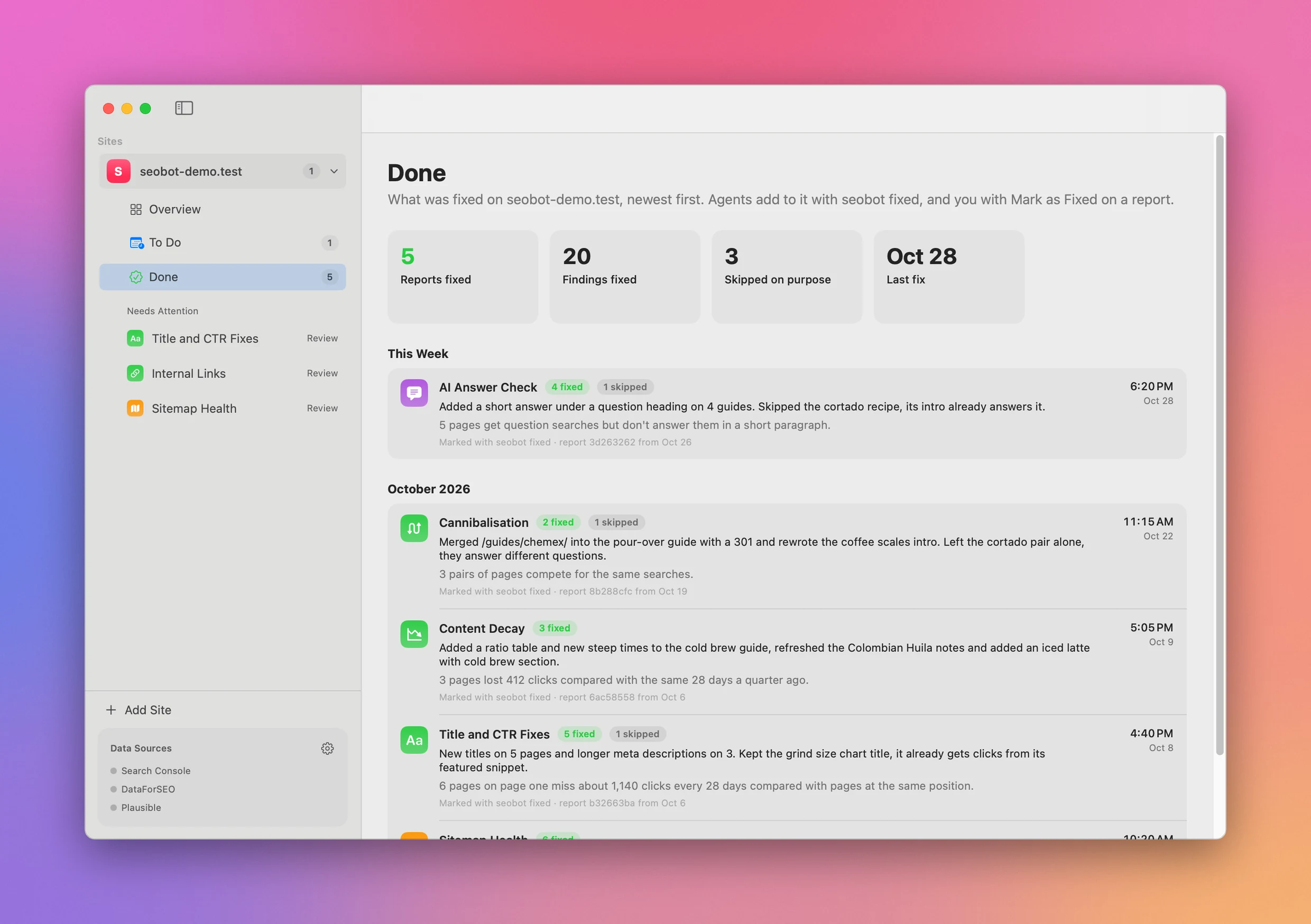
The Done list keeps every fix with the note on what changed. Like all the screenshots below, it shows a fictional demo site.
Start without connecting an account
Sitemap Health and Internal Links crawl the site directly. They are ready as soon as you add a site.
Sitemap Health checks every URL in the sitemaps for loading, indexing and redirect problems. Internal Links finds weak pages and suggests the source page, anchor text and paragraph for each link it can place.
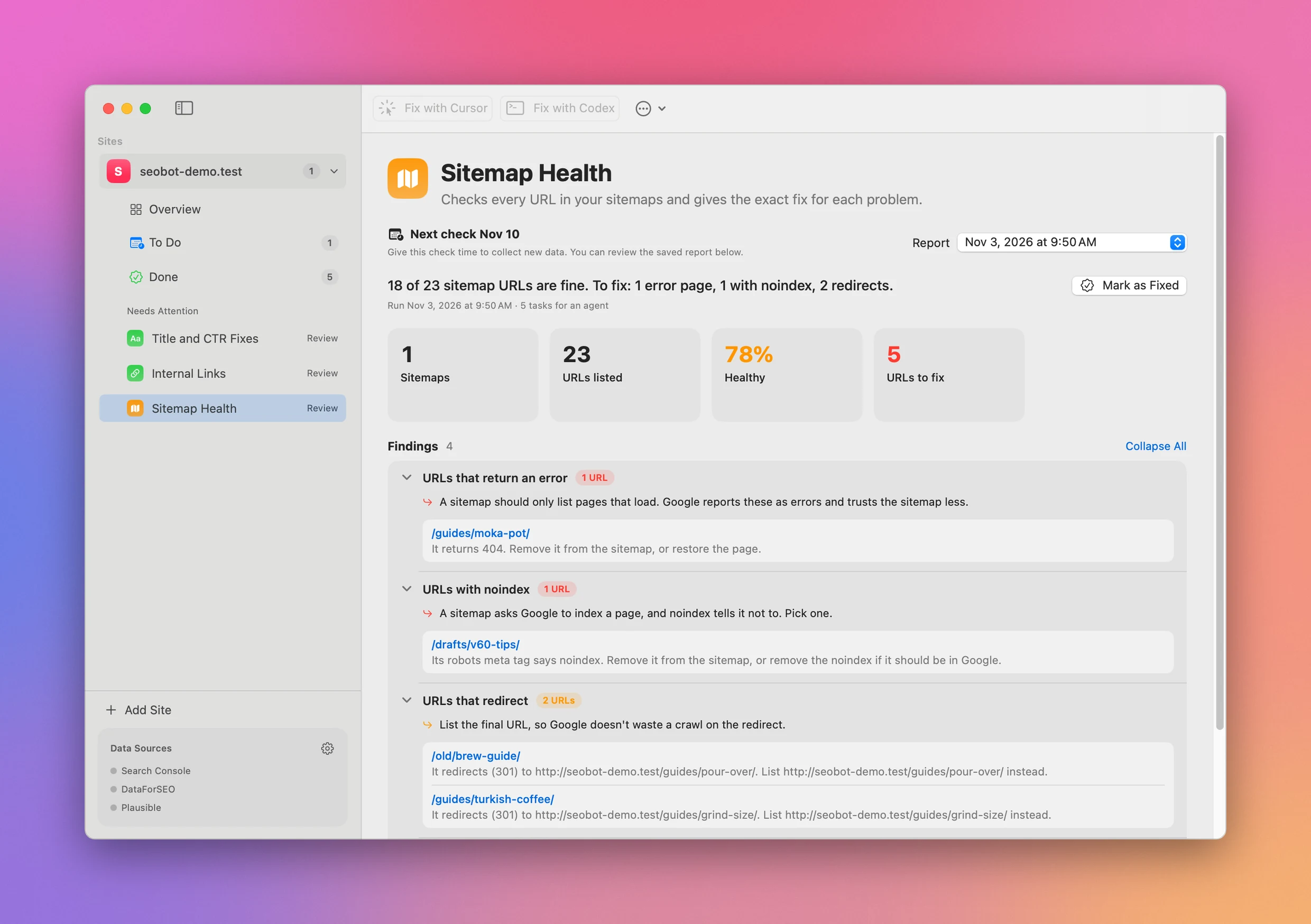
Sitemap Health groups the problem URLs and says what to do with each one.
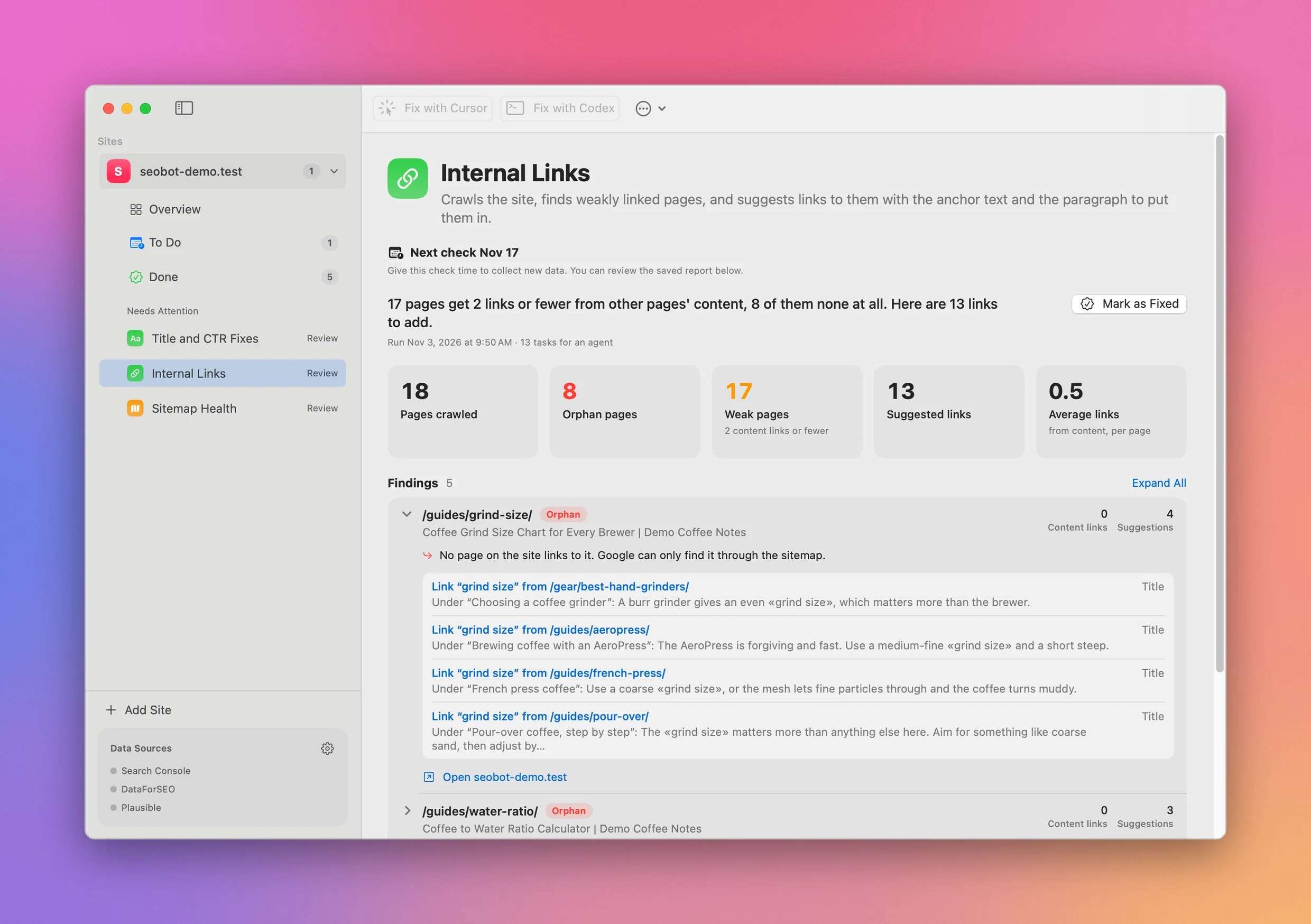
Internal Links found a page nothing links to, and four paragraphs on other pages that already mention its topic.
Grow and monitor search traffic
The Search Console tools cover quick wins, titles with a low click rate, content decay, cannibalisation, translation opportunities, AI-ready answers and Google penalty checks. Reports keep the searches and page data beside each finding so you can see why a change is suggested.
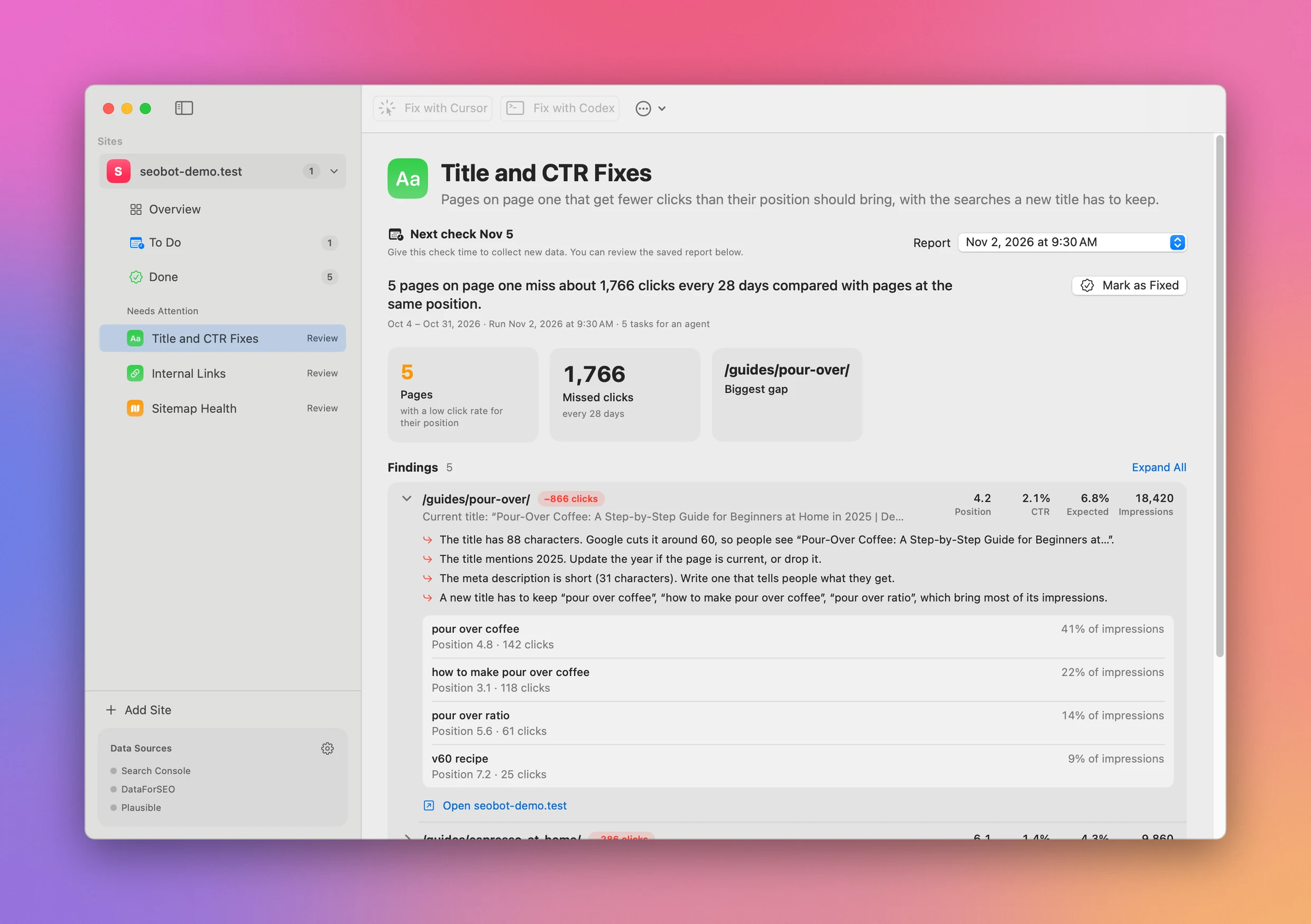
Title and CTR Fixes shows what’s wrong with each title and the searches a new one has to keep.
SEO Bot schedules follow-up checks after a fix. The To Do screen shows what is ready now, what should wait for fresh data and what cleared on the next run.
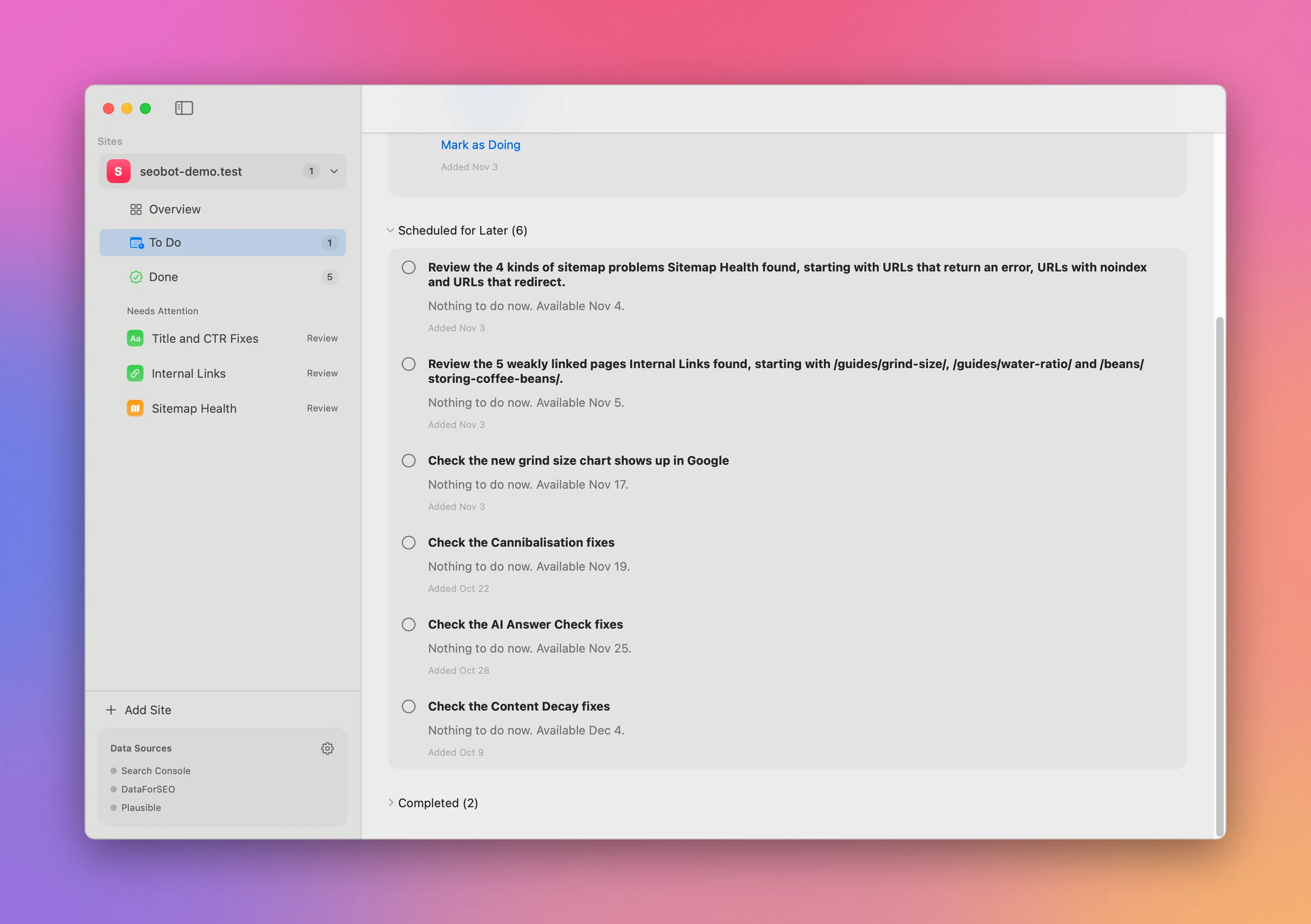
Follow-ups wait in To Do until there’s enough new data to check the fix.
See traffic without mixing AI referrals into search
Connect Plausible to see the last 90 days of visits split into Search, AI, Direct and Referral. The chart compares them with the previous 90 days and projects the week or month under way.
The overview picks two things to work on from the latest traffic and reports. When search traffic drops, the pages losing clicks come first. When AI referrals grow, it can point to pages that need a short answer an assistant can quote.
Research keywords when you need it
DataForSEO powers the rank tracker, content gaps, keyword clustering and programmatic SEO ideas. Each report shows the API cost returned by DataForSEO.
The rank tracker runs once a day while SEO Bot is open. Other paid research tools run when you ask for them. SEO Bot never hides those calls behind a subscription.
Use the same data from Terminal
The app includes the seobot command and an agent skill. They read the same sites, reports, tasks and credentials as the app.
seobot add seobot-demo.test --source ~/Sites/seobot-demo
seobot run sitemap-health --site seobot-demo.test
seobot report latest --site seobot-demo.test --tool sitemap-health
seobot todo --site seobot-demo.test
The CLI can print JSON for scripts, prepare an agent handoff, mark a report fixed and schedule a reminder for the next check.
What you connect and pay for
The $20 one-time purchase covers SEO Bot, the universal Mac app, the CLI, the agent skill and the full MIT-licensed Swift source. Tax is included.
Google Search Console, Plausible and DataForSEO are optional and use accounts you provide. They are not included in the purchase. Search Console does not add a charge from SEO Bot. Your Plausible plan or self-hosting costs are separate, and DataForSEO charges your account for the requests you make. Cursor and Codex are optional too, with their own accounts and charges.
SEO Bot does not call an AI model. It sends requests directly to the site and the providers you connect. Sites, reports and credentials stay on your Mac in ~/Library/Application Support/SEO Bot; credentials are stored unencrypted there so the app and CLI can share them.
What you get
SEO Bot runs on macOS 14 or later, on Apple silicon and Intel Macs. The ready-to-run app is signed with my Apple Developer ID and notarized by Apple.
After paying through Polar, connect your GitHub account and accept the invitation to the private repository. Download the app from Releases, or inspect, change and build the source yourself. A GitHub account is required for delivery.
Updates are downloaded manually from the repository. There is no subscription, hosted service or separate SEO Bot bill.