How to rerender a Svelte component on demand
By Flavio
Tagged: Svelte
How to remount or refresh a Svelte 5 component on demand with {#key} and reactive props, using a datepicker as the example.
Yesterday I had this problem: I was using a Datepicker Svelte component - 2 instances of it.
Just to give you more context, I want to set a starting date, and an ending date:
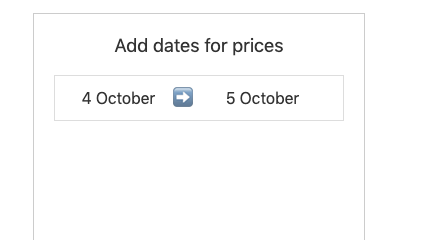
When you clicked the starting date, the date picker showed up:
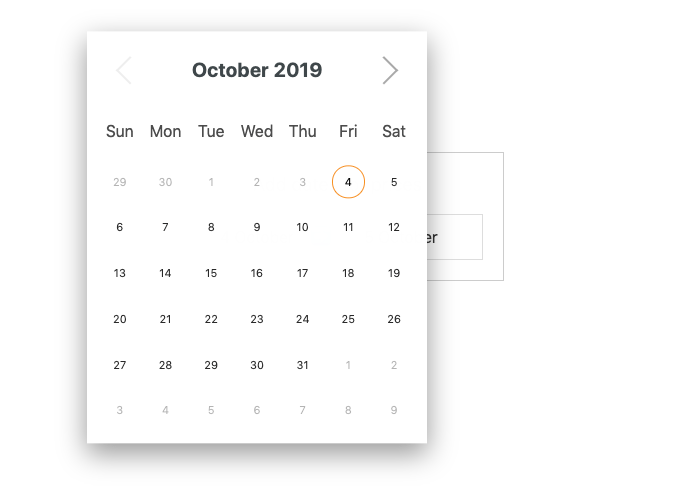
When you clicked the ending date, the second date picker showed up:
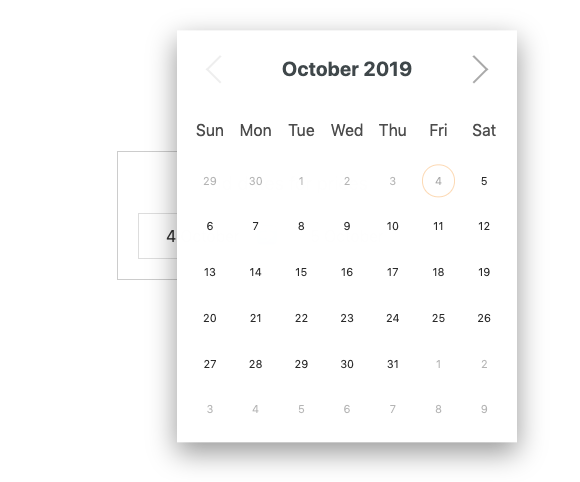
Now the problem was that based on the starting date, the end date had some constrains. For example, a logical one was that you can’t set an end date that’s prior to the starting date.
The date picker component exposed a selectableCallback function prop, called when the component is first rendered, running for all the dates in the calendar, allowing me to return false on some dates to disable them.
<script>
let startDate = $state(null)

let endDateSelectableCallback = date => {
  //TODO: decide if date is ok, using startDate
}
</script>

<Datepicker selectableCallback={endDateSelectableCallback} />
Sounds great!
Except this function only ran when the component was rendered the first time.
I needed a way to re-run that function when the other component changed its value. So I could remove all dates prior to the starting date selected. Also, it had to run multiple times as the user could change idea.
Remount with the key block
The clean way to force a child to mount again is the {#key} block. When the keyed expression changes, Svelte destroys the block and creates a fresh instance. That runs setup again, including a prop like selectableCallback that only runs on first render.
{#key} did not exist when I hit this problem (it arrived in Svelte 3.28, a year later), which is why I ended up with the trick I describe below. Here’s how I would write it today, in Svelte 5:
<script>
let startDate = $state(null)

let endDateSelectableCallback = date => {
  //TODO: decide if date is ok, using startDate
}
</script>

<!-- first date picker, start date -->
<Datepicker on:dateSelected={e => {
  startDate = e.detail
}} />

<!-- second date picker, end date: remount when startDate changes -->
{#key startDate}
  <Datepicker selectableCallback={endDateSelectableCallback} />
{/key}
When startDate updates, the end datepicker remounts and evaluates the callback against the new constraint. $state keeps startDate reactive so the {#key} expression notices the change. For more on reactive locals, see Svelte state management.
The first picker still uses on:dateSelected, because this datepicker library dispatches its own events. Listening to a component event with on: works in Svelte 5 too. Events between parent and child are covered in Svelte events.
The old “assign to itself” trick
Back then, when selecting a date on the first component, I used the on:dateSelected event to just reassign the function I passed to selectableCallback, called endDateSelectableCallback, to itself:
endDateSelectableCallback = endDateSelectableCallbackIt worked. Svelte 3 treated every assignment as a change, so the prop was sent to the child again. This might not have been the most idiomatic Svelte code, but the Svelte 3 docs themselves mentioned adding a redundant assignment to trigger an update:
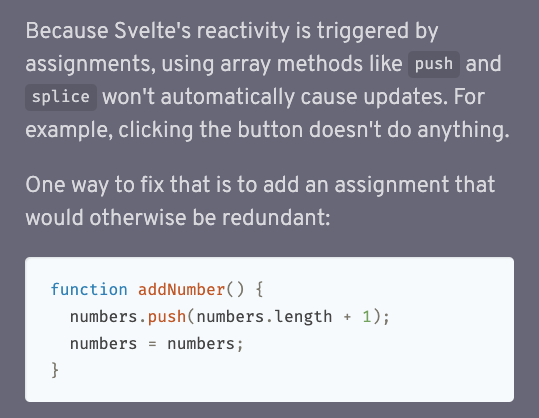
Don’t do this in Svelte 5. In runes mode reactivity is explicit: a $state variable only notifies when its value actually changes, so reassigning the same function does nothing. When a child only reads a callback once at mount, {#key} is the fix.
If the library instead accepts a reactive prop (for example the min date itself), pass that prop and skip remounting. Use {#key} only when you truly need a fresh instance.
Want me to talk about your product? You can sponsor this site.