Resend: the email API I use for my sites, my apps and my AI agents
By Flavio
What Resend does, how I use it to send sign-in links and form emails across my course sites, why I like it, and how to give AI agents email with its MCP server, CLI and skills.
Resend is an email API for developers. You verify a domain, create an API key, and send an email with one HTTP request.
I use it for all the transactional email of my business. Every time someone signs in to one of my courses, they get a link by email, and that email goes out through Resend. The forms on this site send through it too.
This post covers what Resend does, how I set it up, the code I run in production, what I look at in the dashboard, and how to use it with AI agents, both agents that write your email code and agents that send email themselves.
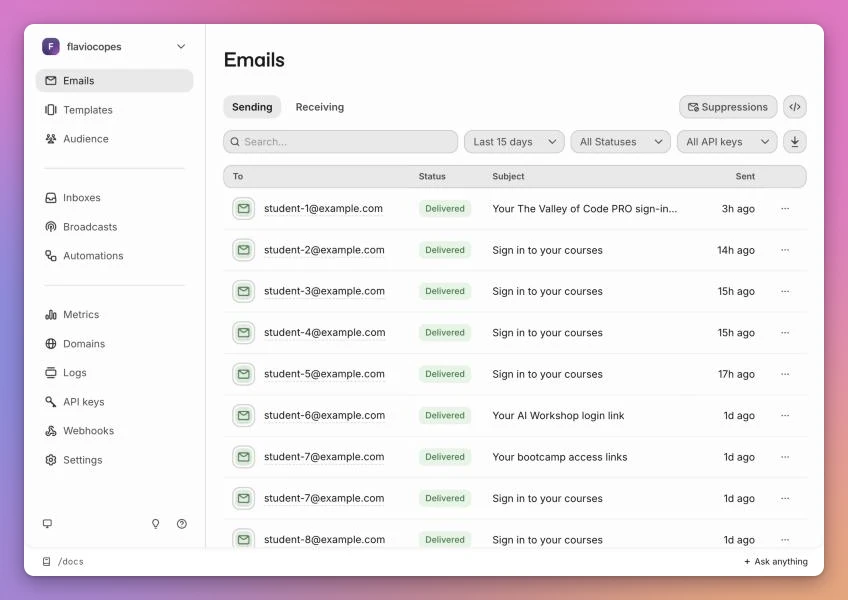
Every email address in the screenshots of this post is replaced with a
student-N@example.complaceholder, and the API key prefixes and sign-in tokens are masked.
What Resend does
Resend started in 2022 as a tool for sending transactional email, the emails your app sends to one person because of something they did: a sign-in link, a receipt, a password reset. The same team made React Email, a library for writing email templates as React components.
It grew a lot since then. Here’s what’s in the dashboard today, and which parts I use:
| Feature | What it does | Do I use it |
|---|---|---|
| Emails API | Send one email with POST /emails, or up to 100 with the batch endpoint | Yes, every day |
| Domains | Verify a domain with DKIM and SPF records so you can send from it | Yes, resend.flaviocopes.com |
| API keys | Keys with full access or sending access, optionally limited to one domain | Yes, one per site |
| Logs | Every API request with its request and response body | Yes, to debug |
| Insights | A deliverability checklist for each email | Yes, once per new email |
| Receiving | Inbound email, delivered to your app as an email.received webhook | No |
| Broadcasts | Newsletters sent to a list of contacts | Not in my account, but Sitebase uses it |
| Audience | Contacts, segments, topics, and the unsubscribe preferences for broadcasts | No |
| Templates | Hosted templates with variables and version history | No |
| Automations | Workflows triggered by events, like “send this email 3 days after user.created” | No |
| Inboxes | Shared inboxes with threads and drafts, built for agents, launched in October 2026 | No |
| Webhooks | Delivery, bounce, complaint and inbound events sent to your endpoint | No |
It’s also an SMTP server, at smtp.resend.com with the username resend and an API key as the password. That’s how I connect apps that only speak SMTP, like Supabase Auth.
Why I like it
I tried most email providers for my comparison of email services for developers. I keep coming back to Resend for three reasons.
The API is small. Sending an email is one JSON object with from, to, subject and a body. There’s no “sender identity” object to create and no sandbox you have to ask to leave, like on Amazon SES.
The dashboard shows me what happened. When a sign-in email doesn’t arrive, I search for the address, open the email, and see if it was delivered, bounced, or never sent because my code failed. The logs page shows the exact JSON my code sent. I’ll show both later in this post.
It works from everywhere I deploy. Most of my sites run on Cloudflare Workers and Pages Functions, where the Node SDKs of older providers don’t run. Resend’s API is plain JSON over HTTPS, so fetch is enough.
The free plan is enough for a small project: 3,000 emails a month with a limit of 100 a day, and 3 domains. Here’s the pricing I see today:
| Plan | Price | Emails | Notes |
|---|---|---|---|
| Free | $0 | 3,000 a month, 100 a day | 3 domains, 1 webhook, 30 days of logs |
| Pro | $20 a month | 50,000 a month | 10 domains, no daily limit, $0.90 per extra 1,000 |
| Scale | from $90 a month | 100,000 a month and up | 1,000 domains, cheaper overage |
| Marketing | from $40 a month | priced by contacts, not by emails | for broadcasts, separate from the plans above |
Receiving uses the same quota as sending, so one plan covers mail in both directions.
How I set it up
A subdomain for sending
I don’t send from flaviocopes.com directly. I added resend.flaviocopes.com as the sending domain, and my emails come from flavio@resend.flaviocopes.com with flavio@flaviocopes.com as the reply-to address.
A subdomain keeps the reputation of my transactional email separate from the main domain, which also sends my newsletter through a different provider. If one of them gets in trouble with Gmail, the other one isn’t dragged along.
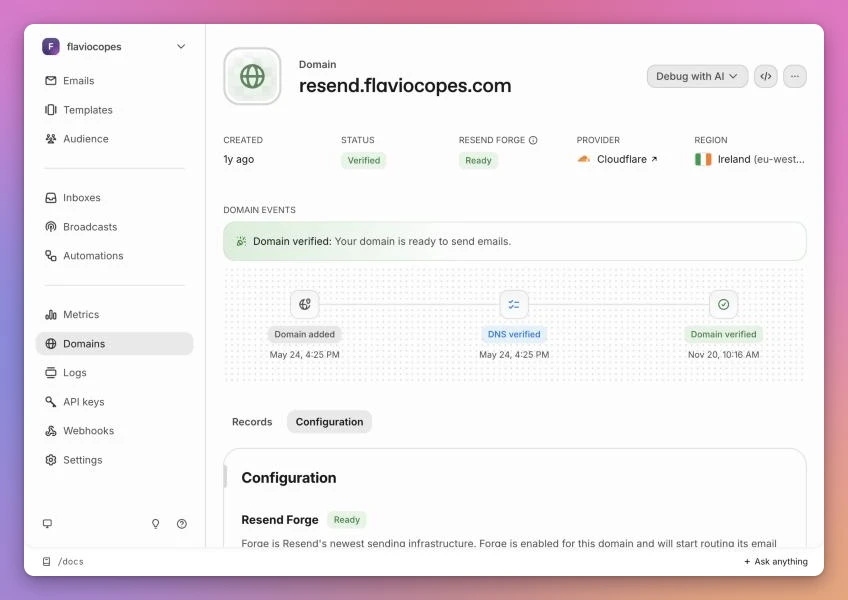
Verifying the domain means adding the DNS records Resend gives you: a TXT record with the DKIM public key, and an MX and a TXT record on send.resend for SPF and bounces. My DNS is on Cloudflare. I explain what each record does in SPF, DKIM, and DMARC explained for developers.
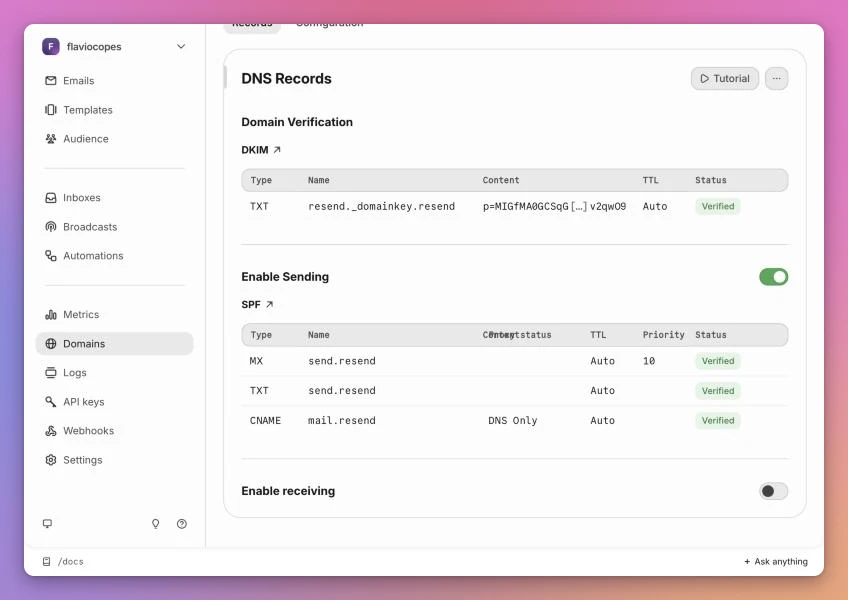
Enable receiving is off. This domain only sends. Replies go to my real address through the reply-to header.
I also left open and click tracking off. Click tracking rewrites every link in the email so it goes through Resend’s redirect first. For a sign-in link that’s the last thing I want: the token would pass through a third server, and some mail providers follow rewritten links on their own.
One API key per site
Each site gets its own API key, named after the site. Most of them have Sending access, which can send email and nothing else. It can’t read my logs, list my contacts or delete my domain.
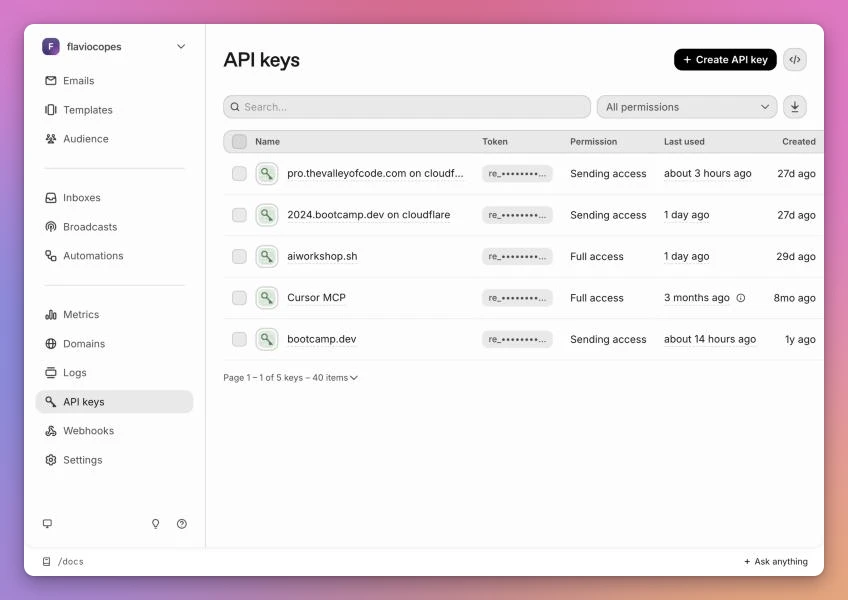
This pays off in two situations. When I shut down a site, I revoke its key and nothing else breaks. And when a key leaks, the damage is limited to sending emails from my domain, which is bad but recoverable.
The Cursor MCP key has Full access on purpose, because it lets an AI agent manage my account. More on that in the agents section.
How I use it in my business
Sign-in links for my courses
All my course sites use passwordless sign-in. You type your email, you get a link, you click it and you’re in. That’s courses.flaviocopes.com, The Valley of Code PRO, the bootcamp and the AI Workshop.
Here’s the flow on courses.flaviocopes.com:
The Worker that serves courses.flaviocopes.com sends the email with fetch. This is the code, formatted for reading:
const result = await fetch('https://api.resend.com/emails', {
  method: 'POST',
  headers: {
    Authorization: `Bearer ${env.RESEND_API_KEY}`,
    'Content-Type': 'application/json',
    'Idempotency-Key': `archive-${await hash(token)}`,
  },
  body: JSON.stringify({
    from: env.FROM_EMAIL,
    to: [email],
    reply_to: 'flavio@flaviocopes.com',
    subject: 'Sign in to your courses',
    text: `Hi!\n\nUse this link to sign in to your courses:\n${link}\n\nIt expires in 15 minutes. If you didn't request it, ignore this email.\n\nFlavio`,
  }),
})

if (!result.ok) {
  await env.DB.prepare('DELETE FROM login_tokens WHERE hash=?')
    .bind(await hash(token))
    .run()
  throw new Error('Mail unavailable')
}
A few details are there because of things that went wrong, or could.
The Idempotency-Key header tells Resend “if you see this key again, don’t send a second email”. If the request times out and gets retried, the student gets one email, not two. The key is derived from the login token, so every new sign-in request gets a new key.
When Resend returns an error, I delete the login token I just stored. A token nobody received is useless, and it shouldn’t sit in the database waiting to be guessed.
The link in the email opens a page with a button, and only the button’s POST signs you in. Corporate mail scanners open every link in an email to check it. If a plain GET consumed the token, the scanner would use it up before the student clicked.
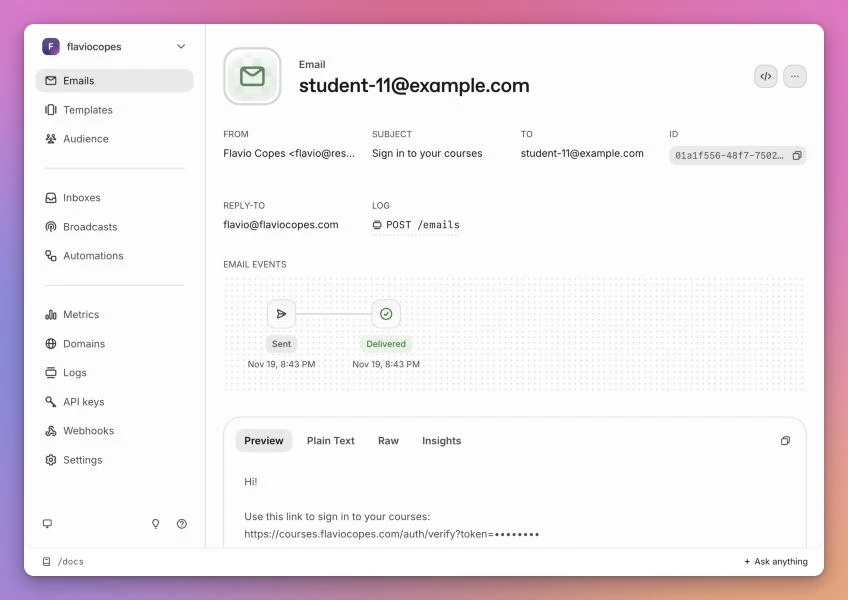
In the dashboard, each email shows when it was sent and delivered, and its body:
Forms on flaviocopes.com
This site is static, but two forms post to Cloudflare Pages Functions: the sponsor inquiry form and the form where past buyers get their course access links again. Both send through Resend.
Pages Functions can run the official Node SDK, so here I use it:
import { Resend } from 'resend'

const resend = new Resend(env.RESEND_API_KEY)

const result = await resend.emails.send({
  from: 'Flavio Copes <flavio@resend.flaviocopes.com>',
  to: 'flavio@flaviocopes.com',
  replyTo: email,
  subject: `Sponsor inquiry: ${name}`,
  html: `<p><strong>Product or project:</strong> ${escapeHtml(name)}</p>`,
})

if (result.error) {
  throw new Error(result.error.message)
}
Notice the result.error check. The SDK doesn’t throw when the API returns an error, it returns { data, error }. If you only wrap the call in try/catch, a failed send looks like a successful one. There’s a comment about it in my code so I don’t forget.
The sponsor email comes to me with the sponsor’s address as replyTo, so I answer from my mail client and the reply goes straight to them.
Admin alerts from my apps
My apps on Cloudflare Workers email me when something happens: a new report, a new signup, an error. I wrote about this in Transactional email from Workers with Resend, including how I deduplicate error alerts with KV so a crash loop doesn’t send me 500 emails.
Newsletters with the customer’s own key in Sitebase
Sitebase is my project that adds waiting lists, forms and newsletter signups to any site. Its own sign-in links go through Resend, from a separate mail.sitebase.dev domain.
Newsletter broadcasts work differently. Each site owner pastes their own Resend API key in the dashboard, and Sitebase uses Resend’s Broadcasts API with that key. Sitebase keeps the subscriber list. Before each send it creates a segment and a topic in the customer’s Resend account, syncs the active subscribers as contacts, and creates the broadcast with {{{RESEND_UNSUBSCRIBE_URL}}} in the footer.
I chose this so I’m not in the delivery path. The site owner’s domain reputation and their bill are theirs, and nobody can use Sitebase to spam through my account.
My newsletter
My newsletter runs on Sendy with Amazon SES, a setup that is older than my Resend account. If I started a newsletter today, I’d start with Resend Broadcasts, because contacts, unsubscribe topics and sending would live in the same dashboard as the rest of my email.
Debugging deliveries
When someone says they didn’t get an email, I start from the Logs page. Every API request is there, with its status code and the API key that made it.
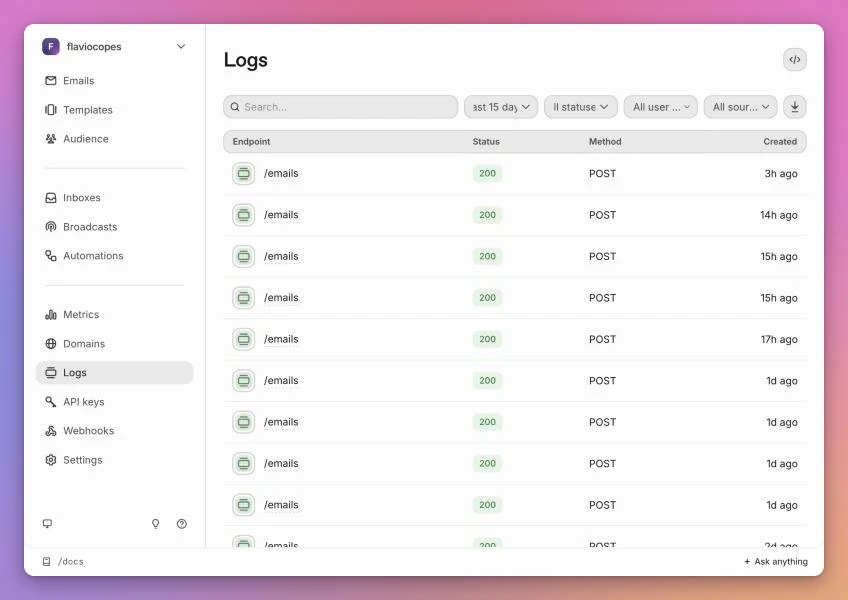
Opening a request shows the exact JSON my code sent. This is where you spot a wrong from, a missing reply_to, or a template that rendered undefined.
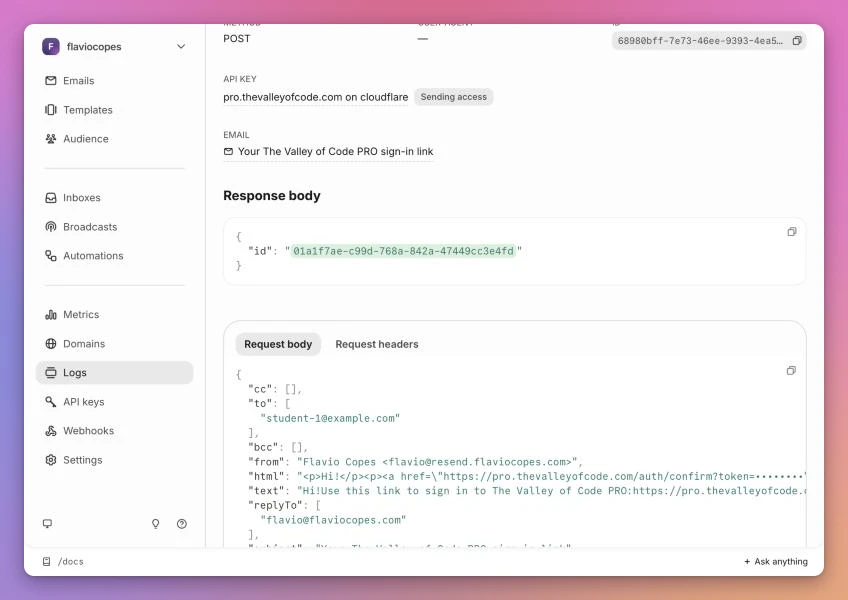
If the request is there and the email shows Delivered, the problem is on the receiving side, usually a spam folder. If the email shows Bounced, the address is wrong or the mailbox is full. If there’s no request at all, my code never called Resend, and I go read my Worker logs.
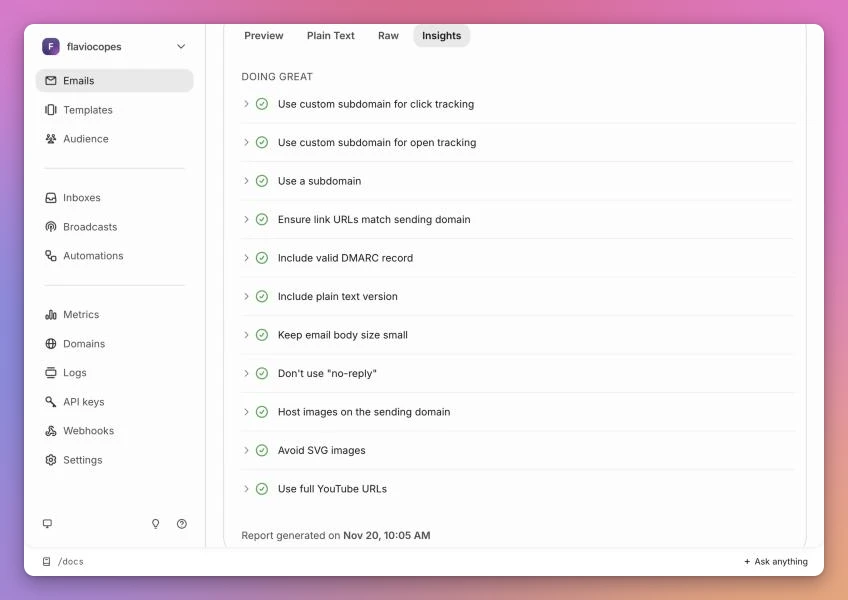
The Insights tab of each email is a deliverability checklist: a plain text version, no no-reply sender, a valid DMARC record, links that match the sending domain. My sign-in emails pass all of it.
Resend and AI agents
There are two different things here. Agents that write your email code, and agents that send email themselves.
Agents that write your email code
Resend is easy for coding agents for the same reason it’s easy for people: the API is small. Resend helps further with a llms.txt, every docs page available as Markdown, and official skills you install with:
npx skills add resend/resend-skillsWhere agents trip is the environment around the API call. In Sitebase, the local .dev.vars file held a real Resend key, so while I was testing forms locally, real notification emails landed in my inbox. The fix was a guard that treats local development as “no key”:
function canSendEmail(env: EmailEnv): boolean {
  if (env.APP_ENV === 'dev') return false
  return Boolean(env.RESEND_API_KEY)
}
When it returns false, the code logs the email and, for a sign-in, shows the link on the page instead. Then I added a line to the project’s AGENTS.md saying that local dev never sends email, so the next agent doesn’t undo it.
If you want an agent to test real sends, give it Resend’s test addresses. delivered@resend.dev simulates a delivery, bounced@resend.dev a hard bounce and complained@resend.dev a spam complaint, without hurting your domain’s reputation.
Agents that send email: MCP, CLI or API
You have three ways to let an agent use Resend.
| MCP server | Resend CLI | REST API | |
|---|---|---|---|
| Install | URL https://mcp.resend.com/mcp or npx -y resend-mcp | npm install -g resend-cli or brew install resend/cli/resend | Nothing |
| Auth | OAuth in the browser, or an API key | resend login, saved in the macOS Keychain | API key in an env var |
| Good for | Chat clients like Claude, Cursor and Codex | Coding agents with a shell | Code you deploy |
| Context cost | Tool descriptions load before the agent does anything | The agent reads --help when it needs it | None |
| Covers | The whole API, including received emails and broadcasts | The whole API, plus doctor and local webhook listening | The whole API |
The MCP server is what I used first. The Cursor MCP key in my dashboard is from when I connected Resend’s MCP server to Cursor, eight months ago. It has full access because the server covers the whole API, not only sending. For Claude Code there’s an official plugin:
claude plugin install resend@claude-plugins-officialThe hosted server signs you in with OAuth, so you don’t paste a key anywhere.
The CLI is what I’d give a coding agent today. It’s built for scripts and agents: --json forces JSON output, errors come back as { message, code }, and resend commands prints the whole command tree as JSON so an agent can discover it in one call.
My favorite flag is --dry-run. It prints the request instead of sending it, which is how an agent can show me an email before it goes out:
resend emails send \
  --from 'Flavio Copes <flavio@resend.flaviocopes.com>' \
  --to delivered@resend.dev \
  --subject 'Sign in to your courses' \
  --text 'Use this link to sign in: https://courses.flaviocopes.com/auth/verify?token=test' \
  --reply-to flavio@flaviocopes.com \
  --dry-run
{
"dryRun": true,
"request": {
"from": "Flavio Copes <flavio@resend.flaviocopes.com>",
"to": [
"delivered@resend.dev"
],
"subject": "Sign in to your courses",
"text": "Use this link to sign in: https://courses.flaviocopes.com/auth/verify?token=test",
"replyTo": "flavio@flaviocopes.com"
}
}It also has --scheduled-at with natural language like "tomorrow at 9am ET", and --idempotency-key, the same protection against double sends I use in my Worker.
resend doctor checks the CLI version, the API key and the domains in one go. It’s the first command to run when an agent says it can’t send.
Keep the agent’s key small
An agent with your email account can email anyone as you. Treat its key like you’d treat a key for an intern’s script:
- Give it a Sending access key, limited to one domain, unless it really needs to manage the account.
- Use a separate domain or subdomain for agent email, so a mistake doesn’t hurt the reputation of your main sending domain.
- Have it
--dry-runor draft first when the recipient is a real person. - Name the key after the agent, so you can find it in the logs and revoke it alone.
Agents that receive email
Resend can also receive. You add an MX record for a domain, and each incoming email triggers an email.received webhook. Your code fetches the body with the API and passes it to a model. In October 2026 Resend added Inboxes, shared inboxes with threads, labels and drafts, with an agent that can answer with your instructions.
This is the part I want to try next. None of my products has an email support flow yet, and Inboxes looks like the shortest path to giving an agent its own address, with threads and drafts I can check before anything goes out.
Resend and Cloudflare Email Service
The other service I’d consider is Cloudflare Email Service, when an app lives entirely on Cloudflare Workers and I want email as a binding in wrangler.jsonc instead of an API key. I use it for Waiting Lists.
For everything else, Resend is my default. Sign-in links, form emails and alerts from my apps all go through it, and the dashboard, the logs and the agent tools are the reason I keep adding new projects to the same account.
Want me to talk about your product? You can sponsor this site.
Related posts about services: