React DOM events on components
By Flavio Copes
Learn how to handle DOM events like onMouseEnter on a React component by passing them as props and attaching the handlers to a real DOM element inside it.
You can’t attach DOM events like onMouseEnter directly to a component you wrote. React only wires those up on real DOM elements, like a or div. On a custom component, onMouseEnter is just a prop with a familiar name. Nothing listens to it.
The solution is to pass the handler down as a prop, and attach it to a DOM element inside the component. Let me show you the problem I was solving when I ran into this.
The problem
I wanted to show or hide a little panel based on the mouse hover status.
When I hovered a link, the panel would show up.
Then I could enter this panel with the mouse, and when I moved the mouse away, the panel would hide.
Like the Twitter profile that shows when you move the mouse upon the name of a person:
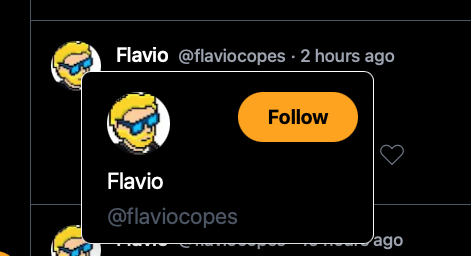
On the <a> element that triggered the panel to show up, I added the event onMouseEnter:
<a
  onMouseEnter={() => {
    setShowCard(true)
  }}
>flavio</a>
so the panel would show when I hovered it with the mouse, because it was shown depending on the showCard state variable I had set before:
const [showCard, setShowCard] = useState(false)That worked, because a is a DOM element.
Then I had the ProfileCard component and I tried the same thing:
<ProfileCard
  onMouseEnter={() => {
    setShowCard(true)
  }}
  onMouseLeave={() => {
    setShowCard(false)
  }}
/>
It didn’t work. ProfileCard is not a DOM element, so React never attached those handlers to anything. The component received them as props, and ignored them.
The fix
What I had to do was accept onMouseEnter and onMouseLeave as props inside the ProfileCard component, then identify the correct DOM element that could receive those events, and attach the handlers there. In this case, I used the container div:
const ProfileCard = ({
  onMouseEnter,
  onMouseLeave
}) => (
  <div
    onMouseEnter={onMouseEnter}
    onMouseLeave={onMouseLeave}>
    ...
  </div>
)
Now leaving the panel would hide it.
Notice the naming is up to you. I could have called the prop onCardEnter. But keeping the DOM event name makes the intent obvious to whoever reads the code later.
Watch out for the gap
One thing to check: if there’s empty space between the link and the panel, the mouse fires onMouseLeave while crossing it, and the panel hides before you can reach it.
Position the panel so it touches or overlaps the link. If your design needs a gap, delay the hide with a short setTimeout and cancel it when the mouse enters the panel.
Want me to talk about your product? You can sponsor this site.