Python, create a TCP server
By Flavio Copes
Learn how to create a TCP server in Python using the socketserver package with TCPServer and a request handler, then test it with the Netcat nc command.
To create a TCP server in Python you don’t need any external library. The Python standard library provides the socketserver package, which handles the low-level socket work for you.
Here’s a server that echoes back every message it receives:
from socketserver import BaseRequestHandler, TCPServer

class handler(BaseRequestHandler):
    def handle(self):
        while True:
            msg = self.request.recv(1024)
            if msg == b'quit\n':
                break
            self.request.send(b'Message received: ' + msg)

with TCPServer(('', 8000), handler) as server:
    server.serve_forever()
Let’s break this down.
We define a handler class that extends BaseRequestHandler. Its handle() method is called once for every client that connects. Inside it, self.request is the socket connected to that client.
recv(1024) reads up to 1024 bytes from the client and returns them as bytes. That’s why we compare against b'quit\n' and not 'quit': sockets work with bytes, not strings.
TCPServer(('', 8000), handler) creates the server. The empty string means “listen on all network interfaces”, and 8000 is the port. serve_forever() blocks and keeps accepting connections until you stop the program.
How to test it
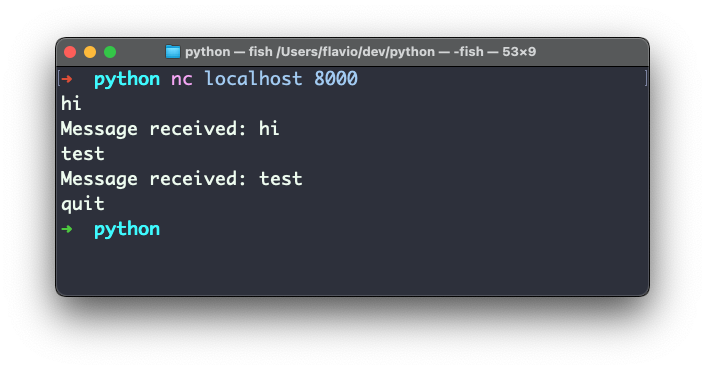
Connect to this using Netcat, a handy utility that is very useful to test-drive TCP and UDP servers. It’s installed by default on Linux and macOS, available under the nc command:
nc localhost 8000Once it’s connected to the server, you can send any message by typing it. The server will reply with a confirmation of the message received.
Until you say quit. Then the connection will close (but the server will still run, you can connect again).
What if the client disconnects?
When the client closes the connection without sending quit, recv() returns empty bytes, b''. The loop above doesn’t check for that, so it keeps spinning and trying to send data to a closed socket.
The fix is one extra condition:
msg = self.request.recv(1024)
if not msg or msg == b'quit\n':
    break
Now the handler exits cleanly whenever the client goes away.
Handling more than one client
TCPServer handles one connection at a time. While one client is connected, everyone else waits.
For multiple simultaneous clients, swap it for ThreadingTCPServer, which runs each connection in its own thread:
from socketserver import BaseRequestHandler, ThreadingTCPServerThe handler code stays exactly the same.
“Address already in use”
If you stop the server and restart it right away, the bind can fail with OSError: [Errno 48] Address already in use (errno 98 on Linux). The old socket is still in the TIME_WAIT state.
Tell the server to reuse the address before creating it:
TCPServer.allow_reuse_address = True

with TCPServer(('', 8000), handler) as server:
    server.serve_forever()
With this set, restarts work immediately.
Want me to talk about your product? You can sponsor this site.
Related posts about python: