A deep dive into Ponytail
By Flavio
Updated
Tagged: AI
Learn how Ponytail stops AI coding agents from over-engineering: install it in ChatGPT, Codex, or Claude Code, choose a mode, and review diffs.
AI coding agents like writing code.
Sometimes they like it too much.
You ask for a date field. The agent installs a date picker, adds a wrapper component, creates a theme file, and starts discussing time zones.
The browser already has this:
<input type="date" />Ponytail is a ruleset that pushes coding agents toward that kind of answer.
It was created by Dietrich Gebert. The project describes its approach as the lazy senior developer: understand the problem, find the smallest correct solution, and stop.
Lazy doesn’t mean careless here. Ponytail tells the agent to keep validation, error handling, security, accessibility, and anything you explicitly asked for, focusing on cutting down the code you have to maintain.
How Ponytail works
Ponytail gives the agent a seven-step ladder.
The agent stops at the first step that solves the real problem:
- Does this need to exist?
- Does the codebase already have it?
- Does the standard library provide it?
- Does the native platform provide it?
- Does an installed dependency already solve it?
- Can it be one line?
- Only then, write the minimum new code.
That order makes the agent reuse an existing date-field component before reaching for a native HTML input.
If the field needs a calendar system the browser input can’t represent, the native option no longer fits, so the agent moves down the ladder.
Ponytail also tells the agent to inspect the relevant code before changing anything. It traces the real flow, checks for existing helpers, and fixes a bug at its shared cause instead of patching one visible symptom.
Install Ponytail in the ChatGPT app
Open Settings, then select Plugins.
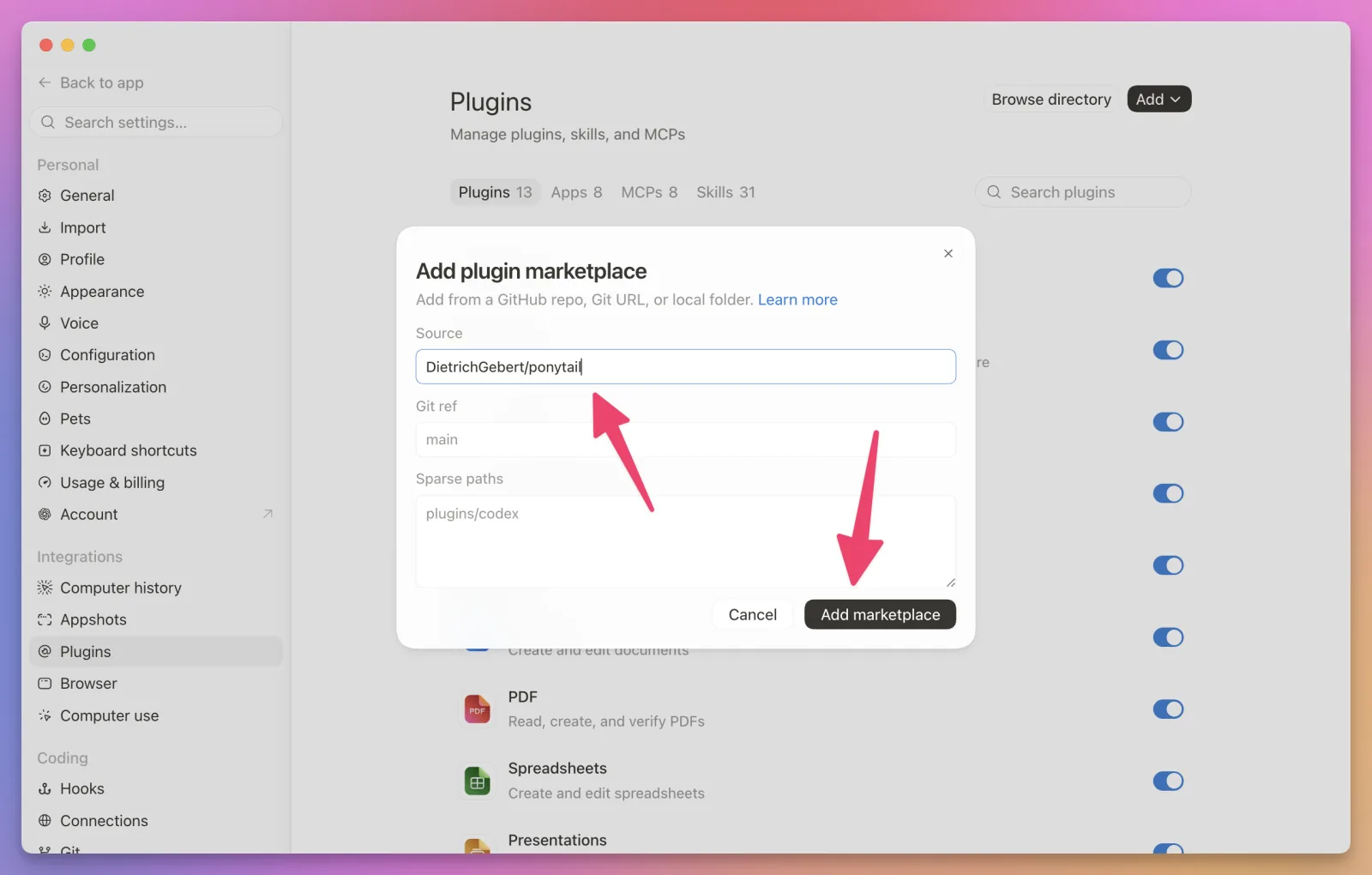
Open the Add menu and choose Add plugin marketplace. Enter DietrichGebert/ponytail as the source, then click Add marketplace:
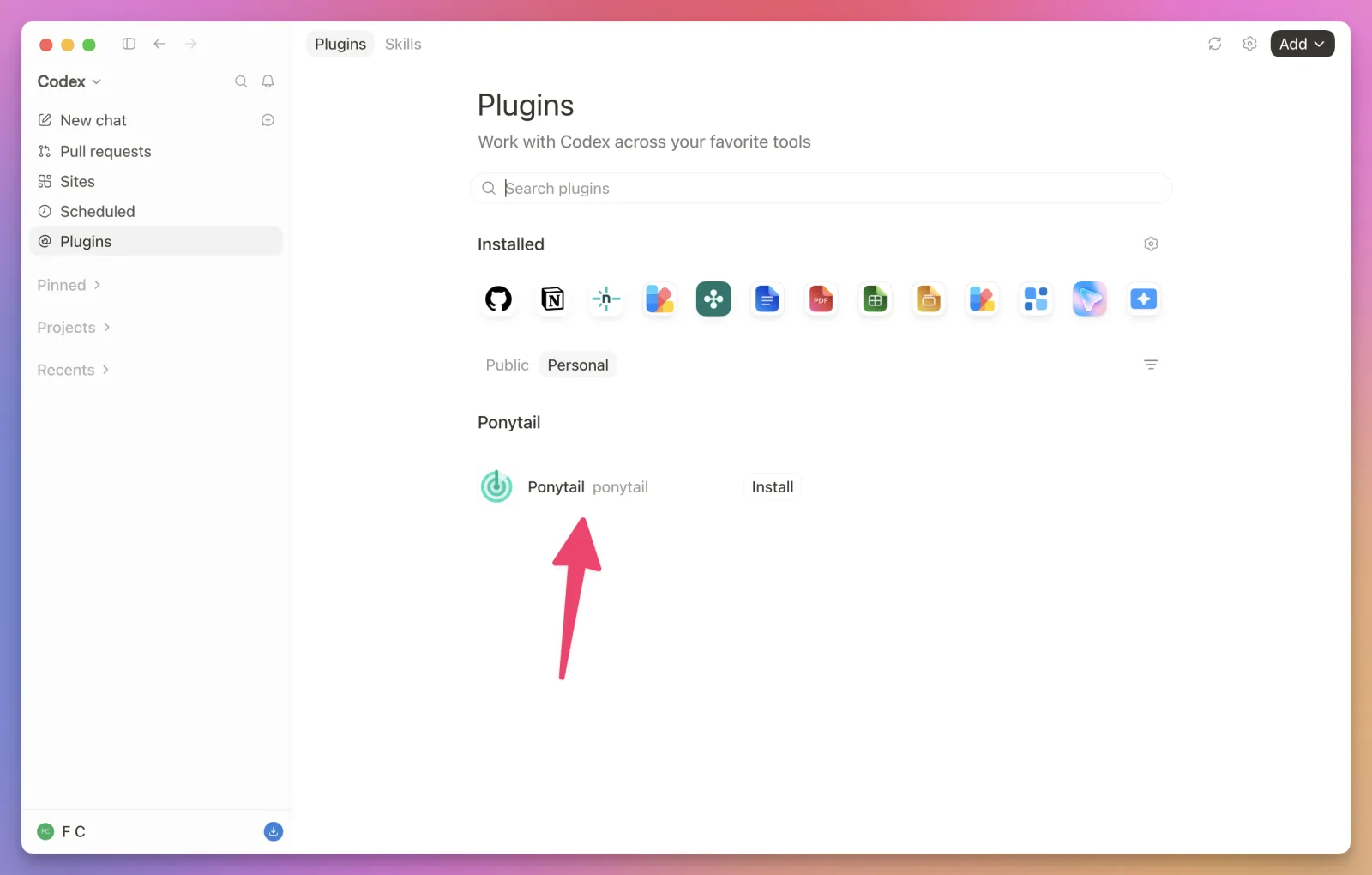
Return to the Plugins page and select Personal. Find Ponytail and click Install:
Open a new Codex task and type:
/ponytailThe composer shows the installed Ponytail skills. Select the main Ponytail skill and send the prompt:
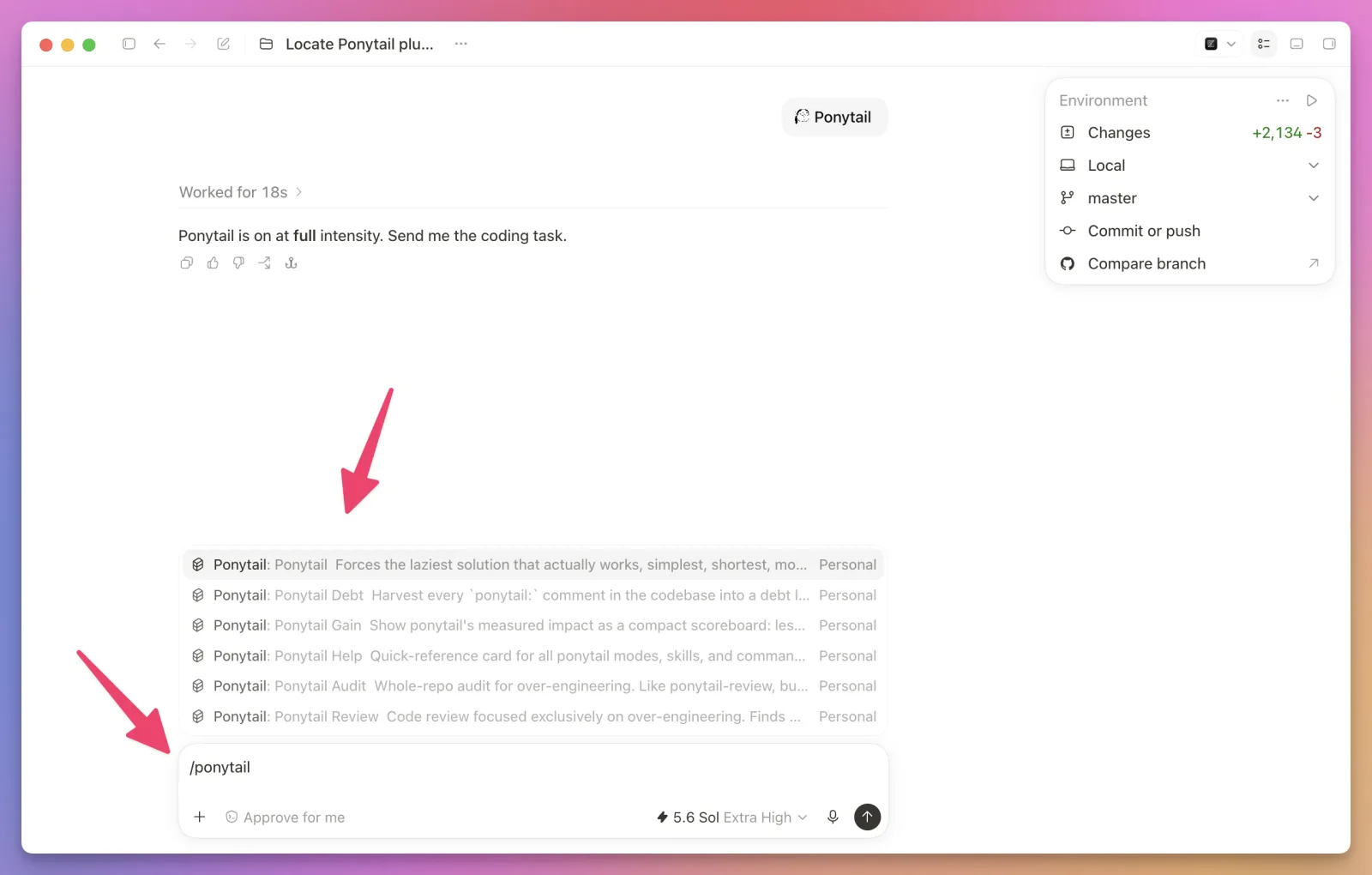
Ponytail confirms the active intensity. The default is full.
Install the Ponytail plugin in Codex CLI
Ponytail is available as a Codex plugin.
Add its marketplace:
codex plugin marketplace add DietrichGebert/ponytailThen install the plugin:
codex plugin add ponytail@ponytailStart Codex and open the hooks screen:
/hooksReview and trust Ponytail’s lifecycle hooks, then start a new task.
The hooks activate Ponytail when a session starts and pass the active mode to subagents.
If you install from the terminal and use the ChatGPT app too, restart the app so it loads the same plugin.
Ponytail starts in full mode by default. You can check that the bundled skills are available with:
@ponytail-helpCodex CLI invokes skills with @. The ChatGPT app and Claude Code use slash commands.
Install the Ponytail plugin in Claude Code
In Claude Code, send these as two separate prompts.
First, add the marketplace:
/plugin marketplace add DietrichGebert/ponytailWait for that command to finish, then install Ponytail:
/plugin install ponytail@ponytailStart a new session afterwards. Ponytail activates automatically in full mode, so you can keep prompting Claude Code as usual.
To check or change the current mode, run:
/ponytailThe same two install commands work in the Code tab of the Claude Code desktop app.
Install Ponytail in other CLIs
GitHub Copilot CLI, Gemini CLI, and Pi have their own install commands. Copilot CLI uses the same marketplace flow as Codex:
copilot plugin marketplace add DietrichGebert/ponytail
copilot plugin install ponytail@ponytail
Gemini CLI installs it as an extension:
gemini extensions install https://github.com/DietrichGebert/ponytailAnd Pi:
pi install git:github.com/DietrichGebert/ponytailThe Claude Code and Codex plugins use small Node.js lifecycle hooks. If node is missing from the non-interactive shell’s PATH, the skills still work, but automatic activation doesn’t.
The command examples below use Codex CLI’s @ syntax. In the ChatGPT app or Claude Code, replace @ with /.
How do you use the Ponytail skill?
Once the plugin is installed, you don’t need to invoke it on every prompt. In Claude Code and Codex CLI, the lifecycle hooks turn it on in full mode as soon as a session starts, so you just prompt your agent normally.
You only call the main skill directly when you want to check or switch the mode, like /ponytail lite in Claude Code or @ponytail lite in Codex CLI.
Try it on a small feature
Let’s give the agent a task that often attracts too much code:
Add a birthday field to the profile form.
Use the existing form styles and keep the current validation behavior.
In full mode, Ponytail first inspects the form and its existing components.
If plain HTML covers the requirement, the result might look close to this:
<label for="birthday">Birthday</label>
<input id="birthday" name="birthday" type="date" />
You don’t end up with a new package, a calendar wrapper, or a custom date parser.
Notice that the prompt didn’t say “write the fewest lines possible.” Ponytail applies the ladder as a standing rule.
If the app already has a form component with error messages and accessible descriptions, the agent uses that instead, because reusing the codebase sits higher on the ladder than reaching for raw browser elements.
Choose an intensity
Ponytail has three active modes:
litebuilds what you requested and mentions a smaller alternativefullenforces the complete ladder and is the defaultultratreats speculative requirements aggressively and prefers deletion
In Codex CLI, switch modes by invoking the main skill:
@ponytail lite@ponytail full@ponytail ultraUse lite when you want the agent to follow your design while still pointing out a cheaper option.
For everyday work, stick with full. It picks the smaller solution without turning every task into an argument.
Save ultra for experiments, cleanup work, and features whose requirements aren’t settled yet. In that mode the agent can challenge the feature itself, which only helps when you’re open to cutting it.
To turn Ponytail off, say normal mode or run:
@ponytail offThe active mode lasts for the session.
Set the default mode
You can change the default with a config file at:
~/.config/ponytail/config.jsonFor example, this starts new sessions in lite mode:
{
  "defaultMode": "lite"
}
Valid values are lite, full, ultra, and off.
You can also set PONYTAIL_DEFAULT_MODE. The environment variable takes priority over the config file.
Review the current diff
Ponytail includes a separate review skill for code that’s already in your current diff.
Run:
@ponytail-review Review the current diffThis is a read-only review looking for a small set of problems:
- dead code and unused flexibility
- standard-library features rebuilt by hand
- dependencies that duplicate native platform features
- abstractions with one implementation
- logic that can keep its behavior with fewer lines
You get back a delete list, and the command doesn’t apply any changes.
You still need a normal code review for correctness, security, performance, and product behavior. @ponytail-review focuses on a narrower question: what can you remove?
Audit the whole repository
The review skill only checks the current diff.
To inspect the complete codebase, run:
@ponytail-audit Audit this repository for over-engineeringThe audit ranks opportunities to delete, reuse, or replace code, and reports how many lines and dependencies it thinks could disappear.
Treat that total as an estimate and check every finding before changing working code. An abstraction with a single implementation might look unnecessary inside this repo while still serving as a real boundary for a plugin API, a test seam, or a second implementation living outside the repository.
Track deliberate shortcuts
Sometimes the smallest correct implementation has a known limit.
Ponytail uses a ponytail: comment to record that limit and the reason to revisit it:
// ponytail: linear scan, add an index when lists exceed 10,000 itemsInclude both the ceiling and the upgrade trigger in the comment.
You can collect those comments with:
@ponytail-debtThis gives you a ledger of deliberate shortcuts and flags any comment that doesn’t say when the shortcut should be replaced.
The command doesn’t change the code. If you want a permanent ledger, review the output and ask the agent to save it.
What Ponytail will not remove
Cutting code blindly breaks things, so Ponytail sets explicit boundaries. It tells the agent not to simplify away:
- validation at a trust boundary
- error handling that prevents data loss
- security controls
- accessibility basics
- behavior you explicitly requested
It also asks for one runnable check around non-trivial logic. A branch, parser, loop, money flow, or security path should leave behind a small test or assertion that fails when the logic breaks.
That keeps safety and tests inside what the agent treats as a working change. Run your usual security review on top of it before shipping.
What the benchmark shows
The project includes a published agentic benchmark.
It ran real Claude Code sessions against a FastAPI and React repository. The same agent completed 12 feature tasks with and without Ponytail, with four runs per task.
Across those tasks, the reported result was:
- 54% fewer added lines
- 22% fewer tokens
- 20% lower cost
- 27% less time
The largest reductions happened when a native browser control replaced a custom component. Date and color pickers dropped by more than 90%.
Backend tasks looked different. When the existing implementation was already small, both runs landed on roughly the same code because there wasn’t much bloat to cut.
The benchmark also ran 20 adversarial safety checks. Ponytail kept every tested guard, while a shorter “YAGNI and one-liners” prompt failed a path-traversal check.
Keep the test scope in mind: it covered one model, one repository, 12 tasks, and four runs each. Ponytail makes the biggest difference on tasks that give an agent room to overbuild.
How I would use Ponytail
The way I see it, Ponytail pairs with fstack instead of replacing it. fstack helps me clarify the task, write a plan, build in small steps, check the result, and ship. Ponytail then keeps the implementation choices tight inside that workflow.
On a project like Port Pilot, the sequence looks like this:
- Record the product behavior and safety boundaries in
AGENTS.md. - Use fstack to clarify and plan the change.
- Build in Ponytail’s
fullmode. - Run the real tests and a normal correctness review.
- Run
@ponytail-reviewagainst the final diff.
Port Pilot can stop local processes, so its confirmation rules and process-safety checks are part of the product itself. Ponytail can simplify the code around those checks, as long as it leaves the checks intact.
Don’t treat Ponytail as a product manager, though. It can’t tell whether an abstraction is part of a public API, or if a piece of code exists for an integration that’s already promised. The same goes for something like a hardware calibration setting that only looks unused because your test machine happens to be accurate.
Keep it away from prose too. Ponytail is built for code, so writing needs a different review skill with its own rules.
Use Ponytail with other agents
Ponytail also supports OpenCode, Cursor, Windsurf, Cline, Kiro, Zed, and several other coding agents. Some of them install it as a plugin, while others load a copied rules file or your repository’s AGENTS.md. You can check the Ponytail repository for the exact setup steps for each one.
If you want to see how the bundled SKILL.md files, activation descriptions, hooks, and supporting resources fit together, my guide on how to write an Agent Skill walks through all of that from scratch.
Remove Ponytail
To remove the Codex plugin, run:
codex plugin remove ponytailThat removes the plugin files, though Ponytail can still leave its mode config behind under ~/.config/ponytail/.
If you want to clear that state out too, follow the cleanup instructions in the repository before you uninstall. The cleanup script lives inside the plugin, so uninstalling first removes the script along with it.
Want me to talk about your product? You can sponsor this site.
Related posts about ai: