Google is requiring AI agents to use its Workspace MCP servers
By Flavio
Tagged: AI
From February 1, 2027, Google requires AI agents to use its Workspace MCP servers. What the live endpoints expose, what stays partner-only, and what it costs.
On November 24, 2026, Google made its eight hosted Google Workspace MCP servers and its official gwscli command-line tool generally available. On the same day, it published a new Workspace AI Tools Addendum to the Google APIs Terms of Service.
Starting February 1, 2027, any tool that “is or is driven by an AI Agent, an AI Harness or an AI model or service employing an AI model” must connect to Gmail, Drive, Calendar, Docs, Sheets, Slides, Chat, and Tasks through Google’s MCP servers instead of calling the REST APIs directly.
If you connect to those servers right now, you hit a catch almost immediately. The Gmail MCP server can search your inbox, read threads, manage labels, and create drafts. It cannot send an email, reply, forward a message, or edit a draft it already created. Those operations exist on the server, gated behind partner access.
What the new Workspace terms require
The rule sits right at the top of the Additional Terms section in Google’s Workspace AI Tools Addendum. Clause 1 says any “GWS Access Tool” driven by an AI agent, harness, or model must use a Google MCP server, and you may not disguise an agent to avoid that classification.
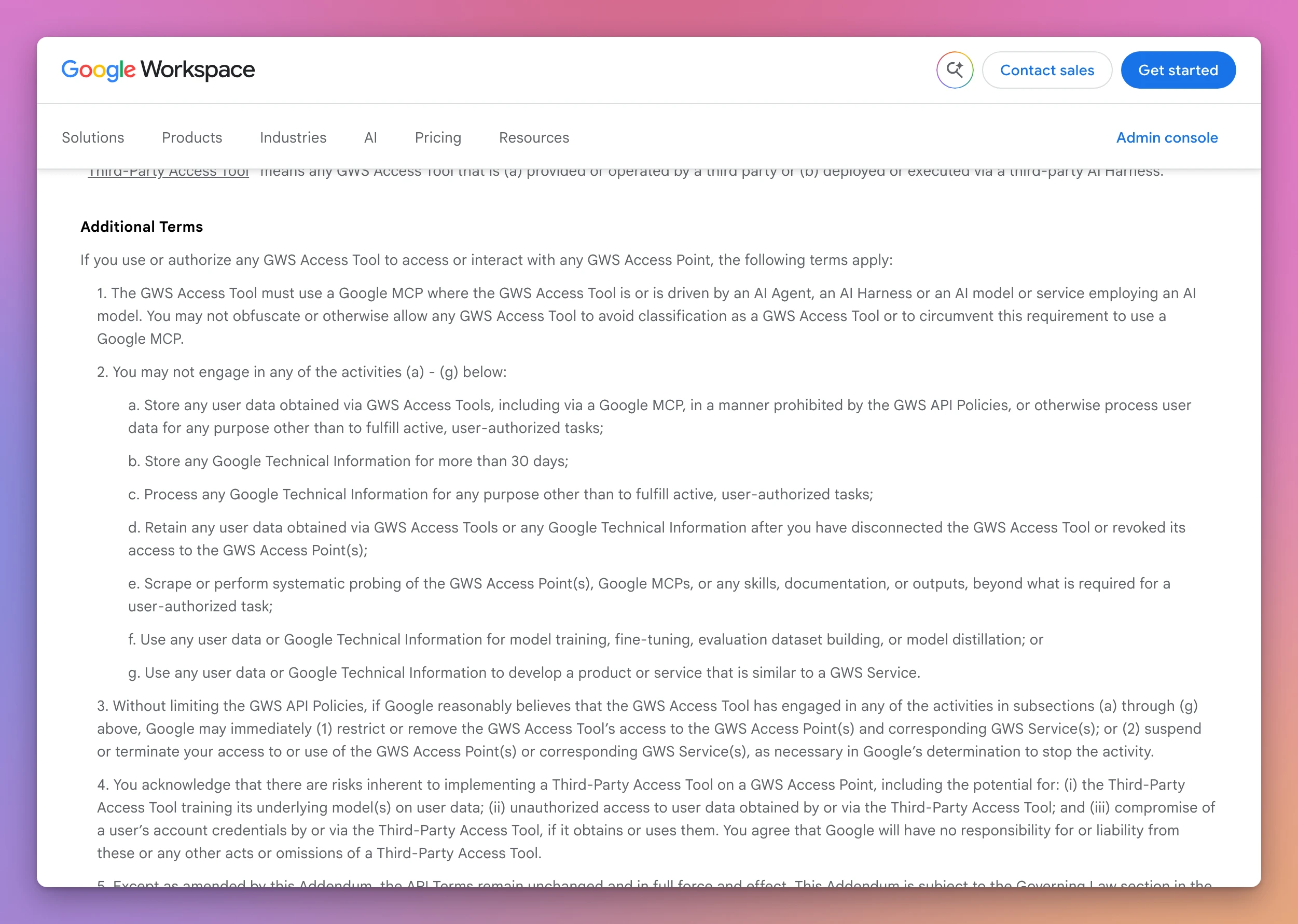
Google backs the legal clause with a technical limit. From February 1, 2027, AI agents that keep calling Workspace REST APIs directly are capped at Standard Tier quotas no matter what tier the Google Cloud project pays for. Violation of the addendum also lets Google cut off the tool’s access or suspend your account.
Traditional software without AI in the loop keeps working as before. A nightly backup script, a deterministic CRM sync, or a standard web integration running on its own OAuth client stays on the REST APIs with no change.
The data retention clauses in Section 2 are just as important for anyone building agent products:
- Active tasks only: you can only process Workspace user data to fulfill active, user-authorized tasks, and you must delete it as soon as the user disconnects or revokes access.
- A 30-day cap on derived memory: you cannot store “Google Technical Information” for more than 30 days. Google defines that term to cover vector embeddings, memory indexes, user profiles, organizational graphs, and findings derived from Workspace data.
- No training or competing products: model training, fine-tuning, evaluation datasets, distillation, systematic probing, and building a product similar to a Workspace service are all prohibited.
If you built an assistant that indexes a user’s past two years of emails or Drive contracts into a persistent vector database, the 30-day rule breaks that architecture. You either drop long-term memory or rebuild the index every month.
Probing the eight live MCP servers
Google’s hosted servers speak standard Model Context Protocol JSON-RPC over HTTPS at https://<product>mcp.googleapis.com/mcp/v1, and they answer tools/list without requiring an OAuth token.
You can query Gmail’s live tool catalog directly with curl:
curl -sS -X POST https://gmailmcp.googleapis.com/mcp/v1 \
  -H "Content-Type: application/json" \
  -H "Accept: application/json, text/event-stream" \
  -d '{"jsonrpc":"2.0","id":1,"method":"tools/list"}' \
  | jq '[.result.tools[].name]'
Here is the exact list of 23 tools the Gmail server returns:
[
  "create_draft",
  "list_drafts",
  "get_draft",
  "get_thread",
  "get_message",
  "search_threads",
  "label_thread",
  "unlabel_thread",
  "apply_sensitive_thread_label",
  "trash_thread",
  "untrash_thread",
  "mark_thread_spam",
  "unmark_thread_spam",
  "list_labels",
  "label_message",
  "update_message_labels",
  "unlabel_message",
  "apply_sensitive_message_label",
  "trash_message",
  "untrash_message",
  "mark_message_spam",
  "unmark_message_spam",
  "create_label"
]
Running that same tools/list call across all eight generally available servers gives a clear picture of what Google shipped and how large the tool schemas are:
| Server | Endpoint | Public tools | Raw tools/list JSON | What works publicly | Missing vs REST API |
|---|---|---|---|---|---|
| Gmail | gmailmcp.googleapis.com/mcp/v1 | 23 | 88,436 bytes | Search/read threads & messages, create/list/get drafts, labels, trash, spam | Send, reply, forward, edit draft, filters, delete/update label (partner-only); attachment download, push watch |
| Drive | drivemcp.googleapis.com/mcp/v1 | 9 | 89,751 bytes | Search, recent files, metadata, permissions read, read/download, create, copy, upload revision | Move, rename, share/change permissions, trash, delete, comments, shared drive admin |
| Docs | docsmcp.googleapis.com/mcp/v1 | 2 | 43,010 bytes | read_doc, update_doc (full batch updates) | Close to parity |
| Sheets | sheetsmcp.googleapis.com/mcp/v1 | 6 | 33,786 bytes | Read metadata/values, write values/formulas, insert rows/columns, batch updates | Creating spreadsheets (use Drive), niche batch operations |
| Slides | slidesmcp.googleapis.com/mcp/v1 | 4 | 37,962 bytes | Read presentation, page, thumbnails, batch update | Close to parity |
| Calendar | calendarmcp.googleapis.com/mcp/v1 | 9 | 119,208 bytes | List calendars/events, search, suggest times, create/update/delete/RSVP | Creating or sharing calendars, calendar settings |
| Chat | chatmcp.googleapis.com/mcp/v1 | 4 | 37,640 bytes | List/search messages, search conversations, send message | Space administration (write calls also need a configured Chat app) |
| Tasks | tasksmcp.googleapis.com/mcp/v1 | 9 | 101,584 bytes | Full CRUD, complete/uncomplete, undelete | Close to parity |
The schema footprint is huge. Connecting all eight servers loads 66 tools totaling 551,377 bytes of JSON definitions (roughly 538 KB, with Calendar alone accounting for 119 KB across 9 tools). Loading all eight into one coding agent burns a massive chunk of context before you even send a prompt.
Gmail and Drive also have glaring workflow gaps. In Gmail, an agent can draft a reply, ask you for feedback, and then get stuck because it cannot edit that draft. It has to leave the old draft behind and create a second one. In Drive, an agent can create or copy a file, yet it cannot move that file into a folder, rename it, share it with a teammate, or move an obsolete copy to Trash.
Partner-only tools are already wired up on Google’s servers
Google’s Gmail API and MCP server quotas page lists eight extra tools with an asterisk: create_filter, delete_label, forward, list_filters, reply, send_message, update_draft, and update_label. The footnote underneath states that those tools “require partner access and aren’t generally available”.
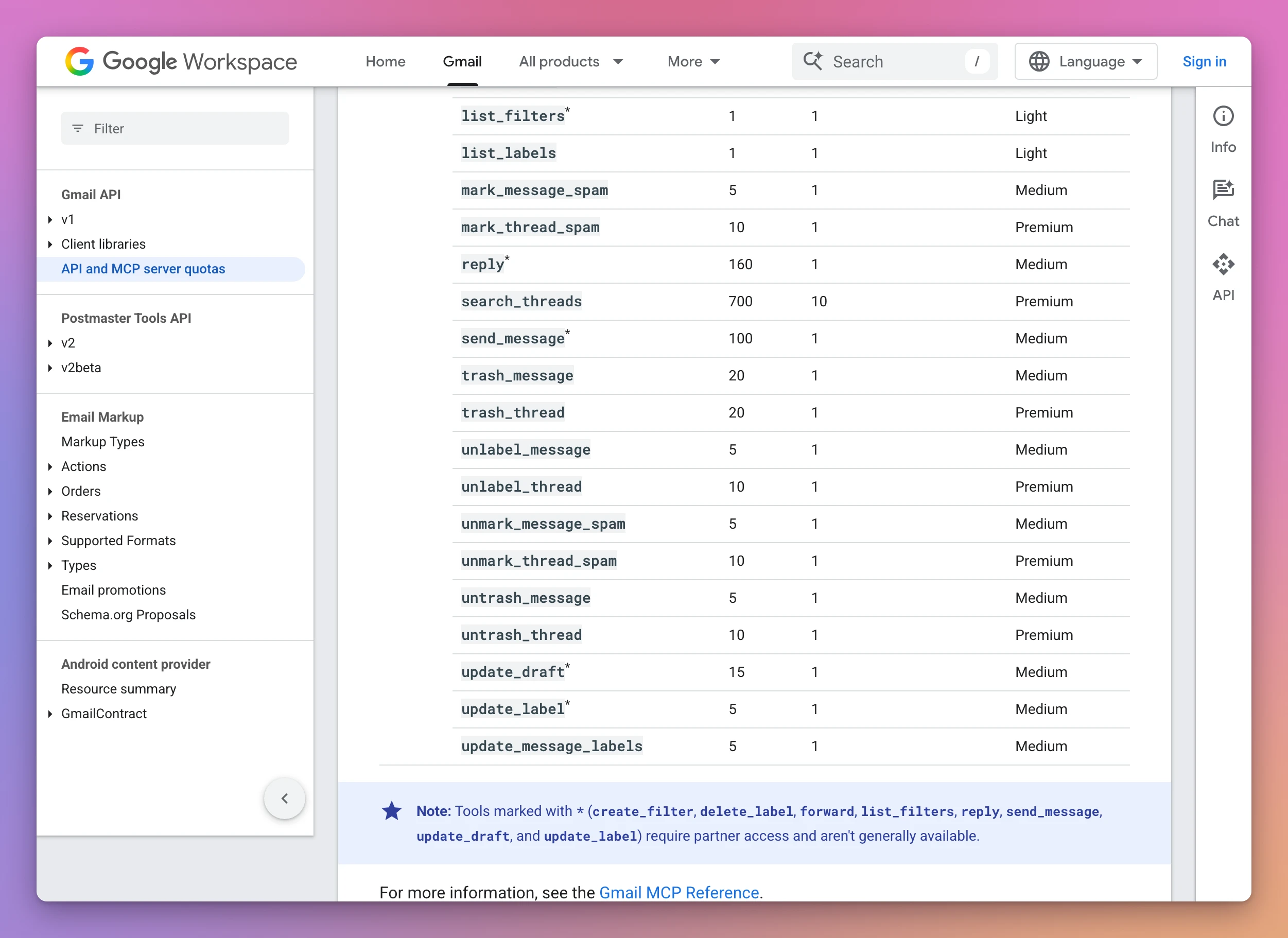
You can verify that those tools live on the exact same server by requesting their RFC 9728 OAuth protected-resource metadata endpoint:
curl -sS https://gmailmcp.googleapis.com/.well-known/oauth-protected-resource/send_messageGoogle returns HTTP 200 with the required scopes, including gmail.send:
{
  "authorization_servers": ["https://accounts.google.com/"],
  "bearer_methods_supported": ["header"],
  "resource": "https://gmailmcp.googleapis.com/mcp",
  "scopes_supported": [
    "https://mail.google.com/",
    "https://www.googleapis.com/auth/gmail.compose",
    "https://www.googleapis.com/auth/gmail.modify",
    "https://www.googleapis.com/auth/gmail.send",
    "https://www.googleapis.com/auth/gmail.send.self"
  ]
}
All eight partner-only Gmail tools return HTTP 200 on that metadata path, while a made-up tool name returns HTTP 404. The endpoints are built and running; Google simply hides them from tools/list unless your OAuth client has partner access.
You can already see the two-tier split in the wild. Anthropic’s Google Workspace connectors for Claude support sending, replying to, and forwarding Gmail messages, plus sharing, moving, and trashing Drive files. Big AI platforms with partner agreements get the full workflow. Independent developers and self-hosted agents get drafts and read-only Drive organization, and after February 1, 2027 they cannot fall back to the REST API without violating the terms.
What about gwscli and the older gws CLI?
Alongside the remote MCP servers, Google shipped gwscli, an official single-binary command-line tool for terminal agents like Claude Code, Codex, and Antigravity.
I downloaded the macOS Apple Silicon binary (gwscli version 1.0.6.1026726559, 11 MB) and ran gwscli gmail --help and gwscli drive --help to see if the CLI exposed anything beyond the MCP endpoints:
gwscli gmail --helpSearch emails, read threads, manage labels, and create drafts
Usage:
gwscli gmail [command]
Available Commands:
apply_sensitive_message_label Prefer `trash_message` or `mark_message_spam` instead.
apply_sensitive_thread_label Prefer `trash_thread` or `mark_thread_spam` instead.
create_draft Creates a new draft email in the authenticated user's Gmail account.
create_label Creates a new label in the authenticated user's Gmail account.
get_draft Retrieves a specific draft email ...
get_message Retrieves a specific email message ...
get_thread Retrieves a specific email thread ...
... (23 commands total; no send, reply, forward, or update_draft)It matches the MCP server one-for-one because gwscli talks to the same *.googleapis.com/mcp/v1 endpoints under the hood. gwscli drive --help shows the exact same 9 Drive commands, with no move, rename, share, or trash.
If you have been using the community gws CLI that wraps Google’s REST Discovery Service, its README now carries a notice directing agent traffic to gwscli. The community tool keeps working for human terminal use and scripts, though using it behind an AI agent after February 1, 2027 puts you on the wrong side of the addendum.
Agent OAuth clients, edge cases, and the new billing math
To call any Workspace MCP server, your user-delegated OAuth 2.0 client ID in Google Cloud must have the “Use this client for an AI-powered agent” option enabled under Google Auth Platform > Clients. The MCP servers reject requests from clients without it. If your existing OAuth client also serves non-agent features, or won’t let you toggle the setting, Google tells you to create a separate OAuth client ID for the agent.
For personal use on your own Google account, Google added a Quick setup for personal mode flow in the Cloud Console that creates a pre-configured agentic OAuth client without going through full OAuth app verification. Two edge cases remain documented in the MCP configuration guide: service accounts using domain-wide delegation cannot set the agentic flag (they aren’t rejected for missing it, though sensitive actions still trigger approval prompts), and Apps Script’s built-in default OAuth client cannot be marked as agentic, so scripts calling MCP servers need a custom OAuth client.
Then there is the pricing rollout on April 1, 2027, documented on Google’s API and MCP server pricing and billing tiers page.
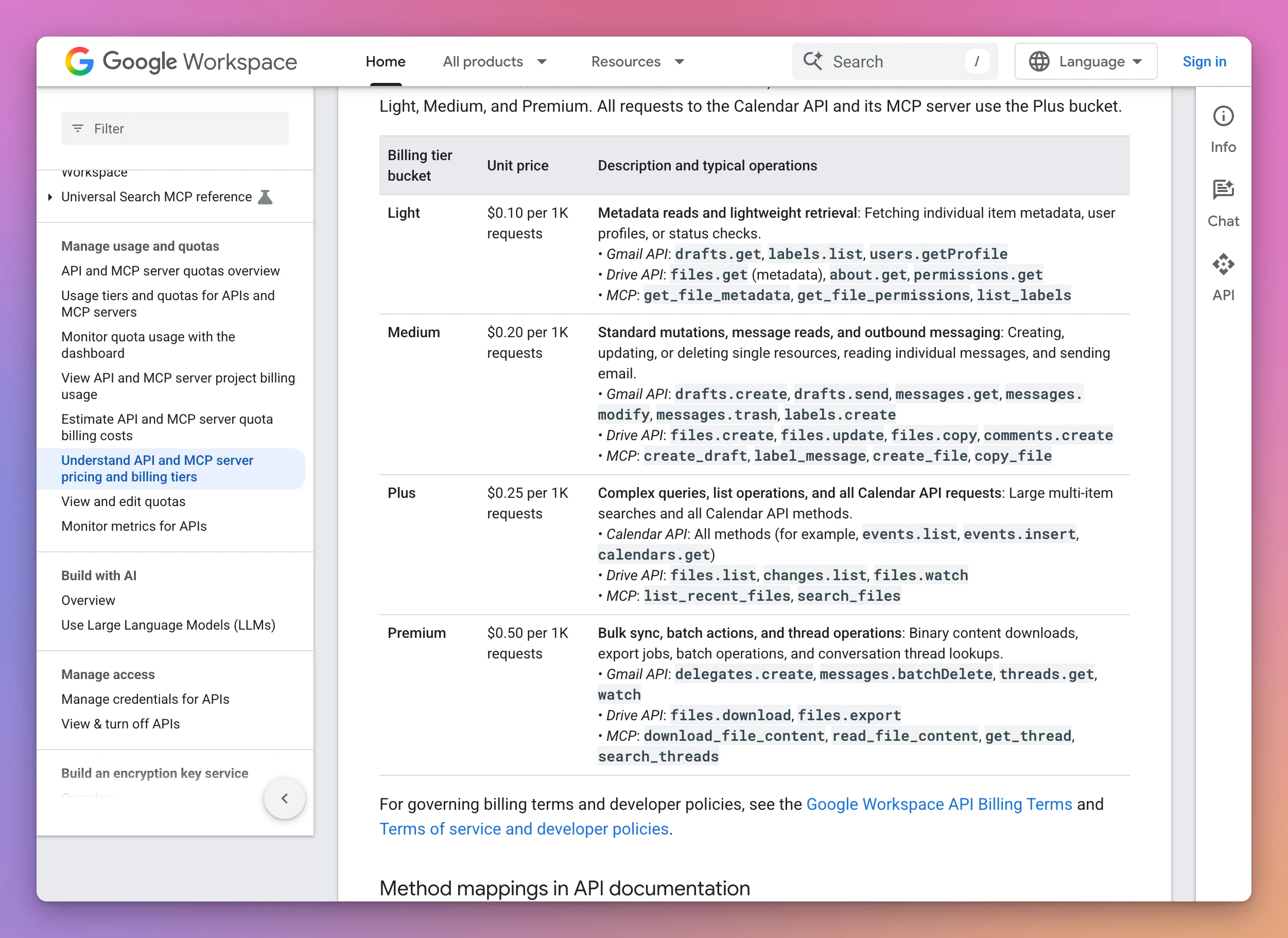
Google divides projects into a free Standard Tier and a paid Scaled Tier (applied to the entire Google Cloud project, not per API). The asymmetry between REST and MCP on the Scaled Tier is striking:
| Dimension | Workspace REST APIs (Scaled Tier) | Workspace MCP Servers (Standard vs Scaled Tier) |
|---|---|---|
| Free daily allowance | 70M Light, 10M Medium, 1M Premium requests/day (Gmail) | Standard: 5,000 requests/day per project per product. Scaled: 0 free requests/day |
| Unit prices (per 1K units) | Light $0.10, Medium $0.20, Plus $0.25, Premium $0.50 | Same 4 buckets: Light $0.10, Medium $0.20, Plus $0.25, Premium $0.50 |
| Composite call multiplier | 1 request per REST call (varying quota units) | search_threads and list_drafts count as 10 billing units per call |
| Failed calls | 4xx/5xx not billed | HTTP 200 JSON-RPC responses with isError: true count toward billing |
| Internal-use quota exception | Available for org-internal REST projects | Not eligible for MCP server quota increases |
| Allowed for AI agents (Feb 1, 2027+) | No (breach of terms + capped at Standard Tier) | Yes |
Do the math on Gmail search. On the free Standard Tier, search_threads counts as 10 requests against the 5,000-request daily project cap. That is 500 searches per day across every user of your app combined.
The moment you upgrade the project to Scaled Tier to lift that cap, your free MCP allowance drops to zero. Every search_threads call sits in the Premium bucket ($0.50 per 1,000 units) and costs 10 units, which comes out to $5.00 per 1,000 searches. Even a malformed tools/call that returns HTTP 200 with isError: true in the JSON-RPC body gets billed. Meanwhile, a traditional app calling the Gmail REST API on the exact same Scaled Tier gets 1,000,000 free Premium calls a day before paying a cent.
Why Google did this (and the Slack precedent)
In their Google Cloud security announcement, Workspace engineering VP Chandu Thota and Google Cloud president Brad Calder lay out a real security problem. Workspace APIs handle more than 2.8 trillion calls per month. OAuth was built for human-paced web apps where a valid token meant a person clicked a button. An autonomous agent reading an untrusted email can be hijacked by prompt injection and abuse a broad gmail.modify token at machine speed.
Routing agents through Google’s MCP servers puts Workspace DLP rules, admin audit logs, Model Armor prompt-injection screening, and MCP form elicitation (human confirmation prompts before risky writes) directly in the request path. That is a real improvement over handing an autonomous loop raw OAuth tokens, for the same reasons I wrote about when preventing AI agents from taking irreversible actions.
At the same time, that gateway gives Google control it never had over plain REST clients:
- It decides which AI vendors get partner access to send email or manage Drive files, and which independent builders stay on drafts.
- It enforces a 30-day ceiling on embeddings and memory indexes, limiting long-term agent products built on Workspace data.
- It taxes agent traffic from the first request on Scaled Tier while keeping REST generous for traditional apps.
We saw a similar move from Slack in May 2025, when it throttled conversations.history and conversations.replies to 1 request per minute and 15 objects per call for non-Marketplace commercial apps to curb bulk LLM ingestion. Slack drew the boundary at its app marketplace. Google is drawing it at whether an AI model is driving the client, which is much harder to define and gives platforms a blueprint for gating agent access to user data.
How I would use this right now
I haven’t migrated a production Workspace app onto these servers yet, and looking at the live endpoints and pricing rules, my approach depends on what you are building.
For personal coding-agent workflows against your own Google account, I would use gwscli instead of wiring all eight remote MCP servers into your agent config. Connecting all eight remote servers dumps 551 KB of JSON tool schemas into context. Calling gwscli on demand from the shell keeps your context clean, matching the tradeoff I ran into when I replaced my Things MCP server with a CLI. Using gwscli for reading threads, searching Drive, creating Gmail drafts that you review and send yourself, checking calendar slots, and editing Docs or Tasks works well today and stays inside the free 5,000-request daily limit for a single user.
I would not build an independent multi-user email or Drive automation SaaS on Workspace MCP right now unless Google grants you partner access first. Without send_message, reply, forward, update_draft, or Drive move/share/trash, core workflows break, the 5,000-request project-wide free cap disappears fast with real users, and the 30-day cap on embeddings blocks any product that relies on persistent inbox memory.
If you are shipping an agent product that already uses Workspace REST APIs, you have until February 1, 2027 to create an agent-flagged OAuth client, audit which tools you depend on that are missing from the public MCP catalog, and decide whether to apply for partner access or narrow your feature set to what the public servers allow.
If you want to understand how MCP servers, OAuth scopes, and safe tool design fit together under the hood, check out my free MCP Server Handbook (and how to design an MCP server for your own product) along with the Web & API Security Handbook.
Want me to talk about your product? You can sponsor this site.
Related posts about ai: