The Next.js App Bundles
By Flavio Copes
Learn how Next.js 16 App Router splits your app into per-route client references and shared chunks, and what those scripts are for.
When you view the page source of a Next.js 16 app, you still see a bunch of JavaScript files being loaded. Those are the app bundles: Next.js splits your application code so the browser only downloads what each route needs.
The screenshot and HTML below come from a Pages Router dev build I took in 2019. The filenames changed since then, the idea did not: separate chunks, preloaded early, plus a small payload the client uses to hydrate.
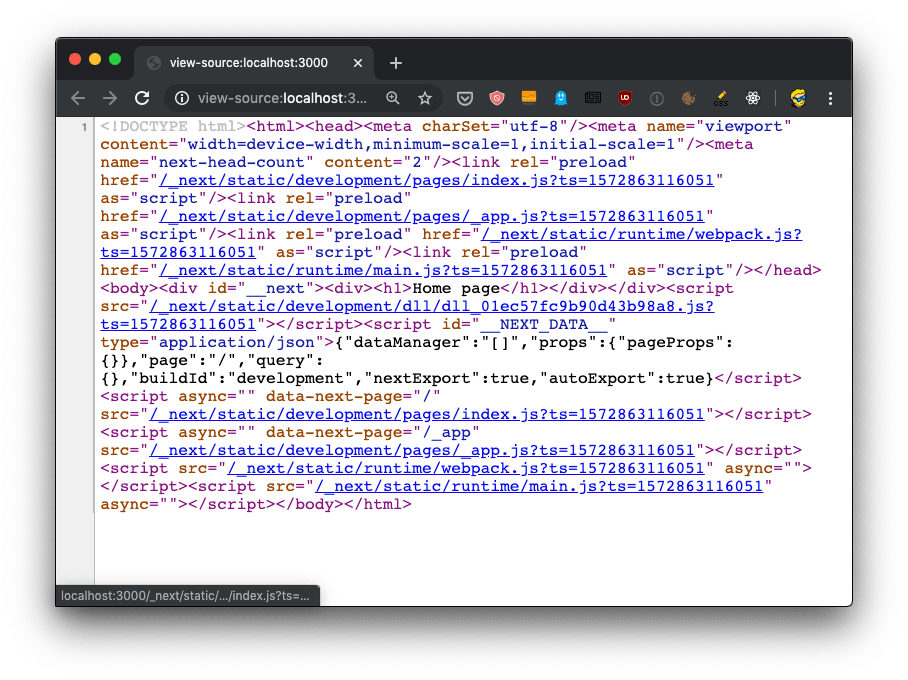
What a Next.js 16 App Router response looks like
In Next.js 16 with the App Router, the document loads hashed scripts from /_next/static/chunks/. Some hold the React and Next.js client runtime, some hold modules shared by more than one route, and some hold the Client Components of the layout and page you opened. Preload hints in the head let the browser start fetching the important ones early.
The page also carries the React Server Components payload inline (the “flight” data), so the client can hydrate what the server rendered without fetching the tree again.
Server Components never end up in those chunks. Their code runs on the server and only the rendered output reaches the browser. What you download for a route is the client code that route needs, plus the shared chunks.
The hashed filenames change on every build, so there’s no point memorizing them. Open the Network panel on a production deploy and you’ll see chunk URLs with content hashes, which is what lets browsers cache them for a long time.
An older Pages Router example
Here’s the 2019 document from the screenshot, run through an HTML formatter so we humans have a better chance at reading it:
<!DOCTYPE html>
<html>

<head>
    <meta charSet="utf-8" />
    <meta name="viewport" content="width=device-width,minimum-scale=1,initial-scale=1" />
    <meta name="next-head-count" content="2" />
    <link rel="preload" href="/_next/static/development/pages/index.js?ts=1572863116051" as="script" />
    <link rel="preload" href="/_next/static/development/pages/_app.js?ts=1572863116051" as="script" />
    <link rel="preload" href="/_next/static/runtime/webpack.js?ts=1572863116051" as="script" />
    <link rel="preload" href="/_next/static/runtime/main.js?ts=1572863116051" as="script" />
</head>

<body>
    <div id="__next">
        <div>
            <h1>Home page</h1></div>
    </div>
    <script src="/_next/static/development/dll/dll_01ec57fc9b90d43b98a8.js?ts=1572863116051"></script>
    <script id="__NEXT_DATA__" type="application/json">{"dataManager":"[]","props":{"pageProps":{}},"page":"/","query":{},"buildId":"development","nextExport":true,"autoExport":true}</script>
    <script async="" data-next-page="/" src="/_next/static/development/pages/index.js?ts=1572863116051"></script>
    <script async="" data-next-page="/_app" src="/_next/static/development/pages/_app.js?ts=1572863116051"></script>
    <script src="/_next/static/runtime/webpack.js?ts=1572863116051" async=""></script>
    <script src="/_next/static/runtime/main.js?ts=1572863116051" async=""></script>
</body>

</html>
What are those 4 files?
We have 4 JavaScript files being declared to be preloaded in the head, using rel="preload" as="script":
/_next/static/development/pages/index.js(96 LOC)/_next/static/development/pages/_app.js(5900 LOC)/_next/static/runtime/webpack.js(939 LOC)/_next/static/runtime/main.js(12k LOC)
Each one has a specific job.
index.js contains the code of the page component serving the / route. It’s tiny, because it only holds the code you wrote for that page.
_app.js contains the App component, the wrapper that Next.js renders around every page. Anything you put there loads on every route.
webpack.js is the webpack runtime, the glue code that lets the bundles find and load each other.
main.js is the Next.js client-side code. It bootstraps the app in the browser, hydrates the server-rendered HTML, and handles client-side routing.
The preload hint tells the browser to start downloading those files as soon as possible, before the normal rendering flow reaches the script tags at the end of the body. This improves the page loading performance.
The page data
Then those 4 files are loaded at the end of the body, along with /_next/static/development/dll/dll_01ec57fc9b90d43b98a8.js (31k LOC), and a JSON snippet that sets some defaults for the page data:
<script id="__NEXT_DATA__" type="application/json">
{
  "dataManager": "[]",
  "props": {
    "pageProps":  {}
  },
  "page": "/",
  "query": {},
  "buildId": "development",
  "nextExport": true,
  "autoExport": true
}
</script>
Next.js reads this JSON during hydration. It’s how the client-side code knows which page it’s on and which props the server used, so React can take over the static HTML without re-fetching anything.
The App Router replaced __NEXT_DATA__ and the pages/* script list with the flight data I described above. The goal is the same: reuse what the server already rendered.
Code splitting
Both versions implement one feature called code splitting. In the old document, index.js only holds the code for the / route. In an App Router app, the route’s Client Components get their own chunk. Either way, a visitor landing on / never downloads the code that only /contact needs, which keeps the initial load fast even as the app grows.
These are development bundles, which is why they are so big. In production, Next.js minifies them and adds a content hash to each filename, so browsers can cache them for a long time.
One thing to watch out for: since _app.js wrapped every page, a heavy library imported there got shipped to every single route. The same holds for app/layout.tsx today. Anything a shared layout imports on the client ships to every route under it. If only one page needs a chart library, import it in that page’s Client Component instead, so the other pages don’t pay for it.
Want me to talk about your product? You can sponsor this site.
Related posts about next: