A deep dive into Clairic
By Flavio
Tagged: Cloudflare
Extract typed values from text, screenshots, and PDFs with Clairic on Cloudflare Workers AI. Build a Worker and learn how to check the model's answers.
I gave Cloudflare’s new extraction model six sentences about its own launch and asked it one easy question: what’s the standard price?
It answered 0.1, with no error and no warning. The response even said valid: true.
The right answer is 0.24. Clairic costs $0.10 per million input tokens until November 30 and $0.24 after that, and my paragraph mentions both, so the model grabbed the promotional one. If I’d been importing price lists, that wrong number would be sitting in my database right now, looking exactly like a right one.
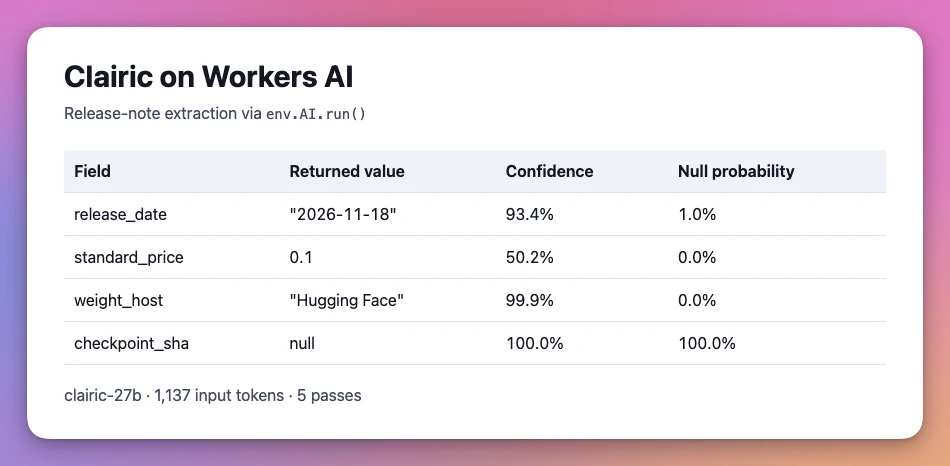
What makes Clairic worth a closer look is that it also told me it wasn’t sure. The wrong price came back with 50% confidence and no link to any span of the source text. In the same run, the release date was correct, and a commit SHA the text never mentions came back as null, scored with high confidence.
So in this post we’ll build a Worker that calls Clairic, read the evidence it returns next to each value, get the right price out of it two different ways, and then point it at a screenshot and a PDF. Cloudflare’s release announcement
What is Clairic?
Clairic is an extraction model in preview on Workers AI. Give it a source and a description of the fields you want. It returns an answer for each field.
The source is called the state. It can be a piece of text, and the hosted 27B model also accepts images and PDFs. The fields describe the output. You can ask for dates, numbers, booleans, text, lists, and more. Each field can have its own instructions, like “use the standard price after the promotion.” You can also ask for a bounded estimate or several steps of a forecast. Clairic model reference
Cloudflare calls Clairic a System One model. It acts as a specialist for one step of an application. A chatbot can write an explanation of the new prices. Clairic can fill a field your program already knows how to validate and store. Cloudflare’s guide to extraction models
Run Clairic from a Worker
We’ll keep the example small enough to try from the terminal. The Worker reads a fixed summary of Cloudflare’s own release note. By the end we’ll see which fields match the article and why one goes wrong.
Create a directory and install Wrangler. If Wrangler needs you to sign in, run npx wrangler login first.
mkdir clairic-release && cd clairic-release
npm init -y
npm install --save-dev wrangler
Save this as wrangler.jsonc. The AI binding is how the Worker reaches Workers AI. With remote: true, Wrangler runs the Worker locally and sends inference to Cloudflare. Those requests count as real model usage. Workers AI bindings documentation
{
  "name": "clairic-tutorial",
  "main": "worker.js",
  "compatibility_date": "2026-09-18",
  "ai": { "binding": "AI", "remote": true }
}
Save the request as release.json. Here model selects the Clairic variant, state contains the material to read, and fields maps the keys we want to their field specs.
{
  "model": "clairic",
  "state": "Cloudflare released the new Clairic on November 18, 2026. Clairic has 27 billion parameters. Its standard price is $0.24 per million input tokens. Clairic-flash has 9 billion parameters and costs $0.10 per million input tokens. Both cost $0.10 per million input tokens through November 30. Cloudflare published the weights on Hugging Face.",
  "fields": {
    "release_date": {
      "type": "date",
      "instructions": "Date Cloudflare released the new Clairic model"
    },
    "standard_price": {
      "type": "number",
      "unit": "USD per million input tokens",
      "decimals": 2,
      "instructions": "Clairic standard price after the promotion. Exclude Clairic-flash."
    },
    "weight_host": {
      "type": "text",
      "instructions": "Name of the site where the model weights were published"
    },
    "checkpoint_sha": {
      "type": "text",
      "instructions": "Exact Git commit SHA of the Clairic checkpoint, only if given"
    }
  }
}
In worker.js, call the model by its full Workers AI ID. The binding uses the account you’re signed in to, so this code needs no API token.
import extraction from './release.json'

export default {
  async fetch(request, env) {
    const { pathname } = new URL(request.url)

    if (pathname !== '/extract' || request.method !== 'GET') {
      return new Response('Not found', { status: 404 })
    }

    const result = await env.AI.run('@cf/cloudflare/clairic', extraction)
    return Response.json(result)
  }
}
Run npx wrangler dev and open another terminal. I used jq to print the parts of the reply I wanted to inspect.
curl -fsS http://localhost:8787/extract | jq '{
  model,
  answers: (.answers | map_values(.value)),
  truncated
}'
This was the output on Workers AI.
{
  "model": "clairic-27b",
  "answers": {
    "release_date": "2026-11-18",
    "standard_price": 0.1,
    "weight_host": "Hugging Face",
    "checkpoint_sha": null
  },
  "truncated": false
}
You can also run the same request from an HTTP client. For REST, use your Cloudflare account ID and a Workers AI API token. If you create a custom token, Cloudflare’s quickstart calls for both Workers AI - Read and Workers AI - Edit. The answers are under result.answers. Workers AI REST quickstart
curl --fail-with-body --silent --show-error \
  "https://api.cloudflare.com/client/v4/accounts/$CLOUDFLARE_ACCOUNT_ID/ai/run/@cf/cloudflare/clairic" \
  -H "Authorization: Bearer $CLOUDFLARE_API_TOKEN" \
  -H "Content-Type: application/json" \
  --data-binary @release.json
If the API returns HTTP 401, check that the token has access to the account in the URL. The Wrangler example uses the credentials from your Wrangler login.
The free Cloudflare course’s Workers AI lesson goes into bindings, model selection, and handling inference failures.
Read the evidence around each value
The browser view rounded the confidence for weight_host to 99.9%. In the actual Worker response, the field also had a span of [326, 338]. Those offsets locate “Hugging Face” in the original text. For this input, which uses only ASCII, state.slice(326, 338) gives the same string.
Here is what I use each part of the reply for.
| Part of the reply | What it tells you |
|---|---|
value | The model’s answer in the requested type, or null. This is the field your application should consume. |
confidence | The model’s score for its answer. Compare scores against the results on your own test data before choosing a cutoff. |
p_null | The model’s estimate that the source has no answer. The missing SHA came back with p_null close to 1. |
span | Where the answer matched the source text, when the decoder reports a match. Keep the original text if you want to highlight it. |
valid and complete | Status flags on generated answers. Other field types, including date, can have different metadata. |
truncated | A request-level signal for invalid or incomplete generated output. Inspect individual fields before using their values. |
Now look at the wrong price again. It had valid: true, complete: true, a confidence of about 50.2%, and no span. It satisfied the numeric schema, so the flags were fine, and only the score and the missing span hinted at a problem. The null SHA answer, on the other hand, scored high, so a confident answer can also be a confident “not in the text”.
For a real importer, I’d test this against a small set of documents where I know the answers. I’d include missing fields, two similar values, and revised pages where a number used to mean something else. I’d route required fields with no value to review. Where a field affects billing, I’d cross-check it against a known price or keep it out of the billing path.
Give the field less text to choose from
I ran the same request on Clairic-flash. I changed the binding’s target to @cf/cloudflare/clairic-flash and the payload’s model to clairic-flash. It pulled out the correct price on this input.
Then I switched back to the 27B model. I asked for one field and gave it one sentence.
{
  "model": "clairic",
  "state": "Clairic standard pricing from December 1, 2026 is $0.24 per million input tokens.",
  "fields": {
    "standard_price": {
      "type": "number",
      "unit": "USD per million input tokens",
      "decimals": 2,
      "instructions": "Printed standard price of Clairic."
    }
  }
}
All three runs used the live Workers AI binding. The correct answer for the release note is 0.24.
| Run | Returned price | Model confidence | Input tokens |
|---|---|---|---|
| Clairic 27B, full note and four fields | 0.10 | 50.2% | 1,137 |
| Clairic-flash 9B, full note and four fields | 0.24 | 73.9% | 1,167 |
| Clairic 27B, one sentence and one field | 0.24 | 98.6% | 149 |
The chart isolates the two 27B calls. The reduced request used about 87% fewer input tokens in this run.
The smaller model did better on this field. I’d run both against a set of documents before choosing one. The reduced request also cost less because I sent fewer source and schema tokens. If I already know which paragraph holds the price, I can pass just that paragraph and keep the rest of the document for review.
There is also a source_only option for some field types, including numbers and dates. I tried adding "source_only": true to the same reduced number field. In that run, Clairic returned value: null, valid: false, and truncated: true. I treat this option as a constraint to test against my documents and still check the reply. Cloudflare’s open-weight Clairic model card
Extract from an image or PDF
The same field schema applies to media. I captured two rows of Cloudflare’s pricing table and asked Clairic for the two standard rates and the promotion’s end date. The text state tells the model which screenshot it’s looking at. The prices and date appear only in the image. Cloudflare’s Workers AI pricing table
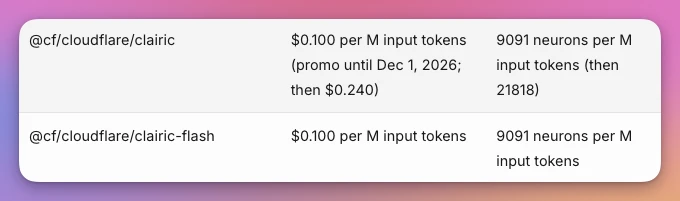
To run it with the same image, download the screenshot and use base64 and jq to make the request.
curl -fsSLo pricing-source.webp \
  https://flaviocopes.com/images/clairic/pricing-source.webp

base64 < pricing-source.webp | tr -d '\n' | jq -Rs '{
  model: "clairic",
  state: "This screenshot shows two rows of Cloudflare Workers AI pricing. Read the model IDs exactly.",
  images: [{content_type: "image/webp", base64: .}],
  fields: {
    flash_rate: {
      type: "number", unit: "USD per million input tokens", decimals: 3,
      instructions: "Printed dollar price in the @cf/cloudflare/clairic-flash row."
    },
    standard_rate: {
      type: "number", unit: "USD per million input tokens", decimals: 3,
      instructions: "Dollar price following the word then in the @cf/cloudflare/clairic row."
    },
    promo_end: {
      type: "date", instructions: "Date the Clairic promotion ends, shown in its row."
    }
  }
}' > pricing.json
Change the import in worker.js to import extraction from './pricing.json' and call /extract again. All three values matched the screenshot. In this response each answer’s text span was null, because the values came from the image. To review a result, keep the image or a link to the source alongside the output.
curl -fsS http://localhost:8787/extract | jq '{
  answers: (.answers | map_values(.value)),
  usage: (.usage | {image_tokens, input_tokens, passes})
}'
{
"answers": {
"flash_rate": 0.1,
"standard_rate": 0.24,
"promo_end": "2026-12-01"
},
"usage": {
"image_tokens": 126,
"input_tokens": 908,
"passes": 12
}
}I also ran the same fields on the original crop before adding the backdrop. That used 100 image tokens and 830 total input tokens, with the same answers, so cropping to the part of the page you care about saves tokens too.
For a PDF, put the base64 data under documents. To test the same source as a PDF, I converted the screenshot to a one-page file with macOS’s built-in sips and reused the rest of pricing.json.
sips -s format pdf pricing-source.webp --out pricing-source.pdf

base64 < pricing-source.pdf | tr -d '\n' |
  jq -Rs --slurpfile request pricing.json '
    . as $file
    | $request[0]
    | del(.images)
    | .documents = [{content_type: "application/pdf", base64: $file}]
  ' > pricing-pdf.json
With pricing-pdf.json imported in the Worker, Clairic returned the same three values. This time it reported 546 image tokens and 2,168 total input tokens. Cloudflare renders each PDF page to an image, so changing the file format can change the number of tokens consumed.
Cloudflare caps requests at four images or rendered pages combined, with limits of 4 MiB per file, 8 MiB of decoded media in total, and 16 MiB for the request body. Split longer PDFs at useful page boundaries, like one receipt per page. Clairic media parameters
Extract, compute, estimate, or forecast
I start with the question I need the field to answer.
- Use a typed extraction field when the input contains the answer. A release date is a
date. A price is anumber. - Use
computefor a numeric result derived from the text. If your program already has verified quantities and prices, do the arithmetic in code. - Use
estimatefor an unknown number where the input gives relevant evidence, like the comparable sales Cloudflare used for its repair and valuation examples. Give the model a range it should work within. - Use
forecastfor several time-indexed values. Specify the horizon and interval, and test the predictions on historical data before relying on them.
For estimates and forecasts, look at the interval alongside the point value. In Cloudflare’s example using daily TSA passenger counts, the October 14 prediction had a median of 2,419,283, with a p10 of 2,270,774 and a p90 of 2,556,769. The actual count was 2,419,474. Across 21 days, 17 actual counts fell inside the model’s interval. A wide interval can move a record into a review queue even when the point forecast looks plausible. Cloudflare’s forecasting experiment
Measure the cost of the whole request
Workers AI bills Clairic for input tokens, including media tokens. The standard Clairic rate is $0.24 per million input tokens from December 1, 2026. The preceding promotion and Clairic-flash both use $0.10 per million input tokens. Output tokens appear in usage and carry no model charge. Workers AI pricing
The important number to collect is usage.input_tokens. Read it together with usage.passes. The full release-note request had 89 state tokens, but Workers AI reported 1,137 input tokens across five passes, including schema tokens and repeated work. Cloudflare documents that passes can reread the same text and images. Measure a representative batch before estimating costs from the size of one PDF.
At the standard rate, 10,000 calls using exactly 1,137 input tokens each would amount to 11.37 million input tokens, or about $2.73 in Clairic inference. That’s before any free allocation or cost for the rest of the application.
How I would use Clairic
I would use it to turn release announcements, order confirmations, or scans into records I can review. I’d save the source beside each record and show the matched excerpt where the model returns a span. If a number came from an image, I’d show the page next to it.
For a changelog import I’d keep the first schema small. A release date and a version are useful fields. If the date is missing or several versions are mentioned, the review screen should show that before the record gets published. If the data already comes from a versioned API or a stable CSV, I’d parse that format directly. Clairic is most useful when people are already reading the source by hand.
Want me to talk about your product? You can sponsor this site.
Related posts about cloudflare: