Help your coding agent find the CLI tools you already installed
By Flavio
Updated
Let a coding agent search your installed commands with clitools, read what a tool can do, and check its flags before it writes a script or guesses an option.
Ask a coding agent to add a sound to your app and it starts writing a script, or searches npm for a package. Meanwhile there’s a command on your Mac that does exactly that, and the agent doesn’t know it exists.
CLI Tools Cabinet keeps a catalog of every command-line tool you installed, and its clitools command lets an agent search it. We’ll follow one task from start to finish, exporting a button sound, with the real output from my Mac.
Building the catalog itself, and what each source means, is in List every command-line tool you installed with Homebrew, npm and Cargo. Here I assume clitools is installed and you ran clitools scan once.
Search by what you want to do
An agent doesn’t know the tool’s name, but it knows the task. Search takes a word:
clitools search sound blips Local 1.2.0 A library of about 6,000 8-bit sound effects made with jsfxr, each clearly different from the others in its category: interface sounds like click, success and error, game sounds, combos like sent and trash, and jingles like fanfare and countdown, to find, play and copy into apps.blips is the command of my app Chip Pops. Search matches names, commands, packages and descriptions, and it includes archived tools.
An agent should add --json. Don’t hand it the whole catalog instead: clitools list --json is 305 KB for my 133 tools, and the agent needs one of them.
| Command | JSON size on my Mac | What the agent gets |
|---|---|---|
clitools list --json | 305 KB | Every tool, with help text and examples |
clitools capabilities --all --json | 81 KB | What 20 tools say they can do |
clitools search sound --json | 5.8 KB | The tools that match the task |
clitools show blips --json | 5.6 KB | One tool’s cached details |
clitools capabilities blips --json | 3.5 KB | One tool’s tasks, with a command for each |
Read what the catalog knows, then refresh it
show reads the catalog and doesn’t run anything:
clitools show blipsblips
A library of about 6,000 8-bit sound effects made with jsfxr, ...
Source: Local
Version: blips 1.2.0
Package: Chip Pops
Path: /Users/flaviocopes/.local/bin/blips
Resolves to: /Users/flaviocopes/dev/chip-pops/dist/Chip Pops.app/Contents/Helpers/blips
Installed: Nov 5, 2026Notice the version. blips is at 1.3.1 now, and show still says 1.2.0, from the last time the catalog looked at it. inspect fixes that. It runs the tool with --version and --help, fetches its examples, and saves the result:
clitools inspect blips --no-helpblips
A library of about 6,000 8-bit sound effects made with jsfxr, ...
Source: Local
Version: blips 1.3.1
...--no-help leaves the full help text out of the output. Inspect runs the tool, so only inspect tools you trust. In the app, selecting a tool inspects it.
Ask the tool what it can do
Some tools answer a capabilities command with a summary, the tasks they handle with a command for each, and a changelog. All my own CLIs answer it, and clitools describes itself the same way:
clitools capabilitiesclitools 1.6.1
Discover the CLI tools installed on this Mac, and find the one that can do a task.
What it can do:
See what every installed tool that supports 'capabilities' can do, in one call
$ clitools capabilities --all --json
Find a tool by name, package, description, or what it can do
$ clitools search slideshow --json
...Ask a tool through clitools and the answer is saved in the catalog:
clitools capabilities blipsblips 1.3.1
...
What it can do:
List the sound categories: interface sounds, game sounds, combos and jingles
$ blips categories --json
Find sound effects in a category, by tag like soft or rising, or by words
$ blips list --category success --tag soft --json
Play sound effects to hear them before picking one
$ blips play success-003 success-007
Copy a sound effect into an app's resources, with the name the app uses
$ blips export success-003 --to Resources/Sounds --name saved.wav
...clitools only asks tools whose help lists a capabilities command. Running claude capabilities would start a Claude Code session with “capabilities” as the prompt, so it doesn’t guess. For any other tool you get an error and a pointer to show:
Error: gh doesn't support 'capabilities'. Run 'clitools show gh' to see what the catalog knows.To get every answer in one call:
clitools capabilities --all --jsonThat asks again every tool that answered before, so the list is fresh. On my Mac it’s 20 tools and takes about a second and a half. A tool you just installed joins after clitools capabilities <tool> or clitools inspect <tool> asked it once.
Check the flags before running
The capabilities list says which command does the task. The tool’s own help says which flags it takes:
blips help exportCopy sounds into a folder, like an app's resources.
Usage: blips export <sound or category>... --to <folder> [--name <file name>] [--format wav|m4a|caf|aiff] [--seed <n>] [--json]
Files are named after the sound, like success-003.wav. --name renames a single sound, so an app
can call it what it is. --format converts the sound with afconvert. ...This step is what stops an agent from inventing an option. Here’s what happens when it guesses --output-dir:
blips export success-011 --output-dir public/soundsblips: 'export' has no --output-dir option. Usage: blips export <sound or category>... --to <folder> [--name <file name>] [--format wav|m4a|caf|aiff] [--seed <n>] [--json]With the help in front of it, the agent writes the right command:
blips export success-011 --to public/sounds --name saved.wavThat replaces an existing saved.wav, so the agent should check the folder first. Picking the sound itself is a listening job, covered in Add a button sound with Chip Pops and a few lines of HTML.
Put it in your agent instructions
Add this to your project’s AGENTS.md or CLAUDE.md:
Before writing a script or installing a new tool, search the installed
tools with `clitools search <task> --json`. If a tool matches, read
`clitools capabilities <tool> --json`, then the help of the command you
will run. Use only flags the help lists. If nothing matches, tell me
what's missing before choosing another approach.
My own AGENTS.md tells agents to run clitools capabilities --all --json before they write a script or ask me.
The agent-readable CLI glossary entry explains what a command should expose for an agent to use it.
See how agents ran a tool before
The app’s detail pane can also show how your agents used a tool. Under Agent History, click Find agent runs and it reads the local Cursor, Codex and Claude Code transcripts.
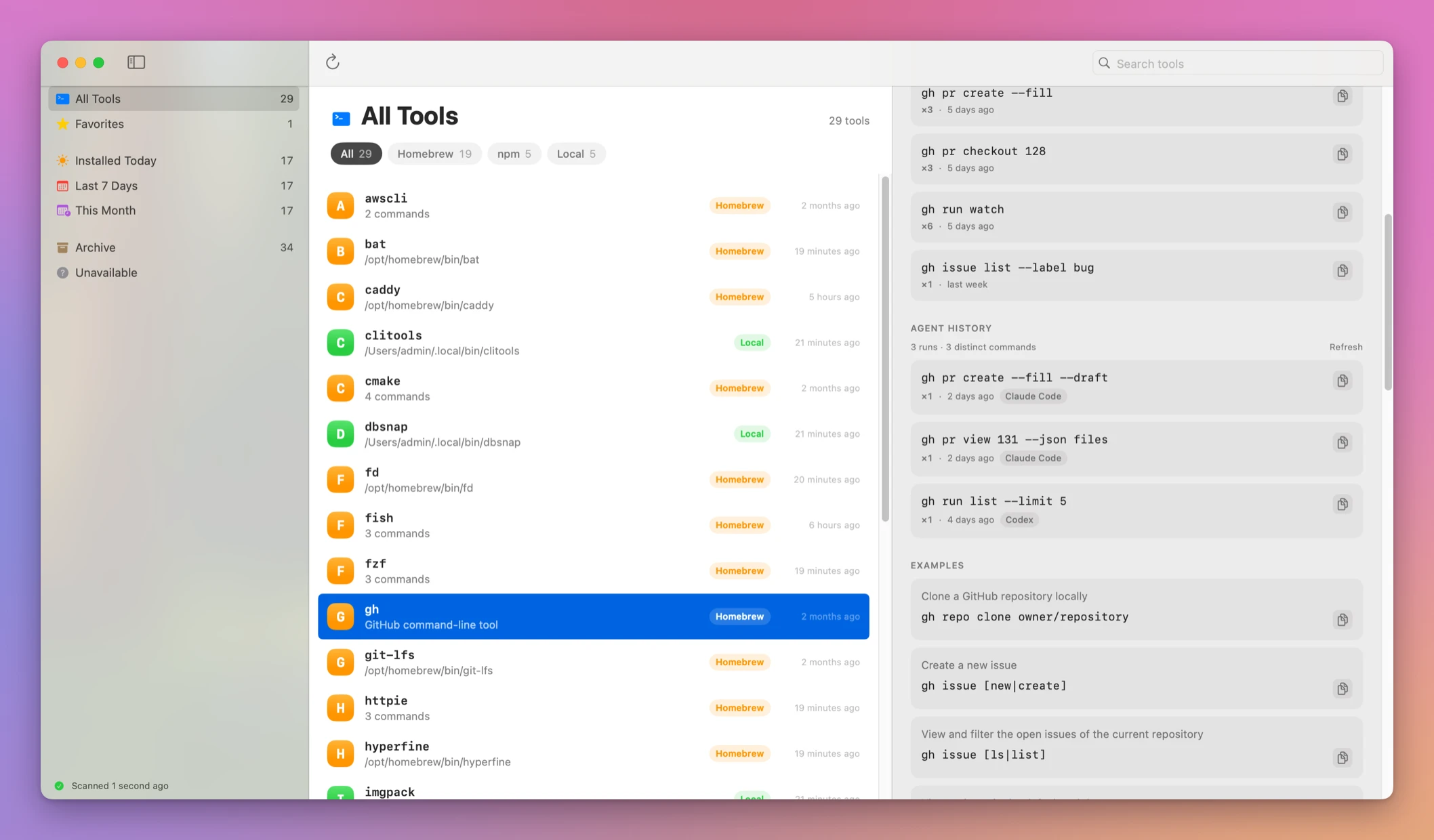
From the terminal, clitools history gh --agents prints the same list. It reads the transcripts each time, which can take a few seconds.
If something looks wrong
If a search finds nothing, it prints No matching CLI tools. and exits 0. Try a shorter word, or the tool’s name. If the tool was installed after the last scan, run clitools scan.
If the catalog’s version doesn’t match what runs, run clitools inspect <tool>. If it still doesn’t match, you have two copies. The catalog keeps one entry per command name: on my Mac it lists the npm codex at 0.150.1, while command -v codex points to ~/.local/bin/codex, which is 0.159.2. Have the agent run type -a <tool> before it trusts a flag from the catalog.
Get CLI Tools Cabinet
Catalog tools from Homebrew, npm, Cargo, and your PATH, with examples, shell history, and a JSON CLI for coding agents.
See CLI Tools Cabinet → · Read the docs · $20. See the app page for tax details, with full source code.
Want me to talk about your product? You can sponsor this site.