
An app by Flavio
Searchable Scan Folder
Point it at the folder your scanner saves to, and each scanned PDF gets a searchable copy. Text recognition runs on your Mac, nothing is uploaded.
Buy Searchable Scan Folder · $20One-time purchase. Plus tax where it applies.
macOS 14 or later · Apple silicon and Intel
Latest version 1.2.1, released November 20, 2026
You scanned a year of paper. Bills, the lease, the car insurance, receipts for the tax return. They’re all PDFs now, in a folder, and that felt like progress.
Then you need the invoice with reference A-102, and searching for it finds nothing. A scanner saves a picture of each page, and to your Mac a picture has no words in it. So you open the scans one by one and read them.
Searchable Scan Folder reads those pictures and saves a copy of each PDF with the text in it. The copy looks the same, but now you can search it, select a sentence and copy an amount. You can run it on a folder once, or leave it watching the folder your scanner saves to, so every new scan gets its searchable copy a few seconds after it lands.
Who it’s for
- Anyone going paperless at home with a document scanner and a drawer of letters. Scan the pile, let the app work through the folder, and search for the electricity provider’s name next time you need a bill.
- Bookkeepers who get receipts and bank statements as scanned PDFs from clients. Put them in a folder, and you can search all of them for an amount like
1,240.00instead of opening each file. - Small offices where the shared scanner saves into one folder. Leave the app watching it on the office Mac, and every scan has a searchable copy in a second folder by the time someone goes looking.
- Students and researchers with scanned book chapters and photocopied articles. Find the page with the quote again, and copy it instead of typing it out.
- Lawyers, paralegals and anyone with a case file of scanned letters and contracts. Search for a name, a date or a clause number across the whole folder.
How it fits your week
Here’s the setup for a home scanner that saves to a folder called Scans.
- Make a second folder, for example
Scans - Searchable. The copies go there. Watching refuses the scan folder itself as the destination, so the app never processes its own copies. - Open the app, click Add Folder… and choose
Scans, or drag the folder onto the window. - Click Choose… next to Destination and pick
Scans - Searchable. - Check Recognition language. It starts at
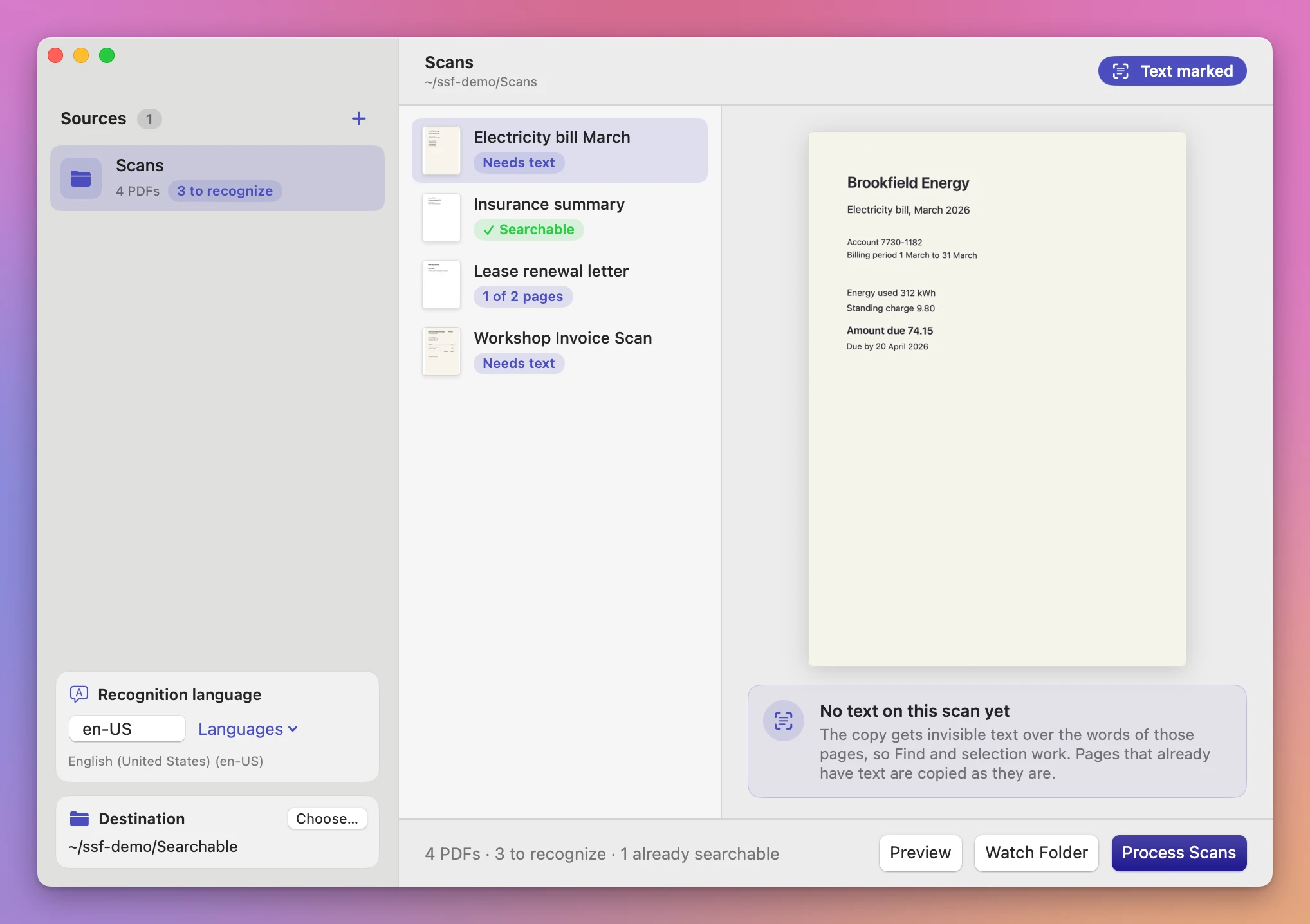
en-US. For Italian letters typeit-IT, for Germande-DE, or pick the language from Languages. If you type one your Mac doesn’t read, the app says so in red. - Click Preview. Every PDF gets a pill: Needs text for a plain scan, 1 of 2 pages for a file where only some pages are pictures, or Searchable for a file that has text on every page.
- To do what’s in the folder now, click Process Scans. To keep going as new scans arrive, click Watch Folder instead.
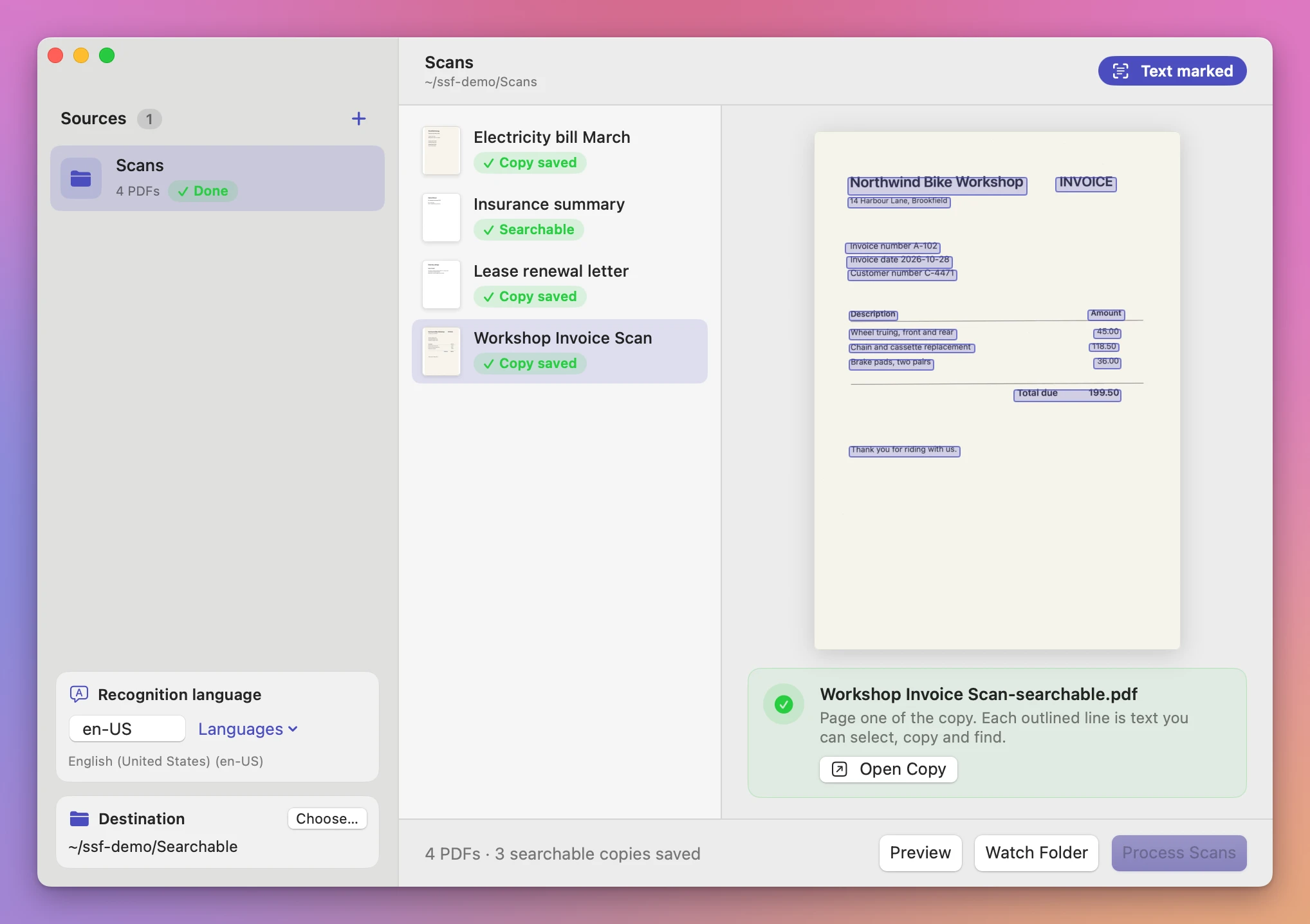
While it watches, the app looks at the folder every three seconds. A scan that’s still being written keeps changing size, so the app waits until a file stays the same between two checks before it touches it. Then the searchable copy appears in the destination, named like Electricity bill March-searchable.pdf, and the scan’s pill turns to Copy saved.
Click Stop when you’re done for the day. Next time you start watching, the app remembers which scans it already did for that folder, destination and language, and only does the new ones.
What it does
Recognition that stays on your Mac
The app uses the text recognition built into macOS, set to its accurate mode. Your scans aren’t sent anywhere. That matters when the scans are bank statements, medical letters or contracts, which are exactly the papers people scan.
Only the pages that need it
Before recognizing anything, the app checks every page for text. Pages that already have text are copied as they are. When every page of a PDF has text, it’s reported as “Already searchable” and no copy is made. A mixed file, like a typed report with two scanned signature pages at the end, only gets those two pages recognized.
What the copy looks like
A recognized page is redrawn as an image at 220 dpi, with the recognized text placed invisibly on top, line by line, where the words are. It looks like your scan. When you search or select, you’re using the invisible text underneath.
Select a scan in the app after processing to see page one of its copy, with an outline around every line of text it found. If a line you need isn’t outlined, Find won’t find it either.
Because the page is redrawn, the copy’s file size can differ from the original, and it’s often larger. If the copy has to fit an upload limit, PDF Size Limit can make it smaller.
Honest reports
If recognition finds nothing on some pages, the copy is still saved with an orange Some pages empty pill, and the app says which ones: “No text found on pages 3, 5”. If it finds nothing on any page, you get no copy and a message to check the language and the scan’s clarity.
A damaged or password-locked PDF gets a message in the report, and the rest of the folder keeps going. When you start watching again, files that failed last time are tried again.
Your originals and existing files
The scan folder is only read. The original PDFs stay where they are, unchanged.
Copies end in -searchable.pdf. If that name is already taken in the destination, the new copy gets a number, like Lease-searchable (2).pdf, and nothing is replaced.
Why not do it by hand
Some scanner apps and PDF editors can add text recognition, and online OCR sites will do it if you upload the file. Those are fine for one document.
For a folder that keeps filling up, the trouble is the routine. You open each scan in the editor, run recognition, save it, and close it. Sixty scans from a year of paper is sixty rounds of that, and the next scan you make needs the same steps again. With an online site you also upload your bank statements and contracts to someone else’s server.
| By hand in a PDF editor | Searchable Scan Folder | |
|---|---|---|
| 60 scans | 60 rounds of open, recognize, save, close | One folder, one click |
| New scans | Remember to do each one | Done while the app watches |
| Pages that already have text | Up to you to notice | Skipped automatically |
| Pages with no text found | Easy to miss | Listed by page number |
| Your originals | Depends on how you save | Never touched, copies go to a separate folder |
| Privacy | Depends on the tool | Stays on your Mac |
What it doesn’t do
- PDFs only. Scans saved as JPEG or PNG aren’t read. Set your scanner to save PDFs.
- One folder level. Only PDFs directly inside the folder are processed, not those in subfolders.
- One language per run. A folder with English and Italian letters needs two runs with different destinations, or a choice of the language most of them use.
- No miracles with bad scans. Blurry pages, handwriting and pages scanned sideways can come out with missing or wrong words. Check exact figures against the page before you rely on them.
- No watching while the app is closed. Watch Folder works while the app is open and watching. It isn’t a background service.
- No renaming or sorting. The copy keeps the scan’s name, plus
-searchable.
Questions
Are my original scans changed?
No. The app reads them and writes copies to the destination folder you choose.
Does anything get uploaded?
Recognition runs on your Mac with the text recognition built into macOS. The app goes online only for updates.
Can it do a folder of old scans, not only new ones?
Yes. Click Preview, then Process Scans, and it works through every PDF in the folder. Watch Folder also picks up the PDFs it hasn’t done yet when you start it.
Which languages does it read?
The ones the text recognition in your version of macOS supports. Type a code like en-US, it-IT or fr-FR. If your Mac doesn’t support it, the app shows the list it does support.
What happens when I scan a file again with the same name?
When a watched file changes size or date, the app treats it as a new scan and makes a new copy. The earlier copy stays, and the new one gets a number.
The documentation has the details on watching and retrying.
What it needs
Searchable Scan Folder runs on macOS 14 Sonoma or later, on Apple silicon and Intel.
Processing happens on your Mac.
Buy Searchable Scan Folder
$20 plus tax where it applies, paid once.
Download the ZIP after checkout, unzip it and drag the app to Applications. The download is signed and notarized.
The app checks for updates once a day. When a new version is ready, click Install and Relaunch. To check anytime, choose Searchable Scan Folder → Check for Updates….