
A developer tool by Flavio
Cloudflare Domains Toolkit
Let your AI agent search, quote and register Cloudflare domains, with your approval on the exact charge. Includes a DNS CLI.
Buy Cloudflare Domains Toolkit · $20One-time purchase. Tax included. Source code included.
Node.js 20+ · Cloudflare account · compatible MCP client
Latest version 1.1.0, released November 18, 2026
You’re starting a side project with a coding agent. It’s good at naming things, so you ask it for domain ideas. Then you open the Cloudflare dashboard, search each name, compare prices, check the renewal, buy one, and go back to add the DNS records.
You could hand the agent a Cloudflare token and let it do all of that. But domain registration is billable and non-refundable, and an agent that decides a purchase was “probably what you meant” costs real money.
Cloudflare Domains Toolkit sits between those two. It’s a Registrar MCP server and a companion DNS command-line tool. The AI searches for domains, checks the real Cloudflare price and prepares a quote. It buys one only after you approve the exact charge.
Here’s the whole flow in 90 seconds: a search, a quote the $20 limit refuses, a quote, the approval form, then DNS changes from the CLI:
The domains, prices and DNS records are fictional. The MCP server and the CLI talk to a local fake of the Cloudflare API, and the MCP client is the MCP Inspector.
I used it to buy hostingpicker.dev for $12.20. That server still sits in my MCP inventory as the one I wrote myself. I wrote one rule before writing the server:
The AI can search and prepare. A person approves the exact live purchase.
I also added a hard $20 safety limit. It applies to the complete initial domain charge.
Who it’s for
- Indie hackers with a new idea every month. You brainstorm names with Cursor or Codex, and half of them are taken. The agent checks availability and real prices while you talk, and you approve the one you like without leaving the editor.
- Developers already on Cloudflare. Your sites, Workers and DNS live there. Registering through Cloudflare Registrar keeps the new domain next to the rest, at Cloudflare’s price.
- People who run agents with a lot of freedom. Your agent has tools that write files and run commands. You want the one tool that spends money to stop and ask, every time, with no flag that skips the question.
- Anyone who edits DNS from the terminal. Adding a CNAME for a new subdomain or a TXT record for a verification means four clicks deep in the dashboard.
cf-domains adddoes it in one line, andcf-domains recordsshows what’s there first. - Developers who want to see how it’s done. The source is included under the MIT license. Read how the quote, the recheck and the approval fit together before you build your own billable MCP tool.
From a name idea to a live record
Here’s a typical run, with an MCP client that supports elicitation, like the MCP Inspector in the video.
- Ask the agent for ideas: “Find me a short
.devdomain for a hosting comparison site.” It callssearch_domainsand lists names with their status. - Pick one and ask for a real check.
check_domain_availabilityasks Cloudflare for that exact name and its current price. - Ask for a quote.
quote_domain_purchasereads the minimum term, works out the full first charge and returns a quote that expires in five minutes. A domain over $20 never gets one. - Ask the agent to buy it.
purchase_domainchecks the quote, asks Cloudflare again for availability, price and term, then opens the approval form. - Read the form: the domain, the exact USD total, the term, the non-refundable warning and auto-renewal off. Tick the box and accept. Anything else stops the purchase.
- Once the domain is a zone in your account, switch to the terminal. Run
cf-domains records yourdomain.dev, thencf-domains addfor the records your site needs.
Without the toolkit, that’s a round trip to the dashboard for every name you check, then another for every record. With it, the agent does the searching and you make one decision.
What it does
Two tools, two tokens
Domain registration and DNS management are related, but they have different risks. So they’re separate programs with separate Cloudflare tokens.
The Registrar MCP server has four tools:
| Tool | What it does |
|---|---|
search_domains | Suggests possible names |
check_domain_availability | Checks one name and its current pricing |
quote_domain_purchase | Creates a short-lived quote |
purchase_domain | Rechecks the quote and asks for approval before registering |
The companion cf-domains command-line tool handles DNS. It lists zones and records, creates and updates records with options like --ttl, --proxied and --comment, and deletes one record after confirmation.
Here the CLI lists the zones and records of a fictional coffee shop, adds a CNAME, and asks before it deletes a record:
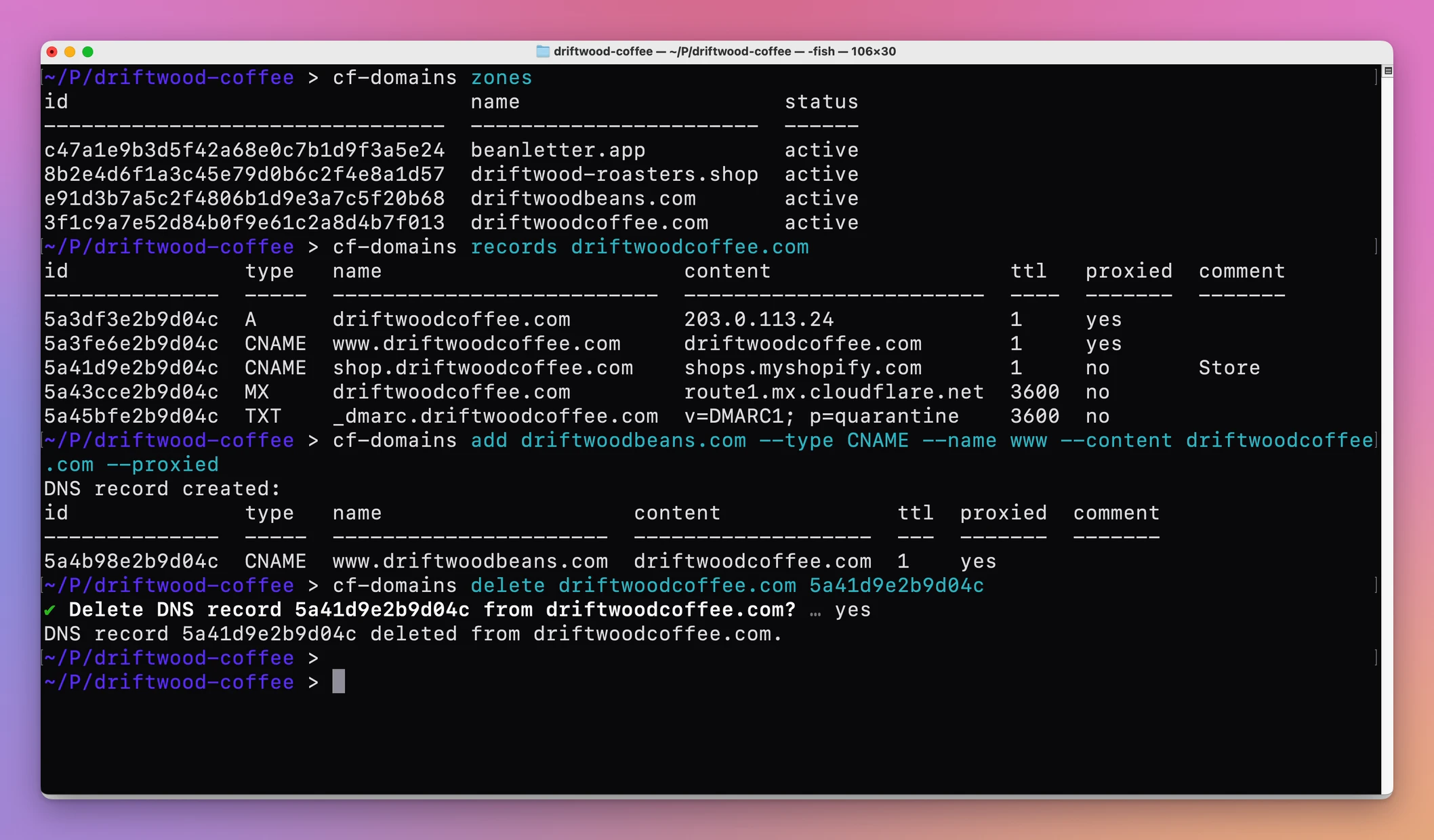
The Registrar token can’t edit DNS. The DNS token can’t buy domains. On macOS both tokens live in your login Keychain, outside the project folder. On other systems you pass them as environment variables.
A purchase starts with one exact domain
The purchase tool needs one exact name. It accepts a plain ASCII domain such as hostingpicker.dev.
It rejects URLs, paths, ports, wildcards, Unicode input, empty labels and bad hyphen placement. Search can be loose because it’s for discovery. Quote and purchase work with one exact registrable domain.
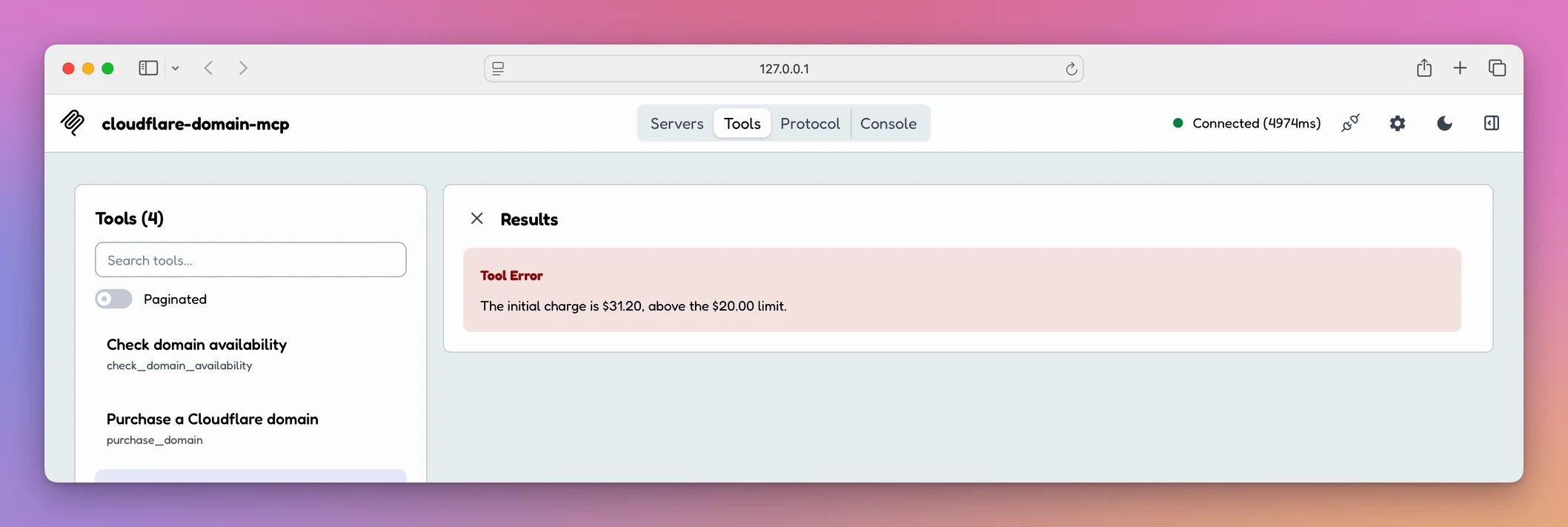
The $20 limit counts the whole first charge
Cloudflare returns decimal price strings, which the server parses into integer cents before applying any rule. There are no floating-point comparisons around the $20 limit.
Some domain extensions require more than one year. For those domains the first charge is:
registration price + renewal price × remaining required yearsSo a domain advertised below $20 can still be rejected if its minimum term makes the initial bill larger. Premium domains and prices outside USD are rejected too.
A .cafe domain at $31.20 never gets a quote:
A quote is a five-minute decision record
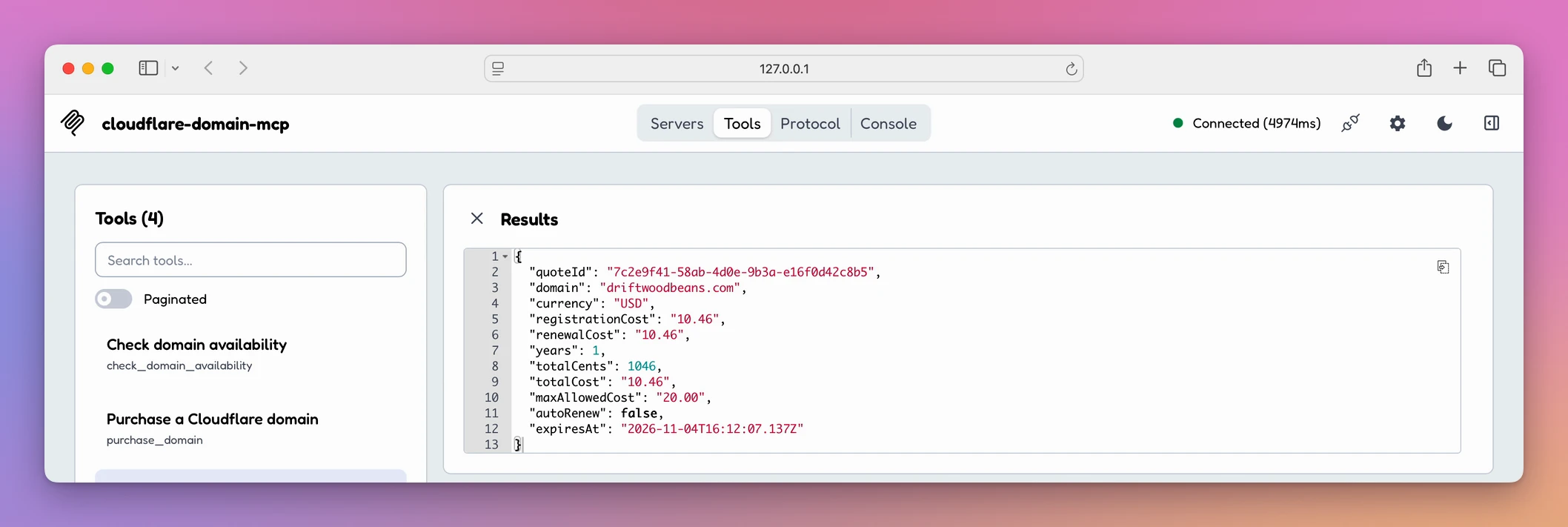
The purchase tool can’t receive an arbitrary domain and amount. It needs a quote. The quote holds a random ID, the exact domain, the registration and renewal prices, the currency, the required years, the complete initial charge in cents, the auto-renewal state and an expiry time.
Quotes expire after five minutes. They’re single-use and disappear when the MCP process stops. A quote isn’t a reservation. It’s a record of the decision you’re about to make.
This is a quote for a one-year .com registration:
The server checks everything again
When purchase_domain runs, the server checks that the caller repeated the quote ID, domain, currency and total cents. Then it asks Cloudflare for availability, price and minimum term again. If anything changed, the purchase stops and you need a new quote.
Only after that recheck does the server show the approval form. You approve the latest known charge, not a number cached a few minutes earlier.
The approval is part of the protocol
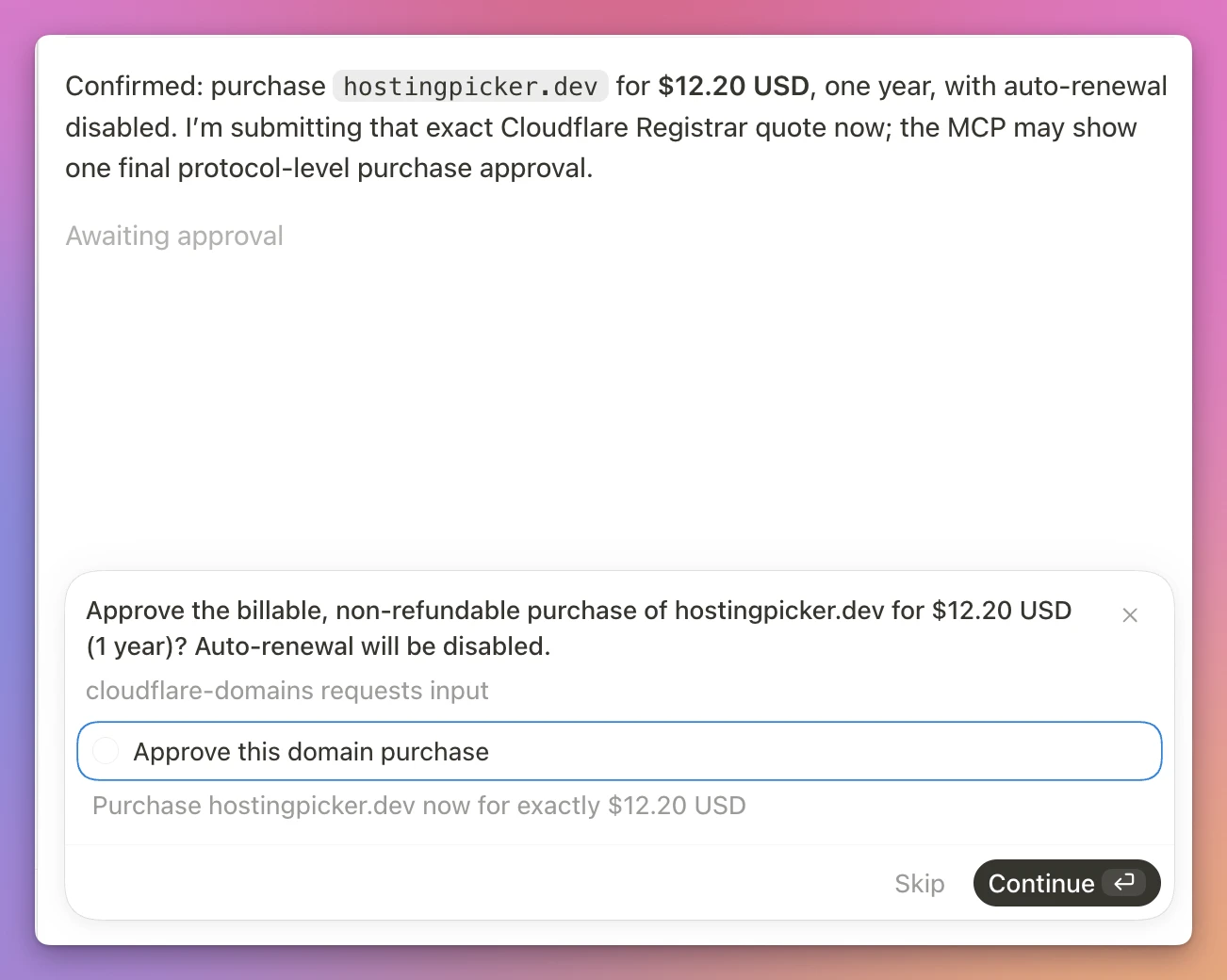
The final decision happens through MCP elicitation. The form repeats the domain, the exact USD total, the registration term, the non-refundable warning and the disabled auto-renewal.
The checkbox starts unticked. The purchase continues only when the client returns an accepted form with it set to true. If the MCP client doesn’t support elicitation, the server blocks the purchase. There’s no terminal fallback or environment flag that skips approval.
This is the real approval I used to buy hostingpicker.dev:
No automatic retries
Imagine the registration request reaches Cloudflare, but the connection fails before the response comes back. The server can’t know whether the domain was bought, and retrying an uncertain billable action could make it worse.
So the server never retries a registration. The quote stays used, and you check the Cloudflare account before trying anything else.
How I built and tested it
I put every Registrar HTTP request behind one TypeScript interface:
interface RegistrarClient {
  checkDomain(domain: string): Promise<DomainAvailability>
  searchDomains(query: string, limit: number): Promise<DomainAvailability[]>
  getMinimumRegistrationYears(domain: string): Promise<number>
  createRegistration(
    domain: string,
    years: number
  ): Promise<RegistrationWorkflow>
}
The rest of the program doesn’t know about Cloudflare URLs, authentication headers or response envelopes. That also let the tests use a fake Registrar client, so the policy tests never contact Cloudflare and can never buy a domain.
My first version marked a quote as used after waiting for approval. When two purchase calls arrived close together, both could reach the approval step before either one consumed the quote. I changed the order:
quote.used = true
const approved = await approve(publicQuote(quote))
A focused test opens the first approval, starts a second purchase with the same quote, and confirms the second call fails immediately.
The tests cover domain normalization and rejection, decimal-to-cents conversion, multi-year charges, the $20 limit, premium and non-USD rejection, quote matching and expiry, price changes between quote and purchase, approval rejection, quote replay and concurrent purchases. A smoke test starts the compiled MCP server, does a real protocol handshake and discovers all four tools. The DNS CLI tests inspect generated requests through a fake fetch, so they never change real DNS.
I kept live testing read-only until those passed. Then I ran one real purchase: search, check hostingpicker.dev, quote, confirm the $12.20 price and one-year term, approve with auto-renewal off, and one registration request.
The same approach applies beyond domains:
- Keep discovery separate from action.
- Record the exact decision for a short time.
- Recheck external state immediately before approval.
- Show the latest values to a person.
- Require an explicit protocol-level decision.
- Consume single-use state before awaiting anything.
- Never automatically retry an ambiguous destructive call.
- Test the policy with fakes before one real end-to-end run.
I wrote more about that in MCP server design. If you’ve never written a server, start from how to build an MCP server.
Why not use the dashboard, or a raw token
The Cloudflare dashboard does all of this for free. You search, see the price, buy, and edit DNS in the same place. For one domain a year, it’s fine.
It’s slow when an agent is helping you name things. Every idea means a new search in the browser. And giving the agent a raw Registrar token is the other extreme: nothing stands between “find me a domain” and a charge on your card.
| Dashboard, or a raw API token | Cloudflare Domains Toolkit | |
|---|---|---|
| Checking 10 name ideas | 10 searches in the browser | The agent checks them while you talk |
| Price you approve | Whatever the page shows | The full first charge, rechecked right before approval |
| An agent buying on its own | Possible with a raw token | Blocked without your approval in the form |
| Spending cap | None | $20 for the first charge, premium and non-USD refused |
| DNS records | Several clicks per record | cf-domains add in one line |
| Tokens | One broad token if you script it | Two scoped tokens, in the Keychain on macOS |
What it doesn’t do
- It doesn’t buy domains over $20. The limit covers the full first charge. Premium domains and non-USD prices are refused. Change the source if you want a different policy.
- It doesn’t work without elicitation for purchases. Search, check and quote work in any MCP client. Buying needs a client that can show the approval form.
- It doesn’t turn on auto-renewal. Registrations are made with auto-renewal off. Review the renewal settings in your Cloudflare account.
- It doesn’t include the domain. The $20 software price is separate from what Cloudflare charges for a registration.
- It doesn’t promise every extension. The Cloudflare Registrar API is in beta, so supported extensions and API behavior can change.
- It isn’t an app with a window. It’s a local stdio MCP server and a Node.js CLI.
Questions
Can the agent buy a domain without me?
No. The purchase needs a quote, a live recheck and your accepted form with the box ticked. A client without elicitation can’t buy at all.
Which MCP clients work?
Any client that runs a local stdio server. There are setup examples for Cursor, Codex and a generic MCP client. For purchases, the client must support MCP form elicitation.
What do I need on the Cloudflare side?
A Cloudflare account with its Registrar setup done, including a payment method and a registrant contact. Then two API tokens: one with Registrar write permission, and one with Zone Read and DNS Edit, limited to the zones you want to manage.
Does the DNS CLI delete records without asking?
No. cf-domains delete asks for confirmation. You can skip it with --yes when you script it.
Is the source included?
Yes, under the MIT license. You can read it, change the limit, and run the tests yourself.
Let an AI agent quote a domain, and approve the purchase yourself walks through a purchase, and Manage Cloudflare DNS records from the terminal covers the CLI.
What the software includes
You get the ready-to-run CLI and MCP server, with setup guides.
The download includes:
- the compiled Registrar MCP server
- the companion
cf-domainsDNS CLI - macOS Keychain helpers and portable environment-variable support
- setup guides for the MCP server and DNS CLI
- an MIT license
You need Node.js 20 or newer, a Cloudflare account with billing and a default registrant contact, and two narrowly scoped API tokens.
Buy Cloudflare Domains Toolkit
Cloudflare Domains Toolkit costs $20 including tax, paid once. The purchase includes the ready-to-install ZIP.
Download the runtime ZIP from your purchase page. Reopen that page for later versions.
Run it locally
Install the runtime dependencies in mcp/ and cli/, then connect the compiled Registrar server to an MCP client that supports stdio and elicitation. Follow the setup guide.
Supply your own Registrar and DNS tokens. The $20 software price is separate from domain registration charges billed by Cloudflare.