Let an AI agent quote a domain, and approve the purchase yourself
By Flavio
Updated
Set up the Cloudflare Domains Toolkit MCP server, let an agent check and quote a domain, and approve the exact charge in a form before anything is registered.
I wanted an agent to look up domains and tell me the real Cloudflare price, without ever registering one because a chat message sounded like a yes. Registration is billable and not refundable.
Cloudflare Domains Toolkit is a local MCP server with four tools. The agent can search, check one name and create a quote. The fourth tool, purchase_domain, rechecks the price and then shows you a form. Nothing is registered until you tick the box in that form.
That’s how I bought hostingpicker.dev for $12.20. Here we’ll set up the server, connect a client and walk through the same flow.
If you’ve never pointed a client at a local server, start with how to build an MCP server. The form is an MCP elicitation, covered in MCP Tasks and Elicitations in Claude Code.
What you need
- Node.js 20 or later.
- A Cloudflare account where Registrar is ready to buy: a default payment method, a default registrant contact, and the Domain Registration Agreement accepted.
- A Cloudflare user API token with Registrar write permission, for this account only.
- An MCP client that runs stdio servers and can show elicitation forms. The source has config examples for Cursor and Codex.
The source zip from your Polar receipt has two folders. mcp is the Registrar server, cli is cf-domains, a separate DNS command. Each has its own package.json.
Build and test the server
From the mcp folder, install, build and run the tests:
cd mcp
npm install
npm run build
npm test
The tests use a fake Cloudflare client, so they never touch your account:
# tests 11
# suites 0
# pass 11
# fail 0
They cover the $20 limit, quote expiry, price changes between quote and purchase, a declined approval, and two purchase calls racing on the same quote.
Then the smoke test. It starts the compiled server with a placeholder token, does a real MCP handshake and lists the tools:
npm run smokeMCP smoke test passed: check_domain_availability, purchase_domain, quote_domain_purchase, search_domainsStore the token and connect a client
On macOS, store the Registrar token in the login Keychain. The script asks for it without echoing what you paste:
npm run keychain:storeIt saves the token under the service cloudflare.domain-registrar-mcp, with your macOS username as the account, and prints both. On Linux or Windows, pass CLOUDFLARE_API_TOKEN through the client’s secret handling instead, never through a file you commit.
The client needs the absolute path to node (which node prints it) and to mcp/dist/server.js. This is mcp/examples/cursor-mcp.json with my paths filled in:
{
  "mcpServers": {
    "cloudflare-domains": {
      "command": "/opt/homebrew/opt/node@22/bin/node",
      "args": [
        "/Users/flaviocopes/dev/cloudflare-domains/mcp/dist/server.js"
      ],
      "env": {
        "CLOUDFLARE_ACCOUNT_ID": "your-cloudflare-account-id",
        "CLOUDFLARE_KEYCHAIN_SERVICE": "cloudflare.domain-registrar-mcp",
        "CLOUDFLARE_KEYCHAIN_ACCOUNT": "flaviocopes"
      }
    }
  }
}
The account ID is in the Cloudflare dashboard URL. It’s an identifier, not a secret.
The Codex example, mcp/examples/codex-config.toml, also sets approval_mode = "prompt" on purchase_domain. Codex then asks before it even calls the tool, and the server’s own form comes after that.
Restart the client. If the server dies right away, the client’s MCP log shows why. These are the two errors you get from a bad config:
Error: CLOUDFLARE_ACCOUNT_ID is required.Error: Cloudflare API token was not found in the environment or macOS Keychain (service cloudflare.domain-registrar-mcp, account flaviocopes).The second one also shows up when the token sits only in the iCloud Keychain, which the security command doesn’t read. Run npm run keychain:store again to put it in the login Keychain.
The four tools
| Tool | What it does | Marked read-only |
|---|---|---|
search_domains |
Suggests names for a phrase, 10 by default, up to 20 | Yes |
check_domain_availability |
Checks one exact name and its registration and renewal price | Yes |
quote_domain_purchase |
Rechecks the name and creates a five-minute, single-use quote | Yes |
purchase_domain |
Rechecks again, shows the approval form, then registers | No, marked destructive |
Search is loose, it takes a brand or a phrase. Check, quote and purchase take one exact domain. The server lowercases it and drops a trailing dot, and refuses anything else that isn’t a plain domain. This is what it does with a few inputs:
| Input | Result |
|---|---|
HostingPicker.DEV. |
hostingpicker.dev |
https://hostingpicker.dev |
The domain name is not valid. |
-host.dev |
The domain name is not valid. |
hostingpicker |
Provide a registrable domain such as example.com. |
caffè.dev |
Unicode domain names are not supported. |
Ask for a check, then a quote
Start with a check, and say you don’t want to buy:
Check whether hostingpicker.dev is available. Do not buy it.The agent calls check_domain_availability and reports the registration and renewal price. When the name looks right, ask for the quote and stop there:
Request a quote for hostingpicker.dev. Show me the exact domain,
minimum term, initial USD charge and renewal price. Stop after the
quote. I have not approved registration.
A quote is a JSON object. Here it is in the MCP Inspector, for a fictional domain served by a local fake of the Cloudflare API:
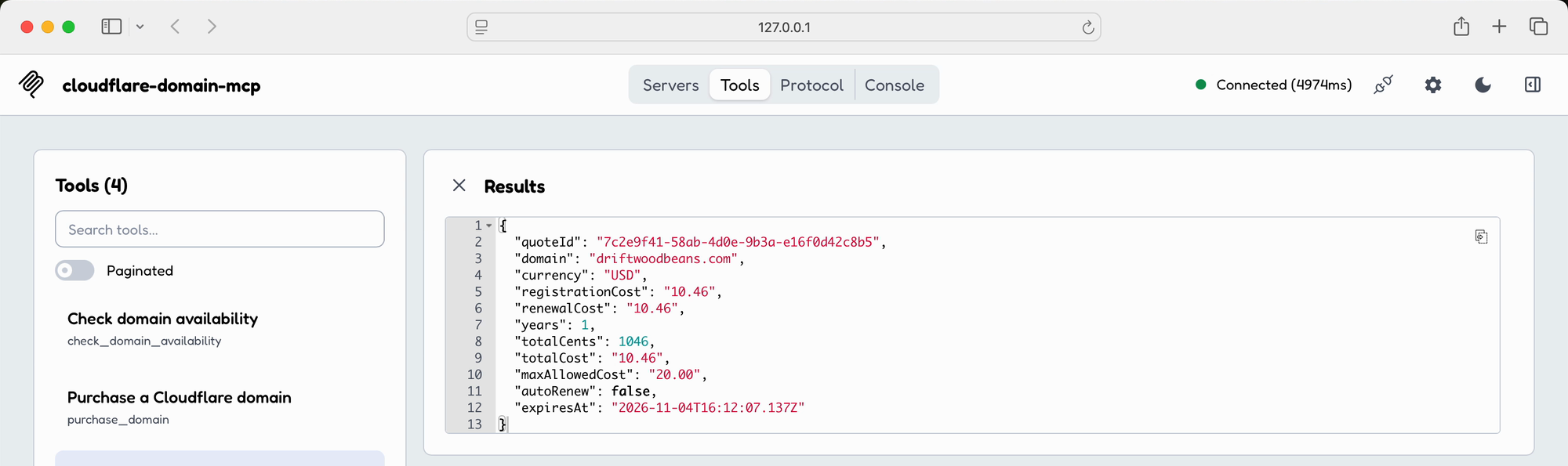
The fields to read are domain (the full name, extension included), years, totalCost and renewalCost. totalCents is the same total in integer cents, which is what the server compares and what the purchase call has to repeat. My real quote for hostingpicker.dev was $12.20 for one year, so totalCents was 1220.
The quote lives in the server’s memory. It expires after five minutes, works once, and is gone if the client restarts the server. Cloudflare doesn’t hold the name for you meanwhile.
The $20 limit
Some extensions require more than one year. For those, the first charge is the registration price plus the renewal price for each extra year:
registration price + renewal price × (minimum years - 1)The server compares that complete first charge with a hard $20 limit, so a name advertised under $20 can still be refused. Premium names and prices that aren’t in USD are refused too. A .cafe name at $31.20 never gets a quote:
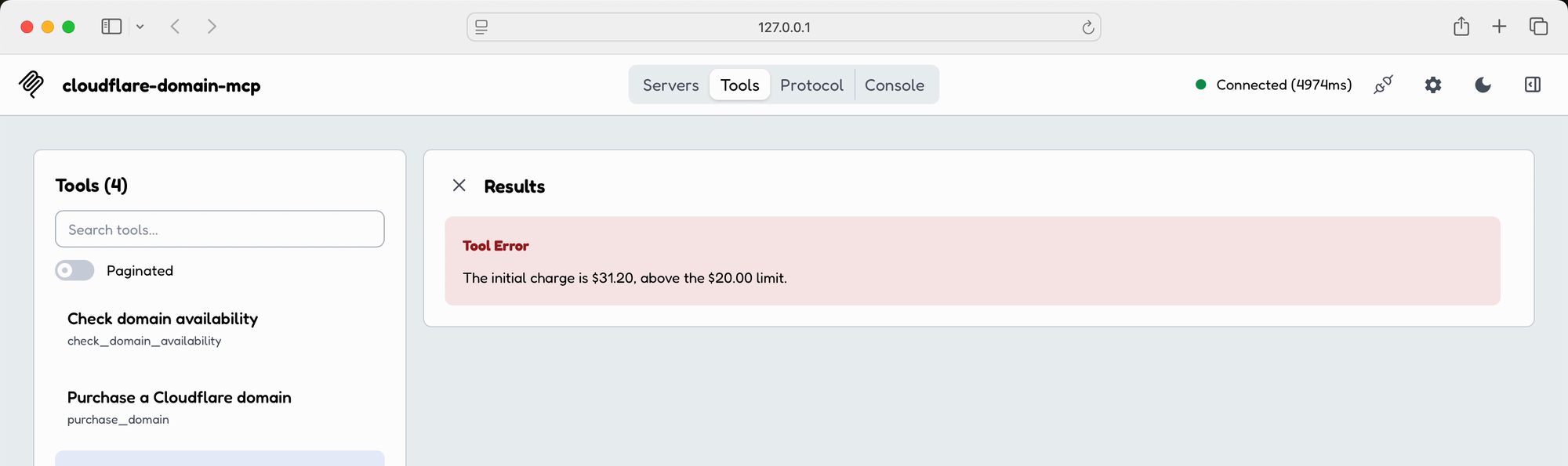
The limit is the MAX_PURCHASE_CENTS constant in mcp/src/money.ts, and purchase_domain also rejects a total_cents above 2000 in its input schema. There’s no environment variable for it.
Approve the purchase
When you tell the agent to go ahead, it calls purchase_domain with the quote ID, the domain, the currency and the total in cents. The server checks that all four match the stored quote, then asks Cloudflare again. If availability, price or the minimum term changed, it stops there and you request a new quote.
Only then does the form appear:
This is the form I got for hostingpicker.dev:
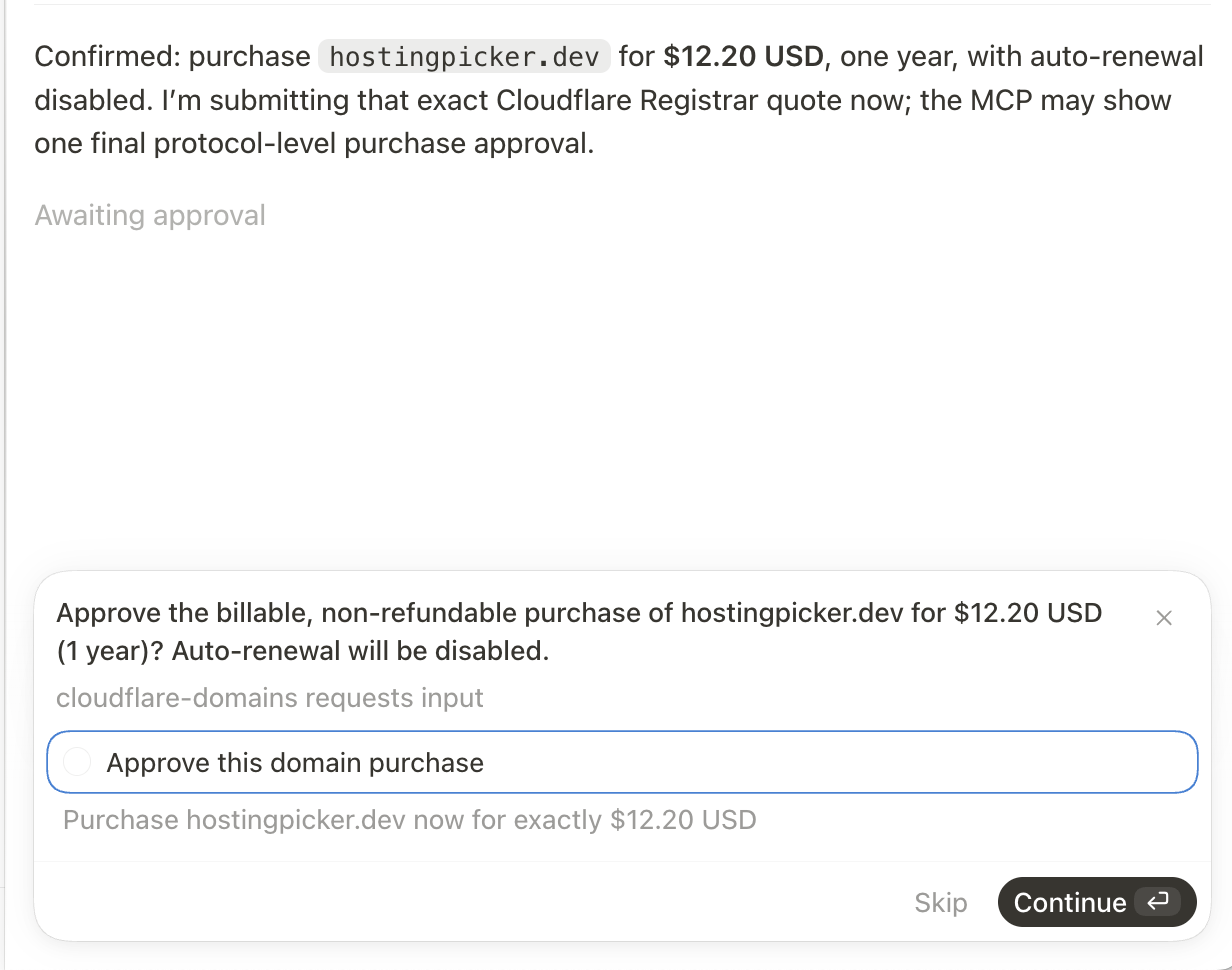
The checkbox starts unticked. The server registers only when the client returns an accepted form with the box ticked. If the client doesn’t support elicitation, the purchase is blocked, and there’s no terminal fallback or environment flag that skips the form.
The registration request sends auto_renew: false and privacy_mode: "redaction". After it succeeds, set renewal the way you want it in the Cloudflare dashboard.
The quote is marked as used before the form opens. Two purchase calls on the same quote can’t both show a form, and a declined form means you need a new quote.
When the purchase stops
Each stop comes with an error message from the server:
| Message | What to do |
|---|---|
| The purchase quote is missing or expired. Request a new quote. | Quote again and read it again |
| This purchase quote has already been used. | Quote again |
| The approved purchase details do not match the quote. | The agent changed a value, ask it to use the quote as returned |
| The live price or registration term changed. Request a new quote. | Read the new quote before deciding |
| The domain purchase was not approved by the user. | Nothing was bought |
| This MCP client does not support elicitation, so the purchase is blocked. | Use a client that shows forms |
The server never retries a registration. If the request reached Cloudflare and the connection dropped before the answer, it can’t know whether the name was bought. Look in the Cloudflare dashboard before you quote again.
DNS goes through cf-domains
The Registrar token can’t edit DNS. For records, the cli folder has cf-domains, with its own token (Zone Read and DNS Edit, scoped to the zones you pick) and its own Keychain entry, cloudflare.domains-cli. Install it with npm install and npm link in cli, then:
cf-domains --helpCommands:
auth Manage Cloudflare API authentication.
zones List accessible Cloudflare zones.
records <domain> List DNS records for a domain.
add [options] <domain> Create a DNS record.
update [options] <domain> <record-id> Update a DNS record.
delete [options] <domain> <record-id> Delete a DNS record.
help [command] display help for commandcf-domains auth login stores the token. delete asks for confirmation unless you pass --yes. The same help text tells agents to run cf-domains auth status first and cf-domains records <domain> before changing anything. Manage Cloudflare DNS records from the terminal goes through each command.
Get Cloudflare Domains Toolkit
Search, quote and register Cloudflare domains through an MCP server with human approval. Includes a DNS CLI and full MIT source.
See Cloudflare Domains Toolkit → · Read the docs · $20 including tax, with full source code.
Want me to talk about your product? You can sponsor this site.