The AHA Stack
By Flavio
Published · Updated
Tagged: Astro, htmx, Alpine.js
Complete guide to the AHA Stack (Astro 7, htmx 4, Alpine.js 3): concepts, Cloudflare D1 counter tutorial, 18 demos, FAQ, and an AI agent skill.
I came up with the AHA Stack in late 2023 to describe a way of building web apps with Astro, htmx, and Alpine.js (AHA). Back then I put all the docs, comparisons, and examples on a separate site at ahastack.dev, and in September 2026 I updated that site for Astro 7, htmx 4, 18 Cloudflare Workers demos, and a coding agent skill.
Maintaining a separate domain and Starlight codebase for one set of docs stopped making sense, so I’m retiring ahastack.dev and moving everything into this page. All the docs, the Cloudflare Workers + D1 walkthrough, the 18 demos reference, and the coding agent skill now live here on flaviocopes.com.
Here is the whole idea in three lines:
- Astro provides the HTTP backend and renders HTML on the server, paired with whatever database you like.
- htmx handles client-server interactions after the page loads, swapping HTML fragments returned by the server.
- Alpine.js handles the small bits of browser-only interactivity you need for a clean UI.
The stack is 100% JavaScript and TypeScript, but you don’t build a Single Page Application where a JavaScript library owns all rendering in the browser. You use the browser as intended: it renders HTML, responds to events, and sends HTTP requests.
It’s not for everyone.
Most people who love htmx dislike JavaScript and want to write Go, Python, or another backend language, so they won’t pick Astro. Most people who love Astro come from frontend frameworks and go right back to React or Svelte at the first roadblock because hypermedia feels unfamiliar.
The people who click with the AHA Stack sit in the middle. You like JavaScript and TypeScript, you like JSX-style components, and you want far less frontend complexity on your projects.
Built on the Web Platform
The AHA Stack builds directly on the primitives the browser and HTTP already give you:
- HTTP,
Request,Response, and cookies - HTML, forms, and
FormData - CSS
- JavaScript, the DOM, and browser events
Those standards are rock solid. They don’t ship a breaking version 2.0 that forces a rewrite every three years.
On their own, plain links and forms mean full-page reloads on every click. To avoid writing piles of imperative DOM JavaScript just to update a list item or submit a form inline, we add two small, dependency-free libraries on top of an HTML-rendering server.
When a user clicks a button that changes server state, htmx makes the HTTP request, receives an HTML fragment, and swaps it into the page. When a user opens a dropdown or toggles a confirmation prompt, Alpine updates that tiny bit of local UI state right in the markup.
Astro
Astro is the server layer of the AHA Stack. It gives you file-based routing, server-side rendering, API routes, built-in Markdown and content collections, and a component templating language that feels familiar if you know JSX.
Unlike React JSX, Astro templates render on the server at build time or request time. By default, Astro ships zero JavaScript to the browser. You compose pages out of components like <Todos /> using standard JavaScript imports, and the browser gets plain HTML.
If one screen in your app truly needs a heavy interactive widget, Astro’s island architecture lets you drop in a React, Vue, or Svelte component on that single page without turning the whole application into an SPA. You can estimate what each island costs in shipped JavaScript with my Astro islands cost calculator.
Three reasons I keep choosing Astro:
- It stays simple. You don’t have to hold a huge framework architecture in your head to trace a request.
- It stays flexible. You can mix static pages with on-demand server routes, read
FormDataand cookies with standard Web APIs, and deploy to Cloudflare Workers, Node, or Docker. - It scales without starting heavy. Small projects stay a few
.astrofiles, and larger apps don’t hit a wall.
You can swap Astro for Rails, Django, Laravel, Go, or Rust if you prefer another backend language. The only requirement is a server that talks to your database and returns HTML pages and partials. I pick Astro so the whole stack stays in JavaScript and TypeScript.
Read why I use Astro or go through my free Astro course to learn it from scratch.
htmx
htmx describes itself as an extension of HTML. It removes four arbitrary limits built into browsers:
- Any HTML element can send an HTTP request, not only
<a>and<form>. - Any DOM event can trigger a request, not only clicks and form submits.
- You can use
PUT,DELETE, andPATCHdeclaratively alongsideGETandPOST. - You can replace one target element on the page with an HTML fragment instead of reloading the entire screen.
It has zero dependencies, works with any backend, and loads from a single <script> tag. Instead of calling fetch(), parsing JSON, and manually updating DOM nodes, you declare the request and swap target directly on the HTML element.
Read why I use htmx, my breakdown of HTMX 4, or take the free HTMX course.
Alpine.js
Alpine.js handles the browser-only side of the UI: opening a dropdown, tracking an input’s character count, showing a confirmation before a destructive action, or closing a modal on Escape.
People often ask if Alpine overlaps with htmx. They solve different jobs. htmx owns everything that crosses the network to the server. Alpine owns temporary UI state that lives and dies in the browser.
You could write vanilla DOM event listeners for local UI state, and sometimes I do. Alpine keeps that state right next to the markup it controls so you can read one element and understand what happens.
Read why I use Alpine.js or work through the free Alpine.js course.
How they combine
Put the three pieces together and each one stays in its lane: Astro renders the initial HTML and every fragment, htmx shuttles fragments over HTTP, and Alpine handles local toggles without making a request.
Both frontend libraries are small, mature, and dependency-free. Alpine.js first shipped in November 2019 (now over 30k stars on GitHub) and htmx in May 2020 (approaching 50k stars). Including both via <script> tags removes an entire frontend bundler pipeline from your project.
Because none of these tools take over your entire architecture, you can swap any piece later. They are tools on top of HTML and HTTP, not a closed ecosystem. You can learn the core htmx and Alpine attributes in an afternoon and spend the rest of your time on the app itself.
What’s changed since 2024
I wrote the original ahastack.dev docs at the end of 2023. The core mental model didn’t change, but Astro and htmx shipped major versions.
htmx 2 to htmx 4
htmx 2 arrived in June 2024, dropping IE support and moving extensions out of the core file.
htmx 4 arrived in August 2026 with bigger, cleaner changes:
- Native
fetch(). htmx 4 replacesXMLHttpRequestwithfetch(). - Explicit attribute inheritance. Attributes on a parent no longer silently inherit into children. If you want inheritance, write
:inheritedon the parent (for examplehx-target:inherited="#list"). - Error responses swap by default. Responses with
4xxor5xxstatus codes are swapped like any other response, which makes server-rendered422validation errors work out of the box. - No local history snapshots. Back-button navigation requests the page from the server again instead of restoring stale DOM snapshots from
localStorage. - Out-of-band-only responses skip the main swap. If a partial returns only
hx-swap-oob="true"elements, htmx leaves the triggering element untouched without requiringhx-swap="none". - Multi-target
<hx-partial>tags and built-in morph swaps. One response can wrap several<hx-partial hx-target="...">blocks, andinnerMorph/outerMorphpreserve focus and input state when needed.
Here are the htmx 2 habits to drop when writing htmx 4:
| htmx 2 | htmx 4 |
|---|---|
hx-target on a parent applies to children | Add :inherited (hx-target:inherited) or set it on each child |
hx-swap="none" required for oob-only responses | Not needed; main swap is skipped automatically |
4xx and 5xx responses ignored by default | Swapped by default (use hx-status:* to route error targets) |
htmx:afterRequest, htmx:beforeSwap | Colon-separated events: htmx:after:request, htmx:before:swap |
hx-disabled-elt | hx-disable |
On npm, latest stays pinned to htmx 2 until early 2027 so unpinned CDN links don’t break. Install htmx 4 explicitly (npm install htmx.org@4) or load https://cdn.jsdelivr.net/npm/htmx.org@4.0.0. If you have an existing htmx 2 app, run the official checker:
npx htmx.org@4.0.0 upgrade-check -- .Alpine.js 3
Alpine is still on version 3. Same API, same script tag, steady releases. You learned it once and your old templates still work.
Astro 5, 6, and 7
Astro moved fastest of the three:
- Astro 5 (December 2024) added the content layer and server islands, and removed
output: 'hybrid'. You now pickoutput: 'static'(opting individual pages into SSR withexport const prerender = false) oroutput: 'server'to render every route on demand. - Astro 6 (2026) rebuilt
astro devto run inside your real production runtime. On Cloudflare,astro devruns onworkerd, so local D1 and KV bindings work straight out of the box viaimport { env } from 'cloudflare:workers'(Astro.locals.runtimeis gone). - Astro 7 (2026) moved the compiler and Markdown pipeline to Rust, upgraded to Vite 8, and added
src/fetch.tsfor wrapping Astro with customfetchhandlers or Hono.
One Astro detail that trips people up when testing partials from the terminal: on-demand server routes check the Origin header on POST requests by default. Same-origin htmx requests from your browser pass automatically, while a bare curl -X POST gets a 403 unless you pass an Origin header.
How we got here
For years, web apps worked as server-rendered HTML. Links opened pages, forms sent data, and the server returned the updated page.
When people wanted richer interfaces like Gmail and Google Maps, AJAX let JavaScript ask the server for data and update the page in place. Libraries like jQuery made $.ajax() and $.post() approachable.
Then browsers got fast enough that developers moved the entire rendering layer into client-side JavaScript. Backbone, Ember, Knockout, and then React turned the browser into a full application runtime while the server shrank into a JSON API.
For genuinely complex browser apps like Figma, Photopea, Google Maps, or Descript, that client-side architecture makes sense. You need heavy local JavaScript for a canvas editor or a browser video timeline.
Most apps we build are not Figma. They have login forms, settings pages, lists, filters, modals, and database records. They are CRUD apps, and shipping an SPA runtime plus client state synchronization for a CRUD app is overkill.
HTML-first and simplicity
One core rule runs through the whole stack: the server owns the state and ships HTML.
On the first request, Astro returns a full HTML document. When the user clicks a button, submits a form, or types in a search box, an Astro endpoint returns an HTML partial and htmx drops it into the page. There is no JSON serialization layer and no second set of client templates trying to stay in sync with the server.
I spent more than a decade building SPAs, starting with Ember, then React, Vue, and Svelte. I enjoy client-side libraries, and they solve real problems. Still, developers reach for complex stacks even when the app doesn’t call for them, often out of habit or fear of looking unsophisticated in front of senior engineers.
Stack complexity has zero correlation with whether anyone uses or pays for your app. A simpler stack lets you ship faster, test ideas sooner, and carry fewer moving parts in your head when you come back to a codebase six months later.
Comparing the AHA Stack
Here is how the AHA Stack sits between a JavaScript SPA and a traditional full-page-reload server app:
| Aspect | AHA Stack (Astro + htmx + Alpine) | JS SPA (React / Vue / Svelte) | Traditional Web 1.0 (SSR only) |
|---|---|---|---|
| Initial page load | Server-rendered HTML, minimal JS | Large JS bundle + hydration or client render | Server-rendered HTML, zero JS |
| Dynamic UI updates | Server returns HTML partials, htmx swaps them | Client fetches JSON and re-renders virtual DOM | Full page reload on every action |
| Client-only state | Small Alpine directives inline in HTML | Framework state hooks, stores, contexts | None or manual vanilla DOM scripts |
| Source of truth | Server and database | Split between server DB and client cache | Server and database |
| Frontend build step | None for htmx/Alpine (CDN script tags) | Required bundler and framework toolchain | None |
| Framework lock-in | Low; each layer can be swapped independently | High; UI and routing tied to one framework | Low |
| Best fit | CRUD apps, dashboards, SaaS, internal tools | Canvas editors, offline-first apps, rich local state | Static content, simple form flows |
Compared with a JS SPA
- Simpler mental model. You don’t keep a client-side copy of database state in sync with the server after every mutation.
- Less shipped JavaScript. First paint is server HTML, and you avoid the blank white screen caused by a runtime error in a 400 KB bundle.
- Lower lock-in. htmx is a single file and Alpine is a small attribute layer. If you outgrow either one on a specific page, Astro lets you drop in a React or Svelte island without rewriting the app.
Compared with a Web 1.0 app
- No full-page flicker. Partial swaps keep your scroll position and update only the row, counter, or form that changed.
- Declarative client interactivity. Alpine gives you dropdowns, inline edit toggles, and confirmations without hand-wiring
addEventListeneracross separate script files.
Is this like Hotwire, Livewire, or Phoenix LiveView?
Same family: HTML over the wire. Hotwire grew out of Rails, Livewire out of Laravel, and Phoenix LiveView out of Elixir.
The AHA Stack brings that workflow to full-stack JavaScript and TypeScript with Astro. And you can swap any letter: replace Astro with Django, Go, Rails, or Rust; replace htmx with Alpine AJAX, Unpoly, or Datastar; replace Alpine with petite-vue. Giving the Astro + htmx + Alpine combination a short name just makes tutorials and agent skills concrete.
Walkthrough: a counter on Cloudflare Workers and D1
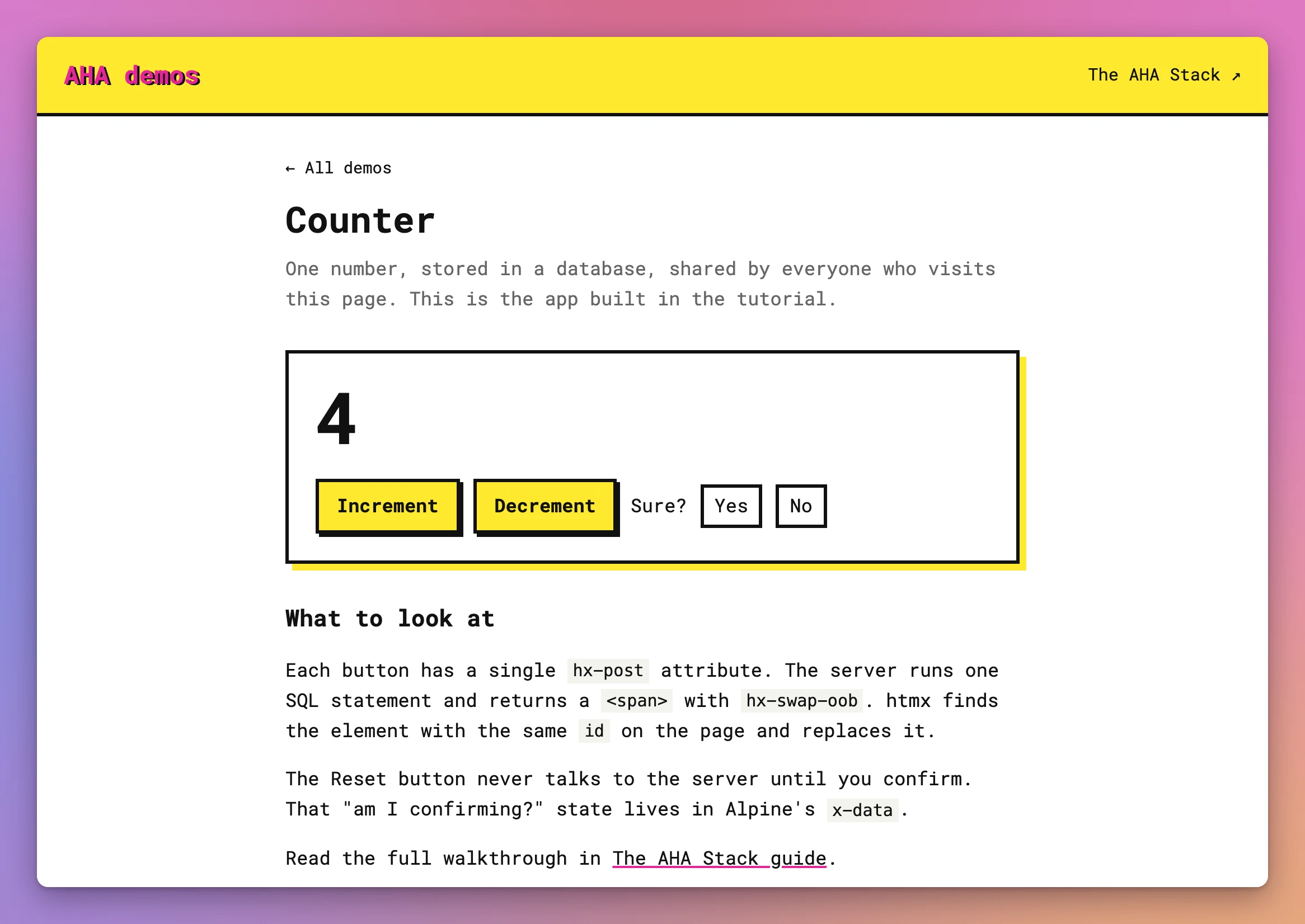
Let’s build a real server-backed counter from scratch with Astro 7, htmx 4, and Cloudflare D1, then add Alpine.js for an inline reset confirmation. This is the exact app from the Counter demo.
1. Create the Astro app and add Cloudflare
Start a new Astro project and add the Cloudflare adapter so Astro renders pages on demand:
npm create astro@latest -- --template minimal
cd aha-counter
npx astro add cloudflare
Set output: 'server' in astro.config.mjs:
import { defineConfig } from 'astro/config'
import cloudflare from '@astrojs/cloudflare'

export default defineConfig({
  output: 'server',
  adapter: cloudflare(),
})
2. Create the D1 database
Cloudflare Workers don’t have a writable local filesystem, so we store the count in D1 (Cloudflare’s SQLite database). Create a database with Wrangler:
npx wrangler d1 create aha-counterWrangler prints a database_id. Put the binding in wrangler.jsonc at the project root:
{
  "name": "aha-counter",
  "d1_databases": [
    {
      "binding": "DB",
      "database_name": "aha-counter",
      "database_id": "<your database id>"
    }
  ]
}
Create schema.sql with a single table and initial row:
CREATE TABLE IF NOT EXISTS counter (
  id INTEGER PRIMARY KEY,
  value INTEGER NOT NULL
);
INSERT OR IGNORE INTO counter (id, value) VALUES (1, 0);
Apply the schema to both your local dev database and the remote production database:
npx wrangler d1 execute aha-counter --local --file ./schema.sql
npx wrangler d1 execute aha-counter --remote --file ./schema.sql
3. Render the page and load htmx 4
Create src/pages/index.astro. The code between the --- fences runs on the server on every request, reads the count from env.DB, and renders plain HTML with htmx 4 loaded in <head>:
---
import { env } from 'cloudflare:workers'

const count = await env.DB.prepare(
  'SELECT value FROM counter WHERE id = 1'
).first('value')
---

<html lang='en'>
  <head>
    <meta charset='utf-8' />
    <meta name='viewport' content='width=device-width' />
    <title>AHA counter</title>
    <script src='https://cdn.jsdelivr.net/npm/htmx.org@4.0.0'></script>
  </head>
  <body>
    <h1>Count: <span id='count'>{count}</span></h1>

    <button hx-post='/api/increment'>Increment</button>
    <button hx-post='/api/decrement'>Decrement</button>
  </body>
</html>
Because Astro 6 and 7 run npm run dev on workerd, env.DB works locally against your D1 database without any extra mocking layer.
4. Create the HTML partial endpoints
When you click Increment, htmx sends a POST request to /api/increment. Create src/pages/api/increment.astro:
---
import { env } from 'cloudflare:workers'

export const partial = true

const count = await env.DB.prepare(
  'UPDATE counter SET value = value + 1 WHERE id = 1 RETURNING value'
).first('value')
---

<span id='count' hx-swap-oob='true'>{count}</span>
A few details worth noticing here:
export const partial = truetells Astro to return only this HTML fragment, not a full document.UPDATE ... RETURNING valueincrements and reads the count in one atomic SQL statement, so two visitors clicking at the same time can’t overwrite each other.hx-swap-oob='true'tells htmx to find the element withid="count"on the page and replace it. Because the response contains only an out-of-band element, htmx 4 skips the main swap automatically and leaves the button alone.
Create src/pages/api/decrement.astro the same way, subtracting 1 instead of adding 1:
---
import { env } from 'cloudflare:workers'

export const partial = true

const count = await env.DB.prepare(
  'UPDATE counter SET value = value - 1 WHERE id = 1 RETURNING value'
).first('value')
---

<span id='count' hx-swap-oob='true'>{count}</span>
5. What the server actually sends back
You can inspect what this endpoint returns with curl. First, calling POST without an Origin header hits Astro’s built-in cross-origin protection:
curl -s -i -X POST https://aha-demos.flaviocopes.com/api/counter/incrementHTTP/2 403
content-type: text/plain;charset=UTF-8
Cross-site POST form submissions are forbiddenPass the matching Origin header (just as the browser does on a same-origin htmx click), and the Worker returns a 200 with text/html and one <span>:
curl -s -i -X POST \
  -H 'Origin: https://aha-demos.flaviocopes.com' \
  https://aha-demos.flaviocopes.com/api/counter/increment
HTTP/2 200
content-type: text/html
server: cloudflare
<span id="count" hx-swap-oob="true">4</span>The server returns HTML directly, with no JSON payload or client parser in between. Deploy the app to Cloudflare with:
npx astro build && npx wrangler deployIf you want to go deeper on the Cloudflare side, see the free Cloudflare Workers course and Cloudflare D1 course.
Adding Alpine: an inline reset confirmation
Now let’s add the second “A” in AHA. We want a Reset button that asks for confirmation before wiping the counter back to zero.
“Am I currently asking for confirmation?” is pure browser UI state, so Alpine owns it. “Reset the count in D1 to zero” talks to the server, so htmx owns it.
Add Alpine.js 3 in <head> right next to htmx:
<script defer src='https://cdn.jsdelivr.net/npm/alpinejs@3/dist/cdn.min.js'></script>Add [x-cloak] { display: none !important } to your CSS so hidden elements don’t flash before Alpine loads, then add the reset block below the two buttons in src/pages/index.astro:
<span x-data='{ confirming: false }'>
  <button x-show='!confirming' @click='confirming = true'>Reset</button>
  <span x-show='confirming' x-cloak>
    Sure?
    <button hx-post='/api/reset' @click='confirming = false'>Yes</button>
    <button @click='confirming = false'>No</button>
  </span>
</span>
Look at the Yes button: hx-post='/api/reset' sends the server request through htmx, and @click='confirming = false' closes the confirmation prompt in Alpine. Two attributes, two libraries, one button, zero custom event listeners.
Create src/pages/api/reset.astro:
---
import { env } from 'cloudflare:workers'

export const partial = true

await env.DB.prepare('UPDATE counter SET value = 0 WHERE id = 1').run()
---

<span id='count' hx-swap-oob='true'>0</span>
Here is that exact counter running with the Alpine confirmation open:
The 18 demos
When I refreshed ahastack.dev in September 2026, I replaced the old Fly.io counter with 18 small working apps on a single Cloudflare Worker with D1, and published the full source on GitHub at flaviocopes/ahastack.dev/tree/main/demo.
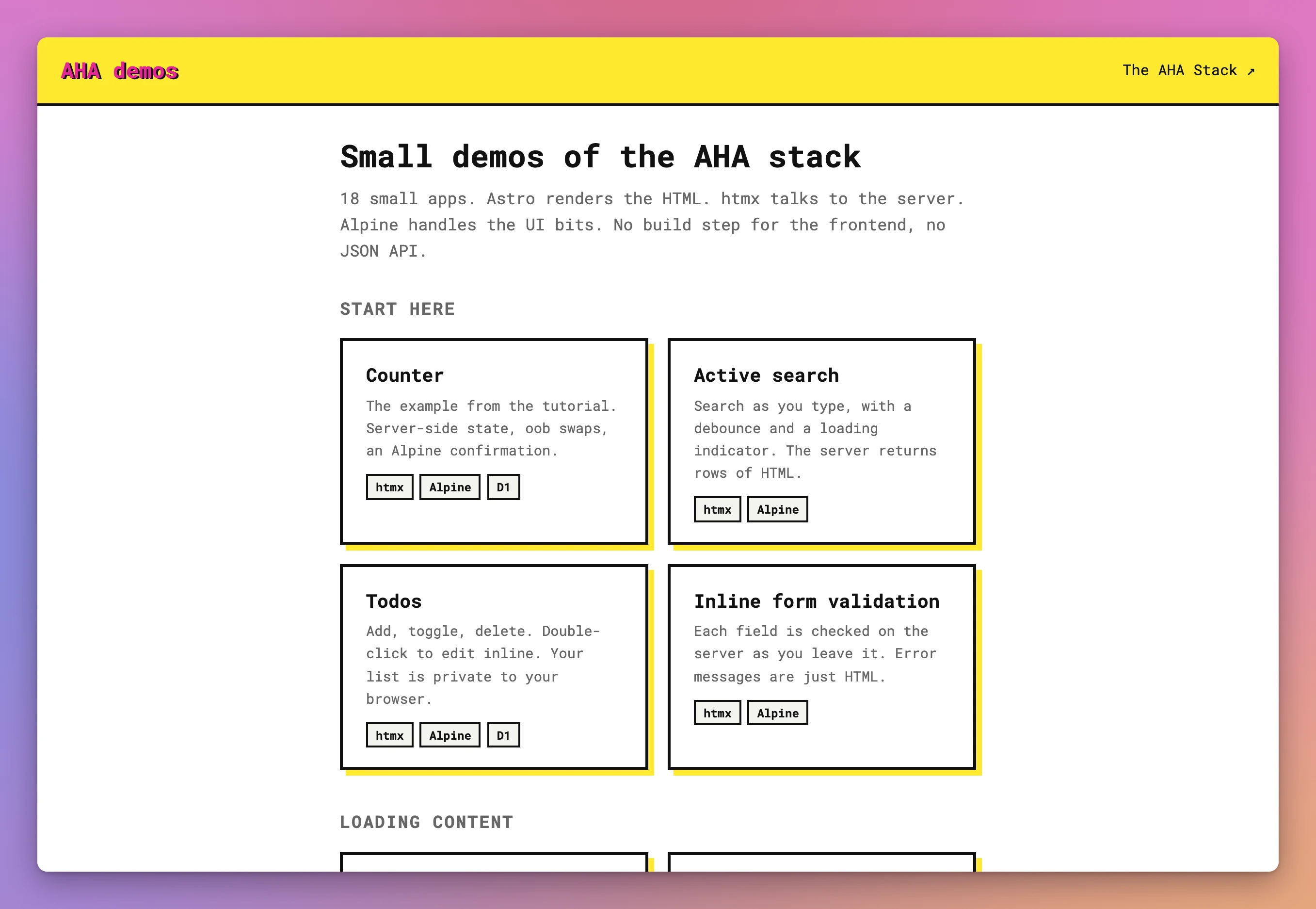
Every demo is just a few .astro files. Three patterns come up in almost every real app you build with the stack.
Active search
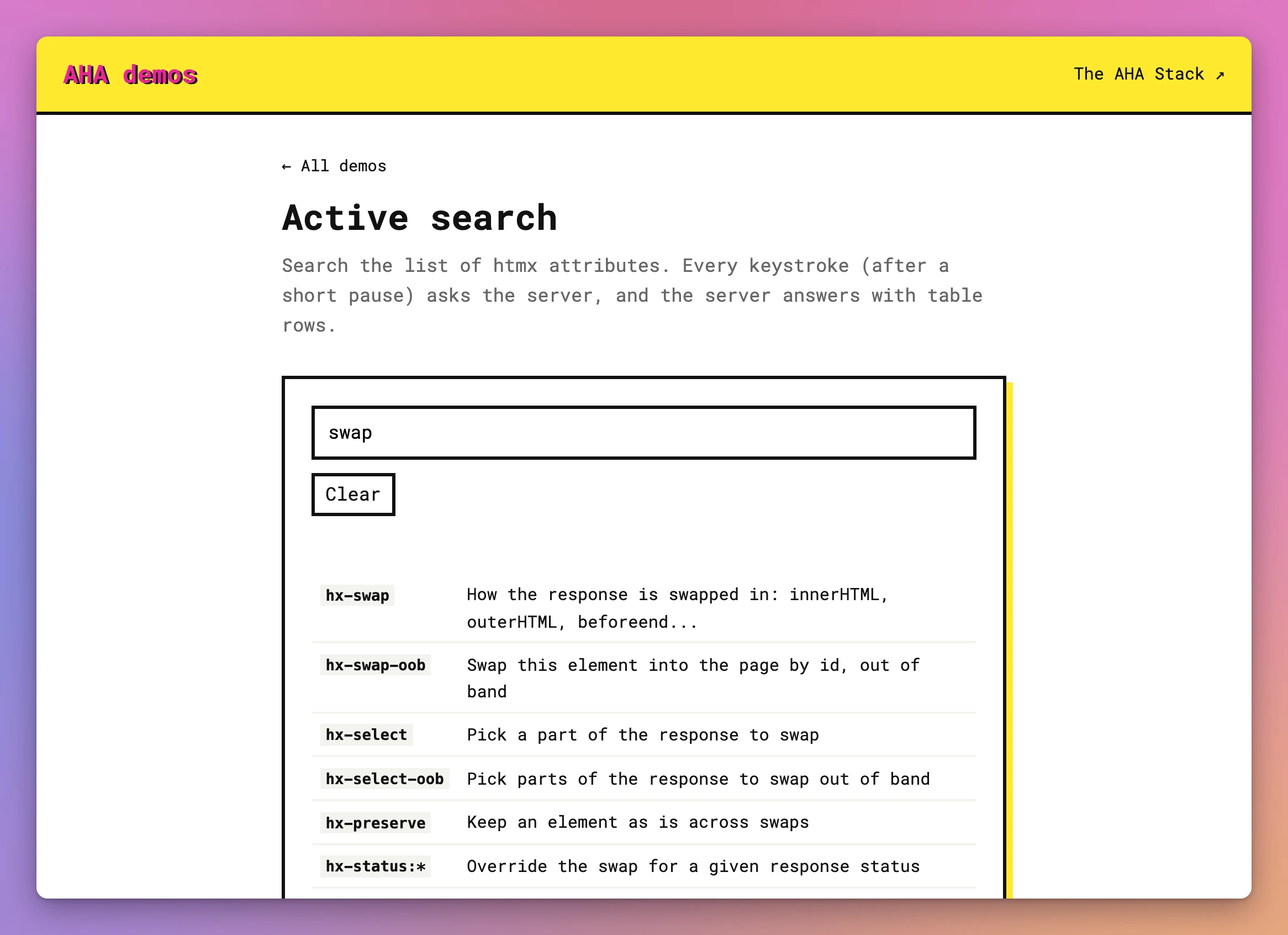
The search input debounces keystrokes in one attribute (hx-trigger='input changed delay:300ms, search') and swaps server-rendered rows into #results. Alpine keeps track of q only to show or hide the Clear button:
<div x-data='{ q: "" }'>
  <input
    type='search'
    name='q'
    x-model='q'
    hx-get='/api/search'
    hx-trigger='input changed delay:300ms, search'
    hx-target='#results'
    hx-indicator='#spinner'
  />
  <button x-show='q' x-cloak hx-get='/api/search' hx-target='#results' @click='q = ""'>
    Clear
  </button>
  <span id='spinner' class='htmx-indicator'>Searching…</span>
  <div id='results'><SearchResults /></div>
</div>
The /api/search endpoint reads Astro.url.searchParams.get('q') and renders the exact same <SearchResults /> component used on initial page load. Querying it with curl -s "https://aha-demos.flaviocopes.com/api/search?q=swap" returns a <table> with the six matching rows (hx-swap, hx-swap-oob, hx-select, hx-select-oob, hx-preserve, hx-status:*).
List item CRUD (Todos)
One component, TodoItem.astro, renders each row on initial load and inside every API response. Toggling or editing returns a fresh <li> with hx-target='closest li' hx-swap='outerHTML'. Deleting uses hx-swap='delete' with an empty response. Double-clicking flips an Alpine editing boolean to swap the label for an inline form, and adding an item appends a new <li> with hx-swap='beforeend' while an out-of-band <TodoForm /> clears the input.
Modal dialog coordinated by a response header
The modal uses the browser’s native <dialog> element. Clicking Change name runs hx-get='/api/profile/form' to load the form into the dialog body while Alpine sets open = true and calls showModal().
If validation fails, the server returns status 422 with the re-rendered form and error message, which htmx 4 swaps in automatically. If the save succeeds, the server returns the updated greeting out of band and sends HX-Trigger: profile-saved as an HTTP header. htmx converts that header into a DOM event, and Alpine closes the dialog via x-on:profile-saved.window='open = false'. The server decides when the modal closes without knowing anything about modals.
Complete index of all 18 demos
Every demo runs live at aha-demos.flaviocopes.com, and the full source lives in the demo repository on GitHub:
| Demo | What it demonstrates | Pieces used | Source |
|---|---|---|---|
| Counter | Shared D1 counter, oob swaps, Alpine reset confirm | htmx, Alpine, D1 | counter.astro |
| Active search | delay:300ms debounce, hx-indicator, Alpine Clear button | htmx, Alpine | search.astro |
| Todos | Per-cookie D1 CRUD, inline edit, hx-swap="delete" | htmx, Alpine, D1 | todos.astro |
| Inline form validation | Per-field server checks returning 422 HTML errors | htmx, Alpine | validate.astro |
| Lazy loading | Skeletons swapped with live npm registry stats fetched on the Worker | htmx, fetch | lazy.astro |
| Infinite scroll | Loads next 10 rows when the last row enters the viewport (revealed) | htmx | scroll.astro |
| Sortable table | hx-select pulls the table from the full page while updating URL history | htmx, history | table.astro |
| Tabs | Server-rendered panels on click with Alpine tracking active tab state | htmx, Alpine | tabs.astro |
| Who’s online | Active browser count polled every 3 seconds from D1 | htmx, polling, D1 | presence.astro |
| Progress bar | Polls a server job until complete and resumes across reloads | htmx, polling, D1 | progress.astro |
| Guestbook | Shared messages refreshed with a morph swap so inputs don’t flicker | htmx, Alpine, D1 | guestbook.astro |
| Optimistic like button | Heart toggles immediately in Alpine while the server confirms in D1 | htmx, Alpine, D1 | like.astro |
| Modal dialog | Native <dialog> closed by HX-Trigger response header | htmx, Alpine, D1 | modal.astro |
| Cascading selects | Country select loads matching city <option> tags from the server | htmx, Alpine | selects.astro |
| Bulk actions | hx-include collects selected checkboxes for batch updates or deletes | htmx, Alpine, D1 | bulk.astro |
| Error handling | Routing status codes with hx-status:*, error events, and timeouts | htmx, Alpine | errors.astro |
| Boosted navigation | hx-boost across three pages while keeping a running timer alive | htmx, history | boost/index.astro |
| Alpine only | Dropdown, password toggle, char counter, and local list with zero requests | Alpine | alpine.astro |
The AHA Stack for AI coding agents
Coding agents know React cold. They know htmx less well, htmx 4 even less, and left to their own habits they will create a /api/*.json endpoint and write a fetch() loop in a <script> tag.
To prevent that, I wrote the rules of the stack as a 245-line skill file covering the mental model, Astro partials, htmx 4 differences, Alpine rules, Cloudflare D1 queries, and anti-patterns.
The skill file now lives directly on this site at /aha-stack/skill.md.
Install it with the Skills CLI (works with Cursor, Claude Code, Codex, and others):
npx skills add flaviocopes/ahastack.dev@aha-stackOr download it straight into your agent’s skills folder:
mkdir -p .cursor/skills/aha-stack
curl -o .cursor/skills/aha-stack/SKILL.md https://flaviocopes.com/aha-stack/skill.md
Use .claude/skills/aha-stack/SKILL.md for Claude Code or .agents/skills/aha-stack/SKILL.md for Codex.
If you prefer a short summary in your project’s AGENTS.md or CLAUDE.md that loads on every turn, paste this block:
## Stack

This is an AHA stack app: Astro (output: 'server') + htmx 4 + Alpine.js 3.
Full rules: https://flaviocopes.com/aha-stack/skill.md

- The server owns the state. Endpoints return HTML fragments, never JSON.
- Fragments are `.astro` files under `src/pages/api/` with `export const partial = true`.
- htmx for anything that talks to the server. Alpine for UI-only state (open, editing, hover).
- One `.astro` component renders a piece of UI both on page load and inside an htmx response.
- htmx 4: attributes do not inherit (use `:inherited`), 4xx/5xx responses are swapped,
  oob-only responses skip the main swap, events are `htmx:after:request` style.
- Alpine directives need an `x-data` ancestor. Never keep app data in `x-data`.
- Read-modify-write goes in one SQL statement (`UPDATE ... RETURNING`).
- Astro 7 collapses newlines between text and inline tags. Keep such paragraphs on one line.
Keeping the 10-line summary in AGENTS.md and the full 245-line skill on demand saves context on turns where the agent is only touching CSS or copy.
FAQ
Why did you put this stack together?
Because I wanted simplicity, and nobody was forcing me to use a heavier stack. As Edsger W. Dijkstra put it:
“Simplicity is a great virtue but it requires hard work to achieve it and education to appreciate it. And to make matters worse: complexity sells better.”
When I put ahastack.dev together in late 2023, I wanted fewer abstractions, less boilerplate, and a setup where a single server could handle my apps without turning every form into a state-management exercise.
Will it work in the real world?
Yes, for the kind of web apps most people actually ship. You can build full multi-screen apps with authentication, file uploads, team permissions, Stripe webhooks, and background jobs on top of HTML partials.
Does it scale?
Ask which kind of scale you mean: user traffic or codebase complexity.
Traffic scale is a backend problem. Astro + htmx scales as far as your server, database, and caching layer scale. You are sending small HTML fragments over HTTP instead of JSON, which is often lighter on the client device than parsing JSON and reconciling a virtual DOM.
Codebase scale is where the stack helps most on small teams. With fewer moving parts and one server-side template per UI piece, there is less surface area to break.
Isn’t this too simple?
It can feel strange the first time you replace a custom debounce hook and fetch effect with hx-trigger="input changed delay:300ms".
That discomfort fades fast once you realize how much glue code you stopped writing and debugging. The model is simple because it leans on HTTP and HTML instead of rebuilding them in JavaScript.
What about mobile apps?
The AHA Stack is for web applications. If you also ship a native iOS, Android, or TV app that consumes JSON, add a separate JSON API beside your HTML routes using the same backend data functions.
As the Hypermedia Systems authors put it: “The existence of a hypermedia API in no way means that you can’t also have a Data API.” Read JSON Data APIs and Why you tend not to use content negotiation for the details.
Is this just AJAX?
If by AJAX you mean talking to the server without a full-page reload, then yes, just like fetch(), Axios, or TanStack Query.
Beyond that, it’s nothing like 2006-era AJAX. Old AJAX meant writing imperative XMLHttpRequest callbacks, parsing responses, and mutating DOM nodes by hand. htmx makes both the request and the post-response swap declarative right in HTML. That difference is like writing p { color: red } in CSS instead of painting pixels by hand with the CSS Paint API.
Where I use it, and where I don’t
I reach for the AHA Stack when I’m building a web app made of pages, forms, tables, search, authentication, and database-backed workflows. SaaS dashboards, admin tools, internal apps, and quick side projects on Cloudflare Workers or Railway all fit naturally.
I also used it in real desktop experiments: the first version of Note Repo, my daily notes app for macOS, ran the AHA Stack inside Electron before Note Repo 2.0 moved to native Swift to cut memory usage to a third.
I skip the AHA Stack when the app’s core job lives entirely in the browser: a drawing canvas, a video or audio timeline editor, a complex offline-first spreadsheet, or any interface where dragging one element has to recalculate dozens of client-only coordinates at 60 frames per second. For those screens, either drop a React or Svelte island onto that Astro page or build a dedicated client app.
More examples and courses
- The Hypermedia Systems book (hypermedia.systems) is the best book to read when starting with htmx. The book builds a contacts app with Flask and htmx; I put together a companion repository porting those commits to Astro, htmx, and PocketBase at github.com/flaviocopes/astromediasystems (note that it was written for htmx 1, so check the htmx 4 migration guide if you copy code from it).
- Community examples: Jack Herrington’s AHA Stack Wordle walkthrough, the Trellix Trello clone with Astro, Alpine, and htmx, and TodoMVC in Astro + htmx.
- Free courses on each piece: Astro, HTMX, and Alpine.js.
- Full end-to-end project: The AHA Stack Masterclass walks through building Secretplan (a Basecamp-style project manager with PocketBase, authentication, teams, Stripe subscriptions, PWA support, and a Railway Docker deploy) across 125 text lessons.
Want me to talk about your product? You can sponsor this site.
Related posts about astro: