Fix Tailwind 'unable to resolve dependency tree' in Next.js
By Flavio
How to add Tailwind CSS 4 to Next.js 16 with @tailwindcss/postcss, and what the old npm ERESOLVE peer-dependency error meant.
If you are setting up Tailwind CSS in a Next.js 16 app today, you do not need the old peer-dependency workaround from this post.
Current path (Next.js 16 + Tailwind 4)
The easy way is to let create-next-app wire Tailwind for you:
npx create-next-app@latestPick Tailwind when the CLI asks. You get Tailwind CSS 4 with the App Router.
On an existing Next.js app, install Tailwind 4, its PostCSS plugin and PostCSS itself:
npm install -D tailwindcss @tailwindcss/postcss postcssAdd the PostCSS plugin in postcss.config.mjs:
export default {
  plugins: {
    '@tailwindcss/postcss': {},
  },
}
Import Tailwind in your global CSS (for example app/globals.css):
@import 'tailwindcss';Import that CSS file from the root layout (create-next-app already does it in app/layout.js). Tailwind 4 is configured in CSS, so there is no tailwind.config.js to create for a basic setup.
That’s all there is to it today. What follows is the original post, from when Tailwind 2 and npm 7 refused to install together. I’m keeping it because the ERESOLVE error still shows up with other packages, and the explanation is the same.
Historical: the ERESOLVE error
While setting up a new Next.js project with Tailwind I ran into this issue.
This issue might just be a temporary issue due to configuration problems and libraries versions, but I’m writing this in case someone stumbles on it.
I ran:
npm install tailwindcss postcss-preset-env postcss-flexbugs-fixes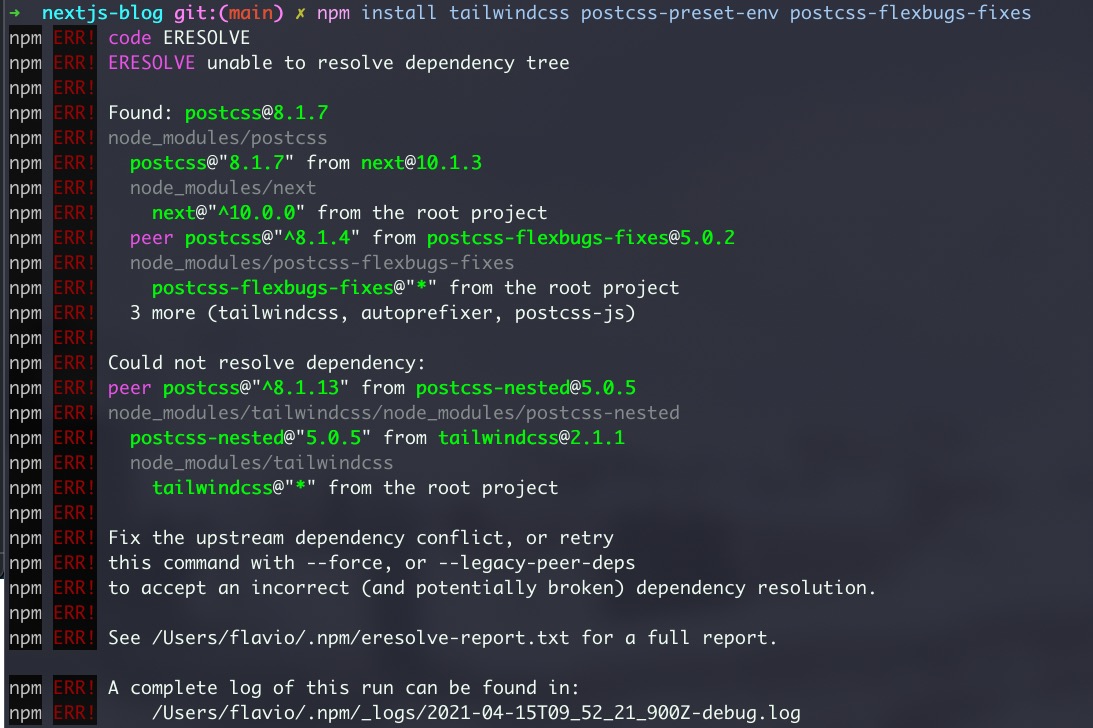
In other words, PostCSS 8.1.13 was required but Next installed 8.1.7.
What the error means
The ERESOLVE code comes from npm 7. Starting with that version, npm treats peer dependency conflicts as hard errors, while npm 6 only printed a warning and carried on.
Tailwind declares PostCSS as a peer dependency: it expects your project to provide a compatible PostCSS version. My project already had the 8.1.7 that Next.js brought in, the packages I was installing wanted at least 8.1.13, and npm refused to build a tree where both claims are true.
So nothing was broken in Tailwind or Next.js. The two just disagreed on which PostCSS version should be present.
The old fix
Install the latest Tailwind and, in the same command, an explicit up to date PostCSS:
npm install tailwindcss@latest postcss@latest postcss-preset-env postcss-flexbugs-fixesand it worked!
Adding postcss@latest puts a version in the tree that satisfies every peer requirement, so npm can resolve it and the install goes through.
The workaround I’d avoid
You’ll find --legacy-peer-deps suggested for every ERESOLVE error:
npm install tailwindcss --legacy-peer-depsThe flag tells npm 7 to behave like npm 6 and ignore the conflict. It gets you past the error, but the mismatched versions are still there, and PostCSS plugins built for version 8 can fail in confusing ways when an older version loads them at build time.
If a compatible version exists, install it explicitly like we did above. That solves the conflict instead of hiding it.
At the time, Tailwind also published a separate PostCSS 7 compatibility build for projects stuck on the older PostCSS. Upgrading PostCSS itself was the cleaner way out, and it’s the one that worked here.
Want me to talk about your product? You can sponsor this site.
Related posts about next: