Wait until a local server is ready before running tests
By Flavio
Updated
Use Port Pilot's ports wait to pause a script until a server is listening, answers with HTTP 200, or lets go of its port, and know where its HTTP check gives up.
A test script starts the server in the background and runs the tests on the next line. The first requests hit a server that isn’t listening yet, or one that’s listening and still answering 503 while it boots.
sleep 5 sort of works until the day the server needs 6 seconds. What you want is to wait for the actual condition: the port is open, or the server answers with a 200.
Port Pilot’s ports command has a wait subcommand for this. It checks the port every 500 milliseconds until the condition is true, or gives up after 30 seconds. (Install steps are in the Port Pilot docs.)
The three things it can wait for
| Command | Returns when | Prints |
|---|---|---|
ports wait 4321 | something listens on 4321 | ✓ Port 4321 is ready |
ports wait 4321 --http 200 | a request to / on 4321 gets a 200 | ✓ Port 4321 is responding with HTTP 200 |
ports wait 4321 --free | nothing listens on 4321 any more | ✓ Port 4321 is free |
All three exit with 0 when the condition is met. When time runs out, they print Error: Timed out waiting for port 4321 and exit with 1. --timeout 60 changes the limit to 60 seconds, --interval 250 checks every 250 ms. --free and --http can’t be combined.
Listening isn’t the same as ready
To see the difference, I wrote a server that takes 3 seconds to start listening, then answers 503 until it’s been running for 7 seconds:
import { createServer } from 'node:http'

const startedAt = Date.now()

setTimeout(() => {
  createServer((request, response) => {
    const ready = Date.now() - startedAt > 7000
    response.writeHead(ready ? 200 : 503, { 'Content-Type': 'text/html' })
    response.end(ready ? '<title>Ready</title>' : '<title>Starting</title>')
  }).listen(43129, '127.0.0.1')
}, 3000)
I started it in the background and waited for the port:
ports wait 43129✓ Port 43129 is readyThat returned after 3 seconds. But the server isn’t ready, and ports check shows it (these are the last two lines of its output):
ports check 43129 HTTP: 503 http://localhost:43129/ (8ms)
Title: StartingA test run started here would get 503s. Waiting for the status code is the useful check. When I started the server again and ran this right after it, the line came 8.4 seconds later, once the 503s were over:
ports wait 43129 --http 200✓ Port 43129 is responding with HTTP 200Add --json and a script gets the details of the server it waited for:
ports wait 43129 --http 200 --json{
"ready": true,
"free": false,
"port": 43129,
"entry": {
"port": 43129,
"pid": 69613,
"fullCommand": "node slow-start.mjs",
"http": {
"reachable": true,
"protocol": "http",
"url": "http://localhost:43129/",
"status": 200,
"title": "Ready",
"responseTimeMs": 6,
"error": null
}
},
"waitedMs": 1277
}I cut a few fields from entry, which is the same record ports check --json prints. This run came after the server was already healthy, so the first check matched, and waitedMs is the 1.3 seconds that one scan of every port took.
The dashboard screenshot on the Port Pilot page shows the same thing on a bigger scale. All six fictional servers are listening, and webhooks-worker on 8080 answers 503:
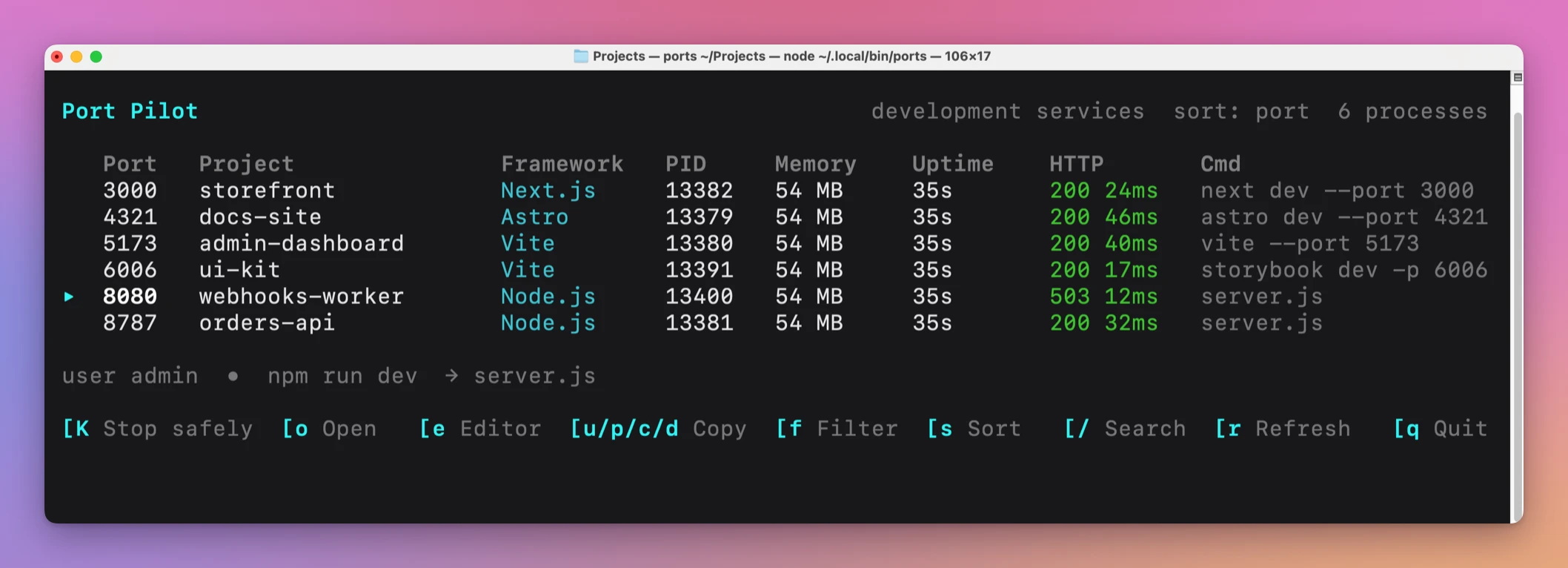
ports wait 8080 would return right away for that one. ports wait 8080 --http 200 would wait until it’s healthy.
Start, wait, test, stop
This is the whole flow in one script. It starts a server, waits for a 200, runs a test with curl, then stops the server and waits for the port to be released:
#!/bin/sh
set -e

npm start > server.log 2>&1 &
server=$!

ports wait 43127 --http 200 --timeout 30
curl --fail --silent http://localhost:43127/ | grep -q 'Practice server'
echo 'tests passed'

kill $server
ports wait 43127 --free --timeout 10
✓ Port 43127 is responding with HTTP 200
tests passed
✓ Port 43127 is freeset -e makes the script stop if ports wait times out, so the tests never run against a server that didn’t come up. In a real project, replace the curl line with npm test.
The --free wait at the end matters when the next step starts another server on the same port, like a second test suite. Without it, that server can hit “address already in use” while the first one is still shutting down.
Where the HTTP check gives up
The HTTP check is a request to /. It tries http://localhost:PORT/ first, then https://, follows redirects, and stops waiting for a response after 450 milliseconds. Here’s what that means for different servers:
| Server | What --http 200 does |
|---|---|
Answers / with 200 in 6 ms | Returns as soon as that happens |
Answers / with 404, like an API without a home page or the Vite server on my port 5173 | Never matches. Wait for --http 404, or use ports wait without --http |
Redirects / to /login | Matches the status of /login |
| Answers 200 after 1 second | Never matches. The request is dropped at 450 ms |
Here’s the slow case with a server that waits 1 second before answering:
curl -s -o /dev/null -w '%{http_code} %{time_total}s\n' http://localhost:43130/200 1.005517sports wait 43130 --http 200 --timeout 10Error: Timed out waiting for port 43130curl gets a 200. Port Pilot doesn’t, because it stops waiting before the response arrives. ports check 43130 shows no HTTP line at all for the same reason.
Dev servers that render pages on demand can be that slow. This site’s Astro dev server takes about 6.5 seconds to render the home page, so --http 200 would never return for it. For a server like that, wait for the listener and let the test runner’s own timeouts handle the first slow request:
ports wait 4321 --timeout 60
npm test
Name the port once
If a script waits on the same port every day, give it an alias:
ports alias api 8787
ports wait api --http 200
Aliases are saved in ~/.config/port-pilot/config.json, outside the project, so a teammate’s machine won’t have yours. In a script that lives in the repo, use the number.
Get Port Pilot
Inspect local services, check their health, and stop the right process through a terminal dashboard, CLI, or macOS menu bar app.
See Port Pilot → · Read the docs · $20. See the app page for tax details, with full source code.
Want me to talk about your product? You can sponsor this site.