DJI file names explained: DJI_0001 and DJI_20261018101530_0007_D
By Flavio
Older DJI drones name videos DJI_0001.MP4, newer ones DJI_20261018101530_0007_D.MP4. Here's how to read both, what the folders they sit in are called, and what the names tell you about a flight split into parts.
Depending on the drone, the videos on a DJI card are called something like DJI_0001.MP4 or something like DJI_20261018101530_0007_D.MP4. Both are DJI names. The short one is a counter. The long one adds the date and time the video started.
Here’s how to read each, and what they tell you when a long flight was split into parts.
The two styles side by side
| Older style | Newer style | |
|---|---|---|
| Example | DJI_0001.MP4 | DJI_20261018101530_0007_D.MP4 |
| Date and time in the name | No | Yes, 20261018101530 is Oct 18, 2026 at 10:15:30 |
| Counter | 0001 | 0007 |
| Letter at the end | No | D |
| Folder on my stand-in card | DCIM/100MEDIA | DCIM/DJI_001 |
| Sorted by name in the Finder | In recording order | In recording order |
Which drone uses which isn’t something DJI lists in one place. Guides for the Mini 3 Pro show the short names in 100MEDIA, and guides for the Mini 4 Pro and Air 3 show the long names in DJI_001. Your own card shows which one your drone uses.
The Mini 4 Pro manual also lists Custom Folder Naming and Custom File Naming in the DJI Fly app’s storage settings. When you change them, new files get the new naming, so a card can have more than one style if someone changed it.
Reading a newer name
DJI_20261018101530_0007_D.MP4 has four parts:
DJI, the same on every file.20261018101530, the date and time: year 2026, month 10, day 18, then 10:15:30.0007, the counter. The next video gets0008.D, a letter. It’s the same on every part of a flight, so it doesn’t help you group them.
The .SRT and .LRF files next to a video have the same name with another extension, like DJI_20261018101530_0007_D.SRT.
When a long flight is split, every part gets its own time, the moment that part started. I tried this on a stand-in card: a disk image formatted like a drone’s card, with made-up clips named the way a newer DJI drone names them, cut into 2 minute parts instead of 4 GB ones. The three parts of one flight are:
| Part | Name | Time in the name | Length |
|---|---|---|---|
| 1 | DJI_20261018101530_0007_D.MP4 | 10:15:30 | 2 min |
| 2 | DJI_20261018101730_0008_D.MP4 | 10:17:30 | 2 min |
| 3 | DJI_20261018101930_0009_D.MP4 | 10:19:30 | 47 sec |
Part 2 starts at 10:17:30, part 1’s start plus its 2 minutes. That’s the most useful thing in these names: you can check that one part starts where the last one ended. The tutorial about why a drone splits a flight shows the whole card.
The names are hard to read in a narrow Finder window, where the middle gets cut to DJI_20261...07_D.MP4. Drag the right edge of the Name column to see the time.
Reading an older name
DJI_0001.MP4 is only the counter. I made a second stand-in card for these, with a DCIM/100MEDIA folder and three made-up videos named the older way:
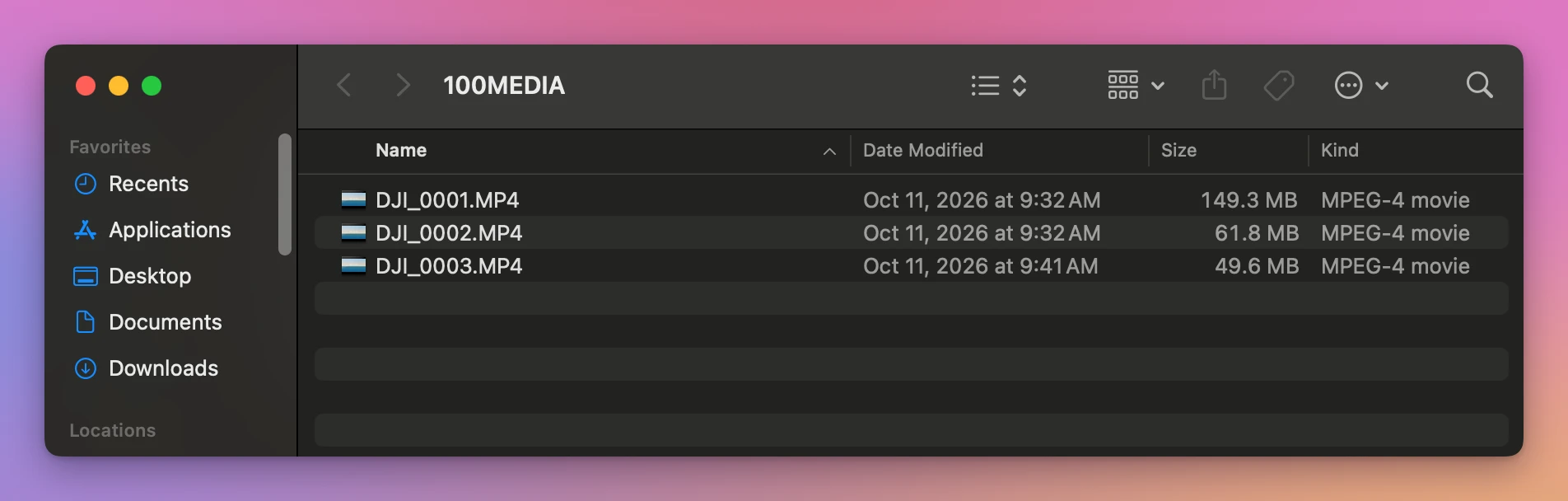
DJI_0001.MP4 and DJI_0002.MP4 are one flight split in two, and DJI_0003.MP4 is a separate clip. Nothing in the names says so. With the short names you have only the order of the numbers, the sizes, and the lengths of the videos to go by.
Let an app read the names
Joiner for DJI is a Mac app I made that reads both kinds of names, finds the parts of each flight and joins them into one video. It’s not made by, affiliated with or endorsed by DJI. It costs $20, paid once.
It doesn’t rely on the names alone. It looks at the numbers, the video settings, and whether each file starts where the one before it ended. On the older card it found the split flight right away:
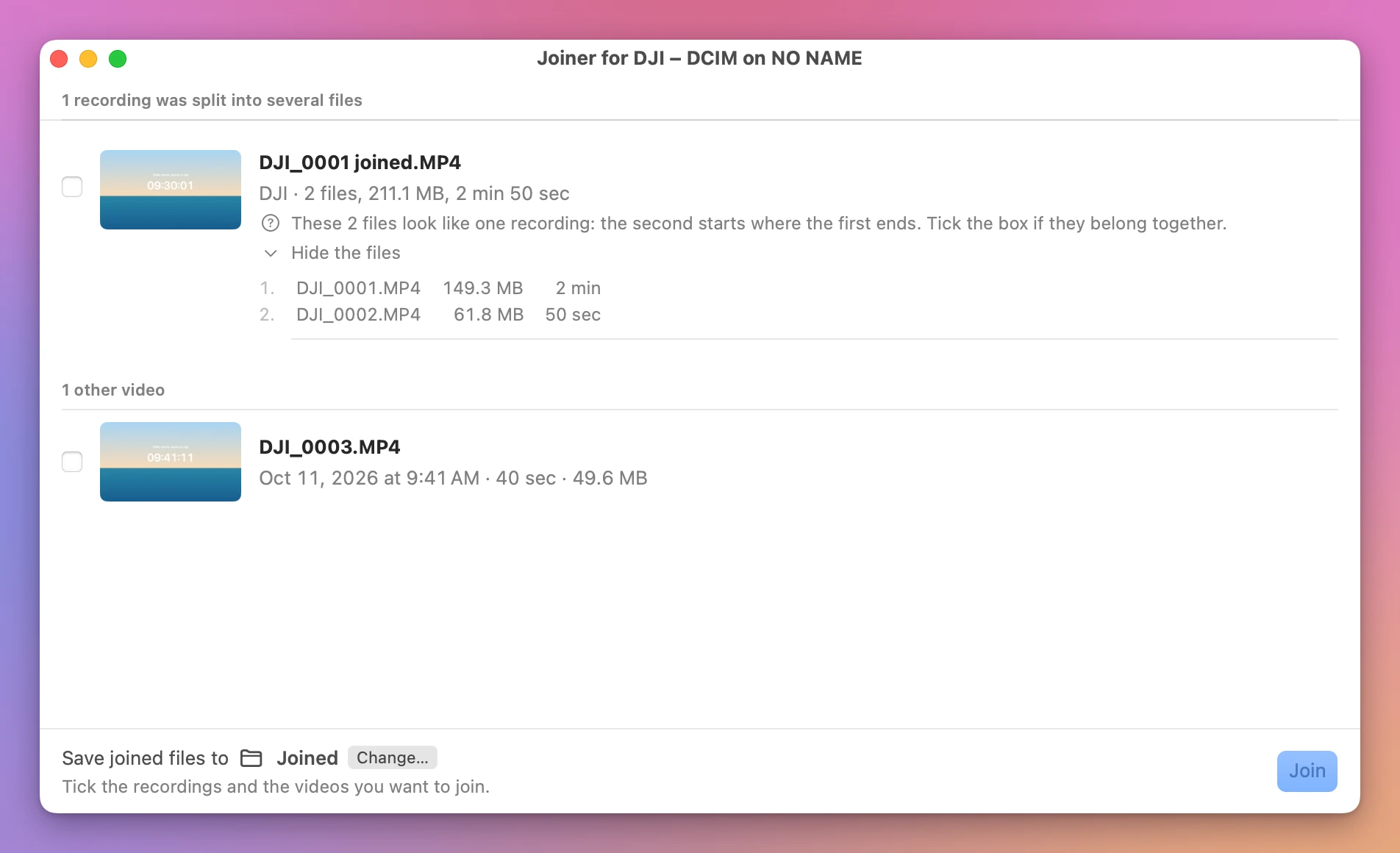
The joined video keeps the first part’s name with ” joined” added: DJI_0001 joined.MP4 here, DJI_20261018101530_0007_D joined.MP4 for a newer drone. Since it’s a guess, the row starts unticked, and you tick it when you agree.
Get Joiner for DJI
Put the parts your DJI drone split a flight into back together, into one video on your Mac, straight from the card, with the .SRT flight data merged to match. Nothing loses quality, and the small .LRF files can go with the originals.
See Joiner for DJI → · Read the docs · $20. See the app page for tax details.
Want me to talk about your product? You can sponsor this site.